Outlook to Palm Pre sync

[youtube https://www.youtube.com/watch?v=n0NzQsyN2Jw]

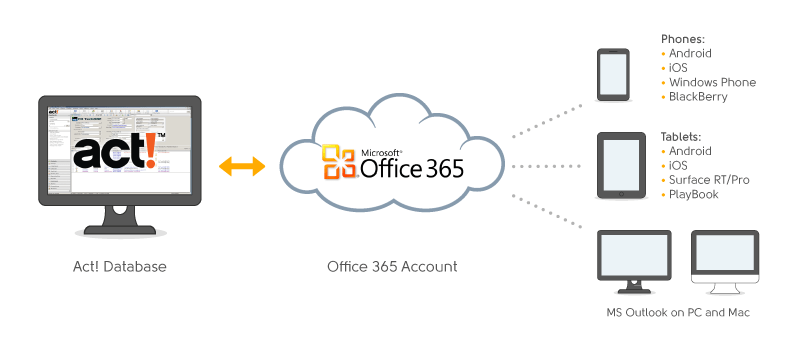
CompanionLink will be offering a way for Outlook users to sync their data with the Palm Pre device.  All you need is CompanionLink for Google ($29.95, one-time purchase) and a free Google account.

So how does it work?

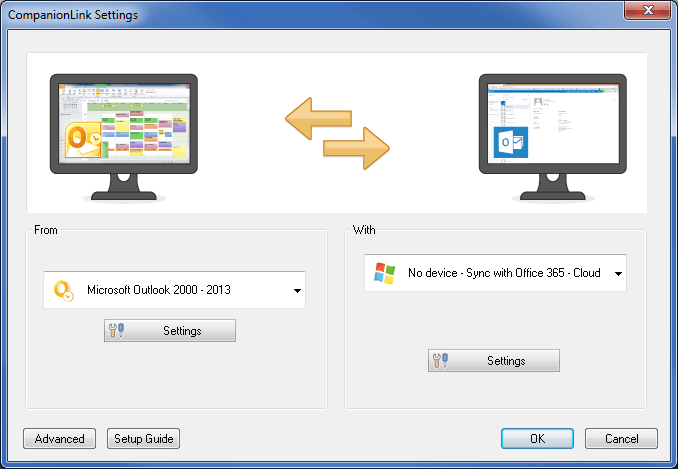
1. CompanionLink will sync Outlook with your Google account.

2. Your Palm Pre will sync with your Google account, over-the-air.

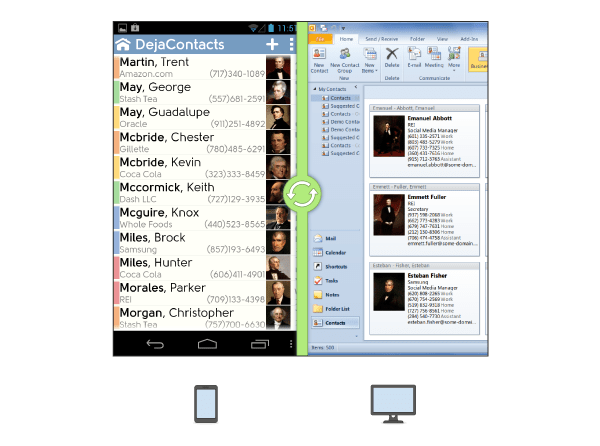
Two-way sync ensures that all your data is updated regardless of where you change it: in Outlook, in Google, or on your Palm Pre.

Read the full press release about this solution.

CompanionLink working with BlackBerry Enterprise Server

Here’s a forum post from a user who has set up CompanionLink to work closely with Blackberry Enterprise Server (BES) and Outlook.

If you’ve already invested in BES, you can quickly set up CompanionLink to sync your CRM/PIM (like ACT! by Sage) with your Outlook account.  Once your data is in Outlook, your BES will automatically sync it with your BlackBerry phones.

It’s really that easy.

Read about the user’s experience here.

BlackBerry App World

BlackBerry App World

RIM’s version of the Apple App Store is now here.  It’s called the BlackBerry App World and has  hundreds of apps for your phone.  All your usual suspect apps are there: Facebook, MySpace, Ticketmaster, etc.

CompanionLink users won’t need to download anything special since our software syncs data directly with the native address book, calendar and tasks applications on BlackBerry devices.  Simple.

Sync Lotus Notes with Google

For less than $30, you can get a complete two-way wireless sync system between Lotus Notes, Google and your phones.

CompanionLink for Google works as a two-way sync connector between Lotus Notes and Google.  Users can then use Google Sync (Beta) to sync data over-the-air with their phones.

CompanionLink for Google allows Lotus Notes users to sync their contacts, phone numbers, email addresses, calendar events, calendar details, contact notes, and alarms and reminders with their Google or Google Apps account. Complete two-way sync ensures that any change to data in either Lotus Notes or in Google is automatically updated.

Once Lotus Notes data is in Google, users can use the free Google Sync (Beta) service to push data to their iPhone, BlackBerry or Windows Mobile device. CompanionLink for Google ensures that any changes made on the phones will sync back with the Lotus Notes database.

The new Palm Treo Pro

CompanionLink works with the Palm Treo Pro from day 1.  Since the phone is on a Windows Mobile platform (which CompanionLink supports), we work with it!  No need to update your CompanionLink software.

The Treo Pro boasts WiFi, GPS, and 3G speeds in a tiny package.  It’s currently available through the Sprint cellular network.

Syncing overdue tasks in Google

When you sync overdue Outlook tasks to your Google account using CompanionLink, they now get summarized into a sorted list (by date) and entered as a calendar event for the current day.  The calendar event is called Overdue Tasks.

This is extremely useful for people who use Outlook tasks with Google, and tend to lag behind the due dates they set on those tasks.  Previously, you would loose sight of those tasks as they fail to show up on your calendar after a certain point in time.  The latest build of CompanionLink for Google fixes that by having all overdue tasks summarized for you in a single calendar event.

Here’s a screenshot of how Overdue Tasks look in your Google calendar.

Sync services by Microsoft, Apple and Google

MyPhone: they host your data on the web and sync contacts, calendar and photos with Windows Mobile devices.  This is a free service offered by Microsoft.

MobileMe: they host your data on the web and sync mail, contacts, calendar and photos with iPhone devices.  This is a paid service, currently $99/year.

Google Sync (Beta): syncs Google contacts and calendar (hosted on the web) with iPhone, BlackBerry and Windows Mobile devices.  This is a free service offered by Google.

We’re excited at the introduction of these services!  It gives users a reliable and affordable way to sync to their phones, over-the-air.

So do you still need CompanionLink with the introduction of the services mentioned above?  The answer is Yes.

For example, if you’re using ACT!, Lotus Notes, Outlook BCM, Palm Desktop, GroupWise or any other PIM/CRM that’s not supported by the cloud services above, you’ll need CompanionLink to sync this data.  The cloud services can’t access your data.

While our software can sync directly to your phone and bypass the need for the cloud services above, we’re also looking for ways to work with Microsoft, Apple and Google’s sync services.  This will allow you to use CompanionLink to get data from your PIM/CRM to the services above, and then rely on their push-sync to get that data to your phones.

This is what we’re working on:
PIM/CRM <> CompanionLink <> Cloud services (above) <> your phone

Stay tuned to this blog for the lastest developments and a timetable for when we’ll support these mobile sync services.  In the mean time, if you need to sync your PIM/CRM data with your phones, just use CompanionLink’s direct sync.

CompanionLink to support the Acer Tempo smartphone series

Acer just announced a new line of smartphones called the Acer Tempo series.  All devices will be based on the Windows Mobile platform and will span the spectrum from low-end consumer devices to high-end business devices.

One device will even boast dual-SIM card capabilities so users can associate two different numbers (e.g., business and personal) with one phone.

Since CompanionLink supports all devices on the Windows Mobile platform, we will support these Acer devices from Day 1.

More info about Acer Tempo can be found here.

$129 for 12 months of Premium Support

UPDATE: As of June 1, 2011, Premium Support is now $129.

Free support is great when you have time. But what if you’re in a hurry to get answers?

CompanionLink’s Premium Support is like hiring a personal technician for your sync needs. Get in front of the support queue and speak with a single dedicated specialist. It is the fastest way to get your support issues resolved!

Here’s what you get:

# Front-of-the-line privileges for phone and email queues
# Single point of technical contact
# Senior customer-focused specialists on specific PIM/PDA setups
# Dedicated toll-free number
# Guaranteed next-day service on voice messages left during non-business hours

Read more here.

CompanionLink works with Google Sync (Beta)

This week, Google launched their free over-the-air sync service with iPhone and Windows Mobile devices.  They already offered this for BlackBerry devices.

Google Sync (Beta) allows you to wirelessly sync Google contacts and calendar events with iPhone, BlackBerry and Windows Mobile devices.

CompanionLink fits this puzzle by allowing Outlook, Lotus Notes and other PIM users to sync their desktop data with their Google accounts.  Once this data is in their Google accounts, it’s automatically pushed to their phones using Google Sync (Beta).

So essentially, with one license of CompanionLink for Google (runs you $29.95), you can have a complete two-way wireless sync solution between Outlook, Google, and your phones.

[youtube https://www.youtube.com/watch?v=n0NzQsyN2Jw]

We're #1 on Google's review site

CompanionLink for Google is now ranked first for the number of reviews received in the Google Solutions Marketplace under the “Migration and Sync” category.

Here’s a snippet of what one of the reviewers has to say:

“This Software changed my life ! Before, I had two agendas: private under Palm and professional with Outlook. Now, by using different colors, I’m using Google and synchronizing both sides, private and professional, thanks to CompanionLink for Google!!!”

What is CompanionLink for Google?  It’s desktop software that allows you to sync your Google data with Microsoft Outlook or your phone.

Sync BCM with Outlook/Exchange and BlackBerry

A common source of confusion is how to sync Outlook Business Contact Manager (BCM) data with Outlook/Exchange, and with your BlackBerry.

CompanionLink can do this.  In fact, it can do it in four different ways.

  1. BCM < > BlackBerry (using USB)
    Set up CompanionLink to sync your BCM data to you BlackBerry directly using USB.  Your existing BES solution will then push this data from your BlackBerry to your Outlook, automatically. (Cost: $49.95)
  2. BCM < > Google < > BlackBerry (using Google Sync)
    Set up CompanionLink to sync your BCM contacts and calendar data with a free Gmail account.  Then, use the free Google Sync service to sync this data to your BlackBerry. (Cost: $49.95)
  3. BCM < > CompanionLink wireless sync service < > BlackBerry
    Set up CompanionLink Pro to wirelessly sync BCM data to your BlackBerry.  Your existing BES solution will then push this data into your Outlook.  (Cost: $99.95 + $9.95/month for wireless sync service)
  4. BCM < > PIM (like Palm Desktop) < > Outlook
    We need the intermediary PIM because BCM data can’t be synced directly with Outlook (at least, not yet).  Set up CompanionLink Pro to sync BCM to a free PIM solution like Palm Desktop.  Then, set up another profile in CompanionLink Pro to sync Palm Desktop to Outlook.  Once this data is in Outlook, your existing BES solution will push that to your BlackBerry.  Please note: you’ll need CompanionLink Pro to do this; the Express version doesn’t have the ability to create multiple profiles.  (Cost: $99.95)

For more info about BCM sync, please visit this page.