iClink is now free

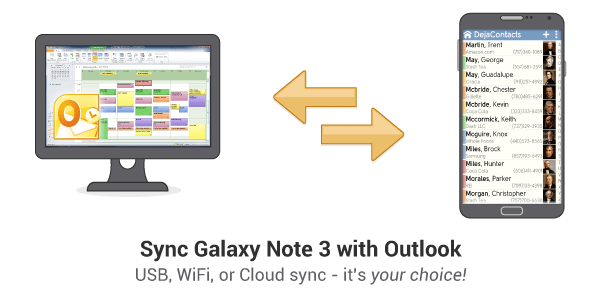
iClink, our application that runs on the iPhone and allows users to wirelessly sync with their PIM/CRM data, is now available for free from the iTunes Store.

This means that anyone who has a 14-day evaluation of CompanionLink Pro can download iClink for free and configure their PIM/CRM to sync with their iPhone.

For full details of how to wirelessly sync data with your iPhone using CompanionLink, visit: companionlink.com/iphone.

Strong wireless sales during the recession

Major carriers are reporting strong sales of smartphones and data plans during this recession.  This is great news for the mobile industry, especially since other industries are taking a beating.

Where’s the logic to this growth?  Perhaps with more people electing to stay home instead of spending on lavish vacations, there’s an increasing need for devices that allow them to connect with others. If this is true, look for greater adoption of smartphones like the iPhone, Google Android, and BlackBerry Storm.

Microsoft's cloud computing services

Better late than never.

Microsoft will be releasing their own cloud computing and data synchornization services in 2009.

They’re planning 3 offerings:

  1. SkyBox: repository for all your contacts, calendar events, email and pictures.  This is aimed at consumers and will sync with their phones. This seems to be their answer to Apple’s Mobile Me.
  2. SkyLine: this is SkyBox revised for enterprise-level customers.  It will sync with Microsoft Exchange.
  3. SkyMarket: online marketplace for mobile applications.  This seems to be their answer to Apple’s iTunes App Store.

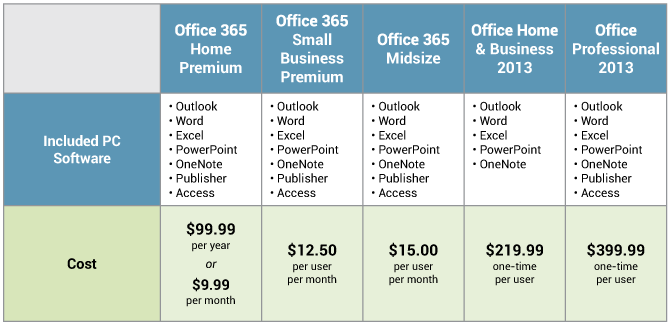
Here’s a complete breakdown of their offerings.

CompanionLink will be looking for ways we can extend Microsoft’s SkyBox services to popular CRM and PIM solutions.  Stay tuned…

A more powerful wireless sync (OTA)

It’s been nearly two years since we’ve launched wireless sync (over-the-air) for popular mobile platforms like BlackBerry. The newest phones ship with more memory and faster processors.  Wireless data connections are faster as well.  We’d like to tap into all this new technology to see how CompanionLink can improve our software and services.

Our engineers are working on ways to make our wireless sync protocol more robust.  Stay tuned for more details on what you can expect.

Second-generation Android phone (minus keyboard)

Gizmodo has apparently leaked some pictures of the second generation Android phone.  Most notable is the lack of a physical keyboard, allowing the device to be slimmer than the G1 phone.

The great thing about CompanionLink’s ability to sync with this new second-generation Android device (assuming Gizmodo is correct) is that we will support it out-of-the-box!  We can do this because Android devices rely on Google’s web-based calendar and contacts – which we already sync with!

CompanionLink to support Palm webOS and Palm Pre

At CES 2009 in Las Vegas, Palm announced their new mobile operating system called Palm webOS.  They also unveiled the first smartphone based on that OS – Palm Pre.  You can read about it here.

CompanionLink will provide full two-way sync support for Palm webOS based devices, including the Palm Pre.  We’re committed to being the first to do so!

Sync Exchange 2007 with ACT!

DoubleLook Enterprise will soon be able to sync ACT! directly with Exchange 2007.  Our new technology will be a little different than what we have right now.  We will be able to run DoubleLook Enterprise on a separate machine (not your Exchange Server).  This will allow your IT department to leave Exchange alone (you’re welcome!).

Exchange 2007 has some new features and protocols that have allowed us to make the sync much faster than the existing version.  If you’d like to be a part of the BETA testing for this enterprise solution, send an email to marketing@companionlink.com with “DLE Exchange 2007 BETA” in the subject line.

Mobile devices for business and pleasure

Amazon’s e-book reader, called Kindle, was out of stock for Christmas thanks to generous publicity from Oprah and others. While e-book readers have been around for years, the public is finally accepting the fact that their e-book reading experience can match or surpass that of reading a real book.

In short, people are using mobile devices to replace legacy tasks – browsing the Internet, scheduling their day/calendars, email, social media, online transactions, gaming, and (can you believe) just plain old calling.

Devices like the iPhone and BlackBerry Storm push the limits even further.  2009 looks like a promising year for a continued push in mobile tech.  Many mobile device developers have filed for some very interesting patents that shed light on where technology will be going.  However, with consumer and business budgets at all-time lows, we’ll see how frugal consumers are with their wallets in 2009.

Palm's new (web)OS

Palm had a major announcement at CES today.  They’re releasing a new device (called the Palm Pre) that will run on a new OS, called Palm WebOS.

The new device and OS is similar to iPhone and Google Android, except that it claims to seamlessly marry various online technologies into one device.  The claim is that you can use your Facebook, Gmail,  and Outlook data seamlessly; for example, access your Outlook contacts in Facebook.

The same holds true for your calendar.  Your Outlook and Google calendars are merged together on one color-coded calendar.

You can read all about it here:
https://news.cnet.com/8301-1035_3-10137055-94.html?tag=mncol;title

The perils of SaaS

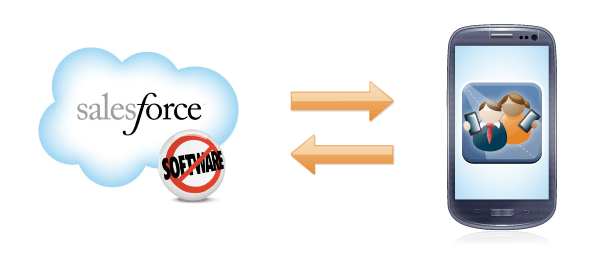
Salesforce.com just witnessed a service outage.  Just more proof that no matter how big or famous you are, 100% up-time is not a reality.  Translation: have a plan for outage situations and how you will handle your customers/clients.

However, does that mean a software solution is better than SaaS?  Not necessarily.  Outages or “reboots” occur all the time for software solutions, as I’m sure we’re all aware of.

SaaS vs. Software — an economical perspective

Pragmatic Marketing Magazine has an in-depth look at the economics of purchasing a SaaS (software-as-a-service) solution versus a software solution.

While the article is (overly) technical and lengthy, they arrive at a definitive conclusion.

The SaaS model ultimately provides the same type of products as a software licensing model—but with a better economic model, one that is lower in cost to the customer and structurally inclined to keep getting better for the customer with every new release.

Personally, I like the idea of purchasing from a company that is financially motivated to keep me happy, not one that is pressured to find another customer as soon as I’ve written my check.

Do you agree or disagree?  Share your thoughts and experiences by commenting below.