Capture More Than Great Photos With The HTC Amaze

The HTC Amaze from T-Mobile is aptly named. This top-tier phone packs one of the most advances camera system currently available. Combined with its powerful processor and 4G speeds, the Amaze makes it easy to capture every moment quickly and easily. It’s available now from T-Mobile for $259.

Tech Specs:

  • 1.5Ghz dual-core Qualcomm Snapdragon S3 processor
  • 1GB RAM
  • 4.3” qHD super LCD display
  • 8-megapixel rear camera; 2-megapixel front camera
  • 4G capability
  • Android 2.3.4 (Gingerbread)

Clearly the Amaze is a powerful phone, but what if you need it to do more? That’s where we come in. Using CompanionLink, you can sync the HTC Amaze with Outlook, Salesforce, ACT!, and more. Use our free Android app, DejaOffice, to gain advanced control over all your contacts, calendars, tasks, and memos. Now that’s amazing.

See for yourself with a 14-day free trial of CompanionLink. Be sure to download DejaOffice for free while you’re at it!
Sync the Samsung Stratosphere

If virtual keyboards aren’t your thing, you’re in luck – the Samsung Stratosphere has officially landed. This Verizon wireless Android device touts 4G speeds and a physical keyboard, making it rather unique – there are only a few 4G phones available with a physical keyboard at this time. The stratosphere is available now for $199 on contract. Read on for the specs…

Tech Specs:

  • 1Ghz Cortex A8 Hummingbird processor
  • 4” Super AMOLED display
  • 5-megapixel rear camera; 1.3-megapixel front camera
  • 4G LTE capability
  • Android 2.3 (Gingerbread)
  • 5-row physical QWERTY keyboard

If you’re looking to sync the Samsung Stratosphere with Outlook, ACT!, Salesforce.com, or any number of other CRM applications, we’ve got you covered. Using CompanionLink and DejaOffice for Android you’re able to sync contacts, calendars, tasks, memos, and more.

Check it out for yourself with a 14-day free trial of CompanionLink and download DejaOffice for free while you’re at it!
DejaOffice for Android 1.12.2 Now Available

If all the hype surrounding today’s iOS 5 release isn’t your thing, don’t worry – we’ve got you covered. DejaOffice 1.12.2 for Android has just landed in the Android Market and will be in the Amazon Appstore soon. If you’ve been following along with our beta builds, this is an official release. For those who haven’t, this update brings a host of new features. I’ve mentioned some on the blog already, but I think a few of them are worth highlighting again.

Time Zone Shifting

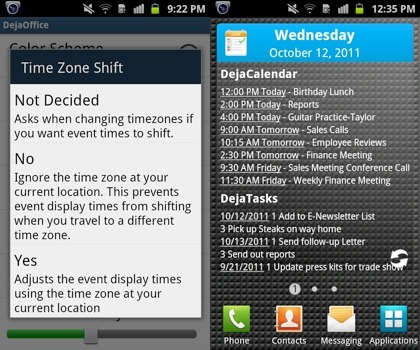
For the world travelers our there, this feature should prove to be indispensible. The next time you change time zones, DejaOffice will ask you if you’d like to enable time zone shifting. There are three options: Yes, No, and Not Decided.

Selecting “Yes” adjusts your tasks and calendar events to the current, local time zone. This means an event at 4pm PST will be display as 7pm EST, for example. Choosing “No” ignores your current time zone. This means an event at 4pm PST will display as 4pm EST. Opting for “Not Decided” simply allows you to choose yes or no every time you enter a new time zone.

DejaToday Widget Enhancements

The DejaToday widget is now able to displays events beyond the current day. This is great for those who like to have an idea of what’s on the agenda tomorrow. To enable this feature, head into the DejaOffice Settings, choose DejaTasks, then select the number of Future Days you’d like to show. It’s that easy.

Performance & Stability Improvements

Of course, with an update this big, there’s a large number of performance and stability improvements, as well as bug fixes. We’ve worked hard to make DejaOffice 1.12.2 a great update. It’s available now in the Android Market and Amazon Appstore, so update today and start taking advantage of the new features!

For the full list of release notes, head over to the DejaOffice website. And be sure to let us know what you think in the comments below!

DejaOffice Is Ready For iOS 5

Apple’s latest mobile operating system, iOS 5, will be released any time now. With a host of great new features, including improved notifications, wireless sync, and iCloud, many users will understandably be eager to update. However, some users may hesitate, waiting to ensure their most-used apps are iOS 5 compatible.

Today, I’m happy to report that DejaOffice 1.2.5 and above is iOS 5 ready!

We’ve been testing our app on the beta builds for some time now and have not seen any issues when using DejaOffice on iOS 5. So, just ensure you’re running the latest version of DejaOffice by checking for any updates in the App Store, then go enjoy the new features in iOS 5! We’re loving the new notification system – what about you?

Android + Chrome OS: The Next Step in Mobile Computing?

We’ve talked about this before on our blog, but I felt it bears repeating as it inches closer to reality. In a post over at Droid-Life, we can see what the future of mobile computing might look like, from the Android perspective…

“…a good first step to resolving these problems with notifications and making lapdock and deskdock form factors useful would be to use Chrome OS. I think there will always be a place for a mouse and keyboard form factor because touch doesn’t always make sense. As computing continues to become more mobile and as technology improves, we may eventually be able to have one device that connects to different form factors.”

Read the full article over at Droid-Life, then swing back by our blog to share your thoughts in the comments!

How To Use Siri To Set Up Business Meetings In Outlook, ACT!, & More

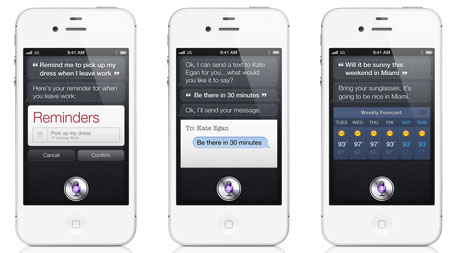
Just the other day, Apple revealed their latest iteration of the iPhone – the iPhone 4S. One of the biggest new features comes in the form of Siri, Apple’s self-described “humble personal assistant.” Using voice recognition technology, Siri is able to take verbal commands and act on them, allowing you to check and compose messages, emails, calendar appointments, and much more.

Image Credit: TUAW

Currently, Siri is designed to work with Apple’s built in apps – it’s not clear if or when the technology will be opened up to third party developers. However, DejaOffice has the unique ability to connect with Apple’s built in apps. As such, DejaOffice is able to harness the full power of Siri and sync new or updated data back to your existing CRM solution.

Doing so is simple. First, you’ll need to ensure that DejaOffice is set to sync with the native databases. To do this, just launch DejaOffice on your iPhone 4S, tap “Settings,” then “Sync.” From there, select “Sync with Apple’s Calendar” and “Sync with Apple’s Contacts” to enable syncing with the native databases.

Once that’s enabled, press and hold the home button on your iPhone 4S to activate Siri. Say something like “Schedule lunch with John Smith at noon on Friday” and Siri will comply. The next time you sync DejaOffice via CompanionLink, that appointment will be transferred into Outlook, ACT!, Salesforce, or whatever CRM solution you’re using. It’s that easy!

The iPhone 4S

Apple just wrapped up another keynote presentation unveiling their latest products. As always, there’s a lot of news to sift through. Let us save you time by highlighting the important details here!

Improved Specs

The iPhone 4S features the standard “spec” boost that we’ve come to expect – faster processer, better battery, more storage, and an improved camera. These are all welcome additions and should serve to keep you running the latest and greatest apps.

More Choices

The iPhone 4S is a “World Phone,” meaning it contains both GSM and CDMA radios. It’s also available on AT&T, Verizon, and Sprint in the US, and even more carriers abroad as well. Check out Apple’s iPhone4S page for the full details.

Near-4G Speeds

Apple touted an improved antenna design that, in a nutshell, allows them to nearly double your download speeds. The result is near-4G, though they aren’t calling it that. The iPhone 4S is still a 3G phone, though one of the fastest 3G phones around.

Voice Control

This is the biggest news from Apple’s iPhone 4S announcement. Using advance voice recognition technology, dubbed “Siri,” you will be able to listen to (and reply to) text messages, check your calendar and schedule appointments, send emails, check stocks and weather, search the web, and much more. Time will tell how well this works in the “real world,” but it has the potential to drastically enhance productivity on the go.

Final Thoughts

For now, voice control is limited to the built-in apps. Imagine, however, the potential that lies in this technology when it’s opened up to 3rd party developers, like ourselves!

Of course, we’ll need to get our hands on an iPhone 4S to test DejaOffice, but we’re confident that DejaOffice will be fully supported at, or shortly after, the iPhone 4S launch on October 14th. Stay tuned for more on that!

DejaOffice for iOS Receives Major Update

Don’t let the version number fool you – DejaOffice 1.2.6 for iOS is a major update. While you won’t notice too many cosmetic changes (yet), we’ve done quite a bit of work under the hood.

The biggest focus of this update has been DejaCalendar. We’ve completely rewritten the calendar to improve stability and sync reliability. Right away, you’ll notice a much smoother experience when using the app. This is just the beginning for us, however. We have exciting plans for DejaOffice!

Continue reading →

Sync Outlook on Windows 8 Developer Preview

I know – Windows 8 won’t actually be released until sometime next year. That hasn’t stopped us from working with the Windows 8 Developer Preview, however. After some initial testing, I’m happy to inform you CompanionLink works great with Windows 8! That’s right – we can sync Outlook from Windows 8 to your mobile device. CompanionLink works with both 32- and 64-bit versions of Outlook. We can also sync ACT!, Salesforce, Lotus Notes, Palm Desktop, Zoho, and more, all from Windows 8!

You’ll want to ensure you’re running the latest version of CompanionLink, but other than that there are no special steps required to get up and running in Windows 8. So, if you enjoy working with the latest technology and software (like I do!), rest assured CompanionLink is there to support your synchronization of contacts, calendar, tasks and notes.

Understanding Android Contacts [Infographic]

Confused about how Android Contacts and Accounts work?  We’ve created an infographic that helps explain the chaos!


Update: Now that Motorola’s DROID RAZR and Samsung’s Galaxy Nexus (featuring the next generation of Android – Ice Cream Sandwich) have been announced, this infographic is even more relevant. These two phones are sure to draw many users over to Android for the first time!


Coming to Android from a “feature phone,” a BlackBerry, or even iOS, there are a number of new features to get used to. One aspect that we’ve seen a lot of uncertainty about is exactly how Contacts work on Android.

As such, we’ve created an infographic to help visualize how Android Contacts work and hopefully eliminate some of the confusion. Check it out below:

(Click the graphic for a larger version)

Android Contacts Infographic

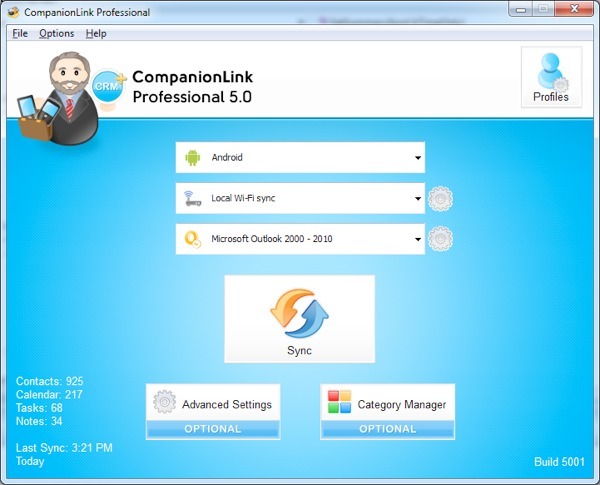
CompanionLink 5 Launches Today

As of today, CompanionLink 5 is officially out of beta!

If you haven’t already heard what’s new, head over to our blog post announcing the beta to read all about it, but know that you can expect the following:

– A completely redesigned interface
– New setup wizards to help you configure a reliable sync process
– Multiple device profiles in CompanionLink Express
– CompanionLink Professional now allows up to 5 profiles
– Support for the latest CRM software and mobile OS’s
– Numerous bug fixes and sync improvements

Prices start at $14.95.  We have discounted upgrades for existing customers.  Visit our storefront and click on the blue Upgrade button next to the product you want to upgrade to.

The Samsung Galaxy S II Is Now Available In The US

Sprint has officially begun selling the Galaxy S II, which marks the beginning of the phone’s entry into the US. It has been wildly popular in Europe over the past few months, and with the specs that it has it’s no real surprise! While Sprint has been the first major carrier to carry the device in the US, AT&T and T-Mobile are set to follow shortly, though the exact dates are unknown.

Take a look at our video below to learn a bit about each of the unique variants of the Galaxy S II and hear our thoughts on whether this phone is worth the upgrade!

[youtube=https://www.youtube.com/watch?v=mzwLnAiJGI8&hd=1]