Sync the iPhone 4 with Outlook and your PC

Hot on the heels of the launch of the new Apple iPhone 4 with iOS 4, CompanionLink announces full support for synchronization with the iPhone 4. CompanionLink allows you to sync contacts, calendar, tasks and notes with the iPhone 4 from PC software such as Microsoft Outlook, Lotus Notes, ACT! by Sage, Palm Desktop, GoldMine, GroupWise and more. CompanionLink is also compatible with previous-generation iPhones running the new iOS 4.

Sync the iPhone 4 with your PC

CompanionLink offers four ways to sync to the iPhone 4:

  1. Local Wi-Fi sync
  2. Wireless sync through Google
  3. CL Wireless Sync using the phone’s data connection
  4. USB sync using Outlook and iTunes

Two-way sync is fully supported with the native contacts and calendar apps on iPhone 4, allowing users to create and edit data from their iPhone 4 and sync back to their PC.  Advanced contact management functionality for iPhone 4 is available through DejaOffice, suite of contacts, calendar, tasks and notes apps for iPhone 4.

CompanionLink’s synchronization solutions for the iPhone 4 are available for a one-time cost starting at $39.95. Free telephone support is included. More details and a free 14-day evaluation are available at www.companionlink.com/iphone

Maximize your productivity with DejaOffice – Contacts, Calendar, Tasks and Notes Apps for Android

DejaOffice is our robust suite of calendar, contacts, tasks and notes apps for Android. We’ve been hard at work adding a multitude of features that you can leverage to increase productivity and complement your workflow. To better showcase these features and how they can be used, we’re proud to introduce the new DejaOffice Classroom.

www.dejaoffice.com/classroom

The Classroom contains a guided walkthrough that will show you how to take advantage of everything DejaOffice has to offer. Some of the features you’ll find in the DejaOffice Classroom include:

  • How to Install DejaOffice
  • Import data from the native Android databases
  • Filter your Contacts by Category
  • Schedule a New Event with a Contact
  • Sort your Tasks by Priority, Subject, or Due Date
  • Manage Categories and assign colors
  • Search all DejaOffice data from one query
  • Add DejaOffice Shortcuts to your Android Desktop

DejaOffice is available from the Android Market at no cost, and is compatible with the HTC EVO, Motorola Droid, HTC Droid Incredible and other Android phones.

The upcoming HTC Aria

Will all the cool new Android phones recently released like the Droid Incredible and the EVO 4G, AT&T subscribers looking for an Android have reason to feel a little bit left out in the cold, as their only current choice on AT&T is the Motorola Backflip. On June 20th, AT&T subscribers will have another choice – the HTC Aria.

The HTC Aria is a slick little device that features a 3.2-inch display, a 600MHz Qualcomm processor, and Android 2.1 with the HTC Sense user interface. It manages to pack in all these features while keeping the size and weight down to minimal levels. It looks like it will be a great device for professionals focused on mobility.

CompanionLink has prepared for all the soon-to-be Aria owners looking for solutions to sync the HTC Aria with Outlook, ACT!, Palm Desktop, Lotus Notes and other PC applications. From the day the Aria launches, CompanionLink will offer complete two-way synchronization of contacts, calendar, tasks and notes. CompanionLink’s works with DejaOffice, a robust contact management application suite for Android devices. All the info you need to sync the HTC Aria to your PC can be found at www.companionlink.com/phones/htc-aria.html

Android Tech Tip – Link Calendar items to Contacts using DejaOffice

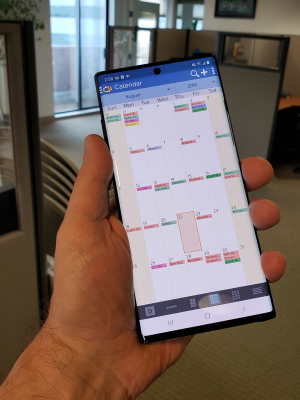
DejaOffice, an application suite of contacts, calendar, tasks and notes apps for Android, now allows you to link your contacts to individual calendar entries, tasks and notes. This lets you easily check who an appointment or a meeting was scheduled with, or view everyone attached to a certain project in your task list. To link a calendar entry to a contact, open DejaOffice, navigate to the calendar, and bring up the details screen for a calendar event. From here, tap the ‘Add Contact’ button and your address book should open up. Select the contact you’d like to attach, save, and you’re done!

DejaOffice is available at no cost from the Android Market and at www.dejaoffice.com

DejaOffice Updated with New Productivity Features for Android Calendar, Contacts, Tasks and Notes Apps

DejaOffice for Android

DejaOffice, a suite of productivity apps for Android, recently released an update that adds major new features to its contacts, calendar, tasks and notes apps for Android. New features include:

• Link contacts to calendar appointments, tasks and notes
• Contextual menus that allow one-tap scheduling of a calendar appointments or creation of tasks with a contact name attached
• Password-protect sensitive data like contacts and notes
• Color-coded categories for contacts, calendar, tasks and notes
• Quick search any field, including custom user-created fields
• Full integration with the native Android contacts and calendar databases
• Two color themes – Dark and Light

DejaOffice was built for the mobile professional who demands that their phone fit into their workflow. DejaOffice is available at no cost from the Android Market and www.dejaoffice.com

Video: The HTC EVO 4G – Sync it to your PC with CompanionLink and DejaOffice

We want to take a quick minute or two to show you DejaOffice running on the HTC EVO 4G. DejaOffice is a suite of robust contacts, calendar, tasks and notes for Android. Using CompanionLink, the HTC EVO 4G can sync with Outlook, Palm Desktop, Lotus Notes, ACT!, and more. Data from the PC syncs to DejaOffice on the device. Take a look, and then download DejaOffice at www.dejaoffice.com

[youtube=https://www.youtube.com/watch?v=otNy1hT5Xio&hl=en_US&fs=1&rel=0]

More information on PC sync with the HTC EVO 4G, visit www.companionlink.com/phones/htc-evo-4g.html

Apple iOS 4 to introduce 1500 new developer features

During Apple’s recent keynote event, Steve Jobs announced the newest version of the iPhone’s operating system, dubbed iOS 4. The new iOS 4 will add some hotly-anticipated features to the iPhone, such as application multitasking. In addition to new user features, iOS 4 opens a whole slew of new APIs for developers to use in their applications.

DejaOffice is our super-charged suite of contacts, calendar, tasks and notes apps for iPhone. The new iOS 4 will allow us to introduce new features that haven’t been possible in previous versions of the mobile operating system. We are especially excited about the new calendar APIs. This will allow us to better integrate the DejaOffice calendar with the iPhone’s native calendar. Apple is also opening up developer access to the iPhone’s notification system, which will allow DejaOffice to use audible calendar notifications (don’t miss that appointment!). To see a roadmap of planned features, as well as general information about DejaOffice, visit www.dejaoffice.com.

Sync the HTC EVO 4G with your PC

The brand new HTC EVO 4G, out June 4 on Sprint, is quite the landmark phone. It boasts a huge screen, top of the line specifications that make Android fly, and the first 4G data connection for high-speed internet access. Early reviews have been overwhelmingly positive, and it looks like the HTC EVO 4G will set the bar for the next generation of mobile devices.

We here at CompanionLink can’t wait to get our hands on one tomorrow and see DejaOffice, our new Android app, running on that gorgeous screen. DejaOffice is a suite of super-charged calendar, contacts, tasks and notes apps for the EVO 4G. It has advanced features that provide more flexibility and functionality than the native apps, such as category colors, variable font sizes and more search and sort fields. DejaOffice is available from the Android Market at no charge, just search the Market for “DejaOffice” on your EVO 4G.

DejaOffice works with CompanionLink to sync data from your PC. CompanionLink can sync the EVO 4G with Outlook, Lotus Notes, ACT! by Sage, Palm Desktop and more. Sync either direct via USB or wireless through Google. Download a 14-day free trial here.

BlackBerry, webOS and iPhone deflectors going to HTC EVO 4G

AndroidCentral.com ran a poll on who was planning to buy the EVO 4G (for which CompanionLink provides complete two-way sync).  Turns out that most of the folks are coming from the BlackBerry platform.  The EVO 4G arrives June 4 on Sprint’s network.

iPhone, webOS and Windows Mobile all tie for a distant second place.  The surprising element to the poll is the number of people buying their first smartphone (roughly the same number as those migrating away from other existing smartphones).

There seems to be a lot of people still sitting on the sidelines, waiting for just the right smartphone before buying their first one.  AT&T’s new (lower) pricing for data plans may help bring these people into the smartphone world.  The cost of entry is now just $15/month.  If history is any indication, other carriers will follow AT&T’s price shuffle to attract new customers.

myTouch 3G Slide now available on T-Mobile

The myTouch 3G Slide is the newest Android phone to join the ranks over at T-Mobile. It features a nice little slide-out keyboard, which is rare amongst the many touchscreen-only Android devices out there. Like many other Android phones, the myTouch 3G Slide is compatible with DejaOffice and CompanionLink’s sync solutions. For more info on how to sync the myTouch 3G Slide with Outlook and other desktop software, check out www.companionlink.com/phones/tmo-mytouch3gslide.html

Image courtesy of T-Mobile.

DejaOffice is Bump-compatible

DejaOffice is fully compatible with the Bump app for iPhone, iPad and Android devices.  If you store contacts in DejaOffice, you can exchange them with others using Bump.  It works great!

We are working to integrate the Bump API to exchange other DejaOffice data like calendar appointments, tasks and notes.  For example, a manager can use this as a great tool to delegate tasks to an assistant.

1. Create a task in DejaOffice

2. Every morning, walk into the office and bump fists with your assistant to transfer the tasks.  (Plus, you’ll actually look more sociable!)

3. Your assistant can work off the list on their device, or use CompanionLink to sync that list from DejaOffice to PC software like Microsoft Outlook.

40% of iPhone purchases by business users

A CNET blog post cites AT&T’s Business Solutions unit claiming 4 out of 10 sales of the iPhone are made to “enterprise users”. The iPhone has come a long way since its inception as a consumer-centric device.

Not surprisingly, CompanionLink is witnessing similar trends.

More and more business professionals are asking how they can make their iPhones and Android-based smartphones work more like business-friendly devices. They recognize these devices are powerful mini-computers, but they need help leveraging that power so it works for their business.

The DejaOffice app does just that. DejaOffice transforms iPhone, iPad and and any Android device into a business-friendly tool. The app makes the phone work more like your PC software.

For example:

– contacts, calendar, tasks and notes can be organized into categories that match and link with your PC

– appointments can be created with people from your address book

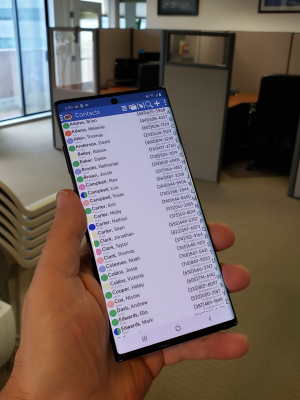
– view company name right next to each name in your address book

– create custom fields and label them whatever you want

– search functionality works even with your custom fields

The mobile world has moved on since the first PalmPilot devices arrived in the 90s.  However, the timeless business productivity principles are still in effect today.  CompanionLink and DejaOffice lets mobile professionals have a suite of tools on their phones and tablets to be as productive as they are when using their PCs.