When users search for a specific product, listings don’t appear magically in a random manner with vendors hoping their product will be picked. You need to work hard on your product page and ensure that the SEO is fully optimized. Just like Google, Amazon is going to use an algorithm that will pick up on cues that are strengthened using SEO.
So before you spend money on an Amazon SEO consultant, you might want to follow some of the tips given below to see if it makes a difference. If nothing, this guide will help you reach the basic standard that any quality vendor would implement in their listings.
Keyword Research
Before listing your product, carry out some research on keywords depending on your target audience and the type of product you want to list. Focus on long-tailed keywords and keep your research consumer-focused rather than having a generalized viewpoint.
Even though your research will be focused on the viewpoint, you need to be as vast as possible with your coverage because even one missed keyword can make all the difference in the world. o streamline and enhance your keyword research process, consider using the best Amazon keyword research tools available in the market.
Be Smart with your Content
Now that you’ve got all your keywords figured out, you need to be smart when it comes to usage. First and foremost, make sure that you aren’t pasting all the relevant keywords wherever you can find some space. You need to be organic with their usage and keep the flow of information consistent and intact throughout the page. Even if you have every keyword possible included in your content, if the information doesn’t follow a format and comes off as forced, the search algorithms will ignore the content and your page’s ranking is going to suffer. Your keywords need to be integrated into the information of the product rather than the other way around.
When it comes to images, use high-resolution HD images with a zoom enhance function if possible. This improves the buyer usability experience on the page and by extension the Amazon website. The better the user experience, the better your page will rank as this is one aspect that the Amazon SEO algorithm also follows.
Be Consistent with the Formatting of your Text
Whatever font, size, and tone you might choose for the text on your page, you need to ensure that it remains consistent throughout its entirety. The inconsistency leads to bad overall user experience and is likely to impact your SEO rating.
Present information in an organized manner and use bullets for different aspects of information. Your font type and size should be the same throughout the description and you need to check on spelling and grammar as these small errors can also have a significant impact on your page rating.
Amazon Guidelines
It also helps if you read the Amazon guidelines. These aren’t just rules that vendors are supposed to follow, but rather a format which helps Amazon organize all its listings and makes it easier to display them to the buyer.
A Brief Guide on Optimizing your Product Page SEO on Amazon was last modified: July 3rd, 2025 by Parth
In this age of digitalization, being an owner of any foodservice, you must invest an amount of thought about an excellent online appearance of your business to reach more and more people, besides having an offline brick and mortar appearance.
It is particularly important for growing restaurants to stand out from the crowd and adapt to consumer trends and current events. Besides marketing great food, employers increasingly implement online food handler’s certification training to promote food health and safety at every step of the food preparation process. Knowing they are in for a delicious and responsible dining experience is a difference-maker in a dining industry that continues to bear the impact of COVID-19.
With the coming of social media networks, e-commerce websites, and mobile devices, getting your food service noticed depends a lot on the online recommendation, customer ratings, reviews, pictures of your restaurant with a pleasant ambiance, etc.
Nowadays, several successful bakeries and start-up food services use the modern platform of digital marketing very skillfully to grow faster by applying tactics like an online ordering system, amazing visual content, loyalty programs, geo-targeted ads, and other online branded business identities.
Here, in this article, we will be helping you with such enormous business ideas to land your food business strongly in an online platform.
1. Create a Food Blog:
Make an interesting food blog with lots of information, engaging stories, pictures of food, etc. You also need to update your page regularly and keep your page up to date show up in the desired place of the search engine results and drive a lot of traffic for your website.
Also updating interesting things regularly will turn your searchers into the regular visitor of your page and the visitors into constant customers. For example, Ceres PR is one of the best Food PR agencies in the UKwho post amazing blogs over many intriguing topics on their page to stay in good attention of the search engines.
2. Share Engaging Posts on Social Media:
You should know the procedure of paid traffic driven to your blog by successfully using advertising campaigns through social media platforms like Instagram, Facebook. In this process, you need to invest a little bit of money, but it is definitely worth it. When considering the huge number of audiences you can be connected with, the amount of buzz you can create with your next food content launch.
3. Approach Other Bloggers to Promote Your Business:
Find out some other bloggers who provide food services like you or other services and ask them to promote your page. Before choosing any ensure that the audiences of those blogs are the consumers that you are trying to reach.
Today, one of the most widely used and successful strategies of digital marketing for food products is to collaborate with food bloggers and ask them to promote your food business.
4. Arrange Engaging Things like Live Videos, Online Contests, and Events:
To get more and more engaging audience for your page, you need to really interact with people through social media. You can host an open-house event, food tasting, or even a new dish launching at your restaurant.
The easiest and useful way to broaden your exposure to the viewers is by running contests that demand your audience to engage with your social media appearance also you can arrange some exciting gifts. Another useful idea would be to promote your service through videos made with the past reviews you have achieved.
Having a convenient online food ordering system for your customers allows you to customize orders so that they fit with your brand identity.
Conclusion
So, in this article, we have tried to write down some beneficial tips for you to stand out with your foodservice. We hope it will be helpful for you.
Trendiest Ways of Food Services Using Digital Marketing was last modified: April 12th, 2023 by Lyle MacLeod
As globalization changes the economic stage of the world, businesses at all levels are affected by a fault. This puts the small business at risk due to unforeseen changes. Thus, it is important that for a business to stay afloat, it maintains productivity and efficiency throughout its daily operations. However, this is a daunting herculean task for the management to sustain unless inculcated into the office work ethics and traditions.
As the saying goes, “Success leaves clues”, meaning that by looking at predecessor similar companies, we can learn a thing or two, adopting best practices used in their business models. These practices are what has kept them self-sufficient and moved them to the top echelon of their various industries. Each of these companies achieved record-breaking levels of productivity for long periods.
Hence, this write-up is about ways to help
improve your productivity to better handle the ever-changing field of play in
the business arena. Below listed are 10 tips to help boost productivity in your
small business.
Be Efficient
Have you thought of how your job
environment could better experience cost and time reductions in executing
activities? That is what efficiency is all about. Here, from time to time, you
ask yourself this question “Is there a better way of doing this?”
This forces you to think of more suitable ways to ease the flow of work and
achieve better results.
Like the adage more for less, when you’re efficient, driven resource allocation patterns change. You’ll get more results using fewer resources when they’re better applied. To do this, you’ll need to be flexible in your orientation to change without changing your goal in mind.
Thus, workers should have a human resource manager who creates an office workplace that breeds creativity. This gives room for workers to suggest better ways of doing things. Being hands-on, the workers are better suited to notice areas where improvements can occur.
Implementing employee performance management software can greatly contribute to creating an environment of efficiency and continuous improvement. By providing a centralized platform for goal tracking, feedback, and performance evaluation, the software empowers employees to identify areas for improvement and suggest innovative solutions. Moreover, the software enables managers to easily recognize and reward exceptional performance, fostering a culture of creativity and collaboration within the workplace.
Automate
As a small-scale business owner, it is important to reduce human labor charges wherever technology can suffice. Leveraging intelligent tools such as an AI Chatbot can help automate customer interactions, streamline lead management, and save valuable staff time. Introducing certain technology and machinery reduces work lines with repeated tasks or job descriptions.
This reduces the number of workers needed there and increases the consistency of quality in work done. This helps to reduce the costs incurred when paying off labor wages and also other labor rights such as retirement plans and benefits. Also, it saves time since machinery does not experience fatigue as humans do.
Save By Outsourcing
Outsourcing is one of the ways of leverage
which the entrepreneur uses to improve his yield productivity. It means giving
out tasks that are done by yourself to other companies, individuals or groups
to perform. As we achieve nothing great alone, this calls for the review of
certain jobs though miniature. Check to see whether it is the cost incurred for
performing that task is less than the price stipulated for subcontracting it
out to another group/company.
For example, assignment help in Canada will base its written works from those outsourced by other Canadian companies or neighboring countries. These companies needing briefs or other literary works that could have been done but as a coping mechanism to cut costs have been outsourced.
Smaller businesses can also benefit from working with HR consultants to handle tasks such as recruitment, employee training, and performance evaluations. This not only saves time and resources but also allows the business owner to focus on key areas of their business.
Furthermore, through outsourcing your
work-schedule is also made lighter, the only challenge to this is management
and trust. The group must be known for integrity in work ethics and quality to
ensure it doesn’t affect one’s overall performance. With this in mind, when
outsourcing the company should be well vetted and analyzed to determine if
they’re good enough for the job.
Collaborate
This involves putting in place systems that
help to ease communication and encourage people. It is most needed in groups
under the same unit or division working together on a similar task. Provision
of amenities like videoconferencing, file sharing, contact archiving, general
broadband internet database, etc. would go a long way to ease the ability to connect
with colleagues, clients, vendors, etc. This improves customer satisfaction as
ease of access usability is a well sought after criteria in business when
dealing with customers.
It helps to trace and correct errors or
points of conflict in production lines or the business model itself. By
increased collaboration, in conflict resolution communication is more effective
hence it is easier to pinpoint and isolate issues and their causes.
Delegate
Delegation is the new way of a shift in the
power play in an office. It means to give authority to a subordinate to oversee
and effect changes to a certain degree in certain areas of work. By putting the
worker in charge, he or she becomes responsible for that work.
Delegation is unlike micromanagement, where
the entrepreneur is the sole decision-maker. Here a certain amount of freedom
is accrued to the workers to allow them to use their preferred work methods
unless specified. To do this, some level of competence and reliability is
required on the part of the worker. Hence it works best when the worker is prepared
for delegation.
The delegation also increases the
independence of workers on their superiors for supervision. By gaining
experience without strict supervision, workers also build trust in their
abilities and have increased knowledge and confidence. This further reduces internal
bureaucratic systems that lead to complicated administrative procedures that
are time-consuming.
Reduce Distractions
Distractions take on multiple forms but all
achieve in delaying us accomplishing our set targets. To many entrepreneurs,
distractions seem to not having much importance compared to their other
challenges being faced by the company. This isn’t the case, as distractions are
one of the main reasons for high unproductivity especially in small scale
businesses.
Hence as an entrepreneur, it is important
to reduce
distractions experienced at all levels of the company to see improved
productivity.
Listed below are a few examples of office
rules to help curb distractions
Keep meetings as short as possible addressing the issues brought up
with an open mind.
Take on more challenging work as this would allow your company’s
general mind-set to remain compliant and active
Reduce office chatter. Although social bonding is encouraged among
colleagues, it is not tolerated during work hours.
Workers should turn off smartphone notifications and shouldn’t be
allowed to use phones during active work hours
Have the Right Tools and Equipment
A lot can be said about a workman just by
looking at his tools and equipment. The same can be said about the quality and
time taken on a service or products delivered by a company. It is wise to
invest in good tools and equipment over time. This saves the company future
cost incurred due to poor durability or accidents that would have happened.
Also, it helps to speed up the work rate. Workers having better precision and ergonomics relieving them of body pains will ensure the longevity of work. This goes to say the there will be better finishing since there’s a lot more attention to details in the products or services rendered. This leads to increased customer satisfaction, which in turn helps sales and marketing the company’s brand.
Offer Support and Set Realistic Goals
Goals serve as a means to checkmate
productivity during a period. For productivity to increase, a small business
should be goal-oriented working to meet specifications outlined goals and
objectives.
Set specific goals every day for workers
stating time frames as deadlines. This helps to keep in my mind the urgency of
work to be done and prompts the worker to work. If the worker fails to achieve
these daily objectives, an employer should issue a query. Then the worker
should be interviewed whether he/she is competent for the job. Also, the goal
and objectives should be revised to see if it is realistic and feasible.
Hence, with each difficulty experienced
along the way by workers, management should provide support where needed. This
support is to clarify, educate, correct and understand the issues arising from
the work to be done.
Improve Workforce Conditions
There’s just a nice feel to a serene work
environment that naturally brings out the best possible performance in a
worker. This stimulates a deeper worker’s connection to their workspace making
them feel more relaxed and at home with their office.
One achieves this through the following:
Keeping the office clean
Providing sufficient lighting conditions
Reducing noise pollution to a minimum
Providing health safety kits and equipment where necessary
Ensure Employees Are Happy
It’s been observed that the best
performance is seen in companies having the best human relations with their
employees. Happy
workers are known to go the extra mile in doing tasks the right way without
trying to cut corners. This gives the company a cumulative edge to improve
productions and services rendered.
An increased feeling of self-worth in a
company helps workers feel appreciated and indebted to the success of the
company. One can achieve this through the following:
Having personal relationships with your workers
Develop and train them in their field of work
Management should recognize and reward excellence in performance
Management should request feedback and encourage them bringing up
ideas for presentation to the management.
Provide medical benefits
Practice positive reinforcement.
Final Thoughts
Now that you understand these various
interwoven dynamics of the things listed above, you’ll find out that the
outcome of getting improved productivity is predictable. Hence, you begin to
see the pattern to it and make the necessary adjustments needed to achieve the
desired end goal
10 Small Business Productivity Tips was last modified: December 5th, 2025 by Jennifer B.
The reason is simple. It is the only App you can download on your phone that has Contacts, Calendar, Tasks and Notes, just like Outlook on your PC.
Contacts, Calendar, Tasks and Notes
The Magic of Outlook is that it keeps all your schedule in one place. But on your Phone, some vendors think you should use one app for Calendar and a different app for Tasks. DejaOffice offers a coherent whole so you can easily coordinate your data entry. You can turn a task into a Calendar event, or add a Contact location to a task.
Category Colors, Linked Contacts, SMS History, Caller ID
DejaOffice extends Outlook category colors to all the Apps, so your Contacts and Tasks can be arranged by color. Every task can have a linked contact. There is a system to record SMS text as history. When people in your database call, their contact info is displayed on your phone. DejaOffice is exactly what you need to make your phone an extension of Outlook on your PC.
Sync using USB, Wi-Fi, Bluetooth and DejaCloud
Easy sync options include USB, Wi-Fi, Bluetooth* and DejaCloud. (*Bluetooth is only available on Android, not on iPhone due to iOS restrictions). CompanionLink for Outlook gives you easy and automatic two-way sync from any Outlook Folder to your Android and iPhone. For ease of use, use DejaCloud Sync for two-way push sync that is fully automatic.
Free 14-Day Trial
This trial will synchronize all your contacts and calendar just like the paid program. All fields are included.
Sync any version of Outlook, Outlook IMAP, POP3 and Outlook 2010 Folders
CompanionLink will synchronize with any Outlook folder. You do not need Exchange or Office 365 to use it. You can synchronize to any Google account. Works with Office 365, Outlook 2019, Outlook 2016, Outlook 2013 and Outlook 2010. You can synchronize Contacts, Calendar and Tasks.
Think about some of the biggest brands in the world, what do you realize about them? They all have names that you can instantly recognize and that you know what the brand is going to offer you and bring to the table.
When you have this in mind, then you are going to realize that having the very best killer brand name is what you need to make sure that your business is a success, that your company has the best chance of getting where you want it to be.
So, to help you to create a killer brand
name we have put together some of our top tips on getting it right.
Think about words that match your vision
and vibe
One of the most important things that you
need to think about when it comes to your brand name is that the word that you
choose matches the type of brand that you want to create. Think about words
that you believe will give the right impression of your brand and appeal to
your target audience.
Be different
If there is one thing that you can notice when it comes to some brand names it is that they follow a pattern. Of course, this makes it much easier to find a brand name as you can pull inspiration from others out there in the world, but you don’t want to blend into the crowd. Instead, be brave, be the brand that stands out, rather than the one that simply is following the crowd.
If you are stuck then use your surname
Whilst some of us are creative, there are
also those who are not quite as able to think about an interesting and unique
brand name. If you are finding it a huge struggle, then why not think about
using your last name (just so long as it isn’t the lamest name in the world)?
Some of the biggest brands in the world are based on the last name of the owner
and creator of the business and they really do work!
Take a look at the dictionary
Another great idea is to find your brand
name in a dictionary, to do this it is a good idea to look for words that
relate to your brand, that have a meaning that is going to match what you are
trying to offer and the audience that you want to appeal to. Just try and pick
a word that is a little different and that stands out.
These are just some of the top tips to keep in mind when it comes to creating a brand name for your business. The best tip is to take your time, to focus and try and have fun with the process too, that way you can make sure that your brand name is everything that you want it to be. Whether you are wondering how to re-brand and get it right, or if you are starting out completely fresh, getting your brand name is one of those things that you absolutely need to get right. So, take the time and think about it carefully and we can promise you in the long run that things will all be worthwhile.
How to Create a Killer Brand Name was last modified: April 7th, 2026 by Nichelle Antoque
Once you have got your website up and running of course, you want to keep it going at its best. You’ll be aiming for a place on the hallowed first pages of searches and constantly pushing to be at the top of the list. It can be tricky to know where to start. But when you know the right keywords and working links can secure a top SEO ranking, it could be the difference between success and failure. Finding the right SEO plug-ins will help.
Yoast EO
If you’re looking for the most popular and probably the most efficient SEO plug-ins for your WordPress site, look no further than Yoast SEO. It enjoys top ratings with its impressive range of features. It receives regular updates, comes with a great interface and serves as the most user-friendly option for anyone looking for a way to maintain the SEO-friendliness of their site.
Another great thing is that Yoast SEO comes with its own dedicated website where you can enjoy premium support and connect with others in a thriving community of SEO specialists. For some businesses, going for Yoast SEO premium is a great choice because it users have access to advanced features such as previewing sites on social media platforms, finding the best keywords and optimizing the page for at least five and getting internal link suggestions. It is wise to consider these features when making a choice.
All in One SEO Pack
Just like Yoast SEO, the All in One SEO Pack works great to keep your SEO campaign up to the mark. It is ideal for those looking for a complete suite of SEO backend solutions. You enjoy premium support along with impressive features for a reasonable nominal fee. You can also get your business license from the developer. It works particularly well if you’re one of many customers relying on WooComerce. Install this plug-in and you will be able to find additional tools such as SEO for categories, video SEO module and custom taxonomies.
SEOPress
If you’re looking for a robust SEO tool for your WordPress site but don’t want to shell out any money, try SEOPress. This completely white-labeled plug-in works amazingly well to help you manage your titles and meta descriptions for all your pages. By using it, you will also be able to simplify the task of creating HTML and XML sitemaps, optimize tags for content sharing and track your performance with Google Analytics.
Broken Link Checker
In case your goal is to find an impressive SEO plug-in to run an audit of your website, you may want to put your money on Broken Link Checker. You can use it to clean up your site as you can easily find and remove any broken links. It also simplifies the task of fixing redirections. By making these corrections, you will notice a fast improvement in your SEO rankings as well.
Pro Rank Tracker
It is yet another impressive WordPress SEO plug-in that you can use to analyze your SEO rankings. Installing it will help you get plenty of information regarding Searching Engine Results page, which in turn, will help keep an eye on your site’s position.
Summary
Can you really afford to miss out on getting the most from your website? Any quick online search will find your a near endless list of SEO helpful plug-ins, but be sure to check the one you find at https://digitaldominationdojo.com/wp-seo-plugins. Whether you go for using individual plug-ins like Yoast EO or Pro Rank Tracker or for a full toolkit like All in One, in these highly competitive times, it would be foolish to not have at least a couple of these really useful plug-ins ready to use close at hand.
Pick the Best WordPress SEO Plug-ins to Manage Your Campaigns Efficiently was last modified: October 19th, 2019 by Lyle MacLeod
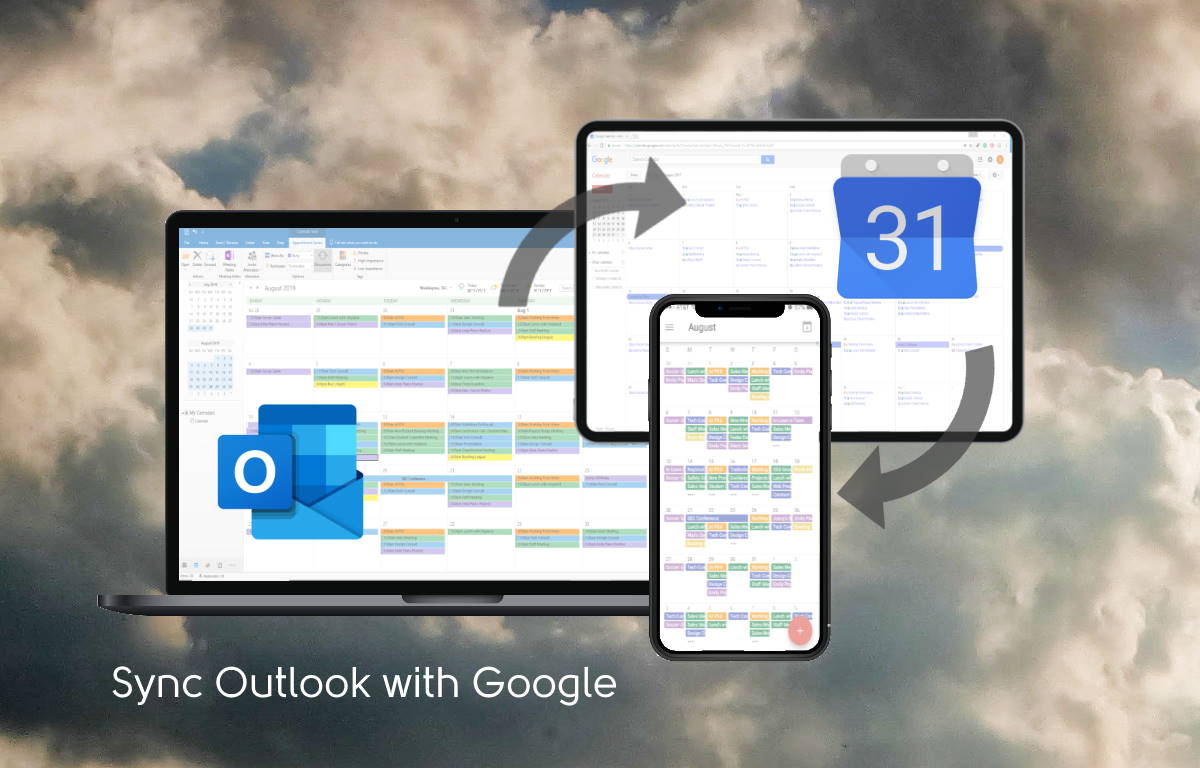
Synchronize any Outlook Contacts folder to Gmail Contacts. Synchronize any Outlook Calendar folder to Google Calendar. All your events will synchronize including recurring events. You can use a Scheduling tool for Google, that will synchronize to your Outlook Calendar. When people call you, their Outlook name will show on your phone. When you read an SMS text you will see their name at the top.
Fully Automatic Two-Way Sync
CompanionLink for Google gives you easy and automatic two-way sync from any Outlook Folder to Google, and Google will sync to your phone. CompanionLink is the only sync tool that has Push Sync enabled for Google Calendar, so you see changes from Google instantly in your Outlook Calendar.
Purchase now for just $19.95!
One Computer License retail $24.95 now 20% off –Click Here to Purchase today for $19.95. A one-computer license is for one computer only. If you later purchase a new computer, you would need a new license for it.
Portable License retail $49.95 now 20% off – Click Here to Purchase today for $39.95. A portable license may be installed on up to 3 computers, work, home, laptop, and can be transferred when you buy a new computer.
Free 14-Day Trial
This trial will synchronize all your contacts and calendar just like the paid program. All fields are included.
Sync Google Calendar to IMAP, POP3 and Outlook 2010 Folders
CompanionLink will synchronize with any Outlook folder. You do not need Exchange or Office 365 to use it. You can synchronize to any Google account. Works with Office 365, Outlook 2019, Outlook 2016, Outlook 2013 and Outlook 2010. You can synchronize Contacts, Calendar and Tasks.
You most
likely use your SIM card every day. Yet, if someone asked you how it works
you’d have a hard time explaining it. If you’re curious to find out how SIM
cards work, read on below as we explore why then is tiny card is so important
the mobile phone users.
What is a SIM card?
Modern-day
mobile phones come in two main varieties, namely Code Division Multiple Access
(CDMA) and Global System for Mobile (GSM). While CDMA phones don’t require a
SIM card, GSM models do, and they happen to be the more popular of the two
options.
Basically, a
SIM card is a tiny card that’s placed on the back of a GSM smartphone and the
word SIM stands for Subscriber Identity Module.
How does a SIM card work?
A SIM card contains a smaller chip that works as its micro controller. It’s made from silicone and plated with gold or other metals to help it keep in contact with the phone. The chip contains a processor, memory and security circuits. Your mobile device reads the chip when you stick the SIM in it. It contains the operating system for the card and stores important information like SMS messages and phone numbers.
All messages
from your phone to the network are in a secret code. The key to encrypt and
decrypt messages is stored in the SIM card. This provides communication privacy.
The SIM card
chip also stores specific data such as the name of your service provider, your
card’s unique serial number, your PUK code, last dialed numbers and your PIN
code.
Your SIM
card is also where the International Mobile Subscriber Identity (IMSI) and its
authentication key are kept. This key is provided by your carrier and it
connects your phone number with your device. This means that when someone dials
your number, the call will go the exact phone that you have.
The process of activating a SIM card
Once
inserted, your SIM card follows an authentication process which is as follows:
First you start up your phone so that it can acquire the IMSI from the SIM card. This information is then sent directly to the network.
The network searches for the IMSI’s authentication key from within its own database.
The network generates a new phone number based on the authentication key.
Your SIM card is legitimized and you can now enjoy your phone and use it to its capacity.
Once you’ve
activated a prepaid SIM card, it’s pretty easy to transfer it to another phone
when you decide to switch phones. It’s worth noting that every SIM card comes
with a unique identifier known as the Integrated Circuit Card Identifier
(ICCID).
The ICCID is
literally engraved onto the SIM card and it comprises three numbers. There’s an
identifying number for your unique account, an identifying digit for the SIM
card provider and a parity number which is a combination of the two other
numbers.
Most SIM cards come with a storage capacity of 32KB to 128KB. If you want to transfer data such as SMS messages from one phone to another, then you must remove the SIM card and insert it into the phone that you want to transfer data to. By the way, even after installing the SIM card, you still need to worry about your network connection speed. In order to have a stable connection all the time, you will need to get yourself a cell phone signal booster.
What about locked SIM cards?
When most of
us come across a locked phone we assume that the SIM card is the cause of it.
But, it’s usually the phone that’s locked and not the SIM card itself.
GSM carriers
have the ability to create software that effectively locks in a particular
network into the phone to the exclusion of any other network. This means the
phone can only work if it’s used with a matching SIM card.
If you want
a locked phone to access SIM cards from different networks, you have to unlock
it, but that’s a whole other article.
Pre-paid SIM cards
Prepaid SIM cards operate according to a pay-as-you-go
system which is different from a recurring contract or subscription plan.
Pre-paid SIM cards are cheaper than the latter and they’re useful for anyone
that wants to avoid roaming charges when traveling overseas.
What is an eSIM?
As SIM card technology continues to evolve, the
industry is now moving towards the eSIM, a type of SIM card that’s built-in to
the phone. The eSIM is remotely activated by the service provider which means
you don’t have to manually insert it into your phone.
Some phone companies already use eSIM cards as part of a dual-SIM setup. But, this option is only available from a few providers and it’s going to take a while before it becomes standard.
Conclusion
While it’s
possible to use your phone without a SIM card, you can’t make phone calls or
send text messages without it. In fact, a smartphone device without a SIM card
is like a human without a brain. We hope this article has helped you understand
how SIM cards work so you can get the most out of them.
How Does A Sim Card Work On Mobile Phones? was last modified: April 19th, 2023 by Joevren Curmi
In today’s hectic schedules people find it tough to maintain a perfect working job and look for easier alternatives. Setting up a freelancing business is a step that most such people take so that they get the flexibility of working at their own pace. However, doing so requires a lot of effort and patience in the initial years and here we share with you steps that freelancers should take to set up their own business.
Define the Goals
First and foremost you need to find out what goals you want to achieve by setting up this business. Is it that you want to make money or you are just starting the business to a network?
Once you have your goals in mind, it is important to research solopreneur ideas that would fit with them. There are a variety of solopreneur ideas.
For example, freelancing, blogging, copy writing, web design/development, graphic design, and virtual assistant services.
Whatever kind of goal-long term or short term you have to take care that you are clear enough about it. You would also need to find what niche you want to make your career in. Are you interested in writing, designing or software development? The choice of the stream would pave the way for your prospects.
Invoicing
Obviously, you would not be working for free and the payment needs to be prompt. If you are looking for a long term work then prepare an invoice format that you would want all your clients to fill. The invoice should have all the details of the work you have done along with the payment you should receive. Alongside you may also need to set clear payment terms about the frequency of payment and any late charges that you impose in case of a delay.
Finding the Right Clients
Next up you need to find out places where you can find clients which would be profitable for you. Normally there are many job boards that can give you a breakthrough. However, it is not necessary that all the job boards would have trustworthy clients pertaining to your field. You may have to look around and figure out which ones are the best places to invest your energy in. Don’t make the mistake of dabbling into all kinds of industries at one shot. Instead, keep it limited to just 2-3 niches where you feel you can derive the maximum benefit.
Price Setting
Next, you would have to set a particular price for the work you are offering. When such a situation arises you must first find out what the average rate for this kind of service is. If you charge more than what the existing rate is then you should have a solid reason behind doing so. Until you are set perfectly in the business you may have to compromise on your rate but later on, you need to maintain a fixed stand.
Conclusion
If you are deciding to foray into the freelancing field be prepared for disappointment and successes as well. By following the above tips though you should be able to make good money within a few months of starting. Expect some harsh work in the beginning though things should simplify in a year or two. Keep your horizons opened and set payment terms clear before any deal to avoid any confusion later.
Steps Freelancers Should Take To Set Up Their Own Business was last modified: April 6th, 2023 by John Bickley
Mobile application testing is evolving with the rapid development in mobile technology. The device manufacturers are coming up with new features and new operating system versions. All the new features and functions are creating challenges for the testers to perform functional testing and non-functional testing. Let’s have a look at some of the challenges that the testers face while testing an app.
Context Awareness
Context can influence the operation of an app or its
functions with data from its environment. Applications can be in different contexts
with different data which creates a problem in the entire testing process.
Also, smartphones rely on constantly
changing environments and usage patterns that impact the context.
Security Issues
When it comes to testing an app on cloud-based devices, private cloud is much more secure rather than the public cloud. A secure private cloud will have an extra layer of enterprise-level security. Although the public cloud is also safe to use for testing the apps, the better option is to go for private cloud to avoid any high-level data breach.
Operating System versions
OS fragmentation is an issue that worries most of the testers. Apple has launched iOS 13 and that
means that the new apps need to be
compatible with the currently popular
versions including 10, 11, and 12. Although when it comes to Android, the
problem is much severe. Android has 29 API levels and at least 9 API levels are
still widely used by the users. There is a great percentage of users who still
use Android 6. So the testers need to make sure that all the functionalities
work fine on all the devices irrespective of the OS version.
Device Screen Sizes
The mobile device manufacturers are upgrading their screen
technology and coming up with larger and better screens. There are devices with
different screen sizes like 5, 5.5, 6, 6.3, 6.5 inches, etc. This creates problems
for testing as the app should be tested on a variety of devices to be
compatible with different screen sizes. Now there are foldable devices in the
market which means there is a need to test the app for foldable screens too.
Parallel Testing
Enterprises are looking to automate most of the testing to
increase productivity. Although parallel
testing is not practiced in most of the cases. It means that the test scripts are not
executed on multiple devices all at once. Users can test a device with an Android
operating system, and a device with an iOS running on it at the same time to
maximize the test coverage.
Conclusion
It is required to perform mobile testing at a scale to assure quality. Users can connect with tens or hundreds of devices using appropriate tools. It’s better to record the test script and run it on multiple devices using the right automation testing tool. Users can also opt for a performance testing tool to simulate network condition. If required then use a load testing tool to test the functions for performance under difficult conditions. This enables users to expand test coverage.
Challenges in Mobile App Testing and their Solution was last modified: October 21st, 2019 by Balamurugan
I am a huge fan of Nokia’s line of Android Phones. For decades Nokia dominated the pre-Smartphone market. Then they got sidetracked by Microsoft into the failed Windows Phone effort. Nokia’s hardware is great! The Windows Phone operating system was full of primary colors and awful apps. Not so great.
A few years ago, Nokia got released from Microsoft and have re-built a credible smart phone line. The latest release is the Nokia 7.2. Retailing for about $350 her in the US, this is a phone you can own and use for years, and not feel Samsung Shamed. .
Just like a Nokia is a mid-priced phone, many people use mid-priced Outlook. There’s no need to pay for the expensive Office 365 subscription, which only gets you owned by Microsoft’s in-app ads. Many people use Outlook 2010 and 2013 because you can actually own it, and it does not change randomly in the middle of the night.
CompanionLink provides the ideal solution by providing sync without using Exchange. When you sync using CompanionLink’s system you get many features that Exchange Sync lacks; Color Categories, Task sync, Notes Sync, and Calendar Events linked to a Contact.
To sync Outlook to Nokia 7.2 without Exchange
From Google Play Store, install DejaOffice on your Nokia 7.2 phone
Watch your Outlook Contacts and Calendar appear on your phone.
DejaOffice is a Free for your Nokia phone from the Google Play Store. CompanionLink runs on a two-week trial. Click here for details about CompanionLink for Outlook.
Many people conduct their businesses online. It’s a fast and popular method, which brings many dividends. One of the most important parts of successful business promotion is the content. Every website should be stuffed with proper documents and informative blogs, articles, and other papers. Besides, a website owner is supposed to write emails, reports, reviews and so on. They are necessary when a businessman works with partners, clients, and suppliers. Therefore, properly developed writing skills are of great importance.
Not all people are gifted in writing. The others may have problems with business writing, which is formal, strict, and professional. Such people have to look for some possible solutions. Of course, they have to practice every day and read appropriate literature to become experts. Some of them use online help.
There is an essay writing service which can help to boost the writing productivity of any business platform. The experts write thematic business papers that fully suit the purposes of clients. They are of exceptional quality and unique. All the orders are written on time, private data is secured, and we set fair prices. Feel free to visit a professional essay writing company to find out more details. You will be satisfied with the capabilities, which will bring your business website to the new quality level.
We can also recommend several tips. They are good enough to boost your writing productivity with your own effort. Be attentive and try to use them properly.
Organize Your Thoughts
It’s essential to be always organized and understand what you’re supposed to do. Before you even begin to write, you should identify some important issues. These are as follows:
The main message;
Effective ways to deliver it;
Understanding your audience;
When and where to apply;
What are possible problems;
How to overcome problems, etc.
Keep these points in your mind and organize your thoughts. Thus, you’ll know how to start and what to write about.
Be Concise and Logical
Business papers differ from other pieces. They are not some sort of storytelling. They always get right to the main question of the paper. Therefore, follow this simple but important rule. Don’t write too long sentences, as well as long paragraphs. If you have done so, see how you can divide them into smaller pieces. Short sentences and paragraphs make any text more readable and pleasant to the eye.
Never go astray. Once you have reported the main purpose of your paper, stick to it. Don’t write pointless sentences that don’t affect the topic of your paper. You may find a possible solution at DoMyWriting. All the explanations and examples must fully suit your topic.
Avoid Unknown Words
Some folks adore playing with words. This habit negatively reflects on their writing. They begin to use too many unknown and overly “wise” words. It is understood that if you write about business, you ought to use certain terms and definitions, which belong to it. Most people may not understand them and so, a good writer explains them. If they are inevitable, provide clear examples and explanations.
However, don’t write too many unfamiliar words. Otherwise, your text will be a real mess of explanations. Cut out jargon, professional terms, slang, and similar words. Use them only when they MUST be used. Other terms can be substituted with common and well-known words.
Use Active Voice
It’s also vital to cut out passive voice to a few sentences per text. Active voice is much better for most papers and business is no exception. Why is it better than passive constructions? Firstly, the active voice makes our speech more dynamic and faster. Secondly, the passive voice takes more words to finish our thoughts.
Compare two plain examples:
Passive: The book was read by me.
Active: I read the book.
It is easy to see that an active construction took fewer words to finish the sentence. Consequently, it affects the way your text looks like. Your sentences will be shorter, which won’t make them unreadable. Besides, it will be comfortable and quick to read them. Of course, your readers will likewise understand your message better as well. Lengthy texts may take away their concentration and attention.
Be Attentive and Professional
Always give heed to the names, gender, positions, titles and similar essentials. Your documents should be formal and professional. When you turn to other people, make sure you know their full names, ranks, and some responsibilities. If you are precise, people will notice it and will be grateful for your attention.
If you want to engage a person in your writing, use the pronoun “you”. The practice shows that people become more interested in what they read if the author turns to them like “As you can see…”, “You may notice…”, “You are welcome to…”, etc.
State a Clear Call-to-Action
Every business document has a “call-to-action”. It clarifies the main intention of the author. He or she may want to:
Advertise;
Sell;
Buy;
Invite;
Encourage;
Engage, etc.
Regardless of your purpose, this sentence or two should be straight to the point and clear. Use proper language that fits the content of your paper and deliver a plain message of what you expect the readers should do.
Memorize these tips. They are universal and can suit any business direction you choose. Use them wisely and you’ll gradually become a great business report writer. Besides, seek other methods and writing activities to improve the productivity of your business in other aspects.
How to Improve Writing Skills for Your Small Business Productivity was last modified: March 22nd, 2021 by Sergey