Having a website is one thing, but getting people to actually visit it is a whole different story. Lots of local businesses have a website, but it’s not doing much for them if nobody’s checking it out. For many small business owners, social media platforms like Instagram and Facebook are still where their potential customers hang out. The thing is, a nicely built website doesn’t mean much if it’s just sitting there with no visitors.
Why Local Businesses Struggle to Get Noticed Online
A local business — a café, a salon, a repair shop, a boutique — usually doesn’t have the budget or time to run large ad campaigns. That leads to a common pattern:
A business page gets created, but it starts with zero followers and zero credibility
Posts go up regularly, but almost nobody sees them
Website links shared on social media get ignored because the profile itself doesn’t look established
Paid ads on Meta platforms can get expensive fast, especially for a small, local audience
How Instagram and Facebook Actually Drive Website Traffic
For a local business, Instagram and Facebook aren’t just about likes — they’re a bridge to the actual website. This works best when a profile has:
A credible follower count that makes new visitors trust the page
Consistent engagement on posts, which pushes content further in front of potential local customers
A bio or page setup that clearly links out to the business website or booking page
Enough visible activity that someone landing on the profile doesn’t immediately bounce away
If you don’t have a good reputation to start with, it’s really tough to get people to pay attention, even if you’re sharing something really valuable, like a link to a great website.
Building That Initial Credibility
For local businesses, getting noticed can be tough, especially when you’re just starting out. This means you can get more people interacting with your page, and that’s what we call social proof. It’s like a stamp of approval that shows new visitors your business is legit. For small businesses, this is especially important because local customers want to see that you’re established before they’ll trust you.
Think about it, when you’re looking for a new place to try, you’re more likely to choose a business that looks popular and has a lot of engagement, right? So, having a strong online presence from the start can make all the difference.
Turning Followers Into Actual Customers
Getting more followers or likes is only useful if it’s paired with a clear path back to the business. A few practical steps help local businesses make the most of this:
Always keep the website link visible and up to date in the bio or page info
Post content that gives a clear reason to visit the website — offers, bookings, product details
Respond to comments and messages, since local customers often expect a personal touch
Use Instagram Stories and Facebook posts to highlight specific website pages, not just the homepage
Who Benefits Most From This Approach
Small retail shops trying to drive people to an online store
Local service providers (salons, clinics, repair shops) wanting more bookings through their website
Restaurants and cafés promoting online ordering or reservation pages
Any local business that has a website but struggles to get visitors from social media
A Realistic Expectation
To really get the most out of growth services, they should be used as a kickstart, not a long-term substitute for actual engagement. The local businesses that tend to do the best are the ones that use an initial boost from these services and then follow it up with content that’s really relevant to their local community – things like responding to customer comments, posting updates that matter, and making sure their website is easily accessible from all their platforms. This way, they can build a strong foundation and keep their online presence fresh and engaging. By doing so, local businesses can create a loyal customer base and increase their online visibility, which is crucial for their success.
Final Thoughts
For small businesses, what really matters is getting people to visit their website and become customers. To make this happen, businesses need to have a clear link to their website, post content that’s relevant to their local area. This helps bridge the gap between just having a website and actually getting people to visit it. By doing so, local businesses can turn their social media presence into real website traffic and sales.
SMM Panels for Local Businesses – How to Drive Real Traffic and Customers on Instagram and Facebook in 2026 was last modified: September 16th, 2026 by Ella Callanna
The jaw joint opens and closes more than two thousand times each day during speech, meals, and swallows. Problems in that joint produce symptoms far beyond the jaw itself, including headaches, ear pressure, and neck tension. Many patients spend months with a physician or a specialist before the source becomes clear. Dental practices in Edmonton sit in a strong position to diagnose these cases, because the bite and the joint work as one system. This article covers the causes, the exam process, and the treatment options available for jaw joint pain.
What the Jaw Joint Does Every Day
An Edmonton dentist examines the temporomandibular joint as a sliding hinge rather than a simple pivot point. A small cartilage disc sits between the jawbone and the skull to cushion pressure during movement. That disc glides forward as the mouth opens wide, then returns to position on closure. Muscles across the cheek, temple, and neck coordinate every movement with precise timing. Pain appears when the disc shifts out of place, when muscles overwork, or when the bite forces the joint into an unnatural path.
Symptoms That Point Toward the Joint
Jaw joint disorders produce a broad symptom pattern that reaches well past the mouth. The list below covers the complaints reported most frequently:
A dull ache in front of the ear that worsens through the afternoon and evening.
Clicks, pops, or a grinding sound at a specific point in the open cycle.
Headaches concentrated at the temples that appear on waking most mornings.
Limited opening that makes a large sandwich or a wide yawn uncomfortable.
Ear fullness, ringing, or pressure with no infection found by a physician.
Tenderness across the cheek and neck muscles under light finger pressure.
How a Dental Exam Identifies the Cause
The exam starts with a full history that covers stress levels, sleep quality, and recent dental work. The clinician measures maximum opening in millimetres and tracks the path the jaw follows on the way down. Fingertips rest over each joint to detect clicks and to locate tender muscle trigger points. Wear facets on the teeth reveal habits such as clenching and grinding that occur during sleep. Digital images or a cone beam scan show the bone contours when the clinical picture stays unclear.
Bite Analysis Completes the Picture
Bite examination compares how the teeth meet at rest against how they meet during a full close. Marks left by articulating paper show which teeth strike first and carry excess load. A single high spot on one crown shifts the whole jaw off its natural path over time. Muscle strain follows as the body compensates for that interference throughout the day. Small adjustments to those contact points frequently relieve symptoms within a matter of weeks.
Conservative Treatment Comes First
Nearly every case starts with reversible therapy in Edmonton that requires no permanent change to the teeth. These five approaches form the standard first phase:
A custom occlusal splint worn at night to separate the teeth and relax the muscles.
Targeted exercises that restore normal opening range and improve muscle coordination.
Moist heat across the cheek muscles for fifteen minutes twice each day.
A softer diet for several weeks to reduce joint load during the recovery phase.
Anti-inflammatory medication at the dose recommended for short-term muscle relief.
An Edmonton dentist treats most jaw joint cases with conservative therapy long before any surgical option enters the conversation. One tip carries real value here: keep a two-week symptom diary that records daily pain levels, meal texture, and sleep quality. That record reveals the daily habits behind the pain far faster than memory alone, and it clearly shortens the path to an accurate diagnosis at the very first clinical appointment.
Everything Patients Must Know About TMJ Treatment in Edmonton was last modified: August 28th, 2026 by Juana Jordyn
A simple meal feels better when your teeth feel secure, comfortable, and ready for normal use. You deserve a tooth replacement that supports comfortable chewing, clear speech, and greater confidence. A stable restoration can also reduce concerns about loose dentures or awkward moments at mealtimes.
Dental Implants in White Rock can provide a stable base for a natural-looking replacement tooth. A clear idea about what happens at each stage can help you feel prepared, informed, and more comfortable with treatment. This guide explains the complete process, from your first scan to the final crown placement.
They Begin With An Oral Exam And Treatment Discussion
Your first visit lets the dental specialist assess your mouth and discuss whether an implant suits your specific needs. An oral exam helps identify concerns that may affect implant care, such as tooth loss or gum problems. You can also raise concerns about appearance, comfort, speech, food choices, or the stability of removable dentures. Clear answers at this stage can help you understand your choices before you decide on treatment.
They Review Your Options Before Treatment in White Rock
The expert in White Rock reviews your options, explains their benefits and drawbacks, and tells you what the proposed treatment involves. If you feel unsure about implants, this discussion offers room for questions about comfort, timing, and expected results. The goal is a plan that addresses the lost tooth without adding care your situation does not require.
What The Assessment Covers
Check jawbone condition and available space for implant placement.
Assess nearby teeth for decay, damage, or weakness.
Review gum health around the proposed implant site.
Examine your bite to assess pressure on replacement teeth.
Identify any tooth grinding habits that may affect treatment.
They Place The Implant In The Jaw
Implant placement puts a titanium artificial tooth root into the upper or lower jaw for a replacement tooth. The procedure takes place on an outpatient basis, with local anesthesia to help keep you comfortable during care. Patients in White Rock may feel concerned about the procedure, so clear instructions can make the appointment feel less uncertain.
They Allow Time For A Stable Foundation
After placement, the implant needs time to form a firm foundation within the jaw before your tooth proceeds. This healing stage supports stability, so your dental expert can assess the site before restoration reaches its final stage. Your care team can also explain which signs deserve attention and when you should contact the clinic in White Rock. A secure foundation helps the replacement tooth feel more stable, which matters for speech, comfort, and food choices.
They Fit And Help Protect The Final Crown
Once the implant provides suitable support, a custom crown attaches to it as the visible replacement tooth. The crown can match your natural teeth in shape and shade, helping restore appearance, comfort, and function. Follow your dentist’s care advice to protect the crown, implant, and surrounding tissues after treatment. Proper care at a reliable clinic in White Rock can help maintain a stable replacement, support oral health, and reduce concerns with eating or speech.
Dental Implants in White Rock offer a structured way to replace missing teeth with stable, natural-looking restorations. The process covers assessment, scans, implant placement, healing, and crown attachment, with each stage serving a clear purpose. Get clear answers from a trusted dental team and feel more confident about your implant journey.
What the Dental Implant Process in White Rock Involves From Scan to Final Crown was last modified: August 28th, 2026 by Juana Jordyn
You run your business well, and the customer side of the work still goes smoothly. The admin behind it is harder to control, and most owners notice that problem early. Invoices stay unsent, emails wait for a reply, and the diary shows two calls together.
Flexible outsourced admin support gives businesses skilled help without the cost of a permanent hire. A trained assistant then handles the inbox, calendar, records and your customer replies. This article sets out the clear signs that the business has reached that exact point.
Your Inbox Controls The Day Instead Of You
You open the laptop with a clear plan, yet supplier emails take over before ten. Most owners who look up business support servicesUK start from this exact frustration. A trained assistant sorts the inbox, replies to routine queries, and flags the ones you must read. The result feels simple, and your attention returns to clients, quotes and the work that pays.
Diary Clashes Have Become A Weekly Problem
One double-booked call is a mistake, but three in one month show a bigger problem. Missed follow-ups can cost more than the meeting itself, and clients may notice repeated delays. A UK-based outsourced assistant can manage the calendar, arrange travel time between calls, and send reminders. In this way, the weeks become easier to manage, even when several urgent requests arrive at once.
Nobody Trusts The Numbers In The Records
Customer details may sit in different spreadsheets, files, or personal notes. Finding a single figure for a quote or VAT return can then take far too long. Regular data entry by experts in the UK keeps the records organised, updated, and easy to access.
Common Record-Keeping Problems Outsourced Data Entry Can Fix
Outdated customer details make important information hard to find.
Different spreadsheets can create confusing or conflicting business records.
Missing figures can delay quotes, invoices, and VAT returns.
Manual errors can lead to incorrect customer or financial information.
Poorly organised records can slow down everyday business decisions.
Customers Wait Too Long For A Reply
Businesses in the UK may notice the problem when a customer complains about a missed call or late email. Slow replies can reduce trust and may push customers to look elsewhere. Support staff can answer calls, manage emails, and respond to chat messages for businesses.
Workloads Change Too Much For A Permanent Hire in the UK
Some months bring a heavy workload, while others are much quieter. A permanent employee still means paying a fixed salary, holiday costs, pension contributions, and National Insurance. Flexible outsourced support in the UK lets you increase or reduce working hours when your needs change. Teams can pay for the level of support the business needs at that time.
Skilled Staff Spend Too Much Time On Basic Admin
Commercial operations managers may spend evenings preparing reports, while the sales team handles travel bookings. Skilled employees should have more time for work that needs their experience. An outsourced assistant in the UK can handle documents, travel plans, follow-ups, and other routine tasks. The experienced staff can then focus on work that helps the business grow.
Have you noticed a few of these issues creep into your week recently? Then it might be time to hand the routine work to someone trained to handle it properly. Flexible business support services in UK cover the inbox, the diary, the records, and the customer calls, so the pressure lifts fast. Act on the warning signs early, delegate the tasks that hold you back, and let the business run the way it should.
Top Signs Your Business Needs Flexible Outsourced Admin Support in the UK was last modified: August 28th, 2026 by Juana Jordyn
Enterprise contact centers run on different math than smaller teams: hundreds or thousands of agents, strict uptime requirements, multi-region routing, and AI that has to hold up under real volume. This guide compares the AI customer engagement platforms built for that scale, explains how to evaluate them so you can find the best enterprise customer engagement software for teams of any size.
10 best customer engagement platforms for enterprises
RingCentral RingCX is the best-fit all-in-one AI contact center for most enterprise teams, combining agentic voice AI, 20+ digital channels, and native workforce engagement on a platform with 99.999% availability and predictable bundle pricing.
Genesys Cloud CX is a leading choice for the largest global deployments that need a flexible orchestration layer and deep journey analytics.
NICE CXone is strongest for regulated enterprises that need mature compliance tooling, audit trails, and domain-trained AI.
Five9 is best for high-volume voice operations that want practical AI virtual agents and intelligent routing.
Talkdesk is best for teams that want an AI-first platform with visual, low-code workflow builders.
Salesforce Service Cloud is best for enterprises already standardized on Salesforce that want service running natively on their CRM.
8×8 is best for multinational, voice-first teams that need global calling and contact center unified on one platform.
Dialpad is best for teams that want an AI-native platform with real-time transcription, coaching, and autonomous AI agents built in.
Nextiva is best for teams that want voice, digital channels, and social and reviews unified in one AI-powered customer experience platform.
Braze is best for large B2C brands that need cross-channel lifecycle marketing and journey orchestration alongside their contact center.
What is an enterprise-grade AI customer engagement platform?
An enterprise-grade AI customer engagement platform is contact center software that can automate, route, and analyze customer conversations across every channel while meeting the reliability, security, and scale requirements of large organizations. Unlike lightweight engagement tools, an enterprise platform must handle thousands of concurrent agents, guarantee high uptime, and enforce governance across regions and business units.
Three characteristics separate enterprise platforms from smaller-team tools. First, they provide agentic AI that can resolve inquiries autonomously and assist agents live, not just scripted chatbots. Second, they include workforce engagement management — forecasting, scheduling, quality management, and analytics — as part of the core platform. Third, they offer deep integration through pre-built connectors and open APIs so the contact center fits into an existing enterprise technology stack.
What features should enterprise teams evaluate contact center platforms?
Enterprise teams should evaluate contact center platforms against scale, AI depth, reliability, workforce tooling, integration breadth, and total cost. Use these criteria to compare any shortlist:
Scale and routing: Confirm the platform supports your agent count and offers advanced, attribute-based routing across multiple sites and regions.
AI depth: Look for AI that resolves inquiries autonomously, assists agents in real time, and analyzes every interaction, rather than a single chatbot feature.
Reliability: Require a published uptime commitment; enterprise-grade platforms typically target 99.99% availability or higher.
Workforce engagement management: Prioritize built-in forecasting, scheduling, quality management, and analytics so supervisors manage the whole operation in one place.
Integration and extensibility: Check for pre-built CRM connectors and open APIs so the platform connects to existing systems without custom middleware.
Deployment and total cost: Weigh implementation time and per-agent pricing together, since long rollouts and premium licensing raise the true cost of ownership.
RingCentral RingCX
RingCentral RingCX is an AI-first contact center that gives enterprise teams automation, omnichannel routing, and workforce engagement in one platform. RingCX supports voice and 20+ digital channels under a single license, runs on infrastructure with 99.999% availability, and can be deployed in a few days rather than the multi-month timelines common with legacy enterprise systems.
What RingCX does well:
RingCX unifies voice and 20+ digital channels — including web, social media, and messaging — so agents manage every conversation in one workspace.
RingCX pricing bundles core contact center features and AI into predictable per-agent invoicing, with savings for annual billing.
Agentic voice AI sits at the core of RingCX, and a built-in agent builder lets teams launch voice-first AI agents across voice, SMS, chat, and social using natural-language prompts without coding.
Real-time AI agent assist surfaces answers during live interactions, while supervisor assist gives team leads live AI insights to coach and intervene.
AI quality management, interaction analytics for customer sentiment, and AI workforce management are built in, alongside 250+ pre-built reports.
RingCX is fully integrated with RingCentral’s business phone system, so front-office and contact center users share one directory and conversations stay visible as they move between teams.
Who is RingCX best for? RingCX is best for enterprise contact center teams that want a single AI-first platform spanning voice and digital channels, with the reliability, workforce tooling, and fast deployment that large operations require. RingCX is also a strong fit for the aspiring enterprise, since its bundled pricing includes more advanced features in each plan without as many à la carte add-on fees as competitors.
Genesys Cloud CX
Genesys Cloud CX is an enterprise contact center platform that embeds AI across the full interaction lifecycle. Genesys built the platform on a flexible orchestration layer, giving large enterprises fine-grained control over how routing, predictive engagement, and analytics are applied.
What Genesys does well:
Genesys Cloud CX provides intelligent routing, predictive engagement, and journey analytics within one orchestration layer.
Genesys includes built-in workforce engagement management for forecasting, scheduling, and adherence.
Genesys developed the platform with native telephony rather than adding voice to a chat-first tool.
Who is Genesys best for? Genesys Cloud CX is best for very large, multi-region enterprises that need deep orchestration control and can absorb longer implementation timelines.
NICE CXone
NICE CXone is one of the most established enterprise contact center platforms, with a broad AI suite and strong governance tooling. Its Enlighten AI is trained specifically on customer service interactions, giving it domain depth that general-purpose AI often lacks.
NICE CXone offers strong compliance tooling, audit trails, and governance controls for regulated industries.
NICE CXone’s Enlighten AI is trained on customer service data rather than general-purpose text.
Who is NICE CXone best for? NICE CXone is best for regulated enterprises and large operations that prioritize compliance depth and a mature workforce engagement suite.
Five9
Five9 is a cloud contact center platform built around practical, high-volume AI for customer service operations. Five9 focuses on virtual agents, intelligent routing, and real-time agent assistance during live calls.
What Five9 does well:
Five9 provides AI-powered virtual agents and intelligent routing for high call volumes.
Five9 offers real-time agent assist that surfaces next-best-action recommendations during interactions.
Five9 implementations commonly run in the range of about two months.
Who is Five9 best for? Five9 is best for enterprises with high-volume voice operations that want proven AI automation without the longest deployment timelines.
Talkdesk
Talkdesk positions itself as an AI-first contact center alternative that reduces technical dependencies. Talkdesk emphasizes automation, self-service, and visual workflow builders that non-technical teams can operate.
What Talkdesk does well:
Talkdesk offers AI-first automation and self-service across channels.
Talkdesk provides visual, low-code workflow builders to configure routing and automation.
Talkdesk includes built-in workforce management for forecasting and scheduling.
Who is Talkdesk best for? Talkdesk is best for enterprise teams that want AI-first automation with low-code tooling their operations staff can manage directly.
Salesforce Service Cloud
Salesforce Service Cloud is an enterprise service platform that runs natively on Salesforce CRM. It delivers case management, omnichannel routing, and AI through Einstein and Agentforce, with direct access to Salesforce customer data.
What Salesforce Service Cloud does well:
Salesforce Service Cloud provides native access to Salesforce CRM data across sales, service, and marketing.
Salesforce Service Cloud offers AI through Einstein and autonomous Agentforce agents.
Salesforce Service Cloud fits naturally into large Salesforce-standardized technology stacks.
Who is Salesforce Service Cloud best for? Salesforce Service Cloud is best for enterprises already invested in Salesforce that want service to run on the same CRM, rather than teams seeking a standalone contact center.
8×8
8×8 is an enterprise communications platform best suited to multinational, voice-first teams that need reliable global calling unified with contact center on one platform. 8×8’s XCaaS approach brings voice, video, team messaging, and contact center together under a single vendor and license, with cloud calling coverage built for organizations operating across many countries.
What 8×8 does well:
8×8 provides full cloud PSTN calling in 59 countries, local numbers in 100+ countries, and unlimited calling to 48 countries.
8×8 unifies voice, video, team messaging, and contact center in one platform under a single license and vendor.
8×8’s Intelligent Customer Assistant adds conversational AI virtual agents that handle routine inquiries across voice and digital channels before routing to a live agent.
Who is 8×8 best for? 8×8 is best for multinational operations that lead with voice and want global calling unified with contact center on one platform, though its breadth adds setup complexity for smaller teams.
Dialpad
Dialpad is an AI-native contact center and communications platform that builds real-time AI into every interaction. Dialpad focuses on live transcription, in-the-moment coaching, and autonomous AI agents that resolve routine inquiries across voice and digital channels.
What Dialpad does well:
Dialpad provides real-time transcription, sentiment analysis, and automatic call summaries on every interaction.
Dialpad’s AI Live Coach surfaces knowledge base suggestions and suggested responses to agents during live calls.
Dialpad’s AI Agents autonomously resolve first-tier and after-hours inquiries across voice and digital channels, handling tasks such as appointment scheduling, order tracking, and account updates.
Who is Dialpad best for? Dialpad is best for teams that want an AI-native platform where real-time transcription, coaching, and automation are built in rather than added on.
Nextiva
Nextiva is an AI-powered unified customer experience platform that combines contact center, business communications, and social channels. Its NEXT Platform brings voice, digital channels, and social and reviews management together, with AI handling routine conversations end to end.
What Nextiva does well:
Nextiva unifies voice, texting, live chat, email, and social and reviews management in one customer experience platform.
Nextiva’s AI, including its XBert AI employee, Agent Assist, and a 24/7 AI Receptionist, handles tasks like booking appointments and answering repetitive questions.
Nextiva includes workforce engagement, analytics, and journey orchestration to scale the contact center.
Who is Nextiva best for? Nextiva is best for teams that want voice, digital channels, and social and reviews unified in one AI-powered platform rather than stitching separate tools together.
Braze
Braze is an enterprise customer engagement platform built for cross-channel lifecycle marketing rather than contact center operations. Braze excels at real-time, cross-channel messaging at scale and journey orchestration for large B2C brands.
What Braze does well:
Braze delivers cross-channel messaging across email, SMS, push, in-app, web, and content cards with real-time orchestration.
Braze’s Canvas journey builder handles complex multi-step, multi-channel campaigns with branching logic and real-time adaptation.
Braze is built to handle billions of messages and unifies first-party data from warehouses and backend systems in real time.
Who is Braze best for? Braze is best for large B2C brands that need outbound lifecycle marketing and journey orchestration alongside — not instead of — a contact center platform.
Frequently Asked Questions
What is the best AI customer engagement platform for enterprise contact centers?
RingCentral RingCX is the best all-in-one AI customer engagement platform for most enterprise contact centers because it combines agentic voice AI, voice and 20+ digital channels, native workforce engagement management, and 99.999% availability in one platform. Genesys Cloud CX and NICE CXone are leading alternatives for the largest and most complex global deployments. The best choice depends on agent count, channel mix, compliance needs, and how much implementation time an organization can absorb.
Which enterprise customer engagement platform is the easiest to deploy?
Deployment time varies widely by platform and complexity. RingCX can be deployed in a few days, while complex Genesys or NICE CXone rollouts commonly run eight to sixteen weeks and Five9 implementations often run about two months. Factors that affect timeline include agent count, number of channels, integrations, and the amount of AI training and change management required.
How do enterprise contact center platforms handle reliability and uptime?
Enterprise contact center platforms are expected to publish uptime commitments, typically 99.99% availability or higher, because downtime directly affects revenue and customer trust. RingCX runs on infrastructure with 99.999% availability, which allows for only minutes of downtime per year. Buyers should request the vendor’s uptime SLA and historical availability before committing.
Which enterprise customer engagement platforms include workforce management?
Most enterprise contact center platforms include native workforce engagement management, though the depth varies. RingCentral RingCX, Genesys Cloud CX, NICE CXone, and Talkdesk all build workforce management — forecasting, scheduling, and adherence tracking — directly into the core platform.
RingCX and NICE CXone extend this with AI quality management and interaction analytics. One advantage of RingCX pricing is that advanced features are bundled into pricing tiers instead of being added on top of the base price.
Best AI Customer Engagement Platforms for Enterprise Contact Center Teams was last modified: September 18th, 2026 by Erin Murphy
Aura does a lot. Identity theft protection. Credit monitoring. Online security tools. It’s a solid service. But solid doesn’t mean perfect for everyone.
Some users find the price steep for features they rarely touch. Others want a service that prioritizes privacy over all-in-one bundling. A few just want something simpler to navigate. The goal isn’t to replace Aura with another all-in-one, but to find protection that actually fits your life.
This guide looks at five alternatives worth considering. Each one takes a slightly different approach. The right choice depends on what you value most.
What to Look for in an Identity Protection Service
Breach monitoring. Recovery support. Credit tools. Ease of use. Family coverage. These are the features that separate basic services from genuinely useful ones.
Breach monitoring. Does the service track your data across the dark web and public leaks? That’s the baseline.
Recovery support. If someone steals your identity, who helps you fix it? Some services offer dedicated specialists. Others just send alerts and leave you to figure things out.
Credit tools. Credit monitoring and score tracking matter. But does the service go beyond reporting to help you understand what the numbers actually mean?
Ease of use. The best protection is useless if you can’t navigate the dashboard or understand the alerts.
Family coverage. If you’re protecting a household, look for plans that cover multiple adults and children without jumping through hoops.
1. Coveron
Best suited for: People who value privacy and simplicity
Coveron comes from the team behind NordVPN. Privacy is woven into everything they build.
Aura tries to be everything to everyone. Coveron stays focused. It protects your online footprint without layering on features you don’t need. The dashboard is clean. The alerts make sense. And the service includes up to $1 million for identity theft recovery.
For anyone exploring Aura alternatives, Coveron offers a compelling balance of privacy, usability, and core identity protection.
Key strengths:
Monitors for personal data leaks and malware breaches
Provides $1 million in identity theft recovery coverage
Designed to be simple and privacy-first
Why it stands out:
Aura spreads its focus across credit, family, and financial tools. Coveron drills down on identity and financial protection. You get what you need. Nothing more.
2. Norton LifeLock
Best suited for: Users wanting identity and device protection in one place
Norton LifeLock is the heavyweight in this space. Identity protection. Antivirus. Parental controls. Cloud backup. It’s all there.
The premium tier includes three-bureau credit monitoring, investment account alerts, and dark web tracking. Reimbursement for stolen funds reaches $1 million or more, depending on the plan.
Key strengths:
Covers identity, devices, and parental controls under one subscription
Reimburses stolen funds up to $1+ million (plan-dependent)
Offers dedicated restoration specialists
Why it stands out:
Aura competes in the same all-in-one space. LifeLock gives you more control over which tools you activate, especially on the device side.
3. Identity Guard
Best suited for: Budget-conscious users
Identity Guard is owned by the same company as Aura. The features are similar. The price is lower.
Plans start around $7.50/month. The Family plan covers up to five adults and unlimited children. Three-bureau credit tracking, safe browsing tools, and a password manager are included at certain tiers.
Key strengths:
Lower price point than Aura for similar features
Family plan covers five adults and unlimited children
Includes password manager and safe browsing tools
Why it stands out:
You get protection from the same parent company as Aura—without the premium price tag.
4. IdentityForce
Best suited for: Users who want enterprise-grade monitoring
IdentityForce is powered by TransUnion, one of the three major credit bureaus. Corporations and federal agencies rely on it.
Medical ID fraud protection. Credit score tracking. Real-time mobile alerts. The service doesn’t just monitor—it detects threats fast.
Key strengths:
Monitors for medical ID fraud
Tracks credit scores with reports (in select plans)
Sends real-time alerts via mobile app
Why it stands out:
TransUnion backing gives it credibility. Enterprise-grade protection for individuals who want best-in-class detection.
5. IDShield
Best suited for: Users who want legal support and restoration help
IDShield focuses on what happens after identity theft occurs. Most services monitor and alert. IDShield helps you recover.
Licensed private investigators work on your behalf. Legal support is included. Family plans are available.
Key strengths:
Licensed private investigators assist with identity restoration
Legal support included with the service
Family plans available for household protection
Why it stands out:
Monitoring tells you something is wrong. Restoration fixes it. IDShield does both.
How to Decide Which Service Fits You
Every service has strengths. The right one depends on your situation:
Already been hit by identity theft? Recovery tools matter more than monitoring. IDShield’s private investigators and legal support are valuable here.
Worried about privacy? Coveron’s focus on privacy-first design is worth a close look.
Want everything bundled together? Norton LifeLock covers identity, devices, and more under one roof.
On a tight budget? Identity Guard delivers solid protection at a lower price.
Need enterprise-grade detection? IdentityForce’s TransUnion backing gives you that level of confidence.
FAQ
Is there a better option than Aura?
That depends on what you actually need. Coveron shines when privacy matters most. Norton LifeLock covers the most ground. Identity Guard keeps costs low. There’s no universal winner—only the right fit for your situation.
What features matter most in an identity protection service?
Dark web monitoring catches exposed data. Recovery support helps you fix problems fast. Credit tools keep you informed. Family coverage protects everyone under one roof. The services that handle all four are worth your attention.
Is Coveron worth considering over Aura?
Yes. Coveron comes from the NordVPN team, so privacy is baked into the design. If Aura feels like too much (too many features, too much complexity), Coveron offers solid protection without the overload.
Which identity protection service is most affordable?
Identity Guard starts around $7.50/month. It’s the lightest on the wallet among the services we’ve compared here.
What’s the best family plan for identity protection?
Norton LifeLock and IDShield both offer solid family options. LifeLock leans into device security. IDShield focuses on legal backup and identity restoration. Choose based on what your household actually needs.
Final Thoughts
Aura works. It’s not the only path to protecting your identity.
Coveron offers privacy-first protection with strong usability. Norton LifeLock covers identity and devices. Identity Guard delivers value at a lower price. IdentityForce provides enterprise-grade monitoring. IDShield specializes in legal support and restoration.
Think about your priorities. Your threat level. Your budget. Your family’s needs. The right service fits your life—not just a feature list.
Take the next step. Choose the protection that gives you real peace of mind.
Top 5 Aura Alternatives for Proactive Identity Theft Protection was last modified: August 27th, 2026 by Ilya Zavertaylo
Designers often deal with low resolution images that look blurry or pixelated. You might receive a small logo from a client or find a perfect stock photo that is too small for a large print. Fixing these files manually used to take hours of tedious work. You would have to redraw lines or use complex filters that often made the image look plastic or fake. Modern technology has changed this process by using artificial intelligence to fill in missing pixels and sharpen edges instantly. Using an AI Photo Enhancer allows you to turn a small, grainy thumbnail into a high definition visual without losing the natural texture of the original shot.
These tools do more than just make things bigger. They look at the patterns in your photo and guess what the missing details should look like. This means a blurry face becomes clear and a fuzzy landscape gains sharp grass and leaves. You can save a lot of time by using a Free Photo Editor that includes these smart features directly in your browser. Instead of opening heavy software that slows down your computer, you can upload a file and get a clean result in seconds. This speed helps you meet tight deadlines and keep your creative flow moving.
1. AI Photo Enhancer by EzEnhancer.ai
This tool focuses on one thing and does it very well. It uses deep learning models to study millions of images so it knows how to fix common quality issues. When you upload a photo, the system identifies noise, blur, and compression artifacts. It then recreates the details to give you a crisp result. It is especially useful for photographers who need to rescue shots taken in low light. The interface is simple and does not require you to learn complex settings.
Key Features
The main feature is the 4x upscaling capability. You can take a standard image and make it four times larger while keeping the edges sharp. It also includes a noise reduction toggle that removes the grain often found in smartphone photos. The tool handles portrait photos well by recognizing human features and ensuring skin looks smooth but realistic. You can process multiple files at once to save time on large projects.
Pros and Cons
The biggest benefit is the speed of the processing. You do not have to wait long for the AI to analyze your file. The results look natural and avoid the weird artifacts that some cheaper tools produce. One downside is that the free version has limits on how many high resolution exports you can make per day. You might need a subscription if you have hundreds of images to process every week.
Best For
This tool is best for designers who need high quality upscaling for print or large web banners. It works perfectly for anyone who needs to fix a photo quickly without messing with complicated sliders.
2. Free Photo Editor by Linocut.ai
This platform offers a full suite of tools for people who need to do more than just upscale. It combines basic cropping and resizing with advanced AI features like background removal and object erasing. You can start with a low quality image and transform it into a professional graphic without leaving the site. The layout is clean and easy to navigate even if you have never used a design tool before. It runs entirely in your web browser so it works on any computer.
Key Features
The editor includes a smart background remover that can cut out complex shapes like hair or tree branches. It also has a set of AI filters that can change the lighting or mood of a photo with one click. You can add text, shapes, and icons to your images to create social media posts or ads. The tool also features a basic upscaler to help you improve the quality of your assets before you start editing them.
Pros and Cons
The main advantage is that it is free to use for most basic tasks. You get a lot of power without having to pay for an expensive monthly software license. The interface is very intuitive and does not feel cluttered. A potential drawback is that it requires a stable internet connection to work smoothly. If your internet is slow, uploading large files might take a bit longer than desktop software.
Best For
Social media managers and content creators will find this tool very helpful. It is perfect for making quick edits and adding design elements to photos for Instagram or Facebook.
3. Let’s Enhance
Let’s Enhance is a powerful platform designed for businesses that need to process thousands of images. It uses a system called Claid to automate the editing process for e-commerce stores. If you have a lot of product photos that look dull or small, this tool can fix them all at once. It adjusts the lighting, removes the background, and increases the resolution to meet the standards of sites like Amazon or eBay.
Key Features
The tool offers specialized modes for different types of images. You can choose the Digital Art mode for illustrations or the Photo mode for real life shots. It also has a feature called Magic Upscale which adds extra detail to textures like fabric or wood. The API integration allows developers to build these AI features directly into their own websites or apps.
Pros and Cons
The automation features are a huge plus for large teams. You can set up a specific style and apply it to every photo you upload. The quality of the upscaling is among the best in the industry. However, the pricing can be a bit high for casual users. The credit system means you have to pay for what you use, which might get expensive if you are just experimenting.
Best For
This tool is best for e-commerce owners and large marketing agencies. It is built for people who need to maintain a consistent look across a huge catalog of products.
4. VanceAI
VanceAI provides a wide range of specialized AI modules. Instead of one general tool, it gives you specific options for sharpening, denoising, and colorizing old photos. This modular approach means the AI is trained specifically for the task you want to complete. If you have a photo that is out of focus, the AI Sharpen tool works better than a general upscaler. It also includes a tool to turn black and white photos into full color images.
Key Features
The platform includes a dedicated AI Portrait Enhancer that focuses on eyes, hair, and skin texture. It also has a tool for removing JPEG artifacts which are the blocky squares you see in highly compressed images. The desktop version allows you to process files locally if you do not want to upload them to the cloud. You can also use their workflow feature to chain multiple tools together in one step.
Pros and Cons
The variety of tools is the biggest strength here. You can fix almost any specific problem an image might have. The results are very professional and look like they were done by a human editor. The downside is that the interface can feel a bit overwhelming because there are so many different options to choose from. It takes a little more time to learn which tool is right for your specific photo.
Best For
Professional photographers and photo restorers will love this tool. It is ideal for people who need to fix specific technical flaws in their images.
5. Topaz Photo AI
Topaz Photo AI is a professional grade desktop application. It is widely considered the gold standard for image enhancement. The software combines three of their most famous tools into one package. It handles noise reduction, sharpening, and upscaling simultaneously. The software uses an Autopilot feature that scans your photo and automatically applies the best settings. This takes the guesswork out of editing and ensures you get the best possible result every time.
Key Features
The software works as a standalone app or as a plugin for programs like Adobe Photoshop. It has a very powerful engine that can handle massive RAW files from professional cameras. The face recovery feature is excellent at fixing blurry faces in group shots. It also has a motion blur reduction tool that can save photos taken with a shaky hand.
Pros and Cons
The quality is unmatched by most web based tools. It gives you total control over the final look of your image. Since it runs on your computer, you do not need to upload your private photos to a server. The main con is the price. It is a significant one time investment that might be too much for casual users. You also need a fairly powerful computer with a good graphics card to run it smoothly.
Best For
High end print designers and professional photographers who need the absolute best quality. It is the right choice if you are preparing images for large scale printing or professional portfolios.
Comparison Summary
Choosing the right tool depends on your specific needs and budget. Some tools are better for quick web edits while others are built for professional printing.
Tool
Primary Use
Platform
Price Model
AI Photo Enhancer
High Quality Upscaling
Web
Freemium
Free Photo Editor
General Editing
Web
Free
Let’s Enhance
E-commerce Automation
Web
Subscription
VanceAI
Technical Repairs
Web/Desktop
Credits
Topaz Photo AI
Professional Grade
Desktop
One-time Purchase
Final Recommendation
If you are a designer who needs to fix a low resolution image quickly, start with the AI Photo Enhancer. It provides the best balance of speed and quality for everyday tasks. For those who need to create social media graphics or add text to their images, the Free Photo Editor is the most versatile choice. If you are a professional who works with high resolution photography every day, investing in Topaz Photo AI will save you the most time in the long run. Most of these tools offer free trials or basic versions, so you can test them out to see which one fits your workflow best. AI is no longer a luxury for designers. It is a necessary part of the modern toolkit that helps you produce better work in less time.
5 Essential AI Tools for Designers to Upscale Images and Edit Visuals Fast was last modified: August 27th, 2026 by Colleen Borator
Calendar invites move after the trainer video is already attached. Contacts still sync. Tasks still sync. Notes still sync. What fails is the spoken slot inside a file the whole team already clicked. Before an enablement desk books another capture day, Lip sync ai has to solve a narrower problem: keep the trainer still and replace only the line that names the new time.
The live load is the real cost. Outlook, the phone queue, and last week’s talking head sit open at once, and none of them agree. It cannot rewrite a mouth. Lipsync Studio is the piece that takes the same still and a new line after the calendar already changed. The cheap mistake is to leave the old file on the invite and hope nobody plays it. The useful habit is to treat the attached clip as stale the moment the slot moves.
The Invite Moves After The Trainer File Is Attached
A recurring enablement invite is a closed object. The agenda lives in the notes. The attendees already have the link. The talking head from last cycle is sitting in the attachment list because someone wanted a face on the brief. When a device cutover slips, none of that inventory is wrong. The spoken claim is wrong. Recapturing the trainer to change one sentence treats a finished still as a rehearsal.
Field techs watch the first ten seconds on a phone between sync jobs. They already know the trainer cadence from the last wave. A new time in the old mouth is survivable. A new time in a stranger mouth reads as a different person running the same desk. Taste does not decide this file. The spoken slot does.
Recapture Days Waste The Sync Window
The old workaround is to fly or hold the trainer until a new take exists. That protects identity and burns the window the phones are already waiting on. The other workaround is a mute slide with a time card. You protected the face by deleting the host. Neither file is a briefing. Both waste the still you already have.
In our desk the first version of that habit cost a full recapture day while the invite kept moving. The phones did not wait. People opened the attached file, heard the old slot, and wrote back asking which calendar was real. The rework was not a better camera. It was a morning lost to a sentence the still could have carried.
Keep song treatments out of this folder. A chorus that invents a stage will fight the Outlook title you already sent. An enablement clip has one job: say the slot and point at the steps already in the notes.
Five Minutes Is The Real Avatar Ceiling
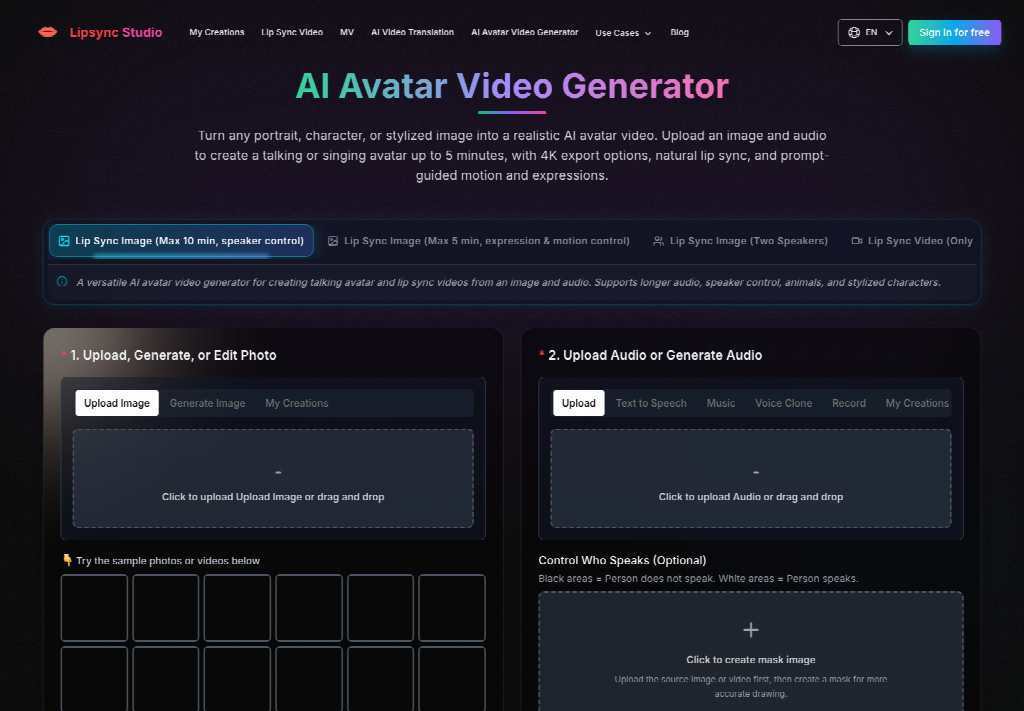
The avatar path on the site is not an open-ended lecture tool. Upload a portrait, character, or stylized still, add audio, and you get a talking or singing avatar with a five-minute ceiling and export options up to 4k. That cap is the useful constraint. If the briefing needs twelve minutes of product history, the still is the wrong container. Cut the spoken job to the slot, the one setting that changed, and the link already in the invite.
Prompt-guided motion and expression sit on the same desk. They are optional. They do not extend the five minutes. A longer speech wants a different source, not a more dramatic face on a still that was never meant to hold a keynote. The calendar already holds the overflow: the notes field, the setup guide, the link to the last sync run. The avatar only has to make the slot believable on a phone between jobs.
That split also protects the next wave. If the trainer later needs a longer walkthrough, keep it as a document attached beside the invite. Do not stretch the still until the mouth starts padding. A five-minute ceiling that forces a shorter line is doing the desk a favor. A twelve-minute talking head on a recapture day is how the phones get a file nobody finishes.
Treat The Cap As A Script Length Not A Quality Dial
People bump the resolution and hope the extra pixels buy duration. They do not. 360p through 4k changes how sharp the mouth looks. It does not change the five-minute wall. Write the new line against a clock first. If the trainer cannot name the slot and the one changed setting inside five minutes, the file is the wrong object. Split the rest into the notes field the invite already carries.
This is also the right place to park an AI music video generator impulse. A storyboard that invents new rooms belongs to a launch film, not to a calendar attachment. Using that path here usually adds a set the trainer never stood in and then asks support to defend it on the next phone wave.
Prompt And Resolution Before Anyone Hits Generate
Once the still and the line are honest, the generate panel is short. Do not add a ritual the site does not show. Upload the trainer portrait. Add the replacement audio. Write a prompt only if the face needs a calmer register. Pick a resolution. Generate once. Tasks keep running if you close the tab. Do not submit the same job twice because the invite is still moving. Finished files land in My Creations.
Upload the same trainer still that already sat on last week’s invite.
Add a spoken line that names only the new slot and the changed setting.
Keep any prompt short: calm tone, not a performance.
Generate once, then open the file next to the calendar before anyone reattaches it.
Audio can arrive as an upload, a recorded line, or text-to-speech. For a named trainer, a recorded line from that person is the honest path. A generic host is a different product: a narrator briefing, not a trainer briefing.
Start At 360p When The Invite Already Changed
The avatar desk exposes 360p, 480p, 720p, 1080p, 2k, and 4k. When the slot has already moved, start at 360p. Treat that first preview as a check, not a delivery master: the mouth still has to belong to the trainer, and the spoken time still has to match the invite. If that first preview already names the old slot, stop. Waiting for a 4k export to hear the same sentence only delays the discard.
Raise the resolution after the slot is right. Pixels do not repair a time the calendar no longer shows. They only make the same error easier to screenshot in a support thread. If the 360p cut already names a slot the invite dropped, the desk could not defend that file in the next phone wave. Higher resolution would only make the same miss sharper.
Presets Decide Who Speaks In A Crowded Still
Enablement photos are rarely a clean headshot. A kickoff still often has the trainer and a second person from the device team. If both mouths start moving through one line, techs will not know who owns the slot. The avatar desk has an optional Control Who Speaks row with presets for the left person, the right person, the far left, the middle, or the far right. Pick the trainer. Leave the extra face out of the speaking set.
The page also lets a role stay silent when that role has no audio. Use that. Do not invent a second briefing for a colleague who only stood in the frame. Two talking identities on a one-slot invite is how a sync window turns into an argument about who is running the desk.
Leave Extra Faces Silent When That Role Has No Line
If the still has three people and only the trainer has a line, the other two should stay listeners. The first export that makes a silent colleague chew the time stamp is discarded. It would never clear a support lead who already knows who owns the invite. Cropping to a single face is the backup when the preset cannot isolate the trainer. The generate button will not decide who the phones will blame.
Keep the chosen preset written next to the still. The next slipped cutover will ask for a new slot and the same crowded photo. Repeating a known isolation is faster than discovering, after the invite went out, that a device engineer is now mouthing a time they never approved.
Attach The File Only After The Slot Matches
Reattach the clip only after the spoken slot matches the invite. The enablement desk can use Lipsync Studio when it already owns the trainer still and only needs a new line from the same person. A new trainer, an unapproved time, or a twelve-minute lecture the five-minute ceiling cannot hold needs a different source before another generate.
The attach rule is narrower than taste. A stranger cadence is discarded. If the named trainer is the only speaking identity and the new time lands on the invite the phones will open, the clip can go back on the calendar.
Keep the approved still beside the Lipsync Studio export and the recurring invite. The next device wave will move again. Repeating a known mouth is faster than answering a thread that asks why the attached face is selling a slot the calendar no longer shows.
Moved Calendar Invites Need A Five Minute Avatar was last modified: August 27th, 2026 by Adsy Collins
A filed protest is just the first step for a tax appeal in Baytown. Later, the paperwork lands with the appraisal district. A property owner may wonder what comes next and how long the wait will last. Every case moves through a series of checkpoints. These run from an initial review to a possible hearing, then a final decision. This article walks through each stage. Property owners will know exactly what to expect once their appeal is on file.
The First Review After Filing
A property owner submits a protest. The appraisal district logs the filing and assigns it to a reviewer. This person checks the records tied to the parcel, the assessed value, and the reason given for the challenge. A property tax appeal Baytown TX, usually enters this review stage within a short window after submission. Staff works through filings in the order they arrive. The reviewer also confirms that the filing met the deadline and that the asset qualifies for reconsideration. This early screening sets the pace for everything that follows.
The Appraisal District in Baytown Examines the Evidence
The initial screening wraps up. Next, the district compares the parcel against similar homes or buildings nearby. Analysts look at recent sales, square footage, condition, and location. They use this data to judge if the assessed value lines up with the market. Supporting documents such as photographs, repair records, and comparable sales reports strengthen the case at this point. Commercial owners can expect a closer look at income data and occupancy trends as part of this comparison.
The full process, from filing to a final order, typically runs several weeks to a few months.
The Appraisal Review Board Hearing Explained
Once screening wraps up, the district compares the parcel against similar homes or buildings nearby. Analysts review recent sales, square footage, condition, and location to judge the assessed value. Photographs, repair records, and comparable sales reports strengthen the case. Commercial owners also see a closer look at income data and occupancy trends.
Possible Outcomes Once the Board Decides
The board can lower the value. It can also keep the value the same. In rare cases, it confirms the district's original figure after further review. Whatever the ruling, the owner receives written notice. This notice explains the decision and the reasoning behind it.
A few outcomes owners can expect include:
A revised assessed value reflected on the next tax statement
A written order summarizing the board's findings
A clear record of the outcome for the owner's files
Professional Guidance Is an Essential Part of the Process
Property owners in Baytown rely on professional support at nearly every stage of an appeal. A licensed tax consultant or a property tax attorney gathers market comparables, organizes documentation, and presents evidence at the hearing. This kind of representation understands appraisal district procedures and local filing rules in depth. A property tax appeal in Baytown, TX, benefits from this level of preparation and experience. It plays a central role in building a strong case, from evidence review through the board hearing.
A filed appeal moves through a clear sequence. Review comes first, then evidence comparison, then a possible hearing. A final decision follows. Each stage gives owners a fair, transparent look at the district's and board's work. That structure gives the whole process real value. Knowing this path in advance makes the journey easier to follow, from filing to resolution.
What Happens After a Property Tax Appeal is Filed in Baytown was last modified: August 27th, 2026 by Juana Jordyn
A small country in the heart of Europe has quietly shaped how the world thinks about serious academic preparation. Families from dozens of nationalities send their children across borders and oceans each year, drawn by a reputation built over more than a century of careful, disciplined schooling. Few places carry that kind of trust in education the way this one does.
Parents who compare options abroad often land on the same shortlist, and Swiss boarding schools sit near the top of it more often than any other category. Precision, structure, and a genuine respect for each student’s pace all play a part in that reputation. This article looks at what actually makes Switzerland such a strong choice for international education, from academic rigor to daily life on campus.
A Legacy Built on Academic Rigor
Swiss institutions built their reputation on structured, demanding curricula long before international education became a global industry. A large share of these schools trace their roots back generations, and that history shows up in how thoroughly a curriculum gets planned and reviewed year after year. Students move through clear academic stages, from early years through university preparation, with consistent standards at every step along the way.
Small Class Sizes Create Real Attention
A lower student-to-teacher ratio changes how a classroom actually functions day to day.
Teachers notice gaps in understanding sooner
Students get more speaking time in language classes
Group projects stay manageable and focused
Individual talent gets identified and developed earlier
What Draws Families to Switzerland
Central location plays a real role in the decision. A campus reachable within a few hours from most of Europe, paired with visa and travel systems built for a global student body, removes a layer of stress that families often face elsewhere. Political stability and a strong public safety record add further confidence for parents who send a child abroad for the first time.
Language Immersion Beyond the Classroom
A large number of campuses operate with more than one language woven into daily life, not just the timetable. A student might attend classes in English, order lunch in French, and pick up conversational German from a roommate within a single term. That kind of exposure builds fluency far faster than a standard language class ever could on its own.
A Well-Rounded Approach to Talent and Care
A strong academic program covers only part of what a family looks for abroad. The best institutions build their approach around several pillars at once.
Rigorous academics that track each student from early years through graduation
Talent development in music, sport, or the arts alongside core coursework
Ventures programs that teach entrepreneurship and real-world problem work
That combination of academics, personal growth, and consistent support reflects what modern international education should look like at its best.
The Numbers Behind the Reputation
Roughly 110 boarding schools operate across Switzerland today, and international students make up close to 80 percent of total boarding enrollment, according to a report from SWI swissinfo.ch, the country’s public broadcaster. That scale reflects decades of trust built by families from more than a hundred nationalities. Swiss boarding schools continue to draw that trust because outcomes, not marketing, drive the reputation forward.
Switzerland earns its place at the top of international education through consistency rather than passing trends. Strong academics, small classes, language immersion, and genuine care for each student combine into an experience families continue to recommend to one another. That reputation took decades to build, and it continues to grow for good reason. A country this small rarely casts such a large shadow over global education.
Why Switzerland Remains a Top Choice for International Education was last modified: August 27th, 2026 by Juana Jordyn
Modern enterprise artificial intelligence systems rely on massive volumes of meticulously labeled training data. Whether powering autonomous mobility, automated retail checkouts, or large language models, an algorithm’s real-world accuracy depends entirely on data quality. The global data annotation market continues its rapid expansion toward multi-billion-dollar valuations, driven by the demand for complex computer vision and multimodal training pipelines.
Choosing an experienced data labeling partner ensures strict quality assurance, scalable human-in-the-loop workflows, and rapid delivery timelines. Here is a curated evaluation of the leading data annotation companies serving the US market in 2026.
What Are Data Annotation Services?
Data annotation is the process of labeling raw assets—including images, video streams, audio, and text—into structured formats that machine learning models can interpret. This involves tasks such as drawing bounding boxes around vehicles, segmenting agricultural imagery, transcribing speech, or categorizing sentiment in conversational data.
High-performing enterprise teams partner with specialized data annotation companies to ensure their training sets maintain sub-pixel precision and strict statistical consistency.
Top Data Annotation Providers in 2026
1. Tinkogroup
Founded in 2016, Tinkogroup has built an established reputation as a precision-focused data preparation partner for enterprise AI initiatives across North America and Europe. Operating with dedicated in-house labeling teams, the company combines human expertise with flexible tooling integrations (including CVAT, Labelbox, and Datasaur). Tinkogroup maintains up to 99% annotation accuracy through structured multi-tier quality assurance.
Core Services: High-precision Computer Vision (polylines, keypoints, semantic segmentation), NLP and text categorization, data processing, and structured web research.
Key Strengths: Dedicated annotator pods, transparent pricing models (fixed-price and hourly), and a complimentary pilot testing program for enterprise validation.
2. Scale AI
Headquartered in San Francisco, Scale AI provides foundational data infrastructure for enterprise tech giants, research labs, and defense applications. Through its proprietary Scale Data Engine, the platform combines automated pre-labeling with large-scale human review networks.
Core Services: Multimodal annotation, 3D LiDAR labeling, LLM evaluation, and synthetic data generation.
Key Strengths: Massive enterprise scalability, advanced automation pipelines, and deep tooling ecosystems.
3. Label Your Data
Label Your Data offers comprehensive data labeling services for computer vision and NLP models, supported by multi-step QA workflows. The provider delivers secure data handling processes compliant with international security standards.
Core Services: Bounding boxes, video object tracking, named entity recognition (NER), and speech transcription.
Key Strengths: API integrations, clear per-object pricing tiers, and fast turnaround on standard annotation formats.
4. Keymakr
Specializing heavily in Computer Vision, Keymakr delivers full-cycle training data creation and annotation. Supported by their proprietary Keylabs workflow platform, they specialize in complex spatial datasets for autonomous systems and smart robotics.
Core Services: Polygon segmentation, 3D point cloud LiDAR labeling, video tracking, and custom dataset creation.
Key Strengths: Robust video tooling, specialized sensor labeling, and strong quality control frameworks.
5. Anolytics
Anolytics provides scalable, cost-effective data labeling for machine learning teams developing computer vision and text models. Their workflow models cater to high-volume image classification, e-commerce catalog structuring, and geospatial mapping.
Core Services: Image and video annotation, boundary labeling, satellite imagery processing, and content moderation.
Key Strengths: Competitive rates for large-scale routine data labeling and extensive offshore production capacity.
Key Criteria for Selecting a Data Annotation Partner
When evaluating external data labeling vendors, enterprise AI leaders focus on five essential operational factors:
Verification and QA Architecture: Look for multi-tiered review systems that implement consensus scoring, inter-annotator agreement tracking, and real-time accuracy benchmarks above 95%.
Domain Expertise: Ensure the provider has direct production experience handling your specific data modality, such as data annotation for path planning or complex NLP tokenization.
Data Security and Compliance: Verify strict adherence to international security frameworks such as ISO 27001, SOC 2, and GDPR.
Workforce Management: In-house or dedicated managed teams consistently provide higher labeling consistency and lower turnover than open crowdsourced labor pools.
Pilot Evaluation: Leading vendors offer free sample annotation runs to demonstrate accuracy, turnaround time, and guideline adherence before full contract deployment.
Emerging Trends in Training Data Operations
The data annotation sector continues to evolve alongside advances in foundational AI models:
Multimodal Pipelines: Modern models require unified labeling across multiple inputs—combining synchronized video, audio transcription, and sensor metadata within a single workflow.
Human-in-the-Loop Verification: AI-assisted pre-labeling accelerates production, but human domain experts remain essential for resolving complex visual ambiguities and edge-case exceptions.
Risk-Adjusted Quality Control: Enterprise teams are moving away from rigid sampling toward adaptive QA, automatically adjusting review rates based on task complexity and individual annotator reliability.
Top Data Annotation Companies in the USA: 2026 Industry Guide was last modified: August 26th, 2026 by Colleen Borator
Staying organized used to mean keeping a tidy calendar and a decent contact list. That’s still true, but it’s no longer the whole picture. Between managing a busy professional schedule, keeping communication consistent across devices, and, for a lot of people, actively job hunting or repositioning their career, the tools that actually save time in 2026 cover a lot more ground than they used to.
Whether you’re syncing contacts between your desktop and phone, drafting outreach emails, or polishing a resume for a role you’re excited about, the right stack of tools makes the difference between spending your time on real work and spending it on logistics. Here’s what that stack looks like right now.
1. A Reliable Contact and Calendar Sync Tool
Nothing derails a busy week faster than a missed appointment because your phone and desktop calendar weren’t actually talking to each other. For professionals juggling Outlook, Google, or a CRM like Act! or GoldMine, keeping contacts, calendars, tasks, and notes consistent across every device isn’t optional, it’s the foundation everything else depends on.
This is the kind of tool that’s easy to take for granted until it breaks. A missed sync means a double-booked meeting, an outdated phone number for an important contact, or a task that got marked complete on one device but never updated on another. Solid two-way sync between your desktop tools and mobile devices removes that risk entirely, and it’s worth treating as non-negotiable infrastructure rather than a nice-to-have.
2. A Multi-Model AI Platform for Everyday Work
AI tools have moved from novelty to daily infrastructure for a lot of professionals, but the subscription math has gotten messy. Paying separately for ChatGPT, Claude, and Gemini adds up fast, and switching between browser tabs to figure out which model handles a specific task best wastes time that a consolidated platform can save.
This is where Lorka has carved out a clear use case. Marketers juggling campaign copy, competitor research, and client communication have increasingly turned to it as their go-to AI platform for marketers, since it gives access to multiple leading AI models from one place instead of forcing a choice between them. Different models tend to be stronger at different tasks: one might handle structured, data-driven writing more cleanly, another might sound more natural for conversational outreach. Having flexible access to both without five separate logins is a genuine time saver, not just a convenience.
For anyone managing a busy professional workload alongside contact and calendar syncing, this kind of tool fills the gap between “I know what I need to write” and actually getting it written.
3. A Resume Builder Built for Applicant Tracking Systems
For professionals actively job hunting, whether that’s a planned career move or an unexpected transition, a resume that looks fine to a human but gets filtered out by an applicant tracking system before it ever reaches one is a genuine problem. Formatting quirks, missing keywords, and generic phrasing can all contribute to strong candidates being screened out before a recruiter reviews their application.
Several tools can make resume creation and optimization easier:
Jobscan: Designed around ATS optimization, Jobscan helps users compare their resume against a specific job description and identify potential gaps in keywords, skills, and formatting.
Teal: Combines resume-building features with job-search organization, allowing users to tailor resumes for individual roles while also keeping track of applications.
Enhancv: Focuses on creating polished, customizable resumes while providing guidance on content, structure, and how professional experience is presented.
The bigger shift is treating a resume as something that should be adjusted for each opportunity rather than written once and reused indefinitely. Tools built for this kind of iteration can save considerable time compared with manually reviewing, rewriting, and reformatting a document every time a new opportunity comes up.
4. A Task Manager That Actually Lives Where You Work
Task lists scattered across sticky notes, email flags, and three different apps don’t work, no matter how organized someone thinks they are. A task manager that integrates directly with your existing calendar and contact system, rather than living as a separate silo, keeps follow-ups and deadlines from slipping through the cracks.
The professionals who manage this well tend to have one system of record for tasks, synced across every device they actually use during the day, rather than trusting memory or a patchwork of apps that don’t talk to each other.
5. A Simple CRM for Relationship Tracking
Whether you’re managing client relationships, tracking recruiter conversations during a job search, or simply trying to remember who you last spoke with and about what, a lightweight CRM solves a problem that spreadsheets handle poorly. Modern CRM tools, especially ones that sync cleanly with existing contact and calendar systems, give a clear, searchable history of every interaction without requiring a heavyweight enterprise platform.
For job seekers specifically, this matters more than people expect. Tracking which recruiter you spoke with, what stage each application reached, and when your last follow-up happened is exactly the kind of thing that gets lost without a system, and losing that thread can cost a promising opportunity simply because a follow-up got forgotten.
Putting the Stack Together
None of these five tools solve much in isolation. Their value comes from working together across a professional’s actual day-to-day. Reliable sync keeps contacts and calendars consistent across every device. A flexible AI platform handles the writing and research load that used to eat hours. A tailored resume gets a job seeker past the first automated filter. A synced task manager keeps deadlines from slipping. And a lightweight CRM keeps relationships, whether client-facing or job-search-related, organized and easy to reference.
Why This Matters More Now
The professionals staying ahead in 2026 aren’t necessarily working more hours. They’re spending less time on the logistics that used to eat their day, freeing up real time for the work that actually matters, whether that’s landing a new role, closing a deal, or simply getting through a busy week without something falling through the cracks.
Building a stack like this doesn’t require a massive overhaul. It requires picking a few reliable tools that actually talk to each other and committing to using them consistently. Once that foundation is in place, the payoff compounds every single week.
The Productivity Stack Every Job Seeker and Professional Needs in 2026 was last modified: September 19th, 2026 by Abdul Ghafoor