For many professionals, the Customer Relationship Management (CRM) system is the lifeblood of business operations. Yet, there is a persistent bottleneck: the “data silo” effect. Critical information—contained within lengthy email threads, PDF proposals, audio transcripts of sales calls, and meeting logs—often remains trapped in unstructured formats, never reaching the CRM where it could drive actionable strategy.
Bridging the gap between messy, raw data and structured CRM records is no longer just a manual task. By leveraging the Gemini 3 Pro API, developers and CRM administrators can build automated pipelines that extract, categorize, and update client intelligence with high precision.
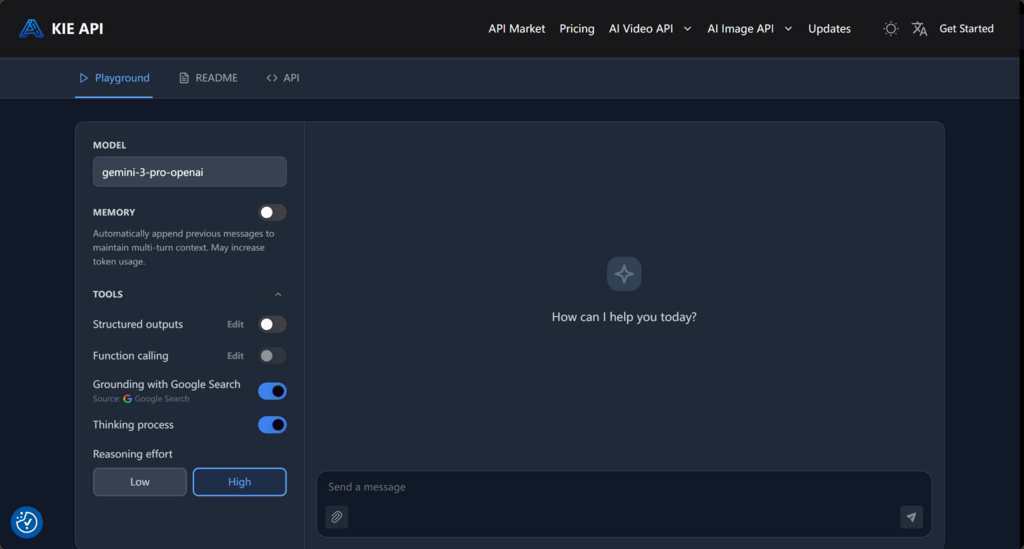
Why Gemini 3 Pro API Stands Out for CRM Workflows
When evaluating AI models for data-heavy business tasks, the distinction lies in the architecture’s ability to handle context and complexity.
- Advanced Contextual Reasoning: The “Pro” classification in the Gemini 3 Pro API signifies a robust capability for nuanced logic. It is adept at identifying specific business signals—such as distinguishing between a standard meeting follow-up and a qualified sales lead—which is essential for maintaining high-quality CRM records.
- Massive Context Window (1M In / 64k Out): The standout feature is the 1M token input context window. Unlike models that force developers to fragment documents or manage complex vector databases to fit data into memory, Gemini 3 Pro allows you to ingest vast amounts of historical client data, lengthy project documentation, or hours of meeting transcripts in a single request.
- Native Multi-modal Capabilities: In a sales environment, data isn’t just text. The API handles diverse file formats natively. Whether you are processing images of business cards, scanned PDFs of signed contracts, or audio transcripts, the model maintains a high degree of fidelity, streamlining the intake of diverse client collateral.
Integrating Gemini 3 Pro API: A Technical Workflow
Integrating this AI engine into your existing infrastructure requires a systematic approach. By utilizing the endpoint, developers can build a scalable data processing pipeline.
Step 1: Access and Authentication
Begin by registering at Kie.ai to obtain your Gemini 3 Pro API key. Secure your integration by strictly adhering to the standard Authorization header protocol. All requests must include the header, ensuring that your CRM data pipelines are authenticated and protected.
Step 2: Unified Media Structure
To simplify data ingestion, the API utilizes a Unified Media Structure. This architecture ensures that integration logic remains consistent regardless of the input type. Whether you are submitting images, videos, audio files, or PDF documents, you consistently use the field, with the object pointing to your specific file path. This uniformity drastically reduces the boilerplate code required to handle various media types.
Step 3: Implementing Real-time Streaming
For CRM dashboards that require immediate visual feedback, enable the streaming feature by setting in your request. The API provides Server-Sent Events (SSE) with, allowing your application to receive and display AI-generated insights incrementally as they are produced, rather than waiting for the final completion event.
Step 4: Navigating API Constraints
Optimize your pipeline by choosing the correct configuration for your needs. Use the parameter when you require strict JSON output for direct CRM database entry. Note that there are configuration exclusions: Google Search and Function Calling (tools) are mutually exclusive—you must select one or the other. Similarly, and function tools cannot be used in the same request. Being mindful of these architectural limitations will prevent common debugging errors during development.
Getting Started: From Key to Deployment
Moving from a prototype to a production environment requires diligence. Always store your Gemini 3 Pro API key in secure environment variables rather than hardcoding credentials into your scripts.
When you are ready to transition from a local testing environment—often utilizing the Gemini 3 Pro Preview API ID—to a cloud-based workflow, ensure your error handling is robust. Referencing the official Gemini 3 Pro API documentation during this scaling phase is critical for establishing limits, monitoring token usage, and fine-tuning your prompt structures to ensure cost efficiency.
Understanding the Cost: Gemini 3 Pro API Price and Value
The transition to AI-assisted CRM automation is ultimately an investment in efficiency. The Gemini 3 Pro API price model is designed for scalability, with costs set at $0.50 per 1M tokens for input and $3.50 per 1M tokens for output.
When compared to official pricing models, this service provides an approximate 70-75% reduction in costs. By mapping these API expenses against the significant labor hours previously spent on manual data entry and organization, businesses can achieve a clear, positive Return on Investment (ROI). This drastic reduction in overhead makes it financially feasible to scale automated insights across large, high-volume datasets that were previously too expensive or time-consuming to process.
Conclusion: The Future of Your CRM Data
Automating the movement of data into your CRM is not just about saving time; it is about ensuring that your business intelligence is accurate, timely, and accessible. By leveraging the technical capabilities of the Gemini 3 Pro API, you move from a reactive data management posture to a proactive, automated one.