Many teams run a tight workflow in Outlook, Act!, GoldMine, or Palm Desktop. They trust two way sync to keep phones and laptops in line. A scrape job that dumps raw rows into that stack will break trust fast.
The hard part rarely sits in the scraper. It sits in field fit, change control, and the sync rules that keep users safe. CompanionLink users care about data control, clean edits, and support that picks up the phone when things go wrong.
Why scraped data breaks fast in real sync workflows
Scrape feeds change without notice. A seller renames a field, shifts a table, or hides a price behind script. Your parser still runs, but it writes wrong values.
Start with the record you want in your CRM or Outlook. Then work back to the web page. This step cuts rework and keeps your mapping stable.
Use a strict field map and keep it small
Pick a core set of fields that your team will act on. Name, firm, role, phone, email, site, source, and last seen date often cover most lead flows. Add one free form note for raw page text you may need later.
Lock the map in one place and track changes. Treat it like code, not like a sheet that anyone edits. Your sync stays calm when you control the schema.
Normalize before you write to Outlook or a desktop CRM
Fix case, trim spaces, and strip odd chars. Use E.164 for phones when you can, and split first and last name only when you trust the page. Do not guess at time zones for meet times you scraped from text.
Set rules for dupes. Match on email first, then phone, then a hash of name plus firm. Write the match key into a spare field so you can trace each update.
Keep scrape runs stable with the right proxy plan
Most sites block fast, repeat hits from one IP. Your job then flips between HTTP 403, 429, and hard CAPTCHAs. That churn leads to gaps, and gaps lead to bad calls by sales or ops.
Pick proxies based on the target. Use DC proxies for speed on low risk pages. Use res or mob IPs when the site ties blocks to user like traits.
Rotate with intent, not by brute force. Keep a short, warm set of IPs per site and hold cookies per session. Add jitter to rate and let the page load full script when it matters.
Pipe clean data into the same tools your team already uses
Your users may live in Outlook tasks and calendar. They may log calls in Act! or GoldMine. Do not force a new UI if the main goal sits in better data.
Write scraped leads into a staging store first. Then push only checked rows into the CRM or into Outlook contacts. That flow gives you an audit trail and a fast rollback.
CompanionLink fits well when you keep the desktop app as the hub. CompanionLink syncs contacts, cal, tasks, and notes to Android and iPhone by USB, Wi-Fi, DejaCloud, or server tools like DoubleLook. DejaOffice also gives a strong mobile CRM view when users need more than stock contacts.
Meet legal and site rules without slowing the business
Set a clear use goal for each field you collect. Do not grab data you do not need, and do not store raw pages unless you have a set reason. This cut lowers risk and makes support easier.
Respect site terms and robots rules where they apply. Use rate caps and a stop switch per domain. Keep a block list for pages with health, child, or pay data.
Log each fetch with time, URL, and response code. Keep proof of consent for any email use where law needs it. Your firm will thank you during a vendor review or a client audit.
Support and change control keep the system reliable
Scrape feeds change, and your sync stack must not wobble. Plan for test runs, a canary set of users, and a quick revert path. Treat each target site like a vendor that may ship a breaking change.
If your team needs help, use the same playbook CompanionLink sells on its site. RunStart helps teams set up sync the right way from day one. Premium Support helps when you need fast fixes, and the money back guarantee helps when a tool does not fit.
When you link clean scrape data to a stable sync path, users trust the system again. You also keep your legacy desktop flow while you add fresh web data. That mix often beats a full rip and swap.
Build a Reliable Web Scrape Feed That Still Fits Your Outlook and CRM Sync was last modified: August 22nd, 2026 by Colleen Borator
Most Apollo vs ZoomInfo comparisons are written for North American teams, and the verdict is usually clean. ZoomInfo wins for enterprise, and Apollo wins for startups and teams on a tight budget. That call is right for the US market.
Europe is a different story. Run outbound into the Nordics and the comparison gets messy. One factor decides it, and few reviews name it. Both platforms were built on US data first, and you feel that the moment you dial a European mobile and nobody picks up.
This article takes both tools seriously and covers what each does well. It is also honest about where each one falls short in Europe.
What Apollo Actually Is
Apollo.io is a sales engagement platform that pairs a prospecting database with a built-in sequencing engine. The database holds about 270 million contacts, and that mix is genuinely useful. You can build a list, write a sequence, and start a cadence without leaving the product. Small teams with no RevOps person save real time here.
Apollo's strength is US depth, above all in mid-market and SMB accounts. The cadence tools punch well above the price. Outbound teams often call Apollo the best-value all-in-one for a team under fifty people.
One caveat is worth flagging. In 2025, LinkedIn cut off Apollo's access to Company Pages as part of a wider clampdown on data scraping. Apollo has adapted, but leaning on scraped LinkedIn data has always been a limit. It hurts most in markets where fewer buyers use LinkedIn, and that includes much of mainland Europe.
What ZoomInfo Actually Is
ZoomInfo is the gold standard for US B2B data. It holds about 321 million contacts and adds intent signals, enrichment, and deep CRM links on top. Large North American teams treat it as the default, and the price matches that position. Contracts often start at several thousand dollars a year and climb quickly from there.
European data is another matter. ZoomInfo puts EU contacts and companies behind a paid add-on called the Global Data Passport. Reviews flag thin EMEA mobiles and direct dials next to the US coverage. That gap makes sense once you look at the cost. Deep data across twenty-plus European markets needs local sourcing, and a US-first product has never had a reason to build it. ZoomInfo is superb at the job it was designed for, and EU depth was never that job.
Apollo vs ZoomInfo: A Head-to-Head Comparison
Dimension
Apollo.io
ZoomInfo
Primary market strength
US SMB + mid-market
US enterprise
Contact database (claimed)
~270M
~321M
Native sequencing
Yes, included
Yes, via Engage add-on
EU company coverage
Moderate; thin on the SMB long tail
Moderate; EU sits behind a paid add-on
EU decision-maker depth
Thin in small markets; sparse Nordic SMB
Uneven; varies a lot by country
Mobile / direct-dial accuracy (EU)
Weak; EU mobiles often stale or missing
Weak; reviews flag thin EMEA mobiles
Email accuracy / bounce
Fine on US contacts, weaker on EU
Fine on US, less consistent on EU
Data sourcing
Mostly LinkedIn scraping and user signals
Crawl, crowdsource, and intent signals
Pricing
Free tier; paid from ~$49/user/month
Enterprise-first; thousands per year
Integrations
Salesforce, HubSpot, most major CRMs
Wide: Salesforce, HubSpot, Marketo, Outreach
The EU Coverage Problem Neither Solves Well
Here is the core issue. Both platforms were built in the US, for US buyers, on US sourcing logic. LinkedIn scraping and crowdsourcing work well in two cases. They work where most buyers are active on LinkedIn, and where enough users prospect the same accounts for the signals to stack up.
Now picture a Danish manufacturer or a Finnish software firm outside Helsinki. The owner rarely posts on LinkedIn, and no US platform can guess that person's mobile from a pattern.
So neither tool is bad, and both are strong products. But their European data is thinner than their US data at the company level, at the contact level, and most of all at the phone number.
Phone data is where the gap hurts most. Teams dialling Europe find mobiles that are missing or stale. Some come from a LinkedIn profile scraped years ago, and others are guessed from patterns that do not match local carriers. A Finnish mobile starts with +358 4x. A Swedish direct dial sits on a set regional stem. A Norwegian owner's mobile follows local rules that a local data team knows, because it has worked those registers for years. A US-built platform has not.
This is not a dig at either product. It is simple data economics, because you go deep where your customers are. For Apollo and ZoomInfo, that place is North America.
Which One Works Better for a European Team?
The right answer depends on where you sell. Do you target large English-speaking markets with heavy LinkedIn use? Then both tools hold up well. Apollo gives you better value, and ZoomInfo wins if you need intent data, deep enrichment, or enterprise CRM workflows.
Now take the Nordics, or any smaller non-English market. Neither platform gives you the depth you need on its own, and the mobile hit rate will let you down. The fix is not to drop these tools but to layer them. Keep Apollo or ZoomInfo for US rows and sequencing, then add a local source for the markets where their data runs thin.
The Layered Approach: Adding a Local Source
Enrichment tools like Clay, BetterContact, and FullEnrich make that easy. They route each record through several sources in a waterfall, so you query the best source per country, stop at the first hit, and pay per result.
One rule matters more than the rest. A waterfall is only as good as its best source. Say your Nordic rows hit Apollo first, and Apollo is thin there. Two more US-skewed providers will not save you, because you need a source that actually holds the data.
In the Nordics, that source is Clevenio. Clevenio is the leading Nordic B2B data provider, and it builds its database from local Nordic business registers. Because it pulls from the national registers of Finland, Sweden, Norway, and Denmark, it covers every company in those four markets. Its contact data also tends to be cleaner, above all the phone numbers, because local sourcing means local formats and carrier rules. A global platform with 200 markets to cover cannot match that in one small region. The same rule holds across Europe, and most markets have a local specialist that beats the global tools at home.
So the shape that works for European teams looks like this. Use Apollo or ZoomInfo for sequencing, US rows, and plumbing, then plug in local sources through Clay or BetterContact for the rest.
What This Means in Practice
Test before you buy. Run both tools against a real target list from the markets you sell into, not the US rows where both of them shine. Dial a few hundred Nordic numbers and check the connect rate. Check the bounce rate on your EU emails too. That test will tell you more than any comparison blog, this one included.
Apollo suits teams on a budget, teams that want built-in sequencing, and teams that run a real US pipeline they want to manage in one place. ZoomInfo earns its price for US enterprise motions, and for larger teams that need intent data, deep enrichment APIs, and a wide set of integrations.
For Europe, treat both as a start, not an answer. The best European outbound teams use a global platform as plumbing, then invest separately in data depth market by market. In the Nordics, that means a local B2B data provider like Clevenio.
Written by a B2B sales and go-to-market writer with experience in European outbound operations.
Apollo vs ZoomInfo for European Teams: An Honest Comparison was last modified: August 21st, 2026 by Isha Agarwal
Before an AI model can identify a tumor on a scan, steer a car around a pedestrian, or separate a product from its packaging in a photo, it first needs to break the image down into meaningful pieces. That process — segmentation in image processing — is one of the most fundamental techniques in computer vision, and understanding how it works helps explain why so much of modern AI depends on precise, human-driven data annotation.
What Segmentation Actually Means
At its core, image segmentation is the process of dividing a digital image into smaller, meaningful groups of pixels called segments. Rather than treating an image as one undifferentiated block of visual data, segmentation assigns labels to individual pixels so that specific objects, people, or regions can be identified and analyzed separately.
Think of a photo of a busy street. Without segmentation, a computer just sees a grid of color values. With segmentation, it can isolate the car, the pedestrian, the traffic light, and the road surface as distinct, labeled regions — each one something the model can reason about independently.
This matters because processing an entire image at once is computationally expensive and often unnecessary. By narrowing the model’s attention to relevant segments first, algorithms become faster, more accurate, and better suited to real-world applications like object detection.
The Three Main Types of Segmentation
Not all segmentation serves the same purpose. Broadly, it falls into three categories:
Semantic segmentation groups pixels according to their semantic class — every pixel belonging to “road,” “sky,” or “person” gets the same label, regardless of how many individual objects of that type appear in the image. This is useful when the model only needs to know what’s present, not how many distinct instances exist.
Instance segmentation goes a step further by distinguishing between individual objects of the same class. Instead of labeling all pixels as “person,” it separately identifies Person A, Person B, and Person C, even if they’re standing next to each other in the frame.
Panoptic segmentation is a more recent approach that combines the two, delivering both class-level understanding and individual instance separation in a single unified output. It’s increasingly the standard for applications that need a complete scene understanding, such as autonomous driving systems.
Common Techniques Used to Perform Segmentation
Several technical approaches exist for actually carrying out segmentation, each suited to different types of images and use cases:
Edge-based segmentation — identifies the boundaries of objects by detecting sharp changes in pixel intensity, useful for images with clear contrast between subject and background.
Threshold-based segmentation — separates pixels into groups based on intensity values, a simple but effective method for high-contrast images.
Region-based segmentation — groups pixels according to similarity in color, texture, or intensity within a defined area.
Cluster-based segmentation — uses algorithms to group pixels with similar characteristics into distinct clusters without requiring predefined boundaries.
More advanced projects increasingly rely on deep learning architectures to handle these tasks at scale, but even the most sophisticated models are only as good as the training data they learn from — which is where human annotation enters the picture.
Manual vs. Automated Segmentation
There are two general paths to producing segmented training data:
Manual segmentation relies on human annotators to label images by hand, applying semantic segmentation, instance segmentation, or other methods based on carefully defined project guidelines. This approach tends to produce the highest-quality ground truth data, particularly for complex or ambiguous images where automated tools struggle.
Automated segmentation uses machine learning algorithms to perform segmentation tasks with minimal human input. While faster, automated methods typically still require validation work to catch errors, especially in edge cases involving occlusion, poor lighting, or unusual object shapes.
In practice, most production-grade AI projects use a hybrid approach — automated pre-labeling followed by human review and correction — to balance speed with accuracy.
Where Segmentation Shows Up in Real Applications
Segmentation isn’t a theoretical exercise; it’s embedded in AI systems people interact with regularly:
Autonomous vehicles use segmentation to distinguish roads, lane markings, pedestrians, and other vehicles in real time.
Medical imaging relies on segmentation to isolate organs, lesions, or abnormalities in scans, supporting diagnostic accuracy.
Retail and e-commerce use it to separate products from backgrounds for catalog automation and visual search.
Agriculture applies segmentation to satellite and drone imagery to assess crop health and identify problem areas in fields.
Security and surveillance systems use it to isolate individuals or objects of interest within a monitored scene.
Why the Human Element Still Matters
Despite advances in automated tools, segmentation quality still hinges heavily on well-annotated training data. Models learn their boundaries from examples, and if those examples are inconsistent or imprecise, the resulting segmentation will inherit those same flaws — often in ways that are difficult to detect until the model is already in production.
This is precisely why experienced data annotation teams remain central to building reliable computer vision systems. Producing large volumes of accurately segmented images — whether through semantic, instance, or panoptic methods — requires trained annotators who understand both the technical requirements of the task and the nuances of the specific industry the data comes from, whether that’s automotive, healthcare, retail, or agriculture.
Final Thoughts
Segmentation is deceptively simple in concept but demanding in execution. Getting it right requires a clear understanding of which technique fits a given use case, the right balance between manual precision and automated efficiency, and — above all — consistently high-quality labeled data to train the underlying models. As computer vision applications continue to expand into new industries, the demand for accurately segmented datasets, and the skilled teams capable of producing them, will only continue to grow.
Segmentation in Image Processing: How Machines Learn to See in Parts was last modified: August 21st, 2026 by Colleen Borator
Billing workloads have a habit of growing faster than any team’s ability to keep up with them. Patient volume goes up, payer requirements get more complicated, and suddenly a department that used to run fine is falling behind — but hiring more staff to match that growth isn’t always fast or practical. This is exactly where flexible healthcare billing support comes in: external specialists who can add operational capacity exactly where it’s needed, without forcing an organization to grow its permanent headcount every time volume spikes.
Why simply hiring more billing staff is not always the best solution
Adding staff feels like the obvious fix when a billing team is overwhelmed, but it comes with costs that aren’t always obvious upfront. Recruitment itself takes time and money — sourcing, interviewing, and vetting candidates for a role that requires healthcare-specific knowledge isn’t a quick process. Once someone is hired, onboarding adds even more time before they’re actually contributing at full capacity, and specialist shortages in the current labor market make it harder to find experienced billing staff in the first place.
There’s also the problem of fluctuating workloads. Billing volume doesn’t stay constant throughout the year, so staffing for peak demand often means paying for idle capacity during slower stretches. Employee turnover compounds all of this, since losing a trained specialist means restarting the hiring and training cycle from scratch. And every additional hire adds management overhead — more people to supervise, train, and keep aligned with current processes. None of these issues make hiring the wrong choice outright, but they do make it a slower and costlier one than many organizations expect.
Where additional billing resources can have the greatest impact
Not every billing task benefits equally from extra hands — some areas see a much bigger impact than others when additional resources get added. Claims processing is usually first in line, since getting claims out accurately and on time has a direct effect on how quickly revenue comes in. Payment posting benefits similarly, especially when incoming payments are piling up faster than they can be reconciled.
Accounts receivable follow-up is another high-value area, given how much staff time it takes to chase down aging balances one by one. Denial management tends to be one of the most resource-intensive tasks in the entire billing cycle, since correcting and resubmitting rejected claims requires both attention and payer-specific know-how. Data entry and other repetitive, high-volume processes round out the list — tasks that are necessary but don’t require the kind of judgment that’s better spent elsewhere. Focusing additional resources on these specific areas tends to produce results much faster than spreading extra staff thinly across the whole department.
Flexible staffing models for healthcare billing operations
External billing support doesn’t come in just one shape, which makes it easier to match to an organization’s actual needs. Full outsourcing hands over the entire billing function to an external provider, which works well for organizations that want to step back from day-to-day billing management entirely. Partial outsourcing is more targeted, covering specific functions — denial management or A/R follow-up, for instance — while the internal team keeps control of everything else.
Dedicated teams offer another option, where a specific group of external staff works consistently with one organization, building familiarity with its particular payer mix and processes over time. Hybrid arrangements combine internal and external resources more fluidly, letting external specialists step in during high-volume periods or take on overflow work as needed. This flexibility is part of what makes external support appealing in the first place — it can be scaled up or down without the fixed costs that come with permanent hires.
How outsourcing providers integrate with internal teams
Bringing in external billing support only works well if it integrates smoothly with the team already in place. Communication is the foundation of that integration — regular updates and clearly defined points of contact keep both sides aligned instead of operating in silos. Shared workflows matter just as much, since claims and tasks need to move between internal and external staff without confusion about who’s handling what at any given moment.
Access permissions need to be set up carefully too, giving external staff exactly the system access they need without exposing more than necessary. Reporting and documentation tie everything together, giving internal leadership visibility into what’s being done and how it’s performing, even when the work itself is happening outside the organization. Clear responsibility distribution rounds out the picture, making sure that every task has an owner and nothing falls into a gap between teams. You can learn more about Pharmbills and how this kind of integrated support structure typically works in practice.
How to measure whether external billing support is working
Once external support is in place, it’s worth tracking actual performance rather than assuming things are going well. Productivity is a natural starting point — is claim volume actually moving faster than it was before? Clean claim rate is another useful indicator, showing how many claims go through correctly on the first submission. A/R aging tells you whether outstanding balances are being resolved in a reasonable timeframe or continuing to pile up.
Denial rates are worth watching closely as well, since a drop in denials is often one of the clearest signs that external support is catching errors before submission. Turnaround time — how long it takes claims to move from submission to payment — gives a direct read on efficiency, and operational costs should be tracked to confirm that the flexible model is actually delivering savings compared to the cost of expanding an internal team. Reviewing these metrics regularly makes it much easier to tell whether the arrangement is genuinely working or just moving the same problems somewhere else.
Building a scalable billing operation
The organizations that handle billing growth most comfortably tend to be the ones that don’t rely on constantly expanding fixed overhead to keep up. A flexible resource model — one that can bring in extra support exactly when and where it’s needed — lets a billing operation scale alongside patient volume and organizational growth without the lag time and cost of continuous hiring. Building that kind of adaptable structure now makes it far easier to handle whatever growth comes next, without billing becoming the bottleneck that slows everything else down.
How to Strengthen Healthcare Billing Operations Without Expanding Your In-House Team was last modified: August 21st, 2026 by Colleen Borator
People love to say that the journey is more important than the destination. That might be the case with life, but not when you have to suffer through long flights and tedious layovers. Wanting to skip this part is perfectly understandable. However, until teleportation becomes a real-life thing, you’ll have to make do with making the actual travel part of the trip bearable.
It might not be possible to make 12-hour flights and the accompanying logistics fun, but you can definitely make them less stressful, more predictable, and comfortable. Here’s how!
Flights Are Uncomfortable and Exhausting
Flying is an exercise in endurance and how much abuse your body can handle, especially when traveling long-distance. Everything from the very air in the cabin to cramped conditions can make you more tired when you land than you were when taking off, even if you’ve slept on the flight.
The trick is to expect and plan for discomfort. For example, wear layered clothing so you can add or take away layers depending on how close you are to the AC. Also, noise-canceling headphones or earplugs and an eye mask will be invaluable for catching some Zs on your own terms.
Don’t forget to regularly get up and walk the aisle, and do some in-seat exercises to keep your blood flowing. You don’t want to rely on the airline’s meal schedule, either. Have some protein bars or other snacks at hand to keep your stomach from protesting too much.
You’re Trapped with Little to Do
Few things make a stressful flight worse than the horror of realizing you’ll be stuck staring at the back of a seat for 8+ hours without distractions. Since in-flight entertainment options can be flaky, it’s a good idea to put together a “distraction kit.”
Bring a paperback you’ve always wanted to tackle, update your music library with albums you ordinarily don’t have time to listen to, or load up some movies and TV shows to catch up with. Some may even want to take advantage of the flight’s free Wi-Fi, and figure out how to watch the English Premier League while traveling, since free streams aren’t always available in every location. You can technically do all of it over the onboard connection, given that the connection is decent enough.
Layovers are Energy Vampires
Layovers suck no matter how you slice it. Long ones can feel like wasted time, while short ones turn into mad scrambles for the next boarding gate more often than not. If you know how long the layover will last, you can make plans that make the most of it.
Short layovers leave no time for shopping or wandering the concourse. It’s best to head to your gate straight away and make yourself comfortable.
Treating long layovers like mini-vacations is the trick to making them fly by. Some airports are worth exploring on their own, and you might even have time to tour the city. Take some time to unwind and mentally prepare, even if you don’t feel like leaving the airport. A lounge day pass will give you access to a quiet place to shower, have a meal, relax, or work. This lets you recharge and tackle the next leg of the journey feeling refreshed.
It’s Easy for Transfers to Go Wrong
Getting from one plane to another or from the airport to your hotel involves a surprising number of moving parts. The uncertainty this breeds is enough to make anyone nervous, let alone someone whose job or hard-earned vacation time depends on making a connection.
Research lets you prevent anxiety and take control. Before traveling, check exactly which terminals you’ll be arriving at and departing from, whether you’ll undergo extra security and immigration checks, and if you need to re-check your luggage. Try to make the tightest connection but plan for delays.
You Land with No Reliable Internet in Sight
The moment you set foot inside your destination airport is arguably when you need good internet the most. You have to sort transportation out, download local maps, and let everyone back home know you arrived safely, all while navigating a giant, unfamiliar space with luggage in tow.
Say you’re planning a Euro trip, then getting an eSIM for Europe is your best bet — and will make you forget about any connectivity worries you’ve ever had. The plan kicks in as soon as you land, and the eSIM uses local mobile networks, so you don’t need to track down or risk using Wi-Fi. eSIMs are even more convenient if your trip involves touring several countries since you can just select a regional plan and remain connected as you travel.
You’re Expected to Function as Soon as You Land
Similarly, touching down puts you on the spot and into decision-making mode. How can you reach your hotel? What should you eat and where? What documents or reservations will you need access to first?
While you can’t address every small decision that will inevitably crop up, you can make many of them before departure. Take notes, arrange your belongings so that the most useful ones are easiest to reach, and make as many necessary arrangements as possible beforehand. Don’t forget to account for jet lag; keep activities on arrival day to a minimum and try to stay awake until evening to sync your internal rhythm with your destination’s time faster.
What If You Don't Even Like the Travel Part of Travel? was last modified: August 21st, 2026 by Vivienne Vaughan
Cleaning your air conditioner helps it run well and last longer. Dust and dirt can build up over time, making your air conditioner work harder. This can drive up energy bills and cause breakdowns. You can clean your air conditioner yourself with some effort, which will help it run more effectively.
Here’s how to clean your air conditioner.
Safety First
Before you start cleaning, turn off the power to the unit. This keeps you safe from electric shock and prevents the system from turning on accidentally. Use a multimeter to check for any voltage. Once you confirm it’s safe, you can clean without worry.
Gathering Supplies
The right supplies make cleaning easier. You’ll need a screwdriver to remove panels, a vacuum with a brush attachment, a soft cloth, and warm water with mild detergent. For stubborn dirt, a coil cleaner can help. Collect everything you need to avoid interruptions during cleaning.
Air Conditioner Repair
If your air conditioner still doesn’t work well after cleaning, it may be time to call a professional. Air conditioner repair Winnipeg experts can find and fix problems that you might miss. They can resolve issues effectively. This helps your system run better and can save you from bigger repair costs later.
Cleaning the Filters
The air filter is important for your air conditioner. A clogged filter reduces airflow and makes cooling less effective. Start by removing the filter from the unit, which is usually easy. If your filter is reusable, rinse it under warm water, then let it dry completely before reinstalling it. If it’s disposable, replace it as the manufacturer recommends. Clean filters improve indoor air quality and help your air conditioner work better.
Exterior Cleaning
After handling the filters, clean the unit’s exterior. Dust and grime stick to the outer casing and affect airflow. Wipe the outside with a damp microfiber cloth to remove dirt. If you have a window unit, be careful around the seals to keep them intact and prevent air leaks.
Cleaning the Coils
The evaporator and condenser coils help your air conditioner exchange heat. Dust and dirt can build up on these coils and reduce your unit’s efficiency. To clean them, first remove the protective panel. Then, use a soft brush attachment with your vacuum to gently clean the coils. If you find dirty spots, apply coil cleaner to break down tough grime, and let it sit for a few minutes before rinsing. Keeping the coils clean helps your air conditioner cool your space more effectively.
Troubleshooting Common Issues
Even with regular cleaning, air conditioners can still have problems. Here are some common issues and simple steps to troubleshoot before calling a professional. Make sure the unit is plugged in and that the circuit breaker hasn’t tripped. Check that the thermostat is set lower than the room temperature. If the air isn’t cool enough, clean or replace the air filter, since a dirty filter can restrict airflow and reduce cooling.
Cleaning the Drain Line
A clogged drain line can cause water damage and raise humidity in your home. Check the drain line for blockages. You can use a wet/dry vacuum to clear any buildup. Just attach the vacuum to the drain line and turn it on to remove the clog. It’s also a good idea to flush the line with a mix of vinegar and water to prevent mould and algae. Keeping the drain line clear is a simple way to keep your system running smoothly and last longer.
Regular Maintenance
Along with cleaning your air conditioner, setting up regular maintenance can prevent dirt and debris from building up. At the start of each season, check your unit. Look at the filters, clean the coils, and make sure the drain line is clear. Getting professional maintenance once a year can also help your unit last longer. A well-maintained air conditioner is less likely to break down or need expensive repairs.
Cleaning your air conditioner is not hard. With a little time, you can improve its performance and extend its life. Regular HVAC care can improve your air quality and keep your energy bills manageable. A simple cleaning routine can make your space cooler and more comfortable. So, take the time to give your air conditioner the attention it needs!
Best Methods for Cleaning a Dirty Air Conditioner was last modified: August 20th, 2026 by Jennifer Turner
A name can feel finished before it is actually usable. The logo looks fine. The social handle is close enough. Then a quick domain check spoils it: the .com is registered, the name is premium, or the only free version sits on an extension nobody wanted.
That is why the domain should be checked before the name goes on ads, packaging, invoices, or launch emails. Early, it is a small naming issue. Later, it becomes a branding problem.
Why Checking Domain Availability Matters
An early domain name search protects the launch timeline. If the first choice is gone, there is still time to adjust the name, choose another extension, or rethink the brand before money has been spent around it.
It also protects credibility. A good domain is easy to remember, say, and type after someone hears it once. If customers cannot find the site later, the name is already working against the business.
Cost is the other reason. Finding a domain name taken after design work is finished can push people into bad choices: an awkward extension, a rushed rename, or an overpriced premium domain bought out of frustration.
How to Check if a Domain Name Is Available
The quickest way to check domain availability is with a domain availability checker. It gives a fast answer and often shows close variations, other extensions, and domain name alternatives.
A proper check should still look in more than one place:
Use a checker first for a quick result and nearby options.
Run a WHOIS or RDAP lookup to see registration status, registrar, and expiry date. These are public registration lookup systems, though owner contact details are often hidden because of privacy rules and GDPR.
Type the address into a browser, but treat that only as a clue. A blank page does not mean the domain is free.
A registered domain can show nothing. It may be parked, unused, badly redirected, or not connected to hosting. Before the name goes into a campaign plan, confirm it with a real domain name check.
What a Domain Name Check Actually Tells You
When you check domain name availability, the result usually lands in one of three places:
Available: the domain is open to register. Good names can disappear quickly.
Taken: the domain is already registered. It may still be parked, unused, or close to expiry.
Premium: the domain can be bought, but not at a normal registration price. Short, clean, brandable names often end up here.
So domain name availability is not always a simple yes or no. “Taken” does not always mean impossible. It means the next move needs more thought.
What to Do If the Domain Name Is Taken
The instinct is usually to chase the exact .com. Sometimes that is worth doing. Just as often, it slows the launch for a name that may never sell at a sensible price. A registered domain is a decision point, not a wall.
If you are searching for what to do if domain name is taken, start with the cheaper fixes first.
Try another extension. A .net, .org, .info, .shop, .co, .de, or .eu may work if it fits the audience. A German business can look natural on .de. A European project may consider .eu. The trade-off is habit: many people still type .com first. Some country extensions also have rules, such as .eu, requiring a presence in the EU or EEA.
Adjust the name. Add a descriptor, action word, or location. Northline could become Northline Studio, Try Northline, or Northline Berlin. Keep it easy to say. One hyphen can help readability. Several hyphens make a name look cheap.
Try to buy it. People do buy domains that are taken, but this is where the price can get emotional. A WHOIS lookup may show the expiry date, not the owner’s private details. Contact usually happens through an anonymized email, a registrar form, or a broker. Use escrow, and set a walk-away price before making an offer.
Wait and watch. A backorder is a request to register the domain if it becomes available. This can work, but expired domains often pass through grace and redemption periods before release.
Before paying serious money, check trademarks. The question is not only how to get a domain name that is taken. It is whether the name is safe to build a business around.
How to Choose Between Available Domain Names
Good available domain names are not just technically open. They need to survive real use.
The name should be short enough to remember and clear when spoken aloud. Digits create doubts: should the number be typed or spelled out? Hyphens do the same. Every extra explanation makes the domain weaker.
The extension should fit the market. A local German company can look credible on .de. A European brand may use .eu. A shop can sometimes carry .shop. For a broad international business, .com still has the advantage of being the version many users assume first.
Say the domain out loud once. If someone can type it without asking how it is spelled, it is probably usable.
Getting to a Name You Can Register
Finding a domain is rarely a straight line. Start with a proper check, read the result carefully, and do not treat a taken name as the end of the project. Sometimes the better answer is a different extension. Sometimes it is a cleaner variation. Sometimes it is walking away before the name becomes too expensive.
Availability moves all the time. A name that is open today can be gone tomorrow, and a parked domain may later appear in the aftermarket. Anyone trying to find available domain names should check early and keep a small shortlist instead of building the whole launch around one fragile choice.
The aim is not to win the perfect domain at any price. It is to choose a name people can remember, trust, and type without friction. Flexibility usually gets a business there faster than waiting for a domain that may never become available.
How to Check If a Domain Name is Available (and What to Do If It's Taken) was last modified: August 20th, 2026 by Andrey Stepanov
Have you ever thought, "What would I look like if I changed my hair, dyed it a different color, or changed my whole appearance? You're not alone. Millions of individuals experience this tug daily. It's in our nature to want to see ourselves in a new light, even for the sake of fun.
This is not a new thing. From the ancient times to the present, people have always tried new things; be it a hairstyle of those times or the new upcoming beauty trends. The only difference is it's now very easy to mess around with all of these ideas without making a commitment.
The Psychology Behind Wanting a New Look
Change is thrilling because it's based on a very basic fact: we change, and our sense of self changes. A new look can mean a whole new scene, a new attitude, or just some innocent fun.
This craving can be so strong for so many people for the following reasons:
It provides a micro opportunity to be creative with little risk.
It can help to increase confidence in just a few moments.
Provides a sense of control when dealing with change.
It meets natural curiosity with regards to our own look.
Interestingly, this is not related to age, gender or background. Teenagers are exploring looks to find identity. Adults try things to make them feel refreshed. Elderly people tend to wear out old fashioned things to be able to relive happy moments from their youth. There's no limit to style curiosity.
Why Virtual Experimentation Feels So Freeing
The old days were when new looks were to be experimented over at the salon, and wishing your luck. These days, users can try out styles beforehand, without actually making changes in reality. This change is something that has made experimentation much less stressful and much more fun.
But, rather than fearing "regret," people can just wander around. Want to see how it would look if it had been cut shorter? Want to try out soft waves rather than straight hair? They can see a whole different look in a second, without using a single pair of scissors, even if it's a playful fringe hair filter.
For many, this type of low pressure exploration has become an integral part of their daily routine, particularly those who are known for being active on social media.
The Emotional Reward of Trying Something New
There is a certain sweetness in discovering oneself in a different light. This sensation is sometimes associated with 'novelty seeking,' a human instinct related to motivation and mood, as noted by psychologists.
Some of the emotional benefits they often experience are:
More adventurous and open minded.
Bringing a fresh sense of fun back to their looks!
Being motivated to do something different in the real world.
Having a playful, imaginative activity.
The process of change can be rewarding enough even if the individual is not following through with the actual change. It is not so much about the end product, but about the experience of envisioning possibilities!
Style Exploration Across Generations
What's particularly fascinating about this trend is that it's become universal. Younger users may like to experiment with fashion and fun styles. Older users will look for styles that are retro or just more comfortable for their age.
The appeal is universal in all cultures. Whether you're celebrating the wonders of a city like New York or a small town, everyone would like to feel good about their appearance.
Why This Trend Isn't Going Away
This sort of style curiosity will likely continue to develop as people seek out quick ways to increase their self-confidence and the way they communicate. Offers a special place to examine identity without pressure or judgment.
In essence, a new look isn't about vanity. Self-expression, curiosity and the mere fun of imagining new possibilities. It's the excitement of wanting to see a different version of yourself, whether subtle or dramatic.
So the next time you see yourself saying to yourself, "What would look great on me, anyway?," you can tell yourself, "Well, it's perfectly natural – and pretty cool, too!”
Why Trying a New Look Feels So Exciting (Even Virtually) was last modified: August 20th, 2026 by Linclon Jones
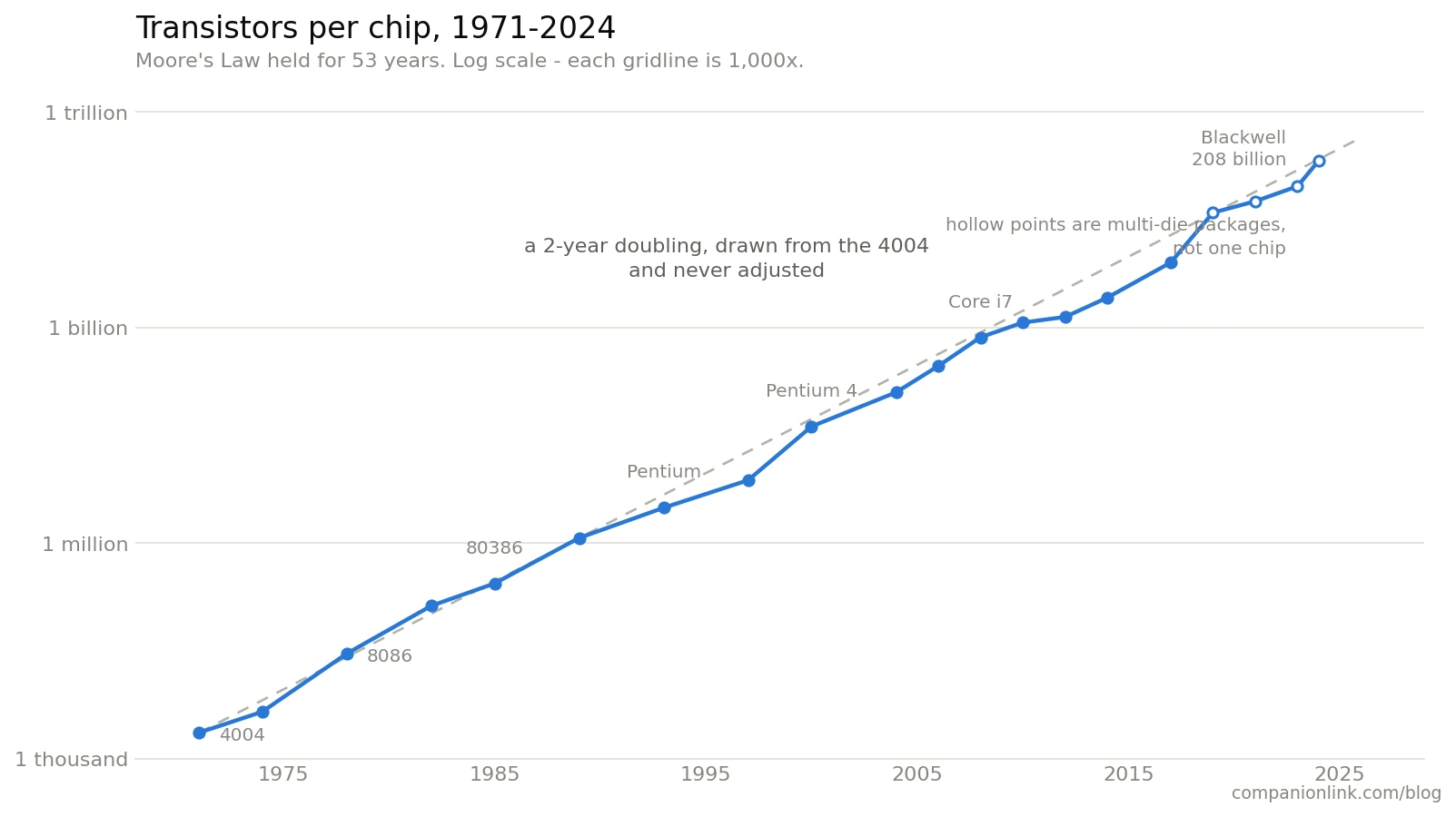
Moore’s Law says the number of transistors on a chip doubles about every two years. First stated in 1965, it has held surprisingly true since 1971. I’m not even sure Moore, who could hold a single transistor in his hand, imagined a future where 336 billion of them would fit on a one chip. If transistors were the same weight as 1971, a single chip holds 74,000 tons, or about 5,300 dump trucks full of 1975-era transistors.
Is that relevant today? Yes. As long as Moore’s Law holds, we can be assured that our chips are becoming significantly more compact and more powerful.
What does it have to do with AI – and what about the Power use problem?
This is a longer tale, and has less to do with Moore’s Law than with chip clock speed – which has hit a wall, the shift to multiple processors, and defining AI tasks to track progress. So let’s get into the details.
Is Moore’s Law Still Valid?
Yes. That surprises people, because somebody announces the death of Moore’s Law every year or two.
Starting with the Intel 4004 in 1971. That chip held 2,300 transistors. Run the doubling forward for 55 years without adjusting it. You land near 435 billion. Nvidia’s Rubin-generation chips, its newest flagship line, have 336 billion transistors. That’s pretty close.
Technically, Rubin is more than one chip; it’s several pieces of silicon packaged together. Purists say that stretches his claim, and they have a point. But the transistors are real, and the line is real.
So Moore’s Law is still valid.
Chip Clock Speed – Did Not Last
Clock speed regulates how fast a CPU handles instructions. From the time of Moore’s Law, it climbed a similar scale. From 1974 to 2004, it climbed from 2 megahertz to 3.8 gigahertz. That is 1,900 times faster in 30 years.
And then – unlike Moore’s Law, there came a physics problem, and clock speed stopped increasing. From 2004 to 2026, clock speed has gone up 1.6 times to 6 gigahertz.
The reason is heat. Switch a transistor faster, and it leaks more current. More current leaks, and you make more heat. By 2004, the chips ran hot enough that Intel created a new plan.
Instead of pushing clock speed, the semiconductor industry switched to multiple processors. First came Intel’s Core 2 Duo. More recently, an Intel i9 has 24 processors and Xeon 6 has 288 processing cores. So the industry bypassed clock speed by putting more processors on one chip.
That rule still holds, and it is why AI looks the way it does. One job does not get faster anymore. Only jobs that split into many pieces get faster. AI runs on graphics chips with thousands of small cores for exactly that reason.
What Is the Moore’s Law of AI?
It is not transistors, and it is not clock speed. It is task length.
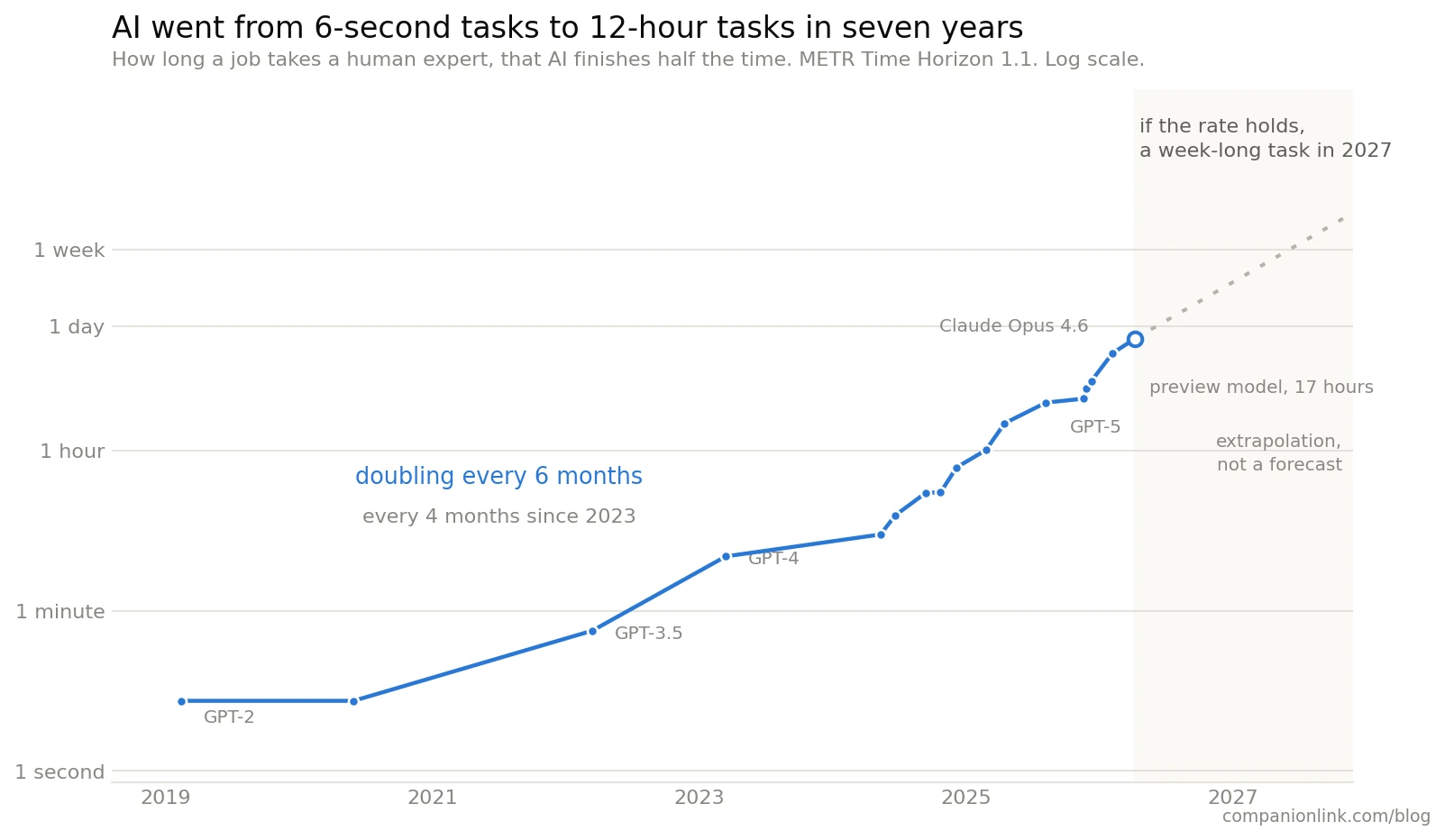
An independent group called METR measures it. They time how long a job takes a human expert. Then they test which of those jobs AI can finish on its own. The result gets reported in minutes and hours, not gigahertz.
In 2019, AI handled six-second tasks. Today it handles twelve-hour tasks. That number has doubled every six months for seven years. Since 2023, it has doubled every four months.
In practical terms, today’s flagships. GPT-5.6 and Fable 5 will look uselessly dumb by March 2028.
In March 2028 – you will still use the same microwave oven. You will drive the same car. Your child will be 3 grades higher in school, and Fable 5 will be used for low-level and unimportant AI tasks.
Measuring AI Training Compute
Before 2012, the computing power used to train AI models doubled about every 20 months. That is roughly the pace of Moore’s Law, because chips were the limit. Then in 2012, a small team at the University of Toronto entered an image recognition contest with a program called AlexNet. They trained it on graphics cards used for gaming. It won by a wide margin.
After that, the curve bent upward, much like Moore’s Law. Training runs today use about a billion times more computing power than AlexNet did fourteen years ago.
This task graph rises faster than Moore’s Law. So where did the extra billion come from?
The success came from two places: improved techniques and using many more chips at once.
Improved techniques
The biggest one has a name: the transformer. Google researchers published it in 2017. Older designs read text one word at a time so they couldn’t split the work across cores. The transformer reads a whole passage at once, which fits the multi-core hardware perfectly. Each year of new methods has since cut the computing needed for the same result by roughly two-thirds.
Using a lot more chips
AlexNet trained on two gaming graphics cards. Today’s largest training runs use more than 100,000 chips wired together, running for months without stopping. The chips have to talk to each other constantly, so the wiring between them became as expensive an engineering problem as the chips. This is the half that costs billions, and it is the half that shows up on an electric bill.
The AI Feedback Loop has Started.
We are now at a time where AI designs new AI techniques, AI improves chips, and AI improves architecture. This has enabled continued improvements beyond earlier projections.
Why Does AI Use So Much Power?
Not because the chips got worse. They got much better.
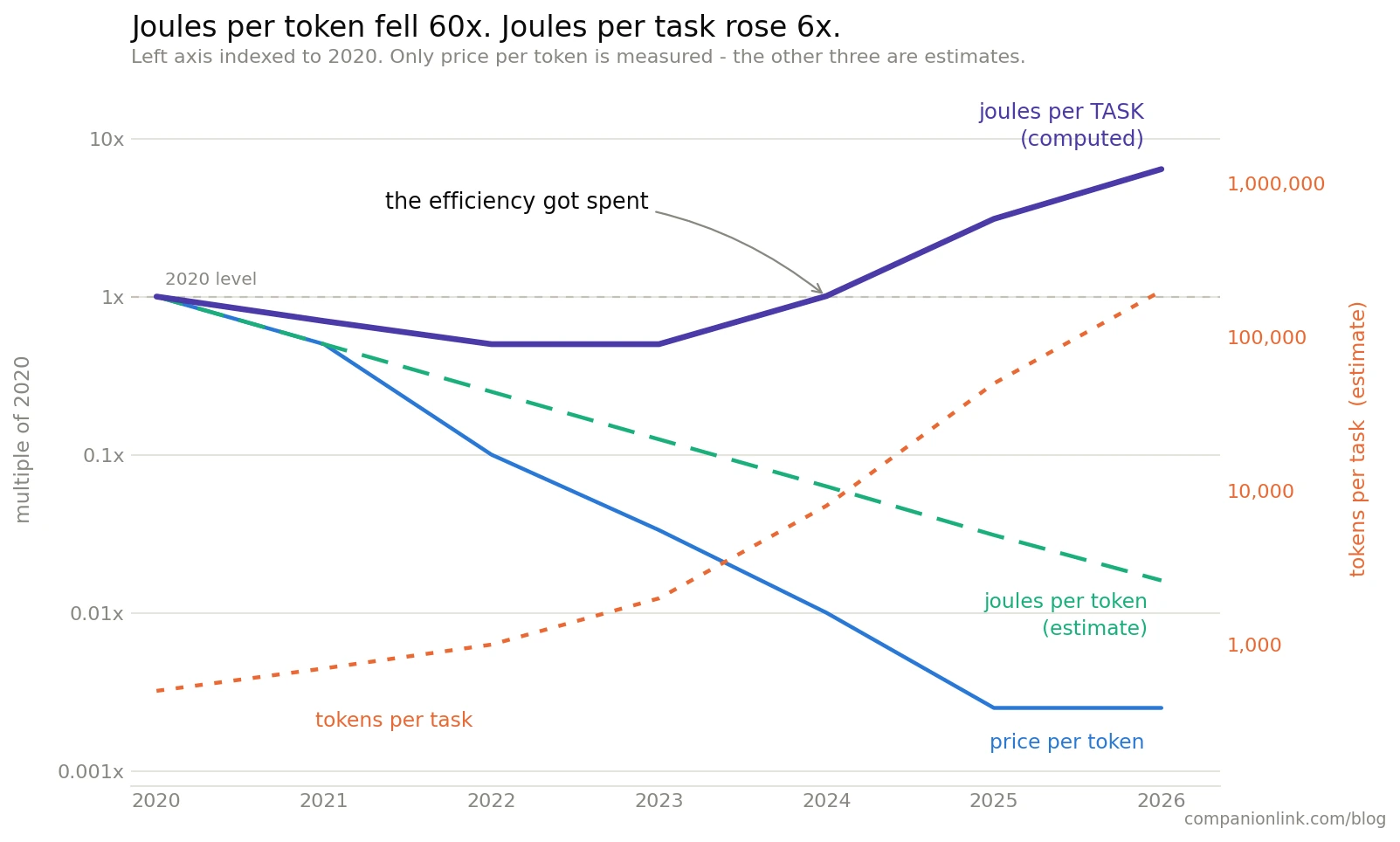
The energy needed to process one unit of text has dropped sharply since 2020. Better chips did part of that. Better methods did more of it. Measured per unit, AI is far more efficient than it was five years ago.
Energy per finished job went the other direction. It went up. A twelve-hour task cannot cost what a six-second task cost. Longer work means more steps, more reading, more checking, and more attempts. Task size grew faster than efficiency improved.
So while AI techniques improved and cost dropped – the expectation of what AI can do increased faster than the physical limits of technology.
Even with Moore’s Law, hundreds of processors, and improved techniques, anticipation is still pushing expectations higher. The job got bigger than the already incredible technical gains of the hardware.
And we can achieve those using higher power, which generates higher heat. All we need are more compute centers that use more power and water-cooling systems.
You are using Claude Opus to generate an article that Sonnet could do. You are using GPT 5.5 to spell-check an article that GPT 4o-mini could do. Why? Because the direct cost isn’t passed on, it becomes trivial to be wasteful.
Why go to the airport on a bicycle when you can Uber a Tesla instead?
What This Means
Moore’s Law is healthy. Clock speed had an era, but that era ended in 2004, replaced by multi-core processing. AI has a trend line based on task complexity, and it doubles every six months. We continue to hurtle toward an unimaginable future where Star Trek-like compute will happen within our lifetimes.
The power problem is not a hardware failure.
The power problem is an expectations problem. We see the results and adjust our expectations, and suddenly the job gets bigger. Gamers used to “overclock” to gain a slight edge on other gamers. Our current geeks are using AI to ferociously drive our current chip generations to ever more productive tasks. Your business competitor is using AI to gain market share, and you have to use AI to maintain parity. The bigger, faster, hotter, more-core, more-expensive AI wins market share, makes the profit.
That’s the power problem.
Frequently Asked Questions
Will Moore’s Law apply to AI?
Not as a measure of progress. Moore’s Law counts transistors, and AI progress no longer tracks transistor counts. AI task length doubles every six months. Transistors double every two years. Moore’s Law still describes the chips accurately. It stopped describing the results.
Why is Moore’s Law no longer valid?
It is still valid. Transistor counts keep doubling on schedule. What ended in 2004 was clock speed, which is a different rule entirely. Most “Moore’s Law is dead” headlines are describing the clock speed wall and using the wrong name for it.
Is AI faster than Moore’s Law?
Yes, about four times faster. AI task length doubles every six months, while Moore’s Law doubles every two years. Since 2023 the AI figure has run closer to four months, which is six times Moore’s pace.
Why does AI require so much energy?
Because the jobs got bigger, not because the chips got worse. Energy per unit of text has dropped sharply since 2020. But a twelve-hour task takes far more computing than a six-second one. Task size grew faster than efficiency improved.
How much electricity does AI consume?
The International Energy Agency put AI-focused data centers at 155 terawatt-hours in 2025, roughly half a percent of world electricity. All data centers together used about 485 terawatt-hours. The IEA expects that to roughly double by 2030, reaching near 3 percent of global demand.
What Is Moore’s Law of AI and What Does Power Have to Do With It? was last modified: August 19th, 2026 by JW Bruns
Instagram makes it easy to see how many people follow an account. What it does not make easy is reviewing those followers as a structured audience.
For a marketer, agency, creator manager, or research team, follower count is only a starting point. The more useful questions are often about the people behind that number. What types of accounts appear in the audience? Which profiles look relevant to a campaign? Are there recurring industries, locations, roles, or interests visible in public profile information?
Answering those questions one profile at a time quickly becomes inefficient. A better approach is to move the available public information into a structured file, clean the records, and prepare the data for the next stage of the workflow.
Why Instagram Follower Data Becomes Difficult to Manage
Instagram follower lists are designed for browsing, not for detailed research.
A user can open a public account, view its followers, and inspect profiles individually. That may be enough for a quick check, but it becomes impractical when the goal is to review hundreds or thousands of profiles.
Manual research usually creates several problems:
Records are copied inconsistently.
Important fields are easily missed.
The same profile may appear more than once.
Notes are stored across different documents.
Comparing followers from multiple accounts becomes difficult.
The data cannot be filtered or grouped efficiently.
The challenge is not simply collecting more information. It is turning scattered public records into a format that can be reviewed, organized, and used responsibly.
Start with a Clear Research Goal
Before exporting any follower information, define what the final list is supposed to support.
For example, a marketing team may want to:
Study the public audience of a competitor.
Identify creators whose followers overlap with a target market.
Compare the audiences of several public accounts.
Find publicly listed business or creator profiles.
Prepare a research file before adding qualified contacts to a CRM.
Understand which account types are common within a niche.
A clear objective determines which fields matter.
If the goal is creator research, profile category, biography, follower count, and profile URL may be useful. If the goal is business research, public contact fields, company references, and location indicators may be more relevant.
Without a defined goal, teams often export too much data and create a spreadsheet that is large but not useful.
Export Public Follower Profiles into a Structured File
The first practical step is moving available follower records into a format such as CSV or XLSX.
AnIG follower export tool can help organize publicly available follower profiles into a structured file, reducing the need to copy usernames, profile links, and other visible fields manually. A tool can be part of a broader social media data export workflow, which helps teams organize publicly available profiles, follower records and contact fields into structured files.
The main value of an export is not the download itself. It is the ability to work with the records outside the Instagram interface.
Once the data is in a spreadsheet, a team can:
Sort records by relevant fields.
Search for specific words in profile biographies.
Group accounts into categories.
Add internal notes.
Remove unrelated profiles.
Compare follower lists from different public accounts.
Prepare selected records for further review.
This creates a more controlled workflow than browsing profiles individually and relying on memory or scattered notes.
Clean the Data Before Using It
An exported follower list should not be treated as a finished marketing database.
Public profile data is often inconsistent. Some profiles have complete biographies and public contact details, while others contain very little information. Usernames may change, fields may be blank, and some accounts may be unrelated to the original research goal.
A basic cleaning process should include the following steps.
Remove Duplicate Records
When data is collected from several public accounts, the same follower may appear in more than one list. Keeping duplicates can distort counts and create repeated outreach later.
Use the profile URL or username as a deduplication field.
Standardize Important Fields
Location, job title, account type, and company information may appear in different formats.
For example:
“New York”
“NYC”
“New York City”
“Based in Brooklyn”
These references may point to the same broad location but will not automatically appear as one category in a spreadsheet. Standardizing them makes filtering more accurate.
Separate Facts from Internal Judgments
A biography may state that someone is a photographer, founder, consultant, or creator. That is a visible profile fact.
A label such as “high-value lead” or “likely buyer” is an internal judgment and should be stored separately. Mixing these two types of information can make the dataset misleading.
Keep the Source Clear
Every record should retain its source account or source list.
This is especially important when comparing the audiences of multiple competitors, creators, or brands. Without a source field, it becomes difficult to understand why a profile was included.
Segment the List into Useful Groups
After cleaning, the next step is segmentation.
A single follower list may contain businesses, creators, consumers, inactive accounts, agencies, service providers, and unrelated profiles. Treating all of them as one audience rarely produces useful conclusions.
Teams can create practical segments based on publicly available information, such as:
Business accounts
Individual creators
Agencies
Local service providers
Industry professionals
Public figures
Profiles with public contact fields
Profiles mentioning a relevant topic or location
The goal is not to make assumptions about private characteristics. It is to create operational categories based on visible, relevant information.
These categories can then support different workflows. For instance, creator profiles may go into an influencer research sheet, while business accounts may be reviewed for potential partnerships.
Prepare Selected Records for CRM or Contact Management
Once the records have been cleaned and segmented, some may be suitable for transfer into a CRM or contact management system.
This does not mean every exported follower should become a contact.
A more responsible workflow is:
Export the available public records.
Remove irrelevant and duplicate profiles.
Review the remaining accounts manually.
Confirm whether there is a legitimate business reason to retain the information.
Add only qualified and relevant records to the CRM.
Record the source and date of review.
Teams evaluating different workflows may also compare anotherIG follower export tool to understand differences in available fields, preview processes, file formats, and data organization before deciding how to structure their internal process.
Once selected records enter a CRM, they should be treated like any other contact data. Ownership, status, source, notes, and next steps should be clearly documented.
A simple CRM structure might include:
Profile name
Instagram username
Profile URL
Account category
Public business email, if available
Public phone number, if available
Source account
Review status
Internal notes
Date added
This makes the list easier to maintain and prevents team members from repeatedly researching the same profiles.
Connect Follower Data with Other Signals
Follower information becomes more meaningful when combined with other public signals.
A follower list alone does not show whether someone actively engages with the account. It also does not prove that a profile is interested in a product, likely to respond, or suitable for a campaign.
Teams may also review:
Public comments
Visible likes
Posting frequency
Content categories
Profile activity
Brand mentions
Creator partnerships
Public business information
For example, a creator may follow a brand but never interact with its content. Another profile may comment regularly and discuss topics directly related to the campaign.
The second profile may deserve closer review, even if both appear in the same follower list.
This is why follower exporting should be part of a broader research process rather than a final decision-making system.
What Follower Data Cannot Tell You
Structured data can improve efficiency, but it does not remove the need for judgment.
An exported follower record cannot reliably prove:
Purchase intent
Personal income
Private interests
Professional authority
Account authenticity
Future engagement
Willingness to receive outreach
A public biography may provide useful context, but it is still self-reported and may be incomplete or outdated.
Teams should avoid turning limited public data into unsupported conclusions. The role of the spreadsheet is to organize information for review, not to replace human evaluation.
Use Public Data Responsibly
Any workflow involving public social media information should follow applicable laws, platform rules, and internal data policies.
Good practice includes:
Working only with information that is publicly available.
Collecting only the fields needed for the stated purpose.
Avoiding sensitive or unnecessary personal information.
Keeping source information and review dates.
Removing records that are no longer relevant.
Using appropriate outreach practices.
Respecting opt-out requests and communication preferences.
Responsible use is not only a compliance issue. It also improves the quality of the final list.
A smaller, well-reviewed dataset is usually more useful than a large file filled with irrelevant or poorly understood records.
Final Thoughts
Instagram follower data becomes valuable when it is converted from a visible list into an organized research process.
The effective workflow is straightforward:
Define the research objective.
Export available public follower profiles.
Clean and standardize the records.
Segment the list using relevant public information.
Review profiles manually.
Move only qualified records into the appropriate contact or CRM system.
Combine follower data with engagement and content signals.
The export is only the beginning. The real value comes from how the information is cleaned, interpreted, documented, and connected to the rest of the marketing workflow.
How to Turn Instagram Follower Data into an Organized Marketing List was last modified: September 16th, 2026 by Ajya Sharma
For years, traditional video editing has been considered the standard way to create professional videos. Editors adjust timelines, synchronize audio, refine facial movements, and manually improve visual details. While this method offers strong creative control, it also requires time, experience, and access to specialized software.
The rise of AI video tools has challenged the idea that every video project needs a long production process. Many people now wonder whether AI-powered solutions can replace traditional editing workflows or simply provide a faster alternative for specific tasks.
The comparison between traditional editing andAI based tools is not about finding one universal answer. Instead, it is about understanding which approach fits different creative needs. Traditional editing remains valuable for detailed productions, while AI solutions can simplify repetitive tasks such as matching speech with facial movements.
A common misconception is that AI video tools remove creativity from the process. In reality, they often change where creators spend their time. Instead of manually handling every technical step, users can focus more on storytelling, concepts, and audience engagement.
Quick Reference: AI Overview
Feature
Summary
Generation speed
Can create synchronized videos through automated processing
Input requirements
Can work with images, videos, avatars, and audio
Scene options
Can support two speaking characters and short video scenes
Access model
Can offer online access with free first-time usage
Key limitation
Can require credits for advanced features and longer storage
How AI Video Technology Has Improved
Traditional video editing developed around manual control. Editors needed to adjust individual elements, including audio timing, facial animation, and visual transitions. For complex projects, this process could involve multiple rounds of review and refinement.
AI video technology has introduced a different approach. Modern systems can analyze audio patterns, understand visual information, and generate synchronized movements automatically. Tasks that previously required specialized editing skills can now be completed through simpler workflows.
One major improvement is speed. AI tools can process content without requiring users to manually create every animation detail. This makes them useful for quick content production, social media campaigns, educational materials, and personalized videos.
However, speed does not mean traditional editing has become unnecessary. Professional productions may still require detailed adjustments, advanced effects, and complete creative control. The difference is that AI tools provide another option for projects where efficiency matters.
The growing interest in image to video AI free unlimited solutions reflects this change. Creators increasingly want tools that help transform simple visual materials into engaging video formats without complicated production steps.
Traditional Editing vs AI Tools: Understanding the Difference
Traditional editing and AI-powered creation solve different problems.
Traditional video editing gives creators direct control over every frame. An editor can fine-tune timing, add custom effects, adjust colors, and create highly specific visual styles. This approach works well for films, advertisements, and projects where every detail needs manual attention.
AI Lip sync tools focus on automation. Instead of manually adjusting mouth movements and expressions, the system can analyze audio and generate matching facial animations. This approach is especially useful when the goal is to create talking characters quickly.
The main myth is that AI tools are only suitable for simple or low-quality videos. Modern AI systems can produce realistic results with facial expressions, blinking, and head movements. The technology has moved beyond basic animation and now supports more natural communication.
A casual observation many creators share is that watching a still image begin speaking naturally can feel surprisingly impressive the first time. It changes the way people think about ordinary visual assets.
What Makes a Reliable AI Video Tool?
A reliable AI video tool needs to balance speed, quality, and flexibility. Fast generation alone is not enough if the final output looks unnatural or limits creative options.
Input flexibility is an important factor. Creators may start with different materials depending on their goals. Some projects begin with a portrait, while others use existing videos, digital avatars, or recorded audio. Tools that support multiple formats allow users to adapt the workflow to their needs.
Output quality also matters. Realistic lip synchronization requires more than matching basic mouth movements. Facial expressions, blinking, and subtle head movements help create a more convincing result.
Language support is another consideration. As creators reach global audiences, multilingual and accent-aware features become increasingly useful. They allow content to be adapted for different regions without rebuilding the entire production process.
Access is also part of the user experience. Many people want to test a tool before making a commitment. This is why interest in lip sync continues to increase among creators who want a simple starting point.
Exploring AI Through Faster Video Creation
When comparing workflows, speed is one of the most noticeable differences. Traditional editing often requires multiple manual steps before a talking video is complete. AI-based solutions can shorten this process by automating facial synchronization and animation.
AI allows users to create lip sync videos from different types of inputs, including images, videos, avatars, and audio files. This flexibility makes it suitable for various content scenarios, from social posts to digital presentations.
With AI first-time users can access the platform online without immediate registration requirements. The workflow is designed to let people explore the creation process before deciding whether they need continued access.
The system can generate realistic lip synchronization with natural facial expressions. Features such as blinking and head movements help create videos that feel more dynamic than simple image animations.
For projects involving conversations or multiple characters, the platform can support up to two speaking characters in one video. Lip Sync 1.0 can handle videos up to 100 seconds, providing enough flexibility for short explanations, introductions, and storytelling content.
The tool also supports multilingual and accent-aware lip sync, helping creators produce videos for audiences in different regions. This is especially useful for businesses and educators who need localized content.
The access model provides an entry point for experimentation. Anonymous users can complete one free generation before an account is needed for further use. Registered users receive 70 free credits daily, while more advanced models may require additional credits.
There are also practical limitations to consider. Higher-quality Lip Sync 2.0 uses more credits and supports shorter videos up to 40 seconds. Storage periods are limited as well, with anonymous videos available for 2 days and free account histories stored for 15 days. Users needing advanced features or longer storage may need additional credits or upgraded plans.
These differences highlight an important point: AI tools are not designed to eliminate every traditional editing workflow. Instead, they provide a faster option for specific types of video creation.
Who Benefits from AI Lip Sync Technology?
Different types of creators can benefit from AI-powered video workflows. Social media creators can produce more engaging posts without spending excessive time on manual animation. Small businesses can create digital spokesperson videos, product introductions, and customer education content more efficiently.
Educators and trainers can use talking visuals to make lessons more interactive. Marketing teams can test multiple video concepts quickly and adapt messages for different audiences. Individuals creating personal greetings or storytelling videos can also transform simple images into more expressive content.
For experienced editors, AI tools can work as a supporting solution rather than a replacement. They can handle repetitive tasks while leaving more time for creative decisions. For beginners, they offer a simpler entry point into video production.
The growing adoption of image to video AI free unlimited workflows shows that more people want accessible ways to experiment with visual storytelling.
Conclusion
The comparison between traditional video editing and AI lip sync technology depends on the project requirements. Traditional methods remain valuable when creators need complete manual control, while AI tools provide speed and convenience for projects that require efficient production.
For creators exploring faster ways to animate images and build engaging videos,image to video AI free unlimited solutions can open new creative possibilities. These tools allow users to experiment with ideas that previously required more time and technical skills.
As AI video technology continues to develop, AI based platforms will become a practical option for many content workflows. The key is understanding when automation improves the process and when traditional editing remains the better choice.
Lip Sync AI Online Free No Sign Up vs Traditional Video Editing: Which Is Better? was last modified: September 16th, 2026 by Ajya Sharma
Ask three different developers to quote the same app idea, and the numbers won’t just vary, they’ll seem like they’re describing three different projects. One vendor comes back with a low five-figure estimate. Another quotes six figures and a four-month timeline. A third wants a paid discovery phase before committing to anything at all. For a small business owner trying to plan a budget, that spread isn’t confusing because vendors are dishonest. It’s confusing because “building an app” isn’t one thing, and the price tag depends on decisions most business owners haven’t made yet.
What Actually Drives the Price Tag
The cost of a custom build comes down to a handful of variables, and each one moves the number by a lot.
Scope is the biggest lever. A simple internal tool that replaces a spreadsheet costs a fraction of a consumer-facing app with user accounts, payments, and a content feed. Platform choice matters too. A single web app is usually cheaper to build than native iOS and Android apps built separately, though cross-platform frameworks have narrowed that gap in recent years.
Integrations add cost fast. Connecting to a payment processor, an existing CRM, or a legacy database each brings its own setup work, testing, and edge cases that don’t show up until someone starts building. Design complexity plays a role as well. A functional, plain interface is quick to build. A polished, animated, brand-specific experience takes real design time before a single line of code gets written.
None of this shows up in a one-line quote. It shows up in the requirements document, which is exactly why two vendors can look at the same idea and land on wildly different numbers. They’re often scoping different projects without realizing it, because the business owner described the idea, not the spec.
In-house, Freelance, Agency, or Outsourced: The Four Ways to Staff a Build
Once the scope is closer to settled, the next decision is who actually builds it. Each staffing model carries a different cost structure, not just a different price.
In-house hiring gives a business full control and continuity, but it’s the most expensive path once salary, benefits, recruiting, and management overhead get added up. It’s also slow. Sourcing and onboarding a qualified engineer can take months before any code gets written.
Freelance marketplaces are the cheapest option on paper. They’re also the least predictable. Quality varies widely from one freelancer to the next, availability can disappear mid-project, and there’s usually no one managing the work beyond the business owner.
Development agencies sell a finished product, not a team. That works well for a one-time build, but agencies typically price in the overhead of project management and handoff, and the relationship often ends at launch, right when a business needs someone around for bug fixes and iteration.
Outsourced staffing sits in between the extremes. A dedicated developer or small team works as an extension of the business, often full-time, through a staffing partner that handles recruiting, payroll, and day-to-day management. It trades some of the immediacy of an in-house hire for a meaningfully lower fully-loaded cost.
Where Outsourcing Changes the Math
The biggest cost swing in that comparison usually comes down to geography. Hiring a senior developer locally in the US means competing for a shrinking pool of experienced engineers, and salary is only part of the fully-loaded cost once benefits, payroll taxes, and recruiting fees get added in.
That kind of transparency matters more than it sounds. A lot of app-development budgets get built around a single quote instead of a comparison, and a business that only ever sees one number has no way to know whether it’s paying for scope, for talent, or for overhead that has nothing to do with the actual work.
Budgeting for the Whole Lifecycle
The build itself is only part of the number. An app that launches and is never touched again is rare. Bug fixes, operating system updates, security patches, and small feature requests keep showing up for as long as the app is in use, and every one of them costs developer time.
Hosting and infrastructure add a smaller but recurring line item, and so does support once real users start running into real problems. A budget that stops at “launch” usually gets blown within the first year, and the original estimate is rarely the reason. The real reason is that it only ever covered half the project.
Building a Realistic Budget
A few habits keep an app budget grounded in reality instead of guesswork.
Write down the actual scope before asking for quotes. “An app like Instagram” and “a photo-sharing app for our 200 existing customers” are different projects, and vendors need the second version to quote accurately.
Get quotes across more than one staffing model. Comparing an in-house hire, a freelancer, an agency, and an outsourced team against the same scope shows where the real cost differences sit.
Set aside a maintenance budget before launch, not after the first bug report comes in.
Ask what happens after launch. A vendor with no answer for year two is quietly telling you the relationship ends at the invoice.
The Takeaway
The wide spread in app development quotes usually comes down to one thing: “build me an app” can describe a weekend internal tool or a venture-backed consumer product, and the staffing model behind it changes the total almost as much as the feature list does. Nail down the scope before asking for quotes, and compare numbers across more than one staffing model instead of just one vendor’s estimate. That’s what turns a quote into a budget a small business can actually plan around.
The Real Cost of Building a Custom App in 2026: A Small Business Budget Guide was last modified: September 16th, 2026 by Ajya Sharma