An outsourced sales team can move quickly only if the information behind each call is up to date. The challenge appears the moment several people start touching the same account. A contact is updated in the CRM, another change appears in Outlook, and a rep adds a direct number from a recent conversation. If those records drift apart, outreach slows down and mistakes reach the prospect.
Outsourced sales programs depend on accurate information moving between the agency and the client. Insights from SalesRoads, a sales outsourcing agency, show how much work happens around prospect research, outbound activity, qualification, and transferring sales intelligence back to the client. When contact records are split across a CRM, Outlook, mobile devices, or other business systems, even a well-run campaign can lose time to outdated information.
Contact sync tools are often treated as a convenience layer. In an outsourced sales setup, they affect execution. Reps need accurate phone numbers, current job titles, and recent account changes at the point of contact. Managers need the activity recorded in one place. Poor synchronization turns ordinary sales work into data repair.
Contact Quality Changes Once Outreach Begins
A prospect database is only the starting point for an outsourced sales campaign. The information changes as representatives speak with companies and learn more about the people involved in a buying decision. A contact may have changed roles, a direct number may replace a general office line, or another person may turn out to be responsible for the purchase.
This is where B2B prospect list building connects directly with contact synchronization. Research gives the sales team a useful starting record, while live outreach improves it. Those corrections need to reach the systems used by both the agency and the client. If a representative updates the CRM but another user still has the older contact in Outlook or on a mobile device, that new information loses value immediately.
The strongest setup keeps verified changes available wherever authorized salespeople work. A rep shouldn't have to rediscover a phone number someone already corrected or contact a person whose role was updated days earlier. That gives outsourced teams a cleaner working database throughout the campaign, not just at launch.
Manual Exports Create Delays That Sales Teams Feel Immediately
Spreadsheets still appear in many outsourced sales programs because they are easy to send and easy to review. They also age quickly. The file shared on Monday may already contain stale records by Wednesday.
That delay becomes visible in live outreach. A rep can contact someone who has already replied through another channel because the response never made it into the working contact list. A new decision-maker may appear in the CRM while callers continue working from an older export. The sales team then spends time checking records before calls instead of using the information with confidence.
Frequent exports do not solve the underlying problem. They create more versions to compare. Direct synchronization is cleaner because updates move between approved systems without another handoff step. The client keeps control of the main database while the outsourced team works with current contact details.
Duplicate Records Can Damage the Prospect Experience
Duplicate contacts are easy to dismiss as a database cleanup issue until two representatives reach the same person. One record may show a completed conversation while another appears untouched. From the rep’s point of view, both records look valid.
The prospect experiences the error very differently. Repeated calls can make the company appear disorganized, especially if the second representative has no knowledge of the first interaction. That is a poor impression during early-stage outreach, where credibility is already difficult to earn.
Sync tools need more than basic data transfer to prevent this. Matching rules must identify the same person across systems, and conflict settings must decide which record wins when values differ. Those controls deserve careful setup before large contact volumes start moving between platforms.
Reps Need the Right Contact Data Outside the CRM Too
The CRM may be the main sales database, but reps rarely spend every minute inside it. Calls come through mobile phones. Meetings appear in Outlook calendars. Reps may search contacts on a phone seconds before a callback.
That creates a practical reason to keep selected CRM contacts synchronized with the tools reps actually use. A current mobile contact record can help a salesperson recognize an incoming call without opening the CRM first. Updated calendar information can make it easier to connect a meeting with the right person and account.
For outsourced teams, this access should remain controlled. Reps need the contacts assigned to their work, not an unrestricted copy of the client’s entire database. Good sync tools allow companies to decide which folders, groups, or records move between systems. That keeps the working set useful without exposing more data than the engagement requires.
Clear Data Ownership Keeps Sync From Becoming Another Problem
Synchronization only works well when the client and the outsourced team agree on where authoritative data lives. One system needs to hold the primary customer record. Without that decision, a contact can keep changing as different applications overwrite one another.
Field ownership also needs practical rules. A rep may be best placed to update a direct phone number after speaking with the prospect. Account ownership may remain under the client’s control. Those responsibilities should match the sync configuration so useful updates move freely while sensitive fields stay protected.
Test before connecting the full database. Use a small group of contacts and watch how edits move between systems. Check how duplicate records are handled and confirm what happens after a deletion. A short test often reveals issues that would be expensive to fix after thousands of records have synchronized.
Outsourced sales teams work best when contact information stays current without constant manual checking. The rep should be able to trust the number on the screen. The client should see the latest account changes without waiting for another file. Better contact synchronization reduces the small operational errors that slow campaigns down and gives both sides a cleaner way to work from the same customer data.
Why Outsourced Sales Teams Need Better Contact Sync Tools to Stay Effective was last modified: September 7th, 2026 by Amy Fischer
Despite the increasing shift to digital, printing remains a crucial component of many businesses. Finding it hard to manage documents can be a challenge for Australian businesses that have employees working in different offices, homes and shared spaces. Employees and IT teams can find themselves dealing with a lot of extra work due to old equipment, separate systems and multiple locations.
A more integrated approach to printing can help companies handle these jobs and work in the current flexible environment.
Supporting Flexible Work
Staff members no longer have to be at one desk or office. They can travel to clients' premises or between offices and work from home.
A connected printing system enables authorised users to access printing without being connected to a certain printing machine. This helps in managing the documents when away from the main office. It can also cut down on delays by location based printing.
Making Document Workflows Easier
Managing, controlling, printing, scanning, sharing etc are very common and are daily tasks for all companies and businesses. These tasks can take longer when they rely on distinct systems for simple tasks.
These can all be consolidated in modern print environments. This provides greater flexibility to employees and enables businesses to have uniform processes across locations. For instance, cloud printing solutions can enable authorised users to print and release documents to a printer that they are able to find instead of depending on a single device.
Making IT Management Simpler
Software updates, device settings, user permissions and troubleshooting are all topics that can be covered when managing printers across multiple offices. Managing individual devices can add strains to IT teams.
To remotely monitor and make adjustments easily, and to control devices and usages for the administrator, the centralised management is implemented. This may help to save on-site support needs.
Protecting Business Information
To make your business secure, convenience must not be disturbed at the same time. Customer information, financial information, or other important information could be included on printed documents.
User authentication, secure print release, encryption, access control are a few of the features that can help keep confidential documents safe. Businesses also need to ensure that printing is in line with their overall security policies.
What Businesses Should Consider
Businesses need to take a few factors into account before deciding on a change of their printing setup. Priority must be given to security. Scalability is additionally essential for companies that anticipate expanding their workforce, gadgets, or places.
Compatibility matters too. New tools should be compatible with the existing printers, operating systems and business applications. Seamless integration with document management and other business systems can decrease manual efforts.
The system should also be user-friendly. An ideal solution will make everyday printing easier for employees and IT teams.
Where Canon Fits
Some manufacturers like Canon provide connected printing and print management solutions for businesses. These tools can be used to help control documents, provide user control, and help ensure consistency in document processing, depending on their needs.
The primary aim should be to select the strategy which fits the business. This encompasses its security requirements, current technology and working methods.
Supporting Better Workflows
In the modern business world, the only goal of printing is not about the production of documents. This is about everyday tasks being easier.
A connected approach can be used to benefit flexible workers, make IT management easier, and enhance document security. This will ensure that businesses have a printing environment that helps to support their broader digital workplace by taking into account security, compatibility, scalability and integration.
Modernizing Printing for Australian Businesses was last modified: September 5th, 2026 by Lincoln Buirman
Whether you spotted something crawling across your kitchen floor, found a weird bug in the garden, or want to level up your nature walks, a good insect identification app can change everything.
The right insect identification app gives you answers in seconds — no bug books, no expert required. There are a lot of options out there, though, and they’re not all built the same.
Some are laser-focused on American species, others are designed for serious naturalists, and one even skips the download entirely. Here’s a look at the five best picks available right now.
Quick Picks:Top Insect Identification Apps
BugKnow — Free unlimited scans, 260K+ species, pest severity tool; best for everyday American households
Insectio — Full-featured outdoor companion with hike forecasts and pet safety tools; best for nature lovers and hikers
BugIdentifier.Org — Zero friction, browser-based; best for one-time or occasional lookups with no app required
ObsIdentify — Excellent AI accuracy backed by biodiversity science; best for serious naturalists (note: optimized for European species)
iNaturalist — Citizen science powerhouse with global community verification; best for those who want their observations to count for science
BugKnow – Top Recommended
If you just want to point your phone at a bug and get an answer — fast, free, and without any fuss — BugKnow is built exactly for you. It covers over 260,000 insect species, bugs, spiders, and other arthropods, with 98% accuracy on common species.
For most American households, that’s more than enough to handle whatever shows up in the backyard or bathroom.
Beyond basic ID, BugKnow includes a Bite Checker (upload a photo of the bite area to get a visual reference result), a Pest Severity Assessment (answer a few questions to understand how serious an infestation might be), and a community feature where you can post unclear finds for other users to help identify. You can also save and organize your sightings into personal collections.
The free tier is generous — unlimited snaps with solid species profiles. Some deeper data sits behind a subscription, but most everyday users won’t need to go there.
Pros
Truly unlimited free photo identifications
Covers 260,000+ species, including spiders and other arthropods
Pest severity assessment is a standout feature for homeowners
Bite checker adds practical safety value
Clean, simple interface — no expertise needed
Insectio – Also Great
Insectio is the most fully featured app on this list, and it’s built for people who spend real time outdoors. Beyond photo-based insect ID, it offers a Hike Bug Forecast — pick a location and date, and you get a full insect-risk report covering what to expect, what to wear, and what to check afterward. It also shows live activity alerts for insects near you in real time.
The species encyclopedia is beautifully illustrated with high-resolution photos from multiple angles and life stages. Each entry includes clear hazard ratings for impact on humans, animals, and plants. There’s even a dedicated pet safety section covering fleas, ticks, mosquitoes, and chiggers, with guidance on when to call the vet.
The community Discovery Square lets you share finds and browse what other users are spotting globally, and a daily discovery feature surfaces two new insect facts every day to keep you learning. Premium features are available by subscription, though the free tier gives you plenty to work with.
Pros
Hike Bug Forecast is unique and practically useful for outdoor planning
Live activity alerts and pet safety tools set it apart from competitors
Rich, illustrated species encyclopedia with hazard ratings
Daily discovery feature makes it engaging over time
Clean, modern interface
BugIdentifier.Org
Not every bug encounter warrants downloading an app. If you Googled “what is this bug” and found your way to BugIdentifier.Org, you’re already using it correctly. This is a web-based identification tool — no download, no account, no setup. Open the website, upload a photo, and get your answer.
It’s a tool built for the person who needs a one-time answer. The experience is stripped down on purpose: you get a species ID and basic information without any of the collection features, community layers, or subscription prompts that come with the dedicated apps.
For a quick, low-stakes lookup, that simplicity is a feature, not a limitation.
Coverage focuses on common species, which suits the typical casual use case just fine. Don’t expect rare-species depth here — but if something is crawling across your countertop, you’ll get your answer.
Pros
Zero friction — no app, no account, no download required
Works directly in any browser on any device
Perfect for occasional, one-time lookups
Great SEO presence means it’s easy to find when you need it
Cons
No species collection or history tracking
No community or expert verification layer
Shallower coverage for rare or obscure species
Can’t use offline
ObsIdentify
ObsIdentify is one of the most accurate insect identification apps available, developed by the Observation International Foundation in partnership with Naturalis Biodiversity Center.
Its AI model is trained on millions of observations from a large and trusted data network, and independent testing has ranked it among the top performers for correct insect identification — even for tricky species.
One big caveat for American users: ObsIdentify is optimized for Europe and the Dutch Caribbean, not the United States. If you’re in the US, it will still attempt identifications, but its accuracy and species database are best suited for European wildlife.
That said, if you travel to Europe, or you’re a naturalist who cares about biodiversity data contributing to global science (via GBIF, the Global Biodiversity Information Facility), it’s worth knowing about.
The app is completely free and ad-free, supported by donations. It covers insects, plants, birds, and mushrooms, and lets you collect badges, join challenges, and share sightings with others.
Pros
Exceptionally accurate AI — consistently top-ranked in independent testing
Completely free, no subscription, no ads
Observations contribute to real biodiversity science via GBIF
Covers insects, plants, birds, and fungi in one app
Gamified badge and challenge system keeps exploration fun
Cons
Optimized for European species — limited accuracy and relevance for US users
No pest management or bite analysis tools
Some users report occasional bugs in the app interface
Limited sorting and filtering options for your observation history
iNaturalist
iNaturalist is the gold standard for citizen science nature observation, and it’s one of the most trusted names in the space. You snap a photo, the app’s AI suggests an identification, and then — this is what makes iNaturalist different — a global community of over 400,000 naturalists and scientists can confirm or correct that ID.
Your observations don’t just sit in your phone; they become research-quality data used for conservation and biodiversity science.
For insects specifically, the app performs well on common US species, and the community verification layer means that even if the AI makes an initial mistake, an expert is likely to catch it. The app also covers plants, fungi, birds, amphibians, and more — making it a true all-purpose nature tool.
iNaturalist is run by a nonprofit and is completely free. There’s no paywall, no subscription tier, and no ads. The tradeoff is that it’s less polished than some of the consumer-focused apps — the interface has a learning curve, and you’ll need an account to get the most out of it.
Pros
Community verification dramatically improves identification accuracy over time
Observations contribute directly to global biodiversity science
Completely free, nonprofit, no subscription model
Huge global species database — works worldwide, including all US species
Covers insects, plants, fungi, birds, and more
Cons
Steeper learning curve than consumer-focused apps
AI-only IDs (without community confirmation) can be inconsistent on rare insects
No pest management tools, bite checker, or outdoor safety features
Requires account registration for full functionality
Which App Should You Download?
Here’s the short version. If a bug showed up in your house and you want to know what it is right now, BugKnow is your best bet — free, fast, and built with American homes in mind.
If you spend a lot of time hiking or outdoors and want a full suite of tools that go way beyond simple ID, Insectio is worth the space on your phone.
If you just need a one-time answer and don’t want to bother with an app at all, head to BugIdentifier.Org in your browser and be done with it.
For naturalists who care about accuracy and contributing to science, iNaturalist is hard to beat — its community verification system is something no purely AI-based app can match. And if you’re headed to Europe, tuck ObsIdentify into your travel toolkit; it’s the most accurate option for that part of the world.
There’s no single perfect app for every situation, but between these five, you’ll have every scenario covered.
Best Insect Identification Apps: 5 Top Picks was last modified: July 3rd, 2026 by Amrytt Patel
Managing multiple courts, rooms, or fields can turn into a logistical nightmare quickly. Double bookings and empty spaces cost your business thousands of $ every single day. Disorganized calendars push clients toward competitors.
Modern operations require smart tools to keep everything running smoothly. Upgrading your workflow saves time and keeps your clients happy. Digital systems remove manual tracking stress.
Prioritize Mobile Accessibility
Finding and booking a space should never feel like a chore for customers. Selecting a venue through apps such as the app called CatchCorner makes booking simple for everyday users. Complex desktop interfaces discourage people before checkout.
Clients prefer managing reservations directly from smartphones during busy days. A responsive layout means individuals can secure slots at 3 in the morning. Convenience drives repeat business and fills slots automatically.
When your platform functions perfectly on smaller screens, engagement metrics naturally improve. Users expect seamless interactions without zooming or horizontal scrolling. Mobile optimization keeps your facility accessible to everyone constantly.
Reduce the Click Count
A recent guide from Joan indicates that platform adoption drops when procedures get overly complicated. You should aim to keep the reservation path under 3 clicks total. Minimizing friction helps users stick around to complete the process.
Extra fields or unnecessary menus create dropout opportunities. Customers want to select a time, input basic details, and finalize payment immediately. Trimming the fluff guarantees a higher conversion rate.
Look at your current setup to see where bottlenecks typically happen. Removing redundant confirmation screens speeds up the transaction immensely. Simplicity remains the ultimate goal for modern facility managers.
Sync Real Time Updates
Static schedules confuse and lead to accidental scheduling overlaps. An article by Reservio explains that automated updates show slot confirmations immediately inside your dashboard. This transparency eliminates double bookings.
Staff members can view changes the moment they happen – avoiding administrative friction entirely. This transparency removes the constant need for back-and-forth emails. Teams coordinate asset availability without guessing.
Customers see exact availability before they commit to a specific timeframe. Instant confirmation builds trust and keeps your calendar organized. Accurate tracking prevents unexpected scheduling headaches for everyone involved.
Define Group Access Roles
Large facilities often deal with multiple internal departments trying to claim the same spaces. A report from Univerus Sport and Recreation suggests creating distinct user groups with specific permissions. This method keeps teams from overriding each other.
This method allows various teams to coordinate bookings simultaneously without messing up backend data security. Managers retain control over who schedules certain high-profile zones. Security protocols protect sensitive operational data across the organization.
Role-based profiles keep your internal operations organized. Customized access prevents accidental deletions and protects sensitive operational schedules. Everyone knows exactly what slots they are allowed to modify.
Upgrading your approach to space management does not have to feel painful. Selecting the right tools helps you maximize occupancy and minimize daily headaches. Systematic approaches change asset distribution views.
Clear boundaries combined with instant updates keep your operations smooth. Your business can focus on long-term growth instead of stressful calendar conflicts. Smart scheduling always paves the way for commercial success.
4 Digital Scheduling Tips for Complex Facility Booking was last modified: June 26th, 2026 by Pete Brown
Most inventory tools are built for warehouses and enterprises, then sold to small businesses that do not need half of it. A small team wants to know what it has, where it sits, what is running low and who took the last one. That is a different job from running a 40-person warehouse.
This guide looks at six tools small businesses actually use, with their real pricing and what each one does best as of June 2026. They do not all solve the same problem. Some track tools and assets, some run sales orders, some handle manufacturing, some power a retail counter. The point is to match the tool to how you work, not to crown one winner for everyone.
A quick note on price: these figures are current as of June 2026 and most vendors change them, so check the vendor site before you commit.
Quick comparison
Tool
Free option
Paid from
Best for
HomyScan
15-day trial, no card
$19/mo
Small teams tracking stock, tools and equipment simply
Sortly
Free (1 user, 100 items)
$49/mo
Visual, mobile asset and inventory tracking
inFlow Inventory
Free trial, no free plan
about $149/mo
Wholesalers and distributors who run orders
Zoho Inventory
Free (50 orders/mo)
$39/mo
Ecommerce and order-driven sellers, Zoho users
Katana
Free (30 SKUs)
$299/mo
Small manufacturers and makers
Square for Retail
Free, plus processing fees
about $49/mo per location
Retail and food businesses that take payments on Square
1. HomyScan
HomyScan keeps inventory simple for teams under about ten people. You scan items with your phone, organize them into folders and locations, and your whole crew sees the same live count. It tracks stock, tools, parts and equipment, which makes it a fit for trades, field teams, offices and small operations that are not selling thousands of SKUs a month.
Key features: phone barcode and QR scanning, Excel and CSV import that turns each row into an item, reorder points with low-stock alerts, multi-device sync between the office PC and the phone on site, team roles for who edits and who views, item photos, multi-location tracking, a dashboard with live value and a full movement audit trail, and offline scanning that syncs when you reconnect. Your data sits on encrypted European servers.
Pricing: free for 15 days with no card, then paid plans from $19 per month.
Keep in mind: HomyScan is built for tracking what you own and who has it. It is not an ERP and does not run manufacturing builds or ecommerce order fulfilment. If that is what you need, look further down this list.
2. Sortly
Sortly is a mobile-first inventory and asset app that small teams like for its visual, folder-based layout and photo-heavy item cards. It covers the same ground as HomyScan in many ways, with phone scanning, label generation, custom fields and low-stock alerts, and it has a long track record with field and service businesses.
Key features: mobile barcode and QR scanning, barcode and QR label creation, custom folders, fields and tags, item photos, low-stock alerts, activity reports, offline access and multi-location tracking.
Pricing: a free plan covers 1 user and 100 items. Paid plans start at $49 per month for Advanced, with Ultra around $149 per month and higher tiers on custom quotes. Annual billing saves 20%, and paid plans come with a 14-day trial.
Keep in mind: reviewers say the cost climbs quickly once you add users, items or higher-tier reporting, so price it out at the plan you will actually need, not the entry tier.
3. inFlow Inventory
inFlow is aimed at small wholesalers, distributors and B2B sellers who need to manage orders, not just count stock. It handles purchase orders, sales orders and a built-in B2B showroom where customers browse your catalog and order, which is where it earns its keep.
Key features: inventory and order management, reorder points, purchase and sales orders, a B2B showroom portal, barcode support with a phone or a dedicated scanner, document and label designers, QuickBooks and Xero sync, multi-location, and a manufacturing add-on for basic assemblies.
Pricing: no free plan, but a free trial with no card. Plans start at about $149 per month billed annually (around $186 monthly) for Entrepreneur, which covers 2 team members and 100 sales orders a month. Small Business runs $436 per month and Mid-Size $999 per month.
Keep in mind: it is a step up in price and in complexity. The mobile app is weaker than the desktop experience, and costs grow with order volume and extra users.
4. Zoho Inventory
Zoho Inventory is built around orders and ecommerce, and it shines if you already live in the Zoho ecosystem or sell across channels. It connects to Shopify, WooCommerce, Amazon and Zoho Books, and its free tier makes it easy to start.
Key features: item and barcode tracking, label printing, purchase and sales orders, serial and batch tracking, multi-warehouse on higher tiers, and integrations with more than 40 tools including the main ecommerce platforms.
Pricing: a free plan covers 50 orders a month, 1 user and 2 locations. Paid plans run Standard at $39 per month, Professional at $99, Premium at $159 and Enterprise at $299, with annual billing cutting the entry price to about $29 per month.
Keep in mind: every tier caps your monthly orders, so growing sellers move up the ladder. It fits order-driven and online businesses better than teams that just track tools and assets.
5. Katana Cloud Inventory
Katana is for small manufacturers and makers who build or assemble products. It connects raw materials, production and sales in one view, with bills of materials and manufacturing orders that basic inventory apps do not offer.
Key features: real-time stock and material tracking, bills of materials, manufacturing orders, production scheduling, purchase management, and integrations with Shopify, WooCommerce, QuickBooks and Xero.
Pricing: a free plan is limited to 30 SKUs, 3 locations and Shopify only. The paid Core plan starts at $299 per month with usage-based pricing and no per-seat fees, and add-ons for traceability and manufacturing raise the total.
Keep in mind: it is the most specialized and the most expensive entry here. Reviewers note the price can climb fast for small teams, and the value only makes sense if you genuinely run production. If you are not manufacturing, it is more than you need.
6. Square for Retail
Square for Retail pairs inventory with a point of sale, so it suits shops, boutiques, pop-ups and food businesses that take payments at a counter. Inventory updates as you sell, and a free online store comes with every plan.
Key features: inventory tracking, low-stock alerts, bulk item import, barcode scanning with a phone or scanner, stock sync across locations, a free online store, and purchase orders and vendor profiles on higher plans.
Pricing: a free plan at $0 per month, with payment processing fees of about 2.6% plus 10 cents per in-person sale. The Plus plan runs about $49 per month per location, and Premium is custom.
Keep in mind: the value is tied to taking payments through Square, and the processing fees add up on high volume. For pure stock, tool or asset tracking without a checkout, it is the wrong shape.
How to choose
Start from the job, not the brand.
If you want to know what you have, where it is and who took it, and you want it running this afternoon, a simple scan-first tool like HomyScan or Sortly fits, with HomyScan the cheaper entry at $19 a month. If you run sales and purchase orders for a wholesale or B2B operation, inFlow is built for that. If you sell online or across channels, Zoho Inventory and its ecommerce links make sense. If you manufacture or assemble products, Katana is the specialist. And if you sell at a counter, Square ties inventory to the till.
The cheapest tool is the one you set up quickly and your team actually keeps using. If your need is tracking stock, tools and equipment for a small team, you can try HomyScan free for 15 days with no card and see if it sticks.
The 6 Best Inventory Software Apps for Small Business in 2026 was last modified: June 19th, 2026 by Colleen Borator
Small nonprofits run on relationships. A member renews because someone kept the organization visible. A donor gives again because the last gift was acknowledged properly. A volunteer shows up because the event reminder arrived on time. None of that happens by accident, especially when the same person may be managing email, the member list, board meetings, donation records, registrations, and follow-up calls.
The challenge is not only collecting information. It is keeping that information usable after it arrives. A payment, form submission, renewal, phone call, or meeting note should lead to the right next step. For many small organizations, the difference between a healthy contact list and a confusing spreadsheet is a simple, repeatable follow-up system.
Start With Payments, But Do Not Stop There
Payments are often the clearest signal that someone has taken action. A member pays annual dues. A donor contributes to a campaign. A family buys tickets to a fundraiser. A sponsor pays for a table at an event. Each transaction matters financially, but it also creates an administrative responsibility.
That is why a nonprofit payment platform should be viewed as one part of the wider follow-up process, not the entire system. A useful guide to nonprofit payment processing, for example, can help organizations understand how payments, dues, donations, merchandise, and event tickets may be handled online. But after the payment is complete, the nonprofit still has work to do. Someone may need to send a thank-you note, update a contact record, assign a board member to call a major donor, add an attendee to an event list, or create a renewal reminder for next year.
The safest way to manage this is to define what happens after each payment type. A donation should trigger an acknowledgement. A membership renewal should update the member’s status. An event registration should connect to the calendar and attendance list. A sponsorship payment should create follow-up tasks for logo collection, seating details, and recognition materials. When those next steps are documented, fewer people fall through the cracks.
Keep One Reliable Contact Record For Each Person
Small nonprofits often develop duplicate records without noticing. One person may appear as a donor in one spreadsheet, a volunteer in another, a member in an email list, and an event attendee in a third-party registration tool. Over time, the organization loses context. Staff may not know whether the person is a current member, a past donor, a board prospect, or all three.
The goal is not to create a complicated database. The goal is to keep one reliable contact record that shows the basics clearly: name, email, phone number, organization, role, membership status, donation history notes, event interests, and follow-up preferences. When that contact record is synchronized with the tools people already use, such as Outlook, Google, desktop CRM software, and mobile devices, the information becomes easier to act on during daily work.
This is especially important for organizations where administrators are not always sitting at the same desk. A director may check contact notes before a meeting. A treasurer may need a phone number after a payment issue. A volunteer coordinator may need to see who attended the last orientation. When contacts are current across devices, the organization spends less time searching and more time responding.
Turn Every Follow-Up Into A Task, Not A Memory Test
A small nonprofit should never rely on one person remembering every promise. Good intentions are not enough when there are renewals, receipts, board reports, event reminders, thank-you notes, and donor calls happening at the same time. The simple fix is to turn follow-up into tasks.
Every meaningful action should have an owner, a due date, and enough detail that someone else could understand it. Instead of writing “call Sarah,” the task should say, “Call Sarah about renewing family membership before June 15.” Instead of “donor email,” write, “Send thank-you email to donor after spring campaign gift and note interest in youth program.” The more specific the task, the easier it is to complete without backtracking.
Tasks also help nonprofits avoid awkward delays. A donor who gives a meaningful gift should not wait weeks for a response. A member who asks about renewal should not be forgotten because the question came in during a busy event week. A sponsor should not have to remind the organization to collect their materials. Task-based follow-up protects relationships because it makes responsiveness part of the workflow.
Use Calendars For More Than Meetings
Calendars are not only for board meetings and events. They are also useful for operational timing. Small nonprofits can use calendar entries to track renewal periods, campaign deadlines, grant reporting dates, donor check-ins, volunteer training sessions, sponsorship deliverables, and post-event review meetings.
For example, a fundraising event should have more than one calendar entry. There may be a registration deadline, speaker confirmation date, payment reconciliation date, reminder email date, event date, thank-you email date, and post-event donor review. Putting these milestones on a shared or synchronized calendar makes the work visible before it becomes urgent.
Calendar discipline also helps volunteers and part-time staff. When people are not in the office every day, they need a quick way to see what is coming next. A synchronized calendar gives the team a practical view of upcoming responsibilities without forcing everyone to search through email threads.
Keep Notes Where They Can Be Used Again
Notes are often the most valuable information a nonprofit has, but they are also the easiest to lose. A board member may remember that a donor prefers phone calls. A staff member may know that a member is interested in mentoring. A volunteer may mention that they can only help on weekends. If those details stay in one person’s inbox or memory, the organization cannot use them consistently.
Good notes should be brief, factual, and attached to the right contact or task. They should explain what happened, what was promised, and what should happen next. For example: “Interested in sponsoring fall event; send package in August.” Or: “Prefers renewal reminder by email, not phone.” This kind of note is small, but it prevents repeated questions and helps the organization sound organized.
Notes are also useful during leadership transitions. Small nonprofits often change officers, board members, committee chairs, and volunteers. When contact history is stored properly, a new person can step into the role without losing years of relationship knowledge.
Wrapping Up
Organized follow-up helps small nonprofits turn payments, renewals, donations, and event registrations into stronger relationships. When contacts, tasks, calendars, and notes stay connected, fewer details are missed and every supporter gets a timely response. The result is a smoother workflow, better stewardship, and more confidence for the whole mission team.
How Small Nonprofits Can Keep Member, Donor, and Payment Follow-Up Organized was last modified: May 10th, 2026 by Jorge Munoz
Daniel Haiem is the CEO ofAppMakers USA, a mobile app development agency that works with founders on mobile and web builds. He is known for pairing product clarity with delivery discipline, helping teams make smart scope calls and ship what matters. Earlier in his career he taught physics, and he still spends time supporting education and youth mentorship initiatives.
For a long time, software teams treated cloud-first like the obvious answer.
Put everything online. Sync everything continuously. Route every workflow through remote infrastructure. If the app was modern, it was assumed to be cloud-dependent.
That mindset made sense for a while. It helped teams move fast, made remote access easier, and created a cleaner story for software vendors selling convenience.
But convenience is not the only thing users care about anymore.
In mobile productivity software, a different expectation is starting to matter more: control. Not every business wants its data flowing through the cloud by default. Not every professional wants to depend on a constant internet connection to access contacts, notes, tasks, or calendar details. And not every company is comfortable with the idea that “modern” automatically means “always online.”
That is why cloud-optional design is starting to look less like an old-fashioned edge case and more like a real product advantage.
Cloud-First Solved One Problem and Created Another
Cloud-first software solved something important. It made data available across devices without much effort from the user. That matters. People want their information where they need it.
The problem is that cloud-first became so dominant that many products stopped asking whether every workflow needed to depend on it.
That shift created new tradeoffs. Users gained flexibility, but often gave up visibility into where data lives, how it moves, and what happens when connectivity drops or security concerns go up. In a lot of mobile productivity apps, the cloud stopped being a useful layer and started becoming a forced dependency.
For some users, that is fine. For others, it is a dealbreaker.
A consultant traveling with weak connectivity, a field worker operating in unreliable service areas, a sales team handling sensitive client details, or a small business owner who simply wants tighter control over customer records may not see forced cloud dependence as progress. They may see it as added risk.
That concern is not theoretical. Uptime Institute’s Annual Outage Analysis 2024 found that 54% of respondents said their most recent significant, serious, or severe outage cost more than $100,000, and 16% said it cost more than $1 million. When software depends too heavily on remote availability, downtime stops being a technical inconvenience and starts becoming a business expense.
Local Control Feels More Valuable Than It Used To
A few years ago, local-first or cloud-optional design was easy to dismiss as a preference for power users.
That is harder to do now.
People are more aware of data exposure, more skeptical of unnecessary data collection, and less willing to assume every software company deserves unlimited trust. Even when a product is legitimate, the user still has to decide whether the tradeoff feels worth it.
That is where cloud-optional design gets stronger.
It gives users room to decide how much dependence they want on external infrastructure. It lets a business keep certain workflows tighter, keep some records closer to the device or desktop, and still benefit from sync where it actually helps. That balance feels more respectful than software that treats permanent cloud dependence as the only professional option.
The selling point is not nostalgia. It is control.
And user sentiment is clearly moving in that direction. In its 2024-2025 public opinion research, the Office of the Privacy Commissioner of Canada found that 89% of Canadians are at least somewhat concerned about the protection of their privacy. The same research found that 74% had refused to provide personal information because of privacy concerns, and only 40% believed businesses in general respect their privacy rights. That is the backdrop every productivity app now enters. Products are no longer competing only on features. They are competing on how safe, reasonable, and controllable they feel.
Offline Reliability Is Still a Real Business Need
A surprising number of mobile productivity tools still behave like a strong connection is always available.
That assumption falls apart quickly in real use.
People work while traveling. They move between buildings. They sit in airports, elevators, parking garages, rural areas, job sites, and customer locations. A productivity app that becomes unreliable the moment connectivity gets shaky is not really helping the user stay productive. It is just exposing where the product made a fragile design choice.
Cloud-optional systems handle this better because they do not force every action through the same dependency chain.
If core data can still be viewed, edited, or acted on without an immediate cloud handshake, the app feels more dependable. That matters in productivity software because these products are often supporting work that needs to happen now, not whenever the network cooperates.
Offline capability is not a fringe feature in mobile productivity. In many contexts, it is part of what makes the product credible.
GSMA Intelligence’s State of Mobile Internet Connectivity 2024 report makes the broader point well. By the end of 2023, 4.6 billion people were using mobile internet, equal to 57% of the global population. But the same report says 39% of the global population live within mobile broadband coverage and still do not use mobile internet, while another 4% are not covered by mobile broadband at all. Even if your customer base is more connected than the global average, that is still a reminder that mobile work does not happen in perfect conditions. Products that assume ideal connectivity are designing for the demo, not the real environment.
Privacy Concerns Are Changing Purchase Decisions
Software buyers may not always use technical language, but they are getting more selective about where data goes and who controls it.
That shows up in product evaluation. It shows up in procurement. It shows up in how people respond to storage policies, sync architecture, and data handling language.
For companies dealing with contact records, task histories, client notes, appointment details, and internal workflows, cloud-optional software can feel easier to justify. It gives decision-makers a cleaner story. Sensitive data does not have to leave the immediate environment unless there is a real benefit to doing so.
That can matter for compliance. It can matter for internal policy. And sometimes it simply matters because the buyer does not want another unnecessary dependency layered into the business.
The point is not that cloud is bad. The point is that mandatory cloud is no longer an automatic trust win.
There is also a financial reason that caution makes sense. IBM’s 2024 Cost of a Data Breach report put the global average cost of a data breach at $4.88 million, up from $4.45 million the year before. When buyers hear numbers like that, data architecture stops sounding abstract. It starts sounding like operational risk.
Speed and Simplicity Often Improve When Everything Is Not Remote
There is also a product-quality reason this shift matters.
Not every interaction in a productivity app needs to wait on remote infrastructure. If a user is checking a calendar entry, opening a note, updating a task, or searching a contact, there is real value in keeping that experience fast and direct.
People notice speed even when they do not talk about it explicitly. They notice when the app opens quickly, when data is available immediately, and when small actions do not feel like they are waiting on a distant server to confirm reality.
Cloud-optional products can create a stronger sense of responsiveness because the app is not constantly asking permission from the network to do basic work.
That does not mean avoiding sync. It means being more selective about when remote sync is necessary and when it is just adding friction.
This is one of the more underappreciated product benefits of cloud-optional architecture. It often feels simpler to the user because fewer everyday actions are blocked by things the user cannot control. The product becomes calmer. It feels more like a tool and less like a service that needs to keep checking in with a remote system before it can do something basic.
Cloud-Optional Does Not Mean Anti-Cloud
This is where product conversations can get sloppy.
Cloud-optional does not mean ignoring modern sync. It does not mean forcing users into outdated workflows. And it definitely does not mean pretending that local-only is the answer for everyone.
The smarter model is usually hybrid.
Let the user keep important data close when that makes sense. Let the product sync across devices when it adds value. Let businesses decide which workflows belong in the cloud and which ones should stay more controlled.
That is a much stronger product position than acting like the only two choices are “everything remote” or “everything manual.”
In reality, most professionals want flexibility. They want the convenience of sync without giving up control by default. They want mobility without feeling locked into one architecture decision made by the vendor.
That is exactly why cloud-optional design is getting more attractive.
It also leads to a healthier product conversation. Instead of defending an ideology, the team can ask what the workflow actually needs. Some actions benefit from live sync. Some benefit from local speed. Some need both. A hybrid model lets the product earn its complexity instead of imposing the same answer everywhere.
Product Teams Need to Ask Better Architecture Questions
A lot of software companies still market around features while ignoring the architecture decisions that shape whether those features feel trustworthy.
That is shortsighted.
In mobile productivity software, architecture is part of the product. It affects privacy, reliability, speed, support burden, and how comfortable a customer feels putting real work into the system.
Teams should be asking questions like:
What data truly needs cloud sync?
What should remain accessible offline?
What happens when the user loses connectivity mid-workflow?
How much control does the customer have over storage and sync behavior?
Are we designing for convenience alone, or for resilience too?
Those questions matter because buyers are getting more aware of what software design choices actually cost them.
This is also where experienced mobile app developers can shape a better product outcome. The right team is not just building sync into the app because it sounds modern. They are deciding what should sync, when it should sync, and how to preserve speed, trust, and user control without making the product harder to use.
Product teams that skip those questions usually end up with one of two bad outcomes. Either the product feels slick but fragile, or it feels secure but inconvenient. Cloud-optional design gives teams a better chance of avoiding both extremes.
Why This Is Becoming a Stronger Selling Point Now
A few trends are colliding at once.
Users expect mobile tools to work everywhere. Businesses are becoming more careful about data exposure. Professionals are tired of products that look sleek in demos but become brittle in real conditions. And software buyers are getting more skeptical of one-size-fits-all platform logic.
That creates room for a different message.
Cloud-optional software does not have to argue against the cloud to win. It just has to make a more grounded promise: your data can stay accessible, your workflow can stay flexible, and your product does not stop making sense the moment the connection weakens or the trust question gets harder.
That is a compelling offer.
It is also easier to communicate than it used to be. A few years ago, cloud-optional might have sounded like a technical preference. Now it connects directly to issues buyers already understand: privacy, outage exposure, control, and day-to-day reliability.
What Buyers Are Really Looking For
Most buyers are not sitting around asking whether a tool is “cloud-first” or “cloud-optional” in abstract terms.
They are asking more practical questions.
Will this work when I need it?
Will my data stay where I expect it to stay?
Do I have to give up more control than necessary just to use the product well?
Can my team rely on this in real conditions, not just clean demo scenarios?
Those questions are why cloud-optional design matters more now. It maps to real user concerns instead of abstract software ideology.
And when a product answers those concerns well, it feels more serious.
That seriousness matters in productivity software because these apps are not entertainment. They sit close to the customer relationship, the workday, and the records people depend on. Buyers do not just want polished UX. They want confidence.
Where Mobile Productivity Software Is Headed
The next wave of strong productivity apps probably will not be defined by who pushes the most data to the cloud. More likely, they will be defined by who makes smarter choices about when the cloud genuinely improves the experience and when it just adds another layer the user did not ask for.
That is the better lens.
Cloud-optional is becoming a real selling point because it aligns with how people actually work now: across devices, across environments, across varying trust levels, and across situations where convenience matters but control still matters too.
That is not a step backward.
It is a more mature way to design mobile productivity software.
Why Cloud-Optional Is Becoming a Real Selling Point in Mobile Productivity Software was last modified: March 31st, 2026 by Daniel Haiem
A delivery route optimization app with accurate ETAs helps businesses plan better stop sequences, reduce wasted driving time, and give customers clearer arrival expectations. Instead of relying on basic maps and manual guesswork, delivery teams can organize multi-stop routes in a more practical order and make the day easier to manage from the first stop to the last.
What a Delivery Route Optimization App Actually Does
A standard navigation app is built to guide someone from one location to another. A delivery route optimization app is designed for a different kind of task – arranging multiple stops in the most efficient order while keeping timing in mind across the full route.
That difference matters because delivery work is not just about finding directions. It is about deciding which stop should come first, how to avoid unnecessary backtracking, and how to make the route flow in a way that saves time over the course of the day. For businesses with regular delivery activity, this can have a noticeable effect on productivity, customer communication, and operating costs.
Accurate ETAs are a central part of that value. A rough estimate may be enough for a casual trip, but delivery businesses need something more dependable. Better ETAs make it easier to set expectations, reduce uncertainty, and communicate arrival times with more confidence. Customers are more comfortable when the timing feels specific rather than vague, and internal planning becomes less reactive when estimates are grounded in a stronger route plan.
The Problems Caused by Poor Route Planning
Inefficient routes create more than extra mileage. They affect the rhythm of the whole day and often lead to a chain of avoidable problems.
One of the most obvious issues is too much windshield time. When stops are placed in the wrong order, drivers spend more time traveling than delivering. Extra turns, repeated backtracking, and awkward sequencing can make even a modest route feel bloated. The result is lower output and less productive use of work hours.
Missed delivery windows are another common problem. When timing is based on guesswork instead of a carefully planned route, arrival estimates become harder to trust. Customers may end up waiting longer than expected, and teams have to spend more time explaining delays that could have been prevented with better planning.
Costs tend to rise as well. Longer routes usually mean more fuel consumed and more labor hours used to complete the same amount of work. Over time, these inefficiencies make it harder to keep delivery operations lean and predictable.
Manual planning adds its own burden. Many businesses start with spreadsheets, handwritten notes, or simple mapping tools. That may feel manageable at first, but as stop counts grow, the process becomes slower and less consistent. Small planning errors begin to repeat themselves, and the route quality can vary from day to day.
Why Accurate ETAs and Better Routing Matter
A well-planned route does more than save distance. It creates a smoother delivery day and gives businesses more control over how work gets completed.
One of the clearest benefits is earlier route completion. When the stop order makes sense, there is less wasted movement between deliveries. That can shorten total route time and help businesses finish earlier without adding pressure to the day.
Better routing also improves delivery reliability. When stops are arranged more logically and ETAs are more dependable, arrival times become more consistent. This helps businesses avoid over-promising and gives customers a better experience because they have a clearer sense of when to expect their order.
There is also a direct efficiency gain. Less backtracking usually means less fuel usage and less drive time. Those improvements may seem small at the level of a single route, but they can add up quickly over weeks and months.
Another advantage is route capacity. Saving time between stops can open up room for more deliveries in the same day. That gives businesses a way to handle greater demand without making the workflow feel heavier.
Accurate ETAs also reduce routine friction. When customers already have a realistic arrival estimate, there are usually fewer calls and messages asking where the delivery is. That makes communication cleaner and frees up time that would otherwise be spent providing status updates.
What to Look for in Route Optimization Software
Not every routing tool is built for delivery operations, so it helps to focus on practical capabilities rather than flashy language.
A useful app should make multi-stop planning fast and straightforward. If building a route takes too much effort, the software adds work instead of removing it. ETA accuracy should also be strong enough to support actual customer communication at the stop level, not just broad route estimates.
Ease of use matters just as much. A route planning tool should feel simple enough to fit into daily operations without creating extra friction. It should also make route changes manageable when plans shift during the day and a sequence needs to be revised.
Businesses comparing options often look for signs such as:
Drivers spending too much time on the road
Routes being built manually each day
Customers frequently asking for arrival updates
Delivery timing feeling inconsistent
Costs continuing to climb without a clear reason
These are all signals that route quality may be limiting efficiency more than it should.
Why Businesses Choose Optiway
Optiway is built for businesses that want cleaner route planning, more accurate ETAs, and less wasted time on the road. It helps turn route planning into a practical advantage instead of a repetitive daily hassle.
With smarter route optimization, businesses can create more efficient runs based on the stops they need to complete. That leads to routes that feel tighter and easier to execute. Accurate ETAs at every stop make communication more dependable and give customers a clearer picture of when their delivery is likely to arrive.
The result is less windshield time and more productive days. When unnecessary miles are reduced, businesses can get more value from the same workday and create space for smoother operations overall. Just as importantly, Optiway helps teams improve route planning without making the process feel complicated.
For businesses getting started, the first step is usually simple – review how routes are currently built, identify where time is being lost, and look for recurring timing problems. From there, choosing software that puts ETA accuracy and route efficiency first can make a meaningful difference in both delivery speed and daily consistency.
Delivery Route Optimization App with Accurate ETAs was last modified: March 28th, 2026 by Colleen Borator
You are losing customers right now. Not because of bad service. Not because of price. Because their email to you landed in your spam folder — and you never saw it. A customer reached out. You never replied. They moved on. You chose Gmail or Zoho or Outlook for good reasons — cost, features, reliability. But the spam filter came with it. Spam filters are built for the whole internet. Your business is specific. You need a tool you can train to know the difference.
We have had this problem since 1999. A lost customer email is a service quality failure — and we felt it. For the last fifteen years, I have opened five or six mailboxes every single morning just to check the spam folders. That is maybe four or five rescued emails per week. The web-based tools are slow. Every mailbox throws up ads, 2FA prompts, and login friction. Doing six in five minutes is genuinely painful. Adding six full mailboxes to Outlook or Thunderbird makes Send/Receive unusable — you get the inbox, the sent folder, the archive, everything. No tool handles the spam folder by itself across multiple accounts.
So we built one.
The Spam Folder Is a Black Hole for Business Email
Most businesses never systematically check their spam folder. They look occasionally. Maybe after a customer complains. Maybe on a slow Friday. But occasionally is not a system. Spams are deleted automatically after 30 days. If you do not check, your customer does not get a reply.
The problem gets worse with multiple accounts. A real business often runs public l email addresses — sales, support, billing, info. Each one has its own spam folder. Each one is a place where a customer’s email can disappear. Checking all of them manually every day is a job nobody wants. So it does not get done. And the cost is invisible — you never see the customer you lost because you never saw their email.
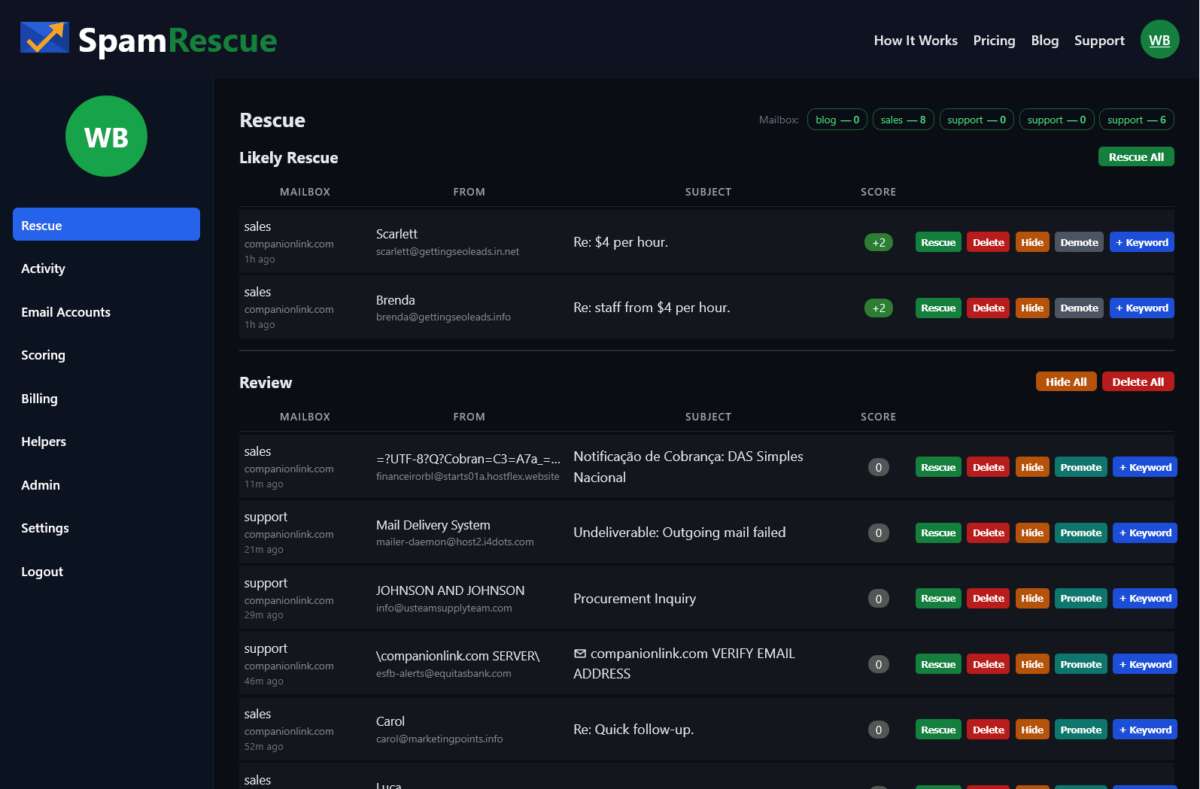
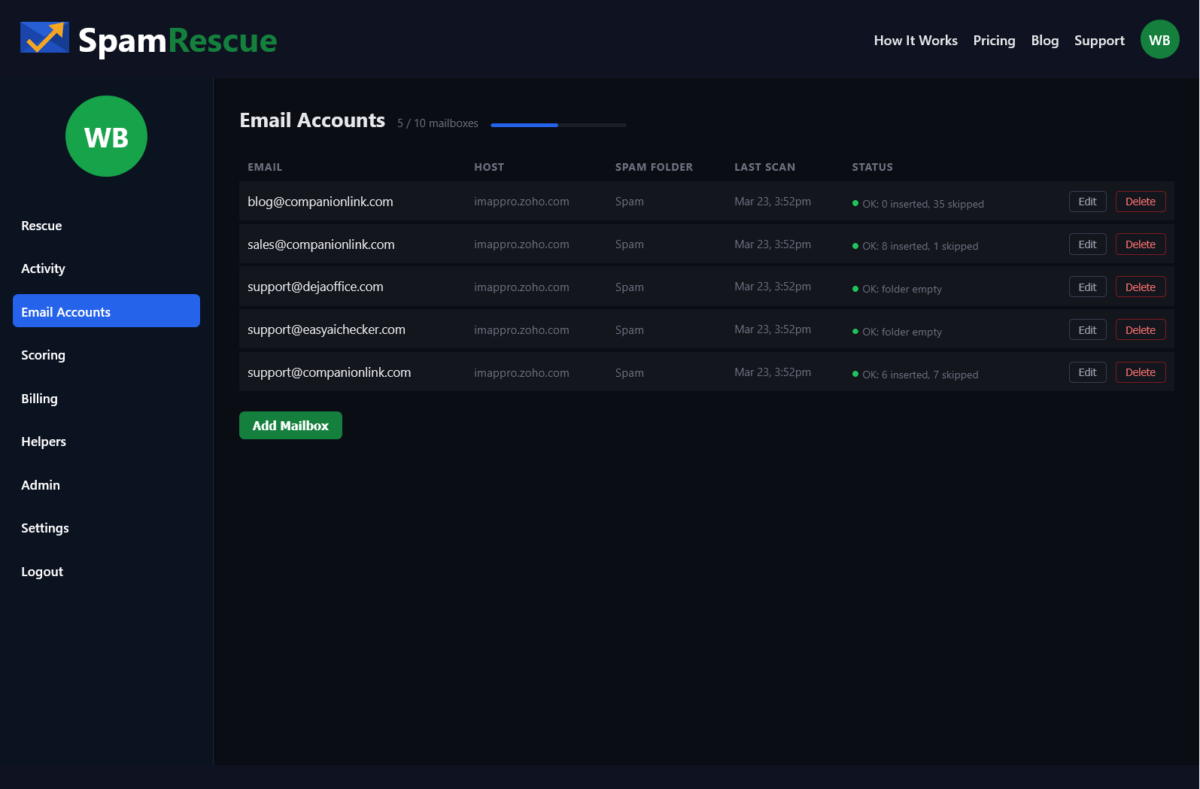
SpamRescue scans all your mailboxes and surfaces, and groups likely client emails into a single list. No logging in and out. No missing folders.
Three Businesses, One Problem, One Fix
SpamRescue works differently depending on your size. A solo consultant has one mailbox and checks it herself. A small business has three or four addresses and needs automation. One person can monitor 10 mailboxes for a team – without giving that person read access to any email. These are three different situations. The solution is the same tool.
Use Case 1: The Solo Business Owner
You run your own business. You have one email address. You check your inbox constantly — but your spam folder? Maybe once a week. Maybe less. SpamRescue automatically connects to your mailbox and scans your spam folder. It scores every message. Likely client emails rise to the top. You review in sixty seconds and rescue what matters.
The free plan covers one mailbox. No credit card. You will find something in there. Everybody does.
Use Case 2: The Small Business With Multiple Addresses
You have a sales address, a support address, maybe an info address. Three or four mailboxes. Checking each one manually every day is the job nobody does consistently. SpamRescue connects all of them. It scans twice a day automatically. Everything lands in one rescue queue — sorted by likelihood, scored, ready to act on.
The Starter plan at $19/month covers three mailboxes. One view. One decision per email. Done in minutes.
Use Case 3: The Office Manager or IT Lead
You are responsible for email across a team. Ten mailboxes. Executives who will not check their own spam. Customers slipping through every week. SpamRescue’s Professional plan lets you assign a Helper — one staff member who monitors spam across all accounts without ever seeing the inbox, the sent folder, or billing. SpamRescue does not surface the mail body – only the subject line and sender. This is real security. This is real control. This is real accountability.
Ten mailboxes, scans four times daily, ninety days of message history. At $49/month, a single saved customer pays for the account.
Frequently Asked Questions
How do I move client email from Spam to Inbox?
Open your spam folder and find the email.
Select it and click “Not Spam” or “Mark as legitimate.”
This moves it to your inbox.
Safelisting the sender prevents future emails from landing in spam.
Why are client emails going to my spam folder?
For many B2B shops, your client may have a bad sending reptutation. That does not mean they are bad people. From a business perspective they are a legitimate client who will spend money, but they get lost or marked. Sometimes links in the email cause a problem. Sometimes a word in the email can trigger it. Spam filters are blunt tools and often can be too aggressive.
How often should I check my spam folder?
How often do you want your customer to wait for a reply?
Email providers generally auto-delete spam after 30 days. Most businesses should check at least 3 times a week.
Can I let a staff member monitor spam without giving them full inbox access?
No standard email client separates access to the spam folder from full mailbox access. If you share credentials, you share everything. Having a staff member monitor the spam folder means they can also view, read, and screenshot the inbox and outbox contents.
Will checking my spam folder reduce the spam?
No. The volume of global spam increases every year. The goal of spam folder monitoring is not to reduce spam — it is to make sure legitimate emails do not get buried alongside it.
Is AI a good way to manage my spam folder?
Not really. Your spam filter is already using automated rules to block unwanted email. Adding an AI layer puts a broad layer checking a broad layer. An ideal system is one you can add your own keywords to – a system that reflects your particular lingo and can quickly sort customer emails to the top. Also – AI tools are not secure and may leak company info.
How do I automatically get client emails out of spam?
Most email platforms offer filter rules—you can safelist a domain or sender so their emails always reach your inbox. The challenge is knowing who to safelist before they email you. For unknown new clients, the only reliable method is regular manual review of your spam folder, combined with sender trust rules you build over time.
Stop Losing Customers to Your Spam Folder
There is a simple rule for business email. If a customer emails you, you answer. That only works if you see the email. Right now, some percentage of your customer emails are landing in a spam folder you are not watching closely enough. You do not know which ones. You do not know how many.
SpamRescue fixes that. It connects to your mailboxes, automatically scans your spam folders, and surfaces likely client emails in one place. You review in minutes. You rescue what matters. You never miss a customer again.
What does a lost email cost you? Credibility? Time? Money? One lost sales query may cost more than a full year of SpamRescue service. One unanswered support email may mean a one-star review. Who has the patience to open six mailboxes every day – like I did – and scan a mind-numbing list of atrocious subject lines to find one or two real rescues?
SpamRescue is a simple service that saves you time, protects your customer reputation, and lets you focus on running your business.
Client Emails Are Going to Spam — Here’s How to Get Them Back was last modified: March 23rd, 2026 by JW Bruns
Building an auction platform from scratch requires significant investment in development resources, infrastructure, and ongoing maintenance. For a lot of businesses, startups, and nonprofit organizations, this path is neither financially viable nor strategically necessary. The time it takes to design, test, and launch a custom-built solution can delay market entry by months or even years, while competitors move ahead with ready-made alternatives.
Here’s when white-label solutions can enter the game. Rather than developing proprietary auction platform software, organizations can license a pre-built system, apply their own branding, and launch a fully functional auction environment in a fraction of the time. However, this approach comes with its own set of trade-offs that should be carefully evaluated before making a commitment.
What Is White-Label Auction Platform Software?
A white-label auction platform is a ready-made software product developed by a third-party vendor that can be rebranded and customized by the purchasing organization. The end users interact with the platform under the buyer’s brand identity, often without any visible reference to the original software provider.
In other words, the technology layer is outsourced while the customer-facing experience remains entirely branded. The vendor handles core development, hosting, security updates, and technical maintenance. The buyer focuses on business strategy, user acquisition, and auction operations. This division of responsibility is what makes white-label solutions attractive to organizations that want to enter the auction market quickly, without assembling a full engineering team.
When Does It Make Sense to Choose a White-Label Solution?
White-label platforms are not a universal fit, but they offer clear advantages in specific business contexts. Understanding when this model works best can prevent both overspending on custom development and underinvesting in a critical tool.
The most common scenarios include:
A startup wants to validate an auction-based business model before committing to custom development.
A nonprofit organization needs a branded auction experience but lacks the technical team to build one internally.
An established marketplace wants to add auction functionality as a new revenue channel without diverting engineering resources.
A company operates in a regulated industry and needs a platform that already meets baseline compliance standards.
An agency or reseller plans to offer auction services to multiple clients under different brand identities.
From a financial perspective, launching white-label software is significantly cheaper than building a comparable product in-house. That’s why a lot of organizations treat white-label as a strategic starting point, with the option to migrate to a custom solution once scale and revenue justify the investment.
Pros of White-Label Auction Platform Software
The advantages of white-label solutions are rooted in speed, cost efficiency, and reduced technical complexity. The following benefits represent the strongest arguments in favor of this approach.
Drastically Reduced Time-to-Market
Building an auction platform from scratch can take 6 to 18 months depending on complexity. A white-label solution drastically reduces time-to-market, often enabling a full launch within weeks. Thanks to this, organizations can begin generating revenue and gathering user feedback much earlier in the product lifecycle.
Lower Development and Maintenance Costs
Custom auction platforms require investment in backend architecture, frontend design, payment integration, security infrastructure, and ongoing bug fixes. White-label platforms bundle all of this into a licensing or subscription fee. This approach drastically reduces both upfront capital expenditure and long-term operational costs.
Built-In Compliance and Security
The majority of reputable white-label vendors have already invested in PCI DSS compliance, data encryption, and secure hosting infrastructure. This means the purchasing organization inherits a security baseline that would otherwise require significant time and expertise to achieve independently. What is also important here is that the vendor typically handles ongoing security patches and infrastructure updates as part of the service agreement.
Proven, Market-Tested Technology
White-label platforms have usually been deployed across multiple clients, which means core functionality has been tested under real-world conditions. Bidding engines, payment flows, and notification systems have already gone through multiple iterations. This positively affects platform stability and reduces the risk of critical bugs appearing during live events.
Cons of White-Label Auction Platform Software
Despite the clear operational advantages, white-label solutions also introduce limitations that organizations should weigh carefully. The following drawbacks may be especially relevant for businesses with highly specific requirements or long-term scaling ambitions.
Limited Customization Depth
While white-label platforms allow branding changes (logos, color schemes, domain names), the underlying functionality may be difficult or impossible to modify. If an organization needs a unique bidding algorithm, a non-standard payment workflow, or deeply customized reporting, the platform’s architecture might not accommodate those requirements without costly custom development from the vendor.
Vendor Dependency
Choosing a white-label solution means relying on a third party for uptime, feature updates, and security maintenance. If the vendor experiences financial difficulties, changes its pricing model, or discontinues the product, the purchasing organization may face a disruptive migration. You should attentively analyze whether the vendor offers data portability and contractual safeguards against sudden service termination.
Shared Feature Roadmap
White-label vendors typically serve multiple clients simultaneously, which means the product roadmap is shaped by aggregate demand rather than any single buyer’s priorities. Feature requests may take months to implement, and the development direction might not align with every client’s strategic goals. This can be frustrating for organizations that need rapid iteration on specific capabilities.
Potential Performance Constraints
A lot of white-label platforms operate on shared infrastructure, where multiple clients run on the same servers. During peak bidding periods, this could lead to performance degradation if the vendor’s infrastructure is not provisioned to handle concurrent high-traffic events. Pay attention to whether the vendor offers dedicated hosting options or performance guarantees through SLAs.
How to Choose the Right White-Label Auction Vendor
Selecting a white-label partner requires a structured evaluation that goes beyond feature comparisons. We recommend focusing on the following criteria to ensure the chosen platform aligns with both immediate needs and long-term strategy.
What a reliable white-label auction vendor should offer:
Transparent pricing structure with no hidden fees for branding, integrations, or scaling beyond initial thresholds.
Full data ownership and portability ensuring that all auction and donor data can be exported in standard formats at any time.
Documented API access allows the purchasing organization to build custom integrations with existing tools and workflows.
Defined SLAs for uptime and support with clear response time commitments and escalation procedures.
A published product roadmap that demonstrates ongoing investment in platform development and responsiveness to client feedback.
Customization options beyond branding including configurable bidding rules, payment workflows, and reporting templates.
It will be helpful to request references from current clients operating in a similar industry or at a comparable scale. Firsthand feedback on vendor responsiveness, platform stability, and customization flexibility can reveal details that marketing materials rarely disclose.
Final Word
White-label auction platform software offers a compelling path for organizations that want to launch quickly, minimize development costs, and leverage proven technology. The trade-offs, including limited customization depth, vendor dependency, shared roadmaps, and potential performance constraints, are real but manageable when addressed through careful vendor selection and contractual safeguards.
Ultimately, the decision between white-label and custom development should be guided by the organization’s current resources, growth trajectory, and the level of control it requires over the auction experience. For a lot of businesses and nonprofits, white-label represents the most efficient way to enter the market, with the option to evolve the platform as needs mature and budgets expand.
White-Label Auction Platform Software: Pros and Cons was last modified: March 22nd, 2026 by Colleen Borator
Having accurate customer data is important for sales teams. It helps them manage leads, keep track of how deals are progressing, and coordinate interactions through different channels. When information is spread over different spreadsheets, emails, and messaging apps, companies face problems like inconsistent records, missed follow-ups, and lacking visibility of their sales pipelines.
Customer Relationship Management (CRM) platforms bring together customer records, interaction history, and pipeline data – all in one place. This setup helps teams keep an eye on new opportunities, record communications, and have a dependable record of account activities.
CRM systems do more than just manage contacts. They assist in simplifying operations by automating routine tasks, offering organized reporting dashboards, and linking up with marketing, communication, and financial tools. With these tools, managers can predict revenue, assess how their team is doing, and regularly keep in touch with prospects and customers.
This article takes a look at various CRM platforms that businesses are considering this year. It highlights features, integrations, and ways of working that can help organizations handle customer relationships better.
What Is CRM Software and Why Do Businesses Use It?
CRM software helps you keep track of customer records, sales activities, and communication histories under one roof. Instead of managing different spreadsheets or email chains, companies utilize CRM platforms to keep track of their potential clients, record interactions, and track how deals are moving through the sales pipeline.
Sales teams can log calls, meetings, and deal updates right on the platform. This helps keep a clear record of how they engage customers. This information helps with keeping an eye on pipelines, predicting revenue, and assessing performance.
Many CRM link marketing and customer service tasks to a shared database. Campaign data, lead sources, and service interactions all get added to the customer record. This helps organizations keep their relationships consistent in different departments.
Key Features Business Should Look For In CRM Platforms
When looking at CRM platforms, buyers pay attention to features that impact sales performance, promise data accuracy, and improve team coordination. Some of the core CRM features are as follows:
Contact And Lead Management: Keeps track of customer records and their interaction history, which helps teams monitor engagement and identify opportunities easily
Sales Pipeline Visibility: Visualizes deals at different stages, helping managers identify delayed opportunities and use resources wisely
Workflow Automation: Sets up task reminders, assigns leads, and updates statuses, which cuts down on manual work and helps avoid missed actions
Reporting And Analytics: Provides dashboards that display pipeline metrics, conversion rates, and performance insights to help make informed data-backed decisions
Integrations: Links up with email, marketing, and finance systems to keep customer records consistent and make teamwork smooth
CRM Platforms Businesses Should Consider This Year
Salesforce
Salesforce is a CRM tool that helps with managing sales pipelines, keeping track of accounts, and monitoring opportunities. It offers customizable stages, automated workflows, and reporting dashboards that monitor pipeline value, conversion rates, and performance metrics.
Salesforce connects with marketing automation, customer service, and ERP systems to keep customer records consistent across different departments. Its flexible platform is available for $25/user/month for its CRM starter pack.
HubSpot CRM
HubSpot CRM combines contacts, deals, and sales activities in one place. It offers visual pipelines and reporting dashboards that make it easier for teams to monitor opportunity stages and sales performance.
It integrates with HubSpot’s marketing and service tools to keep customer records consistent among different teams. The free version of the platform includes basic CRM features, while the paid plans begin at $20/user/month for more advanced automation and reporting options.
Zoho CRM
Zoho CRM helps you manage leads and contacts by keeping track of interactions through email, calls, and social media, so you have organized records of your engagements. With its automation rules, teams can easily assign leads, set up follow-up tasks, and change deal statuses according to specific conditions they’ve set up.
The built-in dashboards compile data on conversion metrics, pipeline value, and sales performance for you to review analytically. Zoho CRM links up with marketing, finance, and collaboration tools to keep customer data consistent. Pricing starts at about $20/user/month for its Standard plan.
Microsoft Dynamics 365
Microsoft Dynamics 365 combines CRM and ERP features, giving you a unified perspective on customer interactions and operational data across sales, service, and finance. It keeps an eye on leads, accounts, and how the pipeline is progressing, plus it works well with Microsoft 365, Outlook, and Teams to help with communication and managing tasks together.
The reporting tools collect data on opportunities and revenue predictions for analysis. The pricing depends on the app and the tier you choose, with basic plans starting around $65/user/month(annual billing) for the Sales module.
Pipedrive
Pipedrive focuses on visual pipeline management, displaying deals at different stages like prospecting, negotiation, and closing. It helps teams keep track of their sales activities by organizing tasks, emails, and calls. This way, they can stay engaged and make sure they don’t miss any opportunities.
Pipedrive’s reporting tools give you a clear view of how your pipeline is doing, the trends in conversions, and overall sales performance. The platform connects with email, calendar, and marketing tools to keep customer records consistent. Plans start at about $19/user/month for its Lite plan.
monday CRM
monday CRM offers a visual board-style workspace that helps you keep track of leads, deals, and customer interactions in an organized way. Users set up columns and boards to reflect sales stages, which helps teams keep track of how opportunities are moving along and how the workload is shared.
The automation rules send out task reminders and status updates, which help cut down on the need for manual coordination. monday CRM links up with your email, calendars, and collaboration tools to keep customer records consistent across all teams. Plans begin at around $12/user/month for the basic plan.
FlowCode CRM
Flowcode is one of the leading QR code platforms that helps capture lead data from physical touchpoints such as packaging, print materials, and in-store displays. Whenever someone scans a Flowcode QR code, the interaction data gets recorded. It is automatically synced as a new lead into CRM solutions such as Mailchimp, HubSpot, and Salesforce. This makes the platform useful for teams that run offline marketing campaigns and want engagement data to feed into their sales pipeline. The pricing begins at $750/month (billed annually), depending on the features you choose.
How Businesses Can Choose The Right CRM
When picking a CRM, it’s important to look at what your operations need, how your team works, and what integrations you’ll require instead of just looking at standard features. Companies should start by figuring out their main goals, like tracking sales pipelines, documenting customer interactions, or coordinating marketing campaigns.
The size and setup of your team can affect which platform you choose. Large organizations usually need systems that can be customized, while smaller teams find it easier to use systems that are simple to set up. Having good integration features is really important to keep data consistent across your email, marketing, and financial tools.
Finally, when it comes to pricing, it’s important that things like user-based fees, feature levels, and setup costs fit well with your budget and your long-term goals for running the operation. This approach makes sure the chosen CRM helps with visibility, consistency, and managing performance for sales and customer-facing teams.
Final Thoughts
Choosing the right CRM platform has an impact on how efficiently teams manage customer relationships, track sales, and coordinate cross-departmental activities. Each platform discussed in this article takes a unique approach to pipeline management, reporting, and integrations, so it is critical to align the system with organizational workflows and operational priorities.
Picking the right CRM affects how well teams handle customer relationships, track deals, and coordinate across different departments. Every platform discussed here has its own way of handling pipeline management, reporting, and integration. So, businesses need to choose a system that fits their workflows and team setup.
Best CRM Platforms Businesses Should Consider This Year was last modified: March 7th, 2026 by Shoaib Idrees
We have all been there. You are working on a complex problem, maybe a calculus equation for an assignment or a financial model and you scribble the solution on paper. Hours later, you need to check that number, but the paper is at home while you are at a coffee shop.
It is a frustrating disconnect. While we edit documents on phones, math has surprisingly lagged behind. For the longest time, doing math meant being tethered to a physical notebook. But that is changing fast. Students and professionals are moving toward a digital workflow, using tools that keep solutions accessible everywhere. It is about having that answer ready whenever you need it.
Why Math and Data Work Is No Longer Done on Paper
The shift away from paper isn’t just about saving trees, it is about speed and accuracy. Handwriting notes leads to transcription errors. Plus, paper is static, you cannot copy-paste a formula into a spreadsheet without retyping it.
This is where the modern math solver AI comes into play. By digitizing the process, you turn static numbers into workable data. Professionals in engineering and finance use a math problem solver AI to store and share calculations instantly. It eliminates the dead end of paper.
For students, the stakes are high. Studying for finals involves reviewing weeks of problems. If those sets are digital, they are searchable. This need for searchability is driving the massive adoption of the AI math solver across universities and workplaces alike. It transforms math into a manageable asset.
Using Online Tools to Instantly Solve Complex Math Problems
Modern technology is lightyears ahead of old calculators. We are no longer just punching in numbers; we are interacting with advanced logic engines.
When you use a high-quality math AI solver, you aren’t just getting a raw number. You get step-by-step logic and graphs. This interactive element makes these tools the best AI math solver options for learning. You aren’t just finding an answer, you are reverse-engineering the logic to understand the process.
What distinguishes a basic calculator from a powerful math solver AI? It usually comes down to versatility. The best math AI solver handles everything from algebra to complex statistics. However, speed is the ultimate factor. An AI math problem solver that takes too long is useless in a meeting. Whether using an app or tool, the goal is to reduce friction.
The Hidden Problem — Your Solutions Are Stored Everywhere
A common issue is device fragmentation. You might find a great math solver AI on your laptop, solve equations, and then close the tab. Later, on the bus, the data is stuck on a different device.
This is the killer of productivity. You might have a math problem solver AI on your tablet, but if it doesn’t talk to the AI solver math tool on your desktop, you are duplicating work. Professionals face this when moving between office and remote work. If you used an AI solver math tool on your phone, you need that record on your workstation later. Without sync, you end up emailing screenshots to yourself—a clumsy way to work.
How Device Synchronization Improves Study and Work Efficiency
The holy grail of productivity is seamless synchronization. When looking for the best math AI solver, your top priority after accuracy—should be cloud capability.
Imagine snapping a photo of a problem with your phone. Your AI math problem solver processes it, and instantly, that solution appears on your laptop, ready for a report. This is why the best AI math solver platforms are now ecosystem-agnostic. By using a cloud-connected math solver, you ensure your work travels with you.
For students, using a math AI solver during a lecture means notes are waiting on your desktop later. For professionals, a synchronized math problem solver AI means a calculation made on-site is accessible to the team immediately. Finding the best math AI solver ensures complex variables are shared without the risk of entry errors.
Conclusion
The transition from paper to digital is a necessary evolution for productivity. By integrating a reliable AI math problem solver into your routine—one that works across all devices you build a smarter, more efficient workflow. Whether you are studying for a degree or managing professional projects, the math AI solver technology is here to help you think faster. All you have to do is log in and start solving.
How Students and Professionals Solve Math Problems Faster Across All Their Devices was last modified: February 7th, 2026 by Evangeline Lyons