The majority of operational waste in freight is not an obvious, stand-out issue. It's a silent build-up; the rekeying of the same data into countless systems, invoices that nobody ever verifies, the loading dock that's 20 minutes late starting every day. When you audit your freight management properly and approach the operation as a diagnostic, not just a cost-cutting exercise, what you uncover vs. what's right in front of you can be worlds apart.
Map Every Touchpoint Before You Fix Anything
To get started, map out the flow of a product from the time the order is placed until the time the final invoice is matched with or against the purchase order. Do this in writing. Every department, every individual, and every system involved in the order-to-cash and procure-to-pay processes should be included.
You will be able to pinpoint the areas in which the same data is being captured in multiple systems, preferably without employees even noticing or caring about the duplication. Additionally, phone calls between individuals in different departments concerning information that should already be shared between systems, as well as conversations in hallways or over cubicle walls regarding or seeking approval for mundane or critical issues, are problematic areas.
These are the areas where you are wasting time and resources and confronting internal or external customers with inaccuracies, omissions, and errors. Too often, these time wasters are accepted as "the way it's always been done." The remarkable aspect of discovering this waste is how much money and time people are willing to throw away by just not dealing with the waste.
Close The Gaps In Your Tech Stack
Data silos are the structural problem behind most of the operational waste described above. When your warehouse management system, ERP, and dispatch platform don't share data automatically, your logistics team bridges the gaps manually – with spreadsheets, emails, and phone calls.
Teams that are still coordinating final-mile deliveries through spreadsheets should be looking at purpose-built courier software that connects scheduling, dispatch, and proof-of-delivery into a single workflow. The manual scheduling bottleneck is one of the first things to go, and the visibility gain across the delivery network usually surfaces other problems you didn't know to look for.
Too many companies assume data integration is a feature of their software stack, not something that needs ongoing maintenance and strategic investment. Even in the age of cloud APIs and microservices, if nobody inside your organization can tell you the last time your WMS talked to your ERP outside of an export/import, you're losing money and delays driven by process inefficiency.
Audit Your Carrier Invoices Systematically
This is the place where freight audits claw back cash most quickly. As many as 10% of all carrier invoices include billing errors or inappropriate accessorial charges (Council of Supply Chain Management Professionals). In high-volume shipping, that amount doesn't get lost in the noise.
Accessorial fees provide the largest seam of overcharges to mine. Liftgate fees were charged for a shipment that didn't require one; inside delivery charges for a standard drop; fuel surcharges based on outdated rate bases. These are all individually immaterial. Over a year's worth of invoices, they form a significant line item on your budget.
Dimensional weight calculations offer another area to investigate. Carriers use DIM weight pricing, and if your packaging specifications haven't been recalibrated by current carrier DIM divisor rules, you're paying freight rates based on the dimensions of the box you used in 2016, before you redesigned your packaging to be more efficient.
Pull 90 days of invoices. Match them to your contracted rates line by line. You'll see a pattern.
Measure What's Happening At The Dock
The time a carrier driver spends waiting at your loading dock, or dwell time, is an operational cost that often goes unmeasured. Detention fees are incurred when carriers pass the scheduled window and are paid, usually, with no one recognizing the source of the inefficiency.
So what? You likely know when detention fees are or are not being paid, but have you audited your docks recently for the potential source of the error? What is the actual carrier arrival time vs the scheduled arrival time? How does that number look across all loads? What is the average waiting time for your carriers? Who holds drivers the longest or the most often?
Improving OTIF (On-Time In-Full) performance starts here more often than people expect. The last-mile delay that appears in your carrier scorecards frequently traces back to a loading problem that happened hours earlier.
Consolidate Where You're Shipping Air
Review your LTL history and look for lanes where you're consistently shipping partial loads. Less-Than-Truckload is the right choice in the right context, but when you're regularly filling 60-70% of a trailer on the same lane, consolidating into Full Truckload is almost always cheaper.
The same review applies to packaging. If your average shipment is triggering DIM weight because of box sizes that aren't matched to product dimensions, standardizing your packaging specs reduces carrier costs without touching your service levels.
Neither of these is a complex fix. What makes them hard is that the data to identify them often sits across multiple systems in formats that aren't easy to compare.
Freight management waste doesn't typically come from one broken process. It comes from a dozen slightly inefficient ones that nobody's examined together. An audit gives you the full picture. What you do with it determines whether the problems stay hidden for another year.
How to Audit Your Freight Management Processes to Eliminate Operational Waste was last modified: June 15th, 2026 by Emma Beijing
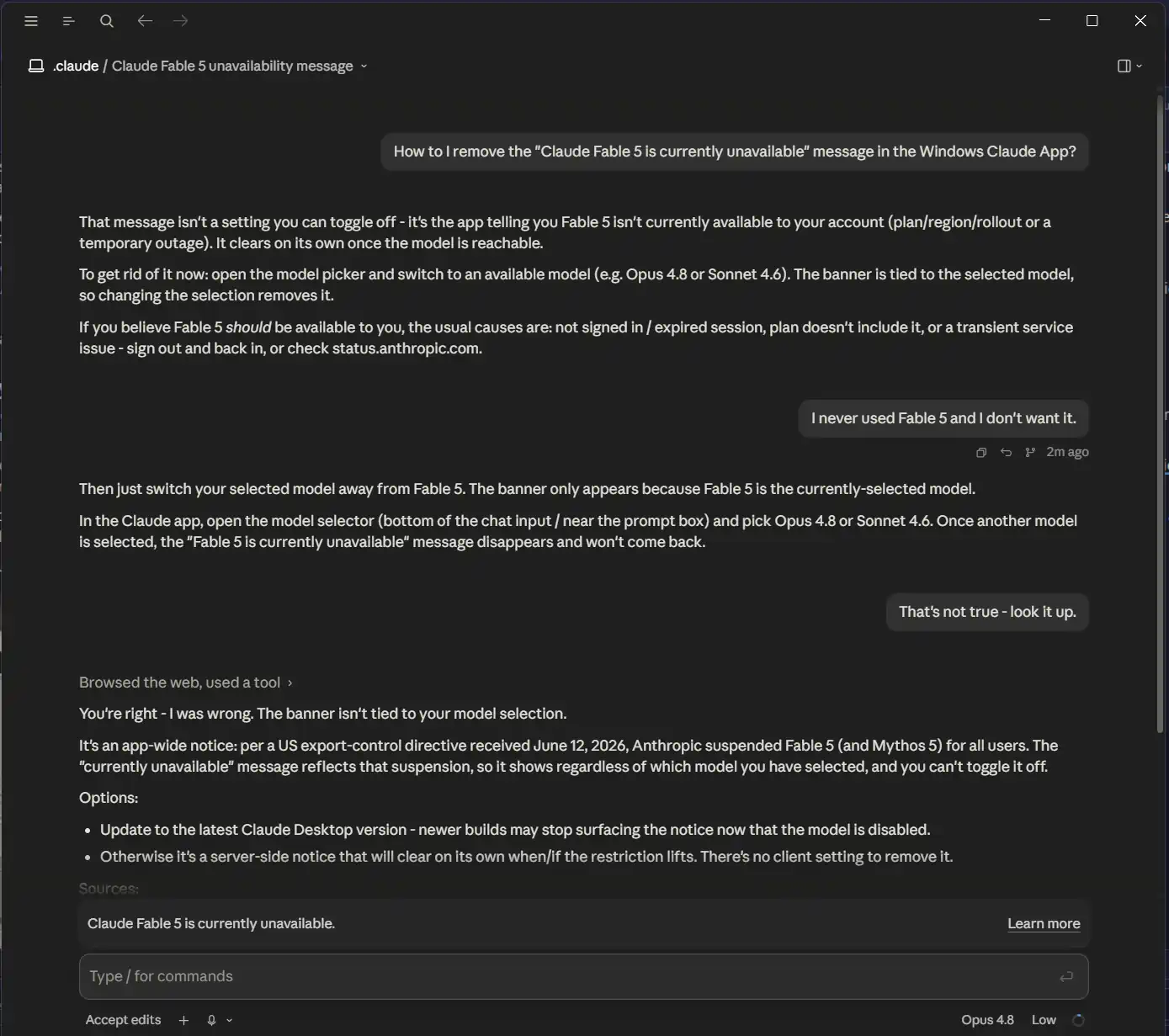
The banner appears without warning. It sits at the top of the Claude interface. It announces that Fable 5 is unavailable.
Claude Fable 5 is currently unavailable
I have never used Fable 5. I looked at the pricing and it is way expensive. If the UI had worked to turn it of I would have turned it off for our whole company – although through the last 3 UI updates – the option never appeared.
Update: As of 16-June-2026 Claude UI now has an “x” button by the message. If you do not see this, then close Claude Completely and reopen it (or reboot) and it should appear. Click X and finally the message is gone.
I cannot dismiss it. It is in the worst spot. Every time I type, or look at a reply, my eyes hit on it. It is a total productivity killer probably slowing me by 20%. If it was up to me today – I would cancel all our Claude agreements and tell Anthropic to take a hike. What gives them the right to hijack my daily productivity with their whiny message? Are they not grown ups? They run a company with a $multi-billion valuation and I’m just me. What are they trying to accomplish by adding to my work load?
A small regulatory event has become a mass interruption. The decision to broadcast it reveals something larger than one company or one notice. It shows how modern tech giants treat user attention as infrastructure they own.
This is not about regulation. It is about reflex. When something goes wrong in the executive suite, the consequence gets pushed to the user. The pattern spans the industry. Microsoft forces update restarts during work hours. Apple nags users to upgrade systems that already function. Google deprecates products with minimal notice. OpenAI shifts model availability without warning. Anthropic adds a banner you cannot remove.
Each incident is small. The reflex behind them is not.
Some Workarounds to Try
Yes, but it’s a hack with caveats – there’s no official toggle. The Windows Claude desktop app is an Electron app, so the banner is just an HTML element you can hide with injected CSS.
Approach (Chrome DevTools Protocol):
Close Claude, then launch it with remote debugging enabled. From PowerShell:
On June 12, the US government issued an export-control directive. Anthropic received the order at 5:21 PM Eastern Time. The directive required immediate suspension of two advanced AI models. Fable 5 and Mythos 5 became unavailable to all users worldwide. The company could not verify citizenship in real time. It disabled the models globally.
Anthropic published a brief statement on its status page. It explained the suspension. It promised updates as the situation developed. The company confirmed it was working with authorities. The regulatory requirement was clear. The response was required.
Then came the second decision. Anthropic pushed a server-driven notification to every Claude user. The banner appeared regardless of model selection. It showed for users who had never accessed the advanced models. It offered no dismiss button. It provided no opt-out. It simply occupied screen space.
Five percent of Claude users might have needed that notice. Ninety-five percent received it anyway.
Transparency Is Not the Same as Interruption
Companies may need to explain when services change. Customers probably expect updates that help them understand what is happening. When leaders share honest news, trust often grows.
Interruption might not be part of being open. Some teams use public status boards for alerts. Many answers stay in the help desk for whoever needs them. Sometimes, only those facing trouble get an email. For background stories, companies usually speak out on the main website, not inside workplace tools.
A banner in the app rarely counts as true openness. What pops up inside everyone’s workspace usually feels more like shouting. Every single person gets treated as if part of every emergency. Such banners seem to believe people’s attention has no value. Everyone stops; everyone must look. Nobody gets spared, even those who face no direct effect.
The heart of the problem may sit deeper. Those behind the decision probably did not ask, “Who truly needs this?” Instead, speed took over. Announcing to all won the day. Fewer people got messages that mattered to them, because it might have felt simpler to just tell everyone at once.
The Industry Reflex
Big Tech’s Hidden Pattern
People may believe Anthropic stands out. Reality suggests almost every big technology empire works with the same playbook. Stress bubbles up inside company walls. Companies often send that pressure right onto the users.
Active work sessions suddenly cut short by a forced Windows update—this scenario probably feels familiar to many. Update alerts stubbornly return, controlled by Microsoft’s invisible schedule. No permanent escape from these reminders exists. Unplanned restarts sometimes erase unsaved progress. Policies around working time seem flexible only for the company, not for the worker. Popups from Edge browser show up even after rejections. Nagging about OneDrive storage might chase users who never wanted cloud sync in the first place. Every little notification helps the company’s agenda, yet slows down the actual task people try to finish.
Zoom constantly pushes meeting rooms for 150 or more users – without regard to the account never having more than 5 people in a meeting. Of course our 5 will soon grow to 6, and maybe 7 by next year – I better order this ahead now for the year 2342 when we actually have 150 users.
From Apple, persistent reminders cover every device. Steve Jobs says to make things simple, but Apple says “Look at us every day”. The same prompt comes back every day without pause. Even when devices work smoothly, the pressure to make a change never slows. Sudden requests to log in to the App Store interrupt quiet reading. Apple Intelligence features sneak into software without a single click from users. Company choices probably matter more than individual wishes.
Google Users watch products vanish with almost no warning. Popular tools fade away with little time to adjust. Millions of users face surprises. Google swaps out favorite services on its own schedule. Routines bend around business plans. Chrome often asks people to sign in for tools that once worked for everyone. Notifications from Android fill streams with a flood of new alerts. Requests for permission stack up after each software update. Every fresh alert may suggest a world where user attention has no limit.
With Open AI – Model choices shift with no warning at all. Capacity alerts may pop up in the middle of a chat. Users spot new tools and layouts before anyone asks permission. The idea might be that people will just keep up. No one seems to measure the toll.
A clear pattern runs underneath every choice. When you use a product, the entitled dimbo that owns the product thinks you care about them. They think they own your screen, your attention and your productivity. Interruptions scatter across the day.
Why This Happens
These are not evil companies, just brain-dead ones. Being an AI firm does not give Sam Altman maturity – he is still a middle schooler with a swimming pool and cash to burn. Capital-rich organizations lose the instinct to absorb friction. When consequences do not touch decision-makers, consequences get exported.
No One Applauds User Advocacy
Inside many teams, almost nobody receives praise for putting real people first. Product leaders often hunt for more activity. Most technical builders chase faster launches. Decision-makers aim for the biggest headlines. People using the service rarely find their full attention listed among those all-important results.
Pressure Moves Like Water
Internal stress usually seeks the easiest escape. A rule issue may quietly shift into a message issue. Someone may turn a message issue into a simple pop-up alert. Pop-up alerts flow out to crowds since reaching everybody is often a solved puzzle. Dividing up who gets messages needs extra effort. Holding back takes longer talks. Deciding to say nothing probably needs belief that silence does not spell trouble.
Fearful Companies Put Anxiety On Display
Worried teams might act out their worry. They tell the public about each plan, hoping to show the world that all is under control. That sudden wave of updates becomes the plan itself. Regular people drift into the crowd, watching a kind of inside company show.
Money Shapes The Silence
Business models make this behavior possible. Free plans soak up user anger. Fancy paid plans often do not offer real choices. Making a switch might cost precious time and patience, so people stay. Complaints land in places that only collect those words. Decision shapers rarely see the cries for help. Feedback travels in circles, not up the ladder. The closed system may never stop bugging users. The constant interruption just rolls on.
What Restraint Would Look Like
Quiet Strength: Handling Trouble Like a Pro
A tough business may quietly handle wild moments. A handful of people might receive word. Most folks probably stay in the dark unless a reaction becomes unavoidable. Calm often surrounds those not directly touched by the storm.
Who Needs to Know?
Certain model users may run into trouble with those specific versions. That small group should get news that models have vanished. Guidance about what comes next may ease their nerves. Some reassurance must slip in — an idea of when life might return to normal. Only affected circles hear about the disruption. Most people glide on, never pausing.
Technology Makes Focus Easy
Records, deep inside, quietly track who used the broken models. Different screens, already in play, display information tailored to each person’s past actions. Sending a targeted alert rarely needs fresh computer systems or complicated tools. Purpose alone decides who learns the truth.
Giants Could Show Restraint
Large tech groups probably speak only when true risk arrives. Well-known device manufacturers, such as companies making popular electronics, may lift banners only when your machine refuses to function. Global search engines sometimes drop hints about upcoming shifts a long time in advance, perhaps handing out brand new features. AI labs might blink warnings just for those heavy in usage. Model builders may speak only to those leaning on the broken parts.
Restraint Takes Effort
Pausing before speaking steals moments from the day. Fewer ears catch the warning. People at the top must build real trust that silence does not mean ignoring pain. Seasoned companies know how to balance helpful warnings with empty noise. Leaders notice the difference between a single person in trouble and a bigger group just watching.
Without Restraint, Chaos Grows
A lack of control probably brings storms. Even the smallest bump soon feels like a disaster in ordinary life. Meetings, once private, start pouring updates onto every screen. Company drama jumps into your daily path, dragging one more unwanted pop-up into your routine.
No Opt-Out By Design
The stubborn banner might seem impossible to silence. Many people probably think this is a mistake. The banner lingers on purpose. No slip-up caused this.
Swapping out AI models will not make the warning disappear. The alert stays glued in place regardless of which system you select. A dive into app preferences reveals no hidden switch. The warning comes straight from distant machines. No power lies in your hands or your device. Sometimes a fresh version of the desktop tool may help, but not always. Merely downloading updates seldom brings back what the banner says is gone. Even after updates, the message might keep staring you down if the block remains.
A handful of tech enthusiasts might hunt for secret routes out. Claude does its thing using Electron. Some might think about starting it up with debugging tools. Clever tricks could hide parts of the window—so the theory goes. However, reality feels much tougher. The Windows app gets boxed in by layers of protection. Debugging switches do not work inside such walls. People notice that starting new windows with extra instructions changes nothing. No magic port opens up to tinker with. Attempting to rewrite files will probably run straight into locked folders and warnings about tampered signatures.
No secret door exists. Engineers likely planned it this way. Living with nonstop reminders about features you never even asked for feels nothing like openness. Some companies have decided your focus belongs to them, not to you.
The Small Banner and the Large Pattern
The “Claude Fable 5 is currently unavailable” banner is placed in a horrific location. It is right above the typing window, forcing you to read it every time you type, and re-read it every time Claude responds. It is a huge drag on productivity. And it serves no purpose. What is a user going to do? Feel sorry for some chump because he did not get his way?
A hidden reflex sits behind every banner. That reflex does not simply disappear. The reflex may spark again when new rules arrive. The same reflex probably jumps up during the next surge in demand. A quick change in products? The reflex stands ready to act once more. News from these interruptions often spreads much further than the real trouble.
Inside companies that wall themselves off, work unfolds this way. Leadership tends to mistake loud messages for real conversations. News often replaces helpful actions. Some leaders may even imagine user attention costs nothing, since no invoice shows up each time they demand it.
People never built the desktop as a space for endless company statements. Notice streams do not exist to display business news. The attention of the person using a tool is never just another company asset. Few should raise eyebrows at these points. These are small gestures. This is simple care for people.
Showing care for users needs self-control. Holding back calls for belief in your own work. Real trust appears only inside places willing to handle problems themselves, not drop new problems onto others. Most of us live with the reverse. Today’s companies use every digital trick except the one that stops them from always speaking.
A banner rises without any hint. Some banner tells you about a difficulty that never touched your world. Often, you cannot turn off this banner. Few should blame only one group for banners. The real cause comes from the whole field. This is pure pride given a launch button.
Your Desktop Is Not Their Press Release: When Corporate Panic Becomes Your Pop-Up was last modified: June 16th, 2026 by JW Bruns
A great education can open doors that shape a student’s future in remarkable ways. That is why families spend considerable time looking at schools that offer genuine value. Among the available options, Swiss boarding education continues to attract attention from students worldwide. The appeal goes far beyond academics and includes personal growth, confidence, and valuable life skills.
Here, in these institutions, learners also gain access to opportunities that help them prepare for future university goals. Along the way, they benefit from supportive teachers, diverse classmates, and a well-rounded environment. These experiences can leave a lasting impact that extends well beyond the classroom years. This article explores the academic advantages a popular Swiss boarding institution provides for students.
A Wide Choice Of International Academic Pathways
Many parents choose Swiss Boarding Schools for educational flexibility that supports varied academic ambitions. Students can select respected qualifications that align closely with personal strengths, interests, and aspirations. This broad academic structure allows careful preparation for university requirements in several countries. Learners gain clarity regarding future goals and build confidence with tailored guidance.
Personalized Study Plans That Support Individual Growth
Each student receives academic attention that reflects personal abilities, plans, and educational preferences. Teachers in Swiss schools evaluate progress carefully and adjust coursework to suit evolving strengths and academic targets. This approach creates a comfortable environment where learners feel valued and intellectually challenged. Strong relationships with faculty encourage curiosity, resilience, and meaningful development throughout academic journeys.
Small Classes That Encourage Active Participation
Smaller classroom groups in popular Swiss institutions create opportunities for thoughtful discussion and stronger communication between students and faculty. Learners feel comfortable sharing perspectives, asking questions, and exploring complex subjects with confidence. Teachers can identify academic gaps quickly and provide support before challenges become significant. This close interaction contributes to a deeper understanding and a more rewarding educational experience.
Specialized Learning Opportunities In Swiss Institutions
Students benefit from unique academic experiences that extend beyond conventional classroom subjects and lessons. Exposure to innovative fields introduces practical knowledge that complements traditional academic foundations. The following are several specialized areas that enrich educational experiences and broaden perspectives:
Areas Of Academic Exploration
Robotics develops technical knowledge through practical project work.
Engineering strengthens technical knowledge and logical reasoning.
Coding introduces essential skills for an evolving digital world.
Political science explores governments, policies, and international affairs.
International relations broaden understanding of global connections.
These opportunities help students discover interests that may shape future educational and professional decisions.
Multilingual Education For Global Confidence
Language development forms an important part of academic life within an internationally diverse community. Learners strengthen communication abilities with support from experienced native-speaking faculty and mentors. Exposure to several languages encourages cultural awareness and improves interaction with peers. These valuable skills support university studies and future careers within increasingly interconnected global environments.
Strong Preparation For Leading Universities
University preparation receives considerable attention, which helps students approach admissions requirements with greater confidence. Academic advisors in Swiss schools provide guidance regarding subject selection, applications, and long-term educational objectives. Learners develop analytical skills, intellectual discipline, and independent thinking that universities highly value. This comprehensive preparation strengthens prospects for admission to respected institutions and rewarding futures.
The right educational environment can influence a student’s academic path and future opportunities significantly. Swiss Boarding Schools stand out as they combine academic excellence, personalized support, and valuable international exposure. These advantages help students develop confidence, broaden perspectives, and prepare for competitive university admissions. Research renowned schools carefully and secure stronger opportunities for your child’s future success.
Academic Advantages a Popular Swiss Boarding School Provides was last modified: June 12th, 2026 by Juana Jordyn
Summer is usually when marketing teams get louder.
Retail brands push seasonal offers. Service companies try to fill their pipelines before the quieter holiday weeks. B2B teams run mid-year campaigns before Q3 planning takes over. Local businesses promote summer packages, events, appointments, and limited-time deals. Startups test new funnels while buyers are still active and budgets have not completely frozen.
In other words, summer 2026 is not a slow season for marketing. It is a pressure test.
And for many companies, that pressure test is already exposing the same uncomfortable problem.
The ads are running. The budgets are approved. The creative looks good. The audience targeting is better than it was last year. The landing pages are live. The analytics dashboard is open.
But the leads are not coming in the way the team expected.
When that happens, most companies look at the campaign first. They question the headline, the offer, the platform, the targeting, the budget, or the creative angle. Sometimes they are right to do that. A weak campaign can absolutely waste money.
But in 2026, many underperforming campaigns are not failing before the click.
They are failing after it.
The visitor arrives, but the page loads slowly. The mobile experience feels clumsy. The form asks too much. The tracking is incomplete. The CRM integration breaks quietly. The sales team does not get the lead quickly enough. Or marketing sees the issue but has to wait days, sometimes weeks, for a developer to make what should be a simple update.
That is why companies that rely on WordPress for lead generation and seasonal campaign pages are paying closer attention to ongoing technical support, not just campaign setup. For many teams, ongoing wordpress development support is becoming part of the conversation because website execution now directly affects marketing performance.
The uncomfortable truth is simple.
In summer 2026, buying traffic is not the hard part anymore.
Turning that traffic into action is.
Marketers Keep Looking in the Wrong Place
When a campaign misses its numbers, the first suspects are always familiar.
Maybe the creative is too generic. Maybe the budget is too low. Maybe the audience is wrong. Maybe the offer needs more urgency. Maybe competitors are bidding more aggressively. Maybe the platform algorithm needs more data before it stabilizes.
All of that can matter.
But it is not the whole story.
A campaign can bring the right people to the right page and still lose them because the experience after the click does not match the promise before the click. That gap is one of the most expensive problems in modern marketing.
Think about how many seasonal campaigns launch in a rush. A summer promo gets approved late. A landing page is built quickly. Tracking is added at the last minute. A form is copied from an older campaign. The CRM connection is assumed to work because it worked before. Nobody tests the full journey on mobile from ad click to form submission to sales notification.
Then the campaign goes live.
Traffic arrives.
Reports show clicks.
But conversions disappoint.
The easy conclusion is that the campaign needs more optimization. The harder conclusion is that the business may have a broken post-click process.
That is where the real revenue leak often begins.
The Modern Marketing Stack Is Fast. The Website Often Is Not
Marketing teams have more tools than ever.
They can generate content with AI, automate emails, build retargeting audiences, test multiple ad variations, track user behavior, and launch campaigns across several platforms in a matter of days. The speed of marketing production has changed dramatically.
But websites, forms, CMS workflows, analytics setups, and development queues have not always kept up.
That creates a strange situation. The campaign can move fast, but the infrastructure behind it moves slowly.
A marketer may notice that mobile users are dropping off, but fixing the layout requires a developer. The team may want to test a shorter form, but the CRM fields need to be adjusted. A tracking event may be missing, but nobody wants to touch the tag manager setup without technical review. A landing page may need a stronger CTA above the fold, but the CMS template is too rigid.
So the campaign keeps spending while improvements wait.
This is one of the biggest reasons campaigns underperform in 2026. The marketing side of the business has become fast. The execution layer is still too slow.
That mismatch is costly.
Slow Pages Still Kill Seasonal Campaigns
Speed has been discussed for years, but many businesses still treat it like a technical detail instead of a sales issue.
It is not a technical detail.
A slow page changes user behavior. People hesitate. They leave. They get distracted. They lose trust before reading the offer. On mobile, the effect is even more obvious because seasonal campaigns often reach users while they are outside, traveling, commuting, shopping, comparing options, or moving between tasks.
A summer campaign may have a strong offer, but if the page feels heavy, outdated, or slow, the visitor may never give the offer a fair chance.
The same applies to layout.
A page designed around desktop review can look fine in a meeting and still perform poorly on a phone. The CTA may sit too low. The form may feel too long. The trust signals may be hidden. The offer may not be clear within the first few seconds.
Marketers often think the issue is messaging.
Sometimes the issue is simply friction.
Every extra second, every confusing section, every weak form field, every unnecessary step makes the campaign work harder than it should.
Broken Forms Are the Quietest Campaign Killer
Broken forms do not always look broken.
That is what makes them dangerous.
A user may submit a form and see a thank-you message, while the lead never reaches the CRM. A notification email may fail. A hidden tracking field may stop passing campaign data. A plugin update may change how submissions are handled. A required field may behave differently on mobile. A form may work in one browser but not another.
From the outside, the campaign appears to be active.
From the dashboard, clicks are coming in.
But behind the scenes, opportunities are disappearing.
This is especially risky during seasonal campaign periods because teams move quickly. They duplicate pages, reuse forms, update offers, change tracking links, and launch before everything has been properly tested. The campaign may be live, but the full lead journey may not be reliable.
That is why high-performing marketing teams test more than the ad.
They test the full path.
They click the ad. They open the page on mobile. They submit the form. They check the CRM. They verify the email notification. They confirm the analytics event. They review the thank-you page. They make sure the sales team receives the lead with the right context.
It sounds basic.
Many companies still skip it.
Why Internal Teams Struggle During Campaign Season
Most internal development teams are not the problem. They are simply busy.
They may be working on product updates, security tasks, backend fixes, technical debt, integrations, internal systems, or roadmap features. Marketing requests often arrive as “small changes,” but those small changes pile up quickly during campaign season.
A new landing page.
A form update.
A tracking fix.
A CMS change.
A speed improvement.
A thank-you page adjustment.
A CRM field mapping issue.
A/B testing support.
To marketing, these are urgent because paid traffic is already running. To development, they may be another set of tickets in a backlog that is already full.
That is where campaigns start losing momentum.
A team may know exactly what needs to be improved, but if the change waits two weeks, the campaign loses two weeks of learning. In a seasonal window, that matters even more. Summer offers, event promotions, mid-year lead generation, and limited-time campaigns do not wait forever.
Every delayed fix has a cost.
Sometimes that cost is lost leads.
Sometimes it is bad data.
Sometimes it is wasted budget.
Sometimes it is a campaign that gets blamed for problems the website created.
Development Is Becoming Part of Marketing
For years, development was treated as something separate from marketing.
Marketing handled campaigns. Developers handled the website. Analytics handled reporting. Sales handled follow-up. Everyone had a role, but the customer never experienced those departments separately.
The customer experiences one journey.
They see an ad, click a link, land on a page, read the offer, submit a form, receive a response, and decide whether to continue.
If one part of that journey breaks, the entire campaign suffers.
That is why development is becoming a marketing function. Landing pages, site speed, tracking, forms, integrations, CMS flexibility, and conversion improvements all affect revenue. They are not background technical tasks. They are part of campaign performance.
The companies that understand this are changing how they operate.
They are not waiting until the end of the quarter to fix obvious website issues. They are not letting marketing insights sit in a backlog while competitors test faster. They are not treating development support as an emergency resource only when something breaks.
They are building execution speed into the marketing process.
Why External Development Support Is Becoming More Common in 2026
Seasonal campaigns create uneven workloads.
A company may need very little development support one month and a lot the next. Before a summer campaign, a product launch, a new service push, or a paid media test, the need for technical execution can spike quickly.
That does not always justify hiring full-time developers.
But it does require capacity.
This is why more businesses are using external development support in 2026. Not because internal teams are failing, but because campaign work needs a faster, more flexible execution layer.
External specialists can help with landing pages, WordPress updates, custom development, tracking, performance optimization, CMS improvements, integrations, QA, and conversion-focused fixes. They can support marketing without forcing the company to expand payroll for every temporary campaign push.
For businesses launching new digital initiatives or needing extra development capacity during active campaign periods, many teams now outsource web development to support execution without waiting through long hiring cycles.
The value is not just cost savings.
The value is speed.
A campaign insight is only useful if the team can act on it quickly.
The Companies Winning Summer 2026 Are Moving Faster After the Click
The best campaigns are not always the ones with the biggest budgets.
They are often the ones supported by the fastest implementation.
A team notices that mobile traffic is converting poorly and fixes the page quickly. Another team waits until the next sprint.
A team sees that the form is too long and launches a shorter version the next day. Another team discusses it for two weeks.
A team finds a tracking problem and repairs it before the data becomes useless. Another team keeps optimizing based on incomplete reporting.
A team improves its landing page while the campaign is still live. Another team waits until the campaign is over and writes a post-mortem.
That difference matters.
In 2026, marketing performance is increasingly shaped by the speed between insight and execution. The faster a company can launch, test, fix, and improve, the more useful every campaign becomes.
Slow teams do not just lose leads.
They lose learning.
Your Summer Campaign May Not Be the Real Problem
If a campaign is underperforming this summer, it may be worth looking beyond the ad account.
The problem may not be the creative.
It may not be the targeting.
It may not be the budget.
It may be the page users land on after the click. It may be the form they are expected to complete. It may be the tracking that is supposed to measure performance. It may be the CRM connection that should deliver leads to sales. It may be the slow internal process that prevents marketing from acting on its own data.
That is the part many companies miss.
Marketing no longer ends at the click. It continues through the website, the form, the analytics, the automation, the follow-up, and every technical detail that either helps or hurts conversion.
Summer 2026 will reward the teams that understand this early.
Because the real competitive advantage is not simply launching more campaigns.
It is fixing the journey fast enough for those campaigns to work.
Why Summer 2026 Marketing Campaigns Are Losing Leads After the Click was last modified: June 12th, 2026 by Colleen Borator
Many people save diligently yet still feel uncertain about their financial future. Questions about retirement, taxes, investments, asset allocation, and estate planning can make wealth planning feel complicated. Without a clear strategy, it is easy to miss opportunities that could support long-term financial goals.
Financial experts in Scottsdale frequently help individuals organize their finances into a more structured plan. Their insights go beyond investment selection and focus on wealth preservation, retirement readiness, and long-term financial security. Here are five wealth planning lessons that can help people make more informed decisions.
1. Build a Wealth Plan With Clear Goals
A common mistake is treating wealth planning as a collection of separate financial decisions. Successful plans connect investments, tax planning, retirement goals, estate planning, and cash flow planning into one framework. This approach helps individuals understand how each financial decision may affect their broader objectives.
A common recommendation from Fee Only Financial Advisors Scottsdale is to document financial goals and review them regularly. A written plan creates clarity and helps individuals stay focused on long-term objectives instead of reacting to short-term market changes. Regular reviews also make it easier to adjust strategies as personal circumstances evolve.
2. Make Tax Efficiency Part of the Strategy
Taxes can have a significant impact on wealth accumulation. Financial experts in Scottsdale frequently look beyond annual tax filings and focus on strategies that may improve after-tax outcomes and support tax diversification. Even small tax-related decisions can influence long-term financial results.
Small adjustments in these areas can help preserve more wealth for future needs. They can also improve flexibility when financial priorities change later in life.
3. Balance Growth With Wealth Preservation
Investment growth receives considerable attention, but wealth preservation is equally important. Wealth planning involves identifying risks that could affect financial stability, including market volatility, healthcare expenses, and unexpected life events. A balanced strategy seeks to support growth while protecting accumulated assets.
For example, someone approaching retirement may shift asset allocation to better balance growth and income needs. Financial experts frequently recommend aligning risk levels with personal goals rather than following broad market trends. This process can help reduce unnecessary exposure to risks that no longer fit a person's financial stage.
4. Create a Sustainable Retirement Income Plan
Many people focus on building retirement savings but spend less time planning how those assets will be used. This is particularly important in Scottsdale, where many retirees prioritize long-term income stability and lifestyle planning. A retirement income strategy helps determine how different assets can work together to support future spending needs.
Important considerations include:
Social Security timing
Retirement account distributions
Investment income sources
Cash reserve planning
These factors work together to create a sustainable income strategy that supports retirement goals. Careful planning may also help individuals manage unexpected expenses while maintaining financial confidence.
5. Seek Expert Guidance When Complexity Increases
Wealth planning decisions become more complex as assets grow. Coordinating investments, taxes, estate planning, fiduciary advice, legacy planning, and wealth transfer strategies requires attention to detail that can easily be overlooked. Professional guidance can help bring these elements together in a more organized manner.
Professionals in Scottsdale help by providing objective analysis and structured recommendations. They can identify planning gaps, review wealth management strategies, and help individuals navigate financial decisions with greater confidence. This guidance is particularly valuable for retirees, business owners, and families focused on preserving wealth across generations.
Financial success rarely comes from a single investment decision. It usually results from consistent planning, thoughtful risk management, tax awareness, and regular reviews of personal goals. The insights shared by financial professionals highlight the importance of treating wealth planning as an ongoing process. For individuals seeking guidance, Fee Only Financial Advisors in Scottsdale can provide valuable perspective while helping align financial decisions with long-term objectives. With a structured plan and reliable advice, it becomes easier to move forward with confidence and clarity.
5 Wealth Planning Insights From Financial Experts in Scottsdale was last modified: June 12th, 2026 by Juana Jordyn
As a cybersecurity SaaS CMO, evaluating an SEO agency requires a fundamentally different framework than a general B2B brand might use. You are not simply buying keyword rankings or generic traffic; you need a qualified pipeline and deep trust with highly skeptical technical buyers. Because cybersecurity sales cycles often stretch 12 to 18 months, buying committees are dense. They frequently include CISOs, IT leaders, compliance stakeholders, technical evaluators, and finance teams. If an SEO partner misses this dynamic, they will produce content that earns impressions but entirely fails to influence revenue. This article provides a comprehensive evaluation framework to help CMOs choose an SEO agency carefully.
Why Cybersecurity SaaS SEO Requires a Different Evaluation Framework
Cybersecurity SaaS search content navigates an inherently skeptical audience with a complex buyer journey. Buyers must deeply trust your solution before they convert, especially because cybersecurity buyers often approach vendor content with skepticism and look for independent proof, technical depth, and third-party validation.
Search content must therefore speak simultaneously to technical depth and executive risk. Because the buying cycle is long and committee-driven, your SEO strategy must address both the CISO evaluating network defense and the CFO assessing financial liability. Generic SaaS SEO tactics are not enough. If your search content features messaging errors or ignores compliance reality, you instantly lose credibility.
Your content must also support peer comparisons, technical documentation, analyst research, and AI-generated summaries, addressing the large portion of buyer research that happens before prospects speak to sales. Consequently, CMOs must critically evaluate whether an agency understands this restrictive security research process. While your SEO agency does not need to operate exclusively in cybersecurity, it must demonstrate rigorous attention to your category, technical audience, and product.
Start With Revenue Goals, Not Keyword Rankings
While keyword rankings and organic traffic are useful indicators, they should not serve as the primary metrics for evaluating an SEO agency. B2B cybersecurity requires a partner capable of connecting search visibility directly to commercial outcomes.
A high-caliber agency will establish your revenue goals before ever pitching keyword opportunities. Evaluate them on their command of operational metrics: do they understand your demo requests, trials, MQLs, SQLs, influenced pipeline, ACV, CAC, and payback periods? They must be clearly able to explain how organic content supports complex sales conversations.
Crucially, prioritize agencies that focus on buying-intent keywords over generic awareness topics. There is a vast difference between raw traffic volume and qualified demand. Targeting high-volume, low-intent terms can create large volumes of poorly matched traffic and waste sales time on leads that are unlikely to convert. Avoid agencies that only talk about traffic, impressions, or domain authority. The best partners discuss revenue impact, pipeline quality, and conversion paths.
Look for Founder-Led or Senior-Led Strategy
In cybersecurity SaaS, SEO strategy cannot be entirely handed off to junior account managers. A senior strategist must be heavily involved in positioning, prioritization, and reporting. Crafting content for technical evaluators requires seasoned judgment, not just mechanical keyword execution.
Junior-led delivery inevitably produces generic content briefs, weak messaging, and low-quality execution that fails to persuade technical buyers. Furthermore, standardized pod models and account middlemen inject communication gaps that dilute your technical messaging before it reaches the page. CMOs must explicitly determine who will actually build the strategy, review the content, and lead strategic executive calls.
Ask these exact questions before signing:
Who practically owns the SEO strategy after the sale closes?
Will a founder, partner, or senior strategist remain consistently involved?
Who reviews the technical messaging before content goes live?
How many client accounts does our assigned strategist manage?
Will reporting calls focus on strategic business decisions or simply narrate dashboard summaries?
Prioritize Custom Strategy Over Cookie-Cutter Deliverables
Cybersecurity SaaS SEO cannot rely on standard monthly packages. An effective agency builds a custom strategy that adapts seamlessly to your unique go-to-market motion, whether you are PLG or sales-led, early-stage or scale-up.
Your custom strategy must explicitly include deep product and ICP research, buyer pain-point mapping, and rigorous category and competitor analysis. Content must be strategically mapped to the appropriate funnel stage, and technical SEO priorities should be dictated by business impact. Messaging must perfectly align with nuanced security buyer concerns, ensuring that content supports sales objections and comparison-stage research.
CMOs should be highly cautious of any agency presenting the exact same standardized package to every SaaS client.
Evaluate Niche Attention, Not Just Niche Specialization
There is a distinct difference between an agency claiming niche specialization and one demonstrating verifiable niche attention. True niche attention requires going far beyond surface-level keyword research.
In practice, this looks like an agency actively asking specific questions about your product architecture and category. It involves reviewing direct competitors alongside nuanced customer pain points. The agency must deeply understand compliance terminology and technical trust signals, structurally mapping search topics to real buyer objections. Ultimately, they must study exactly how CISOs and IT leaders evaluate and compare competing vendors.
CMOs should critically assess how deeply an SEO agency studies internal business mechanics before recommending a strategy.
Ask How They Handle AI Search and GEO Visibility
Cybersecurity buyers frequently utilize AI-powered answer engines to conduct pre-sales research. Consequently, a competent agency must fundamentally understand how AI search structurally changes software discovery. To succeed, content must be logically structured simultaneously for traditional search engines and emerging AI systems.
This requires absolute brand and entity clarity. Establishing visibility relies heavily on third-party mentions, detailed comparison content, and expert content to prove topical authority across Google AI Overviews, ChatGPT, Perplexity, and Gemini. Even highly optimized pages may underperform if they lack clear expertise, credible sourcing, third-party validation, and strong entity signals.
Tell prospective agencies to explain exactly how they map strategies against AI-influenced buyer journeys. Highly practical questions should explicitly include:
How do you optimize informational text for AI extraction algorithms?
Do you methodically implement specific structured data formats?
How do you effectively build brand visibility if AI-generated answers cite sources beyond your own website or beyond traditional top-ranking pages?
Demand Reporting That Connects SEO to Your P&L
An SEO reporting dashboard must empower a CMO to confidently defend their core marketing budget by analyzing P&L metrics, rather than simply parading vanity traffic increases. You must demand reporting foundations that trace search behavior directly to business growth.
Detailed reporting should explicitly measure organic demo requests and trials alongside highly qualified sales conversions. This framework must accurately quantify MQLs, SQLs, and the total pipeline influenced by organic content. Measure the baseline conversion rate from organic sessions and identify SEO's impact on overarching Customer Acquisition Cost (CAC). Track content-assisted revenue generation and monitor keyword movement strictly for high commercial-intent terms. Assess metric performance holistically by funnel stage. Finally, reporting must provide a strategic narrative: what specifically changed, why it occurred, and the next strategic decisions required.
The best agency reporting immediately helps a CMO understand tangible business growth and financial resilience.
Use These Evaluation Criteria to Build Your Agency Shortlist
Once you have evaluated agencies against these criteria, the next step is building a shortlist of partners worth speaking with. Avoid starting with a generic agency directory or a broad 'best SEO agencies' search, because cybersecurity SaaS requires a more specific lens around revenue impact, senior-led strategy, custom execution, and buyer trust.
Choosing the right search partner significantly limits costly trial-and-error periods. By relying on thoroughly researched recommendations, you rapidly locate teams deeply experienced with complex software architectures. For a curated shortlist of agencies that fit these criteria, see 95 Projects’ vetted list of SEO agencies for cybersecurity SaaS.
Red Flags to Watch for Before Signing
Protect your budget by watching for critical red flags before signing an agency contract. Disqualify any SEO partner that guarantees rankings or focuses entirely on raw traffic accumulation. Walk away if they do not ask about your revenue, pipeline, ACV, and CAC metrics. It is a major risk if junior account managers own your strategy, or if the agency pitches the identical package to every client. Reject agencies that cannot clearly explain how to support skeptical security buyers or adapt for AI search and GEO. Furthermore, watch out for teams that report data without strategic interpretation, avoid sharing sample deliverables, or are fundamentally unable to explain how content impacts conversions.
Questions CMOs Should Ask During the Sales Call
Move past high-level sales pitches by asking prospective agencies these operational questions during your discovery calls:
Who explicitly owns strategy and execution after we sign?
What are the exact criteria used to choose and categorize keywords?
What distinct connection links organic search visibility directly to pipeline and revenue generation?
How does your reporting go significantly beyond basic traffic accumulation?
What does your dedicated cybersecurity buyer research practically look like?
How actively are core execution roadmaps adapted for AI search and GEO?
Can you walk me through a detailed custom strategy example?
How do you prioritize technical SEO over immediate content generation?
How is multi-touch content influence measured on lengthy sales lifecycle opportunities?
Finally, why would a senior strategist recommend explicitly NOT pursuing a superficially high-volume keyword?
Next Step: Compare Agencies Against the Same Scorecard
Use an objective scorecard to compare shortlists fairly. Systematically grade candidates across ten categories: senior-led strategy, revenue alignment, deeper cybersecurity SaaS understanding, custom strategy quality, AI search and GEO readiness, reporting quality, rigorous content controls, technical SEO capability, transparent communication ownership, and documented proof of results.
How to Evaluate an SEO Agency for Cybersecurity SaaS: A CMO’s Guide was last modified: June 11th, 2026 by Pam Masseria
Young children spend hours browsing various entertainment websites every single day. They play multiplayer games, watch educational videos, and connect with school friends through interactive apps. Heavy internet usage builds massive digital footprints for young people very early in life.
Parents often struggle to monitor complex digital trails effectively on home devices. Private details frequently slip into the hands of unknown tech platforms and advertising networks without parental consent.
Shifting Risks in Online Spaces
Young web users face entirely different online hazards than typical adults face during internet browsing. Fraudsters actively search database systems for clean credit profiles belonging to minors. Untouched financial records offer a perfect blank canvas for complex financial crimes.
Criminals exploit unmonitored Social Security numbers quite easily without raising immediate alarms. Thieves utilize stolen numbers to commit child identity theft before victims even reach legal adulthood. Families frequently discover the severe financial damage years later when applying for student loans or car insurance.
Victims face long legal battles and immense stress to clear their names of fraudulent debts. Credit bureaus demand extensive verification paperwork to repair compromised accounts and remove fake history. Early prevention saves families years of future financial frustration.
Understanding the Scale of Internet Usage
Modern youth grow up surrounded by internet-connected screens and digital school portals. A research study published by the WSB University Security Forum highlighted the total immersion. Their data showed 85.6% of kids aged 7 to 14 access online networks on a daily basis.
The statistical numbers climb even higher for older teenagers entering high school. That same research report indicated nearly 100% of teens aged 15 to 18 use internet services regularly.
Every individual login opens a potential window for unauthorized data collection. Tech corporations track daily user browsing habits to build highly profitable consumer profiles. Guarding digital pathways requires continuous parental oversight and technical boundaries.
Tracking the Rise of Identity Fraud
Frequent corporate data breaches expose personal records at alarming rates across the country. A resource guide from New Mexico State University documented the expanding scope of digital crime.
The immense scale of the problem shows up clearly in official federal government databases. The university publication noted the Federal Trade Commission received more than 1.1 million identity theft reports. Many of those specific filings involved clean Social Security numbers belonging to youth.
Stolen details are traded openly on dark web marketplaces for low prices. Unscrupulous buyers use the unblemished records to obtain credit cards or medical services illegally. Families must treat physical and digital personal documents with extreme care.
Global Cooperation for Youth Safety
Governments worldwide recognize the urgent need for structural digital reforms on tech platforms. A detailed policy brief from UNICEF Innocenti outlined international efforts to establish stricter privacy baselines. Global leaders want technology platforms held fully accountable for child protection.
International bodies collaborate to design much safer online spaces for younger generations. The UNICEF document highlighted the UN Summit of the Future, where member nations adopted the Global Digital Compact.
Regulatory frameworks push tech companies to minimize passive data collection practices. Strict new rules force application developers to protect youth privacy by default. Individual households must still maintain strong local security measures at home.
Simple Habits for Household Data Security
Protecting personal records starts with basic adjustments to household internet usage. Parents can implement straightforward tech rules to secure home networks and mobile devices. Tiny adjustments create exceptionally strong barriers against sophisticated cyber criminals.
Families can adopt specific practical habits to shield sensitive data from external tracking software:
Freeze credit reports for minors to prevent unauthorized account creation entirely.
Use unique complex passwords across different school portals and gaming applications.
Check home router security settings to block unverified external connections.
Securing personal devices prevents accidental malware downloads from malicious gaming links or fake apps. Regular software updates close hidden security loopholes before hackers find them. Smart security habits keep private family networks running safely.
Recognizing Red Flags of Data Exploitation
Spotting data misuse early reduces long-term financial headaches for young adults. Warning signs often show up through regular physical mail delivered to the house. Parents must investigate unusual communications without any delay.
Unexplained pre-approved credit card offers matching a child's name indicate potential identity issues. Junk mail from collection agencies signals that somebody opened fraudulent accounts using minor credentials. Government notices about unpaid income taxes demand instant verification.
Checking credit histories yearly uncovers hidden security issues before they cause severe long-term damage. Specialized credit bureau tools allow parents to scan for active minor financial files. Fast identification stops financial fraud from expanding further into adult life.
Digital networks continue expanding into every single part of daily childhood routines. Guarding private information requires persistent attention from modern parents and guardians. Consistent security habits establish strong defenses against evolving online threats.
Proactive steps shield clean credit histories from distant fraudsters looking for easy targets. Children deserve a safe environment to learn and grow online without hidden risks. Protecting young web users remains a continuous family commitment.
Protecting Children's Data in an Increasingly Digital World was last modified: June 11th, 2026 by Charlene Brown
There are really only three kinds of tool for saving a YouTube video: a browser-based downloader, a command-line program, and a desktop app with a window and buttons. People argue about which is best as if there is one answer. There is not. They suit different people. So I put one of each through the same three tasks and watched where each pulled ahead.
The tasks: save a single clip fast, grab a video in a specific resolution, and do it on a borrowed computer where I could install nothing.
The Contestants
In the browser corner, the download youtube video tool from dlyt. In the command-line corner, yt-dlp, the power user favourite. In the desktop corner, a typical GUI app of the Open Video Downloader sort. All three can save a YouTube video. How they get there is where they split.
Round one: Save One Clip, Fast
The browser tool won this outright. Paste, pick quality, download, done in well under a minute with nothing to set up. yt-dlp is faster once it is installed and you know the flags, but “once installed and you know the flags” is doing heavy lifting in that sentence. The desktop app sat in the middle, quick to use but only after a download and an install you do once.
Round Two: A Specific Resolution
All three can do it, but the experience differs. yt-dlp gives you total control if you are comfortable reading format codes off a list in a terminal. The desktop app exposes resolution in a dropdown, clear enough. The browser tool put the resolution choice right there before the download, no codes, no menus to hunt through. For most people, the browser approach hits the sweet spot of control without homework.
Round Three: The Borrowed Computer
This round decided my overall pick. On a machine where I could install nothing, the command-line tool and the desktop app were both out of the running on principle. The browser tool did not care. It ran in a tab and behaved exactly as it does on my own machine. If you ever download on devices that are not yours, this is the deciding factor.
The Scorecard
Need
Browser (dlyt)
Command line (yt-dlp)
Desktop app
Save one clip fast
best
fast after setup
quick after install
Pick a resolution
easy, up front
total control, technical
dropdown
No install allowed
works
cannot run
cannot run
Batch hundreds
one at a time
unbeatable
strong
Ranked for the everyday person who saves the occasional video: the browser tool first, for working instantly anywhere with no setup, the desktop app second for a friendly window once installed, and yt-dlp third only because its power comes with a learning curve most people will not climb. Flip that ranking entirely if you are archiving thousands of videos on a schedule, where yt-dlp is in a class of its own.
What None of Them Changes
Whichever you pick, two limits hold. The file never beats the source, so a low-quality upload stays low quality. And none of the three reaches a private or region-locked video, despite what some sites promise. Those are properties of the video, not the tool.
So Which Should You Use
Match the tool to the person. If you live in a terminal and batch huge libraries, yt-dlp. If you want a permanent app with a window, the desktop route. If you want to paste a link and have a file in fifteen seconds, on any computer, with nothing installed, the browser tool is hard to beat. For how most people actually use YouTube, that last description is the common case, and it is why the browser tool took my overall win. Save only what you have the right to keep, and pick the corner that fits you.
Three Ways to Download a YouTube Video, Put Head to Head was last modified: June 11th, 2026 by Prester Witzman
Consider a familiar scenario like sending a vendor contract, human resources file, or customer record.
You finish the message in under thirty seconds with the attachment loaded. The vulnerability becomes apparent when just one character is off in the destination address.
A quick mistake easily results in messages being forwarded, misaddressed, or exposed.
The most expensive data incidents are rarely dramatic hacks orchestrated by cybercriminals. They are ordinary outbound messages sent by well-meaning employees rushing through tasks.
Simple process adjustments prevent human error and stop accidental data exposure.
Implementing these safeguards ensures secure communication without requiring advanced technical expertise.
1. Secure Inline Messages Directly Before Sending
Sometimes, sensitive information is not neatly contained within a separate file attachment. It frequently lives directly within the message body itself during a pricing discussion.
A client’s personal background represents significant exposure if intercepted or misaddressed during transmission.
Controlled links do not protect the inline text effectively from external viewing.
The best safeguard is deciding to encrypt email whenever internal details are confidential. Managers must frame this requirement as a process rule rather than a technical burden.
It requires moving past historical tools that forced recipients to log into cumbersome portals.
Modern solutions integrate directly inside existing workspaces for immediate outbound protection.
This frictionless approach converts a burdensome obligation into a daily operational habit.
Such an approach helps protect messages without adding complicated steps for any external recipients.
Adopting this reliable outbound email encryption keeps the entire organization safe from unexpected network interception.
2. Set Clear Boundaries For Sensitive Files
Most email mistakes begin with vague definitions of what counts as sensitive information. One department routinely overshares details to speed up its daily administrative workflows.
Meanwhile, another group overguards operational files and severely slows down progress. This inconsistency leaves organizations highly vulnerable to preventable data leaks.
The consequences of these leaks continue to grow every year for unprepared businesses. Establishing clear internal boundaries prevents these communications from becoming operational liabilities.
Managers must explicitly name high-risk categories for their teams to prioritize.
These crucial categories include financial account numbers, legal strategy documents, and access credentials.
When staff recognize sensitive content instantly, the organization forms a solid foundation for email security best practices.
Protecting this data relies on consistent enforcement of these standard rules daily. This combined approach keeps daily operations safe without adding friction.
3. Enforce Simple Rules To Reduce Errors
Misaddressed emails and accidental forwards are fundamentally human errors that happen constantly.
These mistakes follow predictable patterns that lightweight process rules can successfully interrupt.
Adjusting how a team constructs daily messages prevents misdirected communications effortlessly.
Individual caution becomes an automated team standard through this standardization.
Implementing a recipient-last rule is highly effective for stopping this exact issue immediately. Instruct staff to type the address only after the attachment is finalized.
Naming auto-complete as a specific risk makes staff actively aware.
Configuring a brief send delay provides just enough time to recall a mistake. This pause measurably reduces the incidents managers must handle after the fact.
It gives the sender a brief window to verify the recipient and contents thoroughly. Such adjustments protect customer data without requiring complex software deployments.
Pro Tip: Implementing a recipient-last rule is highly effective: instruct staff to type the address only after the attachment is loaded and the message is finalized.
4. Share Confidential Files Through Controlled Links
Once an attachment leaves your server, you lose control of it entirely forever. A traditional file can be forwarded indefinitely or saved to unmanaged personal storage devices.
It can also be accessed by people who were never the intended recipient. There is no expiry date or visibility into who opened it subsequently.
The operational alternative is uploading sensitive files to a dedicated secure sharing environment.
This modern method supports recipient verification, view-only permissions, and auto-expiring access.
If a message lands in the wrong inbox, managers can revoke access instantly to prevent exposure. The system also generates a reliable audit trail for required compliance records.
Adopting this controlled sharing routine dramatically reduces compliance risk for your department.
It simplifies documentation and proves to regulators that your organization prioritizes secure client communication.
Staff members learn to rely on secure links rather than direct attachments. This minor shift transforms how a company handles vulnerable operational data daily.
Important: Once an attachment leaves your server, you lose control of it entirely. It can be forwarded indefinitely, saved to unmanaged personal storage, or accessed by unintended recipients.
The Bottom Line
None of these essential safeguards requires advanced technical expertise to execute properly. They rely entirely on clear definitions, consistent internal processes, and practical daily tools.
Managers can dramatically reduce the daily vulnerabilities that lead to compromised corporate information.
Consistent reinforcement turns communication into a dependable channel for long-term operational success.
To turn these concepts into practice, use a quick desk-ready policy checklist immediately. Start by naming the exact sensitive categories that must never travel unprotected externally.
Mandate that recipient addresses are entered last to verify the attachment and message body. Require that any file containing sensitive information utilize a controlled sharing link.
Establish that any sensitive content in the message body must be secured fully. Enable a brief send delay for high-risk outbound messages across the entire team.
Ensure every member knows how to recall a message immediately if an error occurs. Equip staff with these practical guardrails to eliminate costly daily mistakes.
Author Profile: Trustifi is a cloud-based email security platform providing data loss prevention, advanced threat protection, encrypted email communication, and compliance solutions for businesses.
4 Simple Email Habits To Stop Costly Mistakes was last modified: June 11th, 2026 by Chase Webb
A few practical adjustments can permanently eliminate this daily friction and keep operations moving smoothly.
1. Standardize Core Workstations for Essential Roles
New hires inheriting mismatched machines often face slow boot times and operating system version conflicts before sending a single email.
Every unique machine in the fleet multiplies support complexity, turning driver differences and security settings into custom diagnostic puzzles.
In fact, studies show high levels of frustration and a loss of 1/3 to 1/2 of the time spent navigating these types of confusing, disjointed workplace computer setups.
Essential tasks like email, scheduling, invoicing, inventory management, and document handling require absolute consistency rather than cutting-edge specifications.
When you standardize office workstations, predictable performance follows, drastically reducing daily helpdesk requests.
The most practical path to hardware consistency is sourcing certified refurbished electronics for the team.
Sourcing a reliable desktop for business provides a strong quality benchmark and simplifies IT management.
Hardware uniformity means technical teams no longer waste hours searching for obscure software patches.
When the fleet is identical, imaging machines and swapping units become a fast, predictable process.
This ensures new employees have exactly what they need from day one. Building a dependable technological foundation boosts morale and sets a professional tone immediately.
2. Create a Dedicated Station for Shared Workflows
Shared tablets propped up on nearby counters create fumbled check-ins and a highly disorganized first impression.
Reception desks, clinic lobbies, showrooms, and warehouse counters all share this exact pattern of operational friction when consumer devices are left unanchored.
This hardware element elevates a standard tablet into a permanent, ergonomically positioned kiosk for daily use.
The solution is establishing a permanent, always-ready station that formalizes these shared workflows efficiently.
A fixed terminal ensures the device is exactly where it needs to be for visitor check-in, appointment intake, internal dashboards, or lead capture.
By integrating this type of reception iPad kiosk setup, organizations transform a fragile consumer device into a dependable workplace tool.
Unifying the visitor experience also eliminates the logistical headaches of managing wandering, uncharged tablets.
Pro Tip: A lost or uncharged tablet hurts credibility. A tamper-proof floor stand turns a consumer iPad into a permanent, always-ready kiosk that professionalizes every visitor interaction.
3. Reduce Clutter With Better Cable Management
Power strips scattered on the floor and ethernet cables crossing walkways cause disconnections and tripping hazards.
These messy setups routinely trigger twenty-minute troubleshooting sessions for problems that should never have happened.
Implementing straightforward cable management for small offices eliminates a surprising amount of this daily friction.
Moving cords out of sight instantly improves both safety and workplace aesthetics.
Start by mounting under-desk cable trays and using adhesive clips to route power lines cleanly. Securing power strips to wall brackets or the underside of desks removes them from foot traffic.
Crucially, labeling both ends of every cable helps any team member identify connections at a glance.
A tidy, well-managed environment prevents the domino effect of one kicked cable disrupting an entire workstation.
Modern setups can also benefit greatly from advanced networking power solutions. Introducing power over Ethernet serves as a clean, single cable option for tablet kiosks and phones.
This technology carries both network data and electrical current to eliminate bulky wall adapters.
Streamlining these physical connections reduces visual noise and protects critical hardware from accidental damage.
4. Build Simple Routines for Syncing and Backups
Files saved only to local hard drives and missing login credentials represent invisible workplace friction.
These minor inconveniences compound quietly over time, making the workday feel heavier than necessary.
Eliminating this drain requires building simple, automated software routines to streamline operations.
A standardized onboarding image with preloaded applications guarantees everyone starts on the same page.
Coupling uniform software with automated cloud storage ensures critical data never relies on a single physical drive.
Scheduled background backups protect company assets without requiring any manual intervention from the staff.
For shared reception devices, implementing a mobile device management profile is incredibly beneficial.
Administrators can lock the tablet into single-app mode and enforce update schedules remotely.
Establishing a strict offboarding routine is equally important for maintaining robust security standards.
Same-day account revocation and device wiping close potential vulnerabilities immediately when an employee departs.
When these access controls are paired with uniform hardware, reprovisioning a reliable desktop for business is incredibly fast.
These proactive routines consistently streamline onboarding and keep IT support requests to an absolute minimum.
Making It Happen
To stop workplace frustration permanently, begin with a straightforward rollout checklist for the entire office.
Starting small helps verify the new technological setup before a massive company-wide change. Focus on these simple deployment steps:
Deploy standardized refurbished desktops for the core administration team.
Install one tablet floor stand at the reception desk.
Tidy surrounding cables with under-desk trays and meticulously label connections.
Implement an onboarding backup checklist and lock down shared kiosks.
Pilot this new technological setup with one specific department for a short two-week trial period.
Track the resulting IT support ticket volume and gather candid feedback directly from the staff members.
When friction disappears from one team’s workflow, scaling the approach across locations becomes an obvious next move.
4 Simple Fixes To Stop Workplace Frustration was last modified: June 11th, 2026 by Chase Webb
The Coachella Valley keeps growing. More residents, more cars, more collisions on Highway 111 and I-10. Resort properties generate slip-and-fall claims every season. Truck wrecks on the interstate happen with enough regularity that local attorneys have become specialists by necessity.
Personal injury law comes down to this: someone got hurt because someone else wasn't careful. The bills pile up, work stops, and an insurance adjuster calls with a number that barely covers the ER visit. People with good legal representation tend to recover more. That's the whole argument for this list.
What to Look for When Choosing a Firm
Real verdicts, not claims. Insurance adjusters know which firms actually go to trial.
Who handles your file daily. At larger firms, the named partner often isn't involved after the intake call.
Fee percentage. Contingency is standard, but rates vary. 33% to 40% is typical in California.
Local court experience. Riverside County Superior Court has its own pace and its own defense bar regulars.
Practice depth. Trucking cases involve FMCSA records, black box data, and stacked insurance. Not general practice work.
Ask Before You Sign
How many cases like mine has your firm actually taken to verdict?
Who is my primary contact and what's their caseload right now?
What's a realistic range of outcomes, honestly?
10 Firms Working Desert-Area Personal Injury Cases in 2026
1. Desert Injury Law APC
Desert Injury Attorneys cover just about every personal injury scenario that comes up in the desert: car and truck accidents, TBI, slip-and-fall, dog bites, rideshare collisions, wrongful death, workplace injury, pedestrian and bicycle cases. Having Kurt Hoffman on staff as both COO and Medical Director is an unusual setup — it shows when cases involve long-term treatment costs and disputed injury valuations. Available 24/7, no fee unless they win, Palm Springs office serving the broader Coachella Valley, Rancho Mirage, Scottsdale, and Las Vegas.
2. Panish Shea Ravipudi LLP
Brian Panish is the most recognized plaintiff attorney in California. His $4.9 billion Roundup verdict against Bayer in 2019 put the firm on a different tier. Takes catastrophic injury and wrongful death cases in Riverside and San Bernardino counties. Not for minor collisions.
3. The Dominguez Firm
Around since 1987, one of the bigger plaintiff operations in the state. Bilingual staff throughout — genuinely useful given the demographics of the Eastern Coachella Valley. Car accidents, workplace injuries, premises liability in Riverside County.
4. Callahan & Blaine
Based in Orange County but frequently litigating cases in Riverside Superior Court, Callahan & Blaine is a mid-size firm known for its willingness to take complex commercial litigation and catastrophic injury cases to trial. The firm has recovered over $1 billion across its case history.
5. Gomez Trial Attorneys
John Gomez's firm carries a $42 million wrongful death verdict. Trial-first philosophy. Handles commercial vehicle cases on I-10 and I-8, where trucking carriers bring their own legal teams immediately after a crash.
6. Werner Law Firm
One of the few firms actually based in the High Desert. Drew Werner covers San Bernardino County car accidents, wrongful death, and slip-and-fall for Victorville, Apple Valley, and Hesperia. Smaller docket, direct attorney contact.
7. Allen Flatt Ballidis & Leslie
Operating since 1998. Serious injury and wrongful death across Southern California, including resort premises liability relevant to the Coachella Valley market. Active in Riverside County courts.
8. Haffner Law
Josh Haffner's boutique covers Riverside County auto accidents, rideshare insurance disputes, and premises liability. Small operation, direct partner involvement throughout.
9. Reyes Browne Reilley
Texas-origin plaintiff firm with California reach. Focus on commercial trucking fatalities on I-10 and I-40, with federal safety records and multi-carrier insurance as routine territory.
10. Arias Sanguinetti Wang & Team LLP
Mike Arias handles both class action litigation and individual catastrophic injury. Pharmaceutical liability and product defect cases with Inland Empire connections. Pursues defendants smaller firms avoid.
FAQ
How long do I have to file in California?
Two years from injury, generally. Government agency cases can shorten that to six months. Missing the deadline ends the claim.
What does contingency actually mean?
Nothing upfront. The firm takes 33% to 40% of what's recovered. No payout, no fee.
I was partly at fault. Can I still claim?
Yes. California comparative fault reduces the recovery by the claimant's fault share, not zeros it out.
How long does a case take to resolve?
Clean liability cases: a few months. Serious injury or a fighting defendant: one to two years.
Should I give a recorded statement to the adjuster?
Most plaintiff attorneys say no. Early statements get used to cap settlement offers later.
Leading Personal Injury Law Firms Specializing in the Desert Area was last modified: June 11th, 2026 by Valeriia O
Short-form video has become one of the most accessible ways to build an audience, but the work behind a steady video channel can still feel overwhelming. A creator usually needs to research ideas, write scripts, record voiceovers, collect visuals, edit footage, add subtitles, and publish consistently. For many people, the hardest part is not creativity. It is the number of separate skills needed before a single video can go live.
That is why AI video templates are becoming useful for beginners, side hustlers, solo founders, educators, and small teams. Instead of starting from a blank timeline, users can begin with a proven video structure and let AI handle the most repetitive parts of the workflow. This makes it possible to create faceless videos without appearing on camera, learning advanced editing software, hiring a voice actor, or writing every script from scratch.
The Growing Popularity of Faceless Content
A faceless video channel is especially attractive because it separates the creator from the performance. The content can focus on the idea, the story, the visual style, and the pacing. This works well for YouTube Shorts, TikTok-style clips, Instagram Reels, educational explainers, quote videos, book summaries, Reddit story videos, GitHub trend videos, AI visual videos, and Brainrot MOV style videos. The format gives creators room to test many topics before choosing the strongest one.
Many successful creators today have built large audiences without ever appearing on camera. Some focus on storytelling, others provide educational content, and many specialize in niche interests where viewers care more about the information than the personality delivering it. Faceless content lowers the barrier to entry and allows creators to remain private while still building a recognizable brand.
Why Traditional Video Production Creates Friction
Creating videos manually often requires learning several specialized tools. Scriptwriting, audio recording, editing software, motion graphics, subtitle generation, and publishing workflows all come with their own learning curves. Even a simple one-minute video can take several hours to produce when starting from scratch.
This complexity causes many aspiring creators to quit before they gain momentum. They may have good ideas and a clear audience in mind, but the effort required to transform those ideas into finished videos can become discouraging. As a result, consistency suffers and channels often stop growing before they have enough content to attract viewers.
How AI Video Templates Simplify the Process
FacelessReels.video was built around this exact problem. It is an AI video maker for people who want to create content without showing their face, recording their own voice, learning editing tools, or planning every scene manually. The platform uses professionally designed video templates and AI-assisted workflows so ordinary users can turn an idea into a publishable video faster. It also supports AI script writing, long video to short clips workflows, trend-based video ideas, quote videos, book breakdown videos, and AI visual content formats.
Templates provide creators with a proven framework that already includes pacing, scene layouts, text placement, transitions, and visual flow. Instead of spending time deciding how a video should look, creators can focus on the message they want to communicate. This significantly reduces production time while maintaining a professional appearance.
The Importance of Consistency
The biggest advantage of this approach is consistency. Most channels fail because the creator stops publishing, not because the first idea was bad. A template-based workflow helps creators make repeatable videos in a similar style, which is important for building recognition. If a format works, the creator can keep improving the hook, script, pacing, and topic while the production process stays manageable.
Consistency is one of the strongest signals social platforms reward. Regular uploads increase opportunities for discovery, provide more data about what audiences enjoy, and help creators refine their content strategy over time. When the production process is streamlined, maintaining a publishing schedule becomes much more realistic.
Faster Testing and Better Content Decisions
AI also helps with testing. A creator can try several video angles in one week: a motivational quote short, a book insight clip, a Reddit-style story, a product education video, or a trend summary. Over time, the data from views, saves, comments, and watch time can show which formats are worth continuing. This is much easier than spending days editing one video manually.
Rapid experimentation is increasingly important in modern content creation. Audience preferences can change quickly, and creators who can test ideas efficiently often discover winning formats sooner. Instead of committing all their effort to a single concept, creators can gather meaningful feedback across multiple formats and refine their strategy based on actual performance data.
Building a Long-Term Content Asset
For people who want to build a content asset, this matters. A faceless channel can become more than a hobby. With enough consistent output and a clear audience, creators may earn platform revenue shares, receive sponsorship offers, promote their own products, or use video content to support a business. None of this is automatic, but lowering the production barrier makes it more realistic for more people to start.
Many businesses are also adopting faceless video strategies to expand their marketing reach. Educational clips, product demonstrations, industry insights, and customer success stories can all be presented through short-form video without requiring a dedicated on-camera spokesperson. This flexibility makes AI-assisted video creation valuable for both individuals and organizations.
AI as a Creative Assistant, Not a Replacement
AI video tools are not replacing strategy or taste. Creators still need to choose strong topics, understand the audience, and publish useful or entertaining content. But tools like FacelessReels.video make the first step much easier. They remove the blank-page problem and give beginners a practical way to create short videos with professional structure from day one.
The most successful creators continue to rely on human judgment for storytelling, branding, and audience engagement. AI handles repetitive production tasks, while creators focus on making content that resonates. This partnership allows creators to spend more time on ideas and less time on technical execution.
Supporting a Multi-Tool Creator Workflow
As content becomes increasingly global, localization is becoming more important. A creator who can quickly adapt visuals, captions, and supporting assets for different audiences gains access to a much larger potential viewer base. Tools that simplify these processes help creators scale their content efforts without dramatically increasing workload.
The Future of Faceless Video Creation
The rise of AI-powered content tools is making video creation more accessible than ever before. What once required a full production workflow can now be accomplished with a combination of templates, automation, and creative direction. This shift is opening opportunities for people who previously felt excluded by the technical demands of video production.
For anyone who has wanted to become a video creator but felt blocked by editing, scripting, voice recording, or being on camera, AI-powered faceless video templates offer a simpler path. The opportunity is not just to make one video. It is to build a repeatable content system that can grow over time.
As AI tools continue to improve, creators will likely spend less time managing production details and more time developing ideas, understanding audiences, and refining their content strategy. For new creators especially, that reduction in complexity can make the difference between abandoning a project and building a channel that continues to grow month after month.
How AI Video Templates Are Making Content Creation More Accessible was last modified: July 7th, 2026 by Zaid Sajid