Why API Rate Limiting Matters Now: How Traditional Methods Are Falling Short and What to Do Next

The idea of rate limiting has been around since the earliest web APIs.

A simple rule—“no more than X requests per minute”—worked fine when APIs worked for narrow use cases and user base was smaller. But in today’s time in a distributed, AI-driven software ecosystem, traffic doesn’t behave the way it used to.

This post explains why static rate limiting is falling short, highlights the advanced strategies for 2025, and demonstrates how integrating robust testing—like that offered by qAPI—can ensure your APIs are secure, scalable, and user-friendly. Drawing on insights from industry trends and qAPI’s platform, we’ll provide clear, actionable guidance to help you modernize your approach without overwhelming technical jargon.

The Evolution of Rate Limiting

Rate limiting, at its core, is a mechanism to control the number of requests an API can handle within a given timeframe. In the past, as mentioned, it was a basic defense: set a fixed cap, say 1,000 requests per minute per user, and block anything exceeding it.

This approach worked well in the early days of web services, when traffic was predictable and APIs served straightforward roles, such as fetching data for websites.

But fast-forward to 2025, the space has transformed completely. APIs now fuel complex ecosystems. For instance, in AI applications, large language models (LLMs) might generate thousands of micro-requests in seconds to process embeddings or analytics.

In fintech, a single user action—like transferring funds—could trigger a chain of API calls across microservices for verification, logging, and compliance.

You can factor in the global users, in different time zones, spiking traffic unpredictably, and static rules start to crumble. They pause legitimate activity, causing frustration and losing potential revenue, or fail to protect against sophisticated abuse, such as distributed bot attacks.

The shift is needed.

There is a need for context-aware systems that consider user behavior, resource demands, and real-time conditions. This not only protects infrastructure but also enhances user experience and supports business growth. As we’ll see, tools like qAPI play a pivotal role by enabling thorough testing of these dynamic setups, ensuring they perform under pressure.

Core Concepts of Rate Limiting:

To avoid confusion, let’s clearly define rate limiting and its ongoing importance.

What is Rate Limiting?

API rate limiting controls how many requests a client or user can make to an API within a given timeframe. It acts as a preventive layer from abuse (like DDoS attacks or spam), protects backend resources, and ensures APIs remain available for all consumers.

The classic model:

  • Requests per second (RPS) or per minute/hour
  • Throttle or block once the limit is exceeded
  • Often implemented at the gateway or load balancer level

Example: An API allows 1000 requests per user per hour. If exceeded, requests are rejected with a 429 Too Many Requests response.

It’s typically used based on identifiers like IP addresses, API keys, or user IDs, measuring requests over windows such as per second, minute, or hour.

Why does API rate limiting remain essential in 2025?

– To Protect Infrastructure: Without limits, a surge—whether from a sudden surge or a denial-of-service (DoS) attack—can crash servers, leading to downtime. For example, during high-traffic events like e-commerce sales, unchecked requests could affect the databases.

–Enabling Business Models: It helps to support tiered pricing, where free users get basic access (e.g., 100 requests/day) while premium users get access to higher quotas. This directly ties into monetization and fair usage, you pay for what you need.

– Ensuring Fair Performance: By preventing “noisy neighbors”—users or bots eating up resources—it maintains consistent response times for everyone, useful for real-time apps like video streaming or emergency supplies.

– Boosting Security and Compliance: In regulated sectors like healthcare (HIPAA) or finance (PCI DSS), limits help detect and avoid fraud, with brute-force attempts on login endpoints. They also align well with zero-trust architectures, a growing trend in which every request is strictly regulated.

However, traditional old methods had fixed thresholds without flexibility. Today we struggle with a hyper-connected, AI-infused world. They lack the methods to distinguish between legitimate AI workflows and suspicious traffic.

Why It Matters Now More Than Ever

APIs have evolved from backend helpers to mission-critical components. Consider these shifts:

– AI and Machine Learning Integration: LLMs and AI tools often need high-volume calls. Even a static limit might misinterpret a model’s rapid response as abuse, pausing a good productive workflow. Similarly, without intelligent detection, bots mimicking AI patterns could escape limits.

– Microservices and Orchestration: Modern apps break down into dozens of services. A user booking a flight might hit APIs for search, payment, and notifications in sequence. A single step can disrupt the entire chain, turning a seamless experience into a frustrating one.

– High-Stakes Dependencies: In banking or healthcare a throttled API could delay transactions, violating SLAs or regulations. In healthcare, it might interrupt patient data access during emergencies.

Where Static Rate Limiting Falls Short: Common Problems

1. Blocking of Legitimate Traffic: Result? Users see errors during peak demand, eroding trust and revenue. For context, a 2025 survey noted that 75% of API issues stem from mishandled limits.

2. Vulnerability to Advanced Attacks: Bots can distribute requests across IPs or use proxies, bypassing per-source limits. Without a good analysis metric system in place, these slip through, exhausting resources.

3. Ignoring Resource Variability: Not all requests are equal—a simple status check uses minimal CPU, while a complex query might load your servers.

4. Poor User and Developer Experience: Abrupt “429 Too Many Requests” errors offer no guidance, leaving developers guessing.

Advanced Strategies for Rate Limiting in 2025: Practical Steps Forward

1. Adopt Adaptive and AI-Driven Thresholds

Use an end-to-end testing tool to understand normal behavior per user or endpoint, then adjust limits dynamically. For example, during detected legitimate surges, temporarily increase quotas. This reduces false positives and catches unusual off-hour activities.

2. Implement Resource-Based Weighting

Assign “costs” to requests—e.g., 1 unit for lightweight GETs, 50 for intensive POSTs with computations. Users consume from a credit pool, aligning limits with actual load. This is especially useful for AI APIs where query complexity matters.

3. Layer Multiple Controls

Combine:

Global quotas for system-wide protection

Service-level rules tailored to resource intensity

Tier-based policies for free vs. premium access

Operation-specific caps, especially for heavy endpoints

4. Enhance Security with Throttling and Monitoring

Incorporate throttling (gradual slowdowns) alongside hard limits to deter abuse without full blocks. Pair with zero-trust elements like OAuth 2.0 for authentication. Continuous monitoring detects patterns, feeding back into ML models.

5. Prioritize Developer-Friendly Feedback

When limits hit, provide context: Include `Retry-After` headers, explain the issue, and suggest optimizations. This turns potential friction into helpful guidance.

The Impact of Inadequate Rate Limiting

– Revenue Drop: Throttled checkouts during sales can lose millions—e.g., a 35% drop in failed transactions after upgrades in one case study.

– Operational Burdens: Teams spend hours debugging, diverting from innovation.

– Relationship Strain: When integrations degrade or fail due to throttling.

– Security Risks: When teams overcorrect for friction with blunt, machine-wide policies

How to Test Smarter?

Rate limiting is now both an infrastructure and a testing concern. Functional tests don’t cover throttling behavior; you need to test:

  • Simulated throttled flows—what happens when an API returns 429 mid-request
  • Retry and backoff logic awareness
  • Behavior under burst patterns or degraded endpoints
  • Credit depletion scenarios and fault handling

By using an end-to-end testing tool, you can:

  • Simulate real-world usage spikes with virtual users
  • Automate testing for throttled endpoints and retry flows
  • Monitor and observe user experience under varying limit conditions

 Looking Ahead: A Quick Checklist for Rate Limiting with API Excellence

To future-proof:

1. Link Limits to QA: Simulate loads in CI/CD pipelines.

2. Shift Left: Test early with real contexts.

3. Iterate with Data: Monitor metrics like hit rates and feedback.

4. Scale Smartly: Prepare for hybrid environments and evolving needs.

 Conclusion: Embrace Adaptive Rate Limiting for Competitive Edge

In 2025, static rate limiting is just a grave from the past—adaptive, resource-aware strategies are the path to reliable APIs. By explaining limits clearly, adding context through testing, and leveraging a good API testing tool, you can protect systems while and keep your users happy.

The question is not whether to modernize rate-limiting approaches, but how quickly organizations can implement these advanced strategies before traditional approaches affect your applications, even more, affecting growth and security.


The Rise of AI-Native API Testing: From delays to on-time launches

Imagine scrolling through your favorite shopping app, booking a cab, or checking your bank balance. Within a fraction of a second, information zips across servers, payments get authorized, and data flows seamlessly — all without you ever seeing the machinery behind it. That invisible machinery? APIs.

APIs are the silent connectors of our digital lives. They power billions of requests every day, enabling everything from a quick UPI transfer in fintech to life-saving data exchanges in healthcare, to the rise of all-in-one “super-apps” on your phone.

 Gartner predicts that by 2027, 90% of applications will be API-first, up from 40% in 2021.

This boom, however, puts the pressure on quality assurance (QA) teams to ensure reliability, scalability, and performance—challenges that traditional testing methods are unable to handle. Close to 44% of teams have reported to have persisting challenges when it comes to handling API tests

As APIs become more complex, there is a growing need for AI-native QA tools that meet user expectations for speed, accuracy, and smooth integration. Traditional tools often rely on static, predefined test data, which limits their performance. They struggle to adapt to real-world scenarios, resulting in incomplete testing coverage and inefficient use of resources.

The true value, “gold” lies in developing AI models that learn directly from your APIs, understanding their unique technicalities, dependencies, and behaviors. These intelligent systems can then automate test generation, reduce manual effort, and enable the creation of scalable, resilient APIs that save time and minimize downtime.

What are the challenges teams face in API testing?

Despite the growth, API testing faces persistent hurdles in 2025, as highlighted by industry reports.

  • Coding Barriers and Complexity: 78% of QA professionals find traditional tools overly complex due to coding requirements, creating silos. API Testing tools like qAPI helps eliminate this gap with a codeless interface, enabling citizen testing and broader team involvement.
  • Maintenance and Fragmentation: Frequent API updates break scripts, with maintenance costs reaching $9,300 annually per API for scripted tools. AI’s self-healing capabilities reduce this by 70%, automatically adapting test cases.
  • Security Vulnerabilities: With API security testing projected to grow at 36.4% CAGR, high-profile breaches will always be a risk. AI enhances the detection of token-based issues and integrates security into CI/CD pipelines.
  • Data Management: Simulated data often fails to mimic real-world variations, leading to gaps in coverage. AI learns from production traffic to generate realistic scenarios, improving accuracy.
  • Scalability Issues: Simulating thousands of virtual users strains resources and incurs high cloud costs. AI optimizes load testing, predicting problems at an early stage without excessive overhead.

Use a API Testing tool that can address these challenges with an AI-augmented, low-code testing framework that integrates functional, performance, and security checks into a single platform, ensuring teams can scale without compromise.

What are AI-based API testing tools?

AI-based API testing tools use artificial intelligence and machine learning to enhance and streamline the testing process. Unlike conventional tools that require extensive manual scripting, these solutions automate repetitive tasks, making testing easier and more efficient.

They help ensure software applications perform as expected by identifying issues early, optimizing resource usage, and providing predictive insights into potential failures. For instance, AI can analyze API endpoints to generate dynamic test cases, simulate user behaviors, and detect anomalies that manual testing might miss.

In 2025, the API market is moving towards AI adoption in QA, with trends like shift-left testing and AI-augmented workflows gaining traction, the market is expected to grow at a compound annual rate of 36.6% through 2030.

The Benefits of AI-Driven Tools for API Testing

AI-native tools offer transformative advantages in API testing, addressing the limitations of legacy systems and enabling teams to keep pace with the demands of modern development.

  • Enhanced Efficiency and Speed: AI automates test case generation and execution, reducing manual effort by up to 70%. For example, tools can predict potential failures based on historical data, allowing QA teams to focus on high-value exploratory testing rather than routine checks.
  • Improved Test Coverage: By learning from API behaviors, AI identifies edge cases and gaps that static tools usually tend to miss, improving defect detection rates to 84% compared to 65% for scripted automation.
  • Scalability and Adaptability: In a time where API call volumes have tripled in three years, AI-driven tools handle massive loads and adapt to changes in real-time, ensuring scalability without constant rework.
  • Security and Compliance: AI classifiers detect vulnerabilities four times faster than manual reviews, helping meet regulations like the EU Cyber-Resilience Act.

These benefits are particularly evident in an end-to-end API testing platform that simplifies testing by allowing non-technical users to build and maintain tests via intuitive flowcharts.

How to make the AI-Based API Testing shift

A successful implementation requires a strategic approach to avoid common problems like over-reliance on unproven tools or disrupting existing workflows. Teams should focus on gradual adoption, leveraging AI’s strengths in automation while maintaining human oversight. Below are key best practices to guide your rollout:

– Start Small: Begin with a pilot on non-critical APIs to measure ROI and build team confidence. This low-risk approach allows you to evaluate AI’s impact on defect detection and time savings before scaling.

– Leverage Existing Assets: Feed AI tools with your OpenAPI specifications, Postman collections, and historical test data. This helps to understand how the tools you use work, enabling it to generate more accurate and context-aware test cases from the start.

– Integrate Gradually: Run AI-generated tests in parallel with traditional methods initially, then progressively merge them into your CI/CD pipelines. Most teams struggle to migrate to new tools completely so, it’s recommended that you try using new tools without completely abandoning your tech stack. This ensures smooth transitions and minimizes disruptions to release cycles.

– Focus on User-Centric Scenarios: Prioritize AI simulations of real-user workflows over standard and basic endpoint checks. This will help you and your teams to uncover integration issues early and overall application reliability in production-like environments.

– Monitor Metrics: Continuously track key indicators like defect detection rates, maintenance time reductions, and test coverage improvements. Use these insights to refine your AI strategy and demonstrate tangible value to stakeholders.

By following these practices, teams can use AI to streamline API testing without overwhelming resources, ultimately leading to faster deployments and higher-quality software.

The Big Question: Will AI Replace Manual API Testers?

The short answer? No—AI is designed to augment, not replace, human expertise.

While AI excels at handling repetitive tasks like generating and executing regression tests, it lacks the nuanced judgment, creativity, and contextual understanding that skilled testers provide. Instead, AI frees up QA engineers to concentrate on higher-value activities, such as:

– Strategic Test Design and Complex Scenario Planning: Humans are irreplaceable for crafting intricate test strategies that account for business logic, user intent, and edge cases that AI might overlook.

– Checking AI-Generated Results: AI outputs require human validation to ensure accuracy, especially in interpreting ambiguous results or refining models based on real-world feedback.

–Improving Overall Test Strategy and Collaboration with Developers: Testers can use AI insights to develop better dev-QA partnerships, optimizing workflows and preventing issues down the line.

In clear words, AI will help testers to evolve into strategic roles, making the profession more resourceful and needed in an AI-driven world. As one expert notes, “Testers who use AI will replace those who don’t,” highlighting the opportunity for career growth rather than scarcity.

Future Trends: AI’s Role in Shaping API Testing

Looking ahead, AI adoption in QA is set to rise, with 72% of organizations already using it in at least one function, up from 50% previously. Here’s what the future holds:

  • Agentic AI and Autonomous Testing: Tools will evolve to self-generate and heal tests, with 46% of teams prioritizing AI for efficiency.
  • Hyper-Automation and Shift-Left: AI will embed testing earlier in DevOps, reducing defects by 50% and accelerating releases.
  • Agentic AI: Autonomous agents will explore APIs, orchestrate end-to-end flows across microservices, and prioritize risky areas, without constant human involvement.

Conclusion: Embracing AI for a Competitive Edge

If your API needs to handle Black Friday traffic (10x normal load), and you need to test your APIs for a fraction of the cost, you need to try new tools and adapt.

Think of it as the old wave versus the new, improved wave. AI-based API testing tools can help companies stabilize their development processes and drive results for businesses across various industries.

As a contributor, I encourage tech leaders to evaluate these tools today. By prioritizing API quality and developing user-friendly features, you can reap long-term benefits that extend beyond the shortfalls.

The question isn’t if teams will adopt AI for API testing. The real question is: how soon will you start?

Your Next QA Hire Will Be a Team of AI Agents and Here’s Why

Introduction: A New Job Description for Quality

The job description for a Quality Assurance Engineer in 2026 will look radically different. Instead of requiring years of experience in a specific scripting language, the top skill will be the ability to manage a team—a team of autonomous AI agents.

This isn’t science fiction. It’s the next great leap in software quality.

For years, we’ve focused on simply incorporating more AI into our existing processes. But the real transformation lies in a fundamental paradigm shift: moving away from monolithic, scripted automation and toward a collaborative, multi-agent system. This new approach is known as Agentic Orchestration, and it’s poised to redefine how we think about quality, speed, and efficiency.

From Clicker to Coder to Conductor: The Eras of QA

To understand why agentic orchestration is the next logical step, we have to appreciate the journey that brought us here. The history of quality assurance can be seen in three distinct eras.

  • The Manual Era was defined by human effort. Brave testers manually clicked through applications, following scripts and hunting for bugs. It was heroic work, but it was also slow, prone to human error, and completely unscalable in a world moving toward CI/CD.
  • The Scripted Automation Era represented a massive leap forward. We taught machines to follow our scripts, allowing us to run thousands of tests overnight. But we soon discovered the hidden cost of this approach. These automation scripts are notoriously brittle; they break with the slightest change to the UI. This created a new kind of technical debt, with teams spending up to 50% of their time just fixing and maintaining old, broken scripts instead of creating new value.
  • The Agentic Era is the emerging third wave, designed to solve the maintenance and scalability problems of the scripted era by introducing true autonomy and intelligence.

More Than a Bot: What Exactly is a QA Agent?

To understand this new era, we must first clarify our terms. An AI agent is not just a smarter script or a chatbot. It is a fundamentally different entity.

The most effective way to define it is this: an AI agent is an autonomous system that interprets data, makes decisions, and executes tasks aligned with specific business goals.

Think of it this way: a traditional automation script is like a player piano. It rigidly follows a pre-written song and breaks if a single note is out of place. An AI agent, on the other hand, is like a jazz musician. It understands the goal (the melody) and can improvise around unexpected changes to achieve it, all while staying in key.

Crucially, these specialized agents don’t work in isolation. They are managed by a central orchestration engine that acts as the conductor, deploying the right agent for the right task at the right time. This is the core of an agentic QA system.

The Specialist Advantage: Why a Team of Agents Beats a Monolithic AI

The core advantage of an agentic system lies in the power of specialization. Just as you would build a human team with diverse, specialized skills, a modern QA platform assembles a team of AI agents, each an expert in its specific domain. This approach is fundamentally more powerful, resilient, and efficient than relying on a single, monolithic AI to do everything.

Deep Specialization and Unmatched Efficiency

A specialized agent performs its single task far better than a generalist ever could. This is most evident when tackling the biggest problem in test automation: maintenance.

  • Consider a Healing Agent: Its sole purpose is to watch for UI changes and automatically update test locators when they break. Because it is 100% focused on this task, it performs it with superhuman speed and efficiency. This is how you directly attack the 50% maintenance problem and free your human engineers from the endless cycle of repair.

Autonomous Discovery and Proactive Coverage

A monolithic script only tests what it’s explicitly told to. A team of agents, however, can be far more proactive and curious, actively seeking out risks.

  • Unleash an Exploratory Agent: This type of agent can be set loose on your application to autonomously crawl user paths, identify anomalies, and discover bugs in areas that were never covered by your scripted regression suite. It finds the “unknown unknowns” that keep engineering leaders up at night.

Intelligent Triage and Unprecedented Speed

A multi-agent system can respond to changes with incredible speed and precision, shrinking feedback loops from hours to minutes.

  • Deploy an Impact Analysis Agent: When a developer commits code, this agent can instantly analyze the change’s “blast radius.” It determines the precise components, APIs, and user journeys that are affected. The orchestration engine then deploys tests only on those areas. This surgical precision is what finally makes real-time quality feedback in a CI/CD pipeline a reality.

From Scriptwriter to Strategist: The New Role of the QA Engineer

A common question—and fear—is whether this technology will replace human QA engineers. The answer is an emphatic no. It will elevate them.

The agentic era frees skilled QA professionals from the tedious, repetitive, and low-value work of writing and maintaining brittle scripts. This allows them to shift their focus from tactical execution to strategic oversight. The role of the QA engineer evolves from a scriptwriter into an “agent manager” or “orchestration strategist.”

Their new, high-value responsibilities will include:

  • Setting the strategic goals and priorities for their team of AI agents.
  • Analyzing the complex insights and patterns generated by the agents to identify systemic risks.
  • Focusing on the uniquely human aspects of quality, such as complex user experience testing, ethical considerations, and creative, exploratory testing that still requires deep domain knowledge and intuition.

Conclusion: It’s Time to Assemble Your Team

The future of scaling quality assurance is not a single, all-powerful AI, but a collaborative and powerful team of specialized, autonomous agents managed by skilled human engineers. This agent-driven model is the only way to solve the brittleness, maintenance, and speed limitations of the scripted automation era. It allows you to finally align the pace of quality assurance with the speed of modern, AI-assisted development.

The question for engineering leaders and QA architects is no longer “How do we automate?” but “How do we assemble our team of AI agents?”

5 Questions Every VP of Engineering Should Ask Their QA Team Before 2026

Introduction: A New Compass for Quality

In strategy meetings, technology leaders often face the same paradox: despite heavy investments in automation and agile, delivery timelines remain shaky. Sprint goals are ticked off, yet release dates slip at the last minute because of quality concerns. The obvious blockers have been fixed, but some hidden friction persists.

The real issue usually isn’t lack of effort—it’s asking the wrong questions.

For years, success was measured by one number: “What percentage of our tests are automated?” That yardstick no longer tells the full story. To be ready for 2026, leaders need to ask tougher, more strategic questions that reveal the true health of their quality engineering ecosystem.

This piece outlines five such questions—conversation starters that can expose bottlenecks, guide investment, and help teams ship faster with greater confidence.

Question 1: How much of our engineering time is spent on test maintenance versus innovation?

This question gets right to the heart of efficiency. In many teams, highly skilled engineers spend more time babysitting fragile tests than designing coverage for new features. A small change in the UI can break dozens of tests, pulling engineers into a cycle of patching instead of innovating. Over time, this builds technical debt and wears down morale.

Why it matters: The balance between maintenance and innovation is the clearest signal of QA efficiency. If more hours go into fixing than creating, you’re running uphill. Studies show that in traditional setups, maintenance can swallow nearly half of an automation team’s time. That’s not just a QA headache—it’s a budget problem.

What to listen for: Strong teams don’t just accept this as inevitable. They’ll talk about using approaches like self-healing automation, where AI systems repair broken tests automatically, freeing engineers to focus on the hard, high-value work only people can do.

Question 2: How do we get one clear view of quality across Web, Mobile, and API?

A fragmented toolchain is one of the biggest sources of frustration for leaders. Reports from different teams often tell conflicting stories: the mobile app flags a bug, but the API dashboard says everything is fine. You’re left stitching reports together, without a straight answer to the question, “Is this release ready?”

Why it matters: Today’s users don’t care about silos. They care about a smooth, end-to-end experience. When tools and data are scattered, you end up with blind spots and incomplete information at the very moment you need clarity.

What to listen for: The best answer points to moving away from disconnected tools and toward a unified platform that gives you one “pane of glass” view. These platforms can follow a user’s journey across channels—say, from a mobile tap through to a backend API call—inside a single workflow. Analyst firms like Gartner and Forrester have already highlighted the growing importance of such consolidated, AI-augmented solutions.

Question 3: What’s our approach for testing AI features that don’t behave the same way twice?

This is where forward-looking teams stand out. As more companies weave generative AI and machine learning into their products, they’re realizing old test methods don’t cut it. Traditional automation assumes predictability. AI doesn’t always play by those rules.

Why it matters: AI is probabilistic. The same input can produce multiple valid outputs. That flexibility is the feature—not a bug. But if your test expects the exact same answer every time, it will fail constantly, drowning you in false alarms and hiding real risks.

What to listen for: Mature teams have a plan for what I call the “AI Testing Paradox.” They look for tools that can run in two modes:

  • Exploratory Mode: letting AI test agents probe outputs, surfacing edge cases and variations.
  • Regression Mode: locking in expected outcomes when stability is non-negotiable.

This balance is how you keep innovation moving without losing control.

Question 4: How fast can we get reliable feedback on a single code commit?

This question hits the daily pain point most developers feel. Too often, a commit goes in and feedback doesn’t come back until the nightly regression run—or worse, the next day. That delay kills momentum, forces context switching, and makes bugs far more expensive to fix.

Why it matters: The time from commit to feedback is a core DevOps health check. If feedback takes hours, productivity takes a hit. Developers end up waiting instead of creating, and small issues turn into bigger ones the longer they linger.

What to listen for: The gold standard is feedback in minutes, not hours. Modern teams get there with intelligent impact analysis—using AI-driven orchestration to identify which tests matter for a specific commit, and running only those. It’s the difference between sifting through a haystack and going straight for the needle.

Question 5: Is our toolchain helping us move faster—or slowing us down?

This is the big-picture question. Forget any single tool. What’s the net effect of your stack? A healthy toolchain is an accelerator—it reduces friction, speeds up releases, and amplifies the team’s best work. A bad one becomes an anchor, draining energy and resources.

Why it matters: Many teams unknowingly operate what’s been called a “QA Frankenstack”—a pile of tools bolted together that bleed money through maintenance, training, and integration costs. Instead of helping, it actively blocks agile and DevOps goals.

What to listen for: A forward-looking answer recognizes the problem and points toward unification. One emerging model is Agentic Orchestration—an intelligent core engine directing specialized AI agents across the quality lifecycle. Done right, it simplifies the mess, boosts efficiency, and makes QA a competitive advantage rather than a drag.

Conclusion: The Conversation is the Catalyst

These questions aren’t about pointing fingers—they’re about starting the right conversations. The metrics that defined QA for the last decade don’t prepare us for the decade ahead.

The future of quality engineering is in unified, autonomous, and AI-augmented platforms. Leaders who begin asking these questions today aren’t just troubleshooting their current process—they’re building the foundation for resilient, efficient, and innovative teams ready for 2026 and beyond.

Beyond the Bottleneck: Is Your QA Toolchain the Real Blocker in 2026?

Introduction: The Bottleneck Has Shifted

Your organization has done everything right. You’ve invested heavily in test automation, embraced agile methodologies, and hired skilled engineers to solve the “testing bottleneck” that plagued you for years. And yet, the delays persist. Releases are still hampered by last-minute quality issues, and your teams feel like they are running faster just to stand still. Why?

The answer is both simple and profound: we have been solving the wrong problem.

For the last decade, our industry has focused on optimizing the individual acts of testing. We failed to see that the real bottleneck was quietly shifting. In 2026 and beyond, the primary blocker to agile development is no longer the act of testing, but the chaotic, fragmented toolchain used to perform it. We’ve traded a manual process problem for a complex integration problem, and it’s time to change our focus.

The Rise of the “Frankenstack”: A Monster of Our Own Making

The origin of this new bottleneck is a story of good intentions. As our applications evolved into complex, multimodal ecosystems—spanning web, mobile, and APIs—we responded logically. We sought out the “best-of-breed” tool for each specific need. We bought a powerful UI automation tool, a separate framework for API testing, another for mobile, and perhaps a different one for performance.

Individually, each of these tools was a solid choice. But when stitched together, they created a monster.

This is the QA “Frankenstack”—a patchwork of disparate, siloed tools that rarely communicate effectively. We tried to solve a multimodal testing challenge with a multi-tool solution, creating a system that is complex, brittle, and incredibly expensive to maintain. The very toolchain we built to ensure quality has become the biggest obstacle to delivering it with speed and confidence.

Death by a Thousand Tools: The Hidden Costs of a Fragmented QA Ecosystem

The “Frankenstack” doesn’t just introduce friction; it silently drains your budget, demoralizes your team, and erodes the quality it was built to protect. The costs are not always obvious on a balance sheet, but they are deeply felt in your delivery pipeline.

Multiplied Maintenance Overhead

The maintenance trap of traditional automation is a well-known problem. Industry data shows that teams can spend up to 50% of their engineering time simply fixing brittle, broken scripts. Now, multiply that inefficiency across three, four, or even five separate testing frameworks. A single application change can trigger a cascade of failures, forcing your engineers to spend their valuable time context-switching and firefighting across multiple, disconnected systems.

Data Silos and the Illusion of Quality

When your test results are scattered across different platforms, you lose the single most important asset for a leader: a clear, holistic view of product quality. It becomes nearly impossible to trace a user journey from a mobile front-end to a backend API if the tests are run in separate, siloed tools. Your teams are left manually stitching together reports, and you are left making critical release decisions with an incomplete and often misleading picture of the risks.

The Integration Nightmare

A fragmented toolchain creates a constant, low-level tax on your engineering resources. Every tool must be integrated and maintained within your CI/CD pipeline and test management systems like Jira. These brittle, custom-built connections require ongoing attention and are a frequent source of failure, adding yet another layer of complexity and fragility to your delivery process.

The Skills and Training Burden

Finally, the “Frankenstack” exacerbates the critical skills gap crisis. While a massive 82% of QA professionals know that AI skills will be critical (Katalon’s 2025 State of Software Quality Report), they are instead forced to become mediocre experts across a wide array of specialized tools. This stretches your team thin and makes it impossible to develop the deep, platform-level expertise needed to truly innovate.

The Unification Principle: From Fragmentation to a Single Source of Truth

To solve a problem of fragmentation, you cannot simply add another tool. You must adopt a new, unified philosophy. The most forward-thinking engineering leaders are now making a strategic shift away from the chaotic “Frankenstack” and toward a unified, multimodal QA platform.

This is not just about having fewer tools; it’s about having a single, cohesive ecosystem for quality. A unified platform is designed from the ground up to manage the complexity of modern applications, providing one command center for all your testing needs—from web and mobile to APIs and beyond. It eliminates the data silos, streamlines maintenance, and provides the one thing every leader craves: a single source of truth for product quality.

This isn’t a niche trend; it’s the clear direction of the industry. Leading analyst firms are recognizing the immense value of consolidated, AI-augmented software testing platforms that can provide this unified view. The strategic advantage is no longer found in a collection of disparate parts, but in the power of a single, intelligent whole.

The Blueprint for a Unified Platform: 4 Pillars of Modern QA

As you evaluate the path forward, what should a truly unified platform provide? A modern QA ecosystem is built on four strategic pillars that work in concert to eliminate fragmentation and accelerate delivery.

1. A Central Orchestration Engine

Look for a platform with an intelligent core that can manage the entire testing process. This is not just a script runner or a scheduler. It is an orchestration engine that can sense changes in your development pipeline, evaluate their impact, and autonomously execute the appropriate response. It should be the brain of your quality operations.

2. A Collaborative Team of AI Agents

A modern platform doesn’t rely on a single, monolithic AI. Instead, it deploys a team of specialized, autonomous agents to handle specific tasks with maximum efficiency. Your platform should include dedicated agents for:

  • Self-healing to automatically fix broken scripts when the UI changes.
  • Impact analysis to determine the precise blast radius of a new code commit.
  • Autonomous exploration to discover new user paths and potential bugs that scripted tests would miss.

3. True End-to-End Multimodal Testing

Your platform must reflect the reality of your applications. It should provide the ability to create and manage true end-to-end tests that flow seamlessly across different modalities. A single test scenario should be able to validate a user journey that starts on a mobile device, interacts with a backend API, and triggers an update in a web application—all within one unified workflow.

4. An Open and Integrated Ecosystem

A unified platform must not be a closed system. It should be built to integrate deeply and seamlessly with your entire SDLC ecosystem. This includes native, bi-directional connections with project management tools (Jira, TestRail), CI/CD pipelines (Jenkins, Azure DevOps), and collaboration platforms (Slack, MS Teams) to ensure a frictionless flow of information.

Conclusion: Unify or Fall Behind

For years, we have focused on optimizing the individual parts of the QA process. That era is over. The data is clear: the new bottleneck is the fragmented toolchain itself. Continuing to invest in a chaotic, disconnected “Frankenstack” is no longer a viable strategy for any organization that wants to compete on speed and innovation.

To truly accelerate, leaders must shift their focus from optimizing individual tests to unifying the entire testing ecosystem. The goal is no longer just to test faster, but to gain a holistic, intelligent, and real-time understanding of product quality. A unified, agent-driven platform, is the only way to achieve this at scale. The choice is simple: unify your approach to quality, or risk being outpaced by those who do.

7 Property Data Types Real Estate Agents Should Keep in Sync

Real estate work often moves between the field and the office. Without synced systems, key property details risk becoming outdated or inconsistent. 

Syncing data between field devices and office platforms ensures everyone stays on the same page. It saves time, reduces errors, and enhances professionalism in every client interaction. 

With tools that bridge this gap seamlessly, agents can focus on what truly matters—building trust and closing deals.

Now, let’s explore seven types of property data that real estate agents should keep in sync…

1. Property Listing Information

A well-maintained and accurate property listing is the cornerstone of real estate operations. This data includes essential details like addresses, property types, number of bedrooms and bathrooms, square footage, and descriptions that highlight unique features. 

Keeping this information synchronized between field devices and office systems ensures consistency for clients viewing listings online or in person.

Errors in listing data can lead to miscommunications with buyers or sellers. Centralizing updates eliminates discrepancies when adjustments are made on-site or during client consultations. 

Tools that sync changes instantly provide a practical solution for maintaining clarity across platforms.

Consistent property details improve trustworthiness while saving time for agents handling multiple properties simultaneously.

2. Owner and Seller Details

Accurate owner and seller information is vital for smooth transactions. This data typically includes contact details, legal property ownership documents, and any seller-specific preferences or conditions. 

Synchronizing these details ensures that all team members have the most up-to-date information at their fingertips.

Mistakes in this area can cause delays or missed opportunities during negotiations. 

Agents who sync updates in real time reduce the risk of outdated records impacting client interactions. This also helps when collaborating with other professionals, such as an experienced Missouri auctioneer, appraiser, or inspector.

Clear and current records enhance communication between agents, sellers, and potential buyers—keeping every transaction professional and efficient.

3. Price History and Market Trends

Price history provides valuable context for understanding a property’s market position. 

Details like previous sale prices, listing adjustments, and current valuation trends help agents provide informed advice to clients. Synchronizing this data ensures consistency when discussing pricing during client meetings or presentations.

Market trend insights are equally important. These include local appreciation rates, average days on market, and comparable sales data. Field devices that sync with office platforms allow agents to analyze these metrics instantly.

Having real-time access to accurate pricing information not only builds credibility but also helps sellers set competitive prices while guiding buyers toward fair offers—ultimately improving decision-making for all parties involved.

4. Building Specifications and Features

Accurate property specifications are essential for both buyers and sellers. Details like square footage, room dimensions, architectural styles, and included amenities influence decisions. 

Syncing this data across devices ensures all stakeholders can access consistent information without confusion.

Modern tools streamline this process significantly. 

Many agents now rely on virtual floor plan cameras to gather precise measurements during site visits. By incorporating these technologies into their workflow, they create highly accurate floor plan solutions that seamlessly integrate with office platforms. 

This approach minimizes errors while enhancing visual presentations for potential clients—a win-win for efficiency and engagement.

Precise specifications make listings more professional, ensuring better client experiences at every step of the transaction process.

5. Lease or Tenant Agreements Data

For rental properties, lease and tenant agreement details are crucial. This data includes lease terms, rent amounts, payment schedules, renewal dates, and tenant contact information. 

Synchronizing these records between devices ensures no detail is overlooked during property management discussions or transactions.

When agents have real-time access to updated agreements, they can address landlord inquiries more effectively and provide accurate information to potential investors. 

Missing or outdated details may lead to misunderstandings or delays in the leasing process.

By keeping these records current across platforms, agents enhance efficiency in managing rental portfolios while fostering trust with landlords and tenants alike.

6. Maintenance and Renovation Records

A property’s maintenance and renovation history offers valuable insights for buyers and investors. This includes records of repairs, updates to major systems like HVAC or plumbing, recent renovations, and scheduled maintenance plans. 

Syncing this information ensures it remains accessible during showings or client discussions.

Outdated or incomplete records may raise concerns about hidden issues. 

Agents with synchronized access can quickly address buyer questions regarding property upkeep. 

Highlighting well-documented improvements also adds value to listings.

Accurate maintenance data not only reassures potential buyers but also showcases a transparent approach that builds confidence in the transaction process.

7. Geolocation and Neighborhood Insights

Lastly, location remains a top priority for buyers. Information like nearby schools, public transportation options, local amenities, and safety ratings often influences purchasing decisions. 

Syncing geolocation data ensures agents can present accurate neighborhood insights in real time.

Buyers may also want details on zoning regulations or future developments in the area. 

Having this information readily available helps agents answer questions confidently during tours or consultations.

Providing clear geolocation insights builds trust while positioning the property within its broader community context—making it easier for clients to envision their lives there.

Conclusion

When every property detail stays synced—from listings and owner info to pricing, specs, leases, maintenance, and neighborhood insights—your team moves faster and looks sharper. You cut errors, answer questions with confidence, and give clients a seamless experience in the field and at the desk. Make real-time sync the backbone of your workflow, and spend more time building trust—and closing the next deal.

Top 5 Benefits of Cloud Automation That Boost ROI Instantly

Cloud automation isn’t just a technical upgrade – it’s a revenue accelerator. In today’s fast-paced digital economy, businesses that embrace automation in the cloud are unlocking game-changing efficiencies, cutting costs, and scaling smarter. Whether you’re in banking, finance, or SaaS, the five key benefits of cloud automation can deliver a near-instant return on investment when implemented correctly.

From streamlining infrastructure to simplifying security and compliance, cloud optimization has become a foundational element for any business looking to stay ahead. And with growing complexity in cloud ecosystems, the need for intelligent optimization isn’t just important – it’s urgent.

Why Cloud Automation Matters

Before we dive into specific benefits, it’s worth asking: why is optimization such a big deal in the cloud?

At its core, automation simplifies and accelerates the deployment, scaling, and management of your infrastructure and applications. It eliminates repetitive tasks, reduces human error, and creates repeatable, consistent environments. The cloud automation benefits go far beyond efficiency – they directly support innovation, resilience, and long-term agility.

If you’re in a highly regulated industry like banking, for example, cloud automation advantages in banking sector include improved compliance, stronger access controls, and streamlined audits.

Let’s break down the most impactful ways optimization transforms your business operations.

1. Faster Time to Market

Manual processes slow you down. Whether it’s provisioning resources, deploying code, or setting up environments – every step adds friction. With optimization, teams can spin up environments in minutes, push releases faster, and shorten dev cycles dramatically.

For digital-first enterprises, advantages of cloud release automation include reduced deployment risk, instant rollback capabilities, and smoother handoffs between development and operations. More releases, less firefighting.

2. Cost Optimization and Resource Efficiency

Cloud sprawl is real. Unused instances, oversized VMs, and forgotten test environments quietly drain budgets. Optimization helps you clean up, optimize, and only pay for what you use.

Using benefits of automation in cloud computing frameworks, organizations can auto-scale based on real demand, schedule non-production resources to shut off during off-hours, and enforce policies that align usage with budget controls.

And with the key benefits of automation in the cloud Amazon ecosystem, you can leverage tools like AWS Lambda, CloudFormation, and Auto Scaling to maximize every dollar spent.

3. Enhanced Security and Compliance

One of the most overlooked benefits of optimization is how much it boosts your security posture. Automated provisioning ensures that every environment is built with secure configurations from the start – no missed firewall rule, no open S3 bucket.

More importantly, optimization allows for continuous compliance: you can build in checks, logging, and remediation workflows that operate 24/7.

For finance teams especially, cloud automation advantages for financial services include audit readiness, encrypted workflows, and compliance with standards like SOC 2, HIPAA, or PCI-DSS, without adding operational overhead.

4. Resilience and Reduced Downtime

Automated systems don’t forget to restart a failed service or reroute traffic away from a failing node. Whether you’re dealing with unexpected traffic spikes or infrastructure failures, optimization ensures your systems stay online and performant.

That’s why companies are doubling down on DevOps automation services, where monitoring, alerting, self-healing, and rollback processes are all handled automatically, giving you peace of mind and 99.99% uptime.

5. Team Productivity and Innovation

Finally, optimization frees your team from repetitive grunt work. No more manual environment setup or patching sessions at midnight. Developers can focus on writing code. Ops teams can focus on strategy. Everyone moves faster.

The real kicker? Optimization creates space for innovation. When teams aren’t buried in reactive work, they can explore new features, optimize existing systems, and bring real value to the business.

DevOps development services by Artjoker company empower teams to deliver more, stress less, and innovate consistently.

Final Thoughts

The benefits of automation in the cloud Amazon environment aren’t just technical – they’re financial, strategic, and cultural. From faster deployments to reduced costs and greater resilience, optimization is the engine behind modern digital success.

Whether you’re just starting your journey or looking to optimize your existing stack, now’s the time to invest in optimization that delivers real results.

Ready to take the next step? Let’s build a faster, smarter, more automated future together. Reach out to Artjoker and let’s make it happen.

What is ?zx=174295952637117&no_sw_cr=1 — Malware, Malicious Tracking, or Interfering with Search?

Have you noticed a strange string of characters appearing in your Google URL lately? If you’ve seen something like ?zx=174295952637117&no_sw_cr=1 pop up when visiting google.com, you’re not alone. Thousands of users across multiple browsers and devices have reported this mysterious URL change, sparking concerns about malware, secret tracking, and broken search functionality.

The appearance of random-looking numbers in your browser’s address bar can be alarming. Many users initially suspect their computer has been compromised by malware or that Google is implementing a new form of covert surveillance. In this comprehensive guide, we’ll break down exactly what these URL parameters mean, examine the evidence from our testing, and provide actionable solutions you can try today.

Here is what you need. Click here for a guide on how to update your browser to avoid the annoying code:

Google has remained notably silent on this issue. When users raise questions in official Google support forums, moderators frequently lock threads and dismiss them as “non-issues.” This lack of transparency has only fueled speculation that something significant is being concealed from the public.

Below, we’ll dive deep into what these mysterious parameters actually do, analyze the patterns we’ve discovered through extensive testing, and outline practical steps you can take—even though no perfect solution currently exists.

Understanding the Google URL Parameters: What Do They Actually Mean?

Decoding the zx= Parameter

The value following zx= consists of a lengthy number, typically between 13 and 15 digits. This number changes with every page load, which initially makes it appear completely random. However, our analysis reveals a clear pattern: the number consistently increases over time. This behavior indicates it functions as either a counter or timestamp mechanism. While not directly linked to your Google account, it effectively assigns a unique identifier to each individual request.

What Does no_sw_cr=1 Actually Do?

The second part, `no_sw_cr=1`, has been known since 2019. A German SEO site found it when testing mobile search. The value tells Google to ignore cached results and show a fresh page. For search testers this is useful. For normal users, it only looks strange and adds confusion.

Why These Parameters Trigger Malware and Tracking Concerns

For everyday internet users, these cryptic codes create immediate alarm. A URL populated with seemingly random digits feels inherently unsafe and resembles the calling card of malicious software that has infected the browser.

Beyond the visual concern, these parameters actively disrupt normal search behavior. When users type search queries directly into the address bar, their text gets jumbled together with the existing parameter code. This frequently results in failed searches or garbled results. Removing the unwanted characters requires tedious backspacing or precise mouse selection—a frustrating experience for anyone trying to search quickly.

Google’s response makes the problem worse. By closing threads without clear answers, the company looks like it is hiding something. This silence fits with the common fear of a Big Brother style of surveillance.

Even if these values aren’t directly connected to advertising profiles or personal identifiers, they exhibit classic tracking behavior. Every single request receives a unique, incrementing number—enough to raise legitimate privacy concerns among security-conscious users.

What Users Are Reporting Across Forums and Communities

This issue has sparked widespread discussion across numerous online communities. Reddit threads document reports from users on Chrome, Firefox, and Edge browsers. The problem affects Android devices, Linux systems, and Mac computers equally. Using a VPN provides no protection. Popular privacy extensions including uBlock Origin and Privacy Badger fail to prevent the parameters from appearing.

Within the Brave Community forums, initial theories blamed the Brave browser itself. However, further investigation by community members confirmed Google’s servers were the source, not Brave’s code.

Official Google Chrome Help Community threads addressing this topic are consistently marked as “informational only.” Comments get locked, and Google provides zero technical documentation explaining the behavior.

The evidence is clear: this phenomenon isn’t browser-specific or device-dependent. These parameters originate directly from Google’s infrastructure.

Our Analysis: Tracking the zx Number Over Time

Initial observation suggests the zx value is purely random. However, collecting samples over extended periods reveals unmistakable patterns. The number never decreases—it maintains a consistent upward trajectory across days, weeks, and months.

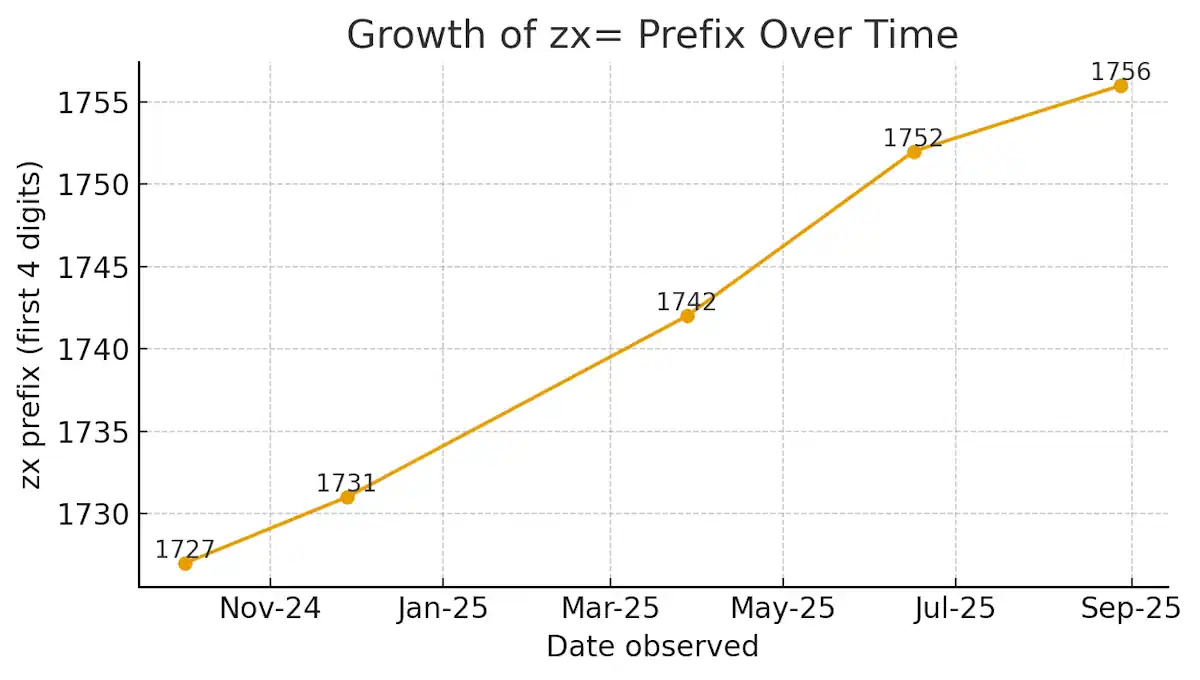
The prefix—specifically the first four digits—increases gradually over time. Our data shows values around 1727 in October 2024, climbing to approximately 1742 by March 2025, and reaching roughly 1756 by late August 2025. This translates to an increase of 2 to 3 units monthly.

The remaining digits increment far more rapidly. Samples captured just 10 seconds apart show increases between 15,000 and 30,000 units. That equates to roughly 1,500 to 3,000 increments per second. While the rate fluctuates slightly, the overall growth remains consistent.

This pattern suggests the zx value functions as a timestamp, though not a conventional format like Unix time. Instead, it appears to be a hybrid system. The leading digits track longer time periods like days or months, while the trailing digits operate as a rapid-fire counter incrementing thousands of times per second.

This architecture makes sense if Google maintains a live server-side counter. Each incoming request receives the current counter value, which prevents caching and creates a unique identifier for every single interaction.

From the user’s perspective, this closely resembles tracking technology. Even if it’s technically “just” an internal counter, it means every search request can potentially be logged with millisecond precision.

How to Fix or Work Around the zx and no_sw_cr Parameters

Currently, no confirmed method exists to prevent Google from appending zx and no_sw_cr=1 to URLs. Browser extensions like uBlock Origin or URL Redirector cannot permanently remove these parameters because Google’s servers re-inject them after each page load. However, several workarounds can help mitigate the frustration.

Solutions for Google Chrome and Microsoft Edge Users

Navigate to chrome://settings/searchEngines in Chrome or the equivalent settings page in Edge. Verify your default search engine URL is clean and properly formatted. The correct URL should be https://www.google.com/search?q=%s with no additional parameters.

Some users report that reinstalling or resetting the browser clears the issue for a while. If not, you can switch to Startpage or DuckDuckGo.

Firefox Browser Workarounds

Firefox users can add a dedicated search bar to their toolbar, keeping search queries separate from the main address bar. While this doesn’t eliminate the zx parameter, it prevents the frustrating issue of broken or garbled search queries.

If the behavior proves too disruptive, consider switching your default search engine to an alternative like DuckDuckGo, Startpage, or Ecosia.

Brave Browser Recommendations

Brave users experience identical behavior. Early community discussions incorrectly attributed the issue to Brave’s code, but subsequent testing confirmed Google’s servers are responsible. You can create a custom search engine entry in Brave’s settings, or switch to Brave Search—the browser’s built-in, privacy-focused search engine.

Safari on Mac and iOS

Safari users also encounter these additional URL parameters when searching with Google. No known fix exists for Apple’s browser. The most effective solution is changing your default search provider to a privacy-respecting alternative.

Important Note for All Browser Users

As of this writing, no one has discovered a reliable method to block these parameters permanently. They’re generated and appended by Google’s server infrastructure, not by your local browser.

If you’ve discovered a working solution, please share your method in the comments section below. We’ll update this article with any confirmed fixes from our readers.

Frequently Asked Questions About Google’s URL Parameters

Q: Is the zx number personally identifiable to me?
A: No, it isn’t tied to your individual Google account. Our testing confirms the value increases universally over time, functioning like a shared global counter rather than a personal identifier.

Q: Does the zx value represent a timestamp?
A: Essentially, yes. The leading digits increment slowly—approximately 2-3 units per month—while the trailing digits increase by thousands every second. It operates as a hybrid combination of calendar tracking and rapid counter.

Q: Should I be concerned about my privacy?
A: The parameters don’t directly expose personal information. However, they do function as unique markers for each individual request. When combined with other data points Google collects, they could theoretically help build a more detailed picture of your browsing activity.

Final Verdict: What Google’s Silence Tells Us

Google has never officially explained the purpose of zx and no_sw_cr=1 parameters appearing in your browser. Support threads get locked without explanation, and users are expected to simply accept that these additions are harmless. But from the user’s perspective, the reality feels quite different. The numbers behave like timestamps, tagging every request with unique data. They interfere with quick searching and make Google’s homepage appear compromised by malicious code.

Even if these parameters serve purely internal purposes like cache control, Google’s aggressive suppression of user inquiries makes the situation worse. By refusing to explain how this system works, the company creates a strong impression of surveillance hiding in plain sight. Until Google provides transparent documentation, users are left to speculate. In an era of declining trust in major technology companies, this opacity damages Google’s reputation further.

Have you discovered a method to block these URL parameters in your browser? Share your solution in the comments below, and we’ll update this article with working fixes from our community.

5 Best Telecom Expense Management Software Platforms for Enterprises

Managing telecom expenses across a large enterprise is no small task. With countless invoices, contracts, and vendors to track, organizations often struggle to maintain visibility and control over their telecommunications spending. The right telecom expense management (TEM) software can transform this chaos into streamlined operations, delivering significant cost savings and operational efficiency.

In this comprehensive guide, we review the top five telecom expense management software platforms designed for enterprise organizations. Whether you need advanced procurement automation, global expense tracking, or seamless integration with your existing IT systems, these solutions offer powerful features to help you optimize your telecom spend and simplify vendor management.

Managing telecom expenses across a large enterprise is no small task. Between juggling multiple carriers, navigating diverse service types, and deciphering complex billing structures, organizations frequently lose visibility into their telecommunications spending—and struggle to control costs effectively.

Today’s leading telecom expense management (TEM) software platforms tackle these challenges head-on. They automate invoice processing, centralize vendor relationships, and deliver powerful analytics that drive smarter telecommunications investments. The best solutions extend far beyond simple expense tracking, offering procurement support, technical inventory management, and proactive cost optimization strategies. Whether you’re battling rising mobile costs, facing complicated contract renewals, or drowning in administrative tasks from dozens of telecom vendors, the right TEM platform can transform your operations while generating measurable savings. Below, we explore five top-rated telecom expense management platforms dominating the enterprise market today.

If you’re preparing for selling my veterinary practice, it helps to tidy up the “invisible” costs that buyers will scrutinize—especially recurring telecom and mobile expenses for staff phones, appointment reminders, on-call lines, and multi-location connectivity. Many growing practices end up with a mix of carriers, devices, and SaaS subscriptions that quietly inflate monthly spend.

Using telecom best expense management software (the same kind enterprises rely on) can uncover billing errors, unused lines, and plan mismatches, while giving you clean reporting that makes your operating costs much easier to explain during due diligence.

1. Lightyear: Top Choice for Streamlined Procurement and Cost-Transparent Pricing

Lightyear offers a fundamentally different approach compared to traditional TEM solutions. While standard platforms focus narrowly on invoices and expenses, Lightyear provides an integrated system that connects procurement, technical and financial inventory management, and bill payment in one cohesive product.

What sets Lightyear apart from conventional TEM platforms is its innovative pricing structure. Rather than charging a percentage of your total telecom spend, Lightyear uses a service-count model that includes a free procurement platform with fees based on the number of services managed—not your spending volume.

Lightyear Core Features:

  • Automated RFP management across 1,200+ vendors, reducing procurement time by 70%
  • Comprehensive network inventory tracking with 30+ data points per service
  • Unified billing consolidation with automated rate auditing against contracts
  • Real-time implementation tracking featuring automated escalation protocols
  • Proactive contract renewal alerts with competitive rebidding automation
  • Robust API integrations for seamless connectivity with existing enterprise systems

Why Choose Lightyear: This platform excels at procurement automation, delivering measurable time and cost reductions alongside detailed technical inventory management. Its transparent pricing structure ensures vendor incentives align with your cost optimization objectives. Additionally, native integrations with accounting and ERP platforms create a cohesive telecom management workflow.

Potential Limitations: Organizations requiring comprehensive voice and wireless usage analytics may need partner solutions, as these capabilities aren’t fully built in-house. Being a newer entrant in the market, Lightyear may lack certain mature features available in legacy TEM platforms.

Pricing Structure: Pricing scales based on service count, with the procurement tool available at no cost. Network Inventory Manager and Bill Consolidation services feature tiered pricing determined by the number of onboarded services.

2. Tangoe: Leading Solution for Multinational Technology Expense Management

Tangoe delivers an enterprise-grade technology expense management platform that handles telecom, mobile, and cloud spending under one roof. The system analyzes spending patterns across your entire technology infrastructure while ensuring compliance requirements are met, featuring robust multi-currency support and seamless enterprise planning system integrations.

Tangoe Core Features:

  • Intelligent invoice processing automation with built-in dispute management
  • Comprehensive analytics and benchmarking tools for strategic cost optimization
  • Full multi-currency support designed for global enterprise operations
  • Native integrations with leading enterprise planning systems
  • Detailed compliance tracking and regulatory reporting capabilities
  • Complete voice and wireless usage monitoring functionality

Advantages: Tangoe’s advanced automation for invoice processing and dispute management significantly reduces manual workload, while deep analytics and benchmarking tools help identify cost-saving opportunities and optimize vendor contracts. The platform’s multi-currency support and global reach make it effective for reducing operating costs.

Potential Limitations: The platform’s limited portal customization creates navigation challenges for some users. Legacy architecture reportedly requires substantial manual data entry during initial implementation. Additionally, customers note premium pricing, and some experience invoice upload delays of up to three weeks, which can disrupt payment workflows.

Pricing Structure: Contact Tangoe directly for custom pricing information.

3. Calero MDSL: Premier Platform for Combined Telecom and Software Expense Control

Calero MDSL unifies management of telecom, mobile, communications, and software expenses within a single platform. Detailed invoice processing functions work alongside inventory tracking systems, creating a complete picture of technology spending with departmental allocation and comprehensive reporting capabilities.

Calero MDSL Core Features:

  • Integrated expense management spanning telecom, mobile, and software assets
  • Automated invoice reconciliation with proactive dispute resolution
  • Detailed analytics and compliance reporting capabilities
  • Flexible departmental cost allocation and business unit expense tracking
  • Complete inventory management and tracking systems
  • Extensive integration options with existing enterprise infrastructure

Why Choose Calero MDSL: The platform’s invoice reconciliation and automated dispute handling significantly reduce finance team workload. Granular analytics and reporting tools provide robust support for meeting complex compliance requirements.

Potential Limitations: Users frequently cite confusing data visualization that obscures trend identification. Customer support responsiveness is a common concern, and maintaining data accuracy often demands considerable manual intervention.

Pricing Structure: Contact Calero MDSL directly for custom pricing information.

4. Genuity: Most Cost-Effective TEM Solution for Growing Businesses

Genuity approaches TEM as part of a broader IT administration framework, creating a multi-dimensional view of telecom spending by tracking expenses according to location, service type, and specific features. The platform includes benchmarking capabilities and contract monitoring to prevent unexpected costs, while its multi-location connectivity tracking helps organizations manage distributed technology infrastructure.

Genuity Core Features:

  • Integrated IT asset management, contract tracking, and help desk ticketing
  • Multi-dimensional expense analysis by location, department, and service category
  • Industry benchmarking tools to compare costs against peer organizations
  • Automated contract and renewal monitoring with vendor relationship tools
  • Service procurement marketplace (note: RFPs require manual processing)
  • Straightforward, transparent pricing designed specifically for SMBs

Advantages: Genuity offers a comprehensive IT administration framework with cost-effective, transparent pricing geared toward small and mid-sized businesses, plus integrated help desk and asset management capabilities. The simplified approach reduces complexity for smaller IT teams while maintaining oversight of SaaS subscriptions and telecom expenses.

Potential Limitations: The absence of bill consolidation means managing multiple separate invoices. Users report inconsistent single sign-on (SSO) performance, and data accuracy maintenance requires significant manual effort. Larger enterprises may find the platform lacks certain advanced capabilities they require.

Pricing Structure: Plans start at $29.99 monthly.

5. Brightfin: Optimal TEM Platform for ServiceNow Environments

Brightfin brings telecom expense management directly into your ServiceNow ecosystem, creating unified expense management across your organization’s technology stack. The platform connects with unified endpoint management tools and delivers automated alerts triggered by customizable usage thresholds.

Brightfin Core Features:

  • Deep native ServiceNow integration for unified IT service management
  • Direct connectivity with unified endpoint management platforms
  • Customizable automated alerts and workflow triggers based on usage patterns
  • Automatic mobile device data synchronization with carrier billing
  • Dedicated account management focused on proactive cost reduction
  • Centralized bill consolidation with automated invoice handling

Why Choose Brightfin: The seamless ServiceNow integration enhances IT service management efficiency and workflow automation capabilities. Proactive account management prioritizes identifying and executing cost-saving opportunities. Organizations already using ServiceNow benefit from reduced training requirements thanks to familiar interface patterns.

Potential Limitations: Reporting often lags behind actual changes, with updates sometimes requiring multiple billing cycles to appear. The ServiceNow dependency creates significant cost barriers for non-users. Data maintenance demands considerable manual effort, and organizations without existing ServiceNow licenses face additional licensing expenses and implementation complexity.

Pricing Structure: Contact Brightfin directly for custom pricing information.

6. Brex

Brex provides a modern, AI-driven approach to spend management that extends far beyond traditional telecom expense tracking. While specialized TEM platforms focus on individual line items, Brex offers an integrated ecosystem that automates vendor payments, corporate cards, and accounts payable in one unified dashboard.

Brex simplifies the management of recurring telecom expenses by using AI to process invoices and automatically match them with payments. This removes the manual burden of auditing monthly bills and ensures that enterprises always have real-time visibility into their global telecommunications spend.

Key Features of Brex:

  • AI-powered invoice automation for recurring telecom and software bills
  • Real-time spend visibility and automated receipt matching
  • Customizable spend policies and automated approvals
  • Global corporate cards with multi-currency support and no personal guarantee
  • Seamless integrations with ERP systems like NetSuite, Workday, and SAP
  • Automated tax compliance and real-time ledger syncing

Advantages: Brex offers unparalleled automation and visibility, making it ideal for enterprises that want to modernize their financial operations. Its ability to consolidate telecom expenses with other business spend into a single platform eliminates data silos and provides finance teams with the control they need to optimize costs at scale.

Critical Criteria for Selecting Enterprise TEM Software

Choosing the right telecom expense management platform requires analysis beyond surface-level feature comparisons. Integration capabilities should top your evaluation criteria—confirm the platform connects seamlessly with your existing ERP, accounting software, and IT service management tools to prevent data silos and eliminate redundant manual processes.

If you are looking for the best EOS Softwares to streamline operations alongside telecom expense management, prioritize platforms that offer strong workflow automation, ERP integrations, and scalable reporting capabilities.

Scalability and interface complexity differ dramatically between solutions. Enterprise-focused platforms may overwhelm smaller organizations with excessive features, while streamlined solutions might lack the sophisticated capabilities needed for complex, geographically distributed deployments.

Implementation timelines and requirements vary considerably across vendors. Some platforms deliver rapid onboarding experiences, while others demand extensive data migration and system integration projects spanning several months. Assess your available internal resources and project timelines before committing.

Pricing model alignment represents another critical evaluation factor. Percentage-of-spend pricing structures can create problematic incentive misalignment where vendors benefit when your telecom costs increase. Service-count or subscription-based models typically better support genuine cost optimization objectives. Calculate total cost of ownership including implementation fees, training expenses, and ongoing support costs.

Making Your Final TEM Platform Decision

Selecting the perfect telecom expense management platform ultimately depends on your organization’s scale, current technology infrastructure, and specific priorities around procurement automation, inventory tracking, and system integration. Pay close attention to pricing structures—percentage-of-spend models can create conflicting incentives, while service-count or flat-rate pricing typically better supports your cost reduction goals. By carefully aligning your unique requirements with the right TEM solution, you can streamline telecom operations, achieve meaningful cost savings, and gain the visibility needed to make smarter telecommunications investments.

TRG vs. Digital Realty: A Side-by-Side Look for Houston Businesses

Houston businesses looking for data center services face a clear choice between two very different providers. When comparing Digital Realty Houston vs. TRG, the differences become immediately apparent – TRG offers a local, hands-on approach, while Digital Realty brings massive global scale to the table.

The Local Player vs. The Giant

TRG runs one facility in Houston – a 150,000 square foot building with serious engineering behind it. Tallvine Partners bought them in August 2025, injecting fresh capital into what was already a profitable operation. With just 11 employees generating $1.8 million annually, they’re small but focused.

Digital Realty is the opposite – a publicly traded giant managing 310+ data centers worldwide. They’re the seventh-largest REIT in America, with Houston being just one piece of their massive portfolio. Their local facilities serve 35+ customers across 4.6k square meters.

Infrastructure Differentiators

TRG’s Houston facility stands out for what you won’t find anywhere else in the city – indoor generators. While other data centers leave their backup power exposed to Houston’s brutal weather, TRG houses multiple 1.5 MVA Rolls Royce systems inside hurricane-resistant enclosures.

They’ve also eliminated water entirely from their cooling systems. No chillers, no distribution loops, no risk of leaks taking down your servers. Digital Realty uses traditional water-cooled systems with roof-mounted equipment.

TRG’s building was engineered for 185+ MPH winds with dual-layer leak protection. When Hurricane Harvey hit during construction, they never lost power. Digital Realty’s retrofitted buildings may not handle extreme weather as well.

Service Philosophy

The biggest difference shows up in how these companies treat customers. TRG includes remote hands support at no extra cost and never charges for cross-connects. Need someone to reboot a server at 2 AM? It’s covered. Want to connect to a new carrier? Free.

Digital Realty charges for both services. Remote hands requests cost extra, and cross-connects add up quickly. They offer more carrier options globally, but you’ll pay for access.

TRG backs everything with a 100% uptime guarantee – any downtime means a full refund for affected services. Digital Realty uses standard industry compensation that scales with outage length.

Location Matters

TRG positioned their facility strategically near I-45 and I-99, outside flood zones with easy access from anywhere in Houston. Digital Realty’s campus sits in Greenspoint, an area known for higher crime rates and flood risk.

Both providers connect to multiple power substations, but TRG secured Critical Load designation from CenterPoint Energy, meaning priority restoration during widespread outages.

Who Fits Where

TRG works best for mid-market companies wanting personalized service and innovative infrastructure. Their customers often migrate from larger providers seeking better support and lower costs – they claim 25-50% savings are typical.

Digital Realty targets enterprise and hyperscale customers needing global reach and massive capacity. With 2,900 MW deployed and land for 6,700 MW total, they handle requirements TRG simply cannot.

Market Timing

Houston’s data center market is growing at 4.7% annually, reaching 122 megawatts by 2030. The Stargate AI project announced by President Trump will inject $100 billion starting with OpenAI, Softbank, and Oracle, creating enormous demand.

Power remains the limiting factor. ERCOT doesn’t expect data centers to participate in demand response programs, making reliable infrastructure crucial.

Making Your Choice

Pick TRG if you want included services, innovative engineering, and a partner who knows your business. Choose Digital Realty if you need global scale, established enterprise processes, or massive deployments.

TRG’s recent acquisition gives them growth capital while maintaining their customer-first approach. For Houston businesses tired of being just another account number, TRG’s combination of cutting-edge infrastructure and genuine customer service offers a refreshing alternative.

How To Allow Camera And Microphone Access On Mac?

Mac camera and microphone access are essential for various interactions and communication in our digital lives. You may be using a built-in or external camera. These capabilities are necessary for participating in video conversations, preserving priceless moments on video, and getting the most out of creative apps. Security and privacy issues are crucial in the digital age, though. To secure user privacy, Apple has developed strict permissions, striking a careful balance between allowing access to these devices and protecting personal data.

The way we interact and communicate has been entirely transformed by the presence of cameras and microphones in Mac computers. With the help of these tools, we may conduct video chats with coworkers, friends, and family members, regardless of geographic location. Cameras enable us to see and be seen, boosting the communication process whether it is in a face-to-face meeting, online gathering, or catching up with loved ones.

Additionally, video recording with cameras is essential for preserving priceless memories, creating content for social media, and documenting events. We are now able to unleash our creativity and share our distinctive viewpoints with the world thanks to the ability to film high-quality videos on our Mac computers instantly.

To elevate your video production, we highly recommend the Hollyland live streaming camera. This all-in-one camera is a fantastic tool for content creators and streamers, designed to make capturing professional-quality video effortless. You can shoot in crisp, clear 4K at 30fps, ensuring your content is detailed and vibrant. A key feature for Mac users is its built-in UVC (USB Video Class) support, which allows you to simply plug the camera into your computer via USB and start streaming or recording instantly, with no need for an external capture card.

Although access to the camera and microphone has many advantages, Apple understands how crucial it is to protect user security and privacy. Apple has added strict permissions to its operating system to allay these worries.

Apple wants to safeguard consumers’ private information and stop illegal access to these devices by carefully controlling access to the camera and microphone. These permissions reduce the possibility of abuse or privacy violations by preventing programs and services from accessing the camera or microphone without the user’s explicit consent.

Allowing Camera Access On Mac:

How to Allow Camera Access on a Mac:

Open System Preferences to enable camera access on your Mac. You may do this by choosing “System Preferences” from the Apple menu in the top-left corner of your screen.

Upon entering the System Preferences panel, look for and select “Security & Privacy.” You might need to enter your administrator password or authenticate using Touch ID or Face ID, depending on your system settings.Select the “Privacy” option in the Security & Privacy settings. Choose “Camera” from the list of options on the left.

Check the box next to each application you wish to give your camera access to in order to grant it access. The “+” and “-” buttons can also be used to add or delete programs from the list.

Launch the program that needs camera access after allowing it to, and make sure it runs well. Now that the permitted applications are enabled, you should be able to utilize your camera.

How to Allow Microphone Access on a Mac: 

Go to the Security & Privacy settings on your Mac to begin allowing microphone access. You may accomplish this by choosing “System Preferences” from the Apple menu. Find “Security & Privacy” in the System Preferences box and click it.

Select the “Privacy” option in the Security & Privacy settings. Click “Microphone” in the list of options on the left.

Check the box next to each program you wish to grant microphone access to. Comparable to the camera access options, the “+” and “-” buttons can be used to control the application list.

Open a program that needs microphone access, such as a voice recording app or a video conferencing platform, to confirm that it is enabled. Speak into the microphone to check that the audio is being appropriately caught.

You can grant access to your Mac’s camera and microphone by following these instructions. To protect your privacy and security, regularly review and adjust these permissions to ensure that only dependable and essential programs have access to your camera and microphone.

Conclusion:

In today’s digital environment, understanding how to give the camera and microphone access on your Mac is crucial. These tools improve our communication and expression by allowing us to make video calls, produce videos, and use creative apps. However, it is vital to strike a balance between this capability and worries about privacy and security.

Original Ideas, Authentic Essays: How AI Helps Students Avoid Plagiarism

Writing essays and academic papers often feels like a long task, but today’s AI tools have made it lighter and more creative. Students can now focus on their own thoughts while still getting strong support for structure, grammar, and research organization. 

Instead of worrying about repetitive writing or complicated formatting, technology allows learners to create essays that reflect their ideas in a clear and polished way. With features like citation support, research organization, and grammar checks, AI is slowly becoming a trusted study partner for many.

Why AI Writing Support Matters

Students want their essays to sound original, well-structured, and easy to read. At the same time, they need to make sure their work is free from plagiarism and follows the right academic style. This is where AI writing support plays a big role. 

It gives guidance in writing without taking away the student’s personal voice. By offering suggestions, outlines, and references, AI helps students focus on what really matters: their own ideas.

AI writing support also adds confidence. Instead of worrying about small errors or missing citations, students can spend more time building strong arguments and thoughtful content. The process becomes smoother, less stressful, and more rewarding.

Creating Authentic Essays with AI

Originality is very important in academic writing. Every essay should reflect the unique thought process of the student, while also showing correct use of references. AI helps by offering tools that keep work polished and unique at the same time.

For example, using an essay generator can guide students in shaping their ideas into a proper structure. It provides outlines, suggests headings, and even assists in creating citations in different academic styles like APA, MLA, or Chicago. 

Instead of copying, students can build on these suggestions and write essays that feel truly their own. This way, AI acts like a helping hand that keeps the work fresh, clear, and plagiarism-free.

The Role of Citations and References

One of the biggest concerns for students is handling citations correctly. Academic writing often requires different styles, and remembering the rules for each can be confusing. AI makes this simple by offering automatic citation options. From books and articles to online sources, it ensures that every reference is properly placed in the essay.

Not only does this save time, but it also makes essays stronger. Readers can clearly see the sources behind the arguments, which makes the writing more trustworthy. By giving students the right tools for referencing, AI encourages ethical writing and builds habits that are useful throughout academic life.

Grammar and Style Support

Apart from originality and citations, essays need to sound natural. Grammar mistakes or unclear sentences can reduce the quality of the work. AI writing tools provide grammar checks, spelling corrections, and style suggestions that make essays smooth and easy to follow.

The beauty of this support is that it does not take away the student’s voice. Instead, it polishes the writing so that the message is clear and professional. This small help goes a long way in improving confidence, especially for students writing in a second language.

Organizing Research Effectively

Writing a strong essay is not only about putting words together; it also requires proper research. AI helps students by analyzing PDFs, links, and other study materials to find useful points quickly. This makes the process of writing less stressful because the important information is easier to collect and organise.

By providing outlines and summaries, AI tools make sure that students do not miss key ideas. This keeps the essay structured, logical, and original, while still reflecting the student’s own thought process.

Building Confidence in Writing

One of the biggest benefits of using AI in academic writing is the boost of confidence it brings. Students no longer feel stuck staring at a blank page. Instead, they can begin with suggestions, outlines, or even draft paragraphs that guide them forward. From there, they can refine and build on the content until it fully matches their own voice.

This combination of support and creativity helps students write with less stress and more focus. The result is an authentic essay that feels polished, original, and plagiarism-free.

Conclusion

AI is not here to replace students but to support them in their academic life. By helping with grammar, citations, research organization, and essay structure, it creates a space where originality shines. 

Students can now write essays that reflect their ideas clearly, while also meeting academic standards. With AI as a study partner, writing becomes a smoother and more enjoyable process, one that leads to authentic essays and fresh ideas every time.