Have you noticed a strange string of characters appearing in your Google URL lately? If you’ve seen something like ?zx=174295952637117&no_sw_cr=1 pop up when visiting google.com, you’re not alone. Thousands of users across multiple browsers and devices have reported this mysterious URL change, sparking concerns about malware, secret tracking, and broken search functionality.
The appearance of random-looking numbers in your browser’s address bar can be alarming. Many users initially suspect their computer has been compromised by malware or that Google is implementing a new form of covert surveillance. In this comprehensive guide, we’ll break down exactly what these URL parameters mean, examine the evidence from our testing, and provide actionable solutions you can try today.
Here is what you need. Click here for a guide on how to update your browser to avoid the annoying code:
Google has remained notably silent on this issue. When users raise questions in official Google support forums, moderators frequently lock threads and dismiss them as “non-issues.” This lack of transparency has only fueled speculation that something significant is being concealed from the public.
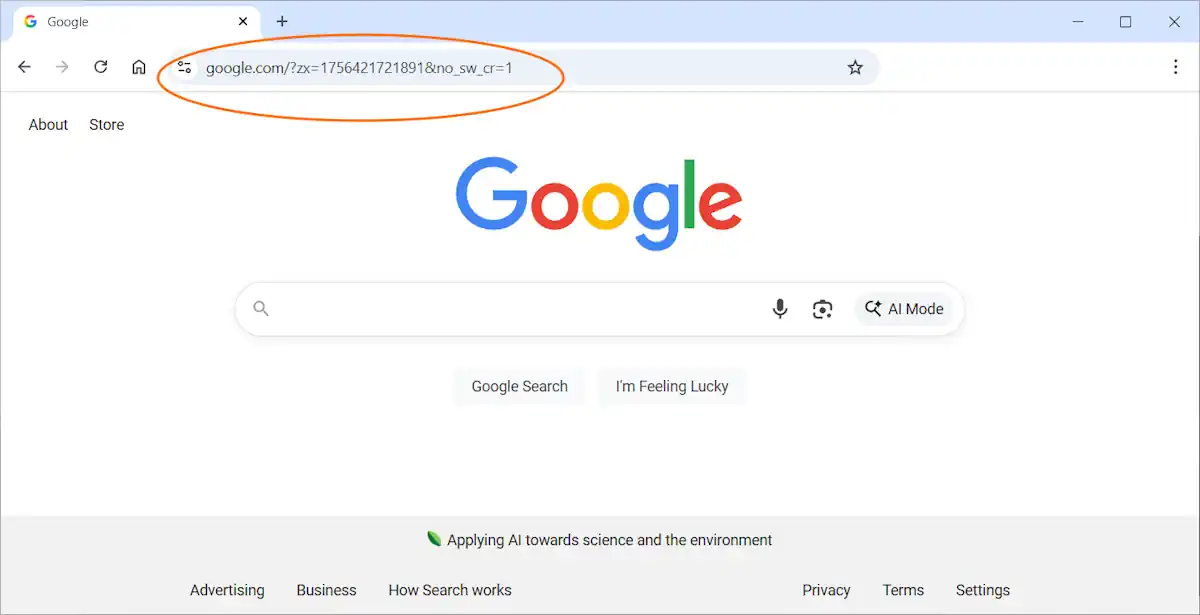
Below, we’ll dive deep into what these mysterious parameters actually do, analyze the patterns we’ve discovered through extensive testing, and outline practical steps you can take—even though no perfect solution currently exists.
Understanding the Google URL Parameters: What Do They Actually Mean?
Decoding the zx= Parameter
The value following zx= consists of a lengthy number, typically between 13 and 15 digits. This number changes with every page load, which initially makes it appear completely random. However, our analysis reveals a clear pattern: the number consistently increases over time. This behavior indicates it functions as either a counter or timestamp mechanism. While not directly linked to your Google account, it effectively assigns a unique identifier to each individual request.
What Does no_sw_cr=1 Actually Do?
The second part, `no_sw_cr=1`, has been known since 2019. A German SEO site found it when testing mobile search. The value tells Google to ignore cached results and show a fresh page. For search testers this is useful. For normal users, it only looks strange and adds confusion.

Why These Parameters Trigger Malware and Tracking Concerns
For everyday internet users, these cryptic codes create immediate alarm. A URL populated with seemingly random digits feels inherently unsafe and resembles the calling card of malicious software that has infected the browser.
Beyond the visual concern, these parameters actively disrupt normal search behavior. When users type search queries directly into the address bar, their text gets jumbled together with the existing parameter code. This frequently results in failed searches or garbled results. Removing the unwanted characters requires tedious backspacing or precise mouse selection—a frustrating experience for anyone trying to search quickly.
Google’s response makes the problem worse. By closing threads without clear answers, the company looks like it is hiding something. This silence fits with the common fear of a Big Brother style of surveillance.
Even if these values aren’t directly connected to advertising profiles or personal identifiers, they exhibit classic tracking behavior. Every single request receives a unique, incrementing number—enough to raise legitimate privacy concerns among security-conscious users.
What Users Are Reporting Across Forums and Communities
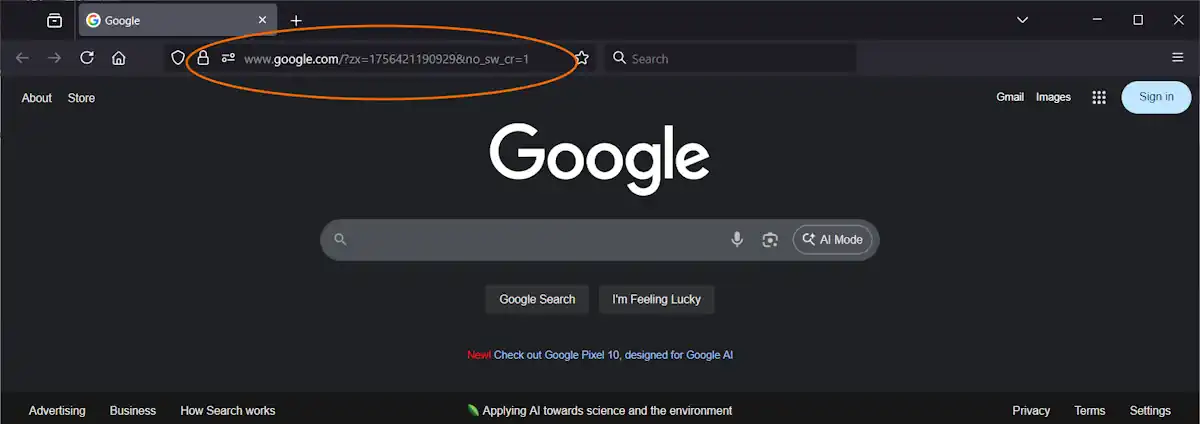
This issue has sparked widespread discussion across numerous online communities. Reddit threads document reports from users on Chrome, Firefox, and Edge browsers. The problem affects Android devices, Linux systems, and Mac computers equally. Using a VPN provides no protection. Popular privacy extensions including uBlock Origin and Privacy Badger fail to prevent the parameters from appearing.
Within the Brave Community forums, initial theories blamed the Brave browser itself. However, further investigation by community members confirmed Google’s servers were the source, not Brave’s code.
Official Google Chrome Help Community threads addressing this topic are consistently marked as “informational only.” Comments get locked, and Google provides zero technical documentation explaining the behavior.
The evidence is clear: this phenomenon isn’t browser-specific or device-dependent. These parameters originate directly from Google’s infrastructure.
Our Analysis: Tracking the zx Number Over Time
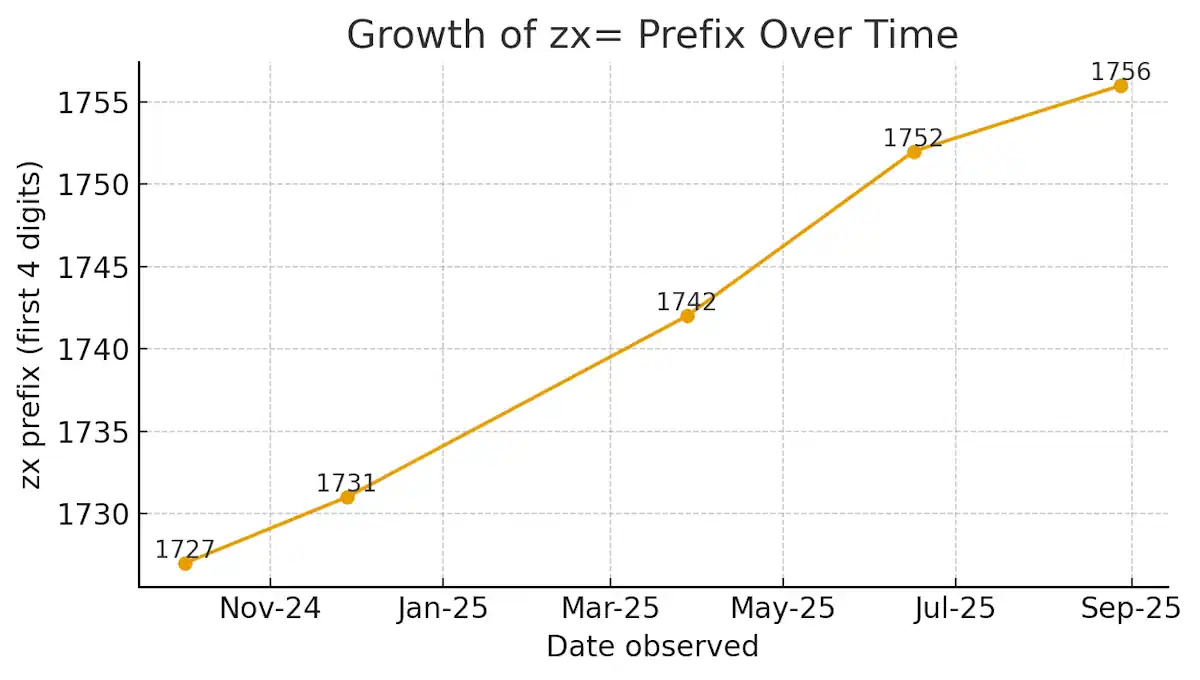
Initial observation suggests the zx value is purely random. However, collecting samples over extended periods reveals unmistakable patterns. The number never decreases—it maintains a consistent upward trajectory across days, weeks, and months.
The prefix—specifically the first four digits—increases gradually over time. Our data shows values around 1727 in October 2024, climbing to approximately 1742 by March 2025, and reaching roughly 1756 by late August 2025. This translates to an increase of 2 to 3 units monthly.
The remaining digits increment far more rapidly. Samples captured just 10 seconds apart show increases between 15,000 and 30,000 units. That equates to roughly 1,500 to 3,000 increments per second. While the rate fluctuates slightly, the overall growth remains consistent.
This pattern suggests the zx value functions as a timestamp, though not a conventional format like Unix time. Instead, it appears to be a hybrid system. The leading digits track longer time periods like days or months, while the trailing digits operate as a rapid-fire counter incrementing thousands of times per second.
This architecture makes sense if Google maintains a live server-side counter. Each incoming request receives the current counter value, which prevents caching and creates a unique identifier for every single interaction.
From the user’s perspective, this closely resembles tracking technology. Even if it’s technically “just” an internal counter, it means every search request can potentially be logged with millisecond precision.
How to Fix or Work Around the zx and no_sw_cr Parameters
Currently, no confirmed method exists to prevent Google from appending zx and no_sw_cr=1 to URLs. Browser extensions like uBlock Origin or URL Redirector cannot permanently remove these parameters because Google’s servers re-inject them after each page load. However, several workarounds can help mitigate the frustration.
Solutions for Google Chrome and Microsoft Edge Users
Navigate to chrome://settings/searchEngines in Chrome or the equivalent settings page in Edge. Verify your default search engine URL is clean and properly formatted. The correct URL should be https://www.google.com/search?q=%s with no additional parameters.
Some users report that reinstalling or resetting the browser clears the issue for a while. If not, you can switch to Startpage or DuckDuckGo.
Firefox Browser Workarounds
Firefox users can add a dedicated search bar to their toolbar, keeping search queries separate from the main address bar. While this doesn’t eliminate the zx parameter, it prevents the frustrating issue of broken or garbled search queries.
If the behavior proves too disruptive, consider switching your default search engine to an alternative like DuckDuckGo, Startpage, or Ecosia.
Brave Browser Recommendations
Brave users experience identical behavior. Early community discussions incorrectly attributed the issue to Brave’s code, but subsequent testing confirmed Google’s servers are responsible. You can create a custom search engine entry in Brave’s settings, or switch to Brave Search—the browser’s built-in, privacy-focused search engine.
Safari on Mac and iOS
Safari users also encounter these additional URL parameters when searching with Google. No known fix exists for Apple’s browser. The most effective solution is changing your default search provider to a privacy-respecting alternative.
Important Note for All Browser Users
As of this writing, no one has discovered a reliable method to block these parameters permanently. They’re generated and appended by Google’s server infrastructure, not by your local browser.
If you’ve discovered a working solution, please share your method in the comments section below. We’ll update this article with any confirmed fixes from our readers.
Frequently Asked Questions About Google’s URL Parameters
Q: Is the zx number personally identifiable to me?
A: No, it isn’t tied to your individual Google account. Our testing confirms the value increases universally over time, functioning like a shared global counter rather than a personal identifier.
Q: Does the zx value represent a timestamp?
A: Essentially, yes. The leading digits increment slowly—approximately 2-3 units per month—while the trailing digits increase by thousands every second. It operates as a hybrid combination of calendar tracking and rapid counter.
Q: Should I be concerned about my privacy?
A: The parameters don’t directly expose personal information. However, they do function as unique markers for each individual request. When combined with other data points Google collects, they could theoretically help build a more detailed picture of your browsing activity.

Final Verdict: What Google’s Silence Tells Us
Google has never officially explained the purpose of zx and no_sw_cr=1 parameters appearing in your browser. Support threads get locked without explanation, and users are expected to simply accept that these additions are harmless. But from the user’s perspective, the reality feels quite different. The numbers behave like timestamps, tagging every request with unique data. They interfere with quick searching and make Google’s homepage appear compromised by malicious code.
Even if these parameters serve purely internal purposes like cache control, Google’s aggressive suppression of user inquiries makes the situation worse. By refusing to explain how this system works, the company creates a strong impression of surveillance hiding in plain sight. Until Google provides transparent documentation, users are left to speculate. In an era of declining trust in major technology companies, this opacity damages Google’s reputation further.