Budgeting for Contact Center AI: Pricing Strategies for Growing Businesses

When growing businesses explore AI-based contact center pricing, understanding the true cost behind automation and intelligence is essential for sustainable growth.

Today’s call center software solutions go far beyond basic call handling—they integrate AI-driven chatbots, voice analytics, workforce optimization, and omnichannel engagement. While these innovations unlock efficiency and better customer experiences, they also introduce new layers of pricing complexity that businesses must navigate carefully.

This guide breaks down how to budget effectively for contact center AI, helping you make smarter investment decisions while maximizing value.

Why Contact Center AI Is Worth the Investment

Investing in contact center AI boosts efficiency and enhances customer experiences. AI automates repetitive tasks like answering FAQs, routing calls, and basic troubleshooting, freeing agents for complex interactions. It lowers costs, reduces handling times, and supports 24/7 service via chatbots and virtual assistants. Advanced analytics provide insights into customer behavior and agent performance, helping businesses optimize processes and personalize service. Overall, AI balances cost savings with improved customer satisfaction, enabling smarter, faster growth in a competitive digital landscape.

Understanding Contact Center AI Pricing Models

Before allocating a budget, it’s important to understand how vendors structure their pricing. Choosing the right model can significantly impact both your short-term costs and long-term scalability.

1. Per-Agent Pricing
This model charges a fixed monthly fee for each agent using the platform. It offers predictable costs, making budgeting easier for businesses with stable team sizes. However, as your team grows, expenses can increase quickly, so it’s important to align this model with your hiring plans.

2. Usage-Based Pricing
With usage-based pricing, you pay based on actual consumption—such as call minutes, chatbot interactions, or API usage. This flexible approach is ideal for businesses with fluctuating or seasonal demand, as you only pay for what you use. The downside is that costs can be less predictable during peak periods.

3. Tiered Pricing Plans
Tiered plans bundle features into different levels, typically ranging from basic to enterprise packages. As you move up tiers, you gain access to more advanced AI capabilities like speech analytics, automation, and predictive insights. This model is great for businesses that want a clear upgrade path as their needs evolve.

4. Add-On Pricing
Some vendors offer a base platform and charge extra for advanced AI features. Tools like sentiment analysis, intelligent routing, or multilingual support may come as add-ons. While this allows customization, costs can add up quickly if multiple features are required.

5. Custom Enterprise Pricing
For larger organizations with complex requirements, vendors often provide tailored pricing. This includes custom integrations, dedicated support, and scalable infrastructure. While typically more expensive, it ensures the solution is fully aligned with the company’s operational needs and long-term growth strategy.

Top 5 Contact Center AI Pricing

1. Bright Pattern

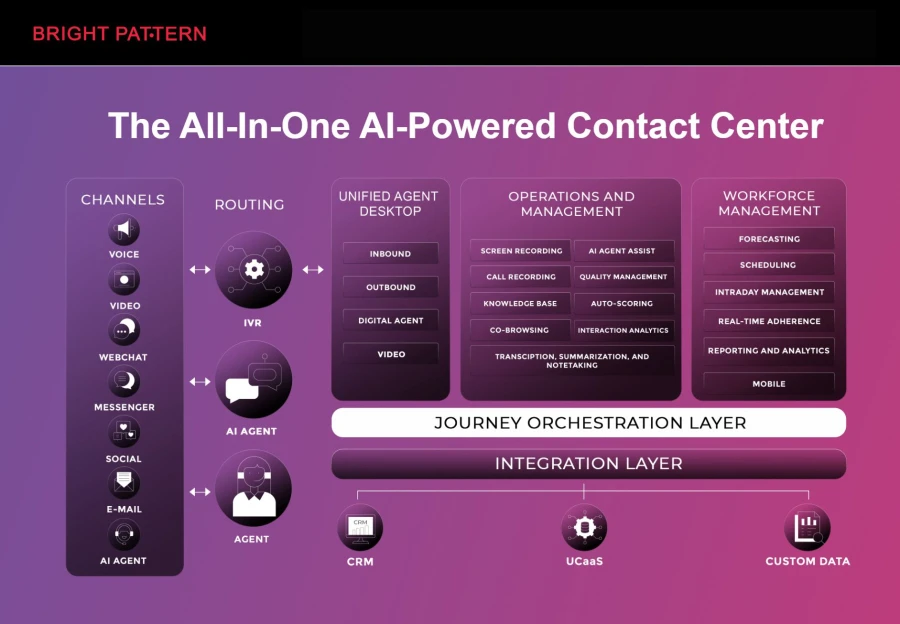
Why #1: Bright Pattern is consistently ranked as a leader in AI‑powered contact center platforms due to its unified omnichannel capabilities, strong AI automation, real‑time agent assist, and pricing flexibility across tiers. Its pricing tends to be competitive on a per‑agent basis compared with large incumbents, with entry‑level plans that can be more affordable for small and mid‑sized teams.

Pricing Highlights

  • Typical per‑user pricing: ~$40–$150 /month depending on features and support.
  • First‑year fully loaded (10 users): approx. $6,800–$28,000 including onboarding and implementation.
  • AI features included in higher tiers; customizable modules available.

Best For: Mid‑market to large enterprises that need strong native AI, omnichannel routing, and integrated analytics without stitching multiple products together.

69cae77071940.webp

2. Genesys Cloud CX

Overview: A major AI‑enabled contact center suite with native AI bots, predictive routing, agent assist, and analytics — widely used by large enterprises.

Pricing Estimates

  • Roughly $75–$155+ per agent/month depending on plan and AI capabilities.
  • Enterprise and advanced analytics tiers can push towards premium pricing.

Best For: Organizations needing deep journey orchestration, large‑scale AI automation, and advanced workforce optimization.

3. NICE CXone

Overview: Full‑featured contact center platform with AI for analytics, workforce optimization, sentiment analysis, and automation.

Pricing Estimates

  • Estimated $71–$249 per user/month depending on the suite tier and included AI features.

Best For: Enterprise environments requiring strong workforce and quality management alongside AI.

4. Talkdesk

Overview: Cloud contact center with AI add‑ons, conversational IVR, and automation — often used in mid‑to‑large teams.

Pricing Estimates

  • Entry‑level starts around $85/user/month, with AI and premium tiers reaching $145+/user/month.

Best For: Mid‑market or tech‑forward teams seeking scalable cloud contact center with optional AI bundles.

5. Five9

Overview: Enterprise‑grade contact center platform with optional AI features like intelligent virtual agents, agent assist, and analytics.

Pricing Notes

  • Requires custom quote; generally considered mid‑to‑upper end on per‑agent pricing.
  • Typical industry estimates suggest $150–$250+ per agent/month on bundled plans with advanced automation.

Best For: Larger contact operations where configurability and enterprise reliability are priorities.

Smart Tips to Budget for Contact Center AI

Planning your investment wisely helps you avoid unnecessary costs while maximizing the value of your AI solution. A well-structured budget ensures that your contact center remains efficient, scalable, and aligned with your business goals. Here are seven practical tips to guide your decision-making:

1. Assess Your Current Needs First
Start by identifying your immediate business requirements. It’s easy to be tempted by advanced AI features, but not all of them are ضروری at the beginning. Focus on core capabilities like call handling, basic automation, and reporting. This prevents overspending and allows you to build a strong foundation before expanding.

2. Forecast Interaction Volume
Understanding your expected volume of calls, chats, and emails is critical. This helps you choose the most cost-effective pricing model—whether that’s per-agent or usage-based. Accurate forecasting also prevents unexpected charges during peak seasons or rapid growth periods.

3. Prioritize High-Impact AI Features
Not all AI tools deliver the same value. Focus on features that directly improve efficiency and customer experience, such as intelligent call routing, IVR systems, and chatbots. Prioritizing these high-impact tools ensures you get measurable ROI from your investment.

4. Factor in Hidden Costs
Beyond the base subscription fee, there are often additional expenses to consider. These may include onboarding, employee training, system integrations, maintenance, and support services. Accounting for these upfront helps you create a more realistic and sustainable budget.

5. Choose Scalable Solutions
Your business will grow, and your contact center technology should grow with it. Select a platform that allows you to easily add users, channels, and features without requiring a complete system overhaul. Scalable solutions save time, money, and effort in the long run.

6. Compare Multiple Vendors
Don’t commit to the first provider you come across. Evaluate multiple vendors, compare their pricing structures, features, and support offerings. This gives you a clearer picture of what’s available in the market and helps you find the best balance between cost and value.

7. Leverage Long-Term Discounts
Many providers offer discounts for annual or multi-year contracts. If you’re confident in your chosen solution, these agreements can significantly reduce overall costs. Just be sure to review terms carefully to ensure flexibility as your needs evolve.

Hidden Costs to Watch Out For

When evaluating AI contact center pricing, base subscription fees are just the start. Additional costs can add up quickly if overlooked:

  • Integration Costs: Connecting AI to CRM, helpdesk, or ERP systems may require APIs, middleware, or consultants.
  • Customization Fees: Tailoring dashboards, automation, and reports improves efficiency but may increase costs.
  • Training Costs: Agents and managers need onboarding and upskilling to use AI effectively.
  • Data Storage & Analytics: Storing recordings, logs, and analytics can incur extra fees; advanced analytics may cost more.
  • Support & Maintenance: Premium support and ongoing system updates are often priced separately.

Being aware of these hidden costs helps you plan accurately and avoid budget surprises.

How to Maximize ROI from Your Investment

Budgeting isn’t just cutting costs—it’s ensuring every dollar delivers value. To optimize call center software, businesses need a strategic approach.

Automate Repetitive Tasks
Use AI for routine inquiries, call routing, and basic troubleshooting to reduce agent workload, speed up responses, and lower costs.

Leverage Analytics
AI analytics reveal customer behavior, agent performance, and service trends. Regular review helps refine processes, remove bottlenecks, and boost efficiency.

Optimize Workforce Management
AI-driven scheduling ensures the right number of agents at the right time, minimizing over- or understaffing and improving cost efficiency and service quality.

Enhance Customer Journeys
AI personalization based on history and preferences speeds resolution and creates meaningful experiences, increasing satisfaction.

When implemented effectively, AI lowers cost per interaction, increases productivity, and strengthens ROI.

Future Trends in Contact Center AI Pricing

As AI technology continues to evolve, pricing models are becoming more flexible and outcome-driven. Businesses should stay informed about emerging trends to remain competitive and budget effectively.

  • Pay-as-You-Go: Pay only for what you use—ideal for variable demand.
  • Bundled AI Features: Advanced tools like chatbots and speech analytics are now often included in standard packages.
  • Outcome-Based Pricing: Costs tied to results like faster handling times or higher satisfaction.
  • Competitive Market: More providers drive innovation, affordability, and flexible contracts.

Staying ahead of these trends keeps your budgeting strategy adaptable and future-proof.

Conclusion

Budgeting for AI in contact centers requires a thoughtful balance between cost, scalability, and performance. By understanding pricing models, accounting for hidden costs, and focusing on high-impact features, businesses can make smarter decisions when evaluating AI-based contact center pricing.

Ultimately, the right call center software solutions should not only align with your financial plan but also empower your business to deliver exceptional customer experiences. With the right strategy, contact center AI becomes more than just an expense—it becomes a powerful driver of growth, efficiency, and long-term success.

When Searching for Seamless Integration Embrace Microsoft Dynamics 365 Cloud Connectors?

In an era where businesses strive for efficiency, the seamless integration of various systems and applications is more important than ever. Microsoft Dynamics 365 Cloud Connectors serve as vital tools for achieving this goal, unifying disparate systems to create a streamlined workflow. By leveraging these connectors, organizations can synchronize data, automate processes, and enhance overall operational performance.

Understanding the key features and benefits of these connectors is crucial for businesses seeking to improve their integration strategies. In this article, we delve into the world of Microsoft Dynamics 365 Cloud Connectors, exploring their capabilities, overcoming common integration challenges, and reviewing real-world success stories. Below, we examine how embracing these connectors can transform a company’s digital infrastructure.

Embracing Microsoft Dynamics 365 Cloud Connectors for Seamless Integration

Cloud Connectors in Microsoft Dynamics 365 serve as crucial links between the platform and other essential business applications, enabling data to flow freely and securely. With connectors in place, businesses can expect a significant enhancement in terms of accessibility and real-time information sharing across various departments and systems.

Microsoft dyanmics 365 cloud connectors for search One of the primary advantages of using Microsoft Dynamics 365 Cloud Connectors is that they eliminate data silos, effectively breaking down barriers that compromise efficiency and insight. By streamlining communication between platforms such as CRM, ERP, and third-party applications, they support a unified business process environment.

To successfully implement Dynamics 365 Cloud Connectors, organizations should start with a clear integration strategy. This includes mapping out data flows, identifying key integration points, and ensuring compatibility and compliance with existing systems. Engaging with expert consultants or utilizing available Microsoft resources can simplify this process.

Key Features of Dynamics 365 Cloud Connectors That Enhance Integration

The ease of customization and configuration stands out as a major feature of Dynamics 365 Cloud Connectors. Users can tailor integration processes to meet specific business needs, which can range from simple data transfer to complex, multi-step workflows.

Moreover, these connectors support a wide array of data formats and communication protocols, ensuring that they can seamlessly interact with a varied technological ecosystem. The versatility of Dynamics 365 Cloud Connectors ensures that they are a fit for virtually any industry or system requirement. For a deeper understanding, looking into Microsoft’s connector reference can provide extensive insights into their multipurpose functionality.

When seeking to harness these features, it’s important for businesses to consider factors such as volume of transactions, frequency of data updates, and potential customization requirements. Regularly evaluating these aspects can help maintain optimal connector performance and ensure that integrations stay aligned with evolving business needs.

Overcoming Challenges in Integration with Dynamics 365 Cloud Connectors

Complex integration scenarios can present significant challenges, but Dynamics 365 Cloud Connectors are equipped to handle even the most demanding tasks. By leveraging their advanced capabilities, companies can overcome common hurdles such as mismatched data fields, incompatible systems, and the need for real-time data synchronization.

One such challenge is ensuring data integrity during the transfer process. Fortunately, Dynamics 365 Cloud Connectors include built-in error handling and data validation features to mitigate risks. Additionally, the connectors’ robust logging and monitoring capabilities provide transparency and control over the integration process.

Businesses facing integration difficulties should conduct a thorough analysis of their current systems and workflows, identifying gaps that could be addressed by Dynamics 365 Cloud Connectors. Additionally, keeping abreast of updates and best practices, such as those found on Microsoft’s Dynamics community forums, can be a valuable resource for navigating integration complexities.

Case Studies: Successful Integration Scenarios Using Dynamics 365 Cloud Connectors

Case studies often reveal how organizations across various sectors have optimized their operations through the strategic use of Dynamics 365 Cloud Connectors. For instance, retailers have synchronized online and in-store sales data to gain real-time inventory insights, thus enhancing customer service and streamlining supply chain management.

In the healthcare sector, providers have integrated patient management systems with Dynamics 365, leading to improved patient care coordination and operational efficiency. These success stories underscore the connectors’ ability to facilitate critical data flows and support industry-specific processes.

For businesses evaluating integration solutions, reviewing case studies and seeking insights from similar organizations can pave the way for effective implementation. Understanding the strategic approach and outcomes experienced by other users can inform decision-making and help to set realistic targets for integration projects.

Ultimately, Microsoft Dynamics 365 Cloud Connectors are powerful assets that enable organizations to build a more connected, efficient, and agile business environment. By understanding their features, overcoming integration challenges, and learning from successful case studies, companies can better position themselves to take advantage of the benefits offered by integrated systems. The key lies in recognizing the connectors’ potential and strategically incorporating them into the broader digital infrastructure.

Client Emails Are Going to Spam — Here’s How to Get Them Back

You are losing customers right now. Not because of bad service. Not because of price. Because their email to you landed in your spam folder — and you never saw it. A customer reached out. You never replied. They moved on. You chose Gmail or Zoho or Outlook for good reasons — cost, features, reliability. But the spam filter came with it. Spam filters are built for the whole internet. Your business is specific. You need a tool you can train to know the difference.

We have had this problem since 1999. A lost customer email is a service quality failure — and we felt it. For the last fifteen years, I have opened five or six mailboxes every single morning just to check the spam folders. That is maybe four or five rescued emails per week. The web-based tools are slow. Every mailbox throws up ads, 2FA prompts, and login friction. Doing six in five minutes is genuinely painful. Adding six full mailboxes to Outlook or Thunderbird makes Send/Receive unusable — you get the inbox, the sent folder, the archive, everything. No tool handles the spam folder by itself across multiple accounts.

So we built one.

The Spam Folder Is a Black Hole for Business Email

Most businesses never systematically check their spam folder. They look occasionally. Maybe after a customer complains. Maybe on a slow Friday. But occasionally is not a system. Spams are deleted automatically after 30 days. If you do not check, your customer does not get a reply.

The problem gets worse with multiple accounts. A real business often runs public l email addresses — sales, support, billing, info. Each one has its own spam folder. Each one is a place where a customer’s email can disappear. Checking all of them manually every day is a job nobody wants. So it does not get done. And the cost is invisible — you never see the customer you lost because you never saw their email.

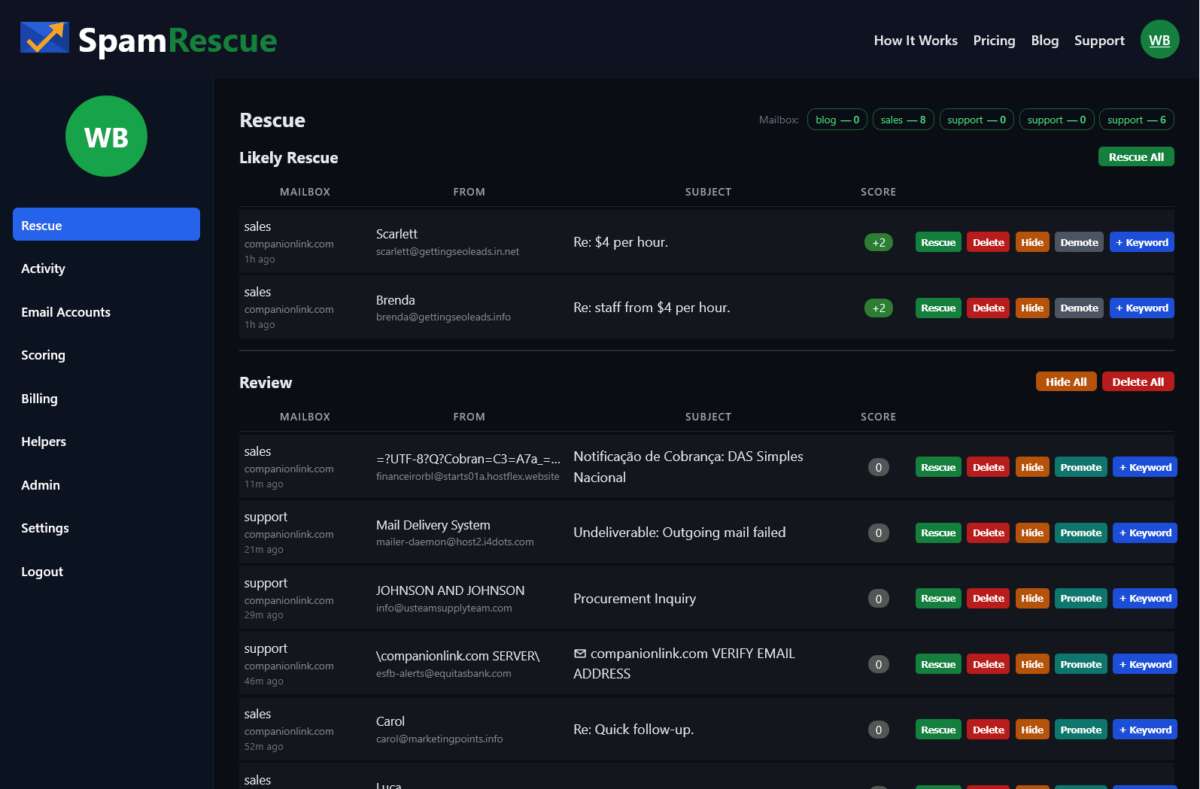
SpamRescue scans all your mailboxes and surfaces, and groups likely client emails into a single list. No logging in and out. No missing folders.

Three Businesses, One Problem, One Fix

SpamRescue works differently depending on your size. A solo consultant has one mailbox and checks it herself. A small business has three or four addresses and needs automation. One person can monitor 10 mailboxes for a team – without giving that person read access to any email. These are three different situations. The solution is the same tool.

Use Case 1: The Solo Business Owner

You run your own business. You have one email address. You check your inbox constantly — but your spam folder? Maybe once a week. Maybe less. SpamRescue automatically connects to your mailbox and scans your spam folder. It scores every message. Likely client emails rise to the top. You review in sixty seconds and rescue what matters.

The free plan covers one mailbox. No credit card. You will find something in there. Everybody does.

Use Case 2: The Small Business With Multiple Addresses

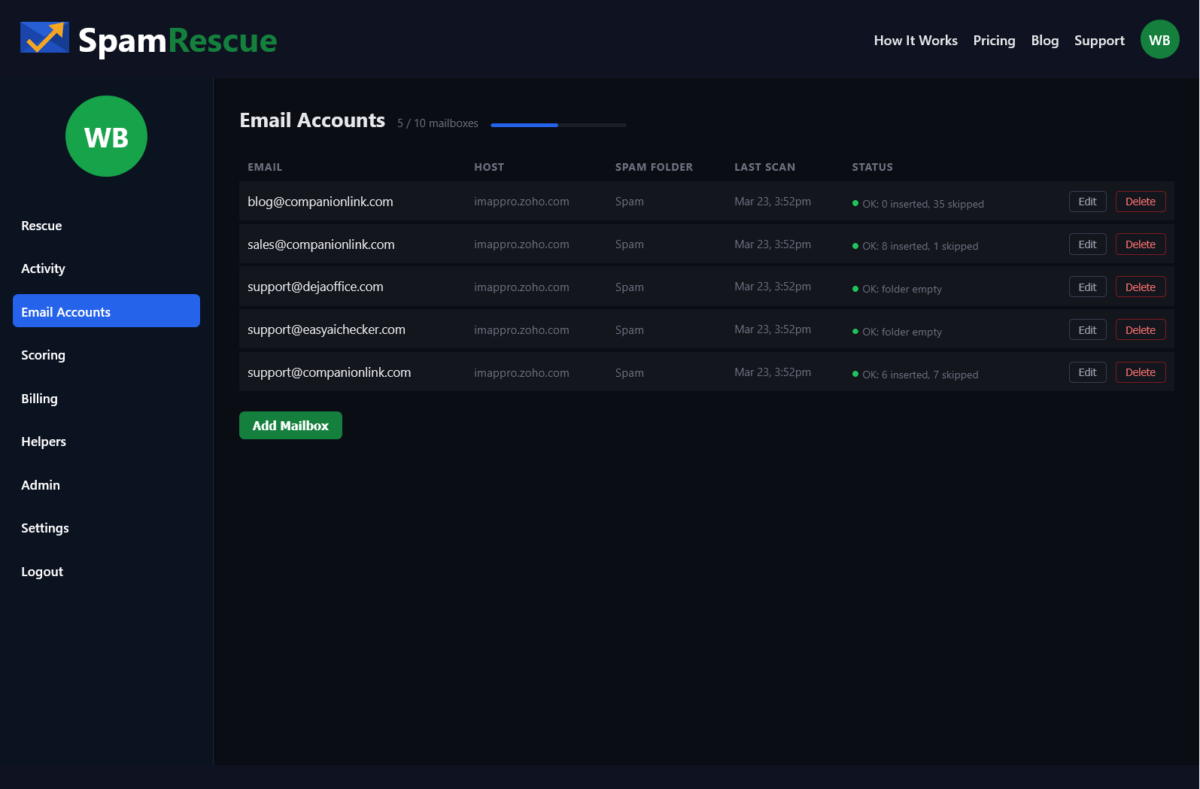
You have a sales address, a support address, maybe an info address. Three or four mailboxes. Checking each one manually every day is the job nobody does consistently. SpamRescue connects all of them. It scans twice a day automatically. Everything lands in one rescue queue — sorted by likelihood, scored, ready to act on.

The Starter plan at $19/month covers three mailboxes. One view. One decision per email. Done in minutes.

Use Case 3: The Office Manager or IT Lead

You are responsible for email across a team. Ten mailboxes. Executives who will not check their own spam. Customers slipping through every week. SpamRescue’s Professional plan lets you assign a Helper — one staff member who monitors spam across all accounts without ever seeing the inbox, the sent folder, or billing. SpamRescue does not surface the mail body – only the subject line and sender. This is real security. This is real control. This is real accountability.

Ten mailboxes, scans four times daily, ninety days of message history. At $49/month, a single saved customer pays for the account.

Frequently Asked Questions

How do I move client email from Spam to Inbox?

  1. Open your spam folder and find the email.
  2. Select it and click “Not Spam” or “Mark as legitimate.”
  3. This moves it to your inbox.

Safelisting the sender prevents future emails from landing in spam.

Why are client emails going to my spam folder?

For many B2B shops, your client may have a bad sending reptutation. That does not mean they are bad people. From a business perspective they are a legitimate client who will spend money, but they get lost or marked. Sometimes links in the email cause a problem.  Sometimes a word in the email can trigger it. Spam filters are blunt tools and often can be too aggressive.

How often should I check my spam folder?

How often do you want your customer to wait for a reply?

Email providers generally auto-delete spam after 30 days. Most businesses should check at least 3 times a week.

Can I let a staff member monitor spam without giving them full inbox access?

No standard email client separates access to the spam folder from full mailbox access. If you share credentials, you share everything. Having a staff member monitor the spam folder means they can also view, read, and screenshot the inbox and outbox contents.

Will checking my spam folder reduce the spam?

No. The volume of global spam increases every year. The goal of spam folder monitoring is not to reduce spam — it is to make sure legitimate emails do not get buried alongside it.

Is AI a good way to manage my spam folder?

Not really. Your spam filter is already using automated rules to block unwanted email. Adding an AI layer puts a broad layer checking a broad layer. An ideal system is one you can add your own keywords to – a system that reflects your particular lingo and can quickly sort customer emails to the top. Also – AI tools are not secure and may leak company info.

How do I automatically get client emails out of spam?

Most email platforms offer filter rules—you can safelist a domain or sender so their emails always reach your inbox. The challenge is knowing who to safelist before they email you. For unknown new clients, the only reliable method is regular manual review of your spam folder, combined with sender trust rules you build over time.

Stop Losing Customers to Your Spam Folder

There is a simple rule for business email. If a customer emails you, you answer. That only works if you see the email. Right now, some percentage of your customer emails are landing in a spam folder you are not watching closely enough. You do not know which ones. You do not know how many.

SpamRescue fixes that. It connects to your mailboxes, automatically scans your spam folders, and surfaces likely client emails in one place. You review in minutes. You rescue what matters. You never miss a customer again.

Start free with one mailbox — no credit card required. Try SpamRescue today.

Summary

What does a lost email cost you? Credibility? Time? Money? One lost sales query may cost more than a full year of SpamRescue service. One unanswered support email may mean a one-star review. Who has the patience to open six mailboxes every day – like I did – and scan a mind-numbing list of atrocious subject lines to find one or two real rescues?

SpamRescue is a simple service that saves you time, protects your customer reputation, and lets you focus on running your business.

Virtual Data Rooms for Teams: Secure Deal Collaboration with CRM Sync

Modern deal teams rely heavily on CRMs to manage relationships, track communication, and move opportunities through the pipeline. That approach works well for contacts and activity. It breaks down, however, when sensitive deal documents come into play. Financial models, contracts, cap tables, and diligence materials demand a level of protection and control that CRM platforms were never designed to provide. This is where data security becomes a practical concern rather than a theoretical one.

For teams preparing for fundraising, M&A, or investor diligence, secure document handling is no longer optional. A single forwarded attachment or outdated file can slow negotiations, raise investor concerns, or create compliance risk. This article explains how virtual data rooms support teams that already use CRM systems and contact sync, why they are essential for a data room for investors, and how they help businesses maintain trust, speed, and control throughout complex transactions.

Why CRM-Driven Teams Struggle with Secure Document Sharing

CRMs are excellent tools for managing relationships, sales stages, and communication history. They show who spoke to whom and when. They were never meant to be secure document repositories for high-stakes deals.

Most teams eventually hit the same friction points. Sensitive files are uploaded as attachments or shared via links, then forwarded outside the system. Access grows organically, not intentionally. Versions multiply. Follow-up questions increase because no one is certain which document is current or who has seen what.

The core issue is structural. A CRM is built for contacts and activity. A virtual data room exists to manage disclosure, risk, and trust. When teams try to force one system to do both jobs, security gaps appear quickly—especially during investor-facing processes.

What a Virtual Data Room Adds to CRM-Based Workflows

A virtual data room is a secure online workspace designed specifically for sharing confidential documents with internal teams and external stakeholders. In CRM-driven workflows, it sits alongside existing systems rather than replacing them.

Instead of attaching files to records or emails, teams store sensitive materials in a controlled environment where access, visibility, and usage are defined in advance. This approach supports stronger data security solutions without disrupting how teams already manage relationships.

How VDRs complement CRM systems

The distinction is simple but important:

  • CRM systems track who is involved and when interactions happen.
  • A secure VDR controls what documents are shared, how they can be used, and under what conditions.

Together, they form a cleaner operational split. CRM remains the system of record for contacts. The VDR becomes the system of record for documents.

Virtual Data Rooms for Teams Using CRM and Contact Sync

For teams using CRM and contact sync daily, document handling often becomes the hidden bottleneck. Contacts flow easily across tools, but documents need stricter boundaries.

Sales teams share pricing and proposals with prospects. Founders distribute decks and financials to potential investors. Corporate development teams exchange sensitive files with advisors and counterparties. In each case, multiple parties need access—but not the same level of access.

A data room for investors solves this by acting as a neutral, secure layer for documents. Contacts synced from a CRM can inform who should be invited, but permissions remain deliberate and role-based. This is why many organizations treat their virtual data room software as the authoritative source for deal materials, while CRM continues to manage communication and outreach.

Typical Use Cases Where CRM + VDR Integration Matters

Sales and enterprise deal teams

In complex sales cycles, prospects often request security documentation, pricing details, and contractual terms. Storing these materials in a VDR allows teams to limit access by opportunity stage and monitor engagement without cluttering the CRM or relying on unsecured attachments.

Fundraising and investor relations

Investor outreach is usually tracked in CRM systems. The diligence process, however, requires a data room for investors where financials, metrics, and governance documents can be shared in a controlled way. This separation helps founders stay responsive without oversharing or losing track of versions.

M&A and corporate development

In M&A, deal teams manage dozens of external parties. Contacts and communications live in the CRM, while the VDR provides structured, auditable access to diligence materials. This approach is standard practice in serious transactions because it reduces confusion and strengthens accountability.

Contact Sync Without Access Chaos

One of the most common operational concerns is the assumption that syncing contacts means granting document access automatically. In reality, the two should remain distinct.

Contact sync is useful for awareness. It tells you who exists in the ecosystem. It should not dictate what those contacts can see. Virtual data rooms address this by separating identity from permission.

Role-based access ensures that contacts imported or referenced from CRM systems are reviewed before being granted entry to specific folders. This keeps CRM data clean while ensuring VDR access remains intentional. In practice, contact sync should inform decisions—not automate them blindly.

Security and Control Gaps CRM Platforms Don’t Solve

CRMs are not built to address advanced document protection. Once a file is attached or linked, control is limited. Forwarding is difficult to prevent. Audit trails are incomplete. Document-level restrictions are minimal.

A secure VDR closes these gaps. It supports view-only access, dynamic watermarks, detailed activity logs, and the ability to revoke permissions instantly. These capabilities are core to modern data security solutions and essential for investor-facing workflows.

Industry frameworks such as those published by NIST highlight the importance of controlled access and monitoring in information security practices.

Similarly, IBM outlines why data security is not just about storage, but about visibility and governance across systems.

A Practical Workflow: CRM on the Front, VDR in the Back

For most teams, the cleanest setup follows a simple pattern:

  1. Relationships, outreach, and deal stages are tracked in CRM.
  2. Stakeholders are invited to the virtual data room based on role and relevance.
  3. Documents are shared progressively as trust and deal maturity increase.
  4. Activity is reviewed in the VDR, reducing back-and-forth emails and manual follow-ups.

This division of labour keeps workflows efficient without compromising Data Security.

What to Look for in a VDR When Your Team Uses CRM Heavily

Not every solution fits every workflow. When evaluating a VDR, teams using CRM extensively should focus on fit rather than marketing claims.

Key considerations include flexible user management, clear permission logic, and simple onboarding for external users. Reporting should support deal reviews without requiring teams to duplicate data already stored in CRM systems. For investor diligence, the goal is not just protection, but clarity.

Many organizations evaluating the most secure VDR provider for transactions find that security and usability must work together. A system that slows participants down can create as much friction as one that lacks controls.

The U.S. Securities and Exchange Commission has repeatedly emphasized the importance of controlled disclosure and auditability in investor communicate.

The Future of Frontline Work Depends on Better Communication Tools

Every organization relies on frontline workers to deliver services, interact with customers, and keep daily operations running. These employees work in retail stores, healthcare facilities, warehouses, and field service roles where traditional desk-based communication simply does not apply.

Yet most businesses still depend on outdated methods to reach their dispersed teams. According to a 2024 report from Emergence Capital, companies that invest in frontline communication tools see measurable improvements in employee retention, productivity, and customer satisfaction. The gap between office workers and frontline employees will continue to widen unless organizations take deliberate steps to close it.

This article explores why traditional communication approaches fail frontline teams, what modern solutions look like, and how businesses can build a connected workforce that thrives in the years ahead.

Why Traditional Communication Falls Short for Frontline Teams

Most workplace communication tools were designed with office workers in mind. This creates fundamental mismatches when organizations try to extend these systems to frontline employees.

The Desktop-First Problem

Enterprise communication platforms assume employees have constant access to computers and stable internet connections. Frontline workers rarely have either. A warehouse associate cannot stop to check emails between shipments. A retail employee cannot log into a corporate intranet while helping customers on the sales floor.

This creates information gaps that compound over time. Important updates get missed. Policy changes go unnoticed. Training materials sit unread in systems that frontline teams never access.

Mobile Limitations and Security Barriers

Many organizations attempted to solve this problem by deploying mobile apps. However, security policies often prevent personal device usage for work communication. Company-issued devices add cost and complexity that many businesses cannot justify for every frontline role.

Even when mobile access exists, apps designed for desk workers translate poorly to frontline contexts. Complex interfaces, slow loading times, and notification overload make these tools more frustrating than helpful for employees who need quick, relevant information during busy shifts.

The Workaround Culture

When official channels fail, frontline teams create their own solutions. Personal text message groups, social media chats, and informal communication networks emerge organically. While these workarounds help teams function, they create compliance risks, knowledge silos, and inconsistent messaging across locations.

Organizations lose visibility into how information flows through their workforce. Critical updates may or may not reach everyone who needs them.

What Modern Frontline Communication Looks Like

Effective frontline communication requires rethinking how information reaches employees who work away from desks and computers. The best approaches share several characteristics.

Mobile-Native Design

Tools built specifically for frontline workers prioritize simplicity and speed. They load quickly on any device, require minimal training to use, and deliver information in formats that work during short breaks between tasks.

Push notifications replace email for time-sensitive updates. Visual content and short-form video communicate complex information more effectively than lengthy documents. Offline capabilities ensure workers can access critical resources even in areas with poor connectivity.

Multi-Channel Content Distribution

Reaching frontline workers often requires meeting them where they already spend time. Organizations increasingly use a social media content management tool alongside internal platforms to create and distribute messages across multiple channels simultaneously.

This approach recognizes that different employees prefer different communication methods. Some check a company app. Others respond better to text messages. Still others engage with content shared through social channels they already use. Effective communication strategies accommodate these preferences rather than forcing everyone into a single system.

Two-Way Communication Capabilities

Traditional top-down announcements fail to capture frontline insights and feedback. Modern tools enable employees to respond, ask questions, and share observations from the field.

This creates valuable information flow in both directions. Management gains visibility into operational challenges and customer feedback. Frontline workers feel heard and engaged rather than merely informed.

Building a Connected Frontline Workforce

Implementing better communication tools requires more than software selection. Organizations must address cultural and operational factors that determine whether new systems succeed.

Starting with Real Workflow Analysis

Before choosing tools, organizations should understand how information currently flows to frontline teams. Shadow existing communication patterns. Identify where breakdowns occur. Map the informal networks that employees use to share knowledge.

This analysis reveals what frontline workers actually need versus what corporate headquarters assumes they need. Solutions built on an accurate understanding of daily workflows have much higher adoption rates.

Training and Change Management

Frontline employees often have limited time for training. New tools must be intuitive enough to learn quickly, with support resources available when questions arise.

Peer champions within frontline teams can accelerate adoption. When respected colleagues demonstrate how a tool helps them do their jobs better, others follow. Top-down mandates without practical demonstration typically fail.

Measuring What Matters

Track metrics that reflect actual communication effectiveness, not just tool usage. Are important messages reaching everyone who needs them? How quickly can critical updates propagate through the organization? Do frontline workers feel better informed than before?

Survey frontline employees regularly about communication quality. Their feedback identifies problems that usage statistics alone cannot reveal.

The Competitive Advantage of Connected Teams

Organizations that invest in frontline communication gain advantages that compound over time.

Improved Retention and Engagement

Frontline roles traditionally experience high turnover. Employees who feel disconnected from their organization and uninformed about their work have little reason to stay. Better communication creates stronger connections between frontline workers and the broader company mission.

When employees understand how their work contributes to organizational success, engagement increases. When they have the information needed to serve customers effectively, job satisfaction improves.

Faster Operational Response

Connected frontline teams can adapt quickly when conditions change. New procedures roll out faster. Safety alerts reach everyone immediately. Customer feedback flows back to decision-makers without delay.

This operational agility becomes increasingly important as markets move faster and customer expectations rise.

Knowledge Capture and Sharing

Frontline workers possess valuable practical knowledge that often remains locked in individual experience. Better communication tools enable this knowledge to spread across the organization.

Best practices from high-performing locations can reach struggling ones. Solutions discovered by one employee can help colleagues facing similar challenges. The collective intelligence of the frontline workforce becomes accessible to everyone.

Moving Forward

The gap between frontline workers and their organizations represents both a challenge and an opportunity. Businesses that bridge this gap through better communication tools will build more resilient, engaged, and effective workforces.

Start by understanding how your frontline teams currently receive and share information. Identify the specific breakdowns that create problems in your context. Then evaluate tools designed specifically for frontline communication rather than adapting office-centric solutions.

The future of frontline work depends on treating communication as a strategic priority rather than an afterthought. Organizations that make this shift now will be better positioned to attract, retain, and empower the essential workers who keep their operations running.

The Communication Gap Nobody Wants to Talk About

There’s a weird disconnect happening in most offices right now. Leadership thinks communication is working. Employees disagree. And somewhere in between, critical information is falling through the cracks.

A Gallup report found that 29% of workers say they lack clear, honest, or consistent communication from leadership. That’s nearly a third of your workforce operating without the information they need. Not because the information doesn’t exist, but because the delivery method isn’t working.

The traditional playbook of emails, meetings, and intranet posts was built for a different era. Today’s teams are distributed, distracted, and drowning in notifications. This is partly why organizations are turning to digital sign software to put information directly in shared spaces where employees naturally gather. Break rooms, hallways, lobbies, and common areas. Places where people exist without actively checking their devices.

Why Email Isn’t Cutting It Anymore

Email made sense when it was the primary digital channel. Now it competes with Slack, Teams, project management tools, calendar invites, and whatever new platform IT rolled out last quarter.

The average knowledge worker receives dozens of emails daily. Many get more. Some are urgent. Most aren’t. But they all demand the same thing: attention. And when everything demands attention, nothing gets it.

Internal announcements get buried between customer requests and meeting reminders. Important policy updates sit unread because the subject line didn’t scream urgency. Company news competes with spam filters and promotional clutter.

It’s not that employees don’t care. They’re just managing competing priorities with limited bandwidth. When your update lands at the wrong moment, it disappears.

The Physical Space Advantage

Screens in common areas work differently than inbox notifications. They don’t require anyone to do anything. No clicking, no opening, no logging in. The information is just there, visible, ambient.

Someone grabbing coffee sees the quarterly results. A person waiting for the elevator notices the upcoming deadline reminder. Teams walking to a meeting catch the safety update without breaking their conversation.

This passive exposure adds up. Research on workplace communication consistently shows that repetition builds retention. People need to encounter information multiple times before it sticks. Displays in physical spaces create those repeated touchpoints naturally.

And unlike email, there’s no unread count to ignore. No archive folder where messages go to die. The content refreshes, rotates, and stays visible until it’s replaced with something newer.

What Actually Works on These Screens

The temptation is to treat digital displays like glorified bulletin boards. Slap up a logo, maybe a motivational quote, and call it a day.

That wastes the technology.

Organizations getting real value use displays for time-sensitive operational information. Shift schedules. Production metrics. Safety reminders. Event announcements. Recognition shoutouts. Meeting room availability. IT outage alerts.

The content changes throughout the day based on what’s relevant. Morning displays might focus on the day’s priorities. Lunch hour could shift to social events or wellness reminders. End of the day might highlight deadlines or upcoming training.

Context matters. A sales floor doesn’t need the same content as a warehouse. A hospital lobby serves different purposes than a corporate headquarters. The best implementations treat each location and audience as distinct communication challenges.

The Frontline Worker Problem

Not everyone works at a desk with constant email access. According to the Harvard Business Review, poor internal communication is costing U.S. organizations roughly $2 trillion annually in lost time and productivity. A big chunk of that loss happens with frontline workers who operate outside the typical corporate communication ecosystem.

Manufacturing employees. Warehouse staff. Retail associates. Healthcare workers. Hospitality teams. They’re often the last to hear about policy changes, the first to deal with customer fallout, and the least equipped with tools to stay informed during their shift.

Screens in break rooms, near time clocks, or in transition spaces reach these workers without requiring them to check an app or remember a password. The information meets them where they already are.

Integration Changes Everything

Standalone screens that someone has to manually update become administrative headaches. The real power comes from integration.

Calendars can push meeting room schedules automatically. HR systems can display open enrollment deadlines without anyone cutting and pasting dates. Safety platforms can push alerts the moment they’re triggered. Business intelligence dashboards can surface metrics in real time.

When displays connect to existing systems, content stays current without constant human intervention. That removes the friction that causes most internal communication projects to fade.

Some organizations go further, tying their display networks into collaboration tools like Teams or Slack. A message posted to a specific channel automatically appears on relevant screens. An IT incident triggers building-wide alerts. A sales milestone generates instant recognition across office locations.

The display becomes another endpoint in the communication infrastructure rather than a separate thing to manage.

The Cost Conversation

Hardware costs have dropped significantly. Commercial-grade screens, mounts, and media players are no longer enterprise-budget-only purchases. Small businesses can start with a single display in a high-traffic area.

Software ranges from free open-source tools to enterprise platforms with dedicated support and analytics. The real cost is usually the ongoing effort to keep content fresh and relevant. Someone has to own it.

For organizations already struggling with engagement and communication, though, the question isn’t whether they can afford screens. It’s whether they can afford to keep losing information in the inbox black hole.

What This Doesn’t Fix

Digital displays don’t replace conversation. They don’t substitute for good management, clear expectations, or genuine leadership communication. They’re one tool in a larger toolkit.

They also don’t work if content is stale, irrelevant, or patronizing. A screen cycling through three-month-old announcements is arguably worse than no screen at all. It signals that nobody’s paying attention.

The organizations doing this well treat their display network with the same care they’d give any communication channel. They assign ownership. They refresh content regularly. They measure whether it’s working.

Communication problems rarely solve themselves. The tools exist. The question is whether teams use them intentionally or just keep hoping the next email will finally get read.

Dynamics 365 Sales VS Traditional CRM – Which is the Best for Your Business in 2025?

Need Future-Ready Sales or Still Using Outdated Tools?

Did you know?

“91% of companies with more than 11 employees now use a CRM to manage customer interactions?”

But all CRMs are not the same. They do differ. Traditional CRM systems were great. They transformed the way businesses handled contracts and pipelines. But the modern sales landscape needs much more. The buyers of this era are digital first. Hence, the deal cycles are very complex. And data is something that drives every decision; be it small or big.

One such modern and feature-rich CRM is Microsoft Dynamics 365 Sales. It differs from traditional CRM systems which are used to only store and track data. Dynamics 365 Sales helps you smartly use that stored data and extract high-end results out of it. It can integrate AI, predictive insights, automation, and Microsoft’s ecosystem to boost your organization’s growth.

But here, the question isn’t limited to “Do you really need a CRM” – It’s all about “Are you still using traditional CRM or want to leverage next-gen future ready sales solution?”

If this is something occupying your ming, you have landed on the right blog. Read on till the end to uncover the key differences between Dynamics 365 Sales and traditional CRMs, explore unique features that give Dynamics 365 Sales the edge, and decide what’s the best for your business.

Key Difference Between Dynamics 365 and Traditional CRM

1. Deployment and Accessibility

  • Traditional CRM: In most cases, traditional CRMs are on-premises solutions. So, you as a business need to invest in multiple things like hardware, software, IT staff for its proper maintenance and other expenses. When I talk about it’s accessibility, it is limited. This is because a user can only access the system from a specific location having all this setup.
  • Dynamics 365 Sales: Dynamics 365 Sales is a cloud-based solution and can be accessed anytime, anywhere. Not only this, but your sales team can access it from any device that has an internet connection. This type of flexibility is important for employees working remotely and businesses with global operations.

2. Scalability

  • Traditional CRM: It is a challenging task to scale traditional CRM system. Moreover, it’s expensive too. For this, business firms need to buy additional software licenses or hardware. This can even lead to downtime while upgrading.
  • Dynamics 365 Sales: Dynamics 365 is specifically designed for high-end scalability. No matter if you’re a startup, SME, or even a huge firm, this platform can grow alongside your needs. Microsoft’s cloud infrastructure guarantees that you can add more users, features, storage, etc. without causing any disruptions.

3. Integration

  • Traditional CRM: Traditional CRMs function in silos. Hence, it is very difficult to integrate it with other business apps like ERP systems, marketing automation tools, customer service platforms, etc.
  • Dynamics 365 Sales: This is one of the sparkling features of Dynamics 365 Sales. It can seamlessly integrate with other Microsoft products like Power BI, Office 365, Azure, etc. What’s more? It does support smooth integration with 3rd party apps as well.

4. AI and Automation

  • Traditional CRM: Traditional CRM systems deeply rely on manual data entry and analysis. Firstly, it’s time-consuming. Secondly, there are high chances of errors or human mistakes. Also, they lack advanced AI capabilities that can offer action-driven insights.
  • Dynamics 365 Sales: Dynamics 365 Sales uses AI driven tools like Microsoft Copilot. This helps automate routine repetitive tasks and even predict customer behavior. They have the ability to also provide personalized recommendations to customers on the basis of their buying patterns and preferences.

5. User Experience

  • Traditional CRM: A lot of traditional CRMs have outdated interfaces. Therefore, they are difficult to navigate. This leads to low user adoption rates.
  • Dynamics 365 Sales: Dynamics 365 Sale has a very sleek, modern, user-friendly interface. It’s even customizable. Hence, your sales team can rapidly adopt it and maximum its potential.

6. Analytics and Reporting

  • Traditional CRM: Traditional CRMs offer just basic reports. You need more tools or manual efforts to get in-depth insights.
  • Dynamics 365 Sales: With the help of built-in Power BI integration, Dynamics 365 Sales renders advanced analytics and real-time reporting. Your sales managers can simply create interactive dashboards. They can track KPIs and get a 360-degree view of your sales performance from a single window.

Key Features of Microsoft Dynamics 365 Sales That Set It Apart

1. AI-Powered Sales Insights

Dynamics 365 Sales leverages AI and machine learning to provide predictive insights, lead scoring, and conversation intelligence.

  • Predictive lead & opportunity scoring simply aids sellers to lay their focus on the deals that are most likely to convert.
  • Conversation intelligence analyzes customer calls and emails. This helps to detect their sentiment. It also highlight keywords and has the ability to recommend next steps.

According to a report, sellers using AI insights experience a 35% reduction in sales cycle time.

2. Seamless Microsoft 365 & LinkedIn Integration

Traditional CRMs work in siloes. But Dynamics 365 Sales is deeply connected within the Microsoft ecosystem.

  • Microsoft Teams integration: It allows real-time collaboration on deals.
  • Outlook integration: It automatically syncs emails, meetings, tasks, etc.
  • LinkedIn Sales Navigator: It enables sellers with relationship insights, job changes, account mapping, etc.

3. Guided Selling with Automation

Traditional CRMs need workforce to remember their tasks. On the other hand, Dynamics 365 Sales guides them with intelligent automation capabilities.

  • Smart reminders: It assists in easy follow-ups, renewals, etc.
  • Automated lead routing: It makes sure that the right prospects are instantly assigned to the right representatives.
  • Power Automate Workflows: It minimized manual effort across different departments.

4. Real-Time Analytics & Forecasting

Traditional CRMs offer static, basic level reports. Whereas Dynamics 365 Sales renders real-time dashboards. It also offers AI-driven forecasting and pipeline intelligence as well. 

  • Sales managers get visibility into deal health, risks, and seller performance.
  • Advanced forecasting predicts sales revenue in an accurate way.
  • Power BI integration turns raw data into actionable insights.

5. Mobility & Modern User Experience

Sales go beyond desks in today’s world. Dynamics 365 Sales is built for instant mobility.

  • Fully mobile-friendly – access. Hence, opportunities and leads are never missed. Get access to dashboards on the go.
  • Voice-to-text for quick data entry.
  • Clean, intuitive dashboards minimize manual clicks and data overload.

6. Scalability & Flexibility

Unlike traditional CRMs that become outdated quickly, Dynamics 365 Sales is cloud-based and modular.

  • Scale up by adding apps like Customer Service, Marketing, or Supply Chain.
  • Flexible deployment options ensure it grows along with your business needs.

Business Benefits of Microsoft Dynamics 365 Sales vs. Traditional CRM

Higher Win Rates – Text: 15% higher win rate with Dynamics 365 Sales

Seller Productivity Boost – 2.5 hours saved per seller weekly (IDC)

Better Forecasting – 15% more accurate forecasts

Stronger Relationships – 42% larger deal sizes with LinkedIn Sales Navigator

Scalable ROI – Higher Return on Investment

Future-Proof Strategy – AI + Copilot keep sales teams ahead of the curve

Final Thoughts

The sales landscape has drastically evolved. Its requirements cannot be fulfilled with basic traditional CRMs. They were good for storing contacts and managing pipelines. But they aren’t the best. They lack various features like automation, scalability, intelligence, etc. So, businesses using them will naturally fall behind their competitors using modern CRM systems.

Microsoft Dynamics 365 Sales bridges such gap. It transforms CRM from a data repository into a sales acceleration platform. It has got everything you need – AI-powered insights, guided selling, advanced forecasting, deep Microsoft ecosystem integration, and what not. It empowers your sales team to win more deals, faster.

So, the answer is clear!

For organizations who are ready to make the shift, working with a reliable Microsoft Dynamics 365 partner like DynaTech Systems can ensure a smooth implementation, faster adoption, and measurable results. By leveraging expert guidance, businesses can unlock the full potential of modern sales tools and accelerate their path to growth.

7 Practical Ways To Get Started With 3CX Integration Today

Getting started with 3CX integration for secure phone payments might seem like a big step. At first, it can seem technical or intimidating. But with the right installation, it is not as difficult as you might think. It can be a quick, hassle-free, and easy process—even for small groups with little technical know-how.

In plain terms, 3CX is an internet-based business phone system that replaces landlines and enables your staff members to make and receive calls using desk phones, mobile apps, or even a computer. It has gained acceptance with businesses wishing to improve communication because it’s versatile, inexpensive, and easy to use.

If you have 3CX already integrated, you’re way ahead of the curve. That phone system is not only for taking calls—it forms the foundation for delivering secure, professional payment experiences over the phone.

This article explores how to start with 3CX integration today, turning regular calls into safe, PCI-compliant payment opportunities.

1. Connect to a Secure Payment Platform

The first and most important step is to connect your existing 3CX phone system to a secure payment platform. This may sound technical, but modern cloud-based integrations have made the job easier. With just a few clicks, your phone system can be linked to a secure payment solution through a SIP trunk—a virtual phone line that runs over the internet. Most platforms have pre-configured connection profiles that you can upload directly into your 3CX management console, saving time and avoiding manual configurations.

Once connected, your calls are transferred securely through a secure area where payment details can be collected without revealing sensitive data to employees or recordings. This setup does not require new equipment or changing how you handle calls. It simply adds a protection layer in the background.

In minutes, your phone system can take in-call payments securely without sacrificing compliance with full data privacy regulations. Having laid this foundation, you’re well-placed to explore other higher-level features and get started with 3CX integration in a way that supports secure, scalable telephone payment processes

2. Activate Payment Sessions

After your phone system has been linked to a secure payment service, the final step is initiating payment sessions over live calls. Thankfully, this step has been made extremely easy. You can initiate a secure payment environment by calling a short, pre-programmed number without hanging up on your customer.

Once activated, customers can enter their card details using the keypad on their phone. You will be kept on the line and receive immediate feedback on the payment status, but you will not see, hear, or store sensitive information. That is safe for your business while providing a smooth customer experience.

3. Train Your Team

After the technical implementation is ready, it’s time to attend to your people. Customer experience is dependent on the human element, regardless of how great the technology is. Proper training of your people to confidently walk customers through phone payments results in effective integration. Fortunately, it’s not hard to master.

Agents never get to touch or even see any card details. They stay online while paying, offering assistance and guidance, and responding to questions. The payment system gets on and does all the banking-sensitive stuff behind the scenes. It protects customers’ security and removes the burden of staff handling compliance risk.

It only requires a quick training session in most instances. Your staff will be taught how to start a payment session, explain the process to customers, and monitor progress without needing access to data. Armed with this, customers are made to feel secure and confident during the call.

4. Set Up Different Payment Types

Every customer’s engagement is different, and so are their payment needs. And that’s why it’s important to implement more than one type of payment within your system. With newer 3CX integrations, you can implement multiple secure payment options to support different situations—making payments immediately, saving card information to use later on, or even setting recurring billing.

Besides, after these are activated, agents can select the payment type from a user-friendly menu on the call. No special knowledge or intricate moves are necessary. It is easy to switch between payment types, and it can be done in real time, subject to your business model or the customer’s inquiry.

5. Maintain Compliance

Security and compliance occasionally become a hassle, especially regarding payment processing. However, with the appropriate 3CX integration, you can meet strict standards like PCI-DSS without implementing major changes to how your business runs. Most of the legwork is executed in the background on your behalf.

The key factor is that card information never comes into contact with your environment. It is not read aloud, not stored in your systems, and not captured. Your customers input their information privately using their phone keypad, which is processed securely through a secure system set up to meet regulations. With this, your compliance risk is considerably reduced, and your company is protected.

6. Add New Numbers and Users as You Grow

One of the most significant advantages of newer 3CX integrations is that they’re designed to be scalable. You can easily add new users, numbers, or locations without replacing hardware or re-designing your configuration.

The system scales with you as you expand to a new office, add agents remotely, or launch new services. You can assign phone numbers in real time, set permissions for different agents, and manage it from an intuitive dashboard, without waiting for third parties or buying physical hardware.

This flexibility gives your business room to expand without slowing down. You’re still in control, adapting to customer demand and internal growth without disruption.

7. Use Built-In Reports to Track and Improve Performance

Once your phone payment system is up and running, monitoring its performance is essential. Reporting tools come in there. With 3CX integrations, you typically gain access to native dashboards and activity logs to see what’s working and where you need to make a change.

You can observe the number of payments being processed, which agents are utilizing the system most effectively, how rapidly transactions are being processed, and whether any fees are failing or incomplete. You can also observe the real-time status of authorizations when calls are ongoing.

Final Thought

It doesn’t have to be challenging to get started with 3CX integration. With the proper setup, your current phone system can become a compliant, secure means of accepting payments, without altering how your team works. It’s quick, adaptable, and built to scale with your business.

By doing so, you can provide a safer experience for your customers and an effortless process for your employees. The time is right now to implement 3CX integration and unlock the true potential of your calls.

How Conversational AI Platforms and AI Agents Are Transforming Customer Engagement

Sales have always been about conversations. But in today’s fast-paced, always-online world, the nature of those conversations is rapidly evolving. Customers expect real-time answers, personalized experiences, and consistent support across multiple channels – all without friction.

This shift has paved the way for intelligent automation powered by AI. Modern businesses are increasingly turning to tools like a conversational AI platform and AI agents for sales to revolutionize how they connect with prospects and close deals.

In this article, we’ll explore how these technologies work, why they’re gaining momentum, and how they’re reshaping the sales funnel from start to finish.

What Is a Conversational AI Platform?

A conversational AI platform is a software system designed to simulate human-like conversations using natural language processing (NLP), machine learning, and advanced dialog management. These platforms allow businesses to create virtual agents (chatbots, voice assistants, etc.) that can understand, respond to, and even learn from customer interactions.

Unlike traditional chatbots with scripted responses, conversational AI platforms can:

  • Understand context and intent behind a message
  • Handle complex, multi-turn conversations
  • Integrate with CRM systems and data sources
  • Improve over time through machine learning

For example, a user might ask, “Can you recommend a product for dry skin?” Instead of giving a static answer, the AI can ask follow-up questions, check inventory, and offer tailored recommendations – just like a real sales rep.

Rise of AI Agents for Sales: From Automation to Intelligence

Sales automation isn’t new. For years, companies have used tools to automate emails, schedule meetings, and score leads. But AI agents for sales take things to a new level – replacing repetitive tasks and assisting with decision-making in real time.

These AI agents can:

  • Qualify leads based on behavior and intent
  • Engage prospects instantly through chat or voice
  • Personalize pitches using CRM and behavioral data
  • Nurture relationships with follow-ups at optimal times
  • Alert human reps when a hot lead is ready to convert

According to Salesforce, companies that adopt AI in sales experience up to a 30% increase in lead conversion rates. AI agents don’t just reduce workload – they actively drive revenue.

Real-World Example: AI in Action

Let’s take a B2B SaaS company as an example. They install a conversational AI platform on their website. When a visitor lands on the pricing page, an AI assistant pops up and offers help. The conversation might go like this:

AI: “Hi there! Are you looking for a solution for a team or an individual?”
User: “A team of 10.”
AI: “Great – we recommend our Business Plan. Would you like a demo?”

This AI agent qualifies the lead, routes the prospect to a sales manager, and adds notes to the CRM – all in under a minute. No waiting, no forms, no friction.

Benefits of Conversational AI in Sales

Here’s what makes these tools game-changers:

1. 24/7 Availability

AI agents don’t sleep. They ensure every visitor is engaged, no matter the time zone.

2. Faster Response Times

According to HubSpot, 82% of consumers expect immediate responses to sales inquiries. AI makes that possible.

3. Scalability

You can handle hundreds of conversations simultaneously without needing to hire more reps.

4. Consistent Messaging

AI never goes off-script, ensuring your brand voice is uniform and professional.

5. Data-Driven Insights

AI tools analyze every interaction, helping refine messaging and uncover patterns in buyer behavior.

Challenges and Considerations

Of course, AI isn’t a magic bullet. Here are a few challenges businesses should consider:

  • Implementation complexity: Setting up a robust conversational AI platform requires strategy, training data, and integration.
  • Human fallback: AI should work alongside human reps, not replace them entirely – especially for high-touch or emotional conversations.
  • Privacy and compliance: Data handled by AI must adhere to regulations like GDPR or HIPAA, depending on your industry.

Future Outlook: Where We’re Headed

The future is hybrid. As conversational AI evolves, the collaboration between human agents and AI will become more seamless. Gartner predicts that by 2026, 75% of customer interactions will be powered by AI, up from just 15% in 2021.

Voice interfaces, emotion detection, and autonomous negotiation agents are all on the horizon, making sales smarter, faster, and more human – ironically, thanks to machines.

Conclusion: A Smarter Way to Sell

AI is not replacing sales – it’s elevating it. With a conversational AI platform handling routine interactions and AI agents for sales guiding prospects through the funnel, businesses can focus on what really matters: building relationships and closing deals.

As customer expectations grow, adopting intelligent conversational tools isn’t just an advantage – it’s a necessity. And those who embrace this transformation early will lead the market in both innovation and revenue.

Trends Reshaping Business Communications

Business communication defines the success of any company today. The right strategy allows you to make useful connections and build trust.

However, technological advancements are changing the business world. So, traditional communication methods are not that effective. It’s essential to adapt to all the innovations and new trends.

Keep reading and learn about the top 7 business communication trends!

AI-Driven Communication

AI-driven communication is changing how businesses operate and connect with stakeholders. AI is no longer just a tool. This technology enhances human capabilities with intelligent systems. It makes interactions more responsive and efficient. To harness its full potential, partnering with an experienced AI Development Company can help businesses integrate advanced AI solutions tailored to their unique communication and operational needs.

How can you benefit from this advancement?

24/7 Intelligent Support

People expect 24/7 customer service from every brand, and AI can help you meet this demand. Intelligent chat systems can now resolve complex requests and maintain a consistent brand voice on all channels.

Internally, AI supports employee engagement through

  • Smart HR assistants
  • Onboarding chatbots
  • Collaborative tools

This technology helps adapt each system to individual working styles.

Real-Time Insights

AI analytics tools can process huge volumes of data. They quickly discover trends and detect sentiment shifts. So, you can make decisions and respond to any issues or opportunities faster.

Executives and communication teams now rely on AI dashboards in most processes. They actively use them for crisis response and campaign adjustments.

Cross-Language Communication

Language barriers are quickly disappearing. AI-driven translation and transcription tools allow you to interact with global teams and customer bases easily.

You can use these instruments to translate

  • Meetings
  • Emails
  • Support conversations

They encourage inclusivity and open up new market opportunities.

Unified Communication Platforms

Unified communication platforms are another dominant trend worth your attention. These platforms combine diverse communication tools into a single, cohesive system.

UCPs are essential if your team operates in a digital or hybrid environment. They ensure secure and productive interactions for each employee regardless of their location.

Why should you adopt an enterprise messaging software system?

Automation Integration

Modern UCPs are more intelligent than ever. They use AI for features like

  • Smart transcription
  • Predictive text
  • Virtual meeting assistants
  • Live language translation

They improve accessibility and enhance decision-making speed.

Customer Experience Improvements

Unified communication isn’t just internal. You can use these platforms to improve customer interactions via connected contact centers and chatbot support. Integration allows you to resolve problems faster and provide individualized service.

Security and Cost-Efficiency

Most UCPs offer advanced security solutions. For instance, they include end-to-end encryption and role-based access controls.

Plus, the consolidation of tools and vendors into a single platform allows you to lower expenditures. You can scale up or down without investing in additional infrastructure.

Voice Technology

Voice technology goes far beyond traditional phone calls. Modern tools offer smart voice assistants, collaboration instruments, and even emotion detection.

This advancement helps you respond faster and improves operational efficiency. However, you need to focus on data privacy and authentication when using this technology.

Here are the benefits of adopting this trend.

Hands-Free Productivity

Hybrid work environments usually require multitasking. Voice-driven tools allow your workers to complete tasks without interrupting their work. They can save time by setting up meetings or drafting emails through voice commands.

Smarter Virtual Assistants

AI-powered voice assistants embedded in business platforms help employees

  • Manage calendars
  • Search company databases
  • Generate reports
  • Transcribe meetings

These assistants understand the context better and respond more accurately.

Language and Accessibility

Live voice translation and transcription simplify collaboration for global teams and allow you to provide multilingual support. Voice also improves accessibility for workers or customers with disabilities. It makes communication channels more inclusive.

Data Privacy and Security

Today, data privacy and security are central to any business communication. Digital tools changed the speed and efficiency of interactions. However, these tools also expose businesses to bigger risks.

Proper security allows you to collaborate more freely and build stronger digital relationships.

Here are the main drivers of the secure communication trend.

Stricter Global Regulations

Governments worldwide are introducing stricter data protection laws. They offer updated versions of GDPR, CCPA, and regional privacy frameworks. You have to ensure that all internal and external communication meets compliance standards. Otherwise, you will face heavy penalties and reputational damage.

Hybrid and Remote Work Risks

Employees connect from diverse locations and devices. So, the traditional security perimeter has disappeared. To protect the data flow, you should employ

  • End-to-end encryption
  • Zero-trust architecture
  • Secure access controls

New Cyber Threats

Phishing attacks and ransomware campaigns targeting communication platforms are more sophisticated. You should respond by investing in AI-driven threat detection, MFA, and secure messaging applications.

Consumer Expectations for Transparency

Modern consumers are highly privacy-aware. They expect you to handle their data responsibly. Transparent interaction practices and consent-driven data usage are now essential to maintain brand trust.

Asynchronous Communication

Asynchronous communication is another trend of 2025 you should focus on. It is the practice of exchanging information without expecting an immediate response. Asynchronous tools allow participants to contribute at their own pace.

These instruments are especially useful for remote teams. They accommodate different schedules and work preferences. This model supports inclusivity and flexibility.

How will this trend benefit your business?

Focus on Productivity and Deep Work

Constant interruptions from synchronous meetings and chat notifications can fragment focus and reduce productivity. Asynchronous communication allows your employees to prioritize tasks and respond thoughtfully. It improves the quality of output.

Work-Life Balance

Employee well-being is a priority for most modern companies. Asynchronous communication reduces the pressure to be always present. It lets your workers manage their time better and reduces burnout.

Accountability and Inclusive Participation

This type of interaction allows your workers to manage their schedules and work independently. It leads to increased ownership and responsibility.

Plus, it’s beneficial for team members who may be less comfortable speaking in live meetings. They can contribute in writing or with pre-recorded content.

Employee Advocacy

The next influential trend in business communication is employee advocacy. Audiences prefer more authentic voices over corporate messages. So, turning your workers into brand ambassadors is a great idea.

Professionals are investing more in building their online presence, and companies can benefit from it. Plus, their social media is a perfect space for networking and talent attraction.

Here are the main advantages of this strategy.

Expanded Brand Reach

Each employee has their own network. It’s usually much larger and more engaged than your official channels. You can extend the brand’s reach and find new audiences by asking your workers to share company content or personal stories.

Talent Attraction

Candidates look for companies where people succeed. You can encourage your team members to share

  • Positive experiences
  • Professional development opportunities
  • Details the workplace culture.

It’s a powerful tool for recruitment.

Employee Engagement and Retention

Employees who participate in advocacy programs often feel more connected to your company. This sense of ownership leads to higher engagement and retention. Your workers promote the company and build their personal brand at the same time.

Cost-Effective Marketing

Employee advocacy offers a high ROI compared to paid media and traditional advertising. It requires an initial investment in training and tools. Yet, the long-term payoff in brand awareness and lead generation is substantial.

Hyper-Personalized Customer Engagement

The last trend we want to mention is the focus on hyper-personalization. It goes beyond utilizing a customer’s first name in an email. You use behavioral data and past interactions to deliver highly relevant messages and offers.

AI, predictive analytics, and omnichannel integration are the main drivers of this trend.

Hyper-personalized engagement offers many opportunities for your business.

Higher Conversion Rates

Adjusting content and offers to individual interests and behaviors boosts engagement a lot. For example, personalized emails consistently outperform generic campaigns.

Website personalization also increases conversion rates. Around 45% of customers prefer to buy from online resources with individual recommendations.

Customer Loyalty and Retention

Customers stay more loyal when they feel valued. Hyper-personalized experiences build emotional connections and brand trust. This leads to higher customer lifetime value and lower churn. By using a loyalty app, you can make it more easy and simple to build customer loyalty and keep them stay with your business longer. 

More Sales Through Upselling

Real-time personalization allows you to recommend additional products or upgrades that are relevant. People usually accept these data-driven suggestions. This approach increases AOV and revenue per customer.

Better ROI on Marketing Spend

Hyper-personalization minimizes waste. It guarantees you deliver messages only to those people who are most likely to engage. As a result, your ad targeting is more efficient, and you get a higher return on marketing investment.

Conclusion

No business can succeed without a strong communication strategy. However, conventional methods are not as effective now. Technological innovations and the popularity of remote work are changing everything.

You need to keep up with all the newest trends to stay relevant. Incorporate AI, UCPs, voice technology, and asynchronous tools into your strategy. Also, pay attention to security and personalization practices.

What Mobile Solutions Mean for Business Organizations Today

Mobile technology has transformed the landscape of business, reshaping how organizations operate and engage with customers. In an era where connectivity is paramount, adapting mobile solutions is not merely an option. It’s a necessity for sustained success. Understanding the impact of mobile solutions on business organizations is crucial as they navigate challenges and seize opportunities in an increasingly digital marketplace. They facilitate seamless communication, improve productivity, and foster innovation. From cloud computing to mobile apps, various technologies are driving growth and efficiency in ways previously unimaginable.

Enhancing Communication Channels

Effective communication is the bedrock of any successful business organization. With the advent of mobile solutions, companies can leverage diverse communication channels to enhance their reach and responsiveness. Businesses can utilize instant messaging, video conferencing, and mobile applications to improve internal communication and enhance customer interaction. A study by Salesforce reveals that over 75% of employees believe communication technology enhances teamwork. As employees engage through various platforms, decision-making becomes faster and more informed, saving time and increasing productivity. As companies expand, keeping communication channels accessible becomes more complex. Mobile solutions offer a unified approach to communication. For instance, top-tier Telecom plans for businesses integrate voice, messaging, and video conferencing into a single platform, allowing employees to connect efficiently regardless of their location. This ease of connectivity translates into improved relationships within teams and strengthens connections with clients, resulting in better service delivery. Businesses can ensure that communication flows seamlessly, supporting their operational objectives and fostering a culture of collaboration.

Boosting Productivity and Efficiency

In an age where time equates to money, improving productivity is a primary goal for any organization. Mobile solutions significantly contribute by enabling employees to work from anywhere, at any time. The flexibility to access services and applications from mobile devices allows teams to complete tasks efficiently and maintain productivity outside traditional office settings. Reports indicate that remote work can increase employee productivity by as much as 47%, according to a study conducted by Prodoscore. This flexibility leads to higher employee satisfaction and lower turnover rates, both critical advantages job market. Mobile solutions streamline various business processes, reducing time spent on mundane tasks. Employees can manage project workflows, track client interactions, and collaborate seamlessly from their mobile devices. Cloud-based project management tools accessible on mobile platforms allow real-time updates and modifications, significantly contributing to effective project execution. Consequently, organizations can allocate resources more efficiently, innovate rapidly, and deliver products or services that meet consumer demands with remarkable speed.

Transforming Customer Engagement

Mobile solutions also revolutionize how businesses engage with their customers. Organizations can utilize mobile apps to enhance consumer experiences and facilitate interaction. An impressive 80% of consumers prefer to communicate with brands via their mobile devices, according to a survey by HubSpot. By offering personalized services through mobile applications, businesses can respond to customer needs more dynamically. Businesses have the opportunity to engage customers with tailored offers and updates, fostering loyalty and enhancing brand visibility. Companies can gain valuable insights from customer interactions through mobile channels. Data analytics tools integrated into mobile solutions allow businesses to gather customer feedback and preferences in real-time. This information can be invaluable for refining marketing strategies and improving product offerings, driving sales. Businesses are increasingly leveraging social media platforms accessible from mobile devices to extend their reach, promoting their products and services to a broader audience. Effective customer engagement results in increased brand affinity and can significantly influence buying behavior.

Ensuring Data Security

With the increased reliance on mobile solutions comes the necessity of robust security measures. Data breaches pose a significant risk to organizations, jeopardizing sensitive information and customer trust. According to IBM, the average cost of a data breach is around $3.86 million, emphasizing the need for stringent security protocols. Businesses must implement measures to protect their mobile platforms from unauthorized access and data leaks. Investing in secure mobile solutions is essential for safeguarding organizational data and maintaining customer trust. Companies can employ advanced mobile device management (MDM) tools to monitor and secure devices that access corporate networks. Encryption and multi-factor authentication serve as additional layers of security, ensuring that sensitive information remains protected. By prioritizing data security, organizations can maintain secure operations while leveraging the benefits of mobile technology.

Future Outlook of Mobile Business Solutions

The future of mobile solutions in business looks promising, with rapid technological advancements paving the way for enhanced functionalities. The integration of artificial intelligence (AI), machine learning, and the Internet of Things (IoT) is anticipated to transform mobile solutions further. These innovations will enable businesses to automate processes, enhance predictive analytics, and deliver even more personalized experiences to customers. As mobile technology continues to evolve, organizations need to stay abreast of trends and adopt solutions that align with their goals. Emerging technologies will improve operational efficiency and create opportunities for entirely new business models. Companies that strategically embrace mobile innovations will likely experience significant competitive advantages. 

By harnessing the power of mobile solutions, organizations can position themselves to navigate challenges and capitalize on emerging opportunities in the business landscape. As mobile solutions continue to redefine the business arena, understanding their implications is vital for organizational growth. From enhancing communication and boosting productivity to transforming customer engagement and safeguarding data, mobile technology is indispensable in the business world. Companies that effectively leverage mobile solutions will ensure their survival and thrive in an increasingly competitive environment.

Why LoRaWAN Hardware Is Becoming Essential for Smarter Business Operations

Business operations today face increasing pressure to become more adaptive, resilient, and responsive to real-time data. Connectivity across systems, assets, and environments has shifted from being a luxury to a necessity. One technology helping meet these demands is LoRaWAN—a wireless protocol designed to facilitate long-range, low-power communication between devices. As organisations seek better ways to collect and use data across sites, factories, offices, and remote locations, LoRaWAN hardware is taking on a greater role in shaping operational efficiency. Whether in logistics, utilities, agriculture, or manufacturing, the promise of connected, efficient systems is pushing this protocol into the spotlight.

What is LoRaWAN?

LoRaWAN stands for Long Range Wide Area Network. It is a communication protocol built to connect battery-powered devices over long distances using minimal energy. Unlike Wi-Fi or Bluetooth, which are more suited for short-range communication, LoRaWAN can cover several kilometers in rural areas and several hundred meters in dense urban environments. For companies wanting to deploy LoRaWAN across sites or projects, the market offers a wide variety of options. One supplier that stands out in this regard is Concept 13, a UK-based specialist that provides a curated portfolio of LoRaWAN hardware and consultancy. Whether it’s for building monitoring, smart metering, or agricultural sensing, many businesses turn to them for practical solutions that align with their specific requirements.

Cost-Efficiency in Infrastructure Deployment

One of the strongest appeals of LoRaWAN lies in how it reduces infrastructure costs. Traditional connectivity setups often require extensive wiring, repeaters, or expensive cellular plans. LoRaWAN devices operate using license-free radio spectrum, which means there’s no need for recurring fees tied to data plans. This approach provides a cost advantage over mobile networks and some proprietary radio solutions.

Gateways are relatively affordable and can handle thousands of messages from hundreds of end devices. The low power requirements of LoRaWAN-compatible sensors also extend battery life to years rather than months, cutting down on maintenance schedules and replacement costs. Businesses can cover large physical areas using just a few gateways, making it particularly appealing for farms, campuses, or facilities spread across multiple buildings.

Another financial benefit comes from faster installation timelines. A LoRaWAN sensor can be mounted and connected with minimal disruption, so operations aren’t put on hold or delayed while new infrastructure is built. This reduced overhead allows small teams to maintain large deployments efficiently.

Improved Data Visibility Across Operations

Reliable, continuous data flow is central to modern business management. LoRaWAN makes it possible to gather metrics in real time from locations that were previously disconnected or hard to access. This greater visibility can help organisations detect problems early, adjust processes quickly, and create more accurate reports.

In manufacturing, sensors can detect deviations in temperature or humidity that might affect product quality. In commercial buildings, LoRaWAN sensors track occupancy and energy usage, guiding adjustments to lighting, heating, or cleaning schedules. The technology supports granular monitoring without overloading network bandwidth, since the data packets are lightweight and designed for infrequent transmission.

When data is readily available, companies can shift from reactive to proactive decision-making. They’re no longer waiting for issues to be flagged manually or spotted during inspections. Instead, the network provides alerts and insights automatically, even across large or multi-site operations.

Adaptability Across Industry Sectors

LoRaWAN’s core strengths—long range, low power, and simplicity—make it adaptable across many sectors. In agriculture, it’s used to monitor soil moisture, track livestock movements, or measure weather conditions. In cities, LoRaWAN supports waste bin monitoring, parking availability, and air quality tracking. Logistics companies use it to follow shipments and assets without relying on GPS or expensive tracking services.

Healthcare institutions have adopted LoRaWAN for non-intrusive monitoring of refrigerators storing vaccines or medications. If a fridge door is left open or the temperature fluctuates beyond a safe range, staff receive alerts quickly. Utilities use LoRaWAN to track water or gas meters and detect leaks without having to send workers to each site.

Longevity and Reliability in Harsh Conditions

LoRaWAN hardware is designed for long-term use. Devices are typically sealed against dust and moisture, with rugged designs suited for extreme temperatures and demanding environments. This makes them ideal for deployment in mines, construction sites, outdoor fields, and industrial plants.

Battery life is a key factor here. LoRaWAN devices often last between five to ten years on a single battery, depending on usage. This longevity makes it feasible to install sensors in remote or hazardous areas where access is limited or costly.

LoRaWAN hardware is becoming an integral part of the infrastructure supporting modern business operations. Its reach, affordability, and low-maintenance profile make it a compelling option for companies across various sectors. The shift toward connected operations is already underway, and LoRaWAN is right at its core.