Why ChatGPT 5 is Glacially Slow on Long Chats and What to Do About It

ChatGPT 5 is the newest and most powerful version of OpenAI’s tool. OpenAI says it is their fastest and smartest model yet, and it can give expert answers in many areas. The company says it can help with school, work, coding, writing, and personal tasks. In its release, OpenAI promised that GPT-5 is “our smartest, fastest, most useful model yet.” You can read this in the official OpenAI announcement for GPT-5.

Don’t miss our follow-up article: 10 Quick Ways to Make GPT-5 Faster in Chrome, Safari, and Firefox — Faster in 2 Minutes and How to Restart ChatGPT Chats and Transfer Your Work Efficiently

Many news sites reported on the launch with excitement. They said GPT-5 is better at understanding questions and giving clear answers. It is faster than earlier versions, and it makes fewer mistakes. Some reviews even said it feels like talking to a human expert. That mix of speed and power is why many people started using it right away.

But there is also another side. The promise sounds wonderful, yet the day-to-day use can be frustrating. The tool does answer with detail and depth, but the longer you chat, the slower the system feels. What should be smooth can turn into a painful wait. The gap between promise and use is essential, and this article will explain why it occurs and what you can do about it.

The Slowness Problem

When you start a new chat in GPT-5, the system feels quick. Answers come smoothly, and the text appears almost in real time. However, as the chat becomes longer, the entire page slows down. A recent thread on Reddit shows that users see the same painful lag.

The slowdown is easy to measure. A simple reply from the server might finish in 13 seconds, but the user sees the reply take 240 seconds to load on the screen. That is a four-minute delay. The problem is worse with code. In my experience, a code reply that the server builds in 20 seconds can take 15 minutes to render in the browser.

This level of delay is significant because many people use GPT-5 for professional purposes, especially in AI Chatbot Development projects . If you need an answer fast, a four-minute lag feels endless. If you are debugging code, a 15-minute wait is a deal breaker. In the following sections, we will examine the technical reasons behind this slowdown and then discuss practical steps you can take when you encounter it.

Restarting Chats

One common way to fix the slowdown is to end the current chat and start a new one. Many users write a summary at the end of a long thread. Then they copy it into a new chat to keep the work going. This clears the page and makes the system feel fast again.

See our article: How to Restart ChatGPT Chats and Transfer Your Work Efficiently

But this method has a very big cost. When you restart, you lose the memory of the long session. The model forgets names, steps, and choices you built up before. A user on Reddit Pro explained that even simple back-and-forth threads become sluggish, and restarting breaks the flow.

Currently, the ChatGPT interface does not allow you to archive or collapse the top of a lengthy chat. The full thread always stays in the browser’s memory. The load is applied only to the front end. It has nothing to do with GPT server performance or context size. It has everything to do with a poor UI design that cannot handle long threads.

Technical Causes of the Slowness

The primary reason for the slowdown is how the ChatGPT interface handles lengthy conversations. Every single message stays active in the page. The browser must keep the entire thread in memory, even if you only see the last few lines. Each new answer forces the browser to recalculate the layout for the whole of the thread. That takes time and makes the page freeze.

Another cause is the excessive use of regular expressions. The system utilizes regular expression (regex) rules to identify links, style text, and format code blocks. Regex is fine for short text, but it is slow for long pages. As the chat grows, each new answer makes the regex scan more text. That puts extra load on the browser and slows down typing, scrolling, and rendering.

Code replies add even more weight. Each block of code is styled and colored. A large block of code can take far longer to render than plain text. This is why a code reply can take 20 seconds on the server but 15 minutes to show up in the browser. As one post on the Cursor forum shows, many users now call it “painful to use.”

Always use GPT-5 Fast Mode

You can also set GPT-5 to Fast mode before you begin. The dropdown at the top of the chat lets you pick Fast, Thinking, or Auto.
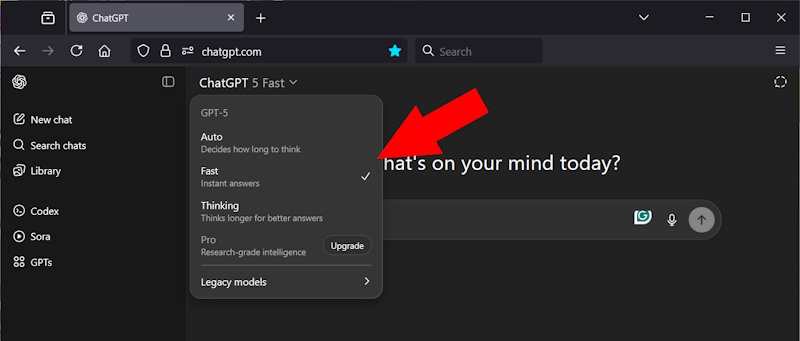
Fast mode makes ChatGPT answer quickly with short reasoning. Thinking mode makes it write longer answers with deep steps. Auto switches between them. For best performance, choose Fast. This setting keeps replies short and helps prevent the slowdown that comes with long chats.

Rules Before Chat

One way to reduce slowness is to set rules before the chat begins. ChatGPT follows instructions better when they are firm and clear. Soft requests, such as “please be brief,” often fail. Strong commands with words like Always and Never work better. For example, you can write: “Always answer in short sentences. Never give more than three sentences unless I ask.”

Paste these rules at the start of every chat:

  • Always answer in short sentences.
  • Do not use regex to update text.
  • Never give more than three sentences unless I ask.
  • Always keep answers under 100 words.
  • Never add explanations before the answer.
  • Always wait for me to ask if I want details.

You can set these rules in the ChatGPT UI before you start. Go to Custom Instructions in the settings. Write your rules clearly. Use strong words like Always and Never. Remember, you are talking to a machine that has no feelings, and not a person who might feel offended by plain language.

When you start a new chat, the model will follow these rules from the first message. Also note that the GPT-5 UI has a mode switch at the top. It can be set to Fast, Thinking, or Auto. For most work, change it to Fast. This setting reduces heavy processing and keeps the chat responsive.

If you have a project, enter rules using the Custom Instructions box in ChatGPT:

  1. Open settings.
  2. Go to Custom Instructions.
  3. Type your rules in the boxes.
  4. These rules apply to every new chat until you change them.
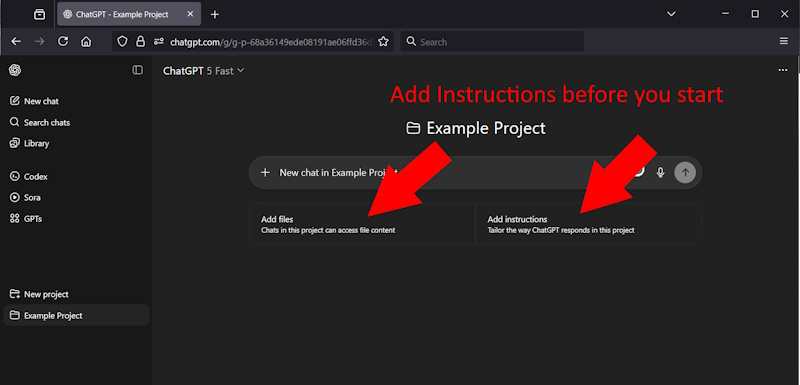
If you do not have a project, set rules at the start of any chat:

  1. Begin the chat with a rule message.
  2. For example: “Always answer in short sentences. Never give more than three sentences unless I ask.”
  3. ChatGPT will follow these rules for that session only.

Rules During Chat

Even with good rules set at the start, long chats can still slow down. When you notice answers getting heavy or delayed, you can add or update rules inside the same chat. ChatGPT will update the rules mid-chat if you give an explicit instruction, so you do not need to restart.

For example, you can say: “From now on, never use long lists.” Or you can say: “Always give one sentence answers until I say otherwise.” You can also say: “Stop giving steps, just give the command.” That direct instruction makes the model reset its style and handle the chat in a simpler way.

This method works because the slowness is linked to the amount of text displayed. By adjusting rules while the chat is active, you keep the session lighter and stop the problem before it grows. It is a simple way to manage the session without losing context.

In FireFox, if it is code generating and Firefox prompts “this page is running slow” you can stop the page, and refresh, and your code is all generated. The backend generation is complete; the part that is running slow is the UI update which can take as long as 45 minutes for one piece of code.

A Message to OpenAI

The slowdown in long chats is not caused by the model. It is caused by the way the client-side browser interface handles long threads. It does not change if you use Chrome, Firefox, or any other browser. The idea of keeping every message active in the browser, even when the user only needs the last few lines, is counterproductive. The interface also runs heavy regex checks and code formatting on every block of text.

The solution is to collapse the model periodically, reduce the ability of the user to scroll up (they are not likely to) and to focus on the Human Interaction rather than the past history of this chat. That’s the whole idea of context: ChatGPT has the context, but the human has their memory.

The front-end design is a weak point that undercuts the power of GPT. Power users face long waits, frozen screens, and lost time because the UI does not scale to chats longer than 15 minutes. And your QA department is either not testing this, or your management is not listening to QA, because power users are important. Performance is important.

A few small changes, such as collapsing old messages or allowing GPT to archive earlier parts of the visible client-side thread, will fix much of the slow chat problem. Don’t make excuses – just do it, it will only take a couple days work. That’s a fraction of the time a million users are wasting today.

Preserving Context in a New Chat

When a chat becomes too slow, sometimes you have no choice but to start a new one. This clears the page and makes the system fast again. But the problem is that ChatGPT forgets everything from the old thread. It forgets the names of modules, the design choices, and even the step order you built over hours. In coding work, this can undo four or five hours of progress.

The best way to minimize damage is to create a backup before restarting. You can ask ChatGPT to build this record for you. Some valid requests are:

  • “Make a summary of the project so far with all key steps.”
  • “List all external file names we have used so far.”
  • “List all modules we have created in this session.”
  • “List all environment variables we defined and their values.”
  • “List all table names and column details we have created.”

Copy the summary into a text file on your computer. When you start a new chat, paste the summary at the top. If your work uses files, you can also have ChatGPT make a list of them. Then place those files in the new chat using the file upload area. This gives the model both the written context and the linked files it needs to continue.

It will not be perfect. The new chat will not remember details the way the old one did. However, the summary and file list will save you from having to start from scratch. Until OpenAI adds a better way to carry context across threads, this is the only reliable method.

Summary

ChatGPT 5 is a powerful tool that promises speed and expert answers. However, the user interface struggles to handle lengthy chats effectively. The slowdown comes from the browser, not from the AI or the server. The design keeps every message active, runs regex on huge blocks of text, and takes far too long to render code.

Your performance will be better if you set the rules before you start and update them during the session. You can also protect your work by asking ChatGPT to create summaries, list files, modules, and tables, and then saving that record before you restart.

You can use these tips to prevent the worst of the slowdown and keep your projects moving forward. ChatGPT 5 has great power, but a better UI design is needed to unlock its full promise.

Don’t miss our follow-up article: 10 Quick Ways to Make GPT-5 Faster in Chrome, Safari, and Firefox — Faster in 2 Minutes

Have you seen this slowdown? Share your own fixes in the comments below

The Role of Leadership in Turning Technology Plans into Measurable Outcomes

The Role of Leadership in Turning Technology Plans into Measurable Outcomes

  • Strong leadership is critical for turning technology plans into measurable results.
  • Alignment between tech initiatives and organisational priorities prevents wasted resources.
  • Clear accountability keeps projects on track and encourages active participation.
  • Long-term involvement ensures technology continues to deliver value well after launch.

When you think about why certain technology projects thrive while others fade into the background, leadership is almost always at the core. The tools and systems you choose matter, but it’s the decisions, clarity, and follow-through from the top that shape the outcome. Without strong leadership, even the most promising tech initiative can lose momentum before it has a chance to make a real difference.

The leadership factor in technology success

You can have the most advanced tools on the market, but without committed and informed leadership, progress is rarely consistent. Your role isn’t just to approve budgets or sign off on plans — it’s to create a vision that others can follow. When people across the business understand not only what is being done but why, they are more likely to engage with the process and contribute meaningfully.

Leaders who succeed in tech initiatives tend to approach them as an ongoing responsibility rather than a one-off event. They set the tone by asking the right questions, removing barriers, and keeping teams focused on outcomes rather than features. This presence at every stage builds trust and keeps the work moving toward measurable results.

Bridging plans with execution

Many organisations start with a strong concept but lose traction when it’s time to turn plans into action. This is where consistent, hands-on leadership makes the difference. By staying close to the process, you can identify gaps early, adjust resources, and maintain alignment with broader company goals. In doing so, you naturally close the gap between a well-documented business IT strategy and execution that produces real-world results.

The key is to make these adjustments visible to the team so they see progress as it happens. Momentum builds when people can connect their day-to-day efforts with larger organisational goals. Leaders who balance strategic oversight with practical support are the ones who see technology plans through to completion.

Aligning technology with organisational priorities

A technology plan can look impressive on paper but still fail to make a real difference if it isn’t closely linked to the organisation’s priorities. Leadership plays a critical role in ensuring that every initiative supports the core objectives of the business. This means looking beyond technical specifications and asking how each project will improve operations, strengthen customer relationships, or drive growth.

Misalignment often happens when decisions are made in isolation from other parts of the business. For example, a system upgrade might improve processing speed but cause delays in customer service if staff aren’t properly trained. Leaders who understand both the technical and operational sides of the business are better equipped to avoid these pitfalls and ensure that investments produce meaningful results.

Building accountability into the process

Accountability isn’t just about tracking deadlines — it’s about making sure everyone involved understands their role in achieving the end goal. Leaders can set this tone by creating clear milestones, assigning ownership for specific outcomes, and reviewing progress at regular intervals. This structure makes it easier to spot issues before they become costly setbacks.

When accountability is embedded into the process, people tend to take greater care with their work. They see how their contributions fit into the bigger picture and are more likely to flag problems early. Leadership presence in these check-ins reinforces the idea that technology projects are a shared responsibility, not a task delegated and forgotten.

The long-term view of tech leadership

Successful technology projects aren’t defined solely by their launch date. The real test is how well they perform and adapt over time. Leaders who remain engaged after implementation can guide updates, monitor performance, and ensure that the system continues to meet evolving needs.

A long-term approach means thinking about scalability, integration with future tools, and the potential impact of industry changes. By staying involved, leaders can anticipate challenges before they disrupt operations and keep technology aligned with the organisation’s vision. This sustained oversight is what turns a good idea into a lasting advantage.

How to Improve Your Netflix TV Streaming Quality

Watching Netflix is a relaxing way to enjoy movies and shows. But nothing ruins the experience faster than blurry images, buffering screens, or poor sound quality. Many people face streaming issues without knowing that they can improve their Netflix quality with a few adjustments.

Better streaming quality not only makes your viewing more enjoyable but also ensures you get the most out of your subscription. Whether you are watching on a smart TV, streaming device, or game console, there are simple steps you can take to improve your Netflix experience.

Here’s a detailed guide to help you enjoy smooth, high-quality streaming on Netflix.

1. Check Your Internet Speed

Internet speed is one of the biggest factors in streaming quality. Netflix recommends different speeds for different resolutions:

  • Standard Definition (SD): 3 Mbps
  • High Definition (HD): 5 Mbps
  • Ultra HD (4K): 15 Mbps or higher

If your speed is lower than these recommendations, you may see blurry video or constant buffering.

A good way to improve your speed is by using a VPN. A VPN helps you bypass ISP throttling, which results in better streaming quality. However, not all VPNs work with Netflix. So, for detailed info on how to get started, you can check out https://streamingwithvpn.com/, which guides users on the best VPNs to use with Netflix, and tricks to get a crisp video quality. 

2. Use a Wired Connection When Possible

Wi-Fi is convenient, but it can sometimes be unstable. A wired Ethernet connection gives you a more stable and faster signal.

If your TV is far from your router, consider using a long Ethernet cable or a powerline adapter. This can make a big difference in keeping your video sharp and your streaming smooth.

3. Reduce Network Traffic

Streaming quality can drop when too many devices are using the same internet connection. If someone is downloading large files or gaming online while you are watching Netflix, you may experience lag.

Try to reduce internet activity on other devices while streaming. You can also set your router to prioritize streaming traffic if it supports Quality of Service (QoS) settings.

4. Adjust Netflix Playback Settings

Netflix allows you to control the video quality in your account settings. By default, the platform might be set to auto-adjust based on your internet speed. But you can change it to always stream in the best possible quality.

To do this:

  1. Sign in to Netflix on a web browser.
  2. Go to Account.
  3. Select Playback Settings for your profile.
  4. Choose High for the best quality.

Keep in mind that higher settings use more data. If you have a limited data plan, you may need to balance quality and usage.

5. Keep Your Streaming Device Updated

Smart TVs, streaming sticks, and gaming consoles often receive software updates that improve performance. An outdated device can lead to slow streaming or app crashes.

Check your device settings for updates and install them when available. Updating the Netflix app itself can also fix bugs and improve stability.

6. Restart Your Devices Regularly

Over time, devices can slow down due to memory buildup. Restarting your TV, streaming stick, or console clears temporary files and can improve performance.

Make it a habit to restart your devices every few days. You may notice faster loading times and smoother playback.

7. Move Your Router Closer to the TV

Wi-Fi signals weaken with distance and obstacles like walls or furniture. If possible, place your router in the same room as your TV or in an open, central location in your home.

If moving the router is not an option, consider using a Wi-Fi extender to boost the signal strength.

8. Upgrade Your Router

Older routers may not handle modern streaming needs well. If your router is more than five years old, upgrading to a newer model can give you better range, speed, and reliability.

Look for a router that supports dual-band or tri-band Wi-Fi. These allow more devices to connect without slowing each other down.

9. Clear Netflix App Cache

If you notice frequent buffering or slow loading even with good internet speed, the Netflix app cache might be the problem. Cached data helps apps load faster, but too much stored data can cause glitches.

Most smart TVs and streaming devices allow you to clear the cache from the settings menu. After clearing it, sign back into Netflix and check if the performance improves.

10. Disable Background Apps and Processes

If your TV or streaming device runs multiple apps in the background, it can slow down Netflix performance. Close any apps you are not using before starting your show.

On some smart TVs, you may need to manually force apps to close. On streaming sticks and consoles, restarting the device is usually enough to clear background processes.

11. Watch During Off-Peak Hours

Internet speed can drop during peak usage times, like evenings when many people are streaming or gaming. If possible, try watching during quieter hours.

While this is not always convenient, it can be a quick way to enjoy smoother playback without changing any settings.

12. Consider a Higher Netflix Plan

If you want to watch in Ultra HD (4K), you need to subscribe to a Netflix plan that supports it. Not all plans allow streaming in the highest resolution.

Check your plan details and upgrade if needed. Keep in mind that your internet speed must also meet the Ultra HD requirements for it to work well.

Final Thoughts

Improving your Netflix streaming quality is not complicated. Most of the time, small adjustments like changing your playback settings, upgrading your router, or reducing network traffic can make a big difference.

A smooth, high-quality stream makes movies and shows more immersive and enjoyable. By taking the time to optimize your internet speed, device performance, and Netflix settings, you can get the best viewing experience possible.

With these tips, your favorite shows will look sharper, sound clearer, and play without interruptions. Now all you need to do is grab some snacks, settle in, and enjoy your Netflix night without distractions.

Episode-Based Reimbursement in Rehab Care: Inside The CMS TEAM Model

The CMS TEAM Model transforms rehabilitative care by shifting from fee-for-service to value-based payments. Healthcare providers using integrated platforms like Persivia CareSpace® report substantial savings and better care coordination across episodes.


Medicare spending on rehabilitative care continues to climb as the population ages and chronic conditions become more prevalent. Traditional fee-for-service models often incentivize volume over value, leading to fragmented care and inflated costs. The CMS TEAM Model addresses these challenges head-on by restructuring how rehabilitative services receive reimbursement. 

The CMS TEAM Model is a value-based care approach that rewards providers for measurable outcomes, not the volume of procedures. It creates a sustainable structure benefiting patients, providers, and the broader healthcare system.

What is the CMS TEAM Model Framework?

CMS TEAM Model is an all-encompassing value-based payment model that is explicitly developed around the rehabilitative care episode. In this model, healthcare providers are paid a certain amount that includes entire treatment cycles, not just services.

This model assigns fixed payments for defined conditions or procedures and encourages care TEAMs to use resources effectively while coordinating treatment across settings. Through shared savings plans, providers may receive additional bonuses based on better outcomes of care with reduced expenditure.

The framework includes several core elements:

  • Episode-based payments spanning initial treatment through recovery
  • Quality metrics that determine performance bonuses
  • Risk-sharing arrangements between providers and CMS
  • Comprehensive reporting requirements for outcome tracking

Value-Based Payment Principles in Rehabilitative Care

Value-based payment models fundamentally alter how healthcare providers approach patient care. The TEAM Model CMS creates direct connections between payment levels and patient outcomes, forcing providers to examine every aspect of their care delivery processes.

The healthcare organizations in these models usually experience decreased readmission rates, a shortened duration of stay in the skilled nursing home, and better patient satisfaction scores.

Prime Healthcare can be an example of this success, as they managed to reduce readmissions by 15%and length of stay in skilled nursing facilities by 7%, and earned savings of $17 million on about 200 episodes.

Eligible Providers and Participation Requirements

The Medicare TEAM Model focuses on hospitals, rehabilitation centers, and skilled nursing centers that serve Medicare patients who need rehabilitative care. Participation requires specific volume thresholds and demonstrated capacity for comprehensive episode management.

Healthcare organizations must meet minimum annual episode volumes to ensure statistical validity of their performance metrics. Most successful participants handle 200 or more episodes annually, providing sufficient data for meaningful outcome analysis.

Participation criteria encompass:

  • Demonstrated financial stability to assume risk-based contracts
  • Established quality reporting infrastructure
  • Integrated care delivery capabilities across multiple settings
  • Commitment to comprehensive patient outcome tracking

How Technology Supports The CMS TEAM Model?

Current management of episodes requires advanced technological platforms that can combine several sources of data on clinical, financial, and operational sectors in an episode. CMS TEAM Model success demands real-time patient, resource, and quality metrics visibility throughout all care settings.

Essential technology components include:

  • Real-time performance monitoring across all care settings
  • Predictive analytics for risk stratification and intervention planning
  • Integrated communication systems for care TEAM coordination
  • Comprehensive reporting tools for CMS compliance requirements

Quality Metrics and Performance Standards

Quality measurement serves as the foundation for all TEAM Model CMS financial arrangements. Providers must demonstrate improvements across multiple domains while effectively managing total episode costs.

Performance is assessed through metrics like functional improvement, patient safety, care coordination, and satisfaction scores. These determine eligibility and bonus payouts.

Performance MetricPrime Healthcare Results (via Persivia CareSpace®)
Total Savings$17 Million
Readmission Reduction15%
SNF Length of Stay Reduction7%
Episodes Managed~200

Primary quality measurement areas include:

  • Functional status improvements using standardized assessment tools
  • Patient safety outcomes, including infection rates and complications
  • Care transition effectiveness is measured through readmission rates
  • Patient satisfaction scores across all participating facilities

Care Coordination Across Multiple Settings

Effective care coordination represents the cornerstone of successful episode management under value-based payment models. The CMS TEAM Model requires seamless communication and shared accountability among all episode participants.

Successful coordination strategies encompass:

  • Structured handoff protocols at each care transition point
  • Daily care TEAM communications regarding patient progress
  • Shared access to comprehensive patient information systems
  • Standardized care pathways based on patient acuity and condition

Integrating Health Equity and Social Factors

The model emphasizes health equity through comprehensive assessment and integration of social risk factors that impact patient outcomes. Providers must capture detailed medical history, personal demographics, and social determinants to achieve optimal episode management results.

Persivia CareSpace® supports health equity by capturing detailed medical history, demographics, and social risk factors through comprehensive Health Risk Assessments. This information enables care TEAMs to address social determinants that might otherwise compromise treatment outcomes.

Implementation approaches include:

  • Comprehensive social screening during initial assessments
  • Integration of community resources for high-risk patient populations
  • Culturally appropriate care delivery methods
  • Language services and health literacy support programs

Managing Post-Acute Transitions for Better Outcomes

Seamless post-acute care transitions directly impact episode success rates and financial performance. The Medicare TEAM Model requires sophisticated placement algorithms and continuous monitoring capabilities to optimize patient outcomes while controlling costs.

Effective transition management reduces inappropriate skilled nursing facility utilization while ensuring patients receive appropriate care intensity matching their specific needs. Length of stay optimization in post-acute settings directly influences episode profitability and quality scores.

Best practices for transition management include:

  • Evidence-based placement criteria using validated patient acuity assessment tools
  • Continuous progress monitoring with intervention capabilities
  • Active family engagement throughout discharge planning processes
  • Home health service integration for appropriate patient candidates

Advanced Analytics and Performance Optimization

Modern episode management relies on advanced analytics, including predictive modeling and real-time decision support tools. These capabilities enable proactive interventions and optimize resource allocation throughout episodes.

CareSpace® provides advanced analytics to monitor performance by means of detailed dashboards and reports. The platform offers useful insights, which enable providers to find ways to improve and streamline care delivery operations. 

Analytics capabilities encompass:

  • Predictive risk modeling for identifying high-cost patient populations
  • Real-time quality metric monitoring with automated alerting systems
  • Care pathway optimization based on historical outcomes data
  • Financial performance tracking with detailed variance analysis

Financial Risk Management and Shared Savings

Financial success under value-based payment models requires sophisticated risk assessment and management capabilities. Providers must balance quality improvements with effective cost containment strategies.

The model enables shared savings while setting risk corridors that protect providers from excessive financial losses. Performance depends on accurate risk stratification and efficient resource utilization across all episode components.

Risk management encompasses several key areas:

  • Historical cost analysis for establishing accurate baselines
  • Patient acuity adjustment models for fair performance comparisons
  • Utilization pattern monitoring with intervention protocols
  • Comprehensive variance analysis for continuous improvement initiatives

Implementation Strategies and Timeline

Successful implementation requires systematic approaches beginning with infrastructure development and progressing through full risk-based participation. Most healthcare organizations need 12-18 months for complete preparation and system integration.

Critical implementation milestones include:

  • Technology platform deployment and comprehensive integration testing
  • Staff training completion across all participating care settings
  • Quality reporting system validation and CMS approval
  • Financial tracking system implementation with real-time monitoring capabilities

Bottom Line

The CMS TEAM Model represents a shift toward sustainable, outcome-based delivery in rehabilitative care. It pays providers to deliver value that can be measured instead of providing more services, which links financial incentives with patient outcomes. To be successful, they involve advanced technology platforms, integrated interdisciplinary TEAMs, and institutional cultural growth. The adoption of this model by healthcare organizations will ensure a sustainable financial position in the long term, as well as great patient care and outcomes.

Choose Persivia To Reform Your Episode Management With Proven Technology Solutions

For healthcare organizations striving for excellence in value-based care approaches, it requires broad-based platforms that are tightly integrated to support clinical workflows, analytics, and care coordination. Persivia offers proven solutions specifically designed for episode management success in rehabilitative care settings.

CareSpace® delivers the integrated platform capabilities essential for CMS TEAM Model participation and success. With documented results including millions in savings and significant quality improvements, Persivia empowers healthcare organizations to excel in value-based care environments.

Join leading healthcare organizations achieving remarkable results in value-based care models through proven technology solutions.

Explore Persivia’s Solutions.

Seamless Workflow Integration: How Managed IT Services Enhance Cross-Platform Productivity and Data Security

Switching between apps should save time. Instead, it often steals hours and focus. Files go missing, systems do not talk, and Data Security worries grow.

Managed IT services fix this. A managed service provider, or MSP, is a third-party team that runs and secures your tech systems. With Workflow Optimization, Data Integration, and smart Automation, you get fewer handoffs and faster results. Cloud Solutions connect your tools so that workflows with less friction.

This guide shows how providers tie platforms together and protect information. You will see what actually works, plus simple steps you can act on today.

The Role of Managed IT Services in Workflow Integration

Managed IT Services close gaps between tools, teams, and data. Providers handle IT management, cloud services, and Cybersecurity, so daily work stays on track.

Need a trusted partner fast? Many owners use CloudSecureTech.com to compare top MSPs by reviews, skills, and service scope. Side-by-side MSP profiles help you pick support that fits your budget and risk level.

Here is what strong System Connectivity looks like in practice:

  • One place to manage users, apps, and permissions.
  • Clear rules for backups, updates, and change control.
  • Fewer silos; teams see the same data at the same time.
  • Faster issue resolution with a single contact for support.

Resource planning also gets easier. An MSP spots weak links, then sets priorities for fixes that cut noise and reduce downtime.

Enhancing Cross-Platform Productivity

Cross-platform work improves when data moves cleanly and tasks run on schedule. With planned Data Integration and simple Automation, teams get more done with less rework.

Clear communication between platforms

Cloud apps, phones, and desktops often live in separate worlds. Managed IT services connect these worlds so information can move without confusion. Teams on Windows, Mac, or Linux can share files and messages without conversions.

Interoperability, the ability of different systems to work together, cuts delays. No one hunts for the latest version or fixes sync errors. Real-time updates keep remote and office staff on the same page. Many businesses trust TravTech or similar to design and maintain integration solutions that ensure data moves reliably across platforms without disruption.

Automation of repetitive tasks

Reliable connections set the stage for fewer manual steps. Process automation uses software to perform routine actions without human input. That reduces errors and frees time for higher-value work.

Common wins include automatic file transfers, scheduled reports, and ticket updates. For example, a weekly sales report can compile itself at night. It arrives in your inbox before the team meeting.

Automation applied to an efficient operation will magnify the efficiency. – Bill Gates

Unified access to tools and data

After automation, access becomes the next hurdle. A single, secure hub lets teams reach apps and files from one place. This cuts tool switching and lost minutes.

Staff can share information across devices and operating systems. Fast sync keeps data current, which improves Workflow Optimization and decisions. Leaders view status, spot risks, and guide teams with confidence.

Strengthening Data Security

Solid protection supports every integration step. Managed IT services combine smart controls, constant watch, and clear rules. The goal is simple: keep bad actors out and sensitive records safe.

Early threat detection

Risk assessment reviews what could go wrong and where. Threat intelligence uses known attack patterns to spot danger. Together, they help teams find issues before damage spreads.

Automated tools scan for weak points daily and alert staff fast. If a breach occurs, an incident response plan guides the first hour. That hour matters most. Regular vulnerability management lowers the odds of a successful attack. Solutions like Action1 support this by automating patch management and vulnerability remediation, helping organizations close security gaps before they can be exploited.

Many companies rely on ISTT’s experts or similar for continuous monitoring and rapid incident response to protect critical business systems.

Encryption across integrated systems

Encryption turns readable data into coded text that only approved users can read. Managed IT services set up strong encryption in transit and at rest. These guards file as they move between platforms and while stored.

Secure methods block snooping on client records or internal documents. Good controls also support compliance rules, which reduces fines and legal risk.

Compliance with security standards

Compliance means meeting required laws and industry rules. An MSP maps your controls to standards that apply to your business. Examples include HIPAA for healthcare and PCI DSS for card payments.

Teams build policies, test them, and keep audit records. Clear steps protect privacy, maintain trust, and prevent misuse of data. When an incident happens, the plan triggers quick, documented action.

Key Features of Effective Managed IT Services

Strong services share a few traits. They support growth, keep watch, and add new tools without slowing your team.

Scalability and flexibility

Needs change with seasons and growth. Cloud computing makes it simple to add storage or processing power without buying new hardware.

Here is a simple example. A retailer doubles online traffic each November. With an MSP, capacity increases in hours, then drops back in December. Service Level Agreements, or SLAs, define uptime targets and response times so you get what you pay for.

Plans for disaster recovery and business continuity adjust as you expand. Disaster recovery restores systems after a major outage. Business continuity keeps critical work running during disruption. You pay for what you use, which aids cost control.

Real-time monitoring and support

Real-time monitoring watches systems and networks without breaks. Remote tools flag unusual activity, slow apps, or signs of attack as they appear. Quick alerts limit downtime and loss.

Support teams jump in when signals appear. They handle network issues, cloud glitches, or backup failures. Regular backups and clear response steps reduce the chance of data loss.

Smooth integration of emerging technologies

After monitoring is in place, adding new tech gets easier. Providers connect cloud platforms, modern security tools, and data analytics into your existing setup. The goal, reduce delays while keeping protection tight.

Apps in the cloud work well with on-prem systems when planned right. Strong network controls protect traffic during upgrades or expansions. The result is steady productivity across devices and departments.

Conclusion

Managed IT services improve Workflow Optimization and help teams work across platforms with less friction. Clear Data Integration, focused Automation, and reliable Cloud Solutions reduce errors and save time. Data Security stays front and center through early detection, encryption, and rule-based controls.

For complex risk or legal questions, speak with a qualified professional. One note, the Verizon Data Breach Investigations Report shows credentials remain a common entry point, so ask about passwords and access controls.

With the right fit, you gain smoother cross-platform collaboration and stronger System Connectivity. That frees energy for growth while your information stays protected.

Streamlining Cross-Platform Productivity: How Managed IT Services Keep Your Systems Secure, and Scalable

Files out of sync waste hours and raise risk. Lost changes, missing versions, and confused teams kill Productivity. Managed IT Services fix this pattern with clear IT Support, strong Cybersecurity, and steady processes. The result is fewer surprises and more time for real work. This article shows how to keep systems aligned across devices, then grow with confidence.

Quick note: this is general guidance, not legal or compliance advice. For regulated data, check standards like NIST and talk to your counsel or compliance team.

The Role of Managed IT Services in Corporate Environments

Corporate communications require that your data matches across phones, laptops, and apps. Managed IT Services builds the rules and tools that make this happen. You get fewer manual fixes and less Downtime Reduction pressure on your staff.

Ensuring Data Consistency Across Devices

Data consistency means the same record shows the same facts everywhere. Cross-platform integration is the process that connects different systems so they share data. Managed teams use Cloud Solutions to keep data fresh on every approved device. That includes real-time checks that catch errors early and resolve conflicts.

Here is what works in practice:

  • Standardize fields and names across systems..
  • Use role-based access so only the right people edit key records.
  • Run validation rules that stop bad entries from spreading.
  • Log every change for audit trails and quick rollbacks.

Network reliability matters too. Compatibility issues slow teams and cause mistakes. Routine health checks, firmware updates, and clear device baselines prevent most snags. “Information must match everywhere to prevent missteps; managed IT keeps your business running smoothly.”

Automating Corporate Processes

Automation removes repetitive work and lowers human error. A sync job is an automated task that moves and updates data on a scheduled or triggered basis. Managed IT Services sets these jobs to run during low-traffic windows or right after a change occurs.

To design a reliable sync plan:

  • Schedule heavy transfers for off-peak hours to reduce slowdowns.
  • Set conflict rules, for example, most recent update wins, with alerts.
  • Test with a small group first, then roll out to the whole team.

Two short examples help. A sales app pushes updates to the finance system every 15 minutes, so invoices match quotes. A file service mirrors new project folders to mobile devices, but only on trusted networks. These steps lift Productivity without adding risk. Many businesses find that hiring Aether IT Systems or similar can streamline automation setup and ensure that sync processes run securely and reliably across all devices.

Enhancing System Security

Corporate servers often have a broad attack surface, which is the total set of ways hackers could get in. Managed IT Services adds layered security during every transfer. The goal is to protect data in transit and at rest, while keeping work simple for users.

Data Encryption and Secure Protocols

Encryption turns data into unreadable code. Only a valid key can read it. Managed teams use strong standards during sync, such as TLS, which stands for Transport Layer Security, and HTTPS, which is secure web traffic. A VPN, or virtual private network, adds a private tunnel across public networks.

Security also means knowing who is asking for access. Multi-factor authentication, or MFA, requires a password plus a code or token. Least privilege limits what each user can do. These controls cut exposure if a device gets lost or stolen. You can visit the official website of Vendita to learn more about enterprise-grade encryption and secure data transfer methods. Encryption is only as strong as its management. True security requires constant vigilance.

Proactive Threat Detection

Threat detection is the practice of watching for risky behavior in real time. Managed IT Services use monitoring tools that flag odd logins, strange data flows, or failed logins at scale. Regular vulnerability assessments, which are structured checks for known flaws, find weak points before criminals do.

A simple response plan keeps damage low:

  • Set alerts with clear thresholds and owners for each alert.
  • Isolate affected devices first, then check logs and backups.
  • Rotate keys and passwords after any suspected incident.
  • Document lessons learned to improve the next response.

These steps protect Business Continuity. If a breach occurs, backups and access logs help you contain the event and recover quickly.

Scalability Through Managed IT Services

Growth adds users, apps, and data volume. You need Scalability that tracks demand without chaos. Managed IT Services size systems up or down so costs and performance stay aligned.

Supporting Growing Data and User Demands

CloudSecureTech.com connects companies to vetted providers with strong records in IT Support, Cybersecurity, and technology management. Their profiles show scale experience and response times, which matter when traffic spikes. That helps you choose partners who can handle data growth and user surges.

What changes with growth?

  • Storage and compute capacity must expand without long waits.
  • Access rules must adjust for new teams and roles.
  • Backups and recovery times must meet stricter goals.

With the right plan, speed stays high and protection stays firm. Users get quick access, and costs track real usage, which improves Business Efficiency.

Flexible Infrastructure for Expanding Needs

Flexible infrastructure means you can add resources when you need them, then remove them when demand drops. Cloud platforms support this with on-demand services. Managed teams watch capacity and shift resources before your users feel slowdowns.

Key practices that work:

  • Use autoscaling rules for predictable workloads and seasonal peaks.
  • Adopt standard images so new apps and devices join fast.
  • Automate resource cleanup to avoid surprise bills.
  • Keep clear runbooks for adding sites, apps, or teams.

Planning for tomorrow reduces Downtime. When new tools arrive, the network is ready and tested.

Best Practices for Cross-Platform Productivity

Good tools and habits protect your time. The right mix improves Productivity while keeping risk under control.

Selecting the Right Tools and Services

Start with a simple checklist. Match tools to work, security, and growth plans. 

  • Security fit: MFA support, encryption standards, and audit logs.
  • Cloud Solutions: native support for your key platforms and apps.
  • Sync features: real-time updates, conflict rules, and rollback options.
  • Support quality: response times, remote support coverage, and SLAs.
  • Compliance needs: experience with your industry rules and audits.

Ask for a small pilot before a full move. A 30-day test with clear success metrics exposes gaps early. For example, measure sync times, login failures, and help desk volume.

Regular Monitoring and Optimization

Monitoring means watching systems on a schedule with clear alerts. Analytics tools track speed, error rates, and usage. This data shows where to tune workflows and reduce Downtime.

Focus on three habits:

  • Review dashboards weekly and act on top issues.
  • Automate routine fixes, such as cache clears and restarts.
  • Update devices and apps on a planned cycle, not ad hoc.

Continuous improvement keeps platforms aligned. As needs change, small updates prevent large failures.

Conclusion

Managed IT Service raises Productivity and strengthens Cybersecurity. You get fewer outages, faster work, and clear paths for Scalability. Choose one area to improve this week, such as MFA or backup tests. Then expand with a pilot and track results. With steady IT Support, your systems stay aligned, your risk drops, and your team delivers more for customers every day.

Maximizing Business Efficiency: How Managed IT Services Enhance Workflow Continuity

Slow data updates and surprise outages drain profit and morale. Files that do not match across devices cause mixed messages and bad choices. Sound familiar? Managed IT services fix this by keeping corporate workflows accurate and fast. You get safer systems, fewer delays, and better workflow continuity. That means higher operational efficiency, smarter use of cloud solutions, and real security enhancement. Stronger IT infrastructure supports business growth while driving smart cost savings.

Enhancing Information Alignment with Managed IT Services

Managed IT services keep information aligned across apps, devices, and locations. The result is fewer errors and faster decisions for your team.

Real-time data updates

Real-time updates make changes appear everywhere at once. Edit a customer record on one platform, and every system matches it right away. That reduces duplicate entries and mistakes that confuse teams and customers.

Cloud computing, which means renting computing power over the internet, makes this speed possible. Around-the-clock monitoring checks performance and alerts support if trouble starts. During busy periods, systems stay responsive, so work does not stall.

Instant access to shared information creates more efficient workflows and better communication. To put this to work, pick a source of truth for key data. Use time stamps so teams see the latest version. Add alerts for process failures, and test them monthly.

Centralized data management

Centralized data management stores information in one controlled place. Teams find files faster, share with less friction, and work from the same facts. That cuts costly errors caused by mismatched records. Companies planning to implement secure, centralized storage for compliance and efficiency gains should discuss with NexaGuard IT to explore integration and management options.

This model supports real-time analytics, which turns raw data into insights. It also supports compliance duties under privacy laws like GDPR and HIPAA. GDPR and HIPAA set rules for how personal and health data is handled. With central security rules, sensitive files stay protected while leaders get clear, consistent reports for decisions.

Strengthening Security in Managed Processes

As systems grow, cyber risks grow too. Managed IT services keep data connected while guarding your operations against attacks that aim to steal or corrupt information.

Advanced encryption protocols

Encryption turns readable data into coded text that outsiders cannot use. Strong standards like AES-256, a widely trusted method, protect files in transit and at rest. This keeps data integrity intact through different toolsets.

Authentication proves a user is who they claim to be. Access control limits who can view or change data. Secure channels, such as TLS, protect information during transfer. Put these together, and you block many attacks before they start. Your team then spots risks faster and responds with confidence.

Ongoing threat monitoring and prevention

Security teams watch for unusual behavior in real time. They run regular vulnerability checks to find weak spots before criminals do. Endpoints, meaning laptops, phones, and servers, get constant attention because they are common targets.

Tools block malware and suspicious logins. Clear incident plans guide the first steps if a threat appears. Compliance frameworks like HIPAA and GDPR shape these controls. Regular reviews keep rules current as the business evolves. Businesses looking to strengthen real-time monitoring and incident response can explore TrustSphere IT’s offerings for tailored solutions that align with compliance and operational needs. For perspective, IBM’s annual Cost of a Data Breach report shows that faster detection often reduces loss.

Maintaining Workflow Continuity with IT Solutions

Good IT planning keeps work moving even when things go wrong. You stay focused on growth, not firefighting.

Automated system backups

Automated backups protect data without extra effort from your staff. They are a must for steady workflow continuity.

  1. Backups run on a set schedule, capturing important data without manual steps.
  2. Cloud storage keeps copies off-site, shielding data from local damage like fire.
  3. System redundancy uses a standby system that can take over quickly when needed.
  4. Disaster recovery plans restore operations fast after cyberattacks or hardware failures.
  5. Encrypted backups protect data while moving and while stored, reducing breach risk.
  6. Routine recovery tests confirm files are complete, readable, and ready for use.
  7. Custom backup timing fits your risk and recovery goals as systems change.
  8. Automatic logs create audit trails that support regulatory requirements and reviews.
  9. Less manual work frees staff to focus on projects that move the business forward.

Practical tip: test restoring a small but critical system each month. Small drills prevent big surprises.

Rapid disaster recovery

Backups are vital, but recovery speed is what your customers feel. A clear plan limits downtime and preserves trust.

  1. Fast recovery tools shrink outages and protect key data across your IT infrastructure.
  2. Redundant systems stand ready to take over after failures or security events.
  3. Risk plans schedule practice runs of recovery steps for a reliable response.
  4. Trained teams watch alerts and act quickly to restore normal work.
  5. Strong backup designs give quick access to the files that matter most.
  6. Regular drills define roles, so everyone knows what to do under stress.
  7. Modern hardware and cloud services add flexibility during restoration.
  8. Recovery steps fit into your wider emergency plan and daily automation rules.
  9. Periodic reviews update procedures as new threats and standards appear.

Track two numbers: typical recovery time and acceptable data loss. Set targets, then measure after every incident or drill.

Scalability and Flexibility for Growing Businesses

Managed IT services support growth without chaos. Systems expand in a controlled way as demands change.

Infrastructure solutions that grow with you

Cloud computing matches resources to current demand. Elastic capacity adds or reduces power as needs shift. Infrastructure as a Service, or IaaS, lets you add virtual servers and storage only when you need them. Automatic load balancing spreads traffic so apps stay responsive.

Virtualization, which runs multiple systems on one physical server, improves uptime and lowers hardware costs. Automation tools handle routine tasks so staff can focus on improvements. Planned network growth keeps people connected during spikes in usage. These practices reduce outages and support steady performance each day.

Adapting to evolving business needs

Your tech should change as strategy changes. Managed IT services design flexible systems that support new products, new markets, and new teams without starting from scratch. Use integrations that fit your goals without adding clutter. Keep security in step with every new tool you add. This balance makes change safer and smoother for people who rely on the system.

Conclusion

Managed IT services protect access, and cut downtime. The payoff is stronger operational efficiency, better cloud solutions, and reliable workflow continuity. With the right partner, you also see real cost savings that support business growth.

Enhancing Business Productivity Through Managed IT Services and Cybersecurity-Driven Data Synchronization

Slow systems steal hours from your week. Files go missing, updates lag, and risk creeps in. With strong IT management and cybersecurity solutions, you can protect data, speed work, and raise business efficiency. Cloud services and clear data protection practices build trust across teams.

Leveraging Managed IT Services for Business Productivity

Managed IT services take care of complex tasks so you can focus on customers and growth. A Managed Service Provider, or MSP, is a team that runs your IT systems for a flat fee. They handle support, security, and cloud services. This approach improves technology integration and reduces daily friction.

Streamlining IT Infrastructure Management

What should you check before you sign?

  • Uptime history and incident reporting
  • Security standards, such as SOC 2 or ISO 27001
  • Clear response times and service level agreements
  • Experience with your core apps and cloud platforms
  • Detailed documentation and offboarding plans

These steps cut downtime and help your team focus on work instead of issues. Choosing a skilled MSP is often the difference between chaos and control.

Enhancing Operational Efficiency

Stronger operations start with a clean foundation. MSPs standardize devices, patch systems, and automate routine maintenance. That means fewer surprise tickets and faster fixes.

Here is a quick example. A 40-person firm used one inbox for support. Tickets got lost. After switching to an MSP with a real help desk, first-response time dropped to under 15 minutes. Staff gained hours each week.

Reducing Downtime and IT Disruptions

Planned maintenance and round-the-clock monitoring keep systems steady. A solid MSP sets alerts, tests backups, and watches network traffic for trouble. Fast response prevents small bugs from growing into outages.

Key practices that limit disruption:

  • 24/7 monitoring and rapid escalation paths
  • Documented recovery steps with timed drills
  • Cloud backups and routine restore tests
  • Patch schedules for operating systems and apps
  • Hardware health checks and capacity planning

When these pieces work together, you reduce risk and protect business continuity. Many companies find that hiring PrimeWave IT or similar provides the proactive monitoring, rapid response, and system resilience needed to minimize downtime.

The Role of Cybersecurity in Data Synchronization

Data synchronization keeps files and records aligned across devices and locations. Cybersecurity solutions safeguard that flow. Encryption, access controls, and careful logging preserve data integrity while information travels and updates.

Protecting Data Integrity

Data integrity means information stays complete, correct, and trusted. Encryption scrambles data so only approved users can read it. Network security filters traffic and blocks unsafe connections. Regular backups create safe restore points.

Access control limits who can view or change records. That includes strong passwords, multi-factor authentication, and role-based permissions. An MSP monitors sync jobs, checks logs, and flags errors early. The result is consistent, accurate data across systems. Businesses seeking advanced, region-specific cybersecurity solutions can explore Lumintus for IT to strengthen their data integrity and synchronization security practices.

Preventing Cyber Threats During Synchronization

Threats often strike while data is moving. Use secure transmission, such as TLS, to protect content in transit. Multi-factor authentication confirms identity before sync starts.

Build a simple defense stack:

  • Endpoint protection that scans for malware
  • Threat detection that watches behavior in real time
  • Network segmentation to limit attacker movement
  • Timely patching for servers and sync tools
  • Audit logs that record who changed what and when

These controls support risk mitigation and reduce breach impact. Industry reports like the Verizon DBIR show that basic security hygiene stops many attacks. Good habits still matter.

Benefits of Cybersecurity-Driven Data Synchronization

When synchronization is secure, teamwork gets easier. People trust the files they use. Leaders make decisions faster, and IT management gets simpler.

Improved Collaboration Across Teams

Staff share and edit files with confidence when data protection is built in. Security tools guard sensitive content without slowing down daily work. Cross-functional groups can move quickly without fear of leaks.

Follow a few rules for smoother collaboration:

  • Use least-privilege access for shared folders
  • Require multi-factor authentication for remote access
  • Label sensitive data and set clear retention dates
  • Train staff to spot phishing and report issues fast

Compliance needs to improve, too. Consistent controls support audits and reduce surprises.

Enhanced Decision-Making Through Real-Time Data Access

Real-time access puts fresh numbers in front of managers. Clean, current data helps teams spot trends and fix problems sooner. When systems agree, reports match reality, not last week’s guess.

Two quick wins:

  • Sync sales and finance data every hour
  • Refresh key dashboards on a set schedule

Fewer errors mean fewer reworks. That protects budgets and trust.

Future Trends in Managed IT Services and Cybersecurity

IT management keeps moving. Two shifts matter now: AI-supported services and edge computing close to where data is created. Both improve speed and control when planned well.

Integration of AI and Machine Learning

Artificial intelligence, AI, and machine learning, ML, find patterns in large data sets. In security, they flag strange behavior fast. In support, they route tickets and predict failures.

Examples you may see soon:

  • Automated patch windows based on risk scores
  • Faster incident triage with suggested fixes
  • Alerts that reduce false positives over time

AI helps, but it needs guardrails. Ask your MSP how they test models and review outcomes. Human oversight still matters.

Expansion of Edge Computing for Faster Synchronization

Edge computing processes data near its source. This reduces latency, the delay you feel when systems talk across distance. For sites with IoT devices, local processing speeds up sync and lowers bandwidth use.

Practical gains include:

  • Quicker alerts from sensors and cameras
  • Less exposure by keeping sensitive data onsite
  • Stronger performance during internet slowdowns

AI at the edge can filter and clean data before it moves. That means faster decisions and fewer sync conflicts.

Conclusion

Managed IT services and cybersecurity-driven data synchronization improve business efficiency without adding chaos. With strong data protection and clear IT management, teams work faster and with less stress.

Choose secure, real-time systems. Protect your information, make better decisions, and keep your business moving. This article offers general guidance only. For legal or compliance matters, consult a qualified professional.

Maximizing Workflow Efficiency with Managed IT Services and Cross-Platform Synchronization

Work feels messy when tools do not talk to each other. Files go missing between phones, laptops, and shared drives. Tasks stall, and small misunderstandings grow into bigger delays. Managed IT Services fixes those gaps with steady care and cross-platform synchronization, which means the same data on every device. With the right setup, daily work becomes clearer, safer, and faster.

The Role of Managed IT Services in Workflow Optimization

Managed IT Services are ongoing support for your technology. A Managed Service Provider, or MSP, is a company that runs your IT systems for a monthly fee. You get expert help, routine upkeep, and fewer surprises. That lets you stay focused on customers and growth.

Proactive Monitoring and Maintenance

IT teams watch system health 24/7. They look for early warning signs before problems spread. This keeps computers and networks steady, which protects your time and your data.

Service tools scan for errors or strange activity, then flag them right away. Prevention is better than cure in IT service management. Regular care includes patching software, adjusting network settings, and fixing small bugs early. A short support call beats a long outage. Businesses can benefit from Compeint’s expert IT support to ensure proactive monitoring, fast incident handling, and minimal downtime across their systems.

Quick help after an incident matters too. Fast recovery shrinks downtime so teams keep working. That steady rhythm supports stronger workflow efficiency.

Enhanced IT Security and Compliance

Good security protects business data from threats like malware and phishing. Compliance means your systems meet industry rules and laws. An MSP reduces cyber risks with updates, access controls, and near-constant monitoring.

Patch management keeps software current across all devices. Clear roles and permissions make sure only the right people see sensitive files. These steps lower the chance of fines or public breaches.

Strong governance, which is how you guide and check IT decisions, adds discipline. Regular audits confirm settings match the rules you must follow. That way, you can pursue growth without hidden risks in daily operations.

Importance of Cross-Platform Synchronization

Cross-platform synchronization keeps files, messages, and tasks matched on every device. You can move from a desktop to a tablet without losing your place. This consistency supports Workflow Efficiency and steady process improvement.

Seamless Data Sharing Across Devices

Data integration connects information across apps and hardware so teams stay aligned. Cloud storage keeps files available from anywhere with a connection. Real-time updates reduce version mix-ups even when tools differ.

Accessibility means everyone gets the right information at the right time. With an MSP in place, the sync process stays managed and safer. Better compatibility means fewer errors and fewer frustrated users. Clean, current data helps make better decisions all day long.

Improved Collaboration and Communication

When updates sync across devices, people stop waiting for the latest file. Managers can assign work and see progress in one view, whether the team uses PCs, Macs, or phones. Shared calendars, task lists, and notes remove guesswork. Many Lexington companies like Zenetrix use cross-platform synchronization to keep teams aligned across offices, devices, and workflows.

Clear links between systems reduce duplicate data entry. Fewer copies mean fewer mistakes. Teams make faster choices because they are all looking at the same facts.

Key Tools for Workflow Efficiency

Picking the right tools speeds up routine work and reduces errors. Look for simple setups, solid app connections, and clear reporting. The goal is the lowest number of clicks between idea and delivery.

Best Workflow Management Tools

  1. Asana helps teams assign tasks, set due dates, and track progress.
  2. CollabCRM unifies recruitment, HR, sales, and project workflows into one platform for streamlined collaboration and efficiency.
  3. Trello uses boards and cards for visual planning and team handoffs.
  4. Monday.com automates repeat steps, assigns owners, and shows workload trends.
  5. Microsoft Teams brings chat, video meetings, and file sharing together.
  6. Slack enables quick messaging and connects with many work apps.
  7. Zapier links apps so data moves between them without manual steps.
  8. Smartsheet blends spreadsheets with timelines and resource views.
  9. ClickUp combines docs, tasks, reminders, and reports in one place.
  10. Jira supports complex projects with detailed tracking and controls for audits.
  11. Google Workspace offers shared docs, live editing, and simple scheduling.

Integration and Automation Platforms

These platforms connect your existing tools and remove busywork. Start small, then build flows that save time every day.

  1. Integration tools pass data between apps without extra copying.
  2. Automated workflows cut routine clicks and reduce mistakes.
  3. Email, calendars, projects, and files link into one working view.
  4. Shared data improves communication and keeps teams aligned.
  5. Most include dashboards for live status and task tracking.
  6. Synced records support business process improvement and faster lookup.
  7. Auto approvals and alerts speed decisions and reduce downtime.
  8. Choosing connected tools helps remote teams act in step.
  9. You will notice fewer delays, fewer manual tasks, and better accuracy.

Benefits of Combining Managed IT Services and Cross-Platform Synchronization

Using Managed IT Services with cross-platform synchronization creates a strong digital hub for daily work. The result is tighter task management and a path to long-term operational excellence.

Streamlined Operations

Managed Service Providers, help reduce friction in daily work. The site’s profiles make it easier to compare IT Support Services by strength and fit. Better matching saves time from day one.

Cross-platform integration lets staff reach the same files on any device with proper security. Reliable cloud computing also removes a lot of manual steps through smart automation. That gives time back to your team.

Reduced Downtime and Increased Productivity

Constant monitoring catches small issues before they become outages. That reduces downtime and protects key work. With experienced support, problems get fixed while your team keeps moving.

Cross-platform synchronization keeps files current on laptops, tablets, and phones. People can switch devices without losing changes. Cloud services also protect work if a laptop fails or someone is out of the office.

Good system integration puts tools in one place with single sign-on, which means one secure login for many apps. Less switching, fewer delays, and stronger focus raise Productivity across the board.

Conclusion

Maximizing Workflow Efficiency with Managed IT Services and Cross-Platform Synchronization

Work feels messy when tools do not talk to each other. Files go missing between phones, laptops, and shared drives. Tasks stall, and small misunderstandings grow into bigger delays. Managed IT Services fixes those gaps with steady care and cross-platform synchronization, which means the same data on every device. With the right setup, daily work becomes clearer, safer, and faster.

The Role of Managed IT Services in Workflow Optimization

Managed IT Services are ongoing support for your technology. A Managed Service Provider, or MSP, is a company that runs your IT systems for a monthly fee. You get expert help, routine upkeep, and fewer surprises. That lets you stay focused on customers and growth.

Proactive Monitoring and Maintenance

IT teams watch system health 24/7. They look for early warning signs before problems spread. This keeps computers and networks steady, which protects your time and your data.

Service tools scan for errors or strange activity, then flag them right away. Prevention is better than cure in IT service management. Regular care includes patching software, adjusting network settings, and fixing small bugs early. A short support call beats a long outage. Businesses can benefit from Compeint’s expert IT support to ensure proactive monitoring, fast incident handling, and minimal downtime across their systems.

Quick help after an incident matters too. Fast recovery shrinks downtime so teams keep working. That steady rhythm supports stronger workflow efficiency.

Enhanced IT Security and Compliance

Good security protects business data from threats like malware and phishing. Compliance means your systems meet industry rules and laws. An MSP reduces cyber risks with updates, access controls, and near-constant monitoring.

Patch management keeps software current across all devices. Clear roles and permissions make sure only the right people see sensitive files. These steps lower the chance of fines or public breaches.

Strong governance, which is how you guide and check IT decisions, adds discipline. Regular audits confirm settings match the rules you must follow. That way, you can pursue growth without hidden risks in daily operations.

Importance of Cross-Platform Synchronization

Cross-platform synchronization keeps files, messages, and tasks matched on every device. You can move from a desktop to a tablet without losing your place. This consistency supports Workflow Efficiency and steady process improvement.

Seamless Data Sharing Across Devices

Data integration connects information across apps and hardware so teams stay aligned. Cloud storage keeps files available from anywhere with a connection. Real-time updates reduce version mix-ups even when tools differ.

Accessibility means everyone gets the right information at the right time. With an MSP in place, the sync process stays managed and safer. Better compatibility means fewer errors and fewer frustrated users. Clean, current data helps make better decisions all day long.

Improved Collaboration and Communication

When updates sync across devices, people stop waiting for the latest file. Managers can assign work and see progress in one view, whether the team uses PCs, Macs, or phones. Shared calendars, task lists, and notes remove guesswork. Many Lexington companies like Zenetrix use cross-platform synchronization to keep teams aligned across offices, devices, and workflows.

Clear links between systems reduce duplicate data entry. Fewer copies mean fewer mistakes. Teams make faster choices because they are all looking at the same facts.

Key Tools for Workflow Efficiency

Picking the right tools speeds up routine work and reduces errors. Look for simple setups, solid app connections, and clear reporting. The goal is the lowest number of clicks between idea and delivery.

Best Workflow Management Tools

  1. Asana helps teams assign tasks, set due dates, and track progress.
  2. Trello uses boards and cards for visual planning and team handoffs.
  3. Monday.com automates repeat steps, assigns owners, and shows workload trends.
  4. Microsoft Teams brings chat, video meetings, and file sharing together.
  5. Slack enables quick messaging and connects with many work apps.
  6. Zapier links apps so data moves between them without manual steps.
  7. Smartsheet blends spreadsheets with timelines and resource views.
  8. ClickUp combines docs, tasks, reminders, and reports in one place.
  9. Jira supports complex projects with detailed tracking and controls for audits.
  10. Google Workspace offers shared docs, live editing, and simple scheduling.

Integration and Automation Platforms

These platforms connect your existing tools and remove busywork. Start small, then build flows that save time every day.

  1. Integration tools pass data between apps without extra copying.
  2. Automated workflows cut routine clicks and reduce mistakes.
  3. Email, calendars, projects, and files link into one working view.
  4. Shared data improves communication and keeps teams aligned.
  5. Most include dashboards for live status and task tracking.
  6. Synced records support business process improvement and faster lookup.
  7. Auto approvals and alerts speed decisions and reduce downtime.
  8. Choosing connected tools helps remote teams act in step.
  9. You will notice fewer delays, fewer manual tasks, and better accuracy.

Benefits of Combining Managed IT Services and Cross-Platform Synchronization

Using Managed IT Services with cross-platform synchronization creates a strong digital hub for daily work. The result is tighter task management and a path to long-term operational excellence.

Streamlined Operations

Managed Service Providers, help reduce friction in daily work. The site’s profiles make it easier to compare IT Support Services by strength and fit. Better matching saves time from day one.

Cross-platform integration lets staff reach the same files on any device with proper security. Reliable cloud computing also removes a lot of manual steps through smart automation. That gives time back to your team.

Reduced Downtime and Increased Productivity

Constant monitoring catches small issues before they become outages. That reduces downtime and protects key work. With experienced support, problems get fixed while your team keeps moving.

Cross-platform synchronization keeps files current on laptops, tablets, and phones. People can switch devices without losing changes. Cloud services also protect work if a laptop fails or someone is out of the office.

Good system integration puts tools in one place with single sign-on, which means one secure login for many apps. Less switching, fewer delays, and stronger focus raise Productivity across the board.

Conclusion

Managed IT Services and cross-platform synchronization make Workflow Efficiency real. You get safer systems, faster handoffs, and clear ownership of tasks. With trusted MSPs guiding cloud computing and system integration, your team avoids common tech traps.

With trusted MSPs guiding cloud computing and system integration, your team avoids common tech traps.

How AI Twitch Emote Maker Helps Streamers Build Unique Branding

In the competitive world of Twitch streaming, building a unique brand is essential for standing out and cultivating a loyal community. One of the most effective ways streamers can make their channels memorable is through the use of custom emotes. With Twitch’s popularity soaring, emotes have become a staple of the platform, allowing streamers to engage with their audience on a more personal level. But creating distinctive and eye-catching emotes can be challenging—this is where an AI-powered Twitch Emote Maker comes in.

What is an AI Twitch Emote Maker?

AI Twitch Emote Makers are tools powered by artificial intelligence that help streamers design custom emotes quickly and easily. These tools typically allow users to input various parameters, such as desired colors, themes, and styles, to generate emote designs that fit their branding. The beauty of using AI for emote creation is that it simplifies the process, making professional-quality designs accessible to streamers, regardless of their design skills.

Traditionally, creating emotes required graphic design expertise or the need to hire a designer. However, AI emote makers remove these barriers by offering intuitive, user-friendly interfaces that help even the most novice streamers craft custom, unique emotes.

Building a Personal Brand with Custom Emotes

For streamers, emotes serve as an essential part of their personal branding. They offer a fun way to interact with followers while expressing the streamer’s personality. Each emote represents a unique aspect of the channel, whether it’s a funny reaction, a catchphrase, or a reference to the streamer’s gaming style.

With AI Twitch Emote Makers, streamers can ensure that their emotes are designed to reflect their channel’s overall theme. Whether a streamer is focused on gaming, charity streams, or casual chatting, the emotes can be customized to perfectly match the tone and style of the channel. This customization fosters a deeper connection with viewers who can relate to the branding, making them more likely to subscribe, engage, and share the content with others.

AI Tools Make the Process Quick and Accessible

Another significant benefit of using AI Twitch Emote Makers is the speed and accessibility they provide. While traditional emote creation may involve hours of trial and error, AI tools streamline the process, allowing for quicker results without sacrificing quality – much like how AI accounting software helps automate repetitive financial workflows. Many platforms offer a range of pre-built templates that streamers can tweak to suit their needs, or even generate entirely new emotes from scratch in seconds.

For streamers who may not have time to design custom graphics from the ground up, AI tools are a game changer. The ease of use means that anyone can create emotes that elevate their branding without the steep learning curve typically associated with graphic design software.

Generating Emotes That Stand Out

In the crowded world of Twitch, standing out is crucial. Streamers need to differentiate themselves from others to capture the attention of potential followers. AI Twitch Emote Makers give streamers the ability to create emotes that are not only unique but also highly engaging. The advanced algorithms behind these tools can generate emotes that are visually striking, memorable, and aligned with the branding goals of the streamer.

AI tools also help streamline the decision-making process by offering suggestions based on trends, popular color schemes, or design styles. This takes the guesswork out of emote creation and helps ensure that the final product aligns with both the streamer’s brand and what viewers are likely to appreciate.

Creating Emotes for Viewer Interaction

Emotes are more than just branding tools—they’re an interactive way for viewers to express themselves. On Twitch, subscribers often use emotes to show their support, engage in the chat, or react to something happening during the stream. With AI emote creation tools, streamers can design emotes that encourage viewer participation, whether it’s through emotes that celebrate in-stream achievements or play off the streamer’s jokes and catchphrases.

For instance, a streamer could design an emote based on a running joke in their community or a memorable moment from a recent stream. This builds a sense of camaraderie and strengthens the community bond. AI tools can help bring these ideas to life in a way that resonates with viewers and keeps them coming back for more.

Affordability for Streamers of All Budgets

Another advantage of using AI Twitch Emote Makers is affordability. High-quality emote design typically comes with a hefty price tag, especially when hiring professional graphic designers. For up-and-coming streamers or those on a tight budget, AI tools provide a much more cost-effective solution. Many of these tools offer free plans or affordable subscription options, making them accessible to streamers at any stage of their career.

By using AI emote creators, streamers can invest their funds in other areas, such as improving stream quality or purchasing equipment, while still getting high-quality emotes that align with their branding.

A Smart Investment for Streamers

AI Twitch Emote Makers are a valuable asset for streamers looking to elevate their brand and engage with their community. By offering easy-to-use tools that allow for unique and customizable emotes, AI platforms help streamline the branding process while ensuring that streamers can focus on what matters most—creating content and building relationships with their audience.

Whether you’re a seasoned pro or just starting, using AI tools to design your Twitch emotes will give you the creative freedom to express your personality and connect with your viewers. In a competitive industry like streaming, a strong, unique brand is key—and custom emotes are a fun, effective way to make that happen.

How to Clean Your Home Air Conditioner Yourself

Keeping your home air conditioner clean is essential for maintaining efficient cooling, improving indoor air quality, and extending the life of your unit. While professional servicing is recommended at least once a year, there are steps you can take to keep your air conditioner in top condition between visits. If you want to go deeper into maintenance, you can know more about the professional cleaning service to ensure your unit gets a thorough and safe treatment.

1. Safety First

Before you start cleaning your air conditioner, always switch off the power at the main supply. This ensures your safety and prevents damage to the electrical components. Never attempt to clean or service an AC unit while it’s connected to the power source.

2. Clean or Replace the Filters

Filters trap dust, pollen, and other particles, but over time they become clogged, reducing airflow and efficiency. For most home air conditioners, filters should be cleaned every month during peak usage seasons. Wash them with mild soap and water, and make sure they are completely dry before reinstalling. If the filter is damaged or overly dirty, replace it.

3. Wipe Down the Indoor Unit

Use a soft, damp cloth to wipe the exterior of your indoor AC unit. For the vents and accessible interior areas, a vacuum cleaner with a brush attachment can help remove dust and debris. Avoid using harsh chemicals that could damage the plastic or metal surfaces.

4. Clear Debris from the Outdoor Unit

Your outdoor unit is exposed to the elements, which means leaves, dirt, and debris can easily collect around it. Turn off the power, remove any visible debris, and gently hose down the unit’s exterior fins. Keep at least two feet of clearance around the unit to allow for proper airflow.

5. Check and Clear the Drainage

Blocked drainage pipes can cause water leaks and humidity issues inside your home. Ensure the drainage channel is clear by passing a stiff wire or pipe cleaner through it. This helps prevent mould growth and water damage.

6. When to Call a Professional

While regular DIY cleaning helps maintain your air conditioner, professional servicing is vital for deep cleaning and diagnosing hidden problems. Technicians can handle internal component cleaning, refrigerant checks, and repairs that require specialist tools.

Final Thoughts

Cleaning your home air conditioner regularly not only improves cooling efficiency but also prolongs the life of the system. By following these steps and scheduling annual professional maintenance, you can ensure a comfortable and healthy indoor environment year-round.

Tips for Getting Consistent Results from Chemistry Tutoring

At first, chemistry can be hard, especially when you start to learn about formulas, equations, and lab work. Some portions, like memorizing symbols or recognizing compounds, may appear easy, but the remainder can quickly become too much. Tutoring really helps by breaking things down and making it easy to follow each step. This article can help you stay on track and experience actual results.

1. Set a Regular Schedule and Stick to It

One of the best methods to get results is to make tutoring a regular part of your week and set aside time for it. You can lose your focus if you skip a session, so only do it if you have to. A daily routine helps you stay on track, not fall behind, and develop good study habits over time. Chemistry needs practice, and this kind of schedule makes it easier for your brain to take in and remember new information.

2. Go Over Class Notes Before the Session

Before your tutoring session, review your most recent school notes and mark the areas that still don’t make sense. Write down everything that seems hard, such as a formula or a lesson that went too quickly. If you prepare in this way, you won’t waste time on things you know about during the lesson. You’ll be able to focus straight on what needs further effort, which will keep everything clear and on track.

3. Ask Specific Questions, Not Just “I Don’t Get It”

Although tutors want to assist, it’s hard when a student simply says, “I don’t understand this.” It’s best to be honest and state things like, “I don’t know how to solve this equation” or “I don’t know what a mole is.” That offers the tutor a place to start and makes it easier for them to clarify things. Always remember that good questions help you find the problem and spend time where it counts.

4. Practice Right After the Session Ends

After your tutoring session, spend a few minutes going over what you learned by tackling some problems. This way, it helps you remember the lesson and makes the ideas stick. You don’t have to accomplish all of your schoolwork at once; just check your understanding while it’s still fresh. However, if something doesn’t make sense, you’ll know just what to ask next time.

5. Keep a Chemistry Notebook Just for Tutoring

A notebook or folder just for tutoring sessions will help you remember what you’ve learned. Make sure to include explanations of the topics, practice problems, and tips your tutor offered you. Write down the things that are hard for you or that you do wrong a lot so you don’t do them again. By the time of the test, you will have a guide in your own words that you can quickly review or check.

6. Use Real-Life Examples to Understand Concepts

Some chemistry concepts seem too difficult, but using examples from real life helps you understand them better. It’s easier to learn the ideas when your tutor connects them to things like cooking or sports. When you think of acids and bases as lemon juice or baking soda, the idea sticks in your mind better. If you still don’t understand, ask your tutor for examples to help you envision it.

7. Stay Honest and Open with Your Tutor

HSC chemistry tutoring Sydney gives you a safe space to be honest about what you know and what still feels confusing. If you need extra time or a different approach, that’s perfectly fine. Good tutors understand that everyone learns in their own way and will adjust their methods to help you get it. Staying open and asking questions makes progress smoother and more rewarding.

Keep Showing Up, Keep Getting Better in Chemistry

To get constant outcomes from chemistry instruction, you need to put in persistent effort, not be perfect. If you don’t understand something, ask questions and keep coming back to learn. Aside from chemistry being hard at times, if you keep your mind on the correct things and take small efforts, you’ll get better. Stick to your habit and trust the process so that your confidence will grow with time.