Is 6G Just Rumors or Is It Around the Corner?

Smartphone manufacturers have only recently started advertising 5G connectivity on their phones. Companies like Apple and Samsung first introduced 5G compatibility on their premium flagships, then extended it to the entire range of their new generation phones. Smartphone users have just started adapting to 5G technology, but telecom companies are already working on the next big thing.

There have been a lot of rumors flying around about 6G. This successor to 5G doesn’t exist yet but is definitely in the works and the proof is in Austin, Texas. Wireless researchers have launched a research center called 6G@UT to start studying how 6G implementation would work. Samsung and Qualcomm have partnered up with this University of Texas project and are promising fast results.

On the other hand, work on optimizing 5G is still going on. The 2021 Mobile World Congress brought wireless researchers together to discuss the birth of 5G Advanced, a form of 5G that promises to deliver even faster speeds than the existing version. What’s more, this year’s conference brought the spotlight to 6G, with the FCC Chairwoman discussing how to roll it out eventually.

So, is 6G a real thing? And when should we expect to see it around us? Before we try to answer these questions, let’s take a look at what 6G technology actually is.

What is 6G?

6G is essentially a newer iteration of the 5G network. It will have high-frequency bands and cloud-based tech that will provide speedy access to the Internet. The best part is that 6G tech won’t be limited to smartphones. The new network will be integrated into things like automated vehicles and smart home systems too.

It promises to be the next big thing in telecommunications. 6G will step up on the speeds provided by current 5G networks by up 50 times. These numbers are unbelievable especially when you consider that an average data rate for users on 6G will be around 1000 Gbps, according to Statista. Practically, this means that the Internet experience will change drastically for the everyday user and businesses, giving them insanely high speeds.

However, experts expect that with the advancement of 5G, users will eventually be able to enjoy lightning speeds as fast as 10,000 Mbps. This would mean that once 6G does launch, it will provide even higher Internet connectivity with little to no latency. The current predictions aren’t super accurate considering how little work has been done on practical implications.

Key Features of 6G

Although it is quite early to list the key features of 6G, still the guesswork has been done by many experts. So, some of the expected key features of 6G are as follows:

  • A speed of 1000 Gbps or 1 TBps
  • Frequencies of 100 GHz or even higher
  • Energy-efficient communication
  • Latency reduced to only a few microseconds
  • More number of connected devices (10 million per km2)

There is a lot more to expect from the 6G, so more features will pop up as the research work continues.

6G: The Good, the Bad, and the Ugly

All new tech has its unique advantages and disadvantages. Information around 6G is also varying depending on who you talk to. However, below are some of the good and bad aspects of 6G:

Advantages of 6G

Here’s how 6G promises to step up the wireless game:

  • 6G technology will apparently support a lot more mobile connections than the networks before it. The average user will enjoy a fast connection and zero interference from other devices. This means streamlined service and smooth access to the network.
  • There will be an unprecedented boost to wireless speeds with 6G. The average data rate will skyrocket but will only be accessible on devices that use the mmWave spectrum. Once these smartphones are created, users will enjoy lightning-fast speeds all from the palm of their hands.
  • One of the irksome things about 4G or 5G connectivity is the amount of area they cover. However, this won’t be a problem with 6G. 6G networks will cover large tracts of land, meaning your connection won’t slow down even if you live in an area with bad weather or lots of trees.
  • There will be innovative breakthroughs in Artificial Intelligence with the advent of 6G. Experts believe that the 6G implementation will help automated vehicles communicate with each other. Moreover, it will make it easier for people to access the metaverse and optimize edge computing.

Disadvantages of 6G

Here are some potential issues that 6G can bring with it:

  • There might be a substantial learning curve that comes with implementing 6G. This doesn’t really apply to smartphone users but it does to telecom providers across the world. New tech can be tricky to learn because it comes with its own Standard Operating Procedures (SOPs) and these can be hard to communicate on a global level.
  • Devices that support 6G will be more expensive than the ones we buy today. New tech requires advanced features, all of which will cost customers a lot more of their hard-earned money.
  • The 6G rollout might also bring some compatibility issues as people on older devices won’t be able to access the network. This will be worse in developing countries where transitioning to a new network takes even longer than it does in the first world.

When to Expect 6G in the Market?

It is not clear currently how long it will take for 6G to hit the market. Pekka Lundmark, Nokia CEO, expects that the 6G network will be in the market by 2030. There is a lot of testing that remains to be done, along with international cooperation. There is a possibility that different countries might undertake 6G development on their own, creating problematic situations for the average consumer. This could also mean that smartphone users, like in Japan, won’t be able to connect to 6G if they travel to another country.

The Final Verdict

6G sounds like an exciting breakthrough but experts have warned to take this news with a pinch of salt for now. This is because even though 5G is technically in popular use, a lot of telecom companies haven’t implemented it because they failed to meet certain international benchmarks. Most companies offer something called 4G LTE, advertising it as faster 4G but not quite 5G.

What’s more, wireless researchers estimated that 4G would achieve speeds up to 100-1000 Mbps, but that fell through, as average speeds on 4G networks rarely cross 40 Mbps. It’s evident that wireless technology does not evolve as quickly as people think it does.

The final verdict is to keep your hopes up because 6G is on its way to becoming a reality. However, it won’t be implemented on a wide scale anytime soon.

Hackers Can Now Ransom Your Onedrive and Sharepoint Files

Traditionally, ransomware attacks are seen to hit local drives (endpoints), but the trend might get shifted now. Cloud storage is long termed as a safe storage drive from ransomware attacks, but the research by Proofpoint is ringing the threat bell.

Researchers from Proofpoint have discovered a feature in the Microsoft 365 suite that could be misused to encrypt files stored on OneDrive and SharePoint. In fact, the ransomware attack would be so strong that you will not be able to recover files without dedicated backups or decryption keys from the attackers. So, let’s explore more about this ransomware attack on OneDrive and SharePoint files. But first, let’s take a brief look at ransomware.

Ransomware – Quick Overview

Ransomware is one of the malware types that takes the control of the victim’s system or account to block access and also encrypt the data. There are many ways for ransomware attackers to penetrate the victim’s system. The most popular way is the phishing approach in which the victim is tricked to share login details or click a malicious link/file that then installs the malware in the system. Alternative, system loopholes can also be used to penetrate the user’s system/account.

Once ransomware attackers are successful in penetrating the system, they can do a lot of activities, i.e., block access, encrypt data, mine cryptocurrencies, etc. In most cases, attackers encrypt the data and then ask for a ransom fee to decrypt the data. Moreover, many attackers even offer a discount for early payments so that the victim doesn’t think much and pays the ransom quickly. In addition, attackers also provide a complete step-by-step guide on how the victim can complete the transaction.

New Vector – Now your Files in OneDrive and SharePoint can be Locked

Proofpoint has identified a dangerous feature in Microsoft 365 that empowers ransomware attackers to encrypt the OneDrive and SharePoint files in the compromised users’ accounts. Afterward, the files could only be accessed back by paying for the decryption key or recovering the dedicated backup made beforehand.

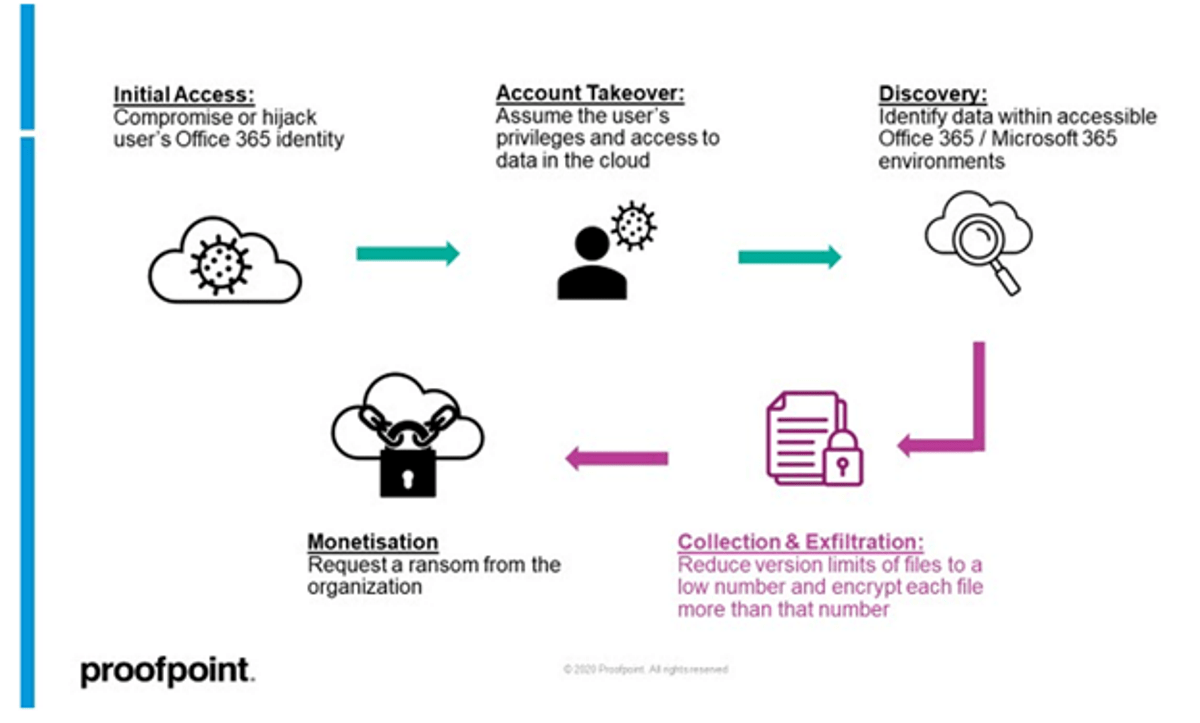
The research by Proofpoint indicates the “AutoSave” feature of Microsoft 365 as a potential threat. This feature is meant to make copies of older versions of files stored on OneDrive/SharePoint. The attack chain as pointed out by Proofpoint could go as follows:

Initial Access

Attackers start by first gaining access to the user(s) OneDrive or SharePoint account(s) through compromising login credentials, tricking the victim to allow third-party OAuth apps, or hijacking the web session of a logged-in user.

Account Takeover

After successful penetration of the user account, attackers have access to all the files stored by the user in OneDrive or SharePoint.

Collection and Exfiltration

Reduce the version limit of files to a low number, like “1” and then encrypt the file more times than the version limit, i.e., encrypt the file twice if the version limit is set to 1. Besides that, attackers can also do a double extortion tactic by exfiltrating the encrypted files.

Monetization

Once the original versions of the files are lost and the encrypted versions are left in the user account, the attackers can then ask for a ransom to decrypt the files.

All the above steps can be automated using Microsoft APIs, PowerShell scripts, and command line interface scripts.

The document library in OneDrive and SharePoint is based on multiple attributes, where one attribute is the number of saved versions that the user can change. When a user reduces the document library version limit, it means that new changes in the file will make older versions quite difficult to restore.

So, what attackers can do is they can either create so many file versions or change the limit of the version to just “1” and then encrypt every file more times than the version limit. For example, the default version limit in most OneDrive accounts is 500. So, attackers can edit document library files 501 times. This way, the original version of every file is the 501st version file, which is no longer accessible. Alternatively, they can set the version limit to 1 and then encrypt the file twice.

What to Do if You Get Hacked and They Ask for Ransom?

From the above research work of Proofpoint and the vulnerable “AutoSave” feature of Microsoft 365, there are clear signs that ransomware attacks can occur in your cloud storage. When this vulnerability was discussed with Microsoft by Proofpoint, Microsoft stated that the older versions of files can be recovered by an additional 14 days through the help of Microsoft Support. However, Proofpoint did follow that but failed to restore older versions.

So, if you get a victim of a ransomware attack and your data is encrypted in your cloud account or local drive, then the one quick option is to pay the ransom and get the decryption key. But this approach is not recommended because you never know if the decryption key would work, you will get back the data, or the attacker might demand more money. Moreover, it also encourages attackers to do more such attacks.

The recommended steps you should immediately perform after the ransomware attack are as follows:

  • Disconnect and isolate the infected device.
  • Contact your local authorities.
  • Reach out to a cybersecurity expert to try to remove malware.
  • Look for the data backup you might have created beforehand or try to restore data from others if you have shared it with them.

In short, you should try every possible measure that you can take to retrieve data without paying the ransom.

Ways to Store Files Securely (on your PC)

Ransomware and other cyberattacks are a serious concern today. As per Cybersecurity Ventures, cybercrimes will cost the world $10.5 trillion annually by 2025. So, it is important more than ever that we store our data and files securely. Below are some of the effective ways to store files securely on your PC:

  1. Encrypt files/folders in Windows. To do that, right-click the file/folder and then click Properties > Advanced > Encrypt contents to secure data > OK.
  2. Control the access to your files/folders in Windows. To do that, right-click the file/folder and then click Properties > Security > Edit. Afterward, select the user’s name or group and then click “Deny Access”. This way, the user/group will have to enter an administrative password to access that file/folder in the future.
  3. Use third-party tools to encrypt sensitive files/folders.
  4. Make regular backup of your files in the cloud or external hard drive.
  5. Use antivirus software.
  6. Keep your operating system and software up-to-date and patched.
  7. Avoid giving administrative access to all software.

To sum up, you should deploy every possible measure you could take to secure your files on your PC. These measures do not guarantee complete protection from cyberattacks, but they can minimize the chances greatly.

How to Save Your Health and Wallet by Eating Out Less

Eating out is fun – and can certainly be tasty – but if you’re doing it more than once or twice per week, it’s most likely having a negative impact on your health and your bank account. Something needs to change!

6 Tips for Eating Out Less

Eating out less is simply a matter of discipline and planning. If you’re willing to do it and you take the time to create a plan, you can eat out less, save money, and be healthier. 

Here are some suggestions:

1. Set a Budget

If the goal is to save money, you need to start by setting a budget. Sit down at the start of each month and give yourself a weekly grocery allowance. (You can also give yourself an “eating out” allowance, but it should be significantly lower.)

2. Plan Out Your Meals

The next step is to plan out your meals for the week. Grab a notebook or a spreadsheet and literally plan out every meal, including breakfast, lunch, and dinner for each day of the week. When planning out your meals, take leftovers into account. You can usually stretch the previous night’s dinner into the following day’s lunch. 

3. Grocery Shop Online

Here’s a little trick that will change the game for you: Shop for groceries online and do delivery or pickup. When you shop online, you aren’t as prone to making emotional purchase decisions that are driven by your stomach. You also get the benefit of easily adding and subtracting things from your cart, seeing the subtotal as you go, and verifying nutritional information on the fly.

(Pro Tip: When you shop online with a store like Walmart, you often come out ahead. If you order something they don’t have in stock, they’ll give you a “substitution.” These substitutions are often better than what you ordered – but they still charge you the same price. For example, if you order a six-pack of pudding that happens to be out of stock, they might give you a 12-pack for the same price.)

4. Learn How to Cook

Cooking is not popping a frozen pizza in the oven or boiling a box of macaroni on the stove. Learn how to actually cook and your desire to eat out will go way down.

When it comes to cooking, cook what you love. If you’re a big pizza fan, buy an outdoor pizza oven and learn how to make your own dough and toppings. If breakfast foods are your thing, find recipes for breakfast casseroles and cook away!

5. Prep Meals in Advance

The key to staying disciplined is to prepare meals in advance. (A lot of people prefer to do this on Sunday afternoons while they’re watching a movie or listening to a podcast.)

By preparing your meals in advance and putting them in individual containers, you make it easy to just grab a meal and go. This prevents you from eating out for the sake of convenience. 

6. Keep the Right Foods on Hand

Avoid putting yourself in a position where you have to rifle through the pantry or refrigerator looking for something to eat. If you aren’t careful, this can lead to pulling up your phone and ordering an expensive, overpriced meal from Uber Eats. 

By always having good food on hand, you don’t have to deal with the temptation of ordering out. Stay stocked up – especially on the weekends. 

How Much Can You Save?

The potential cost savings for eating out less are incredible. To prove this point, let’s run a little exercise with some round numbers. For example, let’s say this is the average cost of each meal you eat out:

  • Breakfast: $6
  • Lunch: $10
  • Dinner: $18

If you eat breakfast out five times per week, lunch five times per week, and dinner three times per week, that’s a total of $134 per week. If you run those numbers out, we’re talking about $536 per month and nearly $7,000 per year. It doesn’t matter if you’re making $30,000 or $100,000 per year – that’s a lot of money spent on food!

But here’s the thing – cooking your own meals and eating in costs just a fraction of what it does to eat out. You can usually prepare a good breakfast for $1 or less, a good lunch for $3 or less, and a good dinner for $7 or less. That’s a cost savings of at least $93 per week (or $372 per month). 

If you’re currently in debt, behind on retirement, or have no savings, simply choosing to eat at home more often could allow you to dramatically improve your financial situation to the tune of $372 per month (or more). There are no excuses – take control of your life!

Tips to Secure Your Computer in University

It is becoming increasingly more important for universities to take precautions against cyber crime. Whether you want to protect yourself and your network, ensure data privacy, or prevent a ransomware attack, there are steps that you can take as an individual that will help protect your computer. Below are tips on how to secure your computer in university when giving cheapest writing services to earn money part-time. Protecting your computer is a major concern that everyone should at least try and consider to protect themselves, your colleagues, and your university’s data.

1. Install Antivirus Software

Antivirus software can go a long way to protecting your computer and ensure the validity of your information. Windows Defender is free and does the job for many users. You should also scan your computer regularly, as often as once a week is recommended, to ensure that you are always protected. However, it should be noted that antivirus software alone will not keep you completely secure.

2. Use Extended Permissions

An individual that has access to limited information on a network, but can change it all without being noticed, represents a big risk for any company or university. Use extended permissions when setting up or changing passwords for your accounts.

3. Change Passwords Often

The most common way for a hacker to gain access to an account is by extracting or guessing the password from the user. Therefore, it is important to ensure that your passwords are strong enough that it would take a significant amount of time before the hacker was able to guess it correctly. If there are any changes in your life that could affect the strength of your password, you should change it immediately. This includes changes in personal information such as address and phone number, or details related to work such as job title and responsibilities.

4. Control Your Social Media

While you should be careful about what information you put on social media, you should also be careful about what information you share on your social media. This means that any personal details, such as address and phone number, should be shared only with people that need it and not posted anywhere for all of the world to see. Therefore, if you are asked to provide this kind of information in an application or form sent over email or fax, do not provide it. You could lose access completely if a screenshot is taken of your address or phone number.

5. Lock Down Your Work Computers

If you have an office or work computer that you use, it is important to ensure that it is completely locked down. This means no browser tabs or files can be open on the machine – this includes accessing files and applications on a flash drive. If a computer at work is infected, you could be at risk of data leakage because the virus could infect other machines on the network. In addition, do not leave your inventory of equipment up to anyone. The information should be kept in a safe place inside your building or locked in a locked file cabinet.

Conclusion

Cyber crime is increasing on a daily basis and the sophistication of hackers is improving by the day. Therefore, it is important that you take the necessary precautions to protect your computer. It is important to remember that these tips will not necessarily secure your computer fully, but they represent an excellent starting point on how to secure your computer in university.

Should You Ever Use Free or Low-Cost Proxy Services?

Every day, millions of downloads happen for free. Updates and patches to existing software, free trials for games, freeware, and apps for mobile devices, are all available for no cost on the net.

There were around 3.48 million apps in the Play Store as of 2021. In the final quarter of that year, 6 billion apps were downloaded. When the pandemic arrived and Covid set in, most people found themselves spending more time at home. This resulted in extra leisure time and increased internet usage.

In 2020, around 218 billion apps were downloaded. Many of these applications would have been free. Many websites also offer free services such as Grammarly or Canva. Clearly then, there is a desire for free software whether it be for entertainment, education, or to automate tasks. 

With apps being given away by YouTube, PayPal, Netflix, and other global companies, there should be no reason to have any mistrust in free software right? But what if the service you are using is for security and safety online, should you risk your sensitive data to a free proxy for instance?

While proxies usually don’t involve actually downloading any software, they still involve a connection to your device and all the risks that may entail.

Are Free or Low-Cost Proxies a Bad Idea?

Nearly all anti-virus software developers have free versions of their programs available. Sometimes these are free trials, and sometimes they are the full package but delivered with limited options.

If anti-virus software can be installed for free, why should you worry about other security options such as proxies, or VPNs for that matter? There is a lot of concern that free or low-cost proxies may not be delivering the protection that users believe they are getting, and the service may be putting the user at risk.

Using a free data center proxy to access region-blocked websites abroad and stream TV shows may not be a serious issue. However, using a free proxy to web scrape, or to protect sensitive data might be.

Does Using a Paid-for Proxy Automatically Mean a Better Service?

Proxies are there to help you stay anonymous on the internet. Instead of accessing a website directly with your IP address clear to see, a proxy will reroute you through its server and replace your IP with one of its own.

Using a free proxy means you get all this without paying a penny. But, that software still needs to be paid for somehow. Developers spend time on their software, and they have staff, marketing, and other overheads to pay. So, when you use a free proxy service, you are likely to be getting a cut-down version of the real thing at best.

Many proxy services will let users try out residential and mobile data for a small fee to see which IPs work best. ProxyEmpire uses only residential and mobile proxies as these are the most reliable and secure way to connect to websites and collect data. A free proxy service will almost never involve residential or mobile IPs.

Instead, they use open proxies which are less secure, can be blacklisted by many websites, and could be open to attack by malicious hackers. A paid proxy service is more likely to have features such as kill switches, and better protocols than a free one.

What Are the Downsides to Using a Free or Low-Cost Proxy?

As mentioned above, free proxy services still need to be paid for. This will often involve advertising. Generally, ads in apps or on websites are more of a nuisance than anything, but there could be a potential security risk. While no self-respecting proxy provider would have any malicious intent, advertising could slip through that is infected with malware.

Potentially worse, is what a free proxy provider may do with your information. It is not unknown for proxies at the lower end of the market to collect and sell data and information from their users.

Plus, a free proxy may simply not be up to the task. The IPs assigned by free proxies are not genuine and can be identified and flagged up by websites. You could find your free proxy is blocked by many of the websites that you wish to visit.

Superior providers offer a rotating proxy service where millions of authentic residential IPs are available to users. These are almost impossible to detect as they are the real thing provided by ISPs.

Disadvantages of Using a Free Proxy Provider

Here are some of the reasons why free proxies may be bad, especially if you are using them for business.

  • Slow speeds
  • No kill switch
  • Potential malware risk
  • Intrusive advertising
  • Weak protocols
  • Data may be sold
  • No residential or mobile IP options
  • Blacklisted by many websites
  • Poor location choices
  • Lack of dashboard features
  • Unsecure

Malware Protection

About 3.4 billion phishing emails go out every day. Many of these contain viruses and malware for their unsuspecting victims. One worrying statistic is that 94% of malware is delivered by email.

A free proxy may not have the security features in place to scan emails for malware in the way that others do. Kill switches are another important security feature that free proxies are unlikely to have.

Secure Connections

When you connect to a proxy, you are trying to establish a secure connection to the website you wish to visit. If that secure connection is dropped then your information and IP can be exposed. A kill switch will ensure that you are disconnected and remain anonymous, whereas a free proxy could leave you fully visible.

Poor Choice of Locations and Servers

In fairness, if you are receiving a free service then you probably don’t expect all the bells and whistles you would get if you were spending cash. However, a free service is useless if it cannot deliver what you need.

Generally speaking, free proxies will not provide you with the premium geo-locations that paid-for services will. This may mean you are not able to connect to the necessary locations.

A Free Proxy Is Useless for Business Needs

Any business involved in data mining or web scraping will need to use residential proxies. Trying to carry out this task with a free or even low-cost proxy will be impossible. IPs will either already be blacklisted or will be soon after operations commence.

There are plenty of reasons why businesses need cyber security, and proxies are essential today. However, using a free proxy is not going to provide the anonymity and protection needed by a business operating online in 2022.

Free proxies will also not provide the number of IPs needed by businesses. For effective data mining, it may be necessary to have hundreds of concurrent connections operating at once. A free proxy service will never provide this.

Summary

Free proxies will rarely if ever provide protocols such as SOCKS4 or SOCKS5, and will always be less secure than paid services. This isn’t to dismiss free proxies entirely, but they should be limited to basic browsing.

While watching foreign streaming content with a free proxy is probably okay, trying to collect data from global websites isn’t going to work.

But above all, free proxies may just not be keeping you as anonymous, or your activity online as private, as you may think.

Startup Management 101: Using Tech to Get Ahead

There’s no denying that in this day and age, company owners either acclimate to modern tech standards or risk stagnating their business. Any entrepreneur who doesn’t make full use of modern amenities will find themselves lagging behind the competition.

While it might seem like a frustrating fact of business management, it doesn’t have to be such an issue. After all, one of the most significant advantages of startups is the potential for a fantastic start. A company that takes the time to prepare for an optimal beginning will always have a bright future ahead.

While you have a lot of work to do, using tech to get ahead is all about finding ways to improve and optimize business practices. Here are a few surefire ways to build a foundation for a successful business.

1. Taking advantage of AI to elevate your business

There are a remarkable number of ways artificial intelligence has served to improve the business sector. The fact that it’s still considered burgeoning tech means that current technological standards are only the tip of the iceberg for AI! It can be used for process automation, closed captions, and transcription—even business forecasting.

As if that wasn’t enough, there are also data annotation services to help optimize AI programs, ensuring your business software works precisely as intended through accurate labeling. There are so many ways to take advantage of AI, though it depends on your chosen industry. AI can even be used to scour through the latest trends and news, giving you access to everything you need to improve your company.

2. Using software tools to fully optimize your company

No matter which industry you choose, there will always be business software that matches your pursuits. For instance, auto detailing software can streamline scheduling, customer management, and invoicing for businesses in the automotive detailing industry.

One general example is marketing, though you don’t necessarily have to do everything yourself. Something as simple as hiring an SEO agency can ensure that your business gets the exposure it needs online. That said, you can take from their example and inquire about the various types of software they use to market your business.

There’s even the potential for software development, where your business creates the software it needs to accomplish your goals. Another advantage of software involves the use of data management platforms, making it easier for you and your staff to tackle day-to-day company responsibilities. For instance, incorporating software solutions for general admission seating can streamline event management and improve the overall attendee experience.

Or you can go the easier route and use online marketing tools like PosterMyWall to manage all your marketing needs, from creating fabulous small business flyers, to social media publishing and email marketing, to creating your own brand kits so your business can always stay on brand, and stay ahead.

3. Taking advantage of tech to improve the customer journey

While digital marketing is there to point potential customers in the direction of your business, it’s still up to you to ensure that the customer journey goes smoothly. For example, web optimization ensures your customers have the highest chances of making a purchase when they get to your landing page. AI and various types of business software can also help your company with an online ticketing system and virtual agents for customer service.

Conclusion

Tech is an integral part of any business, especially if you want to outpace the competition as a startup. The earlier you rely on business software, the easier it becomes to manage your company, especially with regard to scalability.

Is the LIV Tournament Good or Bad for Golf?

The controversial LIV Gold Invitational Series landed in Portland, Oregon on June 2022. The series is funded by the government of KSA (The Kingdom of Saudi Arabia) and promises to deliver, “Golf, but louder”. It’s being spearheaded by Australian golfing icon Greg Norman, LIV Golf chief executive and commissioner. He made a rousing speech at the opening ceremony, urging fans to be more accepting the LIV.

The LIV tour has had a polarizing effect on supporters. Several members of the Pumpkin Ridge Golf Club have resigned in protest, while politicians and 9/11 survivors have also raised an outcry. Their issue is with Saudi Arabia’s serious backing of a tournament that has poached some of the best golf players, hence threatening the PGA tour. Before we dive into the reasons behind this controversy in this article, let’s take a closer look at what the LIV Tournament is all about.

What is the LIV Tournament?

LIV is a brand-new golf tournament that offers substantial prize money and high participation fees. LIV refers to the number 54, in Roman numerals, indicating a 54-hole layout for the tournament. It differs from PGA in various ways, including a three-round format versus PGA’s four. It also has about half the number of golfers that PGA has, meaning there’s no cut-off and that all participating golfers will have to compete from the first to third round unless they decide otherwise.

The biggest and most startling difference to fans is the team play system. While PGA requires golfers to play individually, LIV golf includes captains who draft teammates. The scoring relies on the total score from the team as opposed to individual achievements. The tournament ends with teams playing towards a championship through a knockout event. Teams work together and fight elimination to get to a winner. In the world of golf, LIV is a sensationalized event.

However, PGA comes up short when it comes to collecting payouts. LIV is backed by substantial funds and promises to pay golfers just for entering. This isn’t the case in PGA though, as golfers who don’t get the required score leave empty-handed. The payout format alone might be why PGA golfers Dustin Johnson and Phil Mickelson decided to enter, earning them a suspension from PGA.

So, why is a tournament that promises a better payout and wants to bring golf to the mainstream such a controversial topic? Keep reading to find out.

Why is LIV a Controversial Topic?

The Saudi-backed LIV tournament is being heavily criticized because of KSA’s history of human rights violations. Fans and other stakeholders believe this is the country’s way of “sports washing”, i.e., diverting attention from atrocities through global sporting events. This was particularly prominent here, where locals are still enraged about 15-year-old student Fallon Smart’s death, which was caused by a Saudi national. The perpetrator in question was never prosecuted and fled to KSA safe and sound.

The situation becomes even more serious when you look outside Oregon. LIV will have five total tournaments happening across the United States and people are outraged. This applies especially to 9/11 survivors or family members of some of the victims, who even held a news conference denouncing the tournament. This is because at least 15 of the 19 terrorists involved in the 9/11 incident hailed from Saudi Arabia.

What’s more, critics of LIV have brought up the killing of Washington Post journalist Jamal Khashoggi back in 2018 by Saudi Arabia’s crown prince and the fact that women in the country were only recently allowed to drive. These blatant human rights violations have made people boycotting LIV left right and center, demanding pro-golfers to step back and calling them hypocrites.

However, Norman made his case at the launch event, saying that PGA earns a significant chunk of revenue from Saudi Arabia’s business. He maintained that he was confused about why PGA supporters were giving him hate considering a lot of PGA golfers stand to benefit from LIV’s gargantuan payout. Norman also spoke about wanting a merger between the two rival tours.

In any case, there is a civil war going on in the world of golf right now and it begs the question: is LIV good or bad for golf?

How Does LIV Benefit Golf?

LIV works for golf in that it achieves two goals, as follows:

  1. It breaks up the monopoly that is inherently present in golfing tournaments.
  2. It brings golf to the mainstream.

The traditional golf ecosystem runs on a meritocracy where you have to maintain consistent and clean records, along with participating in tours where you might leave with nothing. LIV provides golfers with guaranteed payouts, even for participating. It could be argued that this will draw more people to the game, creating a larger golfing category and breaking up an existing monopoly.

The team play format and payout options also bring golfing into the mainstream, as KSA’s backing means the tournament will be advertised and broadcast globally instead of just a few selective countries. If you are struggling to understand more about how golf works, checkout The Left Rough for detailed explanations.

How Does LIV Harm Golf?

The biggest way in which LIV harms golf is by creating a split between golfers. Already, LIV has poached some of PGA’s best players and plans to continue doing so. Greg Norman wants to hammer in his legacy with LIV and is collecting pro-golfers like playing cards. The inherent controversy present in the tournament means the golfing community is unable to exist in a cohesive space.

Another potential factor that harms golf is the above-mentioned payout system. Seasoned pros, like Tiger Woods, insist that the only way to come up in golf is to consistently practice especially with the intervention of AI in golf, defeat the odds, and stay competitive . With a tournament like LIV where the payout is guaranteed, there’s a chance that golfers will stop honing their skills or trying to be the best. It could result in mediocre performance since payment is guaranteed.

The Final Verdict

While LIV is proving to be a popular tournament despite its nontraditional format, it doesn’t seem to be catching on with hardcore golf supporters. Many have argued that watching sports is a way for fans to blow off steam and escape real-world issues. However, the LIV Golf controversy is forcing fans to take a moral stance, stealing their attention from the actual sport. There is also disillusionment as certain golfing legends joined LIV, disappointing their fans by participating in a tournament that they see as fundamentally flawed.

Everything You Need to Know About Mining Rig

Creating new Bitindex Prime and cryptocurrencies from their respective Blockchain network is known as mining. Mining hardware is required to obtain and other cryptocurrencies through the mining process. The rig might be a personal computer (PC) or a separate piece of mining equipment. Instead of utilizing a laptop used just for gaming as a secondary system for mining, a dedicated miner must purchase constructed and run solely computers for mining. 

Before beginning the mining process, it is essential to consider the following:

A sensible tactic is to evaluate the return on investment (ROI) of pre-assembled mining equipment and custom-built mining rigs before purchasing. Due to the intense competition level, everyone must consider the following aspects.

  • Hash rate on mining machinery and tools
  • The difficulty of mining bitcoins on the network at the moment
  • The prices of energy
  • Concerning maintenance and preventative care

Hashrate:

To solve the hash puzzle that is needed to mine new coins computers generate trillions of hash numbers each second. To get an idea of how rapidly a pre-built device can complete mining computations, for instance, you may examine the hash rate execution of the device.

Electricity:

Miners should categorize the performance of hash execution depending on the quantity of electricity utilized so that they can accurately assess their computer systems’ return on investment (ROI). On the other hand, the cost of electricity is quite sensitive to one’s location and can swing widely. In most cases, the cost of mining equipment will increase to the point that it will no longer be required if someone steals or obtains free power.

Perform Required Upkeep and Repairs:

It is essential to think about scheduling and maintenance before beginning the mining process. The process of putting together Bitcoin mining equipment is a time-consuming one. Replacement fans are necessary to reduce the tremendous temperatures created by the equipment used to mine bitcoin. Employed personnel can monitor machines and devices that run 24 hours a day, seven days a week, using massive amounts of data.

Components

Let’s look at the many parts that make up a mining rig so you can construct one of your own. When you visit Parallel Miner, you will find a diverse selection of individual components. In a general sense, you should be on the lookout for the following components in particular:

  1. Printed circuit board: Without having one of them, you can’t have a rig. Period. If you are in the market for a new motherboard, you should make it a point to investigate whether or not it is compatible with the graphics card you intend to use.
  2. Graphics processing unit: A graphics card is often called a graphics processing unit (s). They are the factor that will determine whether or not your mining rig will be on par with the best in the world. Nvidia and AMD are the two most prominent names in the industry in producing and distributing high-end graphics cards.
  3. Continuous power supply: A supply of available power. To put it another way, the other components of your system are the sole determinants of the power supply that you will require for your system. You will want a vital power source to construct a robust Bitcoin mining rig.
  4. Cooling system: The provision of adequate cooling in a mining rig is essential to ensuring efficient operation and preventing the buildup of excessive heat, respectively. It is best to avoid caution and purchase the most effective cooling system you can afford rather than trying to save money.
  1. CPU: It is imperative to have a high-quality CPU to ensure that the rig runs smoothly and without any errors.
  2. Frame: Not the least important, but still very important, is the structure of the mining rig, especially when it comes to GPU mining rigs. You have a wide variety of alternatives to choose from when it comes to mining rig frames, so you can select the one that is most suitable for your requirements.

Naturally, you will want to use a structure that will hold the machine together rather than one that will crumble under the weight of the first particle of dust that falls on it. This is because the first particle of dust will cause the machine to stop working.

Conclusion:

Because of the widespread adoption of cryptocurrencies, there is an ever-increasing demand for professionals with specialized knowledge. Users of cryptocurrencies who are familiar with the operation of their mining rigs have a significant advantage. After all, putting together your mining rig educates you on the hardware and the software, cryptography, and trade involved in the process and makes you more efficient in mining.

However, you can also make a profit by bitcoin investment and trading. Beginners and pros alike can benefit from the Bitcoin Compass app, which was designed to make trading easier. On the other hand, the bulk of different applications calls for a power supply that operates at a medium level.

The Complete Guide to What is SEO Content and How it Drives More Traffic To Your Website

Creating engaging content is a proven technique to attract visitors to your website or landing page. The information should be valuable and captivating regardless of whether you write an article or create an illustration.

Just like a strong CRM solution is vital for smooth client interaction, SEO is crucial for generating traffic, reputation, prospects, and purchases, but you can only reap these rewards if you handle it right. Otherwise, your company remains virtually invisible online.

Although staying relevant isn’t always simple, you can’t let your guard down regarding SEO. There is no assurance that previously successful SEO techniques will remain effective because Google constantly changes its search criteria.

To ensure the success of your organization, you must stay on track with the current SEO best practices with constant content refresh.

In this guide, we’ll go over the main points for developing a successful SEO content strategy.

What is SEO Content?

SEO content is there to boost your website’s search ranking. One of the SEO foundations is content, which covers all aspects of creating and organizing content for your site.

To create material that will help your website top the list, you should focus on copywriting, keywords, and optimizing site design. Another important concept is an SEO marketing strategy. It’s a detailed plan for increasing the number of people who come to your site.

Both on-page methods, which employ intent-based terms, and off-page approaches, which generate inbound connections from other web pages, are essential to effective SEO.

Find SEO Keywords

SEO process should begin with keyword research, so performing it poorly or not at all lays the ground for failure. If you don’t conduct keyword research, you run the risk of choosing misleading keywords for your brand. There are very few or no searches for keywords with poor search frequency. It is unlikely that content with these kinds of keywords will be recognized.

When you’re just starting, you can pick long-tail keywords to place higher in Google searches (note: if you can’t afford a keyword research tool, take advantage of SEMrush free trial to get all the premium SEMRush features for free for 7 days. This includes keyword research). After you’ve prepared a selection of your target keywords, think about the potential content subjects. Choose the sort of content – a tutorial, a how-to, a briefing, etc. – for every keyword. Identify each term’s additional, related keywords and the search intent.

User searches have a specific goal, which is referred to as search intent. It is the reason behind a particular search. Ultimately, Google’s top priority is to fulfill user search intent. Consequently, search intent must play a significant role in your strategy if you wish to thrive with SEO and content marketing.

Use a Basic URL Format

Keep in mind that a Google Search result typically includes the URL next to the document title. While Google can efficiently process sophisticated URL structures, creating simple URLs is always preferable.

Visitors will easily access your site if the URLs contain words related to your website’s content and layout. Create short URLs without extra inputs and avoid using generic page titles or too many keywords.

Design a system that effectively groups your information and enables users to understand where they are on your website. Avoid extensive subdirectory clustering and using names for directories that have nothing to do with the contents of those directories.

Concentrate on utilizing and referencing one URL in the design and inner linking of your content. If you notice that users are viewing the same content via several URLs, you can redirect them from undesirable to predominate URLs.

Link to Relevant Resources

You can increase organic traffic without publishing fresh content. A solid internal linking plan can often be enough for your website to increase traffic to the pages with low rankings. An article that ranks on the first page has a more relevant and high-quality link value than an article that ranks on page two or after. By linking those two articles, you give the piece with the low score the chance to get to page one by extending the link’s credibility and relevancy. Try using infographic PowerPoint templates to capture your audience by showing them a visual representation of relevant data.

Links are the most effective technique for directing website users to additional relevant material. Including internal links that will lead visitors to topics they are interested in is a big part of the SEO technique. You can also direct visitors to sites where they can make purchases and even have affiliates direct potential consumers to you.

Get Your Headers Right

Since most people look only at the headlines, attractive headlines will undoubtedly draw your consumers’ attention and improve the likelihood that they will read the full article.

Create a headline, then use a tool to evaluate its relevance. You can include keywords in your headings to make it easier for your readers to find your business. Finally, in order to make your headlines more meaningful and concise, optimize the number of characters.

Why Is SEO Important for Your Website Traffic?

There are about a few hundred ranking criteria used by Google. These ranking variables give importance to practically every aspect of a website, including its speed, URL format, picture names, credibility and relevancy of a page, number of backlinks, and a variety of other elements. Therefore, it’s essential to check that the content on your website is optimized to rank well in search results and interesting enough to lead to clicks, and SEO can help you with that.

Shopping websites receive multiple times more volume from search engines than social networks. This indicates that putting money into SEO is equally (or even more) important than social media promotion. Mix these approaches to maximize the effectiveness of your marketing plan if you intend to attract a ton of traffic to your business and boost sales. SEO proposals are one of the most effective ways to increase your website traffic. Not only will it help you reach more people, but with higher search rankings on Google’s SERPs comes an increased chance for conversion opportunities as well

Conclusion

Make sure your website includes most of or only SEO-friendly material. Everything you publish online should serve a specific purpose. This includes blog posts that answer frequently asked questions, visuals that showcase your goods, and sales pages with a message at the upper end that informs users about the features and helps search engines index and recognize the information.

Increase your search presence to attract more users and, as a result, engagements and profits. It might take effort, but the work invested in becoming an SEO guru is always worthwhile.

Andrej Fedek is the creator and the one-person owner of the InterCool Studio. As an experienced marketer, he is driven by turning leads into customers. His goals always include White Hat SEO. Besides being a boss, he is a real team player with a great sense of equality.

How to Unlock a Disabled iPhone in 2022

With the increase of information leakage, users pay more and more attention to the protection of personal privacy and data, which makes it a trend to set a screen lock for iPhone. However, the common issue is that you may sometimes cannot access the device with the right passcode. Once you reach the limits of incorrect passcode entries, you will trigger the iOS security protection mechanism, only allowing you to input again after its designated time. When it accumulates to 10 times in a row, a message will show: iPhone is disabled connect to iTunes. How to unlock? To get out of the lock, three available solutions are offered here, including iCloud, iTunes and iPhone unlocker from MagFone.

Part 1: How to Unlock Disabled iPhone without Computer

Don’t have a computer to use when your iPhone is disabled? Don’t worry. As long as you have turned on Find My iPhone feature, you can visit online iCloud website to remove your screen lock easily. Here is what you can do:

Step 1:

Open a browser on any accessible device and enter icloud.com/find.

Step 2:

Enter your Apple ID and password to sign in iCloud Find My iPhone.

Step 3:

Select “All Device” on the top of the screen and choose your disabled iPhone from the list.

Step 4:

Tap “Erase iPhone” to confirm and start to wipe this device as a new iPhone without passcode.

Part 2: How to Unlock a Disabled iPhone without iTunes and iCloud

Are you looking for a way that requires no iTunes and iCloud? Well, here MagFone iPhone Unlocker can come in handy. This iOS unlocker is able to remove screen lock without passcode from your disabled or locked devices, including Face ID, Touch ID, 4-digit passcode, 6-digit passcode, and custom graphics. No matter what situation you are in, such as forgotten passcode, second-hand device or broken screen, it only takes some quick steps to unlock. Best of all, you can even unlock Apple ID, Screen Time passcode and MDM restriction using this powerful software. It can ideally support a wide range of iDevices running different iOS versions.

  • Unlock disabled, locked, broken and unresponsive iPhone quickly
  • Unlock Apple ID without password
  • Turn off Screen Time and bypass MDM without data loss
  • Support nearly all iOS devices and iOS versions, like iOS 16
  • Different screen lock removal: numerical passcode, custom graphics, Touch ID, Face ID

iPhone Is Disabled, How to Unlock Using MagFone iPhone Unlocker

Step 1: Run MagFone iPhone Unlocker and Connect iPhone

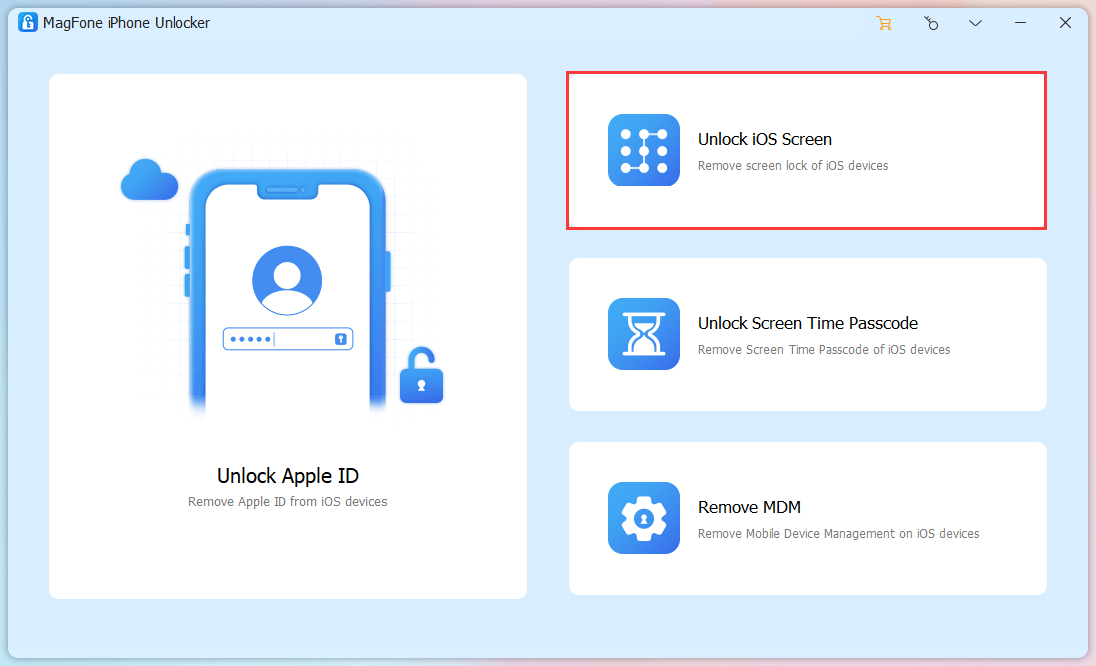
Open your installed MagFone iPhone Unlocker on computer and connect your disabled iPhone to computer using a USB cable. Then you can select “Unlock iOS Screen” in the main interface of this program.

Step 2: Put Disabled iPhone into DFU/Recovery Mode

Under “Remove Screen Lock” interface, click on “Start”. You’ll be required to boot your disabled iPhone into Recovery mode or DFU mode. Just follow the on-screen instructions to operate and once completed, right-arrow can turn blue so that you can click it to continue.

Step 3: Download and Verify Firmware Package

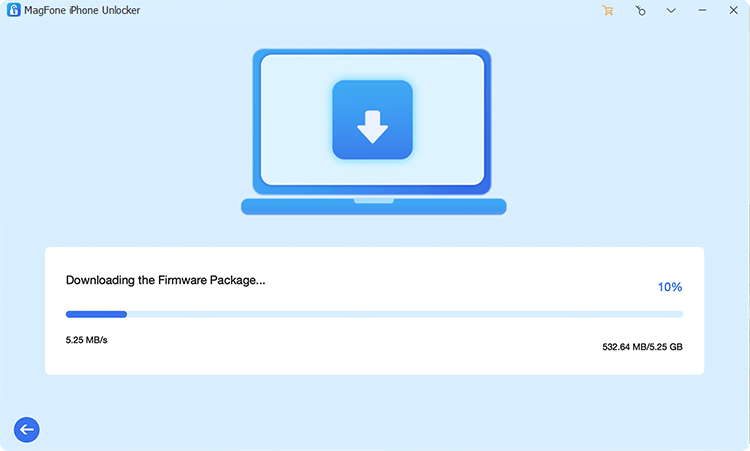
MagFone iPhone Unlocker will show what it detects and display your device information. Have a careful check and make correction if needed. You can then choose a matchable iOS version to “Download” the firmware package. Afterwards, initiate a verification process.

Step 4: Start to Unlock Disabled iPhone

It’s time to click on “Unlock” to unzip your previously downloaded firmware package. MagFone iPhone Unlocker will start to unlocking your disabled iPhone. Once it finishes, wait a moment for your device to reboot without no passcode. You can then restore data from backup and reset your screen lock again.

Part 3: How to Unlock a Disabled iPhone with iTunes in Recovery Mode

Another solution to erase your iPhone passcode is to put it into recovery mode and restore in iTunes. If you failed to connect your iPhone device directly to iTunes, try this way on your Mac or PC.

Step 1:

Put your iPhone into recovery mode. For iPhone 8 and the later, you can press and release Volume Up button quickly, then for the Volume Down button. Next hold the Side button until you can see it enters recovery mode.

Step 2:

Open iTunes and connect your disabled iPhone to computer. iTunes will detect the device in recovery mode and pop up a window with “Restore” and “Update”.

Step 3:

Now choose “Restore” to restore your iPhone and unlock screen without passcode.

Conclusion:

After learning how to unlock disabled iPhone in this article, you can easily remove lock from your screen without using a passcode. Conveniently, iTunes, iCloud and professional MagFone iPhone Unlocker can be applied to different situations you are facing. However, for iOS users who encounter various possible locking issues, MagFone can be a one-stop solution to better manage device.

CompanionLink to Launch Outlook Sync for monday sales CRM

Supported sync destinations include Outlook, Microsoft Teams, Google, iCloud and DejaOffice

CompanionLink Software, the long-time leading maker of PC-based Sync Products, is launching a Sync driver for monday sales CRM in September 2022. This driver will be supported throughout our product line, allowing integration from monday sales CRM to PC Microsoft Outlook, Microsoft 365, Google, iCloud, iPhone, Android and DejaOffice.

A month ago, monday.com announced the availability of the monday sales CRM. The CRM is a fully customizable multi-user CRM you can set up in minutes, giving small business owners and large business sales teams the ability to manage their sales cycle and customer data. Introduced by monday.com (MNDY), monday sales CRM seamlessly integrates with hundreds of apps and services, but not Microsoft Outlook on the PC. Instead, CompanionLink will supply an Outlook Sync product.

Market Position

CompanionLink plans to release software that fully supports Sync with Contacts and Activities in monday sales CRM. Based on a Windows software engine, CompanionLink products commonly connect a legacy platform with a novel platform.

CompanionLink solves a common business problem. Although dynamic teams seek to implement new and powerful web-based technology, established processes and staff rely on traditional PC-based tools to be productive in their everyday assignments. CompanionLink solves this problem by creating software that connects the legacy tool, like Microsoft Outlook, with new platforms like monday sales CRM. As a result, the CompanionLink customer gains the best of both worlds as they maintain their legacy systems while engaging in dynamic involvement with monday’s modern productivity tools.

Outlook Contact Integration with Monday CRM

CompanionLink’s new driver connects Outlook Contacts to monday sales CRM contacts. Your entire contact list is available on Monday in just a few seconds. CompanionLink’s product works without regard to whether you use the email portion of monday sales CRM. You can add the Outlook fields to your monday sales CRM template, and the CompanionLink driver will sync them. CompanionLink supports all forms of Outlook folders, including POP3, IMAP and Exchange folder types.

Outlook Calendar Integration with monday CRM Activities

The new driver connects Outlook Calendar with monday sales CRM activities. This connection ensures your daily activities are shared between Outlook on your PC and monday sales CRM for your team. monday.com’s product lacks a formal week and month view, and many people find these views fundamental to how they schedule their activities in Outlook.

CompanionLink products that integrate with monday sales CRM

When CompanionLink introduces a new driver, it is supported throughout the diverse CompanionLink product line. Customers who use monday sales CRM can take advantage of the following products:

CompanionLink Professional

CompanionLink Professional is sold as a perpetual license for $149.95 per user one-time charge or as a subscription for $28.95 per user, billed once every three months. CompanionLink Express is installed on your local Windows PC and will integrate the following data destinations:

  • PC-based Outlook versions 2007 and higher
  • Outlook.com
  • iCloud Contacts and Calendar
  • Gmail Contacts and Google Calendar

DoubleLook Enterprise

CompanionLink’s DoubleLook Enterprise provides server-based integration used by larger-scale websites to automate the sync process. DoubleLook is commonly used in corporations with a Corporate Exchange server instead of Office 365 hosted by Microsoft. DoubleLook integrates the same destinations as CompanionLink Express, including Exchange, iCloud, Google, and DejaCloud.

DejaOffice on PC, iPhone and Android

DejaOffice CRM is the highest-rated CRM product in the Android App store. It provides a convenient database for handling Contacts, Calendars, Tasks and Notes. The iPhone and Android-based DejaOffice App is free. While DejaOffice will not connect directly to monday sales CRM, customers set up a DejaCloud connector to handle this task. DejaCloud is a sync service offered by CompanionLink.

DejaFlow Automatic Sync

CompanionLink hosts a service called DejaFlow. When monday sale CRM is added to this service, small businesses can quickly add and maintain a connector for a fraction of the cost of Microsoft Automated Services, Appy Pie or Zapier.

Simple Setup

CompanionLink products are focused on the consumer market and are very easy to set up. Supply your login credentials. For example, with monday sales CRM, you create an API key, enter this value in the software, and then select simple items like which user records you want to integrate. You do not need to script separate actions like add, change, delete, or worry about complex data flow.

Speed and Performance Metrics

CompanionLink makes full use of App Hooks, which allows sync to be done in a few seconds. For example, once you have connected your Outlook to monday sales CRM, a new contact added in Outlook can be viewed on Monday at about the same speed as you switch to your browser (about 3 seconds). In addition, when you add an activity in monday sales CRM, it will display on your Outlook Calendar the next time you look at your calendar.

A Step Up for monday CRM customers

While Monday.com provides Google and Outlook integration, CompanionLink’s PC-based tool can provide an alternative level of service. As an established 3rd party vendor, CompanionLink provides a simple setup, fast sync, and technical support service in the style typical of legacy PC products. CompanionLink runs as a traditional Windows App. You install the product, set up the integration, and run automatically for weeks and years without any need for adjustment or maintenance. If you purchase a perpetual license, it is a one-time charge, so you do not need to spend money in future years until the PC or web-based platform requires an updated version.

Availability

CompanionLink’s products with the new monday sales CRM driver is now available in late September 2022. If you are interested please click here.

Tech Support

CompanionLink provides free telephone tech support in our local time zone from 7am-3:30pm US Pacific Time. In addition, you can email 24×7, and CompanionLink will respond to all messages on the next business day. CompanionLink is located in the US in Portland, Oregon.

CompanionLink also provides a one-time setup service called RunStart, for $69 and Premium Tech Support, for $149 per year. An experienced technician will log into your computer with both services and provide hands-on assistance for setup and maintenance tasks.

About CompanionLink Software

CompanionLink® Software, Inc. is a pioneer developer of data synchronization solutions for mobile phones and CRM software and services. They also develop a DejaOffice® for Outlook® App, which runs on Android™, iPhone® and iPad® devices. For 30 years, CompanionLink has connected Contacts, Calendars, Tasks and Notes from legacy platforms to innovative new web platforms as well as mobile phones and tablets. For more information, please visit www.companionlink.com and www.dejaoffice.com.

CompanionLink, DejaOffice, and DejaCloud are registered trademarks of CompanionLink Software, Inc. Other product names are trademarks or registered trademarks of their respective owners.

[xyz-ips snippet=”Reviews-CLP”]

How to Insure a Car with a Rebuilt or Salvage Title

It may seem like a fantastic deal to purchase a car that has been declared salvage after being damaged in an accident and then rebuilt. But finding junk car insurance could be more difficult than finding a regular policy.

Your vehicle might be given a salvage title if it has been deemed a total loss. Because it’s usually against the law to operate a vehicle with a salvage title on public roads, a car with a salvage title cannot be insured. Sounds really bad, but, can I get auto insurance for a rebuilt title?

You might be able to get auto insurance, but it might be challenging if you get the automobile repaired and your state transportation office provides it with a rebuilt title.

Not all firms offer coverage for these kinds of automobiles, and car insurance alternatives for salvage or rebuilt titles are often more expensive. However, in order to drive your automobile and be financially covered in the event of an accident, you must have insurance.

Go through the article, and explore how to insure a car with a rebuilt or salvage title. 

What is a Salvage Title Car?

If a car has a salvage title, it signifies it has sustained significant damage and is no longer safe to drive. Vehicles with a salvage title are often those that have been deemed a total loss or totaled, meaning that it would be more cost-effective to replace the car than to repair it. Utilizing a junkyard database can help you find the best options for selling or disposing of a salvage title vehicle, ensuring you get the most value from your damaged car.

The only way to get a car with a salvage title back on the road is to restore it. 

A licensed repair specialist is often required to rebuild the car and make sure it passes inspection. Your vehicle will be given a rebuilt title if the inspection goes well. After that, before you drive it, you’ll require insurance. It should be noted that not all insurers provide coverage for vehicles with rebuilt titles, and those that do may restrict your options for coverage.

The Differences Between a Salvage and Rebuilt Title

A vehicle that has been declared a total loss by an auto insurance company receives a salvage title from the state. A car with a salvage title is eligible to acquire a rebuilt title if it is fixed and passes inspection. But bear in mind that not all vehicles with salvage titles can be fixed up.

When this happens, a car is deemed “non-repairable,” which means you may only use its parts. Looking at the color of the title is a simple way to tell what kind of car you have:

  1. Title: Green – Clean
  2. Orange – Rebuilt Title 
  3. Blue – Salvage Title

Can You Get Auto Insurance With a Rebuilt or Salvage Title?

Because a salvage title vehicle is not deemed roadworthy, you cannot insure it. You can restore your car, though, unless your insurance provider says it can’t be fixed. When it successfully completes the state-mandated inspections and is insured, it is labeled as a Rebuilt Salvage in this instance.

Your options for insurance coverage may be limited if the vehicle has a rebuilt title. Some carriers will not insure a vehicle with a salvage or rebuilt title, while others just offer liability protection.

Getting collision and full insurance is achievable even if the majority of insurance companies are reluctant to issue a full coverage policy. However, there is a cost difference between higher premiums and potentially smaller pay-outs in the event of an accident.

Four Steps to Get Auto Insurance With a Rebuilt or Salvage Title

It is frequently more difficult to insure an automobile with a salvage or rebuilt title than it is to do so for one with a clear title. The following actions can make the procedure simpler.

1. Secure a Rebuilt Title

Keep in mind that a vehicle with a rebuilt title can be insured but one with a salvage title cannot. The only use for your car would then be as spare parts if the damage was severe enough for your insurance company to declare it unfixable.

2. Certified Mechanic’s Statement

Before seeking to obtain auto insurance discounts for a rebuilt vehicle, it is essential to have a secondary check carried out by a qualified mechanic. This step makes sure that any serious problems left over from the restoration procedure are found as soon as possible.

Before judging your car roadworthy, the majority of insurance providers will also demand a second evaluation.

3. Figure Out Insurance Options Available to You

When looking for coverage for a car with a rebuilt title, you could have fewer possibilities. Knowing which auto insurance providers cover salvage or rebuilt titles are important because some carriers outright refuse to insure these kinds of vehicles.

Some insurers are reluctant to provide comprehensive insurance to vehicles with rebuilt titles because it might be challenging to tell whether losses were brought on by a recent occurrence or were pre-existing. Additionally, some suppliers charge more, raising the price by up to 20%.

4. Compare Quotes

To get the finest coverage accessible to you, make sure to obtain quotes from at least three different vehicle insurance providers. This stage is especially crucial when insuring a car with a rebuilt title because your alternatives will probably be somewhat constrained.

Is Insuring A Car With A Rebuilt Title More Expensive?

You’ll probably pay a higher insurance rate for the same coverage on a car with a rebuilt title than you would for a car that hasn’t been salvaged and rebuilt. Gusner claims that this is in part due to the lack of businesses offering this coverage. Rates may be higher when there is less competition.

It’s also important to keep in mind that if your automobile has a rebuilt title and is totaled, your insurance carrier may not pay out much for your complete or collision claim because payouts are often determined by the value of the car, which may be lower because of the rebuilt title.

Which Insurance Providers Offer Rebuilt Title Coverage?

Root and General Insurance are two companies that offer coverage for vehicles with rebuilt titles. According to Carinsurance.com, The Hartford, 21st Century, Infinity, Omni, and Progressive may also provide coverage for these automobiles.

Remember that some of these providers might in some states provide coverage for vehicles with rebuilt titles but not in others. You’ll need to get in touch with the firm or an insurance representative to find out for sure whether these vehicle insurance companies provide insurance for rebuilt titles in your state.

Be sure to contact your state’s transportation department to learn about state regulations if you’re thinking about purchasing a vehicle with a rebuilt title. To ensure that the automobile was fixed correctly and is safe to drive, you might also wish to purchase a vehicle history record and have the vehicle inspected yourself. 

Ask your auto insurance provider if it covers rebuilt vehicles or if you’ll need to locate another type of coverage.

It’s crucial to search about and compare insurance estimates, just as when purchasing insurance coverage for a vehicle with a clear title. By doing this, you may be able to find solutions that are fairly priced, particularly if you only need liability insurance for the car.