Selling on Amazon often looks simple from the outside, but behind every successful store sits a dense layer of data: inventory numbers, ad metrics, pricing rules, customer behavior, and platform fees. When this data lives in separate tools and spreadsheets, sellers make decisions late or based on incomplete signals. Cooperating with a full-service Amazon agency typically starts with fixing data flow, because stored information allows sellers to react faster, control margins, and scale without chaos. Clean, connected data turns Amazon from a guessing game into a controllable sales channel.
What Data Storage Changes for Amazon Sellers
Putting data on Amazon does not mean storing everything in one dashboard just for convenience. It means creating a feedback loop between operations, marketing, and finance. Sellers who send data to Amazon stop reacting to issues and start predicting them.
A proper setup helps sellers:
Track inventory in real time across fulfillment methods;
Connect ad spend directly to product-level profit;
Adjust pricing based on stock and demand signals;
Spot listing issues before rankings drop;
Align promotions with actual margin data.
When these elements work together, decisions speed up. Instead of checking reports manually or exporting files, teams see the full picture at once. This matters most during high-volume periods, when delays cost sales and stockouts kill momentum. Data storage also supports collaboration, because everyone works from the same numbers rather than separate versions of the truth.
Fees, Margins, and Why Data Accuracy Matters
Amazon fees shape every pricing and advertising decision, yet many sellers underestimate how they affect profitability. Amazon’s referral fees are their main revenue driver, typically ranging from 8% to 15% depending on your product category. These Amazon commission for selling rates are non-negotiable and apply to every single sale. Without financial data, sellers often calculate margins incorrectly and overspend on ads that never turn profitable.
Here’s where it gets interesting: These seller fees on Amazon are charged as a percentage of your total selling price, including shipping and gift wrapping. That detail changes how promotions, free shipping, and bundle pricing should work. When data flows correctly between pricing tools, ad platforms, and analytics, sellers see real profit instead of vanity revenue.
This also improves forecasting. Sellers who connect historical sales, fees, and ad performance can predict which products deserve budget and which should pause. This clarity protects cash flow and keeps growth sustainable instead of risky.
Making Data Into a Competitive Advantage
Amazon rewards sellers who move faster than average. Sending data to Amazon shortens reaction time, reduces costly mistakes, and helps sellers test changes without guessing. Instead of fighting Amazon’s complexity, synced systems turn it into a source of insight.
This structured, performance-focused approach reflects how Netpeak works with Amazon sellers. Netpeak helps brands build data-driven Amazon strategies where analytics, ads, and operations support one clear goal: profitable growth. With deep expertise in performance marketing and marketplace analytics, Netpeak focuses on results that matter, not surface-level metrics. If you want your Amazon data to work as hard as your products do, partner with Netpeak and turn stored information into sales that scale.
Using Data Storage for Better Amazon Sales was last modified: January 2nd, 2026 by Julia Usatiuk
In the fast-moving world of cryptocurrency, having reliable liquidity is essential for efficient trading. Liquidity determines how quickly you can buy or sell assets without affecting market prices. For traders, exchanges, and institutions, partnering with a trusted crypto liquidity provider can mean faster execution, tighter spreads, and reduced market risk.
With more participants entering the market in 2025, from retail traders to large institutions, selecting the right liquidity provider has become a strategic priority.
This article will explain what a crypto liquidity provider does, explore different types of providers, guide you through the factors to consider when choosing the best partner, and provide a detailed overview of top providers, including WhiteBIT crypto liquidity provider.
We will also discuss future trends in liquidity provision and address common questions about this crucial part of the crypto ecosystem.
What Is a Liquidity Provider in Crypto?
A crypto liquidity provider supplies cryptocurrency to a market, enabling other participants to trade efficiently. LPs maintain active buy and sell orders across trading platforms, ensuring that transactions can be executed quickly, at fair prices, and with minimal market disruption. Without sufficient liquidity, markets can experience high volatility, wide spreads, and unpredictable price swings, making trading riskier and less efficient.
Companies that provide liquidity operate in several forms. Centralized exchanges supply liquidity through order books and trading pairs, while OTC desks handle large off-exchange transactions to prevent significant price impact.
Market-making firms actively quote buy and sell prices, maintaining spreads and ensuring deep market depth. In the decentralized finance (DeFi) ecosystem, LPs contribute assets to automated market makers (AMMs) and liquidity pools, facilitating peer-to-peer trading while earning fees or protocol rewards.
By bridging the gap between buyers and sellers, LPs reduce spreads, stabilize prices, and improve overall market efficiency. Their role is critical not only for exchanges and institutional investors, but also for high-volume traders seeking predictable execution. Essentially, a reliable liquidity provider is the backbone of a functional, efficient, and resilient crypto market.
Types of Crypto Liquidity Providers
Understanding the different types of liquidity providers helps traders and institutions select solutions tailored to their needs:
Exchange-Based Liquidity Providers: Centralized exchanges often supply liquidity through their own order books and partner platforms. They offer high trade volumes, low spreads, and fast execution, making them suitable for both retail and institutional participants. These providers are typically heavily regulated and provide robust security, which is appealing for clients who prioritize stability and compliance.
OTC Desks: Over-the-counter desks facilitate large trades off-exchange, reducing the risk of market slippage. They are ideal for institutions, hedge funds, or high-net-worth individuals who need to move significant crypto volumes without influencing public order books. OTC desks often offer personalized services, negotiated pricing, and dedicated support to ensure smooth execution.
Market Makers: Professional market-making firms continuously quote buy and sell prices to maintain market depth and tight spreads. Market makers are essential for exchanges to maintain liquidity across trading pairs, supporting efficient and predictable trading. Their strategies often include hedging and risk management to maintain consistent liquidity even in volatile conditions.
Decentralized Liquidity Providers: In DeFi, individuals or institutions contribute assets to AMMs or liquidity pools. This enables decentralized trading while allowing providers to earn fees or token rewards. While decentralized LPs offer transparency and yield opportunities, they also carry risks such as impermanent loss or smart contract vulnerabilities.
Institutional Liquidity Providers: These specialized firms deliver high-volume liquidity to exchanges, OTC desks, and institutional clients. Services often include technical integration with trading platforms, sophisticated risk management tools, and compliance support. Institutional LPs focus on predictable execution, deep liquidity, and operational reliability for large-scale participants.
Each type serves different priorities. Centralized providers focus on operational reliability and regulatory compliance. OTC desks prioritize discreet execution for large trades. DeFi liquidity emphasizes transparency, protocol rewards, and decentralized governance.
Choosing the right model depends on your trading volume, risk tolerance, regulatory requirements, and whether you value discretion, yield, or integration capabilities.
Factors to Consider When Choosing the Top Crypto Liquidity Provider
Market Depth and Asset Coverage
A top-tier liquidity provider should offer sufficient market depth to execute trades of various sizes without causing significant price fluctuations. Evaluate whether the provider supports the cryptocurrencies you trade most frequently and if they cover major, high-volume assets.
A wide asset range allows flexibility in portfolio management, seamless asset allocation, and the ability to react quickly to market changes.
Execution Speed and Reliability
Fast and reliable execution is critical for minimizing slippage and capturing optimal pricing. Assess latency, historical uptime, and order fulfillment rates. Providers with high reliability ensure that trades are executed promptly, which is especially important for high-frequency trading, large-volume institutional operations, or volatile market conditions.
Pricing Transparency
Transparent pricing models allow traders to forecast costs and plan strategies effectively. Providers may charge spreads, explicit fees, or a combination of both. Ensure the fee structure is clearly defined, predictable, and aligned with your trading style and volume. Hidden or variable costs can erode profits, particularly for high-volume traders.
Integration Capabilities
For exchanges, institutional clients, and automated trading systems, technical integration is essential. A strong liquidity provider should offer robust APIs, SDKs, or other direct integration options to streamline trade execution, reporting, and risk monitoring. Smooth integration reduces operational friction and allows trading systems to respond dynamically to market conditions.
Regulatory Compliance
Compliance with licensing, KYC, AML, and reporting regulations is vital for mitigating operational and legal risk. Providers adhering to regional and international regulations offer institutional clients peace of mind, especially for auditing, reporting, and cross-border trading. Regulatory alignment also enhances market credibility and trust.
Reputation and Track Record
Select providers with a proven operational history and a track record of serving both retail and institutional clients. Reputation indicates reliability and trustworthiness, which is crucial in crypto markets where liquidity failures can cause significant disruptions. Seek providers with positive client reviews, professional endorsements, and long-term market participation.
Support Services
Dedicated account management, risk monitoring tools, and reporting capabilities can significantly improve operational efficiency. Providers offering responsive support, professional guidance, and personalized services help manage high-volume trades, compliance requirements, and risk effectively.
Cost Structure
Compare spreads, fees, and any additional costs across providers. Evaluate whether the cost structure aligns with your trading strategy, volume, and expected returns. Efficient liquidity provision balances affordability with reliability, ensuring access to high-quality liquidity without compromising service or execution standards.
List of the Best Crypto Liquidity Providers
Choosing the best crypto exchange liquidity providers can make a significant difference in trading efficiency, execution quality, and overall portfolio performance. The crypto market in 2025 has matured, with an increasing number of specialized firms, exchanges, and DeFi platforms offering diverse liquidity solutions for retail traders, institutional clients, and OTC desks.
Each provider differs in terms of asset coverage, execution speed, pricing transparency, integration capabilities, and regulatory compliance. Some focus on centralized markets with tight spreads and fast execution, while others prioritize DeFi or OTC services that cater to high-volume trades and yield generation.
Evaluating providers against your trading needs, risk tolerance, and operational requirements is essential to maintain market confidence and achieve optimal outcomes. Below is a crypto liquidity providers list of leading companies.
WhiteBIT Crypto Liquidity Provider
WhiteBIT Crypto Liquidity Provider offers institutional-grade liquidity solutions across major cryptocurrencies. It provides deep liquidity for exchanges and trading desks, low spreads, and high-speed execution.
WhiteBIT also integrates OTC liquidity for large trades, minimizing market impact. Its services include API connectivity, regulatory compliance support, and dedicated account management, making it a versatile choice for professional traders and institutions.
ChangeNOW
ChangeNOW provides API-based liquidity for crypto products that want to add swap functionality inside an existing interface. Its Crypto Exchange API covers 1,500+ assets across 110+ networks, with assets sourced from CEXs and DEXs. Platforms can process cross-chain swaps through standard or fixed-rate flows, depending on whether the user needs market pricing or a locked rate. The integration also includes adjustable partner commissions starting from 0.4% per transaction, with support and maintenance handled by ChangeNOW.
Binance Liquidity Hub
Binance is a global leader in liquidity provision, offering extensive depth across spot, derivatives, and OTC markets. Its institutional accounts include integration tools, risk management support, and high-volume trade execution, making it ideal for both exchanges and large traders.
Kraken Liquidity Services
Kraken provides dedicated liquidity solutions for institutional clients, combining deep pools of crypto assets, low slippage execution, and API connectivity. Kraken emphasizes regulatory compliance and security, with insurance options for institutional trades.
Bitfinex Liquidity Provision
Bitfinex offers high-volume liquidity, advanced trading tools, and broad cryptocurrency support. Its services target hedge funds, market makers, and professional trading desks, enabling efficient market access and predictable execution.
Genesis Trading
Genesis specializes in OTC liquidity and institutional services. It facilitates large trades with minimal market impact and offers structured execution solutions for funds, family offices, and professional traders.
B2C2
B2C2 provides deep liquidity through market-making and OTC services. It supports a wide range of digital assets and focuses on real-time execution, risk-managed trading, and tight spreads for institutional clients.
Cumberland DRW
Cumberland DRW offers OTC trading and exchange liquidity solutions. It serves institutional clients with competitive pricing, fast execution, and risk management tools for large-volume transactions.
Jump Trading
Jump Trading delivers liquidity via algorithmic market-making and OTC services. It supports multiple crypto assets and emphasizes speed, integration, and technology-driven solutions for professional trading participants.
GSR Markets
GSR Markets provides liquidity through algorithmic market-making and OTC channels. It offers customizable institutional solutions for trade execution and risk management, covering a wide range of cryptocurrencies.
Galaxy Digital
Galaxy Digital offers institutional-grade liquidity via OTC and exchange connectivity, along with structured trading solutions. Its services combine deep liquidity, compliance, and integration with custody and trading systems.
Future Trends in Crypto Liquidity Provision
As the crypto ecosystem grows, liquidity solutions will continue to evolve:
Integration with DeFi: Traditional LPs are expanding into AMMs and liquidity pools, combining stability and compliance with the transparency and yield opportunities of decentralized platforms.
Cross-Chain Liquidity: Future solutions will enable seamless trading across multiple blockchains, reducing friction and supporting diversified portfolios.
AI-Powered Execution: Advanced algorithms will optimize order placement, reduce slippage, and dynamically manage pricing and risk.
Regulatory Alignment: Increasing regulatory oversight will favor providers with strict compliance frameworks, helping institutions trade safely and confidently.
Institutional Expansion: Services tailored for hedge funds, exchanges, and corporate treasuries will grow, combining liquidity, custody, and risk management in one integrated solution.
Adopting forward-looking liquidity providers ensures efficient execution, predictable pricing, and a competitive edge in an increasingly sophisticated market.
Conclusion
Selecting the right crypto liquidity provider is critical for successful trading and market participation. Key considerations include market depth, execution speed, pricing transparency, integration, compliance, reputation, support, and cost.
Companies like WhiteBIT Crypto Liquidity Provider stand out by offering deep liquidity, OTC support, regulatory compliance, and dedicated institutional services. Other leading providers also offer comprehensive liquidity solutions for a wide range of institutional and professional clients.
By carefully evaluating providers against operational and strategic goals, traders and institutions can ensure efficient execution, minimize risk, and maintain a competitive advantage in the dynamic crypto markets of 2025 and beyond.
FAQ
Why are crypto liquidity providers important in cryptocurrency trading?
Liquidity providers ensure that trades can be executed quickly, efficiently, and at fair prices. They reduce slippage, maintain market depth, and support stable pricing, which benefits traders, exchanges, and institutions alike.
How do cryptocurrency liquidity providers make money?
Providers earn revenue from spreads between buy and sell prices, transaction fees, or commissions. Some also generate returns by leveraging their capital across multiple trading venues or participating in DeFi liquidity pools with protocol rewards.
What factors should I consider when choosing a crypto liquidity provider?
Key factors include market depth, execution speed, pricing transparency, integration capabilities, regulatory compliance, reputation, support services, and cost. Evaluating this ensures efficient trade execution and reliable market access.
How To Choose the Best Crypto Liquidity Provider? was last modified: June 16th, 2026 by Colleen Borator
Locked out of your iPhone due to a forgotten passcode? What’s worse, after multiple failed attempts, the lock screen displays “Security Lockout” message. This situation can be stressful, especially when you need to access your iPhone to handle urgent matters. So, what does Security Lockout mean and how to fix iPhone Security Lockout? In this post, we will walk you through all details, providing you proven solution.
What Does Security Lockout Mean on iPhone?
Apple introduced the Security Lockout message in iOS 15.2. If you enter an incorrect passcode too many times in a row, the iPhone locks down and displays this message. This message is a security measure to prevent unauthorized access and protect your data. But what if you are trying to access your own data? In newer versions like iOS 16, iOS 17, iOS 18 or iOS 26, the message on lock screen will say “iPhone Unavailable”, instead.
If you have a backup this is a cinch. If you are reading this and you can still access your iPhone, now is the time to make a backup.
For iPhones running iOS 15.2 or later, you may see an “Erase iPhone” option at the bottom of the Security Lockout screen after several failed attempts. This options allows you to erase all content and settings from your device and remove Security Lockout. This is the official method to get past this screen.
Step 1: Tap “Erase iPhone” option on the right bottom of iPhone Security Lockout screen.
Step 2: Under Erase All Content & Setting screen, tap the “Erase iPhone” option.
Step 3: Now type in your Apple ID password
Step 4: Your iPhone will be restored to factory defaults and you can access it.
Method 2: Unlock Security Lockout with iPhone Unlocker
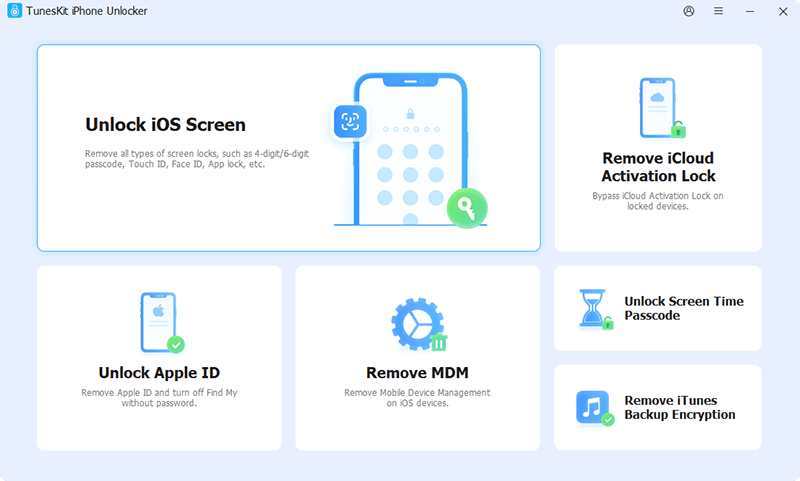
TunesKit iPhone Unlocker is an effective toolkit that can help iOS users bypass Security Lockout screen without passcode. It works well to remove any type of screen locks, including 4-digit/6-digit passcode, alphanumeric passcode, Face ID, and Touch ID. By using this professional iPhone unlocker, you don’t have to provide any credential information and the whole process is easy-to-operate.
Key Features:
Unlock Security Lockout, disabled, or unavailable iPhones
Support all iOS versions and iPhone/iPad/iPod touch models
Remove 4-digit, 6-digit passcodes, Touch ID, Face ID, etc.
Remove activation lock without Apple ID and password
Unlock Apple ID, MDM, Screen Time passcode without data loss
Step 1: Launch TunesKit iPhone Unlocker on your computer. Go to “Unlock iOS Screen” section in its main interface, then connect your target iPhone, and click Start button.
Step 2: Put your connected iPhone into DFU or Recovery Mode by following the on-screen instructions in the program.
Step 3: TunesKit iPhone Unlocker will detect your device and display related device information. Check it and then click Download button to get the firmware package.
Step 4: After download firmware package, you can click Unlock button to remove Security Lockout screen and unlock iPhone without passcode handily.
Method 3: Unlock Security Lockout via iCloud (Find My iPhone)
If Find My iPhone is enabled and you remember your iCloud account credentials then you can use this method.
Step 1: Navigate to iCloud.com and sign in with your iCloud account. Step 2: Click on “Find My” and then All Devices section. Step 3: Select your locked iPhone from the device list. Step 4: Click “Erase” option to get rid of Security Lockout from your iPhone. Step 5:Restore your phone using an iCloud backup or PC backup.
Method 4: Fix Security Lockout with Finder or iTunes
iTunes or Finder can restore your locked iPhone to remove Security Lockout screen. However, you have to put your device into recovery mode. Now, follow the complete steps below:
Step 1: Plug your iPhone into a computer using a USB cable. Step 2: Run Finder (macOS Catalina and later) or iTunes (Windows/macOS Mojave and earlier). Step 3: Boot your connected iPhone into Recovery Mode:
For iPhone 8 or later: Press and release Volume Up quickly, press and release Volume Down quickly, then press and hold the Side button until you see the recovery mode screen.
Step 4: In Finder or iTunes, choose and click Restore option in the pop-up window. Then, follow the instructions to bypass Security Lockout on your iPhone.
Final Thoughts
The iPhone Security Lockout feature is well designed by Apple to protect your data, but it be a nuisance if you are trying to access your own data. Thankfully, Apple provides different ways to unlock your device. If you cannot meet the requirements or provide necessary credential information, such as Apple ID, password, or passcode, TunesKit iPhone Unlocker can be your savior. It unlocks Security Lockout for any iOS device without passcode.
How to Fix iPhone Security Lockout was last modified: April 23rd, 2026 by Kevin
Why Smart Manufacturing Today — Not a Luxury, But a Necessity
Picture this: back in the 1700s, humanity invented the steam engine, and the world basically froze for decades trying to figure out what to do with it. Now we’re living in a time when similar revolutions happen every few years. The First Industrial Revolution mechanized production, the Second electrified it, the Third brought computers and automation. Now we’re right in the middle of the Fourth wave, called Industry 4.0, where smart machines talk to each other without anyone lifting a finger.
If you think you’ve got time to “ponder what to do,” competition won’t give you that luxury. Companies that are still running production with Excel spreadsheets and notebooks are losing market share faster than you can calculate on paper. That’s why software development for manufacturing companies is no longer a luxury for giants like Apple or Tesla — it’s the new standard for survival. It’s become table stakes for survival.
The numbers back this up. Gartner analysts predict the global industrial IoT market will hit $40 billion by 2030. McKinsey reports that companies that rolled out digital tech in manufacturing bumped up productivity by 20–25%, while cutting costs by 15–20%. These aren’t just numbers from some report — this is real money staying in the pockets of market leaders.
Remember that movie “I, Robot”? Robots did the work, people managed the process. We’re heading toward that scenario, but without the whole “machines revolt” doom and gloom. Instead, we get faster product output, way less defects, higher quality, and more time for people to focus on creative work.
What is Smart Manufacturing Software and Why It’s Mission-Critical
Smart manufacturing software isn’t just some program that counts how many bolts are on a conveyor belt. It’s a comprehensive system that bridges the gap between the real world of manufacturing and the digital realm. It’s basically the “brain” of your factory, constantly thinking, observing, analyzing, and making decisions.
In practice, software development for manufacturing companies builds the digital infrastructure that connects machines, data, and decision-making. At its core, manufacturing software development helps a factory do these things:
monitor every single operation in real time, catching problems before they turn into disasters;
predict when a machine needs maintenance instead of waiting for it to break down;
optimize logistics and inventory management so you’re never short or drowning in excess stock;
cut energy costs, making production greener and cheaper.
The tech foundation here sits on three pillars. First, there’s Internet of Things (IoT). Imagine hundreds or thousands of sensors spread throughout your factory. They measure temperature, vibration, humidity, moisture — basically everything. All this data flows into the system 24/7.
Second, there’s Digital Twins — basically digital copies of your factory. It’s like running a simulation of your plant inside a computer. You can test new processes, tweak parameters, model different scenarios, all without risking a shutdown of real production. Think of it like practicing in a video game before the actual mission, except without the option to respawn if you mess up.
Third, there’s Big Data Analytics and Artificial Intelligence. Machine learning digs through millions of data points and finds patterns the human eye would never catch.
Popular Smart Manufacturing Software on the Market
The market is full of software promising to turn any factory into a goldmine, but in reality, most of these promises stay just words on a presentation slide. DXC Technology (IT services & solutions for manufacturing) takes a more serious approach: they offer end-to-end solutions for managing manufacturing, from IoT platforms and artificial intelligence to deep ERP integration. DXC projects run worldwide, from the US to Japan, helping companies modernize their factories and production lines. Their IT services and solutions for manufacturing transform traditional production into smart, data-driven, and automated operations.
Siemens has built an entire ecosystem around its Siemens Xcelerator and MindSphere platforms, offering large-scale IoT and Digital Twin capabilities. PTC is known for its ThingWorx IoT Platform — think of it like a Christopher Nolan movie: everything is connected, and every detail matters.
Rockwell Automation has been a staple in industrial automation for decades. FactoryTalk and Studio 5000 are classics, like an old friend you can always rely on. SAP MII is more for big corporations with mature IT infrastructures — a luxury package for those who already have the base in place.
Real-life cases show how software development for manufacturing actually works. BMW uses digital twins to optimize assembly lines: each car sends data about its status, and the system instantly adjusts parameters. The result — faster assembly, fewer defects, and higher quality.
Bosch implemented advanced analytics to predict breakdowns. Instead of waiting for a machine to fail, the system warns in advance, and maintenance is done proactively. Downtime drops from days to hours.
General Electric uses Predix, its own cloud platform, to monitor turbines at power plants. Sensors send thousands of data points, AI analyzes them in real time, and operations are optimized — like having the best engineer sitting next to every machine, constantly fine-tuning it.
Caterpillar, the heavy machinery manufacturer, set up a system where each machine sends status data to a monitoring center. This allows them to offer customers preventive maintenance and spare parts before problems even happen. Customers spend less on repairs, and Caterpillar earns more profit — a win-win for both sides.
Technologies and Tools Behind Smart Manufacturing
Let’s dive into the techy stuff — but I promise, no deadly boredom here.
IoT sensors and platforms — tiny little sensors scattered all over the production floor. They’re cheap, can run on a battery for years, and send hundreds of data points every minute. WiFi, Bluetooth, 5G, LTE — all the channels these sensors use to tell the central system what’s happening in the factory.
Edge Computing — computing at the “edge” of the network. Data doesn’t travel across oceans to a server in Europe; it’s processed right on site. The perks: fast (no waiting for the internet), secure (data isn’t drifting across seven seas), and reliable (even if the internet goes down, the system keeps running).
Machine Learning and AI — algorithms that learn from historical data and predict the future. They can tell which sound signals an upcoming lathe breakdown or which temperature usually precedes a glitch. Over time, these systems get smarter, more accurate, and cheaper to maintain.
Digital Twins — virtual clones of your production line. They mirror reality in real time. You can test anything on them: new recipes, operation sequences, even disaster scenarios. Think of it as giving your factory a dress rehearsal before the real performance.
Cloud Platforms — Amazon Web Services, Microsoft Azure, Google Cloud provide the horsepower to process millions of data points every minute. Instead of buying your own servers, you only pay for what you actually use. It’s like hiring experts by the hour instead of keeping a full team in the office.
ERP Integration — SAP, Oracle, Microsoft Dynamics — systems that manage company resources. Smart manufacturing software plugs right into them so production data flows instantly into finance, inventory, and planning.
Implementation Challenges and How to Beat Them
Now that we’ve talked about how awesome smart manufacturing is, let’s get real: actually rolling this out isn’t like launching an app on your phone.
Implementation Costs — first and obvious challenge. Buy sensors, install them, connect them to the network, buy cloud infrastructure, hire specialists to set everything up — it all costs serious money. Small businesses often just can’t swing it. A big company might deploy a digital twin for $2–5 million, which might be acceptable, but for a local shop with 50 workers, that’s a nightmare.
But here’s where cloud solutions and SaaS models stepped in. Instead of dropping millions in a one-time investment, companies pay monthly or yearly. This makes the tech accessible to businesses of any size.
Integration with Legacy Systems — lots of factories run equipment that’s 30 years old. These machines were made before the internet was a thing. How do you plug them into modern systems? The answer is adapters and gateways. You install a device that “understands” the old machine’s language and translates it into something the new system gets. It’s like hiring a translator between two people who don’t speak the same language.
Need for Skilled People — IT specialists who understand IoT, AI, and manufacturing are rare on the job market. Many companies need to invest in training existing engineers or hire expensive consultants. It’s basically reinventing professional development in the industrial world.
Resistance to Change — people who’ve run production for 20 years using their knowledge and experience can feel threatened when you tell them an algorithm is now in charge. This psychological piece often gets overlooked, but it’s critical to successful implementation.
The Future of Smart Manufacturing and Final Thoughts
We’re only at the beginning of this revolution. Right now, most factories worldwide still operate using methods that haven’t changed much in 10–20 years. But the pace of change is accelerating.
Over the next 5 years, expect autonomous robot teams coordinated by AI to become normal. Quantum computers will start solving incredibly complex optimization problems. Augmented reality will let workers see instructions right in their line of sight without looking anywhere else.
Manufacturing software development will evolve just as fast. For many industries, software development for manufacturing companies will be the key driver that turns automation and data analytics into real competitive advantage. Systems will get smarter, cheaper, more accessible. My prediction: in 10 years, a small company with 100 employees will have the same data analysis and optimization capabilities that Toyota and Volkswagen have today.
Technology won’t replace people. Instead, it’ll free them from boring, repetitive, dangerous work, letting them focus on creative tasks. Managers can spend more time on strategy instead of micromanaging. Engineers can design new products instead of fixing broken machines all day.
Smart Manufacturing Software Development for Optimized Operations was last modified: March 17th, 2026 by Valeriia O
In short, choosing planned preventative maintenance (PPM) for your business can help you reach a stronger bottom line by saving costs and eliminating profit losses.
While you can learn about available PPM options on the vendor’s website, let’s discuss here why PPM is a cost-saving practice and how it can help you eliminate profit losses.
Why PPM is a cost-saving practice
The cost-saving effect of planned preventative maintenance lies in its ability to prevent minor issues from escalating and turning into emergencies. To clarify, during a PPM visit, your vendor undertakes a full assessment of the units included in the PPM contract. As a result, you can have issues detected and fixed before they turn into major failures and emergencies.
In other words, timely detection and repair will help you save costs:
Timely cleaning, lubricating, and tuning result in fewer failures
If repairs, no emergency repair rates (which are higher than standard ones)
No overpaying for urgent part delivery (you have time to wait for a standard one)
Lower repair rates (most PPM vendors offer discounts as extra benefit from a PPM contract)
How PPM can help you eliminateprofit losses
Now imagine you didn’t service your equipment properly and in a timely manner. Therefore, possible issues weren’t detected and repaired in time but turned into an emergency.
Beyond the immediate repair costs, an emergency triggers a damaging sequence for your business:
Broken equipment reduces your service capacity (partially or even totally)
You lose your profit now because you cannot serve customers as intended
These unserved customers turn their loyalty to your competitors, and you will face profit loss in future
Instead, with a PPM contract, you will benefit with lower emergency risks, continue servicing your customers and enjoying their loyalty, which translates directly into your revenue.
To sum up, when choosing PPM for your business, you adopt a highly cost-effective practice that helps you protect your business from high expenditures on repairs and possible profit losses (now and in the future) due to emergencies.
Why it is better to choose PPM for your business in 2026 was last modified: December 18th, 2025 by Richard Clayton
Small businesses face constant pressure to grow visibility and revenue with limited resources. Marketing teams are often lean, responsibilities overlap, and time is divided between strategy and execution. In this environment, productivity is not a matter of working harder but of removing friction from daily operations.
Artificial intelligence is increasingly used to address this challenge. When applied correctly, AI helps small businesses run more effective marketing programs without expanding their teams. The gains do not come from replacing people, but from reducing manual effort, improving decision quality, and creating more consistent workflows.
Why Marketing Productivity Breaks Down in Small Teams
Most small businesses understand the importance of marketing, but execution is where productivity suffers. Common issues include fragmented tools, manual coordination, and limited visibility into what is actually working.
Channels such as influencer and partnership marketing illustrate the problem clearly. Researching potential partners, evaluating audience quality, coordinating outreach, managing timelines, and tracking performance require significant effort. For small teams, these tasks often fall on one or two people, slowing campaigns and increasing the risk of inconsistent results.
Without structure, marketing becomes reactive. Decisions are made based on limited data, reporting is delayed, and valuable time is spent on administrative work rather than growth planning.
AI as a Productivity Layer, Not a Standalone Solution
AI improves productivity when it supports clear processes. On its own, software cannot fix disorganized workflows. However, when paired with defined execution models, AI helps small teams focus on higher-value work.
In marketing operations, AI is commonly used to assist with pattern recognition, prioritization, and automation. These capabilities allow teams to reduce time spent on repetitive tasks while maintaining control over strategic decisions.
For example, AI can help evaluate large sets of potential partners, highlight meaningful engagement signals, and surface trends that would be difficult to identify manually. This shifts marketing from guesswork toward repeatable execution.
Reducing Manual Work in Influencer and KOL Campaigns
Influencer and KOL campaigns are particularly demanding for small businesses because they involve multiple moving parts. AI-supported systems help reduce the operational burden in several key areas.
One is creator evaluation. Instead of relying on surface-level metrics, AI enables more data-driven creator selection, helping teams focus on partners whose audiences and content patterns align with campaign goals.
Another area is workflow coordination. Outreach tracking, follow-ups, content scheduling, and performance monitoring can be managed through structured systems rather than spreadsheets and email threads. This approach reduces errors and shortens campaign timelines.
Many small businesses choose to work with partners that already operate these systems. Specialized agencies such as kolhq.com apply AI-assisted influencer marketing workflows to manage research, coordination, and performance tracking, allowing internal teams to remain focused on strategy rather than execution details.
Predictability Improves When Processes Are Standardized
One of the most practical benefits of AI-supported marketing is predictability. When campaigns follow consistent workflows, performance data becomes easier to compare and decisions become more reliable.
Standardized processes allow teams to:
Launch campaigns faster
Reduce internal review cycles
Identify underperforming activities earlier
Allocate budgets with greater confidence
This does not remove the need for human judgment. Relationship management, brand alignment, and creative direction still require experience and context. AI supports these decisions by providing clearer signals, not by replacing accountability.
Outsourcing Execution Without Losing Control
For small businesses, outsourcing marketing execution is often a productivity decision rather than a cost decision. Running complex campaigns internally can require hiring or reallocating staff, increasing overhead and slowing progress.
External partners that specialize in execution can operate alongside internal teams without taking ownership away from the business. In the context of influencer marketing, KOL campaign management for small businesses allows companies to access established systems, performance tracking, and operational discipline without building everything from scratch.
This model keeps teams lean while maintaining consistent output.
AI as a Practical Productivity Tool
AI is not a shortcut to growth, but it is becoming a core productivity tool for small business marketing. When applied within structured workflows, it reduces manual effort, improves consistency, and supports better decisions.
The businesses seeing the strongest results are not those using the most tools, but those using AI to reinforce clear execution models. In that sense, productivity gains come from how AI is integrated into operations, not from automation alone.
For small teams, this approach can make the difference between stalled campaigns and scalable marketing performance.
How AI Is Improving Small Business Marketing Productivity Without Increasing Headcount was last modified: December 17th, 2025 by Colleen Borator
In today’s business landscape, customer service is no longer confined to an office or a call center. It operates across time zones, devices, and networks — from bustling cafés to quiet home offices. This flexibility has transformed how companies deliver support, but it has also introduced a new set of challenges: security risks, restricted access, and unstable connections.
As organizations increasingly rely on digital tools for communication and customer engagement, maintaining secure and consistent online access has become essential. For many teams, using a free US VPN offers a simple yet effective way to ensure stable connections, safeguard sensitive data, and access region-restricted systems — all without compromising speed or performance.
This balance of accessibility and protection is redefining the standards for remote work and customer service excellence.
The Rise of Remote Work and Its Security Challenges
The shift toward hybrid and remote customer service models has opened new possibilities for businesses. Agents can now operate from anywhere — handling support tickets, live chats, and video calls just as efficiently as they would in an office. But this digital independence comes with a hidden cost: exposure to unsecured networks and unpredictable access limitations.
Public Wi-Fi hotspots in airports, hotels, or coworking spaces are often prime targets for cyberattacks. According to the Federal Trade Commission (FTC), businesses face increasing risks from hackers exploiting insecure public networks to intercept personal and company data. As the FTC notes, employee awareness and proactive cybersecurity measures are essential to reducing vulnerabilities.
That’s where digital safeguards, including encrypted connection tools, come into play. By securing the link between customer service agents and company systems, businesses can minimize the risk of data leaks, credential theft, or unauthorized access.
Secure Access: The Backbone of Digital Customer Experience
Modern customer experience (CX) depends on uninterrupted access to cloud-based systems, CRM dashboards, and helpdesk software. Many of these tools are hosted on servers located in specific countries — often the United States — and can be affected by regional access restrictions or slower international connections.
A free US VPN allows employees to establish a secure, U.S.-based digital presence, ensuring seamless communication with servers and faster access to global platforms. This advantage extends beyond convenience — it supports customer satisfaction by preventing service delays and data bottlenecks.
For instance:
Support representatives can log in to U.S.-hosted systems with consistent performance.
Managers can conduct data analysis on global dashboards without facing access blocks.
Teams operating from overseas can test customer interfaces in real time, ensuring a unified brand experience worldwide.
The outcome is simple but powerful — a smoother, more dependable workflow that directly translates to better customer outcomes.
Customer Trust Begins with Data Protection
In customer service, every interaction involves sensitive data — from personal details and billing information to private correspondence. Maintaining the confidentiality of that data is not just a technical task; it’s a promise to the customer.
When companies fail to protect that trust, the consequences are severe. Research shows that data breaches lead to both financial losses and long-term reputational damage. Customers who lose faith in a company’s ability to protect their privacy are less likely to stay loyal.
By encrypting data transfers, securing online sessions, and preventing third-party tracking, privacy-focused technologies reinforce this trust. They serve as a silent layer of protection — ensuring that while agents focus on empathy and communication, the infrastructure keeps customer data safe behind the scenes.
Efficiency Through Global Connectivity
Beyond security, one of the biggest advantages of consistent access is operational efficiency. Remote teams often span multiple regions, relying on cloud-based tools for ticketing, customer management, and analytics.
When access is restricted by geography or network firewalls, productivity suffers. Pages load slower, calls disconnect, and collaboration becomes fragmented. A solution like a virtual private network removes these barriers by giving all employees the same level of access to critical systems — whether they’re based in New York, London, or Manila.
This kind of uniform connectivity also helps companies maintain consistent quality assurance. Managers can monitor global service standards, verify responses, and ensure that teams operate under the same technological conditions.
For fast-paced industries like e-commerce, SaaS, and digital marketing, where customer expectations evolve daily, having uninterrupted connectivity is not just a convenience — it’s a competitive advantage.
Balancing Productivity and Compliance
As digital tools evolve, businesses must also align with data protection regulations such as GDPR and the California Consumer Privacy Act (CCPA). Maintaining compliance while enabling flexible work environments can be complex.
Encryption and controlled access play a critical role in ensuring that organizations meet privacy standards without limiting operational agility. Technologies that anonymize browsing and secure data in transit help reduce exposure to compliance risks, making it easier for companies to maintain trust with regulators and customers alike.
Future-Proofing Customer Support
Looking ahead, the future of customer service lies in intelligent automation and AI-assisted responses. But even the most advanced systems depend on one foundational element: secure connectivity.
Companies that combine technology-driven empathy with robust security frameworks will be better equipped to adapt to new customer demands. Secure digital access ensures that human agents and AI-driven tools can coexist effectively — providing faster responses, smarter insights, and personalized service at scale.
By integrating safe, unrestricted access solutions into their infrastructure, businesses are not only protecting their systems but also future-proofing their customer experience strategies.
Conclusion: Building a Secure Foundation for Customer Excellence
In the digital economy, every customer interaction is an opportunity — and every connection is a potential risk. The organizations that thrive will be those that treat security, accessibility, and user experience as interconnected priorities.
A free US VPN offers a simple yet powerful way to support global teams, protect sensitive data, and maintain reliable access to business-critical systems.
As cybersecurity concerns continue to grow and digital customer expectations reach new heights, investing in secure connectivity isn’t optional — it’s the cornerstone of trust, efficiency, and long-term success.
Enhancing Remote Customer Service Through Secure Digital Access was last modified: December 16th, 2025 by Omer Oron
Giving employees a corporate card seems like an invitation to overspend. How will a company know that an employee treated his family to dinner on an outing? Or that someone else decided to allocate $5,000 for a family vacation instead of a client-retreat focused weekend?
But corporate cards are designed with elements that prevent such overspending. It’s not a question of whether you trust someone not to spend inappropriately; it’s whether the system will allow them to do so—in conjunction with what else they could pay for with their cards.
Let’s break down how it works.
Spending Limits Are Like Bumpers
The most straightforward element is a card limit. But it’s not like the general credit limit an individual has—this limit is much more personalized. Each corporate card has a different limit per individual employee, sub-employee (certain manager) and type of expense.
So, for example, the sales team member may have a $5,000 one-month inclusive amount for all uses including travel and client dinners, while the operations employee may have a $500 one-month amount for equipment as well.
But these are monthly limits. They’re not individual transaction request limitations. They’re cumulative.
But some companies take it further to ensure transaction limits as well—you’re allowed to spend up to $3,000 this month, however, anything over $500 must receive managerial oversight.
Category Controls Keep Expenses From Going Through
This is getting technical. Cards can be shut off for merchant-type categorizations where they shouldn’t be used.
For example, an employee authorized for subscriptions and supplies may not have access to buy something at Bed, Bath & Beyond or Petco because that’s not an approved category.
It doesn’t mean mistakes are caught; it means mistakes cannot be made in the first place. Thus, an employee who incorrectly buys something for themselves on a personal card accidentally thinking it’s for their family’s trip will never happen because it won’t go through.
Companies can whitelist individual merchants or types. A marketing team credit can only be used at Google and Adobe and not anywhere else should that group card be utilized.
Real-Time Access Gets Everyone Informed Quicker
In the past, corporate cards could be swiped all over town and unless someone looked through their statement realized something was out of the norm several days later, there was no idea before funds were spent and out of reach.
Now companies have real-time access tracking. The second you swipe your card, finance gets a notification. They can confirm and check instead of waiting 30 days to see what was out of sight and out of mind.
Real-time access is also good for employees who can check their balances against limits at any time. Some systems will even notify individuals that they’re close to maxing out their budgets to prevent frustration down the line.
Receipt Automation
Another reason purchases get overlooked is because receipts get substantiated or accounting support fails to receive them down the line (i.e., no one comes forward with them).
Many systems require receipts before processing automatic purchases. If someone buys something over a certain amount, they get flagged with a receipt—a return-type receipt—for justification.
Some systems are stricter and actually hold up a purchase until someone uploads a receipt. The items can be held in limbo until data is provided to meet a requirement that won’t happen without extra info.
While this may seem annoying—extra steps—it’s better than scrambling for that crumpled receipt at the end of the month down the road when things could go faster without extra hassle in the first place.
Virtual Cards/Locked Merchants
Some companies rely on virtual card numbers that only function at select merchants. Are you using software? Generate a card number that only works at that one vendor.
This is particularly powerful for subscriptions because it won’t work anywhere else—even if somehow the number is leaked—and if it’s time for the subscription to end, just delete it.
Company cars work similarly with one-time-use card numbers.
Need to buy something for something once? Generate a new card number with a max limit just for that one-use transaction; after it goes through it’s no longer good anymore.
Approval Processes
Where cards can function where they automatically decline purchases over a certain amount without initial approval first—an employee wants to spend $2,000? The transaction halts temporarily as it pings a manager to approve or deny it.
It happens in real-time; people are checked out standing by waiting for their specific managers who are pinged for notification; usually, it takes less than two minutes for everyone to be on the same page.
It’s better to take five minutes to wait for approval than fifteen thousand dollars worth of damage for spending without prior notice.
Integrated Expense Policies
The best corporate cards exist in tandem with expense policies of the company—they aren’t PDF’d policies hidden behind hyperlinks and templates—they’re incorporated into the credit itself.
So when the policy states that meals cannot exceed $50? The card will accommodate. If the policy states approval from management is required before purchasing any equipment? It will be required without employee memory limitations.
This makes compliance easier—employees cannot forget rules they never even knew existed; finance no longer plays the bad guy consistently telling them what they cannot do.
Why It Matters More As Companies Grow
When a company consists of five employees, it’s likely purchase is seen by everyone anyway. They don’t care about reimbursements; they hand people cash sometimes or choose not give credit at all—and it all blends into one big budget and everyone knows everything what’s being spent,
But once it gets up to twenty or fifty or one hundred employees, this everyone-can-ask-for-approval approach fails. Administrators do not have time every day to approve a coffee or office supply request.
But they also don’t want free spending without anyone knowing what’s going on. Corporate cards allow companies to walk this fine line between happy options for purchases with limited stupid approvals holding everyone back without compromising integrity,
The Trust Factor
People don’t realize that great controls instill more trust than less—for example—it’s easy to trust someone when there’s zero chance they can screw up because it’s being monitored every second; therefore, managers would rather grant access.
Without controls, companies either NEVER give cards or if they do tentatively give them then play hawk over everyone for what they’re doing,
Neither works.
How It All Works
A sales rep books travel for client meetings—it goes through seamlessly; travel is an allowed category and it’s below their limit regardless. Receipts are automatically captured from their email associated from booking confirmation.
A sales rep tries using his card for her new laptop—denied; electronics are not part of approved categories. She submits a request—the manager approves—and then it can go through.
At month end, finance sees all the approvals given and all categorized receipts attached—and there’s no surprise and nothing lost from anyone’s blind spot.
Specialized Travel Management for Predictable Spend
While broad category controls are effective, specialized platforms provide even more granular oversight for work trips. Engine allows businesses to enforce travel policies at the point of booking, setting star-rating limits and rate caps for hotels, flights, and cars. By controlling spend before it happens, finance teams can ensure compliance without the burden of manual expense reports. This modern approach centralizes all travel spend into a single invoice, offering real-time visibility that complements the protections of a corporate card system.
Summary
Corporate cards facilitate better spending by leveraging adjustments based on smart policies built into them—not restricting spending across the board but creating smart bumpers easily facilitated within payment systems themselves to keep policy spending intentions met with grace.
It’s not about limiting spending potentials; instead, it’s about making it easy to spend money on good things while making it hard or impossible to spend money on bad things. If that’s accomplished, no need to play hawk over spending—it’s already taken care of!
How Corporate Cards Actually Prevent Employees From Overspending was last modified: June 22nd, 2026 by Emma Beijing
The Amazon marketplace can feel like an endless ocean. Millions of products compete for attention, and sellers who can’t read the stream become disoriented. That’s why Best Sellers Rank has become one of the most talked-about data points in BSR ecommerce.
A single number, updated hourly, summarizes each item’s performance against every other title in its category. When interpreted correctly, the BSR acts as a compass that points to hidden pockets of demand, overlooked niches, and scalable opportunities. But raw BSR is rarely enough. You still need a reliable way to translate that rank into real-world sales potential.
Enter the Magic of a BSR Sales Estimator.
By merging historical sales trends, algorithmic modeling, and market seasonality, it unlocks a 360-degree view of how many units an inventory can realistically move each day or month.
In this guest post, we’ll explore why BSR matters, how an estimator works, and practical ways to turn insights into revenue. As you read, keep track of action steps and short case studies that you can implement immediately.
The Power Behind a Single Number
Most sellers assume that a low BSR indicates the product is moving more units, yet few stop to consider how far-reaching that information can be. BSR promotes decisions such as:
Identifying emerging products before competitors notice
Forecast list for upcoming holidays
Negotiating better terms with suppliers using data-driven confidence
Assessing whether to enter a niche or pivot to an adjacent category
Because Amazon updates the BSR constantly, it provides something that keyword tools and historical charts cannot: a living pulse of real-time demand. When you combine that pulse with a robust estimator, you get a dynamic forecast that is based on both current momentum and long-term patterns.
Beyond Guesswork: Turning Rank into Revenue
Imagine two kitchen appliances. Product A shows a BSR of 7500 in the kitchen and dining. Product B sits at Rs 50000.
Which should you order for Q4 Black Friday? Instinct says product A. However, growth in demand, market saturation, and profit margins all influence the final decision.
A BSR estimator converts those BSR values into estimated unit sales so you can calculate gross margin after fees, then decide if the risk is justified. Without that translation layer, every decision is like tossing a coin in the air. According to data-driven decision-making experts, sellers who rely on analytics rather than guesswork achieve up to 30 percent higher profitability.
Here is how we bridge the gap:
Data ingestion We collect thousands of data points per category, spanning BSR movements, publicly available sales data, and shelf life trends.
Normalization BSR behaves differently in Books than it does in Electronics. We normalize across categories so comparisons stay apples to apples.
Algorithmic mapping A proprietary model blends moving averages, seasonality coefficients, and marketplace velocity to deliver unit-level projections.
Continuous learning The estimator improves whenever reality diverges from the forecast, ensuring you benefit from fresh insights each time you log in.
An Amazon BSR Sales Estimator can bring clarity to rank-driven decision making without drowning you in spreadsheets or manual lookups.
The Estimator in Action: A Realistic Scenario
Sophia runs a medium-sized beauty brand. Last winter her Jade Roller Kit was ranked around 12000 in Beauty. Using the estimator, she saw that 12000 was equivalent to about 40 units per day in early November, but that would likely increase to 70 units per day in mid-December due to the gift-giving season. Armed with those numbers, he:
Increased its purchase orders by 60 percent, avoiding dangerous stockouts
Pre-negotiated express shipping rates with his freight forwarder
Updated your PPC budget to match expected sales growth
The result was a 35 percent increase in revenue compared to the previous holiday season. Sophie attributes foresight to the estimator’s ability to transform a static BSR into a forecast with moving parts.
Key Benefits You Will Notice Immediately
Inventory precision Stock what sells, cut what stagnates, and free cash flow for future launches.
Pricing agility Spot when competitors raise or drop prices, then adjust yours while staying profitable.
Marketing efficiency Allocate ad spend to SKUs with demonstrable elasticity instead of hunch-based favorites.
Supplier leverage Use concrete projections to negotiate lower costs or better payment terms.
Each benefit compounds over time, leading to higher margins and a more resilient catalog.
Best Practices for Extracting Maximum Value
Refresh your estimator queries weekly so that the forecast remains in line with real-time trends.
Divide products on a seasonal basis; A toy that thrives at Christmas behaves differently in the summer, even with an identical BSR.
Layer keyword conversion data on top of BSR output for an overall demand picture.
Maintain at least 60 days of inventory for items projected to move two brackets in rank; The pace often goes faster than expected.
Follow these steps and you will outmaneuver sellers who lean solely on gut instinct.
Mistakes to Avoid
Blindly trusting rank without factoring in recent price drops that temporarily inflate sales
Ignoring category differences and applying a one-size-fits-all conversion factor
Overordering because a temporary trend produced an anomalous spike
Failing to revisit assumptions once peak season passes
By steering clear of these pitfalls, you turn the Amazon BSR Sales Estimator into a strategic ally rather than a vanity metric.
Conclusion
BSR remains the clearest indicator of demand in the market, yet it is merely a gateway. Moving through that door requires translating rank into sales velocity, margin forecasting and inventory action plans.
A BSR estimator does the heavy lifting, freeing you to focus on creativity, branding, and customer experience. Whether you manage a single SKU or an extended catalog across multiple markets, the combination of BSR and a reliable estimator turns uncertainty into structured growth.
Adopt the Amazon BSR Sales Estimator today, and watch as informed decisions propel your store forward month after month.
FAQ
1. What is BSR exactly?
BSR stands for Best Sellers Rank, an Amazon metric that reflects how well an item sells compared with others in its category. Lower numbers indicate higher sales velocity.
2. How often should I check my BSR?
Checking daily is useful for high-volume items or during peak seasons. Otherwise, a weekly cadence paired with the estimator keeps you informed without causing data fatigue.
3. Can small sellers benefit from an estimator, or is it only for large brands?
Both. Small sellers gain clarity on whether a potential niche warrants investment, while large brands use it to streamline inventory across hundreds of SKUs.
4. Does the estimator account for seasonal spikes?
Yes. It blends historical seasonality curves with real-time rank shifts to project more accurate daily and monthly unit sales.
5. Is the estimator difficult to use?
Not at all. Input the ASIN, choose a marketplace, select time horizon, and click generate. Within seconds you receive a dashboard mapping BSR to expected sales.
Why BSR Matters: Discover Sales Potential with An Estimator was last modified: January 19th, 2026 by Harmain B
In today’s fast-paced business landscape, small businesses face a constant need to innovate and adapt. While marketing strategies, product development, and customer service are often the focus, one crucial aspect of growth is sometimes overlooked: payment processing.
Modern payment platforms are not just convenient tools—they are essential engines driving business efficiency, customer satisfaction, and revenue growth. As consumers increasingly expect seamless, secure, and diverse payment options, small business owners must recognize the transformative potential of adopting advanced digital checkout solutions.
The Shift Toward Digital Payments
The digital era has reshaped consumer expectations in nearly every aspect of daily life, including how people pay for goods and services. Gone are the days when cash and checks dominated transactions. Today, mobile wallets, contactless payments, and online gateways have become standard. Studies show that businesses offering multiple payment options experience higher customer retention and increased average transaction values.
For small businesses, this shift presents both challenges and opportunities. The challenge lies in keeping up with evolving technology and security standards. The opportunity, however, is significant: businesses that embrace modern payment platforms can streamline operations, attract tech-savvy consumers, and position themselves as forward-thinking competitors in their markets.
Enhancing Customer Experience Through Seamless Transactions
At the heart of any successful small business is a positive customer experience. Payment friction—such as slow processing times, complicated checkout steps, or limited payment options—can erode customer satisfaction and even result in lost sales. Modern digital payment platforms are designed to minimize these friction points.
These platforms offer integrated solutions that enable quick, secure transactions across in-store, online, and mobile channels. By consolidating payment processing into a single, user-friendly interface, business owners can focus on delivering value rather than worrying about technical bottlenecks. Moreover, features like recurring billing, one-click payments, and digital receipts contribute to a smoother, more professional customer experience, encouraging repeat business and positive word-of-mouth.
Boosting Efficiency and Reducing Operational Burden
One of the most compelling reasons for small businesses to adopt modern payment platforms is operational efficiency. Traditional payment methods often require manual reconciliation, frequent trips to the bank, and cumbersome tracking of multiple payment types. These processes consume valuable time and resources that could be better spent on strategic growth initiatives.
Modern platforms automate much of this workload. Transactions are recorded in real time, integrated with accounting software, and accompanied by analytics that provide actionable insights. This automation reduces errors, accelerates cash flow, and allows business owners to make informed financial decisions quickly. For small businesses with lean teams, the ability to manage payments efficiently can be a game-changer, freeing up resources to invest in marketing, inventory management, or customer engagement.
Security and Compliance: Protecting Both Business and Customer
In an era of increasing cyber threats, security is not optional—it is a critical component of business sustainability. Modern payment platforms employ advanced encryption, tokenization, and fraud detection systems to safeguard sensitive data. This protects not only customers but also the business from costly breaches or legal complications.
Additionally, regulatory compliance is a key consideration. Payment platforms that adhere to industry standards, such as PCI DSS (Payment Card Industry Data Security Standard), help businesses maintain compliance effortlessly. For small business owners, this reduces the stress of navigating complex regulations while ensuring customer trust—a cornerstone of long-term growth.
Leveraging Analytics for Smarter Business Decisions
Beyond facilitating transactions, modern payment platforms provide valuable insights into customer behavior, sales trends, and operational efficiency. Detailed reporting and analytics empower small business owners to make data-driven decisions that can directly influence growth.
For instance, tracking peak purchasing times, popular product categories, or preferred payment methods allows businesses to optimize inventory, staffing, and promotional strategies. By understanding the financial pulse of their operations, small business owners can respond proactively to market demands, enhancing competitiveness without relying solely on guesswork.
Integrating With a Broader Digital Strategy
Adopting a modern payment platform is not just about improving the checkout experience—it is about integrating payments into a broader digital business strategy. Platforms that offer APIs and integrations can connect with e-commerce sites, customer relationship management systems, and loyalty programs, creating a seamless ecosystem that enhances efficiency and customer engagement.
For example, linking payment data with marketing automation tools enables personalized promotions based on purchasing history. Similarly, integrating payments with subscription models or membership programs can create predictable revenue streams. In this way, digital payment platforms become central hubs for business intelligence and strategic growth.
Choosing the Right Payment Platform
With the variety of options available, selecting the right payment platform can feel overwhelming. Small business owners should consider factors such as ease of use, integration capabilities, transaction fees, security measures, and customer support. The ideal platform balances functionality with simplicity, allowing businesses to scale without unnecessary complexity.
A reliable resource for understanding and comparing modern payment solutions is https://mypaymentsavvy.com/. This platform offers insights into the latest trends, features, and best practices for optimizing payment processing, helping small business owners make informed decisions that align with their growth objectives.
Conclusion
The landscape of commerce is evolving rapidly, and small businesses cannot afford to ignore the importance of modern payment platforms. By enhancing customer experience, streamlining operations, ensuring security, and providing actionable insights, these platforms are becoming indispensable tools for growth. Embracing digital checkout solutions is more than a technological upgrade—it is a strategic move that positions small businesses for sustained success in a competitive marketplace.
In essence, the digital checkout revolution is not a passing trend; it is a fundamental shift in how businesses operate and engage with customers. Small businesses that adopt these platforms proactively will not only meet consumer expectations but also unlock new opportunities for efficiency, revenue, and long-term resilience. Modern payment platforms are no longer optional—they are essential for growth, innovation, and thriving in the digital age.
The Digital Checkout Revolution: Why Modern Payment Platforms Are Becoming Essential for Small Business Growth was last modified: December 11th, 2025 by Christine Elliot
Your tech company just hit a major milestone, whether it is your first million users, a successful funding round, or your fifth anniversary. You know you should celebrate, but planning something that truly resonates with your team can feel overwhelming. Generic pizza parties will not cut it anymore.
Here is the good news. Creating a milestone celebration that genuinely connects with your team does not require a massive budget. It simply takes intention and the right approach.
Why Tech Company Milestones Actually Matter
Tech environments are notoriously high-pressure. Product launches, sprint deadlines, and the constant push to innovate can leave teams feeling like they’re running on a treadmill that never stops. Milestone celebrations create natural pause points where everyone can acknowledge that yes, you’re actually making progress.
Employee retention is strongly influenced by workplace recognition. Research from Gallup and Workhuman found that employees who feel well-recognized are 45% less likely to leave their organization within two years. In tech, where talent acquisition costs are astronomical, that statistic should grab your attention.
Beyond retention, there’s the culture piece. Companies that thrive long term are not just shipping great products. They are building environments where people want to show up and contribute. Creating a culture where data transparency boosts business productivity starts with openly celebrating wins and making employees feel like valued stakeholders in your company’s success. High-trust teams perform better.
Key benefits of celebrating milestones:
Boosts employee morale and reduces burnout
Strengthens team cohesion and company culture
Improves retention rates and reduces turnover costs
Creates shared memories that build institutional identity
Provides natural moments to reflect on progress and set new goals
Define What You’re Actually Celebrating
This sounds obvious, but it’s where most celebrations go sideways. “We’ve been around for five years” isn’t compelling enough. Dig deeper.
What obstacles did your team overcome to reach this milestone? What decisions early on made this achievement possible? Who were the key players whose contributions deserve the spotlight?
For a tech company celebrating one million users, the story might actually be about the engineering team that rebuilt your infrastructure when you unexpectedly went viral. When you articulate the specific story behind the milestone, you give your celebration genuine meaning.
Choose Activities That Reflect Your Culture
Tech companies span an enormous range of cultures – from buttoned-up enterprise software shops to hoodie-wearing startups with ping pong tables. Your celebration activities should feel authentic to who you actually are.
Activity ideas that work well for tech teams:
Innovation showcases where departments present recent work
Hackathon-style events tied to the milestone theme
Escape rooms or collaborative problem-solving activities
Outdoor adventures like hiking or kayaking
Interactive entertainment that engages analytical minds
Hybrid teams often collaborate better after periodic face-to-face time. For distributed teams, consider organizing a workation for your team that combines remote work flexibility with in-person celebration opportunities at inspiring destinations.
For something truly unexpected, consider bringing in entertainment that challenges your team’s perception. A corporate mentalist like Christophe Fox can create memorable experiences that blend psychological insight with interactive entertainment. This is ideal for tech teams that enjoy clever problem-solving and having their assumptions challenged. These performances spark conversation long after the event ends.
The key is matching activities to your team’s actual interests rather than defaulting to standard corporate event fare.
Make Recognition Personal and Specific
Generic “thanks for your hard work, everyone” messaging falls flat. Your celebration should include moments where specific contributions get called out.
This doesn’t mean putting shy team members uncomfortably in the spotlight. It means finding ways to acknowledge that Sarah’s weekend debugging session saved the product launch, or that the marketing team’s pivot brought in 40% more leads than projected.
Peer recognition often carries more weight because colleagues see the day-to-day effort that executives might miss. Consider letting team members nominate each other for specific contributions related to the milestone.
Recognition Type
Best For
Example
Public shout-outs
Extroverted team members
Stage recognition during the event
Written notes
Introverted team members
Personalized cards from leadership
Peer nominations
Building team bonds
Colleague-submitted appreciation
Awards or gifts
Major contributors
Custom items tied to achievement
Create a Visual Story of Your Journey
Tech milestones represent the culmination of countless decisions, pivots, and late nights. A visual representation of that journey, whether a timeline, documentary-style video, or digital experience, helps everyone see themselves in the larger narrative.
Even a well-designed timeline on your office walls, printed with high-quality photos and milestone markers, creates a powerful effect. Digital versions work great for remote teams. The process of creating these materials often surfaces stories that have been forgotten, becoming part of your institutional memory.
Design the Space and Include Everyone
Whether you’re transforming your office or booking an external venue, the physical environment shapes the experience. Consider photo displays showing company evolution, themed decorations referencing the specific milestone, and dedicated spaces for different activities.
One detail that often gets overlooked: ensure accessibility. Team members with dietary restrictions, mobility limitations, or sensory sensitivities should be able to participate fully.
If your company has remote employees, ensure your celebration doesn’t accidentally exclude anyone. This might mean holding events at times that work across time zones, shipping celebration packages to remote employees, and providing virtual participation options.
Follow Up and Set the Stage for What’s Next
The celebration shouldn’t just be a full stop. Use it as a launching point.
Post-celebration action items:
Send genuine thank-you messages to everyone involved
Share photos and highlights through internal channels
Gather feedback on what worked well
Communicate the next milestone you’re working toward
Archive documentation for future reference
Tech hiring has become increasingly competitive. According to The State of Tech Talent report, the average North American firm spends over $23,247 to fill tech roles. Investing in milestone celebrations that boost retention is far more cost-effective than constantly recruiting replacements. Retention efforts consistently reduce hiring costs.
Start planning at least two to three months out for significant milestones. Build a clear timeline with assigned responsibilities. And remember that a thoughtfully planned celebration that actually happens beats an elaborately designed one that never comes together.
Frequently Asked Questions
How much should a tech company spend on a milestone celebration?
Many companies find success spending between $50 to $200 per employee for annual milestones, with larger investments for major anniversaries. The key is ensuring the investment feels proportionate and authentic to your company’s position.
Should milestone celebrations happen during work hours or after hours?
Work hours are generally more inclusive since they don’t require employees to sacrifice personal time. Consider offering flexibility where possible based on the celebration’s format.
What milestones are worth celebrating at a tech company?
Beyond funding rounds and anniversaries, consider celebrating first paying the customer, product launches, team growth milestones, customer retention goals, and successful pivots. The key is recognizing moments that feel significant to your team’s journey.
Key Takeaways
Define the specific story behind your milestone rather than just the achievement itself
Personal, specific recognition matters far more than generic appreciation
Match celebration activities to your actual company culture
Document everything – photos and videos extend the celebration’s impact
Include remote employees intentionally through shipped packages and virtual participation
Use milestone celebrations as launching points for what’s next
Start planning two to three months ahead for significant milestones
How to Create a Memorable Tech Company Milestone Celebration was last modified: December 11th, 2025 by Nick Zviadadze
Companies lose $12.9 million USD annually due to poor data quality and ineffective reporting. The best Power BI dashboards can completely change this reality.
Data without clarity becomes expensive noise. Your information becomes a competitive edge when shaped into thoughtful Power BI dashboards. Organizations using Power BI make decisions 27% faster and achieve an impressive 366% return on investment within three years.
The numbers paint a compelling picture. Power BI holds 36.5% of the business intelligence market, and experts project it to reach $33.3 billion USD by 2025. Great power BI dashboard designs succeed because they create stories that inspire action.
Your dashboard serves as a control center. A well-laid-out power bi kpi dashboard reveals current situations, their importance, and next steps clearly. This clarity delivers financial results. Companies with coordinated data teams grow revenue 1.6 times faster than their competitors.
We’ll explore proven Power BI dashboard best practices and share inspiring Power BI dashboard ideas that deliver business results in this piece.
Are you ready to convert your data into decisions? Let’s take a closer look.
Why Power BI Dashboards Matter for Business Decisions
Static reports and outdated spreadsheets belong to the past. Today’s businesses need quick access to live data that leads to immediate action. Power BI dashboards revolutionize how organizations view and use their information.
From Reports To Up-To-The-Minute Insights
Companies can no longer wait for monthly reports. Power BI connects directly to live data sources and shows current information through dynamic visualizations. Teams can spot trends, identify problems, and respond to market changes immediately.
Power BI’s live streaming features update dashboards automatically when new data arrives. Managers now have a live view of operations instead of relying on old numbers. This becomes vital in areas like customer service, where quick responses directly boost satisfaction.
Dashboards Speed Up Decisions
Slow decisions cost businesses money. Research shows that over 60% of data leaders want to “reduce time to action” as their main analytics goal. Delays waste the value of analytics investments.
Power BI dashboards solve this through:
Data refreshes automatically without manual work
Interactive visuals that tell stories quickly
Mobile access for decisions anywhere, anytime
Companies using analytical insights see 366% ROI over three years. They save 125 hours yearly through self-service features. Power BI users also cut their analytics team’s work by 42%.
Power BI Makes Data Available to Everyone
The biggest benefit of the best Power BI dashboards lies in making complex information available to everyone. Power BI’s accessible interface helps users in all departments explore data without extensive training.
Power BI breaks down information barriers that once kept insights limited to technical experts. Business users can now analyze data themselves and depend less on IT teams.
Mobile apps let staff check dashboards from anywhere, putting data in everyone’s hands.
Results prove this works: organizations with strong data strategies report better customer satisfaction, revenue growth, and streamlined processes.
Core Principles of Power BI Dashboard Design
Creating effective visualizations combines artistry with scientific principles. The best Power BI dashboards rely on fundamental design principles that balance form with function.
Clarity Over Complexity
Dashboard design resembles packing for a trip – you take only what you need. Your visualizations should stay clean and uncluttered. Details that don’t support the core message should be eliminated. A dashboard’s primary purpose is to provide an overview rather than displaying every data point.
A golden rule guides this process: users should grasp your dashboard within five seconds. Simplification becomes essential if this isn’t possible. The top-left corner naturally draws the eye, making it ideal for key metrics. Card visualizations excel at highlighting critical numbers.
Designing For Your Audience
The dashboard’s intended users shape every design decision. While executives need high-level KPIs, analysts require detailed breakdowns.
Dashboard readers typically follow Z-patterns (top-left to bottom-right) or F-patterns. The content layout should match these patterns: critical metrics belong top-left, supporting analytics fit the middle-right, and timelines work best at the bottom. This arrangement aligns with natural information processing habits.
Using Consistent Visual Themes
A professional, trustworthy appearance stems from visual consistency. Your dashboard should maintain uniform colors, fonts, and chart styles. Power BI themes let you save these settings to reuse across reports.
Bar and column charts excel at side-by-side value comparisons. The best practice suggests avoiding 3D charts, multi-segment pie charts, and gauges since they complicate interpretation.
Optimizing For Performance And Speed
Quick-loading dashboards see more frequent use. Performance stays optimal when you limit visuals to 8-10 per page. Loading times can jump from 5 seconds to over 15 seconds with too many elements.
The Performance Analyzer tool helps identify slow-loading elements. Your data refresh schedule should match the cache update frequency.
Ensuring Data Security And Access Control
Row-Level Security (RLS) forms the foundation of protection by filtering data based on user identity. Precise access control comes through workspace permissions (Viewer, Contributor, Member, Admin).
Microsoft Purview Information Protection helps classify sensitive data and enforces governance policies beyond Power BI. This security remains intact even in exported Excel and PDF formats.
Types of Power BI Dashboards That Drive Action
Power BI has specialized dashboard types that work for business needs of all kinds. Each type focuses on specific metrics that drive action in different departments.
Executive KPI dashboards
Executive dashboards show an organization’s health through 3-5 critical KPIs. These dashboards answer a simple question: “Are we winning or not?” Red and green indicators display performance status, while variance indicators compare actual versus target values. The most effective designs put key metrics in the top-left corner with self-explanatory trend lines.
Sales and revenue dashboards
Sales dashboards highlight market share trends and revenue performance. VanArsdel’s sample dashboard shows industry sales volume (50,000), market share (32.86%), and sentiment scores (68). The regional breakdown reveals that most business comes from the East and Central regions. Sales teams can use these visualizations to track monthly trends and spot opportunities by segment quickly.
Marketing Campaign Dashboards
Marketing dashboards measure campaign success on different platforms. Teams can spot declining ad performance, improve conversions, and make better budget decisions.
Key metrics include:
ROI and conversion rates
Click-through rates by platform
CPC comparison across channels
Device targeting effectiveness
Customer Support And Service Dashboards
Customer service dashboards track open cases by priority and request type. They measure satisfaction scores, response times, and service ratios, the average cases each agent handles. Managers can find long-standing problems and identify their top performers with these insights.
HR And Workforce Dashboards
HR dashboards give a complete view of employee lifecycles. They track department headcount, gender distribution, salary averages, and employee tenure. Smart analytics can spot rising stars and underperformers while monitoring turnover patterns. Leaders use these visualizations to create better workplaces and boost team performance.
Project And Operations Dashboards
Project dashboards show the big picture through timeline views and milestone tracking. The Portfolio Timeline displays all projects in chronological order. This helps resource managers see how work is spread across different initiatives. Project Status dashboards show completion percentages, KPIs, and task metrics for each project. Teams can spot bottlenecks before they delay deadlines.
Need some ideas? Take a look at these best Power BI dashboards to get you started in thinking about your own.
Making Dashboards Actionable and Engaging
A dashboard that displays data alone won’t cut it. The best Power BI dashboards drive action.
Use Of Tooltips And Drill-Downs
Visual tooltips have changed the way users work with their data. Users can now drill down directly from tooltips without right-clicking once they enable the preview feature. This makes data exploration accessible for everyone, including beginners. Your report’s theme colors automatically match the tooltip styling to create a cohesive look.
Highlighting Trends With Conditional Formatting
Numbers come alive with color. Heat maps created through background colors quickly show high and low values. Data bars give visual weight to numbers and make quick comparisons easy. Status indicators like arrows or checkmarks tell the story clearly. Users can spot trends quickly without diving into raw numbers.
Integrating Power Apps For Workflow Actions
You don’t have to switch between apps when you just need to take action. Power BI reports with embedded Power Apps create a complete workflow solution. Teams can check performance dashboards and customer forms in one place. These apps can also trigger Power Automate flows to refresh data or start fix-it workflows when values cross certain limits.
Using Alerts And Thresholds To Prompt Decisions
Your metrics can alert you when they reach specific levels. These updates show up in your Power BI Notification Center or land in your inbox. While basic alerts use fixed thresholds, advanced setups can adjust thresholds based on recent performance. This turns your dashboard from a simple reporting tool into an active decision-making platform.
Conclusion
Power BI dashboards have changed how businesses make decisions. Companies can now respond quickly to market changes and find opportunities before their competitors because of live insights. The numbers prove its worth – businesses see a 366% return on investment within three years and make decisions 27% faster.
A good dashboard strikes the right balance between simplicity and depth. Simple designs work better than complex ones. Users should grasp your dashboard’s story within five seconds, so critical metrics need strategic placement. Well-chosen color themes, consistent visuals, and optimized performance create dashboards that people want to use.
Each business area requires a unique approach. Sales teams need to track market share and regional performance. Marketing teams watch campaign results across platforms. HR teams study workforce patterns while project managers spot bottlenecks before they delay timelines. Every dashboard type leads to specific actions that matter to its users.
The best Power BI dashboards stand out because of their action-oriented design. Users become active explorers through tooltips and drill-downs. Trends become obvious with conditional formatting. Integration with Power Apps creates efficient processes. Alert thresholds turn these dashboards from simple reporting tools into decision engines.
Power BI makes data accessible to everyone. Team members in all departments can explore information without technical knowledge. This evidence-based approach eliminates information silos and encourages collaboration.
Businesses no longer make decisions based on instinct or old reports. Companies that use these dashboard principles will notice trends sooner, adapt faster, and make better choices. Your data holds the answers you need – Power BI dashboards just make those answers clear and practical.
Creating Power BI Dashboards That Inspire Business Action was last modified: March 10th, 2026 by Cory Wells