
How to Record FaceTime on Mac

Introduction

There might be some occasions on which you cannot be with your family or friends due to work routine or a foreign trip— and FaceTime will be the only way to cherish the moments with them. Or in another situation, you might be attending an important business meeting and want to remember some details. In both cases, recording the FaceTime meeting can help you!

Interestingly, you can record the FaceTime video calls on Mac using the built-in screen recorder. Still, it only works when you’re using the MacOS Mojave, Catalina, Bug Sur, or above— any version older than that will not work. In that case, you’ll have to screen record FaceTime on Mac via QuickTime Screen Recorder, or you can use a handy 2-in-1 screen recorder from TunesKit (Mac OS X 10.8 and above).

Here you will learn how to record FaceTime on Mac. Let’s get started with a step-by-step guide!

Method 1: How to Record FaceTime Calls on Mac Via QuickTime

Don’t have the MacOS Mojave or above? No worries! You can record the FaceTime video chats using the QuickTime screen recording feature, and here’s the best part: you can even record audio with video simultaneously without any hassle. You can record, play, share and edit the video call once recorded on your Mac. Here’s how to do it:

Step 1: Launch QuickTime Player

Launch the QuickTime player from your Mac’s application folder and click on File. Select the New Screen Recording.

Step 2: Adjust Record Settings

You can also adjust the screen recording settings for the QuickTime player. First, make sure that the recording area covers the FaceTime window. Press the downward arrow button next to the red record button and choose the microphone from which you want to record the sound with the video.

Note: You can also select if you wish to record the mouse clicks and pointer during the screen recording via QuickTime player from the options.
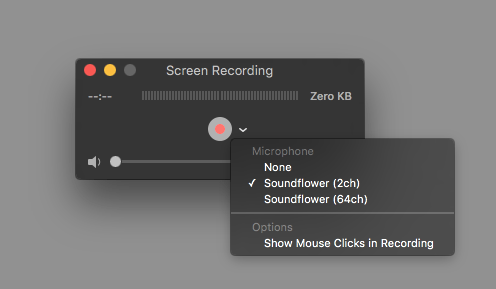
macos - How to record both screen and sound with Quicktime on El Capitan? -  Ask Different

Step 3: Hit the Record Button

Once the settings are adjusted, hit the record button (red circle with grey outline), and start your screen recording.

How to do a video recording of your Mac screen

Step 4: Stop the Recording

Press the Esc button if the recording bar is not showing on the screen. Hit the stop button, and you’re good to go! Or you can also use the shortcut, i.e., Control key+ Command key + Esc, to stop the recording.

Step 5: Save Recording

Click on File>Save to export the FaceTime recording at your desired place.

Method 2: Record with TunesKit Screen Recorder (Best Audio and Video Recorder for Mac)

QuickTime Player— as clear from the name itself— is not a screen record packed with full recording features. Basically, it’s a media player mounted with a dumbed-down screen recorder. Thus, you’ll need an efficient screen recorder alternative to QuickTime Player. TunesKit Screen Recorder offers screen recording capability in high resolution, offers better visuals, and can even record the audio in high quality.

You can not only record the FaceTime calls, but also the webinars, computer games, app tutorials, video lectures, and more in high quality using this 2-in-1 handy audio and video recorder. Here’s the best part: you can choose to record audio from an internal microphone, system sound, sound from a browser or any specific application, or any third-party microphone connected with the device.

Do you know the most loved feature for the FaceTime users in the TunesKit Screen Recorder? It’s the customized screen area— you can select any screen resolution to record any part of the screen and even customize the area accordingly. Furthermore, you can add watermarks, keyboard shortcuts, and even highlight the cursor during the screen recording!

Here’re Some of the Key Features of TunesKit Screen Recorder:

  • Adjustable screen recording area to record part of the screen
  • Schedule recording feature to set the recording time in advance
  • Multiple output formats supported, such as 4K, MP4, 3GP, WMV, MPEG, 3GP, AAC, and more
  • It also works as a screenshot tool to capture pictures in JPG, PNG, etc
  • The screen can be recorded in 60 FPS and Full HD
  • A preview window will show the recorded video before saving the File

What We Like!

What We Don’t Like!

2-in-1 audio and video recording

Not compatible with Linux

Easy to use/ user-friendly interface

No Android/iOS version

Compatible with Windows XP and above, Mac OS X 10.8 and above


Want to record FaceTime with audio on Mac? Give TunesKit Screen Recorder a try, and you’ll not be disappointed! Here’s a quick tutorial to do it:

Step 1: Launch TunesKit Screen Recorder

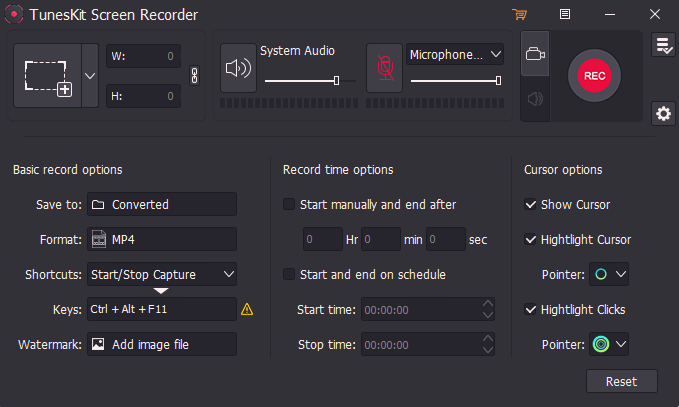
Download and launch the TunesKit Screen Recorder on your Mac. You can click on the Settings button from the right side to access different screen and audio recording settings.

Step 2: Adjust the Settings

Adjust the settings such as the file saving location, shortcuts, recording time options, cursor, start time, and end time.
Graphical user interface
Description automatically generated

Step 3: Select Area to Record

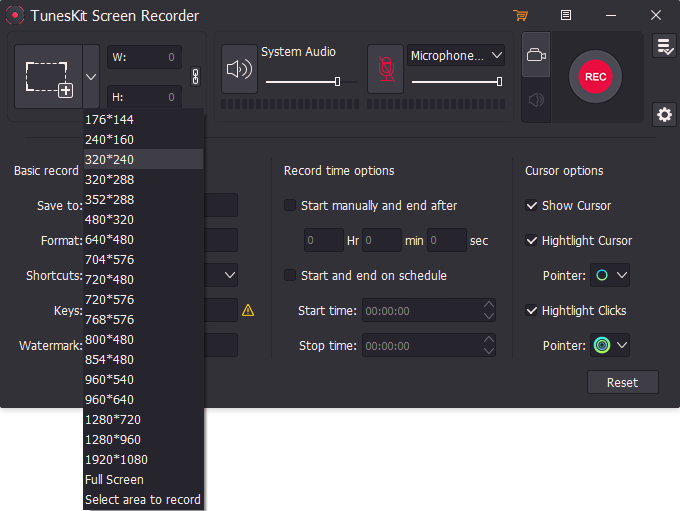
Select the area to record from the Select Area option available on the left side of the window. You can choose the screen resolution or customize it accordingly.
Graphical user interface
Description automatically generated

Step 4: Record FaceTime

Once the settings are adjusted, hit the Record button (in red), and the recording will be started. Hit the Stop button from the toolbar to stop the recording.

Conclusion

FaceTime calls from loved ones are a life savior, especially on special occasions that you cannot attend at home. You might want to relive some of those moments later in life. In that case, recording your FaceTime calls is an excellent option!

Luckily, you can record FaceTime with audio on Mac in two easy ways. QuickTime player conveniently records FaceTime meetings when you don’t have MacOS Mojave or above. On the flip side, we recommend using a feature-packed alternative: Professional TunesKit Screen Recorder and enjoy recording your calls!


Top 8 PC Security Mistakes Users Still Make

Many people still don’t understand the dangers of an unsecured PC. It’s like leaving your home without locking the door, enabling anyone to enter and take whatever catches their eye.

The risks are the same if you’re careless with your computer. Failing to secure it gives potential hackers an easy way into the system, making stealing and misusing your data a walk in the park.

These are the top PC security mistakes users make and the tips for avoiding the pitfalls.

1.   Using Weak Passwords

Passwords are the weakest link in cybersecurity. You can’t use your name, birth date, or other personally identifiable information and expect your accounts and data to be safe and secure. Potential hackers can quickly crack those combinations in password attacks.

Secure passwords are combinations of at least 12 varied characters, including upper-case letters, lower-case letters, numbers, and symbols.

The best practice is to use complex phrases that hackers can’t guess. You can complicate them further by using truncated words or dropping vowels (e.g., “scrty” instead of “security”).

2.   Reusing Passwords Without Two-Factor Authentication

Reusing passwords can be detrimental to your PC security. Using the same password for multiple accounts puts all of them at risk because a potential cybercriminal only needs to crack a single password.

Enable two-factor authentication (2FA) if you don’t want to remember multiple passwords, but we still recommend different credentials for every account.

Another excellent solution is a password manager. It can generate random, complex passwords for all your accounts, storing them in a secure vault.

You only need to remember the master password or PIN or use your fingerprint to enable the manager to log you into connected accounts.

3.   Avoiding or Disabling Antivirus Software

Antivirus software is an extra security layer every PC needs. It can prevent you from accessing malicious websites or downloading compromised files or apps, stopping malware programs in their tracks. Of course, antivirus might not be as helpful on certain occasions. For instance, such security programs can remove ransomware infections. However, users’ files will remain encrypted.

Many people don’t use it because they think it slows down their computers. That may have been the case decades ago, but the latest solutions require fewer resources when running scans, resulting in less CPU usage.

Other PC users temporarily disable their antivirus software to bypass its block regarding downloading specific apps or files. Hackers love those windows of opportunity to crawl into an unsecured system.

So, install reliable antivirus software, keep it up to date, and don’t disable it for a second.

4.   Ignoring Software Updates

Ignoring software updates is like disregarding a smoke detector’s alarm; you know there’s smoke, but the lack of fire means you’re probably safe.

The latest software updates feature bug fixes to improve performance and user experience and security patches to eliminate vulnerabilities and protect data.

Although there’s no actual fire, postponing or ignoring those updates leaves security holes that potential cybercriminals crawl into, and you might not hear any alarm until it’s too late.

5.   Disabling User Account Control on Windows

User Account Control (UAC) on Windows PCs is a fundamental security feature that prevents unauthorized changes to your computer.

Disabling it gives administrative access to all running apps, making it seamless for potential hackers to control your device. Keep it on, no matter how annoying the notifications may be.

6.   Clicking Suspicious links

Phishing emails are some of the most prevalent cybersecurity threats. They contain malicious links that initiate browser-based script attacks or install malware without the target realizing it.

Never click on an email attachment without checking the email address to verify it’s legitimate. Don’t click through if you don’t know the sender and beware of pop-ups recommending unsolicited antivirus software or other solutions; they typically contain malware.

7.   Plugging in an Unknown Flash Drive

Plugging an unknown flash drive into your computer could wreak havoc on your system. That portable device could contain a virus that spreads to your files and infects the entire network.

The same goes for inserting your flash drive into someone else’s PC.

They may not follow the latest security practices, so their compromised PC could infect your flash drive and computer.

8.   Using Public Wi-Fi

Public Wi-Fi networks may be convenient, but they’re far from secure. They’re typically unencrypted, leaving a backdoor open for cybercriminals to enter and access all connected devices.

An excellent solution is a VPN (Virtual Private Network). This tool creates an impenetrable bubble around your internet connection, transmitting data through an encrypted tunnel. A VPN for PC also replaces your IP address with one of its servers, making it impossible for hackers to target you.

Conclusion

Many PC users take cybersecurity protection lightly, making mistakes that often lead to dramatic consequences, including identity theft and fraud.

Don’t give cybercriminals the upper hand. Avoid the pitfalls above and dig deeper into the matter to learn how to keep your data privacy and security intact.

5 Places to Download Premium Templates FREE for Microsoft Office

In workplaces, employees are writing a lot of business papers and sending piles of emails in the contemporary times. As we all know, in today’s fast-paced business environment, developing business papers from scratch for every new opportunity may easily turn into a time-consuming and resource-consuming process, which might be better spent on other business-critical duties.

There are many other free templates sites for Microsoft office that can help you do the most hectic task in just a few minutes. Following are the five best websites that will make it possible for you to complete such tasks in due time by providing you with free professional templates for your every need.

Best Sites for Free Microsoft Office Templates

Templates will help you to boost your productivity by providing the framework for your document that you will only need to fill in the empty spaces according to your needs. Following are the top sites for your free Microsoft office template downloads.

Word Templates Online

There is a website that provides you with access to hundreds of free templates that you may use at your place of employment, at your place of business, or even for personal matters like leaving a last will for your loved ones. When you go to Word Templates Online for the first time, you will see that there are three categories to choose from, such as certificates, contracts and businesses.

However, Microsoft Office templates have made this task easy. You may reuse the same structure and style in numerous business documents for all sorts of information, from sales plans to marketing calendars, corporate budgets, meeting minutes, Swot Analysis, and more.

Word Templates Online focuses on Microsoft Word documents. To use them, you simply select the appropriate template from the thousand options available when you find the most relevant ones and click on download. This is not the only website that provides you with great templates. For legal documents like a Consultancy Agreement Template you find other websites that can cater to your professional and personal document needs. Whether you’re managing contracts for your business or creating a last will for your loved ones, you’ll find a diverse selection of templates on Zegal.

Microsoft Office Online

What is better than the original? With Microsoft Office Online, you can easily find Word templates. Your templates will be straight from Microsoft if you use this resource. To make it easy to find templates, Microsoft Word categorizes them neatly by keyword or occasion. There are also a large number of free Word templates available. For example, resumes and cover letters, posters and brochures, calendars and cards, and so on and so forth.

Select a template to read a short description when you find it. To use it on your computer, click the Download button, or to open it in Microsoft Word Online, click Edit in Browser. If you have an online Office subscription or a desktop Office license, you may view and use these templates for free.

DocTemplates.net

Doctemplates.net is not a part of the Microsoft Office brand. However, it has a large collection of Microsoft Office templates that have been developed professionally. The Word templates available on Doctemplates.net are professionally drafted by experts. All of these templates are available to download for free without the need to sign up. Helping guidelines are also provided for each document on Doctemplates.net so that you can also customize it exactly according to your need.

WordLayouts

This website source focuses on creating professional graphic templates. WordLayouts allows customers to select the template of their choice from 10,000 available templates and then download it directly to their device. By using Microsoft office, the world’s most popular word processing programme, the template can be tailored to their specific needs. WordLayouts has a vast variety of templates to choose from, such as tourism, education, food, and general purposes.

DocFormats.com

New to the market, DocFormats is dedicated to supplying document formats for every conceivable kind of file. Mainly it includes business, insurance, and education categories of templates. Agreement forms, application forms, notice forms, personal application forms and report sheet forms are some of the categories that are being provided by them as an open website source. There are many helpful guidelines, associated sources, templates, and formats of presently accessible documents that you may discover here. Due to the fact that it was just launched at the beginning of 2017, it it is continually upgrading its directory in order to provide you with more and more document templates.

Conclusion

Microsoft Office has enough templates to meet all your need but you need to have license to use them. Here, the above mentioned sites come to the rescue with their vast template collections and appealing stucture. By searching keywords on any of these, you can easily find the desired template of your choice. 

How To Become A Better Online Trader

Anyone who has ventured into the world of online trading knows that it can be a difficult and treacherous place. There are so many different options available to traders, and it can be hard to know which ones are the best ones to choose. In this blog post, we will discuss some tips that will help you become a better online trader. We will cover topics such as choosing the right broker, developing a trading strategy, and managing your risk. So if you’re looking to improve your trading skills, read on!

Choose the Right Broker

Choosing the right broker is one of the most important steps that you can take in becoming a better online trader. There are a lot of different brokers out there, and not all of them are created equal. You need to find a broker that suits your trading style and needs. There are also forex signals that can help you choose the right broker. If you’re a beginner, you might want to look for a broker that offers a lot of educational resources. If you’re an experienced trader, you might want to look for a broker that offers lower fees and commissions.

Develop a Trading Strategy

Another important step in becoming a better online trader is to develop a trading strategy. This will help you make consistent profits in the long run. There are many different popular trading methods out there, so you need to find one that works for you. You can test out different strategies by using a demo account before you commit to using them with real money.

Manage Your Risk

One of the most important aspects of trading is risk management. You need to be able to control your emotions and make sure that you’re not risking more than you can afford to lose. One way to do this is to set stop-losses on your trades. This will help you limit your losses if the market moves against you. For instance, if you’re buying a stock at $100 and you set a stop-loss at $90, then your trade will be automatically closed if the stock falls to $90.

Develop Marketing Strategy

As a trader, one of the most important things you can do is to develop a marketing strategy. This will help you reach more people and get more customers. There are many different ways to market your business, so you need to find the ones that work best for you. You can use social media, email marketing, or even traditional methods like print ads. Most widely used social media are Facebook, Instagram and LinkedIn.

Email marketing is a form of direct marketing that involves sending commercial messages to a group of people using email. It can be used to promote your products or services, or to build relationships with customers and potential customers.

Print ads are another form of traditional marketing that can be used to reach potential customers. They can be placed in newspapers, magazines, or other publications.

Get Feedback

One of the best ways to become a better online trader is to get feedback from your customers. This will help you understand what they want and how you can improve your products or services. You can get feedback by sending out surveys, conducting interviews, or even just asking people for their opinion. Also, you can read online reviews to see what people are saying about your business.

Conduct Market Research

Another important tip for becoming a better online trader is to conduct market research. This will help you understand the needs of your customers and the competition. You can do this by looking at industry reports, conducting surveys, or even just observing the market. Then, you can use this information to improve your products or services. This can be done by offering new features, providing better customer service, or even just reducing your prices.

Have a Business Plan

Last but not least, you need to have a business plan. This is important for any business, and trading is no different. You need to set goals and objectives for your trading business. This will help you stay on track and make consistent profits in the long run. For instance, your goal might be to make $100 per day. Once you have a goal, you can develop a plan to achieve it. Also, you need to have a backup plan in case things don’t go as you expect.

These are just a few tips that will help you become a better online trader. If you’re looking to improve your trading skills, then be sure to implement these tips into your trading routine. With some time and effort, you’ll be on your way to becoming a successful trader. Thanks for reading!

What to Consider When Developing Software

Are you looking for a way to build a cool piece of software and show it to your friends, colleagues, and anyone else who might give you a little recognition for the piece of work you have done? A simple Google search will turn up at least a few articles about how to get started and what to do once you have written the software. If you are just starting out, this may seem like a lot of info. You might think, “I do not need this; I can just wing it, write code and make it work.” You might think this way, but there is a lot to learn, and it is worth spending some time preparing and planning ahead.

There is a good chance that you have written at least one piece of software that just did not work as expected. In order to develop a piece of software that works, you have to understand how the code interacts with the environment. Of course, you can hire the Yellow Systems custom software development company. But what if you want to know all the dev specs?

The Art of Software Development

It is true that writing a bit of code to solve a problem is fun and can even be rewarding, but that is the extent of it. In order for your software to run flawlessly, you need to know what to expect in every possible case. Here are a few things to consider when developing software.

#1 – Environment

It is hard to ignore the fact that we live in a world where everyone is becoming increasingly connected, especially with the rise of smartphones. Most computers these days have Internet access built-in, and a lot of people have access. Even if you are completely offline, your computer will still have a connection to the Internet. That is one of the reasons you can search the web at home, at school, in the library, at the store, or any other place.

If your program will work in these environments and will likely need to work in different environments in the future, then you need to plan ahead. Think of how your program will handle different connections and how you will cope with the fact that there are more and more devices connected to the Internet. You can never predict what connections might be available or how they might be used, but custom software development can keep you ahead of the curve.

#2 – Device/OS

Your program might be working just fine on a Windows or Linux PC, but what if a user will try to run it on an iPad? What if they are on a Mac? They may not be able to see all the options your program uses, so maybe your program will not work the way it does on a PC. You may need to think about how you will use the input and output devices your users might have access to and then write code that takes advantage of those devices.

#3 – Security

Is your program going to store data? That is a really great question. A computer is a lot more than a calculator. Think about all the data that is stored on your PC. Credit card numbers, passwords, social security numbers, and everything else you might store in your program. Where are you going to store that info? Is it on the server or on your users’ computers? How can your program handle various types of security threats?

#4 – Performance

How long does it take for your program to work? Do you have room to improve on that? If it takes a long time to load, are you going to have many options for the user to skip the wait time? Are you going to take advantage of the hardware in a PC or mobile device to improve the performance of your software? How much RAM do your users have? How much disk space do they have available? These are just some of the questions that you need to answer before initiating the development process. At this stage, it is also good to write different test cases to cover all the app use scenarios and ensure the solution works flawlessly.

Do the Things Right!

The world is constantly changing and the way that we build software has become a little more complex over the years. However, it is not as complicated as it may seem, and there are a few tips to help simplify the process of programming. The above list will make the software development task easier for you if you address it at an early stage of software development.

Most Common Truck Accidents You Should Be Aware Of

Truck accidents usually cause a lot of damage and injuries. Nearly millions of people face death due to truck accidents. However, many people choose to avoid being aware of different truck accident types and the associated precautions. Being aware of these factors helps you and ensures the safety of others as well. 

If you have been a truck accident victim and do not know what should be done ahead, it would be in your best interest to contact an trucking accident attorney. Different truck accidents are often related to common causes like negligence in driving, being intoxicated, etc. One must avoid such factors that could only lead them to severe conditions. 

Below are the different types of truck accidents that you must know: 

Truck Rollover Accidents 

Truck rollovers are among the most common accidents that cause catastrophic effects to the victims and the surrounding. Large commercial trucks are usually associated with truck rollovers. The victim can quickly contact a truck accident attorney in Atlanta and have them take care of the truck rollover accident in minimal to severe cases. 

These trucks have a higher center of gravity when compared to other vehicles. Often, when a truck driver fails to maintain the center of gravity, it could be likely that an accident will happen. Sharp turns, overspeeding, failed attempts at braking, etc., are the factors that could cause truck rollovers by the truck driver.

Rear-End Collisions

The majority of the vehicles on the road are cars, motorbikes, and trucks. Vehicles other than the truck are often smaller in scale, size, and weight. While the compact size and control over these vehicles would give them ease in driving, it could potentially cause a rear-end collision with the truck. The difference in size and weight between the truck and other vehicles leads other drivers into a horrifying crash. Trucks or tractor-trailers need more time to stop the truck, change their directions, etc. If the required time isn’t obtained, an accident could take place. 

Truck accidents can have devastating consequences for everyone involved, often resulting in significant injuries, financial losses, and emotional distress. In such cases, understanding legal options becomes crucial. If a crash involves a commercial carrier, victims may want to explore how to sue FedEx or another company responsible for the accident. Consulting a knowledgeable truck accident attorney can help victims navigate the complexities of trucking regulations, liability, and compensation claims to ensure they receive the justice they deserve.

Head-On Collisions

Head-on collisions are often associated with the driver’s negligence and ignorant actions. These accidents mainly occur at signals, areas with traffic signs, or intersections. When a truck driver fails to safely maneuver the truck at a signal, the truck likely clashes with other cars from the front end. 

A truck can collide head-first with any vehicle for several reasons. For instance, a truck driver may feel tired from driving for long hours and miss a necessary action while going. This action could be giving signals to other vehicles or slowing down for a turn. When failed or poorly operated, it is likely that a truck may collide head-first with another car. 

Why Should You Inform Authorities About An Accident?

An accident requires the victim to take specific steps for given reasons. While some of the steps may seem obvious, they are still worth mentioning. These precautions can help the victim build a stronger case against the responsible party and ensure their safety. If you get in touch with a legal advisor you will benefit in many cases particularly in case of severe casualties. 

Why Should You Inform Authorities About An Accident?

The victims of a car accident case may face various difficulties after the accident. These problems can persist from a lack of help and support from legal authorities or medical institutions. It could be pretty simple to eliminate these problems by accounting for a critical step after an accident that you should be aware of.

Importance of Reporting an Accident:

Proper Help 

Some victims avoid informing the local authorities like the police or the insurance company. They think that reporting the sources would complicate the accident case. These victims have tried to settle the matter independently, leading to insufficient compensation or medical care. 

If a victim reports the accident to the police or the insurance company, they might get proper help from every possible aspect. Better medical care, more legal aid, and appropriate compensation for the accident could be achieved once informed about the accident. 

Evidence of the Accident 

Insurance companies and the court may require the victim to prove the occurrence of the accident. The only way to prove it is by reporting the accident to the police and documenting every detail of it. 

A police report will contain every detail of the accident like date and time, place of the accident, list of witnesses, evidence at the scene, etc. The police report will act as a piece of concrete evidence in front of the court or the insurance company. The victim must contact the police and report the accident to the insurance company. 

Compensation 

Many victims do not get fair compensation for the damages and injuries after the accident. It is because the case of their accident does not gets held as valid in some scenarios. An experienced car accident lawyer can help you understand your rights, evaluate the strength of your case, and guide you through the legal process if needed.

People in Georgia, should consider seeking help from skilled car accident attorneys in Brookhaven who understand local laws and procedures. Having experienced legal support can make a significant difference in navigating the aftermath of an accident and ensuring proper compensation.

They can also help you gather and preserve crucial evidence, which could be essential if you need to pursue a claim later.

The insurance company would first check the police report for proceeding with the claim. Once verified, the victim would be further guided to the next step of claiming compensation. 

Otherwise, the victim’s case would likely be dismissed or rejected entirely. It would be in the victim’s best interest to contact a car accident lawyer to ensure their case includes all the necessary details about the case. One can also get fair compensation by building a clear case with the help of a legal professional. 

Why Should You Keep Your Resume Updated Frequently?

A resume is not a one-time document that you create while changing careers. Rather, it should be seen as a summary of your professional experiences and accomplishments that you must update at each stage of your career.

Your career is a dynamic entity that changes as you acquire experience and make an influence on the world around you. The document that should convey this vitality is your resume. However, most of us will fall short of creating a complete picture of our path in the resume.

While you fall into the trap of revising the document when a job interview is approaching, you run the potential risk of racing against the clock and creating something that does not really represent who you are as a professional.

Download PowerPoint templates if you want to showcase yourself as a professional in the eyes of the recruiters. It will allow you to demonstrate your professional journey in a compelling way.

While you fall into the trap of revising the document when a job interview is approaching, you run the potential risk of racing against the clock and creating something that does not really represent who you are as a professional. To better prepare, consider practicing with an AI interview tool that can simulate real interview scenarios and provide feedback, helping you refine your responses and present your best self.

Furthermore, there are several practical reasons why this should be done, even if it requires some time to evaluate and make the necessary modifications on a regular basis. Using a resume builder can make this process more efficient and straightforward.

In this blog, we will discuss some of the most essential reasons why you should update your resume on a regular basis.

Allows You To Look Back Into Your Professional Journey

Looking back on previous work enables you to realize where you’ve been and plan your future strides in your profession. You’ll know what to do next by analyzing your own professional choices and discovering potential career paths.

These pathways might include applying for a new career, completing specialized training, getting project experience, or earning a higher degree or qualification.

In any scenario, you’ll have a thorough understanding of your successes and failures. If you can learn from your mistakes, your next career move will get you closer to your goals.

Eliminates Last Minute Panics

We’re all waiting for that phone call from the headhunter. But will you be ready if they call? Recruiters are continuously sifting through resumes to identify the ideal candidate for the job.

You will be requested to submit your resume if they consider you – somewhat qualified for the post. You won’t have enough time to make updates, and you could speed through them, missing essential aspects of your outstanding career.

If you want to avoid last-minute stress, keep your CV up to date on a regular basis. Using an AI Resume Builder can help you quickly update your resume and ensure all your professional achievements are accurately reflected without rushing. If you learn a new skill or obtain new experiences, make a note of it as quickly as possible.

Enables You To Grab Any New Opportunity Work Immediately

This fresh opportunity may come in the shape of a networking connection enquiring about a position in their organization. It might also be an opportunity to grow inside your current organization, such as a promotion to a senior position or the chance to oversee a new project.

Updating your resume on a regular basis will guarantee that top highlights are available to you on demand. These will be fresh in your mind and written down.

Your interactions and updated resume will show that you are well-organized, competent, and have relevant experience for this potential new position.

Does this also apply to gig work?

Maintain an up-to-date resume on your social platforms so that recruiters and current contacts can discover it; they may glance at your profile to see whether you’re a good fit for the job.

Having the most updated resume enhances the likelihood that you’ll be ready to jump on anything of interest as soon as it becomes available, saving you significant time.

Leverage The Benefits Of The Latest Trends

Companies today use the most contemporary communication trends. Rather than reading a printed copy of a CV, employers may prefer a detailed linked-in profile. Moreover, utilizing an ai headshot generator can ensure your profile stands out with a professional and polished image.

There isn’t enough time under time constraints to hunting for alternate approaches to demonstrate your profile, so you could just stick with the standard MS Word-based resumes.

Take notice of the most latest trends. You should be knowledgeable of the latest design trends as well as how to create an effective CV.

Helps You in Analyzing Gaps

You may find areas where you fall short if you take the time and effort to check your resume against your intended job description. You may need further skills, training, or experience to get your desired career.

This, over time, can ensure that you are able to rise and shine when the occasion calls for it. Not only will you have the proper key points, but you will also have the experience to back them up.

Acts As A Performance Review

Consider your yearly performance evaluations to be a “job interview” for your organization. To demonstrate your worth, you must comprehend and be able to describe the most important things you’ve done in the previous year, as well as your skills and talents.

If you’ve been upgrading your resume with your accomplishments, skill development, and educational triumphs, you’ll be able to showcase them to your boss with confidence and detail how you’ll apply them to your firm in the future. You may also portray yourself as a skilled professional that your organization wants to retain.

Portrays Your Professionalism

Only by consistently updating your resume can you portray professionalism. Recruiters will recognize your expertise and may call you for an interview at their organization.

Every recruiter seeks professionals for positions because they appear to be more qualified. Ensure that you are portraying a professional image. You can also read about the best resume writing tips to help you enhance your resume.

Saves Time

Consider the last time you needed your CV, and it was out of date. How long has it taken you to go back and update the missing information? Did you recall everything exactly?

Because you don’t have time to dig out the exact facts that demonstrate your expertise and achievements, a resume made under a strict deadline may not present you in the best light.

Updating your resume on a frequent basis allows you to add things as they happen, ensuring that you don’t neglect any vital information, including all of the necessary facts that demonstrate your qualifications. It also saves time and effort in exploring old records to get these facts.

Wrapping It Up

Your resume should highlight your most recent skills and experiences that make you a great job prospect.

As time passes, you will most certainly gain new skills, get more experience, and perhaps achieve new degrees or certificates. As a result, you should revise your CV to reflect these modifications.

Constant updates just take a couple of minutes, and you can always find a plethora of career opportunities.

Things to Keep In Mind Before Hiring Construction Accident Attorney

Have you ever come across a workplace accident? If so, then you must be aware of how painful it can be as it not only gives you physical pain but emotional too. But the whole procedure becomes even more painful if you are dealing with compensation proceedings. That’s why most people prefer to hire a construction accident lawyer that can ease the whole process. But when you look for the perfect attorney over the internet, you will come across a plethora of options which again raises the doubt among individuals on how to get the right one. Considering the same, here we are listing out the thing that one should keep in mind before hiring a construction accident attorney.

  • The foremost thing to look at in construction attorneys is experience and their ability to deal with cases. Now the question comes how will you know that the attorney has experience. Many reputed firms or attorneys create their website where they can showcase all their work. So by visiting their website you can read all about their past work and experience in the same field.
  • The second thing which is going to help you is choosing a reputed attorney. The reason for doing so is he will not fight for you but also for his reputation. Winning streaks will add honour to their work and an attorney with a good reputation doesn’t want to risk it in any case. Not just this, a reputed attorney has many connections. The one big advantage of having a huge network is they can pull out favours from their colleagues or friends if needed for the case.
  • The third thing you should always look for is their reviews on all the public forums and review sites. Not only will it give you an idea about the attorney’s working style but also how long they take to win the case.
  • Another thing you should never look at is the cost of the attorney. Just because an attorney is fighting your case doesn’t give him the right to exploit you. A good attorney understands the client’s situation and asks for the appropriate fees. Not just this, they will only take money after the client gets compensation.
  • Lastly, if you are meeting the client face to face then it is best to notice their listening and communication skills. An attorney with effective skills not only will help you win the case but will present your case in a way that helps you gain a lot of support from a jury.

Things to Keep In Mind Before Hiring Construction Accident Attorney

Have you ever come across a workplace accident? If so, then you must be aware of how painful it can be as it not only gives you physical pain but emotional too. But the whole procedure becomes even more painful if you are dealing with compensation proceedings. That’s why most people prefer to hire a construction accident lawyer that can ease the whole process. But when you look for the perfect attorney over the internet, you will come across a plethora of options which again raises the doubt among individuals on how to get the right one. Considering the same, here we are listing out the thing that one should keep in mind before hiring a construction accident attorney.

  • The foremost thing to look at in construction attorneys is experience and their ability to deal with cases. Now the question comes how will you know that the attorney has experience. Many reputed firms or attorneys create their website where they can showcase all their work. So by visiting their website you can read all about their past work and experience in the same field.
  • The second thing which is going to help you is choosing a reputed attorney. The reason for doing so is he will not fight for you but also for his reputation. Winning streaks will add honour to their work and an attorney with a good reputation doesn’t want to risk it in any case. Not just this, a reputed attorney has many connections. The one big advantage of having a huge network is they can pull out favours from their colleagues or friends if needed for the case.
  • The third thing you should always look for is their reviews on all the public forums and review sites. Not only will it give you an idea about the attorney’s working style but also how long they take to win the case.
  • Another thing you should never look at is the cost of the attorney. Just because an attorney is fighting your case doesn’t give him the right to exploit you. A good attorney understands the client’s situation and asks for the appropriate fees. Not just this, they will only take money after the client gets compensation.
  • Lastly, if you are meeting the client face to face then it is best to notice their listening and communication skills. An attorney with effective skills not only will help you win the case but will present your case in a way that helps you gain a lot of support from a jury.

These are some of the pointers that can help you if you are looking for a construction accident attorney.

How to Increase Your Website’s Usability

If you’re running a website, it’s essential that you make sure that it is as usable as possible. After all, if people can’t easily navigate your site and find the information they need, they will not stick around for long. In this article, we’ll discuss some tips and tricks that you can use to improve your website’s usability.

Remember that most of these tips can be easily implemented even by someone relatively new to tech. However, some of the approaches might require professional assistance whose funding should be thought through.

Thankfully, with the help of lending platforms such as MoneyAsap.com, getting money fast is easy. All a borrower is asked to do is fill out a secure online loan application. Then loan takers get approved for a loan by a vetted lender and get their money within 24–48 hours.

Metrics Measuring the Site’s Usability

For starters, let’s have a look at some of the metrics used to determine how user-friendly the site is.

Task Completion Rate: How often do users complete the task they came to your site to do? If they can’t do what they need to, that’s a big problem!

Error Rate: How often do users run into errors when using your site? They’ll likely give up and switch to other sites if they encounter too many errors.

Time on Site: How long are users spending on your site? If they’re only staying for a few seconds, that’s not good. You want them to stick around and explore!

Number of Pages Viewed: How many pages are users viewing during their visit? If they’re only looking at one or two, they’re probably not finding what they need.

Bounce Rate: How often do users leave your site after only viewing one page? If the number is high, it means people are coming to your site and leaving immediately. That’s not good!

There are a few ways to measure these metrics. Google Analytics is a great tool that can help you track this information. Once you know how people are using (or not using) your site, you can start to make changes to improve things.

Why Usability Is Important

It’s important to have a usable website for a few different reasons:

  • It helps ensure that people can do what they need to on your site. If they can’t, they’re going to get frustrated and leave.
  • It can improve your search engine rankings. If Google sees that people are spending a lot of time on your site and looking at multiple pages, they’ll deem your site to be more relevant and rank it higher in the search results.
  • Usability can help improve conversion rates.

If people are able to find what they’re looking for on your site and navigate the purchase process without any issues, they’re much more likely to make a purchase. On the other hand, if your site is confusing and difficult to use, people are less likely to complete a purchase.

So, as you can see, usability is important for various reasons. If you want people to stick around on your site and actually use it, you need to make sure it’s easy to do so!

What to Improve to Increase the Site’s Usability

Below, you will find a list of factors that can make or mar the user’s experience with your website.

Navigation

People should be able to easily find their way around your site, whether they’re looking for specific information or just browsing. Make sure that your menus are clear and easy to understand and that all of your pages are well-linked. If you have a lot of content on your site, consider using a search function to help visitors locate what they’re looking for.

Design

Another important consideration is the overall design of your site. Keep in mind that people will be viewing your site on different devices, so it’s important to make sure that it looks good and works well on all screen sizes. In addition, pay attention to the typography on your site — use easy-to-read fonts and make sure that the text is large enough to be legible.

Content

Don’t forget about the content on your site! Double-check that all pages are well-written and informative and provide value to your visitors. If you have a blog or forum, be sure to keep it updated regularly with fresh content.

Chatbot

Another thing you could do to increase your site’s usability is to add a chatbot platform. Chatbots are computer programs that can mimic human conversation, and they can be a great way to assist visitors in finding the information they need on your site. You can add a chatbot to your site by using a plugin or service like Drift or Intercom.

Search Function

One more thing one could do to ensure their site is highly functional and user-friendly is to provide a search function. That allows users to input keywords related to what they are looking for on your site and brings up corresponding results. It is most beneficial if your site has a lot of content.

Mobile Usability

Lastly, it’s essential to keep in mind mobile users when designing your website. More people are turning to their phones to browse the internet, so it’s crucial that your site works well on all screen sizes. You can use Google’s Mobile-Friendly Test tool to see how your site stacks up. If you would love to make your site more mobile-friendly, consider working with a web development company.

By following this concise yet comprehensive guide, you can ensure that your website is highly usable and provides a positive experience for all its visitors. What other tips can you think of? Share them in the comments below!

Harrison Jones

Harrison has been a freelance financial reporter for the past six years. He knows the major trends in the financial world. Jones’ experience and useful tips help people manage their budgets wisely.

Why an Infographic is the Best Tool For Branding

An infographic is not just a fancy graphic that will get your website visitors’ attention. It also creates an appealing and clean design that helps to convey its message in the most effective manner to any audience. Information graphics encourage users to spend more time on your website, which would enable you to increase traffic, boost search engine rankings and attract new audiences.

An infographic is also said to be better than conventional text because they help improve engagement rates by 85%. Not only do people tend to share infographics easily but they also like seeing visuals instead of reading text. One can make their point instantly and effectively without any delay because infographics generate faster understanding amongst readers thereby satisfying the customer’s needs at once before moving on with other things. They are highly visual, engaging, and appealing at the same time.

Infographics also make for rewarding content marketing tools as they allow you to align your company’s business values with its impact on society at large. The information included in this article brings out the benefits of using infographics for your brand image.

1. The Best Infographics are Visually appealing:

Infographics are highly visually appealing and therefore grab attention. Visually, they communicate your message in a way that other media forms cannot match. They engage the viewers on two different levels – firstly, through visuals and secondly, through text.

2. Maximum impact

Infographics convey large amounts of information in a small amount of space because of their visual appeal. This means that the consumer is able to digest it quickly and take away the message from thereon rather than reading through pages after pages for an article or blog post. In fact, research shows that consumers tend to retain more from infographics as compared to other media forms.

3. A Good Social Media Infographic is Highly Shareable

Infographics are highly shareable, which is one of their main advantages for branding purposes. You can easily upload an infographic on a website or social media network and let the viewers take it forward from thereon to generate more traffic and business leads. By nature, infographics are sharable as they make use of images instead of text. Also, people tend to share infographics that have been posted by others because they include useful information that benefits the readers in some manner. In fact, research shows that 80% of marketers plan to increase their investments in creating original infographics for content marketing this year alone because studies show that visuals aid marketing much more than written communication.

4. A Great Business Infographic May Improve brand awareness

An infographic is said to be the best way of communicating your brand’s story. It helps build an emotional connection with customers and also drives business leads for branding purposes. You can use infographics to describe your company to its market in a visually appealing manner. Also, it makes it much more engaging than plain written text which people tend to avoid. As these graphics are highly informative and well designed, they immediately grab attention and thus enhance brand awareness (which is one of the most important aspects of any marketing strategy for branding purposes).

Need a good infographic fast? Then there is no better app for this than the number one infographic maker – Venngage. Start designing using their app and begin churning effective and striking infographics in no time.

5. A Simple Infographic Improves Information Retention

As mentioned earlier, infographics lend themselves easily to sharing because they contain interesting visuals that people like seeing instead of reading long paragraphs or words. Therefore, infographics help improve information retention rates in readers thereby driving business leads. If you wish to add a factor of creativity and appeal to your content marketing strategy, infographics are the tools for it. When used correctly, they can help improve brand awareness faster than ever before and lead to greater customer engagement with your brand.

Infographics were once considered an unaffordable luxury reserved only for huge companies and businesses due to their high price tags. Nowadays, they have become more affordable and accessible thanks to simple design software available online without having to hire expensive professionals or agencies for this purpose. Therefore, every company big or small can easily take advantage of infographics for branding purposes so as to build a strong relationship with its customers because these graphics are highly useful when it comes to developing long-term relationships with potential customers.

6. Cool Infographics Improves Search Engine Rankings

It is a known fact that Google prefers infographics over other forms of content on the web because its algorithm heavily favors them due to their rich imagery. This has led renowned SEO experts to advise companies to integrate infographics into their content marketing strategy for better search engine rankings. It also provides you with an opportunity of improving your pages’ time on site as well as page views leading to more business leads, which are very important for branding purposes. With over 200 million searches across the world every month on various topics related to your industry, it is best advised to leverage infographics for driving more traffic and improving your website’s standing in search engines.

In Conclusion

Infographics are amazing advertising tools to use to help sell your ideas in the market. However, the bigger impact of infographics might just be on one’s branding!

RSAT Alternative Tool

RSAT or Regression Suite Automation Tool is the official Microsoft solution for automated testing of Microsoft ERP apps and components. Yet, it has a serious competitor which is Executive Automats designed by XPLUS. This article will help you to compare these tools and understand them better.

Installation Process

Even though the installation of RSAT is relatively simple and quick, it requires crucial additional steps. This includes granting access to the DevOps server, LCS and the ERP apps, monitoring connection between this software after updates as well as manual driver updating for RSAT.

After the installation of Executive Automats that takes only 15 minutes, this app can be used without extra actions.

Ease of Usage and Level of Automation

Both RSAT and Executive Automats are using a codeless approach but their design differs a lot.

For example, while you can access the instances of Microsoft Dynamics 365 Finance and Operations directly from Executive Automats and perform test recording, playing and modification, RSAT breaks the process into several steps. Its test scripts are created with a task recorder, but they are stored in LCS. In order to apply the tests to the ERP  app, they first have to be synchronized with the DevOps server which also stores test results.

The testing processes are performed individually using the logs coming from an ERP app. To create separate test versions, you will have to use Excel which is not well-adapted to inserting some crucial testing elements such as loops, try-and-catches or conditional and optional steps. With the limited codeless design of RSAT, only a part of tasks can be automated. Meeting all of the testing needs of your company requires performing some of the processes manually.

Executive Automats has its own integrated editor which allows testers to add any required logic into the scripts which can be updated automatically. This tool supports simultaneous testing processes and offers rich functionality for performance tests simulating peak loads.

Final Costs

Unlike RSAT available to the users of Microsoft ERP apps under the currently used licenses, you will need to pay for Executive Automats separately. Yet, while choosing a testing tool, it is crucial to estimate all of the costs involved into the process. With the maximum testing automation, advanced testing functionality and convenience for the users without technical background, the final costs of Executive Automats are a way smaller.

Do You Really Need an RSAT Alternative Tool?

If you are a user of Microsoft ERP apps, you can use Microsoft RSAT, however, it will automate testing processes only partially and you will still have to reach out for professional expertise. The usage of RSAT itself as well as the delays and disruptions in your ERP app caused by a poorly optimized testing strategy will generate unnecessary costs.

Such a scenario can be easily avoided by deploying Executive Automats, a fully automated tool provided by a Microsoft Gold Partner.