Cyber Insurance: Is It Worth the Investment?

Imagine this: your business gets hit by a cyberattack. Hackers steal customer data, lock your systems, and demand a hefty ransom. It’s not just a tech problem; it’s a full-blown financial and reputational crisis.

For many business owners, this nightmare feels all too real in today’s world of constant online threats.

Here’s the twist: cyber insurance offers protection when things take a turn for the worse. In 2022, global cybercrime costs reached over $8 trillion. That number is climbing fast.

This blog will explain what cyber insurance covers, its benefits, and its limitations. By the end, you’ll know if it’s worth the investment for your business. Keep reading—you don’t want to miss this!

What Is Cyber Insurance Designed to Cover?

Cyber insurance helps businesses handle the fallout from cyberattacks. It offers protection against the financial and operational chaos caused by online threats.

Data Breaches

Hackers expose sensitive customer information during data breaches. Stolen data often includes credit card numbers, Social Security details, or login credentials.

These security incidents damage trust and invite lawsuits. Businesses also face clean-up costs like forensics, legal fees, and notification expenses. For small and mid-sized companies looking to strengthen defenses before a breach occurs, check out these cybersecurity tips for LA businesses. Cyber insurance can soften the blow by covering these financial losses.

These security incidents damage trust and invite lawsuits. Businesses also face clean-up costs like forensics, legal fees, and notification expenses. Cyber insurance can soften the blow by covering these financial losses.

Financial Losses

Cyberattacks can reduce profits faster than you think. A single data breach costs an average of $4.45 million globally, according to IBM in 2023. Small businesses feel the impact more due to limited resources and tighter budgets. “Think one step ahead; your company’s financial health depends on it.”

Costs accumulate quickly from loss of sales, operational downtime, and costly recovery efforts. Fines for non-compliance with regulations like GDPR or HIPAA add extra pressure. Without protection measures like a cyber insurance policy, recovering after online threats becomes much harder for businesses of any size.

Liability Protection

Liability coverage safeguards a business from legal expenses following a cyber incident. For instance, if sensitive customer data becomes exposed during a breach, affected individuals may initiate lawsuits.

This insurance assists in covering defense costs, settlements, or regulatory penalties.

Without this coverage, even a single lawsuit could severely impact small businesses financially. Liability protection provides assurance by directly addressing these risks. Up next is how cyber insurance plays a role in supporting risk management!

Key Benefits of Cyber Insurance

Cyber insurance helps businesses prepare for the worst-case scenarios in the digital world. It also provides critical tools and resources to tackle cyber risks effectively.

Risk Management Support

A solid cyber insurance policy helps businesses handle online threats more effectively. It provides tools and resources to identify vulnerabilities, assess risks, and minimize the chances of experiencing a data breach or financial loss.

By addressing these issues early, companies can avoid costly interruptions. For expert guidance in building stronger security systems and proactive support, visit KPInterface. Managing cyber risk today is as essential as locking your office doors at night.

Protective measures like risk assessments and training programs are often included with coverage. These solutions assist teams in improving cybersecurity practices while meeting compliance standards. With this support, businesses remain prepared rather than responsive to cyberattacks.

Business Continuity After Cyberattacks

Cyberattacks can bring operations to a halt. Downtime leads to lost revenue, frustrated customers, and damaged reputations. Cyber insurance helps businesses recover quickly by covering immediate costs like restoring systems or recovering stolen data. This financial support ensures minimal disruption while your team addresses the breach.

Quick action after an attack prevents minor issues from escalating into major failures. Policies often provide access to experts who guide recovery efforts and reduce downtime. These measures are crucial for resuming business activities swiftly and securely.

Next, learn how incident response assistance makes handling cyber risks manageable.

Incident Response Assistance

Incident response assistance reduces damage after a cyberattack. Insurance providers often connect businesses with professionals who can mitigate threats promptly. This includes IT specialists experienced in addressing online threats and forensic investigators who determine how the breach occurred. Prompt action can lessen financial loss and avert further harm to essential systems.

Support teams’ direct communication with affected parties, such as customers or partners, after a data breach. They also help in meeting legal obligations, such as notifying authorities or complying with regulations.

Expert assistance ensures businesses recover more efficiently and remain compliant. Next, examine possible limitations of cyber insurance.

Potential Limitations of Cyber Insurance

Cyber insurance may not fully protect your business from every online threat, but recognizing its boundaries can help you avoid complications in the future.

Coverage Gaps

Some insurance policies leave out certain types of cyber risks. For instance, acts of war or terrorism might not be included in some plans. Likewise, coverage for insider threats or issues with external vendors could be restricted.

Small businesses may encounter difficulties with exclusions connected to outdated software or inadequate security measures. Not meeting policy standards can also result in unpaid claims. Review the details thoroughly before agreeing to any policy.

High Premium Costs

High premium costs can strain a business’s budget. Smaller companies often struggle to afford thorough cyber insurance policies, especially when profits are tight. Larger organizations might face even steeper premiums due to their broader risk exposure and complex operations.

Insurance providers base premiums on factors like industry type, past data breaches, and the company’s cybersecurity measures. Businesses in high-risk sectors, like healthcare or finance, typically pay more.

Weak internal security practices or outdated systems can also lead to higher rates. These expenses may make businesses reconsider if the coverage outweighs the financial burden.

Is Cyber Insurance Worth the Investment?

Deciding if cyber insurance is worth it depends on your business size, risks, and ability to handle online threats.

For Small Businesses

Small businesses often face significant risks from cyberattacks. A single data breach can lead to stolen customer information, legal fees, and financial losses. Cyber insurance provides critical financial protection by covering costs like restoring systems or notifying affected customers.

Liability coverage can safeguard a business from lawsuits if sensitive information is exposed. Many policies also offer incident response services that help manage crises quickly.

Investing in an insurance policy ensures businesses stay afloat after online threats disrupt operations.

For Large Organizations

Larger organizations face more complex online threats every day. With vast amounts of data and interconnected networks, a single cyberattack can result in severe financial losses and massive data breaches.

Cyber insurance helps cover costs related to data recovery, legal fees, and liability claims. Policies often include customized risk management support and incident response teams.

These benefits help maintain business continuity during cyberattacks. Investing in protection measures ensures stronger security for large-scale businesses prone to cyber risks.

Conclusion

Cyber insurance can be a smart investment for many businesses. It helps protect against costly risks like data breaches and cyberattacks. Small businesses may find it crucial for survival after online threats.

Larger companies might benefit from added risk management and support. Ultimately, the decision depends on your budget and how much cyber risk you face.


Utilizing Quantum Computing for Enhanced Cybersecurity Measures

Cyberattacks are growing smarter and more dangerous every day. Hackers are finding new ways to crack passwords, steal data, and disrupt businesses. Traditional security methods often struggle to keep up with these evolving threats. Staying ahead can feel like an endless chase.

Quantum computing might be the answer many security experts seek. Unlike regular computers that process bits as 0s or 1s, quantum systems use qubits that can exist in multiple states at once. This unique feature creates powerful tools for both encryption and decryption.

In this blog, you will learn how quantum computing is changing cybersecurity—for better or worse. From stronger data protection to potential risks it introduces, we’ll examine it all step-by-step. Ready to enhance your knowledge? Keep reading!

The Role of Quantum Computing in Cybersecurity

Quantum computing shakes up how we safeguard information. It handles complex tasks that traditional systems struggle with, keeping digital defenses sharp.

Leveraging qubits for faster data processing

Qubits process data by existing in multiple states simultaneously, unlike traditional bits. This capability significantly increases computation speeds for complex cybersecurity tasks like decrypting threats or analyzing breaches.

Faster data handling means your managed IT services can respond to risks instantly. Companies implementing advanced protection frameworks often rely on managed solutions like OneNet’s remote support to maintain real-time system monitoring and ensure smooth, secure operations across their IT environments. Speed is crucial when protecting digital assets.

Enhancing encryption through superposition and entanglement

Superposition allows quantum bits to exist in multiple states at once. This means encryption keys become far harder to predict or crack. Entanglement, on the other hand, links qubits in such a way that changing one instantly affects the other, no matter the distance.

Together, these principles create encryption methods that are almost impervious to traditional hacking techniques.

Hackers using brute-force attacks would struggle against this level of security. It introduces complexity so high it surpasses even advanced computational power. By implementing these quantum mechanisms, businesses can protect sensitive data and secure communication channels more effectively than ever before. Readers interested in practical cybersecurity applications for small and midsize businesses can explore more on Power Consulting blog to understand how advanced encryption and IT defense strategies are evolving in real-world use cases.

Quantum Threats to Current Cryptographic Systems

Quantum computers have the potential to compromise the encryption methods currently in use. Malicious actors could take advantage of this to intercept confidential communications.

Vulnerabilities in traditional encryption

Encryption methods like RSA and ECC depend on the challenge of solving mathematical problems. Classical computers find it very difficult to break these, even with advanced processing power.

However, quantum algorithms such as Shor’s can solve them much faster, exposing sensitive data like banking details or intellectual property.

Digital certificates that protect websites are also vulnerable. A sufficiently powerful quantum computer could bypass safeguards designed for authenticating users or encrypting communications.

This risks business transactions and customer information sooner than anticipated. The threat isn’t years away—it’s right at our digital doors.

Risks to digital signatures and secure web traffic

Hackers equipped with quantum computers could compromise digital signatures. These signatures confirm identities in online transactions. Breaking them could enable criminals to mimic users or businesses, resulting in fraud and data theft.

Secure web traffic also faces possible risks. Quantum algorithms might overcome traditional encryption techniques like RSA or ECC. This weakness could reveal sensitive information such as financial details or personal correspondence during transmission over the internet.

Safeguarding these systems from quantum threats is essential for preserving trust in online communications.

Quantum-Enhanced Cybersecurity Solutions

Quantum computing reshapes how we tackle online threats. It brings fresh tools to safeguard sensitive data against evolving risks.

Development of post-quantum cryptography

Security experts are racing to create encryption systems that can address quantum computing threats. Post-quantum cryptography focuses on developing algorithms resistant to quantum attacks, ensuring that sensitive data remains secure even in a future dominated by powerful quantum machines.

Businesses must prepare for the potential weaknesses of current encryption methods. New standards like lattice-based cryptography aim to protect information against cyber risks posed by quantum advancements.

These solutions emphasize security without requiring significant changes to existing infrastructure, making adoption easier for organizations.

Quantum key distribution (QKD) for secure communication

Quantum key distribution (QKD) makes digital communication highly secure. It applies quantum mechanics to create encryption keys that cannot be intercepted without detection. If someone attempts to eavesdrop, the system promptly identifies it and notifies the parties involved.

Businesses handling sensitive data can rely on QKD’s dependability. Financial firms and healthcare providers, for example, can feel reassured knowing their information is protected from breaches.

This technology enhances network security by combining physics with cryptography in ways that traditional methods cannot achieve.

Integration of AI with Quantum Computing for Cybersecurity

AI and quantum computing collaborate to detect cyber threats more quickly than before. Together, they build more intelligent systems that adjust and counteract attacks effectively.

Quantum machine learning for threat detection

Quantum machine learning identifies unusual patterns in extensive data collections. Cybersecurity systems depend on this capability to recognize new threats swiftly.

Threat actors continually adjust, causing standard detection tools to be less effective. Quantum computing can examine datasets that traditional computers find challenging, enhancing speed and accuracy.

For example, identifying phishing attempts or malware becomes quicker and more efficient by applying quantum-trained algorithms on network traffic. This method helps businesses maintain an advantage over cybercriminals while safeguarding sensitive information such as customer data or financial records.

Improved scalability and accuracy in cybersecurity systems

As machine learning merges with quantum technology, threat detection becomes sharper and quicker. This combination enhances cybersecurity systems by expanding their capacity to manage vast networks effortlessly.

Quantum-enhanced algorithms process immense amounts of data in seconds, making cyber defense stronger and more reliable.

Smarter systems reduce false alarms while identifying real dangers faster than traditional methods. They adapt to new threats in real-time, keeping information safe under changing conditions.

For business owners seeking secure communication or IT services managing sensitive client data, this precision offers peace of mind and improved protection against attacks.

Conclusion

Quantum computing is altering cybersecurity. It enhances encryption, accelerates processing, and bolsters defenses. While it poses risks to outdated systems, it also provides new approaches such as quantum keys and advanced cryptography.

Businesses must adapt to these changes to safeguard their data. The future of security relies on maintaining an edge in this competition.

Cybersecurity Best Practices for Protecting Architectural Firms’ Data

Architectural firms encounter cyber threats daily. Cybercriminals aim for sensitive designs, client information, and intellectual property. A single breach can result in significant financial losses and damage a firm’s reputation.

Did you know that 43% of cyberattacks target small businesses? That includes architectural firms similar to yours. Securing data is no longer a choice; it’s crucial for survival.

This guide provides practical steps to protect your firm’s digital assets. You’ll discover how to defend against hackers with straightforward and effective cybersecurity practices.

Begin safeguarding what matters most today!

Conducting Regular Risk Assessments

Protecting your firm’s data begins by understanding its vulnerabilities. Regular risk assessments can help identify weaknesses and potential threats before harm occurs.

  • Identify all digital assets within the firm, such as servers, networks, files, and devices. Keeping a detailed catalog provides clarity on what needs protection.
  • Assess specific cyber threats that might target architectural firms, such as ransomware or phishing attacks. Industry-specific risks should be closely examined.
  • Check for outdated software or unpatched systems that hackers could exploit. Address updates to critical systems without delay.
  • Examine access controls to determine if employees have more privileges than necessary. Reducing excessive permissions lowers risks from internal errors or breaches.
  • Evaluate third-party vendors who handle sensitive data or provide IT services. Poor vendor security can create vulnerabilities in your cybersecurity efforts.
  • Review past security incidents to understand why they occurred and how to prevent similar issues in the future. Lessons learned can save both time and money — and as per Protek, regular vulnerability testing and third-party risk evaluations are vital steps in building a proactive defense plan for architecture and design firms.

Secure Network Architecture

Protecting your firm’s network is like locking all the doors and windows of a building. A well-structured system blocks cyber threats from sneaking in unnoticed.

Network segmentation

Dividing networks into smaller sections limits the spread of cyber threats. Hackers can’t move freely if a breach occurs, reducing potential damage. Organize sensitive data, client files, and financial information to keep them apart from less critical systems.

Consider segmentation like storing valuables in different secure boxes instead of a single large one.

Distinct access points for employees add an additional layer of network security. Assign permissions based on need-to-know principles to manage data flow between sections effectively.

This structure makes monitoring easier and speeds up incident response time.

Use of firewalls and VPNs

Firewalls serve as protectors, preventing unauthorized access to your network. They keep track of incoming and outgoing traffic, permitting only secure data to pass. By establishing precise rules for your firewall, you minimize the chances of cyber threats targeting sensitive architectural data.

Virtual Private Networks (VPNs) encrypt internet connections, forming a secure pathway between devices and networks. This ensures that remote employees accessing company files are protected from unsecured Wi-Fi networks.

Along with firewalls, VPNs enhance overall network security, protecting confidential designs and client information from unwanted access. Many firms collaborate with IT consultants like Norterra in Minneapolis to design and implement secure, scalable network frameworks tailored to their architectural workflows.

Strong Authentication Protocols

Hackers love weak passwords like bears love honey. Strengthen your defenses with authentication methods that make unauthorized access nearly impossible.

Enforce strong password policies

Mandate longer passwords with a mix of uppercase, lowercase, numbers, and symbols. Require a minimum length of 12 characters to reduce risks from brute force attacks. Set expiration dates for passwords and prompt users to update them regularly.

“Strong passwords act as digital locks protecting your most valuable data.”

Stop using default or easily guessed credentials like “123456” or “password.” Educate employees on creating unique passwords for every account. Implement tools like password managers to help staff store and recall complex combinations securely.

Implement multi-factor authentication (MFA)

Strong passwords are a good initial step, but they aren’t completely secure. Adding multi-factor authentication (MFA) adds an extra layer of defense against cyber threats. It requires users to confirm their identity through multiple methods, such as a code sent to their phone or fingerprint recognition.

Hackers often depend on stolen credentials to infiltrate networks. MFA minimizes this risk by making it more difficult for them to access systems, even with valid login details. Architectural firms managing sensitive designs and private client data gain considerable advantages from this added security measure.

Data Encryption

Encrypting data acts like locking your valuable blueprints in a digital vault. It keeps sensitive information safe from prying eyes during storage and transfers.

Encrypt data at rest and in transit

Protect sensitive data with encryption during storage and transfer. Encrypting data at rest secures it from unauthorized access when stored on servers, devices, or backups. This step shields architectural blueprints, contracts, and client information even if hackers breach the system.

Use strong encryption protocols like AES-256 for reliable protection. Secure data in transit by encrypting emails and files sent between parties using HTTPS or VPNs. This stops cybercriminals from intercepting valuable information while it moves across networks.

Regular Backups

Backups act like lifelines when cyber threats strike. Store copies safely to dodge data loss disasters.

Follow the 3-2-1 backup strategy

Keep your data secure with the 3-2-1 backup strategy. Store three copies of your files: one primary copy and two backups. Use two different storage types, like an external drive and cloud-based storage, to minimize risks. Keep one copy far from your office in case of physical dangers, like theft or fire.

Safeguarding architectural designs from loss keeps projects progressing smoothly. Combine this approach with encryption for additional protection against cyber threats. Test each backup regularly to confirm it functions when you need it most.

Test backup restorability frequently

A backup is only as reliable as its ability to function when needed. Regularly test restorability to ensure your backups are complete and operational. A damaged or incomplete backup can leave your architectural firm vulnerable during a crisis.

Recreate practical scenarios like ransomware attacks or hardware failures to check if critical data restores properly. Planned tests reduce downtime risks and safeguard sensitive information from cyber threats.

Strong authentication protocols enhance your overall strategy against unauthorized access.

Employee Training and Awareness

Cybercriminals often exploit human error, making employee training critical. Teach your team to recognize threats and act quickly to prevent breaches.

Conduct cybersecurity workshops

Training employees is a cornerstone of protecting sensitive data. Regular workshops can build awareness and reinforce effective practices.

  • Focus on practical examples to relate cybersecurity risks to daily tasks. For instance, show how phishing emails mimic real client communication.
  • Discuss cases of recent cyber threats targeting architectural firms. This emphasizes the specific risks your industry faces.
  • Promote interactive sessions where employees ask questions or share doubts. Open dialogue supports better learning.
  • Bring in cybersecurity experts to present updated techniques for malware prevention and access control. New insights keep training applicable.
  • Organize role-playing exercises, like identifying suspicious links in emails. Hands-on activities make lessons more memorable than lectures.
  • Offer cheat sheets summarizing key topics, like password management tips and incident response protocols. Quick references help reinforce habits over time.

Employee training directly contributes to preventing human error, which is often the weakest link in security systems.

Implement phishing simulation exercises

Cybercriminals often rely on phishing attacks to steal sensitive data. Testing employees with phishing simulations can strengthen your firm’s defenses.

  • Send fake phishing emails to employees to assess their responses. This identifies vulnerability gaps in real time.
  • Share results individually with employees while explaining risks and consequences of falling for such scams.
  • Use real-world examples of recent cyber threats to make the training relatable and meaningful.
  • Rotate simulation strategies over time to keep the staff alert and attentive against new tactics hackers might use.
  • Reward employees who detect simulated phishing attempts, creating positive reinforcement around cybersecurity awareness.
  • Conduct these exercises quarterly or as part of regular IT security efforts to sustainably reduce long-term risks from cyber threats.

Conclusion

Protecting architectural firms’ data isn’t optional. It’s a responsibility every firm must take seriously. Strong network security, encryption, and regular training can help guard against threats.

Small changes today can prevent major losses tomorrow. Stay alert, stay protected!

Cybersecurity Essentials: Protecting Your Business in the Digital Age

Cybercrime is affecting businesses everywhere. Hackers, scams, and data breaches can create significant problems for companies of any size. A single error, like clicking on a fraudulent email link, could result in losses amounting to thousands or even millions of dollars.

Did you know that 43% of cyberattacks focus on small businesses? Many companies believe they’re too small to attract the attention of hackers. That’s a risky belief in today’s connected world.

This blog will outline both basic steps and advanced methods to help safeguard your business from online dangers. Stay informed. Protecting your business is crucial!

Key Cybersecurity Threats Businesses Face

Hackers are constantly coming up with new tricks to breach systems. Even trusted employees can unintentionally open the door to trouble.

Phishing Attacks

Cybercriminals deceive employees into disclosing sensitive information. They generate fraudulent emails or websites that appear genuine. These scams frequently aim to obtain login credentials, financial details, or customer data.

Falling victim to one can result in stolen funds or a significant data breach. A single click on a suspicious link can cost your business thousands.

Train staff to identify these schemes by verifying email addresses and avoiding unfamiliar links. Implement secure email filters to detect phishing attempts early. Consistent training helps avoid expensive errors and enhances your information security procedures.

Malware and Ransomware

Phishing attacks often create opportunities for more significant threats like malware and ransomware. Malware infiltrates devices, spreading viruses or stealing sensitive data. Ransomware restricts access to files or systems, requiring payment to restore access. Businesses incur an average of $4 million in recovery expenses per attack.

Hackers exploit weaknesses in outdated software and unsecured networks. A single download or click can jeopardize entire systems. Prevention includes installing effective security programs, restricting file access, and routinely backing up essential data.

These actions lower risks while ensuring business operations remain protected from cyber threats.

Insider Threats

Malware can infiltrate your systems from external sources, but dangers often exist within. Internal threats originate from employees, contractors, or even trusted partners. Dissatisfied staff may intentionally share sensitive business information. At times, unintentional actions like clicking on phishing emails lead to harm.

Such risks are challenging to identify because they evade traditional defenses like firewalls. An employee with authorized access can misuse it without triggering alerts. Focus on monitoring internal activity to identify abnormal behavior early and minimize damage swiftly.

Fundamental Cybersecurity Practices for Businesses

Protecting your business begins with establishing reliable digital habits. Simple changes today can safeguard you from significant challenges in the future.

Use Strong Password Management

Weak passwords create vulnerabilities to cyber threats. Create distinct, intricate combinations of letters, numbers, and symbols for each account. Steer clear of common phrases or dictionary words that can be easily guessed by hackers.

A password should be like a toothbrush,” says cybersecurity expert Bruce Schneier. “Don’t share it and change it often.” Consider using a reliable password manager to store credentials securely while reducing the chances of human error best practices evaluated alongside tool capabilities in every recent Candle search engine review.

Go further than just strong passwords by enabling multi-factor authentication (MFA).

Implement Multi-Factor Authentication (MFA)

Strong passwords lay the foundation, but they aren’t always sufficient. Multi-Factor Authentication (MFA) adds additional layers of security to protect accounts and data. It requires users to verify their identity using multiple credentials, like a password and a temporary code sent to their phone or email.

Hackers often take advantage of single authentication methods. MFA makes it more challenging for them, even if one layer gets compromised. By combining something you know (like a password) with something you have (like your smartphone) or are (such as fingerprints), businesses can greatly lower cyber threats. Partnering with Citadel, an IT provider experienced in authentication security, can help organizations implement MFA solutions across users and devices with minimal disruption.

This straightforward step can safeguard sensitive information and preserve digital privacy effectively.

Regularly Update Software and Systems

Upgrading your cybersecurity tools is essential, but it’s not a one-time task. Regular updates are like providing your systems with the resources they need to stay protected against cyber threats.

  1. Install updates as soon as they’re available to address security vulnerabilities. Hackers often exploit outdated software.
  2. Set updates to run automatically where possible to save time and minimize human error. Most operating systems allow automatic installations.
  3. Ensure all software is consistently updated, including third-party apps like Adobe and Java. Even smaller tools can pose significant risks when neglected.
  4. Regularly update hardware firmware to strengthen network security. Devices such as routers, firewalls, and IoT tools often require this extra attention.
  5. Review legacy systems for compatibility with upgrades before implementing any changes in your business environment.
  6. Back up critical data before performing major system updates to safeguard against crashes or glitches.
  7. Test key systems after each update to confirm everything operates reliably without hidden issues.
  8. Notify employees about scheduled updates if there’s potential for downtime that could temporarily impact productivity or access to data.
  9. Work with IT professionals or service providers for expert advice on complex update strategies and scheduling. Businesses that rely on Milwaukee IT services often benefit from proactive system monitoring, timely patch management, and ongoing optimization that keep networks secure and up to date.

Consistent updates safeguard sensitive data, close vulnerabilities, and prepare your business to effectively address evolving cyber threats!

Advanced Cybersecurity Strategies

Strengthen your defenses with smarter tools and real-time vigilance to outsmart cybercriminals.

Employ Intrusion Detection and Prevention Systems (IDPS)

Intrusion Detection and Prevention Systems (IDPS) function as security guards for your network. They oversee traffic, identify suspicious activity, and stop threats in real time. Phishing attacks or malware can often slip through unnoticed without effective tools. IDPS takes action by recognizing unusual behavior before harm takes place.

Small businesses are frequent targets due to less robust defenses. An IDPS efficiently examines patterns to notify you about risks. Its forward-thinking strategy keeps hackers wary while safeguarding critical business data. Pair it with other cybersecurity measures for stronger network security and threat reduction.

Encrypt Sensitive Business Data

Intrusion detection protects against threats, but encryption secures your data from prying eyes. Businesses must safeguard sensitive information like customer records, financial documents, and trade secrets.

Encrypting data converts readable text into a scrambled code. Only those with the correct key can access it, keeping hackers away.

Cybercriminals often target stored or transmitted data. Apply advanced encryption tools to maintain digital privacy and comply with regulations such as GDPR or HIPAA. Regularly review encrypted files for weak points in security protocols.

Without proper encryption, confidential business information becomes vulnerable to cyber threats lurking online.

Monitor Systems and Networks in Real-Time

Encrypted data is only as secure as the systems that store it. Ongoing observation of systems and networks helps identify cyber threats before they grow. Hackers often take advantage of unnoticed weaknesses, making real-time supervision essential.

Monitor unusual activity across your network to identify suspicious behavior quickly. Use automated tools like security information and event management (SIEM) solutions to receive instant alerts on potential risks.

Stay prepared by recognizing irregular access patterns or unexpected file changes immediately.

The Importance of Employee Training and Awareness

Cyber threats often succeed because employees lack the knowledge to identify and prevent them. A single phishing email or weak password can compromise an entire network. Training employees provides them with the skills to recognize scams, secure sensitive data, and follow security protocols. Even simple practices like verifying links or using strong passwords significantly lower risks.

Consistent awareness fosters a mindset of vigilance within organizations. Employees become active contributors in threat mitigation rather than potential vulnerabilities. Practical exercises, such as mock phishing tests, teach staff how cyberattacks work without causing actual harm.

Regular updates on emerging threats keep everyone ready to face new challenges in information security.

Conclusion

Protecting your business online is no longer optional. Threats evolve fast, but so can your defenses. Strong habits and smart tools go a long way. Train your team, stay vigilant, and guard what you’ve built. The digital world waits for no one—stay ready!

What Every Non-Tech Expert Needs to Know About Application Penetration Testing

Applications drive daily business operations. They store data, handle payments, and connect users. With more use comes more risk.

Cybercriminals look for weaknesses. A single overlooked flaw can cause financial loss, legal issues, and damaged trust. This is why application penetration testing matters.

This guide explains the essentials in plain terms. You do not need a technical background to understand. By the end, you will know what it is, why it matters, and how to approach it.

What It Means

Application penetration testing is a security test. Skilled professionals simulate attacks on your software. They look for weaknesses before criminals do.

The process goes beyond automated scanning. It involves both tools and human judgment. Testers attempt real-world attack methods. The goal is to expose gaps in coding, configuration, or logic.

When testing is complete, you receive a report. It shows where the issues are and how serious they are. It also outlines fixes. This helps you make decisions about resources and priorities.

Why It Matters for You

You do not need to write code to understand the stakes. If you run or manage a business, you face three risks when applications are insecure.

  • Financial loss. Breaches are expensive. IBM reports the average global cost of a breach is over 4 million dollars.
  • Legal exposure. Regulations such as GDPR or HIPAA require strong protection. Failing to comply leads to fines.
  • Reputation damage. Customers lose trust fast when their data is exposed. Trust is hard to rebuild.

Application penetration testing gives you evidence-based insights. You see how safe your software is, not how safe you hope it is. It lets you act before attackers exploit you.

How It Works in Practice

The testing process follows structured steps. Even if you are not technical, knowing the flow helps you ask the right questions.

  1. Planning. The testing team defines the scope. They agree on which apps to test, what is off-limits, and the timeline.
  2. Reconnaissance. Testers gather information about the application. They look for entry points.
  3. Exploitation attempts. This is where attacks are simulated. Testers attempt to bypass controls or steal data.
  4. Analysis. Every weakness is recorded. The team ranks issues by severity.
  5. Reporting. You get a clear summary with technical details and practical guidance.

Think of it as a stress test. The aim is not to break the system but to reveal where it breaks under pressure. Application penetration testing provides a controlled way to see your risks without real harm.

What to Look For in a Provider

Selecting the right testing partner is critical. Ask the following questions before you engage:

  • What certifications do their testers hold
  • How much experience do they have with your industry
  • Do they provide actionable reports with fixes, not just lists of flaws
  • What methods do they use, and are they aligned with standards like OWASP

Do not settle for a generic checklist. You need a team that understands both technical and business impacts. The best providers explain findings in language you can act on.

How to Act on Results

A test without follow-up is wasted effort. You need a plan to address findings.

  • Fix the high-severity issues first. These pose the biggest threat.
  • Set timelines for remediation. Hold teams accountable.
  • Retest after fixes. Ensure problems are resolved.
  • Schedule testing regularly. Once a year is a common baseline. More often is needed if you release updates often.

Treat penetration testing as an ongoing process, not a one-time event. Threats evolve. Applications change. Your defenses must adapt.

Key Takeaways

You do not need technical skills to lead on security. You need awareness and the ability to ask the right questions.

  • Application penetration testing finds flaws before attackers do.
  • The risks are financial, legal, and reputational.
  • Testing follows clear steps and gives actionable results.
  • Choosing the right provider and following through is essential.

Security is no longer optional. As someone responsible for outcomes, you must view testing as part of risk management. You protect data, customers, and your business future by making it a priority.

Stronger Security, Simpler Workflows: The Core of Echoworx’s Latest Encryption Updates

Secure communication has become a pressing priority for organizations around the globe. As cyber threats increase and regulatory rules tighten, many businesses are searching for better ways to protect sensitive data without slowing down productivity.

Email remains a vital way professionals share information, but it’s often seen as both vulnerable and awkward to secure. Traditional encryption tools like S/MIME and PGP provide protection but often frustrate users with their complexity. The question isn’t whether stronger security is needed but how to implement it while maintaining daily efficiency. Echoworx has introduced a suite of encryption updates that accomplish this.

The company’s recent developments are anchored in two clear priorities: protecting sensitive communications and improving usability. Rather than forcing a trade-off between security and efficiency, Echoworx is working to improve both.

From platform integrations to certificate automation and key control, its solutions are built to support modern business demands. These enhancements are not isolated features. Together, they reflect a broader shift toward smarter, user-first encryption strategies in the enterprise space.

Elevating Encryption with Strategic Partnerships

Echoworx has made headlines with key collaborations designed to reinforce secure messaging. One of the most impactful moves is its integration with DigiCert. This partnership changes the way large organizations manage S/MIME certificates, which are essential for authenticating and encrypting emails. Rather than relying on manual updates, IT teams can now automate certificate issuance and renewal. This reduces errors, saves time, and ensures continuous protection.

DigiCert users no longer need to worry about lapses in certificate coverage. Encryption can scale with the business, offering consistent protection for every employee’s email. This matters even more in sectors where employee turnover is high or where secure communication with external parties is routine. By bringing automation into certificate management, Echoworx helps close common gaps in secure email systems.

At the same time, the company has grown its presence in Germany through partnerships with respected resellers of IT security solutions. The DACH region has traditionally preferred on-premises systems. But with increasing interest in cloud services and new pressure from privacy regulations like GDPR, demand for enterprise encryption tools that balance control and flexibility is rising quickly. Echoworx’s expansion into the region is supported by a local data center and extensive compliance knowledge.

This regional approach makes sense. In markets where legal requirements vary, encryption providers must offer solutions that align with local needs. Echoworx’s cloud encryption services do just that. Its partnerships help deliver security without delay, especially for German firms transitioning to the cloud.

Platform-Agnostic Tools for Modern Workforces

Beyond regional partnerships, Echoworx is also improving access to encryption across platforms. One of its most recent innovations is a Google Workspace add-on. Designed to work within Gmail, the add-on brings secure email functionality to a platform used by millions of businesses.

Users get a simple click-to-encrypt button directly in their inbox. This removes the need for keyword-based triggers or complex backend setup. For companies short on IT staff, this approach is practical and fast to implement. The deployment process can be done with a private link for administrators, enabling domain-wide activation with minimal effort.

This tool matters for today’s mobile and hybrid workforces. People expect consistency whether they’re using a laptop, phone, or tablet. Echoworx’s add-on ensures that encryption works across devices without sacrificing the user experience. It also empowers users to choose their preferred level of security. Options include attachment encryption, passphrase protection, and secure portal delivery. These features allow each organization to tailor email protection to suit its policies.

Empowering Enterprises with Key Management Control

In response to increasing concerns around data privacy and regulatory compliance, Echoworx introduced its Manage Your Own Keys (MYOK) feature. Built on AWS Key Management Service, this new tool gives enterprises full authority over their encryption keys. That means businesses can create, rotate, and retire keys as needed, without relying on a third-party provider to do it for them.

This capability is especially important in industries like healthcare and finance, where regulators expect strong proof of data control. With MYOK, companies can meet these expectations. They get tamper-resistant hardware protections, automated lifecycle management, and compatibility with advanced encryption standards like AES-256.

Echoworx also addresses concerns about performance. Its key management tools are built to support large-scale use while keeping latency low. That means businesses can apply strong encryption without slowing down operations. This feature plays a vital role in delivering both stronger security and simpler workflows—helping IT teams maintain control without adding complexity.

User-Centric Security: Meeting the Realities of Modern Communication

Much of Echoworx’s recent development stems from a shift in how people use digital communication. Email is still essential, but tools like WhatsApp, Teams, and Slack are gaining traction for both casual and professional exchanges. This change has forced companies to think differently about security. Instead of relying on users to apply security settings manually, the trend is moving toward automated, policy-driven protections.

In executive briefings, leaders have acknowledged that older encryption tools are often underused because they’re hard to manage. This is especially true when employees are left to decide when and how to apply them. Echoworx takes a different approach. Its solutions aim to remove friction, letting administrators set policies that enforce protection in the background.

This is where automation matters most. Whether it’s issuing certificates, encrypting attachments, or managing keys, Echoworx designs tools that reduce human error. These features are helpful and essential in an environment where mistakes can lead to serious breaches.

A Cohesive Vision for the Future of Secure Email

Taken together, these encryption updates show a clear direction. Echoworx is focused on aligning technology with how people actually work. Its tools are designed for real business use, not theoretical best-case scenarios. That means quick deployments, compatibility across platforms, and features that scale as needs change.

Security teams no longer have to sacrifice efficiency to get the protection they need. The goal is simple: make secure communication accessible and dependable. Whether through advanced certificate management, localized compliance tools, or user-first encryption portals, Echoworx delivers a well-rounded enterprise encryption platform.

The benefits go beyond IT departments. Employees get tools that feel familiar, reducing resistance and support calls. Leaders get the reassurance that security policies are enforced without daily oversight. And regulators see that proper measures are in place to protect personal and business data.

Conclusion & Next Steps

Echoworx is showing what modern encryption should look like: strong, seamless, and built with people in mind. These latest updates reflect a commitment to giving organizations the tools they need to protect communication without adding delays or stress.

The push for stronger security no longer means complicated processes. With better certificate management, platform-agnostic tools, and advanced key control, Echoworx brings encryption into everyday workflows.

For businesses looking to improve their security strategy, now is the time to evaluate whether current tools are up to the task. Echoworx makes it easy to take the next step. Explore their platform or schedule a demo to see how encryption can be both effective and easy to use.

Data Synchronization Security: Protecting Business Information

Businesses relying on data synchronization across multiple platforms often underestimate how crucial IT support becomes when protecting sensitive information during these digital transfers. Modern organizations depend on reliable IT support to establish security frameworks that prevent data breaches while maintaining seamless connectivity between desktop applications, mobile devices, and cloud services. Like a digital fortress protecting valuable treasures, effective synchronization security requires multiple layers of defense that work harmoniously to safeguard business information without disrupting productivity.

The challenge extends beyond simple data transfer. When contact databases, calendar entries, and business documents move between systems, they create potential vulnerability points that cybercriminals actively target. Understanding technology’s business impact becomes essential when businesses need to justify security investments in their synchronization infrastructure. Additionally, implementing smart IT support strategies ensures that protective measures enhance operational efficiency rather than create barriers for users.

The Hidden Risks in Everyday Synchronization

Think of data synchronization like a digital highway system where information travels between multiple destinations. Every connection point represents a potential security checkpoint that requires careful monitoring and protection. When business data moves from desktop applications to mobile devices or cloud platforms, it passes through various networks, servers, and storage systems that could expose sensitive information to unauthorized access.

The complexity multiplies when organizations use multiple synchronization methods simultaneously. File synchronization, database replication, and real-time updates each create distinct security challenges that require specialized approaches. Without proper security measures, businesses risk exposing client information, financial records, and proprietary data to cybercriminals who specifically target synchronization vulnerabilities.

Essential Security Layers for Data Protection

Modern synchronization security requires implementing multiple protective barriers that complement rather than compete with each other. End-to-end encryption serves as the foundation, ensuring that data remains protected during transmission between systems. Larger teams pair encryption with a broader data security platform that discovers, classifies, and controls sensitive files across systems. This encryption creates a secure tunnel that prevents unauthorized parties from intercepting or accessing business information even if they compromise network connections.

Access control mechanisms add another critical security layer by ensuring only authorized users and devices can participate in synchronization processes. Organizations implement role-based permissions that limit data access based on job functions, geographic locations, or security clearance levels. These controls prevent former employees or unauthorized devices from continuing to receive sensitive business information after access should have been revoked.

Authentication and Authorization Excellence

Beyond basic password protection, modern synchronization systems require sophisticated authentication methods that verify user identities and device legitimacy. Multi-factor authentication adds security layers that make unauthorized access significantly more difficult. These systems often combine something users know (passwords), something they have (mobile devices), and something they are (biometric data) to create robust identity verification.

Device authorization becomes equally important when managing synchronization across multiple endpoints. Organizations must maintain detailed records of which devices can access specific data types and regularly audit these permissions to prevent security gaps. This includes implementing remote wipe capabilities for lost or stolen devices that could otherwise continue receiving synchronized business information.

Real-Time Monitoring and Threat Detection

Effective synchronization security extends beyond preventive measures to include continuous monitoring of data flows and user activities. Real-time threat detection systems analyze synchronization patterns to identify unusual behaviors that might indicate security breaches or unauthorized access attempts. These systems can automatically suspend suspicious activities while alerting security teams to investigate potential threats.

Monitoring capabilities also provide valuable insights for improving security policies and identifying potential vulnerabilities before they become serious problems. Regular security audits help organizations refine their synchronization processes and ensure that protective measures remain effective as technology environments evolve and new threats emerge.

Managing Conflicts and Data Integrity

Synchronization security must balance protection with functionality, ensuring that security measures don’t interfere with legitimate business operations. Conflict resolution mechanisms help maintain data accuracy when multiple users or systems attempt simultaneous updates. These systems use timestamps, version control, and business rules to determine which changes should take precedence without compromising data integrity.

Implementing robust backup and recovery procedures ensures that businesses can restore synchronized data if security incidents occur. These procedures include regular data backups, tested recovery processes, and clear protocols for responding to various types of security breaches or system failures.

Compliance and Regulatory Requirements

Many industries face specific regulations regarding data protection and synchronization security that organizations must address in their implementation strategies. Healthcare organizations must comply with HIPAA requirements, while financial institutions face different regulatory frameworks. Synchronization systems must include features that support these compliance requirements while maintaining operational efficiency.

Documentation and audit trails become crucial for demonstrating compliance with regulatory requirements and internal security policies. Organizations need systems that automatically record synchronization activities, maintain detailed logs of data access, and provide reports that satisfy regulatory auditors and internal security reviews.

Best Practices for Implementation

Successful synchronization security requires careful planning that considers both technical requirements and business operational needs. Organizations should start by identifying which data requires synchronization and implementing security measures appropriate to each data type’s sensitivity level. This risk-based approach ensures that security resources focus on protecting the most critical business information.

Regular security assessments help organizations identify potential vulnerabilities and update their protective measures as technology environments evolve. These assessments should include penetration testing, vulnerability scanning, and reviews of user access patterns to ensure that security measures remain effective against emerging threats.

Employee Training and Security Awareness

Technology solutions alone cannot provide complete synchronization security without proper employee training and awareness programs. Staff members need to understand their roles in maintaining security, recognize potential threats, and follow established protocols for reporting security incidents. Regular training ensures that employees understand how their actions impact synchronization security and business data protection.

Creating a security-conscious culture helps organizations maintain strong protection even as technology systems and business requirements change. Employees who understand security principles are more likely to make decisions that protect business information and less likely to inadvertently create vulnerabilities that compromise synchronization security.

Successfully protecting business information during synchronization requires combining robust technical security measures with comprehensive policies and employee awareness programs. Organizations that invest in proper synchronization security create competitive advantages through improved data protection, regulatory compliance, and customer trust. The foundation of effective protection lies in treating synchronization security as an ongoing process rather than a one-time implementation, ensuring that protective measures evolve alongside technological advances and emerging security threats.

Security Technology Ideas for Business Event Planning

Planning a business event involves many details, like the guest list and venue. While it’s exciting, security is critical. Good security measures protect guests and create a comfortable place for networking and collaboration. By using modern security technologies, event planners can help guests feel safe as they enjoy the event.

Here are some ways to improve your business event with effective security solutions.

Metal Detectors

Using a walk through metal detector is one of the best ways to improve event security. These devices screen everyone entering the venue, helping ensure safety without causing long waits. Knowing there is strong security helps attendees feel relaxed and more engaged.

Metal detectors work quietly and efficiently, letting guests pass through easily. They can manage high traffic, which keeps the event running smoothly. By investing in this security, you create a safe atmosphere that encourages participation and interaction among guests.

Surveillance Cameras

Surveillance cameras are another key part of business event planning. They monitor the venue during the event and help prevent potential issues. Cameras provide clear visuals of entry and exit points, as well as important areas in the venue, giving peace of mind to both planners and attendees.

The technology has improved significantly, offering high-definition video that can be viewed in real time. This allows security staff to respond quickly to any problems. Additionally, recorded video can help you evaluate and improve security for future events. Including surveillance cameras in your planning helps create a safer environment for everyone.

Access Control Systems

For significant events, managing who can enter certain areas is vital. Access control systems can make this easier. These systems use ID badges or wristbands to allow entry only to authorized individuals. This speeds up check-in and protects sensitive areas, like speaker lounges or VIP sections.

You can customize access levels based on different roles. For example, staff may access all areas while guests have limited access. This approach ensures that only the right people are in specific areas, contributing to a safe and organized event. Implementing these systems shows your commitment to both security and efficiency in your planning.

You can customize access levels based on different roles. For example, staff may access all areas while guests have limited access. This approach ensures that only the right people are in specific areas, contributing to a safe and organized event. Implementing these systems shows your commitment to both security and efficiency in your planning. In practice, wristband systems — including those supplied by Wristbands247 — are often used as part of a broader access control setup.

AI Security Solutions

Artificial intelligence (AI) is changing how we approach security, including for events. AI security solutions can monitor video feeds and spot unusual behaviour right away. This helps security staff respond to potential threats before they become serious. Using this proactive approach greatly improves safety.

AI can also make the check-in process easier by using facial recognition to verify attendees’ identities. This speeds up entry and adds another layer of security by ensuring that only registered guests enter the event. By using AI solutions, you take advantage of modern technology that improves both security and guest experience.

Mobile Alert Systems

Good communication is crucial during any event. Mobile alert systems enable you to share important information with all attendees quickly, as needed. Whether it’s announcements or instructions during emergencies, these systems help keep order and make sure everyone stays informed. Maintaining a well-organized Event Planners Email List ensures that critical updates and pre-event communications reach the right contacts without delay.

These alert systems can connect with event apps or SMS services to provide real-time updates to guests’ smartphones. This reduces confusion and helps attendees stay in touch with the event and each other. Having a reliable communication system shows your commitment to both safety and a great guest experience.

Security Personnel

Having trained security personnel on-site is an essential aspect of ensuring safety at any business event. These professionals can monitor the event in real-time, addressing any issues immediately and preventing potential threats. Their presence offers a visible reassurance to guests, making them feel safer and more comfortable.

Security personnel should be easily identifiable, whether through uniforms or badges, so attendees know where to turn if they need assistance. In addition to crowd management, these individuals can also enforce access control measures, assist with emergency response, and maintain venue order. By investing in a dedicated security team, you enhance your event’s overall security and contribute to a positive atmosphere.

Emergency Response Plans

A comprehensive emergency response plan is vital for any business event. Preparing for potential emergencies, such as medical incidents, fire, or other unforeseen events, ensures that your team can act quickly and effectively. This plan should include evacuation routes, points of contact for emergency services, and designated safe areas.

Communicating this plan to both staff and attendees, perhaps through orientation sessions or printed materials, helps everyone understand what to do in case of an emergency. Providing clear signage throughout the venue can also guide guests to exits and safe areas. By prioritizing emergency preparedness, you demonstrate a proactive approach to safety and instill confidence in your attendees that their well-being is paramount.

Crucial Cybersecurity Practices for Remote Workforces

The shift to remote work has created new challenges for keeping sensitive company data safe. With employees working from various locations, it’s harder to maintain consistent security.

However, robust data management practices can mitigate the risks of having a remote workforce. By taking proactive steps, you can better protect your business. It also helps to maintain the trust of customers and partners.

Lock Down Devices

The laptops and phones your employees use at home are on the front line. Every device should have up-to-date antivirus and anti-malware technology installed. This software protects devices from common threats and blocks suspicious files.

Each device should also automatically install the latest operating system updates. These updates often fix vulnerabilities that cybercriminals could exploit.

Control Access

You should also enforce multi-factor authentication (MFA) for all your systems. MFA requires a second check after inputting a password, such as a code from a phone. The Cybersecurity & Infrastructure Security Agency (CISA) says that MFA leaves bad actors just a 1% chance of hacking your account.

In addition, encourage employees to use passkeys instead of passwords where possible. Passkeys let users access accounts with fingerprints or face scans. This method provides a simpler, more secure alternative to passwords.

Secure Home Networks

Employees’ home networks are often less secure than office networks. This lack of security creates vulnerabilities for attackers to exploit. As a basic security measure, encourage your team to secure their Wi-Fi with strong passwords. Remind them to change these passwords on a regular basis.

Employees’ home networks are often less secure than office networks. This lack of security creates vulnerabilities for attackers to exploit. As a basic security measure, encourage your team to secure their Wi-Fi with strong passwords. Remind them to change these passwords on a regular basis.

You should also provide your business with a virtual private network (VPN). A VPN encrypts all the information between devices and your company’s network. This encryption prevents third parties from intercepting sensitive information. Employees can connect to this VPN when accessing company resources, preserving security. Using services like Securafy cybersecurity can make managing employee security easy and fast.

Protect Cloud Data

Many businesses use cloud computing to store and manage data. While this technology offers incredible flexibility, it also requires specific security measures.

You are responsible for protecting the information you store in the cloud. So, always encrypt sensitive data, whether it’s moving between places or at rest on the cloud. Most major cloud providers offer built-in encryption features that are easy to enable.

Stay Ahead of the Curve

Managing the security challenges of a remote workforce can feel overwhelming. But these practices can help you lay a strong foundation for your business’s security.

Act now to protect your data and prepare your business for the evolving challenges of remote work.

What is ?zx=174295952637117&no_sw_cr=1 — Malware, Malicious Tracking, or Interfering with Search?

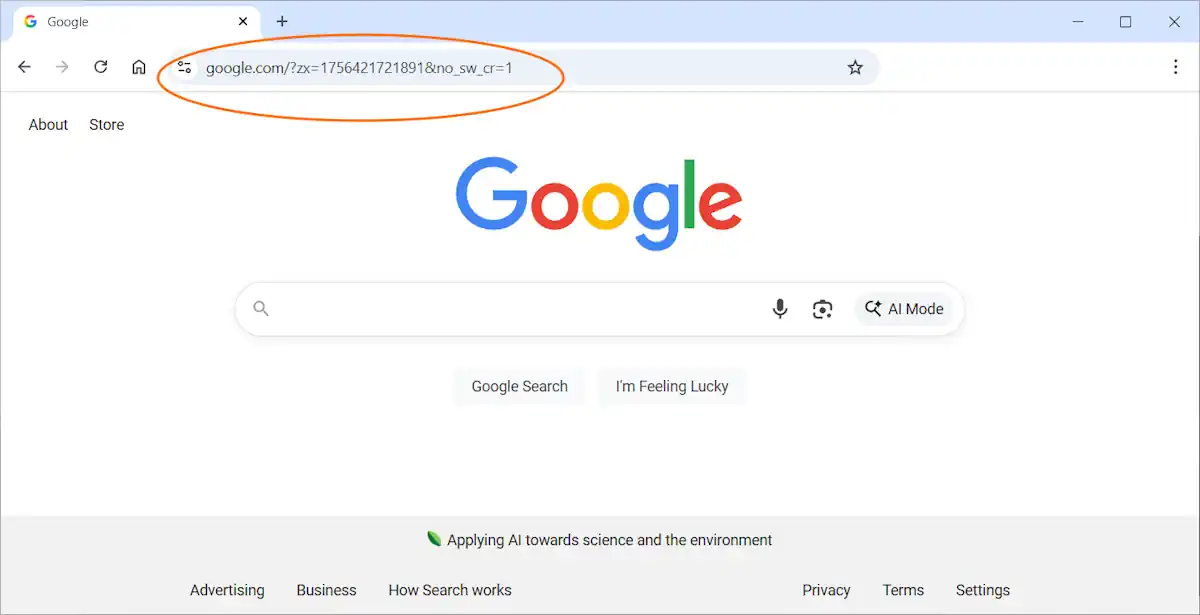
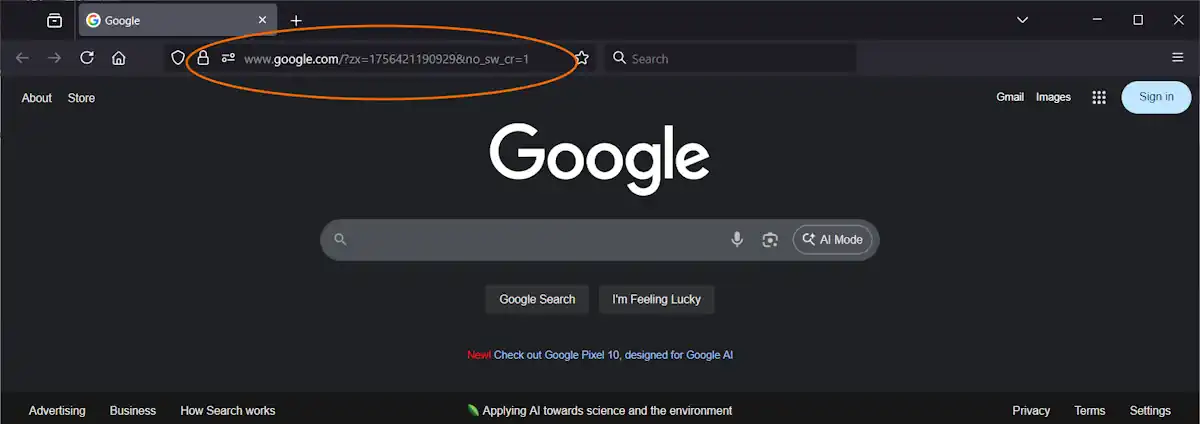
Have you noticed a strange string of characters appearing in your Google URL lately? If you’ve seen something like ?zx=174295952637117&no_sw_cr=1 pop up when visiting google.com, you’re not alone. Thousands of users across multiple browsers and devices have reported this mysterious URL change, sparking concerns about malware, secret tracking, and broken search functionality.

The appearance of random-looking numbers in your browser’s address bar can be alarming. Many users initially suspect their computer has been compromised by malware or that Google is implementing a new form of covert surveillance. In this comprehensive guide, we’ll break down exactly what these URL parameters mean, examine the evidence from our testing, and provide actionable solutions you can try today.

Here is what you need. Click here for a guide on how to update your browser to avoid the annoying code:

Google has remained notably silent on this issue. When users raise questions in official Google support forums, moderators frequently lock threads and dismiss them as “non-issues.” This lack of transparency has only fueled speculation that something significant is being concealed from the public.

Below, we’ll dive deep into what these mysterious parameters actually do, analyze the patterns we’ve discovered through extensive testing, and outline practical steps you can take—even though no perfect solution currently exists.

Understanding the Google URL Parameters: What Do They Actually Mean?

Decoding the zx= Parameter

The value following zx= consists of a lengthy number, typically between 13 and 15 digits. This number changes with every page load, which initially makes it appear completely random. However, our analysis reveals a clear pattern: the number consistently increases over time. This behavior indicates it functions as either a counter or timestamp mechanism. While not directly linked to your Google account, it effectively assigns a unique identifier to each individual request.

What Does no_sw_cr=1 Actually Do?

The second part, `no_sw_cr=1`, has been known since 2019. A German SEO site found it when testing mobile search. The value tells Google to ignore cached results and show a fresh page. For search testers this is useful. For normal users, it only looks strange and adds confusion.

Why These Parameters Trigger Malware and Tracking Concerns

For everyday internet users, these cryptic codes create immediate alarm. A URL populated with seemingly random digits feels inherently unsafe and resembles the calling card of malicious software that has infected the browser.

Beyond the visual concern, these parameters actively disrupt normal search behavior. When users type search queries directly into the address bar, their text gets jumbled together with the existing parameter code. This frequently results in failed searches or garbled results. Removing the unwanted characters requires tedious backspacing or precise mouse selection—a frustrating experience for anyone trying to search quickly.

Google’s response makes the problem worse. By closing threads without clear answers, the company looks like it is hiding something. This silence fits with the common fear of a Big Brother style of surveillance.

Even if these values aren’t directly connected to advertising profiles or personal identifiers, they exhibit classic tracking behavior. Every single request receives a unique, incrementing number—enough to raise legitimate privacy concerns among security-conscious users.

What Users Are Reporting Across Forums and Communities

This issue has sparked widespread discussion across numerous online communities. Reddit threads document reports from users on Chrome, Firefox, and Edge browsers. The problem affects Android devices, Linux systems, and Mac computers equally. Using a VPN provides no protection. Popular privacy extensions including uBlock Origin and Privacy Badger fail to prevent the parameters from appearing.

Within the Brave Community forums, initial theories blamed the Brave browser itself. However, further investigation by community members confirmed Google’s servers were the source, not Brave’s code.

Official Google Chrome Help Community threads addressing this topic are consistently marked as “informational only.” Comments get locked, and Google provides zero technical documentation explaining the behavior.

The evidence is clear: this phenomenon isn’t browser-specific or device-dependent. These parameters originate directly from Google’s infrastructure.

Our Analysis: Tracking the zx Number Over Time

Initial observation suggests the zx value is purely random. However, collecting samples over extended periods reveals unmistakable patterns. The number never decreases—it maintains a consistent upward trajectory across days, weeks, and months.

The prefix—specifically the first four digits—increases gradually over time. Our data shows values around 1727 in October 2024, climbing to approximately 1742 by March 2025, and reaching roughly 1756 by late August 2025. This translates to an increase of 2 to 3 units monthly.

The remaining digits increment far more rapidly. Samples captured just 10 seconds apart show increases between 15,000 and 30,000 units. That equates to roughly 1,500 to 3,000 increments per second. While the rate fluctuates slightly, the overall growth remains consistent.

This pattern suggests the zx value functions as a timestamp, though not a conventional format like Unix time. Instead, it appears to be a hybrid system. The leading digits track longer time periods like days or months, while the trailing digits operate as a rapid-fire counter incrementing thousands of times per second.

This architecture makes sense if Google maintains a live server-side counter. Each incoming request receives the current counter value, which prevents caching and creates a unique identifier for every single interaction.

From the user’s perspective, this closely resembles tracking technology. Even if it’s technically “just” an internal counter, it means every search request can potentially be logged with millisecond precision.

How to Fix or Work Around the zx and no_sw_cr Parameters

Currently, no confirmed method exists to prevent Google from appending zx and no_sw_cr=1 to URLs. Browser extensions like uBlock Origin or URL Redirector cannot permanently remove these parameters because Google’s servers re-inject them after each page load. However, several workarounds can help mitigate the frustration.

Solutions for Google Chrome and Microsoft Edge Users

Navigate to chrome://settings/searchEngines in Chrome or the equivalent settings page in Edge. Verify your default search engine URL is clean and properly formatted. The correct URL should be https://www.google.com/search?q=%s with no additional parameters.

Some users report that reinstalling or resetting the browser clears the issue for a while. If not, you can switch to Startpage or DuckDuckGo.

Firefox Browser Workarounds

Firefox users can add a dedicated search bar to their toolbar, keeping search queries separate from the main address bar. While this doesn’t eliminate the zx parameter, it prevents the frustrating issue of broken or garbled search queries.

If the behavior proves too disruptive, consider switching your default search engine to an alternative like DuckDuckGo, Startpage, or Ecosia.

Brave Browser Recommendations

Brave users experience identical behavior. Early community discussions incorrectly attributed the issue to Brave’s code, but subsequent testing confirmed Google’s servers are responsible. You can create a custom search engine entry in Brave’s settings, or switch to Brave Search—the browser’s built-in, privacy-focused search engine.

Safari on Mac and iOS

Safari users also encounter these additional URL parameters when searching with Google. No known fix exists for Apple’s browser. The most effective solution is changing your default search provider to a privacy-respecting alternative.

Important Note for All Browser Users

As of this writing, no one has discovered a reliable method to block these parameters permanently. They’re generated and appended by Google’s server infrastructure, not by your local browser.

If you’ve discovered a working solution, please share your method in the comments section below. We’ll update this article with any confirmed fixes from our readers.

Frequently Asked Questions About Google’s URL Parameters

Q: Is the zx number personally identifiable to me?
A: No, it isn’t tied to your individual Google account. Our testing confirms the value increases universally over time, functioning like a shared global counter rather than a personal identifier.

Q: Does the zx value represent a timestamp?
A: Essentially, yes. The leading digits increment slowly—approximately 2-3 units per month—while the trailing digits increase by thousands every second. It operates as a hybrid combination of calendar tracking and rapid counter.

Q: Should I be concerned about my privacy?
A: The parameters don’t directly expose personal information. However, they do function as unique markers for each individual request. When combined with other data points Google collects, they could theoretically help build a more detailed picture of your browsing activity.

Final Verdict: What Google’s Silence Tells Us

Google has never officially explained the purpose of zx and no_sw_cr=1 parameters appearing in your browser. Support threads get locked without explanation, and users are expected to simply accept that these additions are harmless. But from the user’s perspective, the reality feels quite different. The numbers behave like timestamps, tagging every request with unique data. They interfere with quick searching and make Google’s homepage appear compromised by malicious code.

Even if these parameters serve purely internal purposes like cache control, Google’s aggressive suppression of user inquiries makes the situation worse. By refusing to explain how this system works, the company creates a strong impression of surveillance hiding in plain sight. Until Google provides transparent documentation, users are left to speculate. In an era of declining trust in major technology companies, this opacity damages Google’s reputation further.

Have you discovered a method to block these URL parameters in your browser? Share your solution in the comments below, and we’ll update this article with working fixes from our community.

What the July 2025 Outlook and Microsoft 365 Copilot Outage Teaches About Cloud Reliability

The July 2025 outage of Outlook and Microsoft 365 Copilot lasted 19 hours. It happened on a workday when offices were busy. Email did not load. Calendars would not open. Teams could not share files. AP News reported the outage disrupted operations for millions of customers.

The timing made the loss worse. Companies rely on Outlook for daily sales and customer service. Managers need calendars for meetings and planning. Staff were unable to confirm orders or send invoices. Lawyers were unable to share documents with their clients. Health care workers had to delay routine updates. Many small businesses lost the entire workday.

The cost of lost time was high. A single hour of email downtime can cost thousands of dollars. Whole teams sat idle while waiting for systems to return. Customer deals were missed. Computerworld said global outages can cost billions in lost work time. For some firms, that one day changed quarterly earnings.

Microsoft Saves Money, But Customers Pay the Price

Microsoft moved Office to a cloud subscription to cut its own costs. It does not need to ship boxed software. It does not need to maintain old versions. Updates are pushed from one central system. It uses Azure data centers for all Office users. That is cheaper for Microsoft because the hardware is shared.

Customers now pay more over time. Old licenses cost once, but subscriptions cost every year. Subscription software shifts risk to customers. Companies trust Microsoft to keep services running because they pay high fees. But Microsoft becomes the source of the problem when its systems fail.

The July 2025 outage showed this imbalance. Microsoft saved money by keeping everything on one system. Customers lost money because they depended on that system. A single change in Microsoft’s network affected millions of businesses. Microsoft cut internal costs, but customers carried the risk.

The Fragile Reality of Hyperscale Cloud Systems

The failure began with a simple configuration change. That change broke a shared part of the system. Outlook, Teams, and Copilot failed at the same time. Cloud systems can fail because they use shared authentication layers.

Hyperscale refers to a large number of servers, but they still rely on cloned software. One mistake can reach every server. Data centers in different regions use the same rules. That means the same error appears everywhere.

Marketing claims often promise full redundancy. The outage proved that the claim was weak. Businesses thought separate regions meant separate systems. The shared layers showed that it was false. The failure moved from one region to another in minutes.

Why Companies Were Left Helpless

Most companies moved fully to Microsoft 365 because it was simple. They stopped using local systems. They stopped keeping local copies of contacts and calendars. They trusted Microsoft to protect data and uptime.

When the outage started, many staff had no contact app. Teams could not call clients because phone numbers were locked in Outlook. Staff were unable to check meetings because their calendars would not load. Whole departments waited with nothing to do.

This choice made sense when outages were rare. But now cloud systems fail more often. Cloud outages will grow as systems become more complex. Blind trust in one provider left many firms without options.

Local Systems Are the Only Real Backup

Local software does not need the cloud. It works even when networks fail. DejaOffice is an example. DejaOffice for secure local contact and calendar management keeps all data on a PC or phone. It does not sync to a remote server to work.

During an outage, staff can still open schedules. They can look up customer phone numbers. They can record new meetings and notes. When the cloud comes back, they can sync updates. DejaOffice is not a full Outlook replacement, but it is a strong backup.

Many companies ignored this kind of tool. They thought Microsoft 365 would never go offline. The July failure showed that local tools are not old-fashioned. They are the only reliable backup for critical work.

Businesses Need to Rethink Blind Trust in Microsoft 365 Copilot

The July outage shows that price does not equal reliability. Companies pay high fees for Microsoft 365 Copilot. They still lose work when the cloud fails. Every business should add local options for key data.

Cloud services will not stop failing. Complexity creates more failure points in big cloud networks. Staff will sit idly again if they do nothing. Local contacts and calendars protect against that risk.

Executives must plan for the subsequent failure. That does not mean leaving the cloud. It means adding tools that work offline. Businesses need to ask if they can survive a day without email. If the answer is no, they need a backup. The July outage proved that again.

Identify and Address Security Vulnerabilities Through Penetration Testing Techniques

Implement regular assessments using simulated attacks to expose vulnerabilities in your systems. Early detection is key to mitigating potential breaches that could lead to significant financial and reputational harm. Use a methodical approach to mimic the tactics of potential intruders, allowing for a realistic evaluation of your defenses.

Consider incorporating both automated tools and expert analysis into your strategy. Automated scanners can provide quick identifications, while professional evaluations yield deeper insights into complex issues that tools may overlook. Collaborating with skilled testers to conduct a penetration test brings a level of expertise that enhances vulnerability management processes.

Make sure to develop detailed reporting mechanisms, addressing identified weaknesses with actionable recommendations. Establishing a follow-up schedule for re-evaluation not only tracks progress but also adapts your defenses to changing threats. An iterative loop of assessment and enhancement strengthens resilience against future incidents.

Choosing the Right Tools for Penetration Testing

For web applications, consider tools like OWASP ZAP, Escape or Burp Suite, which provide comprehensive features for intercepting and analyzing HTTP requests.

For network assessments, Nmap is indispensable for discovering devices and services. Combine it with Metasploit for exploiting vulnerabilities and gathering detailed information about the network’s defenses.

Open Source vs Commercial Tools

Evaluate both open source and commercial options based on your budget and specific requirements. Open source tools often offer great functionality at no cost but may lack professional support. Tools like Aircrack-ng and Nikto can be incredibly useful for specific tasks.

On the other hand, commercial tools like Core Impact, Rapid7 or ZeroThreat.ai can provide more user-friendly interfaces, regular updates, and extensive customer support, essential for teams that rely on consistent performance.

Keep Convenience and Usability in Mind

Consider usability and integration capabilities when selecting your toolkit. Tools should align with your existing workflows. If collaboration is critical, choose options that allow easy sharing of findings, such as Dradis or Serpico.

Regularly review and update your toolkit to include the latest innovations and features. Staying abreast of trends ensures access to enhanced methods and capabilities in this field.

Executing a Comprehensive Vulnerability Assessment

Begin with a detailed inventory of assets. Catalog all hardware, software, and network components to ensure nothing is overlooked.

Utilize automated scanning tools, like Nessus or Qualys, to rapidly detect vulnerabilities across systems. Configure scans to run periodically, incorporating up-to-date signatures to identify known weaknesses.

Incorporate manual testing techniques to complement automated scans. Conduct code reviews for custom applications and utilize frameworks such as OWASP for web applications to pinpoint potential risks that automated tools might miss.

Threat Modeling

Prioritize vulnerabilities based on risk assessment. Consider the potential impact and exploit-ability of each weakness. Map out potential attack vectors and simulate real-world exploitation scenarios to gauge risks accurately.

Remediation Planning

Develop a plan for addressing discovered vulnerabilities. Classify issues based on severity and assign responsibilities for remediation efforts. Implement patches and updates immediately for high-risk vulnerabilities and schedule fixes for others based on a risk management strategy.

Conduct regular follow-up assessments to verify that remediation efforts have been successful. Keep documentation of all findings and resolutions to track progress and maintain compliance standards.

Analyzing and Reporting Findings for Remediation

Begin by categorizing vulnerabilities based on risk levels. High-risk issues should take precedence, followed by medium and low risks. This prioritization aids teams in addressing the most critical weaknesses swiftly.

Detailed Documentation

Provide clear and thorough documentation for each vulnerability discovered. Include specifics such as the nature of the vulnerability, affected systems, steps to reproduce the issue, and potential impact. Use screenshots or logs where applicable to enhance clarity.

Include remediation suggestions tailored to each issue. Recommend specific technical controls, configurations, or patches that can mitigate the identified risks. Additionally, discuss the rationale behind each recommendation to facilitate understanding among team members.

Communication Protocol

Establish a direct line of communication with stakeholders. Schedule regular updates during the remediation process, detailing progress and any complications encountered. Use a collaborative platform to track issues and document resolutions for future reference.

Conduct a debriefing session after remediation is completed to discuss lessons learned. This practice not only improves future efforts but also reinforces the importance of ongoing vigilance in maintaining secure environments.