You definitely need to try nTask. Primarily an online task management software, designed and developed primarily for teams, this tool gives you all the options to live life as productive as it can be.
Loaded with a comprehensive and sophisticated feature set, this free productivity app presents itself with a simplified interface, easily learned and used by homemakers to freelancers and teams to enterprises to get more productive.
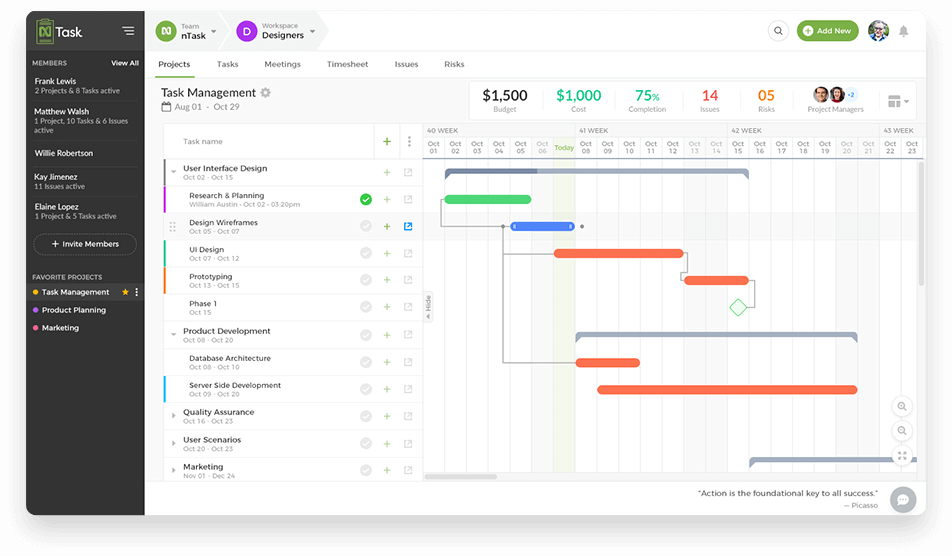
nTask is a simple all-in-one task and project management app that provides its users with comprehensive seven natively built modules including tasks, projects, risks, issues, and meeting management.
This means you don’t have to juggle between multiple apps for getting things done hence making you more productive. These modules facilitate the teams to avoid paying for third-party integrations or constant switching between multiple tools for numerous projects and multiple workspaces.
You can keep notes and use it as a simple to-do list app or create an idea or chore as a task. It helps you to create projects and assign multiple tasks to them. This helps you to easily track ideas, monitor task status, and project progress through Gantt charts.
Plus, with resource planning and budget allocation, you can keep your teams productive and project implementation effective throughout the project development cycle.
According to Lucid Agency – an award-winning agency specializing in digital marketing, advertising, and user-focused web & app design, “This is a great option for small development teams that have a need for free bug-tracking or task assignment.”
This top Productivity app also helps you stay in sync with updates and keeps you and your team on track through reminders and alerts.
Key Features:
With so many features nTask has to offer, here is a glimpse of its key features:
Two-Factor Authentication for extensive security
A simple user interface with access to a wide range of modules.
A detailed meeting management feature to help teams stay in sync. You can arrange and schedule meetings, be it one time or recurring meetings. Plus, it lets you send invites to attendees, add meeting details, and specify follow-up procedures.
Issue management module to facilitate the identification and listing down of issues related to multiple tasks. You can list the issue along with the Issue owner and relevant details to track issue maintenance.
Risk management helps you identify and keep track of potential risks. You can list down the risk and assign a risk owner in order to track risk management.
Powerful search and filter tools that help you search for tasks, projects, meetings, issues, and risks. You can even save more frequently used filters.
Alerts, notifications, and reminders to keep teams on track.
Third-party access
nTask is one of the best iPad Productivity Apps and Best Android Productivity Apps
Pricing Plans:
Free and Pro (starting at $1 per month per user with annual billing) plans.
It has already been more than a year since many people across the world left their offices and started working remotely. While employees have struggled since then to establish a ‘working from home’ routine and manage their time well, the executives have pondered a question on how to maintain the same level of productivity and efficiency when there is no direct contact with and between the employers.
In that regard, one of the solutions applied by many small and big companies is the use of project management and collaboration software. In fact, this is a worthy solution not only for remote work but also when you have the whole team in one place. Such software makes the working process easier, enhances productivity, and assists in solving other issues that can be encountered in project planning and implementation. Considering that, we have composed a list of project management and collaboration software, that you will definitely give a go once you try them.
1. GanttPRO
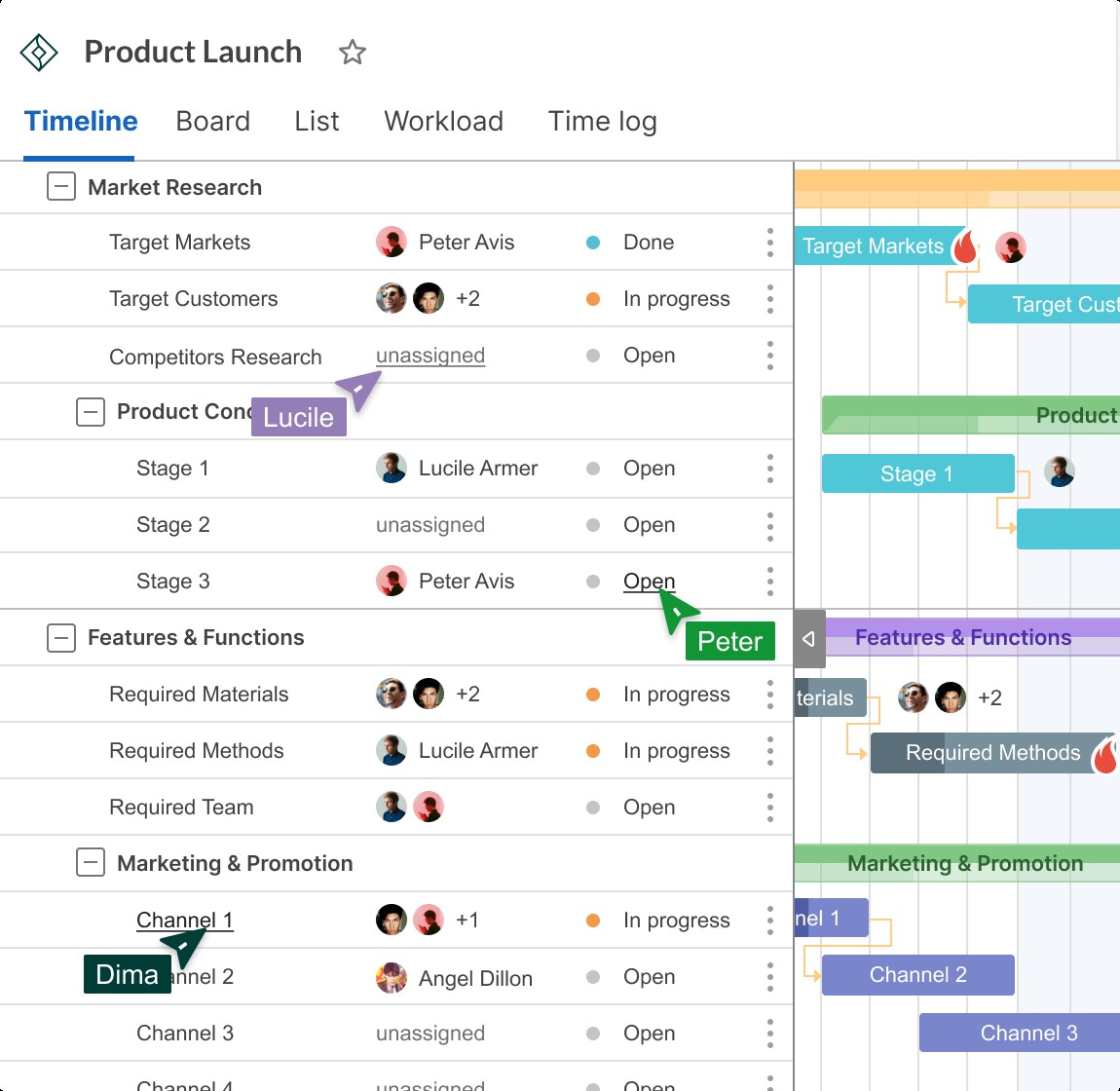
GanttPRO is a project management and collaboration tool to create a Gantt chart online that helps handle personal as well as team tasks. Thanks to a Gantt diagram view, all the tasks, and their dates are plainly seen on a timeline. With GanttPRO, users have the ability to track responsibilities along with the whole progress. Staff members are always clued-up about the project’s state and also avoid risks and misconceptions in organizing.
Why can GanttPRO be your choice?
Collaboration opportunities in the cloud-based GanttPRO are noteworthy. Project participants can work together in real-time: comment tasks, affix documents, leave summaries to assignments, export their charts in PDF or PNG as well as share them through a public link. With the real-time notifications, project participants will certainly know all changes. In terms of project management functions, this Gantt chart app offers loads of possibilities to manage tasks, resources, costs, and also schedules what makes it outstanding project management and collaboration software.
2. ClickHelp
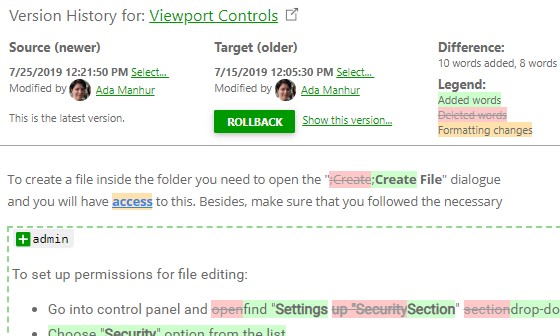
ClickHelp is a contemporary online documentation software. It’s used by businesses all over the world to create and publish different sorts of documents like manuals, customer guides, help documents, frequently asked questions, and so on.
ClickHelp is easy to use for doc teams. It is browser-based and supports multiple systems: Mac OS, Windows, and also Linux, so you don’t need to set up anything. This makes it easy to create and provide your documentation from any location in the world.
In this online project collaboration and documentation software, you can also work on your documents together with your staff members in one online portal. Absolutely nothing will be missed since notifications will certainly keep everybody from your team updated.
Why can ClickHelp be your choice?
Password-protected online assistance.
Easy importing and exporting.
Effective full-text search.
Branding features.
And many more.
3. Google Docs
This widely-known web-based project collaboration software needs no introduction. You could not know the applications from the project or time management category. However, if you have ever dealt with records online, it is 100% certain that at least you have heard of Google Docs.
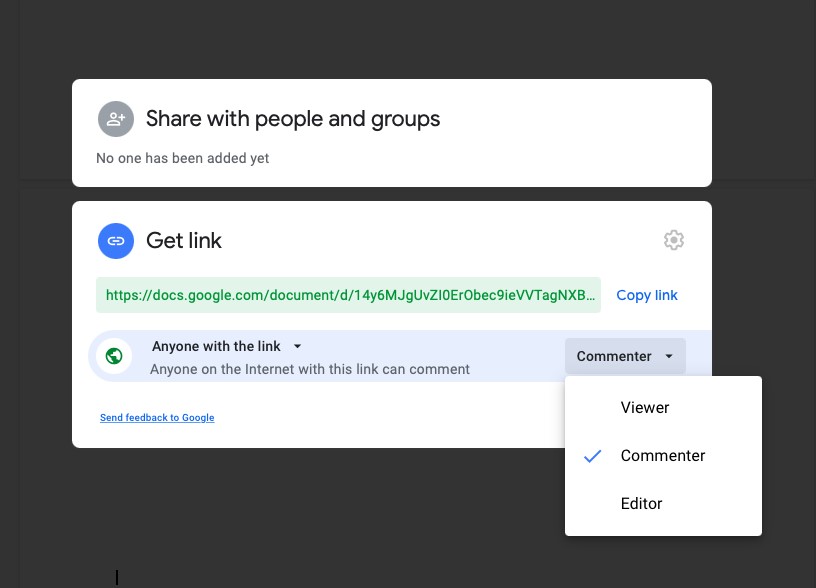
This powerful software allows developing and editing documents any place you are as well as talking and commenting. These incredible collaboration functions make all word-related work a breeze. Google Docs provides lots of templates and add-ons. You just need to log in and that’s it. Everything else you need to do is to enjoy smooth online work with the documents.
Why can Google Docs be your choice?
No lost data — everything is immediately saved online.
Awesome web link sharing with various accessibility levels.
Rich functionality.
4. Wiredrive
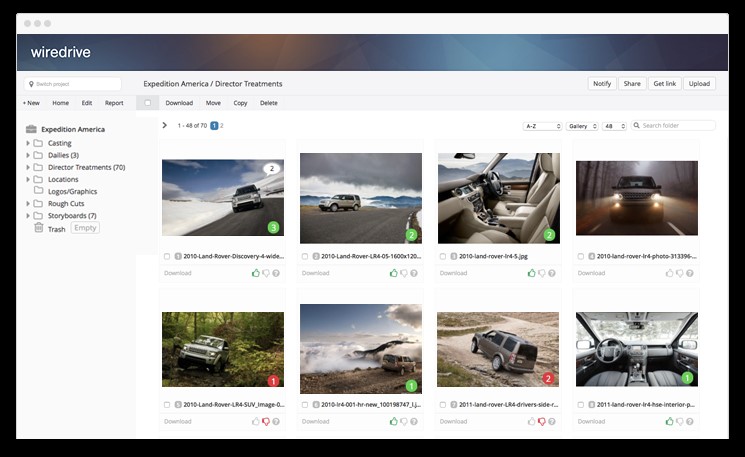
Wiredrive makes media management and collaboration processes smooth and easy to handle. This project collaboration software can become a centralized place where creative teams can keep project-relevant files.
Shared workplaces for tasks and groups enable quick web-based collaboration between project participants: you can review, comment, and track all tasks. On top of that, shared work is encrypted so you do not have to fret about protection concerns.
Why can Wiredrive be your choice?
Notifications that keep everyone from a team updated.
Powerful search and filtering functions.
Presentations in secs.
5. Creativity 365
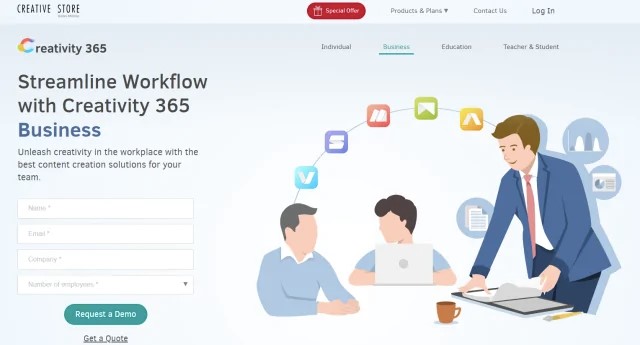
Even though this software is not as all-purpose as the above-mentioned one, Creativity 365 is a great option for creative industries. It offers Individual, Business, and also Education content production solutions. With the help of this software, groups can quickly collaborate online and implement their concepts across desktop and also mobile devices.
This software consists of 5 applications: Animation desk for producing your own animation, GIFs or storyboards; Write-on for making and editing movies; NoteLedge for taking notes, sketching suggestions or videotaping moments; Markup for making notes of Websites, ePub or PDF files, and sharing them; Pocket Scanner for scanning documentation and digitalizing it.
Why can Creativity 365 be your choice?
Great for creative groups.
Enormous storage space capacities.
Presentation feature.
6. Hightail
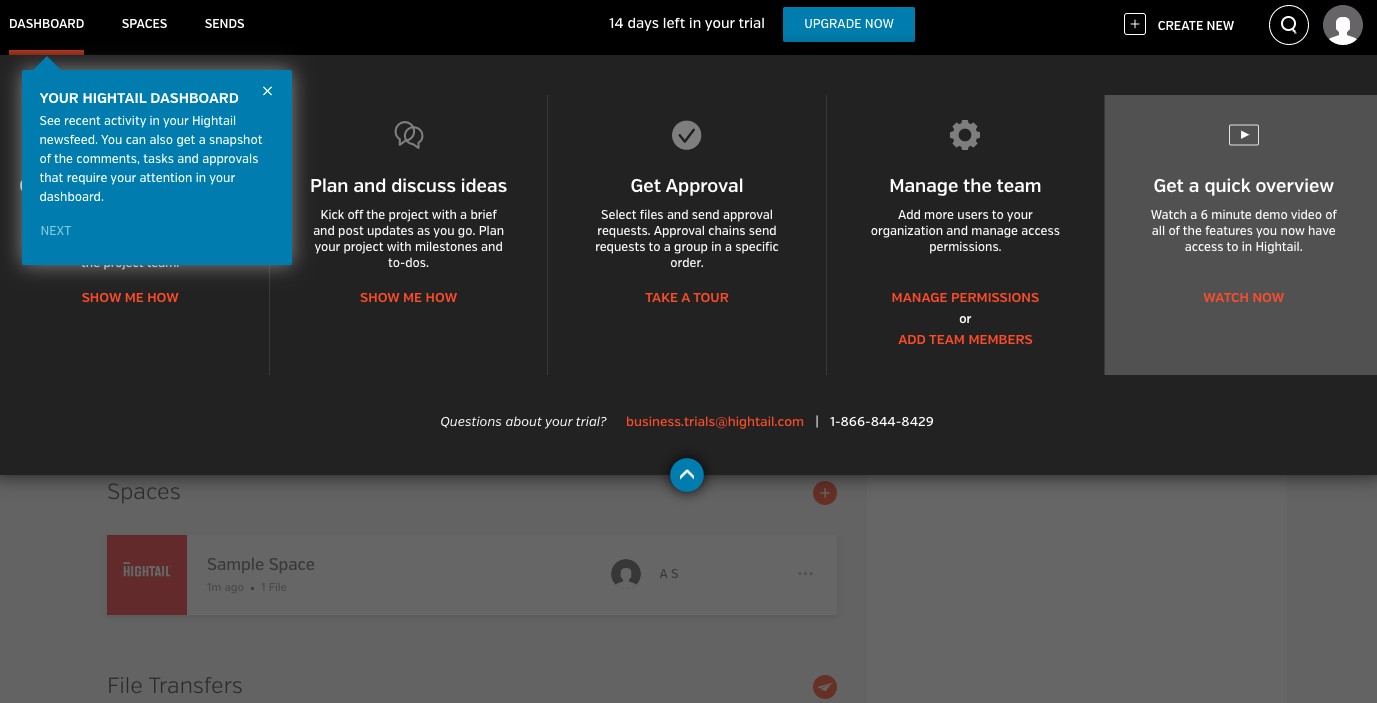
Hightail will certainly be your selection if you require working opportunities for file sharing, creative collaboration, as well as task management within your projects.
File sharing possibilities allow for sending out big multimedia data easily. For this, simply select, drag & drop or import your files from other services – Hightail will cover you. Creative online collaboration gives a single space for groups that eliminates miscommunication concerns. With project monitoring features, individuals can gather employees, set up to-do lists for them, discuss tasks, and also appoint follow-ups.
Why can Hightail be your choice?
Accessibility codes as well as expiry dates.
Lots of file formats accessible for previewing.
Data track delivery.
Version control.
7. Quip
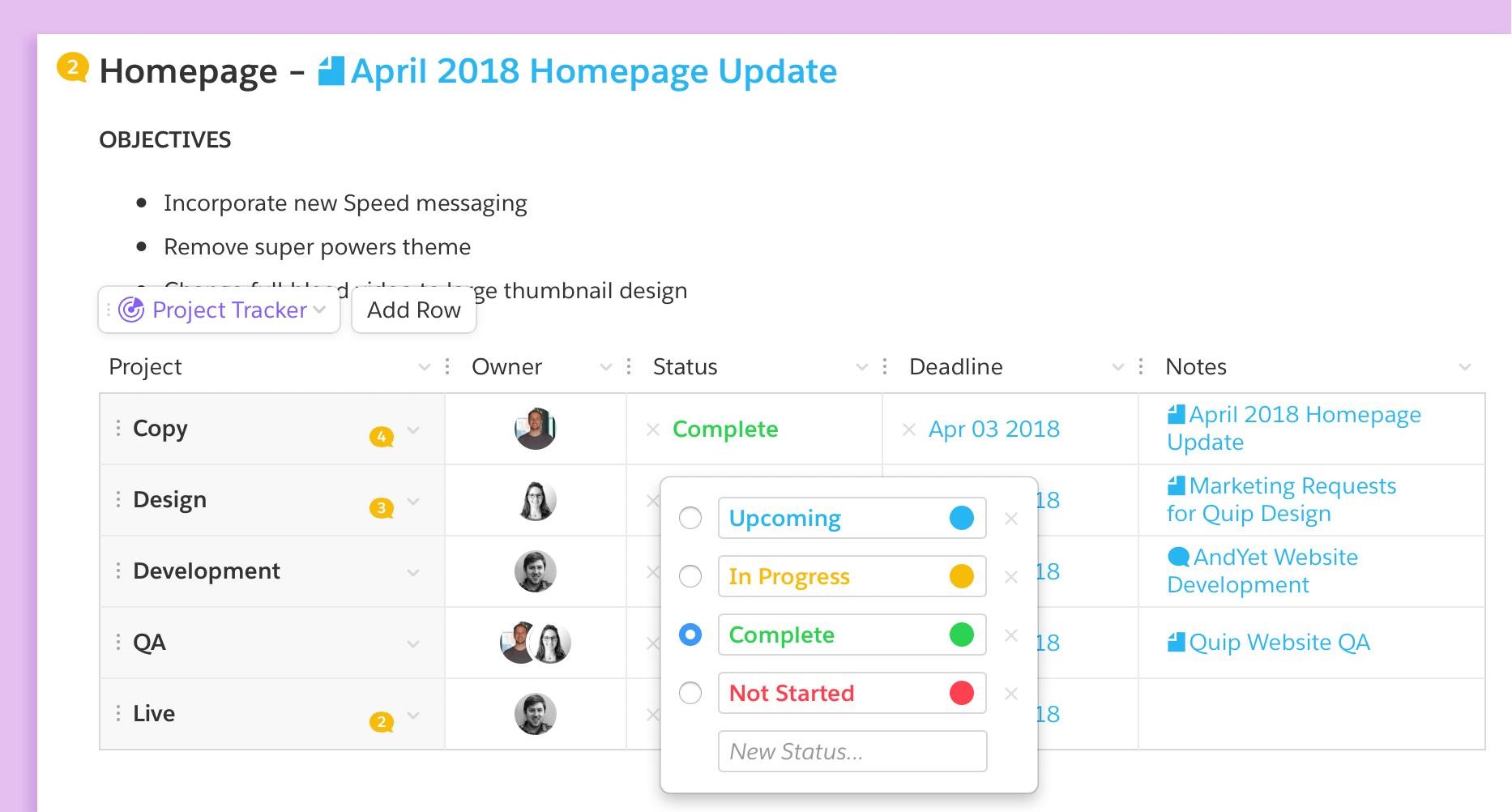
Quip arranges online collaboration on documents and task lists in a very fluid way as it helps teams work faster and be more productive.
This online document collaboration software serves well for making collective meeting notes as well as handling tasks. Quip will be the place where you as well as your group will keep all documentation to get work done.
Why can Quip be your choice?
Opportunities to add project trackers, calendars, as well as numerous other tools right into a Quip document.
Combines group conversations, lists, documents, as well as spreadsheets in one place.
Project Management and Collaboration Tools that You will Definitely Keep Using After Trying was last modified: September 10th, 2021 by Angel Anna
Construction scheduling software is offered by vendors and refers to various programs that professionals utilize to organize, assign, and even forecast tasks on construction projects. These programs have been around for years and can come in many forms. Some of these forms can be free and simple tools to highly and sophisticated multi-user systems.
They can also vary significantly in the functionalities. For instance, large construction companies may need solutions that include a construction scheduling software element. Because construction scheduling software provides precise planning and increases the pace of projects, there are usually cost savings and shorter completion times. This article explains how you can pick the proper construction scheduling software.
Understanding a construction scheduling software
If you decide to work on anything that appears to be a complex construction project, then you can benefit from using a construction scheduling software. Regardless of whether you intend to do a simple construction project or a large one, you can suffer if the project doesn’t go as planned.
The schedule and cost overruns usually happen in many construction projects. These miscalculations can increase and even lead to lawsuits, disputes, or arbitration. Unfortunately, the cost of settling these disputes can cost your company tons of money.
There are various causes that contribute to the inaccuracies like scope creep, change orders, and weather. The big culprit is perhaps the slow adoption of digital technology. As a result, project planning that happens between the office and the field can be uncoordinated and people use paper to do it.
You need to know that behind-schedule projects can create problems for the owners of the construction companies. Worse still, ahead of schedule can also sometimes create some problems since the funds set aside for these projects may not be invested in other projects. This is the reason why you need to use construction scheduling software to manage the timing and sequencing of the work.
Increasing scheduling demands for residential and commercial projects
Building projects are usually categorized as either commercial or residential. In most cases, commercial construction projects are usually larger than residential projects. These projects can also need many code requirements like wheelchair access and some fire safety measures. These commercial projects include government facilities, office buildings, factories, and retail complexes.
When it comes to residential projects, these can include development of multi-family residences, such as apartments, individual homes, and single-family homes. Therefore, builders can construct commercial projects utilizing steel and concrete while residential projects can usually have wood frames.
Commercial projects have a more complex and sophisticated infrastructure. They may need escalators, elevators, parking, and many more. As such, there is also a high level of redundancy build into their internal systems.
Hence, commercial construction projects need more expensive equipment and specialized construction professionals. Commercial contractors can subcontract the work more than residential contractors do.
There is also an inter-dependency in construction, so a delay in one task can affect all subsequent tasks. This is why you need to buy a construction scheduling software that can be useful to you as a project manager or scheduler.
Why you should pick the proper construction scheduling software was last modified: May 9th, 2021 by Roz Malaca
There are tons of great frameworks available on the market. Some of them are used to build full-blown native solutions, while others are ideal for web apps. Today’s article is concerned with AngularJS, a well-known JavaScript framework.
AngularJS development is a great way to build interactive elements. That is why the AngularJS framework can be the best fit for custom website development. What’s more, AngularJS can go a long way in developing robust and responsive apps. So, if you are interested specifically in this solution, make sure to read this article to the end.
Some History
AngularJS was created in 2010 by famous Google developers. They called the new framework Angular because it works in an HTML file, and HTML has angular brackets. Six years later, it was completely rewritten so much so that you couldn’t simply update to the new one. You had to rewrite your whole application. This created a reasonable divide between the users. Some couldn’t justify the long and costly migration, while others became fans of the improved version. The older one bears the classic naming, the new Angular removed the ending in the minimalistic fashion. Still, AngularJS is supported and used on some current Google platforms.
What is Special About AngularJS?
AngularJS appeared at the same time other classic JavaScript frameworks like Knockout and Backbone were born. How exactly was it special then?
Let’s talk about the three pillars of AngularJS. They are two-way data binding, dependency injection, and directives. Let’s tackle these complex phrases one by one.
Frameworks basically define what architecture the app will have. The original AngularJS implemented an architecture called Model View Controller or MVC. It means that the application is separated into three layers. The first model layer is responsible for the core logic of the app, its rules. The view layer is basically an interface, while the controller acts as a part accepting user inputs and sending responses back from the model.
The model and view layers are synchronized, meaning whatever is happening within the model layer is instantly displayed on view and vice versa. And this spares developers the bother of writing code for that exact purpose.
Dependencies, as their name suggests, are responsible for maintaining relations between different pieces of code. As any experienced developer knows, each object in the code needs to construct a dependent object. Therefore, every time there is the need to incorporate any changes to the existing dependency, you have to change the object, as well. That’s where AngularDS comes in and saves the day. The point is AngularJS doesn’t attach dependencies to objects. Instead, it attaches injectors to objects and makes sure they link with dependencies. This enables developers to reuse code and quickly copy dependencies when creating unit tests.
Directives are the most used part of the framework in question, and for good reason. They act as extensions to HTML and take the role of markers on a DOM element. That way, they can dictate AngularJS what behavior to attach to a particular element. Thus, directives enable HTML to create dynamic content.
So, all of this established AngularJS is a perfect tool for crafting single-page applications with multiple elements to interact with. This has gone a long way towards helping engineers solve lots of problems that used to slow down the development process. But this is not the only reason why you should set your sight on AngularJS for your next project. Check out other benefits of using AngularJS.
More Benefits
We have already briefly mentioned some pros of AngularJS. As you already know, this framework comes in handy when there is a need for a robust single-page solution. What’s more, developing apps with AngularJS allows saving time and thus reducing development costs. No wonder, lots of people that cannot afford to spend a bundle on sophisticated full-blown solutions opt exactly for Angular JS. Hire Angular developers to build a secure, scalable, and reliable web app.
An angular development company will use the most recent Angular developer tools and skill sets and create front ends that are extremely scalable, interactive, and dynamic. Another reason why AngularJS can be your best fit is massive Google support. As you know, the Big ‘G’ currently takes care to pack its creation with the most advanced features that can be subsequently utilized by developers for creating clean, high-quality code for their apps.
In contrast to other frameworks that require additional tools like plug-ins for launching the app building process, AngularJS comes as an out-of-the-box solution you can use from the get-go.
AngularJS is one of the most popular frameworks among those who desire to create a visually appealing, easily navigable, and fast business application. With AngularJS your online store or business app will have the look and feel of a full-fledged native app but with less coding and for less money. So, don’t you think AngularJS can be the best fit for your project?
Everything You Should Know About AngularJS was last modified: September 8th, 2022 by James Nagel
If you find yourself struggling with an occasional memory lapse from time to time, you should know that you are not alone. In a survey conducted and published byPLOS One, a peer-reviewed open access scientific journal, about 14 percent of respondents age 18 to 39 said they sometimes experienced these same short-lived memory issues. And many of the same respondents reported that these issues did not significantly interfere with their day-to-day life. Of course, everyone is not so fortunate. In some cases, those seemingly innocuous memory lapses can signal a severe cognitive disorder is on the horizon.
For reference, multiple studies show that people with neurodegenerative diseases, such as Alzheimer’s disease and dementia, will experience only mild memory problems at first, such as forgetting where they put their keys. Eventually, the level of forgetfulness gets to a point where they forget things that are critically important in their life. That said, whether or not things spiral this far out of control comes down to what is happening in the brain when someone has a memory lapse.
How the Brain Works and Why We Forget Things
To better understand memory lapses, it helps to know more about how the brain stores memories. This same understanding will also shed light on how they can morph into severe cognitive impairment. According to a study published by Germany-basedFriedrich–Alexander University Erlangen–Nürnberg, memories related to nearly all life events are captured in the cortex, the part of the brain densely packed with nerve cells. From there, they move to the central switching point of the brain, which is known as the hippocampus. The same flow of information moves in the opposite direction when recalling those memories. Unfortunately, many things can interfere with both of these processes, and when they do, it can make remembering things especially difficult.
Understanding the Different Types of Memory
Now that we are a little more up to speed when it comes to the process involved in storing and ultimately recalling memories, let’s take a moment to go over the kinds of memory human beings have and how they work. Although memory lapses are associated with short-term memory, which is the information we are consciously aware of and are actively thinking about, there are othermemory types in the human brain. And they include the following:
Sensory memory – All forms of memory initially start with sensory memory before moving on to other memory types. It is also further subcategorized by the following:
Visual memory
Auditory memory
Touch memory
Long-term memory – This memory type is often referred to as the final stage when it comes to processing memories, and, as the name might suggest, it is how human beings store information for an extended length of time. A few examples of long-term memory include remembering wedding anniversaries, birthdays, graduations, and the like.
Working memory – This memory type enables individuals to recall the steps involved in completing a given task. Examples of working memory include remembering the steps necessary to solve a mathematic equation, structure an essay for a class assignment, or how to complete specific work-related tasks at one’s job.
What Causes Memory Problems in the First Place?
Many things can contribute to memory problems, and they impact the lives of those young and old alike. Along with aging, some of the most common ones, according to an article published by the Mayo Clinic, a renowned academic medical center based in Rochester, MN, include the following:
Certain medications
Head trauma
Stress
Anxiety
Depression
A vitamin B-12 deficiency
Brain diseases
Substance abuse, namely an alcohol use disorder (AUD)
Hormonal Imbalances and Memory Problems
For many people, a hormonal imbalance is the cause of their memory problems. And this is generally the case for those struggling with hypothyroidism, which refers to an underactive thyroid gland. Among many others, the hallmark symptoms of hypothyroidism include impaired reasoning and critical thinking. Additionally, it can trigger memory loss and even depression. It can also adversely affect reasoning and critical thinking.
Of course, none of this is too surprising when you consider that the thyroid gland sits at the base of the brain. Low human growth hormone (HGH) levels can also put individuals on a fast track to memory problems. Multiple studies, including one published by the National Institutes of Health, have revealed a correlation between adult-onset human growth hormone deficiency and impaired memory. Many studies have also noted a nexus between low HGH levels and impaired concentration, not to mention a higher risk of suffering from anxiety and depression. For males who have more queries there are gathered best Growth hormone for men and more information.
7 Ways to Improve Your Memory
Having detailed the different memory types as well as factors that can lead to memory problems, let’s turn our attention to seven things individuals can do to improve their memory starting today:
Getting enough sleep – One of the easiest ways to improve memory is to get enough sleep. According to the National Sleep Foundation, men and women should aim for getting between 7 to 9 hours of deep, restorative sleep each night. Getting enough sleep has two benefits when it comes to improving memory. Firstly, it makes it easier to consolidate memories. Second, it makes recalling them much easier when the time comes to do so.
Consuming a brain-boosting diet – A healthy, well-balanced diet can benefit brain health just as much as it can benefit physical health, say many nutritionists, dieticians, and physicians. And this is further backed by a study published by Harvard Health Publishing, which noted that consuming foods rich in omega-3 fatty acids, namely fatty fish, helps improve overall brain function. The same was also said of foods rich in antioxidants, such as blueberries, and foods that contain plenty of vitamin K, lutein, folate, and beta carotene, which includes spinach, kale, broccoli, and collard greens.
Learning – Most will agree that continuing to learn as much as possible, regardless of age, contributes to personal growth and development. However, doing so also improves brain health, memory recall, and the ability to retain information. In short, learning is an exercise for the brain, and the more you train it, the stronger and healthier it becomes.
Exercise – Along with improving cardiovascular health and making it easier to maintain a healthy weight, exercising for 20 to 30 minutes each day can lead to a sharper memory. In a study published by theUniversity of California, Los Angeles (UCLA), researchers noted that exercising or even playing sports increases the level of insulin-like growth factor (IGF-1) and vascular endothelial-derived growth factor (VEGF) in the brain. In turn, this facilitates the growth of new neuronal connections that protect against memory problems.
Laughter – Chronic stress can take just as much of a toll on physical health as it can on psychological health. Many studies show that individuals who lead a stressful life are more likely to struggle with memory problems. The same applies to mental health disorders, such as anxiety and depression. Learning to laugh and smile more can make it easier to cope with stress, which, in turn, minimizes the risk of developing a mental illness or suffering from memory problems.
Communication – The act of speaking requires a fair amount of forethought to effectively express one’s thoughts, ideas, and opinions. That said, it stands to reason that conversing more frequently with friends and loved ones can keep the mind sharp and memory problems at bay.
Healthy lifestyle habits – Along with getting more sleep, finding ways to cope with stress, and exercising regularly, minimizing alcohol consumption can keep one’s memory sharp. And for those who smoke, quitting cigarettes or switching to nicotine pouches can also help in this regard, as it reduces the negative impact of smoking on cognitive function.
Additional Ways to Boost Your Memory
Another way to improve memory is to take dietary supplements that contain brain-boosting ingredients. Some of the best ones, according to most naturopathic physicians, include the following:
Ginkgo biloba
Acetyl-L-carnitine
Phosphatidylserine
Creatine
Fish oil
Bottom Line
In summary, many things can adversely affect memory. And while many of them are synonymous with getting older, some are related to hormone imbalances, poor dietary habits, and other non-age-related things. Fortunately, there are plenty of all-natural remedies that can help keep the mind sharp and may even reverse some memory problems. Further, many can lower the chances of developing some of the more severe cognitive issues, such as Alzheimer’s disease and dementia.
7 Ways to Make Your Memory Sharper was last modified: August 20th, 2024 by Janica Eliz
Speech recognition software is helpful in just about any industry, but it’s especially helpful in the medical field. Here are 7 reasons doctors and patients both benefit when medical personnel use this technology.
1. Speech recognition generates accurate documentation
Doctors are human and subject to error when documenting patient information and adding notes to their files. Sometimes errors occur when transferring written information into the computer.
When physicians can capture and record notes regarding a patient’s care just by speaking, the accuracy increases, which ultimately helps the patient receive better care.
2. Physicians can get HIPAA-compliant speech-to-text technology
While there are plenty of speech-to-text applications on the market, clinicians are bound by HIPAA regulations to keep patient data private and secure. Good speech-to-text applications send the content through their servers in order to generate high accuracy. This means medical staff can’t just use any application.
Most medical providers use Dragon dictation software. Dragon is a leader in the speech-to-text industry and now offers a cutting-edge, cloud-based speech recognition solution called Nuance Dragon Medical One. This dictation software fully supports HIPAA requirements and uses state-of-the-art end-to-end encryption to keep all patient data secure.
3. Speech recognition technology is more accurate than ever
When you think about speech recognition software, you might recall a time when you had to speak slowly if you wanted the computer to recognize just 20% of what you were saying. Thanks to Google’s efforts, speech recognition technology has made exponential improvements and is now more accurate than it’s ever been.
A brief history of speech recognition technology’s accuracy
Speech-to-text technology was first invented back in the 1950s. The first version of this technology recognized only numbers when spoken. It took ten years for speech-to-text to recognize words, but was limited to understanding just 16 English words.
DARPA’s Speech understanding Research (SUR) program stepped in around 1971 and created a system called Harpy that could recognize 1,011 English words. By 1985 there were two main text-to-speech software programs: Kurzweil, which understood 1,000 words and IBM’s software, which understood 5,000 words.
Although a 5,000-word vocabulary was considered exceptional at the time, people had to speak slowly, clearly, and enunciate each word carefully or the programs couldn’t understand the dictation.
Speech recognition technology became available to the masses in 1990 when Dragon launched Dragon Dictate. The price tag? $9,000. In 1997, Dragon brought their price point down to $695 with a program called NaturallySpeaking. Although the price had dropped and the program was improved, it still wasn’t reliable enough to use in a professional setting. That’s when Google stepped in and changed everything.
Accurate technology creates better patient care
As previously discussed, accurate dictation results produce better patient care. As the technology is improved with machine learning systems, it will only become more accurate with time.
4. Speech recognition helps patients with complex medical histories
For most patients, physicians can use standard EHR templates to document notes about their condition. However, when patients have a more complex medical history, it’s not that simple. Most physicians aren’t going to be excellent typists and they’re likely going to miss a lot of the nuance involved in a patient’s story.
Traditionally, physicians have used tape recorders or mobile phone apps to record information that needs to be typed up by a transcriptionist. With software like Dragon Medical dictation, the transcript is created instantly, bypassing the fees and delays that come with traditional transcription.
6. Speech can be analyzed
Some clinicians are using speech recognition software for more than just dictation. Some medical professionals use speech recognition with predictive technology for diagnostic purposes, for example, to identify Parkinson’s Disease.
7. Data retrieval
Just as speech recognition can digitally document verbal input, it can also pull up those same records. Some software allows clinicians to speak a patient’s name or other keywords to pull up relevant records and other information. This makes a clinician’s job much easier.
Speech recognition technology is only getting better
Despite its slow start, speech recognition software continues to improve and is on an upward trajectory.
Not everyone is convinced of the benefits yet. However, we can expect to see even more improvements in the coming years that will make speech-to-text an industry standard in the medical field.
7 Ways Speech Recognition Technology Supports Physicians and Their Patients was last modified: April 5th, 2022 by Alex Sanders
Over the last couple of years, a lot of trends have changed. One thing that has changed for good and the change comes highly appreciated, is the way companies used to treat their employees. Gone are the days where employees used to be considered laborers. They would come to the office, sit at their desk, take orders, get to work, report their progress at the end of the day, and go back home only to come to the office the next day and repeat the cycle again.
In the modern era, companies really put in an effort to maintain a great relationship with their employees. Employers wish for their employees to feel comfortable and at ease. The goal is to provide a welcoming environment for the employees so that they can easily reach out to the employers in case they need anything. Other than comfort, companies also wish to appreciate their employees for the work they do. Therefore, employers and companies are often searching for corporate gift ideasthat they can send to their employees and tell them how much their effort and contribution is appreciated by the company.
There are several gift ideas in the market. But when picking employee appreciation gifts, one has to be careful. The gift should depict the intention and should also make the employee feel welcomed and loved.
To help you in this regard, we have put together a list of some gift items from the best swag storesthat would surely make your employees feel loved, welcomed, and appreciated by the company:
1. Chocolate
A bar of chocolate is a gift item that you can never go wrong with. It is a creamy delight that is loved and enjoyed by all. Plus, it is also a sweet gesture that means that one wishes to appreciate and applaud the recipient’s efforts and hard work. When the employees will enjoy their chocolate, it will remind them of their hard work and how the company values it and appreciates it.
If you truly wish to impress your employees, go for the Malted Milkshake Chocolate Bar. The flavored chocolate bar has a creamy and rich texture that literally melts as soon as it touches the tip of the tongue. Plus the malted flavor adds a hint of sweetness that compliments the bitterness of the chocolate and surely amplifies its taste. The employees would be delighted when they receive this bar of chocolate as a means of appreciation for all that they do.
2. Canvas Prints
Looking for a unique and lasting way to show your employees they’re appreciated? Custom Canvas Prints are the perfect gift! Welcome new team members or celebrate a job well done with a personalized touch. Online platforms such as Wallpics offer a wide range of design options, allowing you to create stunning visual keepsakes. Gift a custom canvas print featuring a team photo, a motivational quote with your brand name, or a design that reflects your workspace. It’s a thoughtful gesture they’ll treasure for years to come!
3. Tea
Tea is a lot more than just a drink. It is a great source of calming one down especially after a tough and long day at work. If you are looking for welcome gifts for new employees and want to send a message that they are appreciated but their calm and peace is also a priority for the company, getting them a pack of tea would be a great idea. The Art of Tea Chill is a top-rated product that is highly recommended in this category. The tea is easy to brew, simply let is steep in a cup of warm water. The flavor and aroma of the tea is just divine and it will calm down one’s nerves and lead to a refreshing feeling. The flavor, smell, impact – everything about this tea is just perfect.
4. Wireless Powerbank
The modern era is the age of tech and devices. We can barely even imagine having to live one day without our gadgets. And we do need to charge our devices to be able to use them. If you want to appreciate employees who are always on the go and need a way to keep their gadgets powered, why not get them a wireless power bank. The Lexon Bali Wireless Power Bank is a great pick. The power bank has a capacity of 5000 mAh which will keep it charged for longer. You can use it to charge multiple devices without running out of battery. And since it is a wireless power bank, the user will not have to carry cords and wires along with it. They will simply place the device on the dock and it will automatically start charging it.
5. Bluetooth Speaker
Who does not love music? And when you are in the mood for a little bit of a party, a Bluetooth speaker surely comes in handy. So why not get your employees the Sony XB01 Extra Bass Portable Compact Bluetooth Speaker as an appreciation gift. The speaker is small yet powerful therefore, the sound throw of the speaker is amazing. It is small so carrying it around will not be an issue at all. Plus the Bluetooth connection means that you can connect it to your device wirelessly and enjoy your music whenever you wish to and however you wish to.
What Are Good Employee Appreciation Gifts? was last modified: June 4th, 2024 by Jessica Cam
3D printing technology is gaining traction in the fields of architecture, construction, and design due to its relatively affordable cost, fast speed, and high quality. Since constructing 3D models of architectural designs has always been a challenge, 3D printing is a boon for most architects and designers out there. In the architecture industry, detailed and accurate 3D models are key to showcasing and selling their concept to their investors and clients. Here are some strong reasons why 3D printing is gaining massive recognition in the architecture industry.
1. Enables Architects to Envision Their Idea
Certain limitations like the lack of time, inability to model complicated designs, and lack of materials often restrict architects from preparing and presenting their models. In turn, their creative idea stays stuck in their minds and is never brought on paper. Before 3D printing became a common thing, several architects lost their brilliant ideas only because they were unable to showcase their idea and bring it to life. With 3D printing, every architect can freely explore new concepts without facing this limit. Irrespective of how complicated your design is, you can translate it into a model with 3D printing.
In the past, architects feared adding complicated elements such as vaults, arches, and domes in their designs due to the inability to model them. While 3D software programs can easily create images and rendered pictures of any complicated design, preparing a solid 3D model was always a challenge. With 3D printing, modern-day designers and architects are crushing this barrier.
2. Takes Less Time
Architects need a few days to weeks to prepare a model from scratch, which is why traditional models hold a lot of value. However, since they are also complicated to make and take a lot of time, architects and designers need to adjust their schedules accordingly. With time, 3D printers are taking less and less time to prepare a model from scratch. While most models are ready within a few hours, some models take as little as 60 seconds to get printed. The next time you are running late for your jury, you can stop by a 3D printing shop and get your model ready in no time.
This new technology is a boon for business owners with 3D printers. If a customer needs some changes or makes drastic changes in their designs, the operator can easily feed the data in the 3D printer and make the changes in the final model.
3. A Cheaper Alternative
Compared to the traditional materials such as paper, mount board, scissors, glue, and other alternative tools, 3D printing can be much cheaper. It is believed that 3D printing can lower the cost of any project by 75%, thereby helping you create an affordable budget. This also lets you prepare conceptual models and visualize the design in three dimensions. This pushes the project to success.
Even though they were a bit expensive in the beginning, 3D printers are gradually growing cheaper as the technology continues to evolve. With time, every architecture student will easily be able to afford the cost of 3D printing. Moreover, manufacturers are also producing cheap 3d printers that further lower the cost of the final product. This can give budding entrepreneurs an incentive and a new business idea that they can start with little capital. With cheaper machines and materials, you can reduce the cost by a great margin.
4. Produces High-Quality Models
3D models provide better finishing than handcrafted models and also last longer. You can create detailed models with the most complicated folds and achieve the best results. Not only are 3D models stronger and sturdier but also look better than handmade or traditional models. It also provides the freedom and flexibility to experiment with different finishes. Depending on the type of 3D printing you are getting, the materials and textures can vary. In turn, this can affect the quality and look of your final model. However, you always have the option of painting over your finished model to achieve your anticipated look.
The different types of colors and materials used to make the models also provide a detailed and high-resolution finish to the final model. Since not all potential investors and buyers will get an idea about the design’s details and final look by looking at drawings, a 3D printed model can convey the idea and make a powerful impression.
Since 3D printing is relatively cheap and provides maximum freedom to creative thinkers, it is gaining a lot of popularity in the design, architecture, and construction world. Some 3D models allow the users to interact with the original design to fully envision the concept. As you can see, there are endless benefits and opportunities that come with 3D printing. Whether you are an aspiring architect or a business owner, you can utilize 3D printing technology to fulfill your needs.
Why 3D Printing is Creating a Buzz in Architecture Industry was last modified: March 15th, 2022 by Charlene Brown
With the number of applications out there, getting the most out of your computer can be difficult. Fortunately, you can use a few tips to help you find the programs you need. This article is going to walk you through a few different ways to find the software that meets your needs so that you can get more done.
How Do You Find the Best Software That Suits Your Needs?
1. Review Your Current Processes, and Identify Areas for Improvement
Before you start looking for software, you need to pinpoint the areas of your business where productivity can be improved. Wherever possible, entrepreneurs will try and use software to make their business processes more efficient. One way you do this is by comparing where your business is now, and where you want it to be in the future. By reviewing these processes, you can easily identify any software that you need to remove friction or simplify overly complex processes.
2. Define Your Software Requirements
Getting the right product is easy when you know what you want. It can be more tough finding a product if you are unsure of what’s best for your specific requirement, and have not looked into it yet. If you define your software requirements correctly, you can cut down the time spent searching for software.
It is worth explaining that your requirements should be well-defined but flexible. It should also account for all the use cases you may encounter. Over some time, your needs will evolve and this is where flexibility comes in handy.
3. Identify Options and Make Your Shortlist
It’s not always easy to find the best software for your needs. Especially when you are looking for the first time. The market is saturated and it’s hard to know where to start looking or what to compare. To find the best software you need, you must start by making a list of all possible options.
It may be tempting to just start researching the first software you find, but that may not be productive in the end. Techies at Filehorse have advised that making a shortlist will help you achieve two things; it gives you an advantage in finding the best software and it saves time. By making a shortlist, you get to explore the features before deciding which one you will go for.
4. Select Your Top Choice
Once you’ve found a few software solutions, pick the one that suits your needs the best. This could involve reading reviews or following the development of a product for a couple of months to see how it works for other people. There’s no right way to go about this. Pick what feels comfortable for you and always follow your gut!
5. Check If You Have Further Requirements
While looking for software, you will need to analyze your requirements in detail. By determining the needs of your applications, you can decide whether the existing software will suffice or if it needs to be custom developed. If you’re trying to make something simple then you will most likely find what you are looking for in one of the many software tools.
However, if you are looking for something more complex that there’s no existing plugin for, and you won’t find what you’re looking for in a simple program with a few clicking, then you’ll need to hire custom software developers.
Consider How Much You are Willing to Spend
The software can vary in price and while you want it to feel like you got a bargain, you also want it to be high quality. To find software that suits your needs you have to consider how much you are willing to spend. If you just need something simple and cheap for one-time use, search for freeware.
You could also try online auction sites like eBay or Amazon Marketplace, which offer cheap software. If you plan on using the software regularly, slightly more expensive shareware is ideal. Make sure any shareware that you choose has a money-back guarantee so that if the software doesn’t work out for you, you can get your money back.
Software Installation Safety Tips
In the technological age, you’re bound to be faced with a lot of software installations, whether it’s for new computers, smartphones, or just about anything else. Each time you get a new device or software application, you need to get it up and running.
Some people find this daunting, while others find it easy to do. Regardless of where you belong, you need to consider these tips before or during installation.
Consider If you Have Enough Disk Space or Resources to Run the Software: The first thing to consider is whether you have enough disk space or resources (RAM, CPU, etc.) on your computer to run the software. Many programs take up a lot of disk space, so it’s important to make sure that you have enough room for it.
Is there Any Conflicting Software on Your Computer? Software conflicts happen when you install multiple software programs that try to access the same files and resources. Software conflicts can be a big drain on your computer’s performance, and it becomes hard to figure out which one is causing the problem.
Check Out Removal Options Before Installing: When you install software, it is important to know whether you need to remove it when the time comes. Often, it is easy to download software that doesn’t provide clear instructions on whether it can be uninstalled or if you will lose data if you uninstall it.
Always Uncheck Installation of Extras: Installing software can be fun! Whether you’re installing a new system or downloading something for your Mac, you usually get a few extra things along with it. Look very carefully at the boxes of information before you click “next” and always uncheck anything that sounds like extra because it might just become a problem for your computer performance.
Finding the best software that suits your needs is such a chore these days. There’s too much information to wade through and it’s hard to sort the real value from the false promises. Fortunately, these few pointers should help you along the way, and hopefully, make it easier for you to find the software you can use.
6 Ways to Easily Find the Software You Need was last modified: April 5th, 2021 by Francis Brown
Looking for a screen recorder that can catch every detail of your screen while no lagging when HD recording? Follow this post to get the best screen recorder free of charge without a watermark.
Why Do You Need IObit Screen Recorder
There is no doubt that videos are becoming more and more popular than texts or images. After all, texts are plain. Meanwhile, image delivery limit information. But videos can contain rich elements including words, icons, animations, as well as audios. It takes less time for anyone to get a lot, learn a lot from a video than an article or an image. No matter you are a teacher who wants to record a tutorial, or you are a student who wants to learn skills and review all lessons you have learned, you can finish the task with a nice video.
Therefore, you need a screen recorder. But what makes people disappointed is that you always need to pay for a screen recorder, monthly or yearly. And what makes things worse is that most software limits the record time and adds the watermark by default. If you want to a long video or remove the watermark, no problem, just pay more. On the other hand, people always want an HD video so that they can clearly see what happened during each frame, but only to find large videos with a lot of lag.
Thus, the FREE IObit Screen Recorder comes into being, with all of your needs covered, such as recording any area of your screen, unlimited recording time, no watermark, recording the screen with audio, no lagging while HD recording, taking screenshots while recording, multiple outputs/convert formats, edit after recording. The most interesting thing is the IObit team also provides an online version, which means you don’t need to install any extra software to get a high-quality WebM video. If you are hurry for a tutorial, just enjoy this free online screen recorder now.
How to Use IObit Screen Recorder
Let’s see how to use IObit Screen Recorder to record your screen and make a fantastic video.
Step 1: Head to recorder.iobit.com and download this free software, and install it on your computer. Vista, Win7, Win8, Win8.1, and Win10 – all supported.
Step 2: Run IObit Screen Recorder and select the area you want to record. By default, it will record all areas of your screen. You can select one specific window to only capture everything within that window. Or you can select any area you want to get started.
Step 3: Directly start or change the default settings before starting. Actually, you can now click the “REC” button to begin recording. All default settings are optimized according to the hardware of your computer, to make sure you have the best experience. In case you want to change something such as the output directory, the video and audio format, the frame rate, the hotkeys, or the watermark.
Step 4: Use F9, F10, and F11 to control the recording process. Press F9 to start or end recording. Use F10 to pause or resume. Sse F11 to take screenshots while recording, which may be the most useful feature as the IObit team broke through technical barriers between video & audio recording and screen capture taking simultaneously.
Step 5: Preview and edit your video. If you want to cut some parts off from the original video, just click the edit icon from the video list. Then you can drag the progress bar to only save the parts you want to keep.
Conclusion
This post gives you a simple introduction to IObit Screen Recorder and clearly displays the steps to use it. Hope your life could be more interesting with this free recorder online or offline.
Record Any Area of your Screen for Free with IObit Screen Recorder was last modified: June 14th, 2021 by Tiger Zhang
SaaS Hosting is a specific type of web hosting service where your SaaS software and files are stored on the hosting provider’s servers instead of your own servers. So, your customers and users can access your software solution (your SaaS product) via the cloud.
The Benefits of SaaS Hosting
With a proper SaaS hosting, your customers wouldn’t need to have a copy of your software on their devices, while the hosting service will also provide maintenance and updates at the server level. So, the customers won’t need to update or patch the software.
Hosting for WP SaaS will also provide various benefits to the software developers. For instance, the developer wouldn’t need to host the software in-house, which may require certain infrastructures and management. Some companies also opt for Iaas hosting that maintains the infrastructures.
SaaS hosting can also provide the following benefits:
Security: the more widespread your SaaS software is and the more popular it gets, the more exposed your business is to cyber criminals and other threats. A good SaaS hosting service will also offer dedicated protection against various cyber threats like DDoS (Distributed Denial of Service) attacks, malware and ransomware, hacking, and other threats.
Content delivery network (CDN): a CDN is a network of servers that distribute the content, so users can receive the content (and SaaS service) from a server that is located closer to them, allowing better latency and faster processes
Scalability: you can easily add more web hosting service with virtual SaaS hosting as your company grows, which is more cost-effective and would save more time rather than investing in more physical hosting and servers.
Who’s The Best For Your Site?
1. Cloudways
Cloudways is one of the strongest SaaS hosting platforms in 2025. It offers speed, choice, and simplicity by letting you run your apps on top cloud providers without handling server management yourself.
Agencies in particular benefit from its AI tools, scalable infrastructure, and dedicated partnership support.
Key features:
Managed hosting across DigitalOcean, Vultr, Linode, AWS, and Google Cloud with 40+ data center locations.
Very fast servers with the latest technologies and software
Excellent customer support with 24/7 live chat, phone, and support ticket
Free CDN (by Cloudflare)
Free SSL certification
Multiple data centers in three continents, so you can choose according to your needs
Cons:
Limited/fixed storage, although the initial storage is quite large
Extra fee if you choose monthly billing
SiteGround is our top recommendation for a SaaS hosting for several reasons. First, its VPS cloud servers are based on super-fast SSD architecture, allowing very low latency and excellent reliability.
SiteGround also offers a very powerful CDN service to allow better deliverability of your content and SaaS software, and you can choose between five data centers. Also, SiteGrould will perform automatic daily backups of your site.
Arguably, however, the best reason to choose SiteGround is their excellent customer service: very fast, responsive, and reliable with almost no hold time on live chat and phone.
3. Liquid Web
Key features:
Fully managed VPS and dedicated hosting service (all updates and security fixes are handled by Liquid Web
100% uptime
For WordPress websites, Liquid Web automatically updates your plugins
PHP 7 and Nginx to boost your site’s speed and performance
Manage all your sites from a single location via iThemes Sync Pro
Pros and Cons
Pros:
Fast and secure technologies (SSD, PHP 7, Nginx, HTTP/2, and more)
Fully managed hosting infrastructure for various platforms (WordPress, VPS, dedicated servers)
Automatic daily backups and updates
100% uptime money-back guarantee
Free SSL certification and CDN
Free site migration and DDoS protection
Premium tools included (iThemes Sync Pro, BeaverBuilder, Jilt, and more)
Cons:
Expensive option
Need to pay more for an email hosting
US and Europe data centers only
Liquid Web is definitely one of the best managed hosting services out there, and actually offers more features than SiteGround. Also, a very attractive selling point is its 100% uptime money-back guarantee (they will credit you 10x the amount when you were down).
However, LiquidWeb is relatively expensive (it is not a shared hosting service) and doesn’t automatically include email hosting. If you do have the budget, however, Liquid Web is a very interesting choice.
4. Heroku
Key features:
Fully managed runtime environment
Reliable and secure PostgreSQL
GitHub integration
Various add-ons like New Relic, MongoDB, SendGrid, Searchify, Fastly, Papertrail, ClearDB MySQL, Treasure Data, and more
Heroku CLI for interacting with the cloud environment
Pros and cons
Pros:
Very easy deployment and environment configuration, very fast to launch
Very affordable especially for smaller-scale SaaS apps
A great free option, where you can deploy demo or test applications
Great interface with the Heroku CLI
Excellent mobile-responsiveness
Cons:
Does not offer static IP addresses, which can make Heroku limited in some applications
Pricing can be high for larger SaaS apps
Not very versatile for advanced developers
Heroku is a great choice due to its ease of use, allowing us to deploy apps to the cloud very easily. With Heroku, you don’t really need to manage your servers at all and you’ll also get extremely fast software launch times and intuitiveness. You can use Heroku’s Git push feature which will automatically detect your stack and automatically deploy your app.
Not as versatile as other options on this list, but one of the easiest to use.
5. Digital Ocean
Key Features:
Various data center locations across many different continents
Managed Kubernetes cluster in just a few clicks
Real-time alerts
Various resource metrics and summary stats with time-series graphs
Flexible compute options with various infrastructure options for your workload
Pros and Cons
Pros:
Easy to use, developer-friendly tools and APIs
Great documentation features
Great user interface allowing easy cloud management
Excellent customer service and support
Cons:
No South American servers
Don’t offer enterprise-level options (no MS SQL, Oracle, Windows Server).
Digital Ocean is another great hosting company for SaaS projects, especially for smaller SaaS businesses with their great pricing versatility and a very easy-to-use hosting environment. Fast, reliable, and secure SaaS hosting at a fairly reasonable price.
While it is not the most versatile hosting service, you get a great load time, decent server uptime, and excellent customer service.
End Words
A proper SaaS hosting can significantly improve your SaaS product’s deliverability and usability, by allowing a faster, managed cloud service from the hosting service instead of your own server.
Above, we have also discussed four of the best SaaS hosting options available today, each with its own advantages and disadvantages.
What is SaaS Hosting? Who’s The Best For Your Site was last modified: August 26th, 2025 by Mike Khorev
Jungle Scout is an Amazon research tool that is designed to help businesses reach success in an easy and efficient way when selling or buying products. Small businesses, in particular, can benefit from this tool to find suitable equipment and supplies with a huge bang for their buck. In other words, Jungle Scout helps entrepreneurs get their businesses up and running. On that note, here’s exactly how Jungle Scout can make your Amazon shopping easier.
Helps You Research Keywords
No business or startup can survive without the essentials. Having products on hand that helps you get organized and get to work with ease will allow you to progress. For instance, the latest office equipment can prevent a lot of hindrances; however, searching through the many products Amazon offers can be overwhelming. With Jungle Scout, you’ll be able to research keywords that are relevant to your needs, saving you the hassle of having to do extensive research about a product’s quality yourself. Shopping is much easier when you can immediately find what you specifically need for your office or small business.
Allows You to Estimate Sales
Small businesses don’t have the resources that big enterprises have. For this reason, it can be quite overwhelming for small businesses to manually search products and create spreadsheets to analyze all the data. Moreover, most startups and entrepreneurs cannot afford to hire a big IT company to handle the analytics for them. That’s where Jungle Scout comes in. Since product research is crucial to your business’s success, you can’t overlook it. Therefore, Jungle Scout will help you estimate your sales which helps you evaluate your finances and marketing strategies better.
Allows You to Spy on Competitors
Another major part of a business’s success is being able to stay ahead of the competition. Small businesses don’t have the budget to put towards standing out and getting their brand out there. As such, use Jungle Scout to stay up to date on what is and isn’t working for competitors, and adjust your strategies accordingly. In other words, it makes competitive analysis much easier for aspiring entrepreneurs and small business owners alike. Amazon Agency will show you how to stand out among your competitors and effectively promote your listings.
Offers the Best Products to Grow Your Business
It’s one thing to make a list of all the products you need to shop for to grow your business; it’s another thing to ensure you’re actually getting quality products. Shopping on Amazon becomes much easier when you can turn to Jungle Scout to provide you with the best products that will benefit your business.
The competition is growing exponentially in the e-commerce market, so staying on top of the latest trends and conducting regular market research is vital. Amazon has a lot to offer, and most small businesses just don’t have the resources to ensure that they don’t miss any valuable products or information. So, refer back to this guide the next time you are shopping on Amazon to grow your business. With Jungle Scout at your service, you have the perfect business partner you could ask for.
How Jungle Scout Can Make Your Amazon Shopping Easier was last modified: July 12th, 2022 by Allen Brown