Salesforce is the world’s leading CRM platform. It helps businesses manage things like sales, customer service, marketing, and so much more in just one system. But using Salesforce effectively might sometimes be challenging. In fact, many companies need expert support to be able to set it up properly, customize it to their needs, and keep it running smoothly.
That’s exactly why Salesforce development companies can play such an important role. They can help businesses turn Salesforce into a powerful tool that drives growth. Once companies learn to take advantage of everything Salesforce offers, they can really improve their performance and change the way they do business.
3 Best Salesforce Development Companies
In this article, we will look at three Salesforce partners: Synebo, Accenture, and Algoworks. Each of them has proven experience and a strong presence in the global Salesforce ecosystem.You want to be sure to pick a facilities management that includes scheduled servicing for the best results.
1. Synebo
Synebo is a Salesforce consulting and development company that focuses fully on Salesforce solutions. The company has more than 10 years of experience, has completed 1000+ projects, and holds 255+ Salesforce certifications across a team of 160+ professionals.
As a certified Salesforce consulting partner, Synebo helps businesses improve efficiency, increase revenue, and build stronger customer relationships by using better CRM systems.
Key Features
Salesforce Full Cycle Development
Synebo delivers Salesforce full-cycle development, covering consulting, implementation, customization, integration, and ongoing optimization within a single engagement model. By leveraging AI technologies such as Salesforce Einstein and Agentforce, the company helps businesses enhance automation, improve insights, and build smarter, future-ready Salesforce ecosystems.
Salesforce Consulting & Audits
The team reviews existing Salesforce setups and environments, finds any weak points, and suggests practical improvements. Their recommendations mainly focus on increasing efficiency and aligning the system with business goals.
Implementation & Migration
Synebo helps companies move from legacy systems to Salesforce while keeping their data safe and processes stable. The goal is to ensure a smooth transition without having to disrupt daily workflows.
White-Label Development
The company supports other Salesforce consulting agencies by delivering services under their brand. Doing this helps agencies expand their offerings without having to increase internal development resources.
AppExchange Support
Synebo works with product owners who build and publish apps on Salesforce AppExchange. The team can assist with development and optimization for marketplace requirements.
Multi-Cloud Expertise
The team works across Sales Cloud, Service Cloud, Marketing Cloud, Commerce Cloud, and other Salesforce products. This allows Synebo to design solutions that connect different functions of the business in one CRM system.
2. Accenture
Accenture is one of the largest consulting and professional services companies in the world. It operates in more than 120 countries and serves clients across many industries.
Salesforce is one of Accenture’s key technology partnerships. The company works mainly with large enterprises that need large-scale Salesforce implementations as part of broader digital transformation projects.
Key Features
Enterprise-Scale Projects
Accenture manages large, global Salesforce implementations for different multinational companies.
Multi-Cloud Integration
The company works across Salesforce Sales Cloud, Service Cloud, Marketing Cloud, Commerce Cloud, as well as Data Cloud.
AI and Data Integration
Accenture connects Salesforce with advanced data systems and AI tools, including Salesforce Einstein.
Industry-Focused Solutions
The firm builds Salesforce systems tailored to industries such as finance, healthcare, retail, and telecommunications. These systems are also aligned with industry regulations and any necessary operational models.
Long-Term Managed Services
Accenture provides ongoing support, system management, and user adoption programs to help ensure long-term CRM success.
3. Algoworks
Founded in 2006, Algoworks is a digital transformation and engineering company with a strong Salesforce practice. It serves clients mainly in North America and other global markets.
Algoworks holds Salesforce Summit Partner status, which is the highest partnership level in the Salesforce ecosystem. This status reflects its experience, certifications, and successful project delivery.
Key Features
Custom Salesforce Development
Algoworks builds tailored solutions based on each client’s business needs to ensure they get the best out of the partnership.
CRM Strategy & Consulting
The company helps businesses plan their Salesforce roadmap and improve their existing systems and optimize their Salesforce strategy.
System Integration
Algoworks connects Salesforce with third-party applications, legacy systems as well as any external data sources.
Lightning Migration
The team helps companies move to Salesforce Lightning for a more modern and user-friendly experience and functionality.
AppExchange Development
Algoworks supports the creation and deployment of apps on the Salesforce AppExchange marketplace as well.
Conclusion
Salesforce is a very powerful platform, but its success also depends on how well companies can implement and manage it throughout their operations. And in this case, choosing the right development partner can play a huge role.
The Salesforce development companies we discussed above can all be good options depending on what your company is looking for specifically. Synebo offers focused Salesforce expertise with flexible service models, Accenture delivers large-scale Salesforce transformations, while Algoworks combines strong technical capabilities with its Summit Partner status.
Each of these companies brings strong expertise and proven Salesforce capabilities. The right choice depends on your strategic priorities, technical requirements, and long-term growth plans. With the right consulting partner, Salesforce can evolve from a CRM system into a scalable platform that drives efficiency, innovation, and sustainable business growth.
Global Salesforce Development Companies: A Top 3 Overview was last modified: June 4th, 2026 by Sharman Sagoyan
Starting over with a company can look easy at first. A fresh place opens doors, even second chances. Still, tucked inside that thought are endless shifts, out of sight, happening on their own.
When offices shift, it’s not just boxes on shelves. Yet operations continue despite shaky conditions. People still need results, especially where trust depends on delivery. Even when teams are present, direction remains clear. Within that setup, links must work, regardless of the layout.
When things get busy, these checklists help manage routine work during an office shift. At critical points, exactly what’s needed appears without delay. Top priorities take center stage so nothing falls through the cracks later.
Define the Business Reason for the Move
Start by knowing your reason; moving isn’t just about boxes until you understand yours.
Scaling takes up space sometimes. Cutting down on costs helps too. Working near skilled people makes sense now. Switching to online or mixed work environments works for some. Reaching customers elsewhere is more common.
Put that information together, then share it with leaders immediately. Since motives shape outcomes, they’ll guide where you place offices, how walls are arranged, and also affect messaging within teams.
Stress shows up, yet that focus remains intact.
Build a Relocation Timeline
When a firm moves without clear dates, things start falling apart fast.
Figure out when you want to move in. From there, count down. Milestones matter: finalizing the lease, preparing spaces, securing contractors, configuring technology systems, and notifying staff.
Expect delays. Most office shifts run behind schedule, particularly when several companies and sign-offs are required.
Pick someone to lead the effort. That person handles what’s happening, lines up members, and makes sure the schedule stays current. It works better when only one person handles it.
Coordinate the Physical Move
Pick a mover familiar with office moves, ideally a professional moving company that understands tight timelines, sensitive equipment, and minimal downtime expectations.
Figure out who does what. Write each item showing where it belongs and who handles it. Make a map of the space. Give the moving crew the layout before they arrive.
Move timing should fit around daily activities. Some firms shift operations during weekends or split tasks across stages.
Assign someone each day to oversee moves who is familiar with the spaces and workflows. They will handle queries without pause and keep everything aligned with the plan.
Add a contingency buffer. Unexpected expenses are not a possibility here. They are a guarantee.
Secure the New Space
Pick a spot, then secure it before anyone else claims it.
Take time to go through the lease step by step while consulting a lawyer. Look closely at the sections on contract extensions, space requirements, who handles repairs, and how people exit the agreement.
If your new location is in Oklahoma, working with Tulsa contract law lawyers can be especially valuable, as they can help you understand your obligations under state contract law and protect your business if a dispute with a landlord or vendor arises.
Check how long it takes to set up parts of the space, and discuss what needs to be done and who will handle it with the landlord or contractor. Anything that falls behind schedule could affect everything else later.
Write down every detail. When deadlines loom, spoken promises fall short without recorded proof.
Audit Your Current Assets
Start by writing down what you see. That list will come in handy later.
Some pieces hold value; others take space. Outdated gear sits unused, replaced by time or tech shifts. Donations help communities, while sales fund upgrades. Recycling turns old materials into new ones.
Digital assets face similar scrutiny. Check what’s running on servers, licenses, software subscriptions, and hardware. Moving teams forward often means clearing clutter, making things leaner.
Shifting things you don’t need costs money while piling up mess in the new place.
Plan IT and Infrastructure Early
IT should never be an afterthought during a relocation.
Coordinate early with your IT team or provider to plan:
Internet installation and redundancy
Network cabling and server setup
Phone systems and conferencing tools
Security systems and access controls
Backup and disaster recovery plans
Schedule installations well ahead of move-in day. Test everything before employees arrive. Downtime on day one sends the wrong message.
Communicate With Your Team
News about moves should not spread by word of mouth.
Once the plan is set, pass along the news right away. Explain why the change happens, when it takes place, and then outline how routines might shift because of it.
Start tackling real-life concerns right away. Shifts in daily travel routines happen. Where to park becomes an issue. Flexible remote jobs exist sometimes. Office design matters too. What happens on move-in day often surprises people.
Someone should handle queries. When things are unclear, pressure builds, which weakens results.
Update Vendors, Partners, and Clients
Your address is operationally critical.
Create a list of all external parties who need updated information, including:
Clients and customers
Vendors and service providers
Banks and insurance companies
Legal and regulatory bodies
Shipping and delivery services
Update your address across invoices, contracts, websites, directories, and marketing materials.
Missed updates can lead to delayed payments, lost mail, and frustrated partners.
Prepare the New Space for Day One
By the time workers arrive, the area must be ready, with no gaps left.
Workstations need to be ready. The Internet should work now. Meeting spaces must open to everyone today. Stock up on essential items before they run short.
Check the access badges, security systems, printers, plus any shared equipment you use.
What counts is the little stuff. Getting off on the right foot makes the whole shift feel different.
Support Employees Through the Transition
Moving changes lives in varied ways.
Feelings might run high, joy, along with unease or even disruption. Face it straight.
When appropriate, offer more choices. Shift starting hours if needed. For now, let people work from home for a brief period. Send help, such as travel aids or childcare tips, when daily shifts hit families hard.
When you lead, presence counts. Be there, hear what’s said, then act, simply showing makes a difference.
Review and Optimize After the Move
After everything is in place, set up a check-in after the move.
What worked well. Where things dragged. How it might go better next time.
Get honest comments from workers and their supervisors. Turn those insights into smoother processes, smarter room use, and better ways to stay in touch.
Moving isn’t only moving offices. It can reshape how work gets done.
Final Thoughts
Moving a business brings stress along. That part won’t change.
Still, having a solid strategy, clear roles, and early updates can keep things running despite the chaos.
See move operations like short‑term tasks, not just tasks to check off. Done thoughtfully, they fuel progress, lift spirits, and generate energy, even once everything fits on shelves.
Relocating Your Company: A Step-by-Step Operational Checklist was last modified: June 22nd, 2026 by Elida Berb
You started your side hustle to earn extra cash or turn a skill into something more than a hobby. At first, you focused on getting your first paying customer. As you gain more experience, you may also notice patterns in what customers respond to most. Paying attention to this early feedback helps shape your services and strengthens your business identity. Now you see repeat clients, steady inquiries, and real potential. That shift feels exciting, but it also brings questions about risk. When you treat your side hustle like a real business, you give yourself more control over your income and a clearer path toward stability.
Are you ready to go official?
Before you file paperwork, take an honest look at your numbers and your schedule. If customers contact you consistently and you turn down work because of time limits, you likely have demand strong enough to support a formal business. This is also a great stage to evaluate whether your workload is consistent enough to justify formalising your business. Review your last six months of income and expenses, so you understand your average monthly profit rather than relying on a strong week or two.
You also need to think about risk. When you separate your personal and business activities, you protect your home, savings, and credit score from business-related problems. That separation gives you peace of mind and helps you make decisions based on growth instead of fear. It also makes it easier to apply for funding in the future. Lenders often prefer structured businesses because they provide clearer financial records, which can improve your chances of approval.
Choosing the right structure for success
Your business structure shapes how you pay taxes, how you share profits, and how you handle liability. Different structures also impact how professional your business appears to potential clients. Understanding the tax filing requirements associated with each structure can also help when deciding how to formalize your business. A formal setup can give you a competitive edge, especially when pitching to companies that require vendors to meet specific criteria. Many side hustlers start because it feels simple, but that structure does not separate your personal assets from your business debts.
If a client sues you, they can pursue your personal bank account or property. An LLC often offers a practical middle ground. For example, if you plan to form a Texas LLC, you benefit from limited liability protection while keeping flexible tax options that suit a growing operation. That structure allows you to open a dedicated business bank account and sign contracts under your company’s name, making you look more established when you approach larger clients.
Register and comply with state requirements
Once you choose your structure, you need to register your business name and file formation documents with your state. Each state sets its own rules, and filing correctly prevents delays that can stall your launch. When you register properly, you gain the legal authority to operate, sign leases, and enter contracts as a business rather than as an individual.
You also need an Employer Identification Number from the Internal Revenue Service if you plan to hire employees or open a business bank account. Banks often require this number before they approve accounts, and vendors may request it before extending credit. Don’t forget to keep copies of all filed documents in both digital and printed form so you can access them quickly when needed.
Licenses, permits and tax compliance
Local and state governments often require specific licenses, even for home-based businesses. Researching these requirements early prevents you from accidentally operating without the correct approvals. Some industries have additional safety or compliance rules that can influence how you run day‑to‑day operations. When you secure the correct permits, you reduce the risk of fines that could wipe out months of profit.
Tax compliance also demands attention. You likely need to collect sales tax on certain products or services, and you must track income carefully to estimate quarterly payments. Accurate bookkeeping helps you avoid surprises at tax time and shows lenders clear financial records if you later apply for funding.
How to turn your side hustle into a business was last modified: October 23rd, 2026 by Ellas
Remote working has changed the way UK businesses operate, providing flexibility for teams and reducing overhead costs for owners. However, this shift away from the traditional office creates new challenges for maintaining a secure perimeter. When your staff work from home, they often use personal Wi-Fi networks and varied devices that fall outside the direct control of your internal IT department.
Securing a distributed workforce requires a blend of reliable technology and a strong culture of vigilance. It’s about ensuring that every person, regardless of their location, understands their role in protecting sensitive company data. Since 2012, experts have helped solve these complex challenges by focusing on people-centric solutions. Follow along to explore the most effective ways to secure your remote operations.
Securing the Home Office Network
The first line of defense for any remote worker is their home network. Most standard home routers aren’t configured with business-grade security in mind, making them easier targets for attackers. You should encourage your team to change the default passwords on their routers and ensure their firmware is always up to date.
Using a Virtual Private Network (VPN) is another essential step for maintaining privacy. A VPN creates an encrypted tunnel for data, ensuring that company information remains protected even if the underlying connection is compromised. This is particularly important for staff who might occasionally work from public spaces like cafes or libraries.
Empowering Staff with Cyber Awareness Training
Technology can only go so far in preventing an incident. Human error remains a significant factor in many security breaches, often because employees don’t know how to spot a sophisticated scam. This is why investing in Cyber Awareness training is one of the most proactive steps a business can take.
When your team understands the latest risks, they become an active part of your defense. Effective training programs help staff identify suspicious emails and understand the importance of secure password management. By building this knowledge, you will create a workforce that’s better equipped to handle the realities of the modern threat landscape. To do this effectively, you must:
Implement Multi-Factor Authentication (MFA): Ensure every login requires a second form of verification.
Regular Software Updates: Automate patches for all operating systems and applications.
Encrypted Storage: Use secure cloud platforms for sharing files rather than email attachments.
Clear Reporting Procedures: Make sure staff know exactly who to contact if they suspect a breach.
Managing Devices and Access
It’s common for remote workers to feel tempted to use personal laptops or tablets for quick tasks. However, Bring Your Own Device (BYOD) policies can introduce significant risks if not managed properly. Providing company-managed hardware allows your IT team to install necessary security software and monitor for potential threats.
Controlling access to your systems is just as vital as securing the devices themselves. You should follow the principle of least privilege, which means giving employees access only to the specific data and tools they need for their roles. This approach limits the potential damage if a single account happens to be compromised.
Final Notes
A secure environment is built on trust and open communication. You should foster an atmosphere where staff feel comfortable reporting mistakes without the fear of immediate punishment. If someone clicks a suspicious link, you want them to tell the IT team immediately so they can contain the threat.
Regular check-ins and updates on current security trends can keep these topics at the front of everyone’s mind. By providing actionable advice, you help your team feel supported rather than overwhelmed by the technical aspects of their roles. This collaborative approach ensures that security remains a shared responsibility across the entire organization.
How to Create a Cyber-Safe Environment for Remote Workers was last modified: February 12th, 2026 by Lydia N
Modern deal teams rely heavily on CRMs to manage relationships, track communication, and move opportunities through the pipeline. That approach works well for contacts and activity. It breaks down, however, when sensitive deal documents come into play. Financial models, contracts, cap tables, and diligence materials demand a level of protection and control that CRM platforms were never designed to provide. This is where data security becomes a practical concern rather than a theoretical one.
For teams preparing for fundraising, M&A, or investor diligence, secure document handling is no longer optional. A single forwarded attachment or outdated file can slow negotiations, raise investor concerns, or create compliance risk. This article explains how virtual data rooms support teams that already use CRM systems and contact sync, why they are essential for a data room for investors, and how they help businesses maintain trust, speed, and control throughout complex transactions.
Why CRM-Driven Teams Struggle with Secure Document Sharing
CRMs are excellent tools for managing relationships, sales stages, and communication history. They show who spoke to whom and when. They were never meant to be secure document repositories for high-stakes deals.
Most teams eventually hit the same friction points. Sensitive files are uploaded as attachments or shared via links, then forwarded outside the system. Access grows organically, not intentionally. Versions multiply. Follow-up questions increase because no one is certain which document is current or who has seen what.
The core issue is structural. A CRM is built for contacts and activity. A virtual data room exists to manage disclosure, risk, and trust. When teams try to force one system to do both jobs, security gaps appear quickly—especially during investor-facing processes.
What a Virtual Data Room Adds to CRM-Based Workflows
A virtual data room is a secure online workspace designed specifically for sharing confidential documents with internal teams and external stakeholders. In CRM-driven workflows, it sits alongside existing systems rather than replacing them.
Instead of attaching files to records or emails, teams store sensitive materials in a controlled environment where access, visibility, and usage are defined in advance. This approach supports stronger data security solutions without disrupting how teams already manage relationships.
How VDRs complement CRM systems
The distinction is simple but important:
CRM systems track who is involved and when interactions happen.
A secure VDR controls what documents are shared, how they can be used, and under what conditions.
Together, they form a cleaner operational split. CRM remains the system of record for contacts. The VDR becomes the system of record for documents.
Virtual Data Rooms for Teams Using CRM and Contact Sync
For teams using CRM and contact sync daily, document handling often becomes the hidden bottleneck. Contacts flow easily across tools, but documents need stricter boundaries.
Sales teams share pricing and proposals with prospects. Founders distribute decks and financials to potential investors. Corporate development teams exchange sensitive files with advisors and counterparties. In each case, multiple parties need access—but not the same level of access.
A data room for investors solves this by acting as a neutral, secure layer for documents. Contacts synced from a CRM can inform who should be invited, but permissions remain deliberate and role-based. This is why many organizations treat their virtual data room software as the authoritative source for deal materials, while CRM continues to manage communication and outreach.
Typical Use Cases Where CRM + VDR Integration Matters
Sales and enterprise deal teams
In complex sales cycles, prospects often request security documentation, pricing details, and contractual terms. Storing these materials in a VDR allows teams to limit access by opportunity stage and monitor engagement without cluttering the CRM or relying on unsecured attachments.
Fundraising and investor relations
Investor outreach is usually tracked in CRM systems. The diligence process, however, requires a data room for investors where financials, metrics, and governance documents can be shared in a controlled way. This separation helps founders stay responsive without oversharing or losing track of versions.
M&A and corporate development
In M&A, deal teams manage dozens of external parties. Contacts and communications live in the CRM, while the VDR provides structured, auditable access to diligence materials. This approach is standard practice in serious transactions because it reduces confusion and strengthens accountability.
Contact Sync Without Access Chaos
One of the most common operational concerns is the assumption that syncing contacts means granting document access automatically. In reality, the two should remain distinct.
Contact sync is useful for awareness. It tells you who exists in the ecosystem. It should not dictate what those contacts can see. Virtual data rooms address this by separating identity from permission.
Role-based access ensures that contacts imported or referenced from CRM systems are reviewed before being granted entry to specific folders. This keeps CRM data clean while ensuring VDR access remains intentional. In practice, contact sync should inform decisions—not automate them blindly.
Security and Control Gaps CRM Platforms Don’t Solve
CRMs are not built to address advanced document protection. Once a file is attached or linked, control is limited. Forwarding is difficult to prevent. Audit trails are incomplete. Document-level restrictions are minimal.
A secure VDR closes these gaps. It supports view-only access, dynamic watermarks, detailed activity logs, and the ability to revoke permissions instantly. These capabilities are core to modern data security solutions and essential for investor-facing workflows.
Industry frameworks such as those published by NIST highlight the importance of controlled access and monitoring in information security practices.
Similarly, IBM outlines why data security is not just about storage, but about visibility and governance across systems.
A Practical Workflow: CRM on the Front, VDR in the Back
For most teams, the cleanest setup follows a simple pattern:
Relationships, outreach, and deal stages are tracked in CRM.
Stakeholders are invited to the virtual data room based on role and relevance.
Documents are shared progressively as trust and deal maturity increase.
Activity is reviewed in the VDR, reducing back-and-forth emails and manual follow-ups.
This division of labour keeps workflows efficient without compromising Data Security.
What to Look for in a VDR When Your Team Uses CRM Heavily
Not every solution fits every workflow. When evaluating a VDR, teams using CRM extensively should focus on fit rather than marketing claims.
Key considerations include flexible user management, clear permission logic, and simple onboarding for external users. Reporting should support deal reviews without requiring teams to duplicate data already stored in CRM systems. For investor diligence, the goal is not just protection, but clarity.
Many organizations evaluating the most secure VDR provider for transactions find that security and usability must work together. A system that slows participants down can create as much friction as one that lacks controls.
The U.S. Securities and Exchange Commission has repeatedly emphasized the importance of controlled disclosure and auditability in investor communicate.
Virtual Data Rooms for Teams: Secure Deal Collaboration with CRM Sync was last modified: February 12th, 2026 by SEO Mavens
Candidates accept the offer, clear the checks, and then vanish on day one. It feels personal, but it is a process problem. Smart workflows and top-rated software tools for recruitment agencies can turn this around.
What Day-One No-Shows Really Are
A day-one no-show is when a candidate accepts the job but does not report for their first shift. They do not call, they do not email, and they simply disappear. To the client, it appears you never had control over the hire.
The hiring process experiences its final disruption when candidates fail to show up. The process shows no problems until it reaches its ultimate stage. The placement disappears suddenly, with no prior indication of its loss.
The pattern occurs frequently in positions that require high staffing levels for temporary work in light manufacturing. The pattern exists in healthcare, logistics, and call center operations. The absence of staff who do not show up for work creates hidden financial losses in any industry that relies on quick operations.
Why Day-One No-Shows Happen
Some candidates get better offers between acceptance and the start date. Others feel anxious, unsure, or poorly informed about the role. Some people who participated in the study remained uncommitted because they accepted the invitation to stay connected with their present options.
The situation becomes more challenging because people struggle to communicate with one another. When someone accepts an offer, they remain silent for a long time, creating uncertainty. The first day is challenging because the instructions create confusion that can lead to dangerous situations or public humiliation.
The agency experiences operational disorder, which produces internal disturbances. The information disappears from email threads and spreadsheet documents. Disorganization becomes apparent to candidates who withdraw their trust from the entire process.
Why No-Shows Are So Costly
Every no-show hits revenue and margin. The time dedicated to sourcing, screening, and submitting work has vanished. The internal teams need to work urgently to find a replacement for the vacant position.
The client’s trust is set back. The clients observe vacant positions, unfilled shifts, and interrupted work schedules. A single negative encounter can damage a business relationship that has lasted for years.
The team incurs an additional expense, which remains undiscovered. The recruiter experiences both frustration and a sense of being held responsible. The team members experience a decline in their work capacity because they keep losing successful projects during the final stages.
The Workflow Stages That Matter Most
The first requirement is to create an organized, documented process that begins with an offer and continues through the start of work. The process needs to include all steps from verbal agreement through the first work punch-in. The process needs to operate without relying on the memory capacity of any single individual.
The next step requires you to establish ownership rights for each contact point. The process includes one person who verifies information, another who transmits paperwork, and a third who evaluates the operational state. The movement of items between two parties must be documented, including their status at completion.
The team must establish checkpoints that occur during periods of expected risk. The day after acceptance, three days before start, and the day before start. The checkpoints establish whether candidates maintain their active status.
Using Workflow And Automation To Reduce Ghosting
This is where technology becomes essential. Manual reminders and ad hoc spreadsheets do not scale. You need workflows that trigger actions every time, without fail.
Modern staffing firm software can automate offer-to-start sequences. It can send reminders, log confirmations, and flag missed steps. Recruiters then focus on real conversations, not chasing admin.
Analytics also matter here. By tracking no-shows by client, role type, and recruiter, you see patterns. That data lets you refine scripts, adjust timing, and redesign weak steps.
Conclusion
Day-one no-shows will never disappear entirely, but they can be reduced. The agencies that win treat them as a workflow problem, not just a people problem. With clear processes, automation, and top-rated software tools for recruitment agencies, you shift from chasing ghosts to filling shifts.
The Day-One No-Show Problem: How Workflow Can Prevent Costly Ghosting was last modified: February 10th, 2026 by Jenn Hair
In a business environment, project visibility isn’t just a buzzword; it’s a necessity. When teams lack clear insight into project progress, deadlines, and resources, organizations face delays, inefficiencies, and frustrated employees. Understanding the risks of poor visibility helps businesses take action before small issues become major problems.
Why Project Visibility Matters
Project visibility refers to the ability of team members, managers, and stakeholders to see real-time progress, risks, and dependencies across projects. Without it, work becomes siloed, decisions rely on outdated information, and teams struggle to stay aligned with strategic objectives.
Team-level visibility: Knowing the status of tasks within a single project.
Portfolio-level visibility: Seeing the broader picture across multiple projects and initiatives.
Organizations that lack visibility often waste time in manual status updates, miss deadlines, and fail to allocate resources effectively.
Problems Caused by Lack of Visibility
1. Missed Deadlines and Delays
Without real-time insights, teams can’t identify bottlenecks early. A delay in one task often cascades across multiple projects, affecting delivery timelines and time-to-market.
2. Inefficient Resource Allocation
Teams unaware of who is working on what may double-assign resources or leave some team members idle. This inefficiency strains budgets and reduces overall productivity.
3. Poor Risk Identification
Visibility gaps prevent teams from detecting scope creep, compliance issues, or potential blockers. Problems are often discovered too late, requiring costly corrective action.
4. Slow Decision-Making
Leaders make decisions based on fragmented or outdated information, leading to misaligned priorities and missed opportunities.
5. Siloed Communication
Lack of transparency breeds miscommunication. Teams struggle to collaborate, stakeholders remain out of the loop, and frequent manual reporting eats into productive time.
Signs Your Organization Has Visibility Gaps
Constant surprises with missed deadlines or shifting scopes
Resource conflicts and overworked staff
Dependence on spreadsheets and ad-hoc reporting
Difficulty measuring ROI or project impact
Recognizing these signs early allows organizations to proactively implement solutions to improve visibility.
How Better Visibility Benefits Teams
Enhanced project visibility transforms the way teams operate:
Faster, data-driven decisions: Managers can respond quickly using accurate, real-time data.
Optimized resource planning: Assigning the right people to the right tasks improves productivity.
Consistency across teams: Standardized reporting frameworks reduce confusion and ensure everyone is aligned.
Organizations with high visibility are better equipped to meet deadlines, control costs, and achieve strategic goals.
Tools to Improve Visibility
Centralized tools and structured workflows are essential. These include:
Project dashboards: Provide a real-time snapshot of tasks, progress, and deadlines.
Structured communication cadence: Regular updates and cross-functional meetings reduce misunderstandings.
Documentation and workflows: Clearly defined roles, responsibilities, and shared roadmaps help teams stay aligned.
For organizations managing multiple projects, adopting project portfolio management software is one of the most effective ways to gain enterprise-level visibility. Such tools unify data across projects, prioritize work, and provide a holistic view of progress, risks, and resource allocation.
Conclusion
When teams lack visibility, projects suffer, resources are wasted, and decision-making slows.
Investing in the right solutions, like project portfolio management software, ensures that both team-level and portfolio-level insights are clear, actionable, and integrated into day-to-day operations.
What Happens When Teams Lack Visibility Across Projects was last modified: February 10th, 2026 by Ronica G.
A professional identity no longer lives in a single place. It exists simultaneously on social media and search engine results. A professional image must fit consistently wherever it appears. Any mismatch can weaken credibility faster than a loose thread unravels fabric.
There are now multiple platforms for various purposes, and people enter a person’s name into search bars when they want to look them up before anything else. If the information across platforms is inconsistent, it is considered a huge red flag.
The Fragmented Nature of Online Professional Presence
Inconsistent information is not always a lie, as a modern professional profile is often scattered across platforms created at different times. It can just be:
a resume updated last year
a LinkedIn profile refreshed last quarter
a company bio written two roles ago
This series of information, when read in a sequence, tells a different story even if these differences seem minor individually.
According to a 2023 CareerBuilder study, 70% of employers use social media to screen candidates, and 57% are less likely to interview candidates whose online presence appears inconsistent.
Why Consistency Equals Credibility
Consistency across platforms compounds interest, as each aligned detail builds trust incrementally. That being said, the person gets shortlisted in an instant if he has:
a unified headline
similar role descriptions
a recognizable professional photo
In contrast, conflicting job titles or outdated descriptions can raise silent red flags.
Senior leaders applying for board positions are often evaluated through public profiles before formal conversations begin. Search results that reflect the same leadership narrative across LinkedIn and corporate bios establish their firm’s authority.
Visual Identity as the First Impression
Visuals anchor memory faster than text, as research from MIT shows that the human brain can identify images seen for as little as 13 milliseconds. It proves that the profile image is now a critical element of digital consistency.
Professionals increasingly rely on AI-generated headshots to maintain a polished and uniform appearance across platforms. These images come edited with controlled lighting and professional styling. It is particularly valuable for remote professionals and consultants who may not have access to frequent studio sessions. When the same high-quality image appears across profiles, recognition improves, and trust continues to increase.
Aligning Messaging Without Sounding Rehearsed
A consistent professional image does not require identical wording everywhere. Instead, it requires thematic alignment. Core expertise and value proposition should remain stable, while tone adapts slightly to platform context.
For example, a fintech compliance specialist may emphasize regulatory leadership on LinkedIn, operational impact on a company website, and thought leadership in industry publications. The tempo changes, but the melody stays the same in all scenarios.
The Role of Data Accuracy and Timeliness
Outdated information is the digital equivalent of expired credentials. A 2024 HBR survey found that executives who updated their professional profiles quarterly were 40% more likely to receive inbound opportunities. Accuracy indicates a person’s commitment to their role and career.
Regular audits of digital profiles help ensure alignment with current roles, achievements, and positioning. Minor discrepancies addressed early prevent larger credibility gaps later.
Afterword
Managing digital profiles is less about self-promotion and more about narrative discipline. Each platform acts as a chapter in the same book, and when chapters contradict each other, readers lose confidence in the author.
Managing Digital Profiles Across Platforms for a Consistent Professional Image was last modified: February 10th, 2026 by Ronica G.
The business world is a complex environment, teeming with uncertainty, unpredictability, and direct exposure to risk. Risk scoring—the process of assessing the likelihood of a specific outcome (such as a loan default)—is an indispensable tool for businesses to manage these risks. Traditionally, organizations rely heavily on credit scores and applicants’ income details. But today, organizations are tapping into a new kind of data to better their risk assessments- phone-based data. This article uncovers the transformative power behind phone-based data and how it has revolutionized contemporary risk scoring.
The Power of Phone-Based Data
There are many ways to gather relevant and accurate data, but one of the best is to focus on phone numbers. Through a phone number lookup API, businesses can access a wealth of data connected to a specific phone number. This data could include information about a person’s phone usage, call history, contact lists, location data, and more. Ultimately, something as simple as a phone number can provide deeply insightful data about an individual’s behavior. For risk scoring, this means a more efficient and accurate method of assessing potential risk.
Enhancing Risk Scoring Accuracy
With the help of good, well-bounded phone-based data, you can significantly improve the accuracy of calculations in risk management. By utilizing multiple parameters such as location data, call duration, and even regular contact lists, it’s easier to construct a more comprehensive risk profile. Phone-based data can provide a more precise, holistic view of an individual, enabling better decision-making and improved risk mitigation. This high level of detailed data also reduces the risk of false positives that could inadvertently penalize a responsible candidate.
Providing Real-time Insights
Relying on outdated information can lead to flawed risk evaluations. This is where phone-based data shines, as it can provide real-time insights. Updates to location changes, the contact list, or call behavior can be continuously analyzed to keep an individual’s risk assessment current, thereby reducing the likelihood of inaccuracies from outdated data.
Addressing Privacy Concerns
Privacy concerns are a big deal in the era of data-driven decision-making. It’s essential for organizations to understand the ethical concerns associated with using personal data, such as phone data, for risk scoring. It’s vital to ensure that all data collection and usage comply with established regulations such as the General Data Protection Regulation (GDPR) and similar regulations worldwide. Remember, if you operate internationally, you will need to comply with both the data regulations where you are and those of the market or markets you’re targeting.
A Path Towards the Future of Risk Management
The use of phone-based data for risk scoring represents a significant shift in how companies approach risk management. These data-rich models promise to deliver increased accuracy, timeliness, and overall efficiency. However, with great power comes great responsibility. As businesses leverage phone-based data to improve risk scoring, they must not overlook critical considerations, including privacy and confidentiality.
Phone-based data has the transformative potential to revolutionize risk scoring. By providing companies with a more detailed, nuanced view of the individuals they’ve engaged with, phone-based data can offer insights that were previously inaccessible or unimaginable. Despite the challenges regarding privacy and regulation, the benefits, from more accurate risk assessments to enhanced customer service, position phone-based data as a valuable asset to contemporary risk management practices. The future certainly looks promising for phone-based risk scoring methodologies and for companies willing to tap into this emerging potential.
How Phone-Based Data Improves Risk Scoring was last modified: February 3rd, 2026 by Julia Adams
Both Omnisend and Klaviyo are major players in the email marketing space for ecommerce businesses. They mostly differ in terms of the depth of what they offer, which is why it’s important to clearly define what you need from the platform to avoid overpaying for features you won’t use.
If your business is scaling quickly, you likely need to consider automation capabilities, omnichannel marketing, the platform’s learning curve, pricing, and customer support. While both platforms are quite capable and competitive in these areas, each has its pros and cons.
Automation and workflow capabilities
Based on the latest data, email automations drive significant revenue for ecommerce stores. In 2025, they represented just 2% of email sends, but drove 30% of revenue.
Pre-built templates help you get started quickly, while customization options allow you to fine-tune campaigns to your needs as your business grows.
Omnisend has a wide selection of pre-built automations that cover the customer journey almost completely. You can choose between welcome series, abandoned cart sequences, browse abandonment flows, cross-sell campaigns, birthday messages, and more. Additionally, you can then customize them however you want.
Klaviyo also provides a library of pre-built automations, including specialized flows like price drop alerts and back-in-stock notifications. Once you set them up, you can also customize their contents and settings to your liking.
As your contact list grows, you may need to think about more personalized automations. Both platforms allow you to confidently segment your audience within automations by selecting trigger filters, audience filters, and more. It ensures the right message reaches the right audience at the right time.
Both Omnisend and Klaviyo are excellent from this point of view.
SMS marketing aspects
SMS marketing is especially useful for quick, urgent nudges that must be opened and seen. It has an average conversion rate of 21% – 30%, as opposed to email’s 12.04%.
Omnisend supports SMS globally, so regardless of where you operate or scale, it is most likely supported in your region. You can easily leverage SMS marketing alongside your email campaigns (both manual and automated) to get the best results from your marketing efforts.
Klaviyo operates in only 18 countries for SMS, so if you’re growing into markets outside of those 18, you’ll most likely need a different SMS provider. It automatically comes with managing multiple platforms and losing the unified customer view.
While it doesn’t matter for US-only brands, it becomes a factor if you’re considering going global, making Omnisend better suited for scaling or global brands.
Which platform has a steeper learning curve?
Most email platforms are relatively easy to use in the beginning, when all you need are core workflows and 1 weekly newsletter to your entire list. But once the business scales, you need to truly learn the ropes and focus on more complex workflows.
Omnisend is a growth-focused platform that keeps in mind scaling businesses’ needs. Once you get to the point where complex segmentation and automations are required, the AI segment builder comes in handy. If you grew from a 500-contact list to 10,000, you don’t need to manually sort the contacts out.
You can type in “VIP customers who haven’t purchased in 30 days”, and get that audience built instantly. It works on all plans (including free), and helps you create campaigns faster as volume increases.
Reports are also filled with necessary data, but they’re made to be easy to understand without the overlying complexities usually associated with analytics. The dashboard allows you to take away actionable insights for your next campaign without having to hire a data analytics team to understand or interpret them.
Klaviyo’s interface assumes you’ll invest time trying to master the complexity. It does come with deeper data and analytics than Omnisend, but it’s only useful for teams that have their own dedicated data scientists to unlock it fully, and it is usually overkill for most growing businesses.
If deep data expertise is a crucial component of your success, and you have the time and resources to access it, then Klaviyo is the better choice. But if you’re a growing business that needs a well-rounded platform with easy-to-understand, actionable insights, Omnisend is the more logical choice.
How does support accessibility compare?
Fast growth can sometimes result not only in more revenue, but also more questions and technical difficulties. Waiting for 24 hours may not be ideal if something breaks during your biggest sale of the year.
Omnisend provides 24/7 live chat and email support on all plans, including free accounts. Small and growing businesses get the same access as enterprise customers. Response times average under three minutes for live chat. As you grow further and upgrade to the “Pro” plan, you can also get a dedicated account expert at $400 MRR, if needed.
Klaviyo restricts free users to 60 days of email support, then cuts them off entirely. If you’re on a paid plan, you do get 24/5 support access for live chat, and 24/7 for email, but the waiting time varies from a few minutes for live chat, and 1-2 days for email. Additionally, full weekend support requires upgrading further to professional plans.
Scaling businesses, especially those operating on tight margins, may face unnecessary friction with Klaviyo’s customer support accessibility and delays. For better support, choose Omnisend.
Can you manage multiple stores in one account?
This one is especially important for agencies, but some businesses launching different brands may also benefit from it. When your business starts to scale from several clients to tens, or even hundreds of clients, having a platform that makes it easy to handle multiple stores with a single login becomes essential.
Klaviyo requires separate accounts for each store, which means juggling multiple login details, rebuilding workflows for each brand, and maybe even hiring more people to manage disconnected accounts.
Omnisend, on the other hand, allows you to manage multiple stores from one account. When you add a new client or launch a new brand, you can connect it in minutes and natively copy-paste your best templates and workflows across all stores.
If you have an abandoned cart sequence that works wonders every time, you don’t need to manually rebuild it again. All it takes is a few clicks to copy the automation to your new store.
It’s a critical component when your business is scaling, as you don’t need to waste time rebuilding everything from scratch. From this perspective, Omnisend wins.
Omnisend vs. Klaviyo: Verdict
Omnisend scales better for most fast-growing agencies or ecommerce businesses because it removes unnecessary operational friction. It provides convenient management of multiple stores from a single account, global SMS marketing on all plans, and an excellent 24/7 support team that answers in minutes regardless of how much you pay.
Klaviyo is a better option for those who focus more on data and analytics, and has a dedicated team of data scientists to make the most of it. It provides advanced segmentation and predictive analytics that give you the absolute deepest level of insights into your campaigns and audience. It does, however, come with a steep learning curve that most modern businesses don’t need.
Choose Omnisend if you’re scaling fast with a small team and need a reliable platform that will grow with you, both locally and globally. Also, when it comes to analytics, Omnisend is more than capable of giving advanced, actionable data without overcomplicating it, which is enough for most growing businesses.
Omnisend vs. Klaviyo: Which Platform Scales Better for Fast-Growing Businesses? was last modified: February 3rd, 2026 by Jazz Thomas
Rental businesses that operate bicycles, scooters, boats, or other specialized vehicles face a different set of challenges than traditional car rental companies. Their fleets are often smaller, more diverse, and more sensitive to seasonal demand. At the same time, margins can be tighter, and operational inefficiencies have a faster impact on profitability. In this context, management software plays a critical role in maintaining control and scalability.
Unlike large vehicle rental operations, small and specialized fleets depend heavily on accurate scheduling, consistent pricing rules, and efficient staff workflows. Manual coordination or generic tools quickly become limiting as demand fluctuates or inventory expands. Digital management platforms address these constraints by centralizing operations and reducing dependency on ad hoc processes.
Operational Control in Bicycle Rental Businesses
Bicycle rental operations often involve high booking volume, short rental periods, and frequent asset turnover. Managing these dynamics manually increases the risk of availability conflicts, inconsistent pricing, and incomplete records. A bike rental manager provides structure by organizing reservations, tracking asset status, and standardizing operational rules.
Centralized scheduling ensures that each unit is allocated correctly and returned on time. Pricing rules can be applied consistently across rental durations and customer types. Staff gain immediate visibility into availability without manual checks, which improves response time and reduces errors during peak demand periods.
From a management perspective, this level of control supports better planning. Utilization data highlights underused inventory, while booking patterns reveal demand trends that inform purchasing and maintenance decisions.
Managing Boat Rentals With Precision
Boat rental operations introduce additional complexity. Assets are high value, scheduling windows are longer, and regulatory or safety requirements are often stricter. Manual oversight increases exposure to risk, particularly when bookings, payments, and documentation are handled across separate systems.
A structured approach using boat rental management software allows businesses to manage reservations, availability, and financial workflows within a single environment. Booking conditions, deposit requirements, and rental agreements can be standardized, reducing ambiguity and operational risk.
Clear scheduling also supports better asset utilization. Managers can plan maintenance around reservations, avoid idle time, and ensure compliance with operational requirements. As a result, the business operates with greater predictability and fewer disruptions.
Shared Benefits Across Specialized Fleets
While bicycles and boats differ operationally, their management needs overlap in several key areas. Centralized rental software delivers consistent value across both segments by supporting:
real-time availability tracking across all assets
standardized pricing and booking rules
integrated payment and deposit handling
operational reporting for utilization and revenue
reduced reliance on manual coordination
These capabilities allow businesses to operate efficiently regardless of fleet size or asset type.
Supporting Growth Without Operational Disruption
As rental businesses expand, complexity grows faster than volume. Adding new vehicles, locations, or service options introduces coordination challenges that manual systems cannot absorb. Management software enables controlled growth by maintaining consistent rules while allowing operational flexibility where required.
Platforms such as Rent Syst are designed to support this balance. Businesses can scale their fleets or diversify offerings without redesigning workflows or retraining staff from scratch. Operational continuity is preserved even as the business evolves.
Integration and Long-Term Efficiency
Rental management software does not operate in isolation. Integration with booking websites, payment processors, and accounting systems reduces duplicate work and improves data consistency. This connectivity ensures that reservations, financial records, and customer information remain aligned across systems.
Over time, this integrated approach reduces administrative overhead and supports data-driven decision-making. Managers gain access to accurate performance data without additional reporting layers, allowing them to focus on strategic improvements rather than operational troubleshooting.
A Practical Foundation for Specialized Rental Operations
For businesses managing bicycles, boats, or other specialized vehicles, structured management software provides operational clarity. It replaces fragmented workflows with predictable processes and supports efficiency at every stage of growth.
Rather than focusing on individual features, successful operators view management platforms as infrastructure. By centralizing reservations, standardizing rules, and integrating systems, they build operations that are resilient, scalable, and easier to manage in competitive markets.
Managing Small and Specialized Rental Fleets Through Centralized Software was last modified: February 2nd, 2026 by Colleen Borator
Quantum computers are sprinting toward the day they shatter RSA and ECC. Attackers can hoard your encrypted data now and read it later, so the clock is already running.
Research shows enterprises need 12–15 years to swap out every vulnerable key. Fault-tolerant machines may arrive sooner, turning delay into a security gap.
Regulators echo the urgency: a joint CISA-NSA-NIST factsheet urges teams to inventory crypto and build a migration roadmap today.
We’ll guide you through four phased steps, ending with a checklist and tool picks—everything you need to stay ahead.
Form a cross-functional Quantum-Readiness Team chaired by a senior executive who controls budget and removes roadblocks. The Canadian Cyber Centre calls this step “identify a dedicated migration lead” and insists each department include finance, procurement, and project-management voices, along with security engineers.
Executive sponsorship turns an academic threat into a budgeted priority and signals to vendors that quantum safety is mandatory.
Next, draft a short, living charter.
List deliverables: a roadmap draft in six months, quarterly progress briefs, and a full inventory by year-end. Clear deadlines keep momentum and make it simple for the board to track risk reduction.
Finish with an awareness sprint.
Brief senior leadership using plain-language stories: attackers already collect encrypted traffic, and quantum computers will let them read it later. That warning comes directly from CISA, NSA, and NIST in their 2023 fact sheet urging organizations to “begin preparing now.”
With governance anchored, we can discover exactly where our cryptography lives.
2.2 Build a complete cryptographic inventory
We can’t fix what we can’t see.
Launch an organization-wide hunt for every place public-key cryptography hides: servers, applications, IoT gateways, and even dusty backup tapes.
Start with the obvious. Pull certificate logs, scan network endpoints, and query your CMDB for libraries such as OpenSSL. These automated sweeps reveal quick wins like web servers running RSA-2048, VPN concentrators using classic Diffie-Hellman, and code-signing keys tucked into build pipelines.
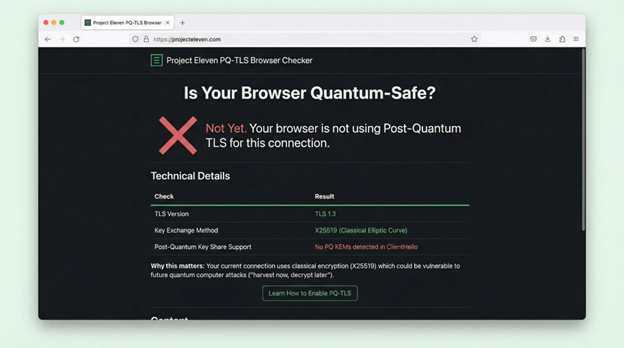
Run client-side tests too.
Project 11’s free PQ-TLS browser checker parses each endpoint’s TLS ClientHello and flags whether it advertises hybrid suites such as X25519-MLKEM768 or pure MLKEM variants, giving you an instant map of which workstations can join early pilots and which need patching.
Then dig deeper. The Canadian Cyber Centre warns that cryptography lurks in surprising corners: embedded firmware, remote-office printers, smart-factory sensors, and hard-coded API calls in legacy apps. Pair scanning tools with interviews. Ask system owners where encryption lives, which algorithms they rely on, and how long the protected data must stay secret.
Capture every finding in a living Cryptographic Bill of Materials. For each asset, record:
system name and owner
algorithm and key length in play
data sensitivity and retention horizon
upgrade path or vendor dependency
This single spreadsheet becomes our north star. At a glance, it shows which systems guard ten-year secrets behind soon-to-expire keys and which can be patched tomorrow with a quick library swap.
Perfection is not required on day one. The Cyber Centre notes that inventories mature iteratively; the key is to establish a repeatable discovery cadence and improve coverage each quarter. As new projects launch, make the CBOM part of change control so fresh cryptography never slips into the shadows.
With governance locked and the inventory underway, we know the size of the mountain. Next, we rank the risks and draft a plan to climb it.
2.3 Shape your quantum-risk profile
An inventory is only a list until we score it.
Translate raw findings into a concise risk picture the board can grasp at a glance.
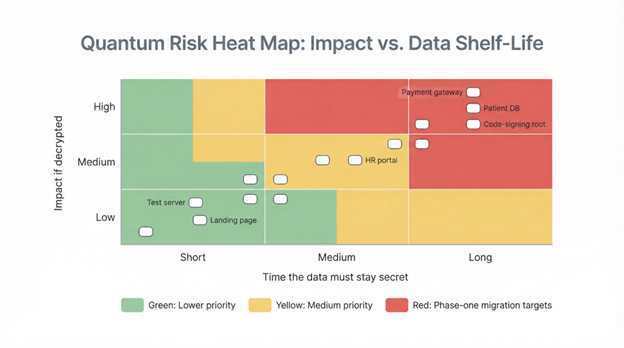
Mark each system with two factors: impact if decrypted and time the data must stay secret. A payroll API that protects tax IDs for seven years carries more weight than a scratch-pad test server cleared weekly. Public blockchains are no exception—on-chain signatures and keys persist indefinitely, and common quantum blockchain myths like “SHA-256 makes the ledger safe” overlook how a future cryptographically-relevant quantum computer could still forge ownership proofs. The MDPI timeline study matters here: large organizations face a 12-to-15-year replacement cycle, so anything valuable past 2030 sits in the danger zone.
Plot the scores on a heat map.
Red squares—long-lived, high-impact data behind classical keys—become phase-one targets. Yellow squares queue for later waves, while green items wait unless resources allow. Document every decision. If a legacy billing app will retire in two years, log an accepted risk with an expiry date rather than spending cycles on a short-lived fix.
Finally, add this risk profile to the enterprise risk register. That move elevates quantum exposure to the same governance channel as financial or operational threats and guarantees regular reviews and budget visibility.
With risks ranked and owners assigned, we have the clarity to design a phased migration plan in Phase 2.
Phase 2 – risk-driven planning
3.1 Analyze and prioritize risks
With a crystal-clear inventory in hand, we turn numbers into action.
Our goal is simple: decide which systems move first, which follow, and which wait for retirement.
Start by mapping every entry in the CBOM against two axes: business impact and secrecy shelf-life. High impact means customer trust, revenue, or safety is on the line if data leaks. Shelf-life measures how long that data must stay unread. A marketing landing page has almost no shelf-life. Medical records? Decades.
Plot the results on a heat map.
The red corner, containing long shelf-life and high-impact data, shows the first movers of our migration. Typical residents include payment gateways, patient databases, code-signing roots, and cross-border VPNs. The Canadian government framework uses the same color-coded lens to ensure “systems protecting long-lived sensitive information are prioritized early.”
Next, fold in practical constraints. Vendor roadmap dates, hardware refresh cycles, and regulatory deadlines can shift the order. If an ERP provider promises a PQC patch in 2027, we may queue that system behind an in-house microservice we control today. The MDPI timeline study reminds us that resource bottlenecks—especially upgraded HSMs—can derail a logical plan if ignored.
Surface the scorecard to leadership. A one-page dashboard that shows “20 percent of high-risk systems scheduled for upgrade by Q4 next year” lets executives track progress and approve funding. It also locks quantum exposure into the enterprise risk register alongside supply-chain and compliance risks.
We now have a ranked list, assigned owners, and shared urgency. The next step is to sketch a phased roadmap that turns those priorities into calendar milestones.
3.2 Draft the phased migration roadmap
Now we convert prioritized risks into a timeline everyone can support.
Picture four waves.
Wave 1 – Preparation (now through next fiscal year). Finish the crypto inventory, finalize the roadmap, and run proof-of-concept labs.
Wave 2 – Pilot & design (2024–2026). Stand up hybrid TLS on a staging site, patch a handful of internal services, and lock supplier contracts for PQC-ready hardware.
Wave 3 – high-priority rollout (2026–2030). Replace or wrap every red-zone system from our heat map: external portals, VPN head-ends, root CAs, and long-term archives.
Wave 4 – full adoption & decommission (2030–2035). Retire remaining classical keys, re-encrypt cold-storage data, and switch default cipher policies to pure post-quantum.
This cadence comes from government guidance that targets high-value systems first and expects all departments to reach quantum safety by 2035. It mirrors real-world refresh cycles, easing budget shocks by aligning with planned upgrades.
Each wave has clear exit criteria.
Wave 2 is complete only when hybrid certificates run in production and handshake performance is measured. Wave 3 closes when every critical service reports “no RSA/ECC in use” in monitoring dashboards.
Resource planning runs in parallel. The MDPI analysis warns that HSM capacity often triples once lattice-based keys arrive, so procurement for larger appliances lands in Wave 2 even if deployment waits for Wave 3. The roadmap pins those long-lead items early so finance can spread costs rather than absorbing them late.
Publish the roadmap as a living document. Quarterly reviews let us adjust for new NIST drafts, vendor delays, or breakthrough attacks. Momentum matters: graduate from one wave to the next without stalling in pilot limbo.
With milestones on the calendar, we are ready to integrate the plan into the broader enterprise risk-management framework.
3.3 Embed the roadmap into your risk-management framework
When a plan lives in isolation, it falters.
We weave the post-quantum roadmap into the same governance machinery that tracks financial, operational, and compliance risks.
Begin with a familiar language. If your organization follows NIST 800-37, map each migration wave to the framework life-cycle:
Categorize & select. Inventory and heat-map work fulfill “Identify” duties, while the roadmap selects new controls such as PQC algorithms, hybrid certificates, and upgraded HSMs.
Implement & assess. Pilot projects and Wave 3 rollouts show the “Protect” and “Validate” steps, complete with test evidence.
Authorize & monitor. Executives sign off on quantum-safe states, and dashboards track remaining RSA/ECC exposure in real time.
This familiar model reassures auditors and shows budget committees that quantum work extends existing programs rather than creating a new silo.
Document residual risk formally. For systems waiting on a vendor patch, file a risk acceptance with an expiry date and compensating controls—for example, network isolation or symmetric-encryption overlays. This prevents forgotten tasks and keeps leadership accountable.
Maintain rhythm. Add quantum-readiness metrics to quarterly risk reviews: percentage of high-risk systems migrated, number of RSA certificates still live, and HSM capacity versus requirement. Show the same graph every quarter so progress, or lack of it, is obvious.
By anchoring the roadmap inside your enterprise risk framework, you turn quantum migration from a side project into core operational resilience. That alignment unlocks steady funding, executive attention, and the organizational muscle needed for the long haul.
Phase 3 – execution
4.1 Run low-risk pilots and gather hard data
Plans on paper satisfy auditors; working code convinces everyone else.
We start execution with small, low-risk pilots that let us feel the weight of post-quantum cryptography before touching critical systems.
Pick a friendly target, maybe a staging web server or an internal developer portal. Activate a hybrid TLS cipher that pairs classical RSA with the lattice-based Kyber key exchange. Modern builds of OpenSSL and Chrome already speak this dialect, so you will see success traffic on day one while legacy clients fall back to RSA.
Measure the results.
Track handshake time, CPU load, and certificate size. A bump of 5–10 ms in handshake latency is normal; anything larger flags a tuning task long before customers notice. Log every client that rejects the hybrid suite. That data becomes your compatibility heat map for broader rollout.
Share findings quickly. When leadership sees a live demo with packet captures proving quantum-safe key establishment, they move from abstract risk to visible progress. Engineers gain confidence, procurement learns which HSM firmware works, and the migration story shifts from “someday” to “already underway.”
Armed with real-world metrics, we can tackle production systems.
4.2 Upgrade the cryptographic plumbing
Pilots prove feasibility; now we swap parts in production.
Start with the trust backbone, your public key infrastructure. Patch internal certificate authorities so they can issue composite or Dilithium-signed certificates. Shorten certificate lifetimes to simplify future rotations and automate renewals through a certificate-lifecycle manager.
Next, address key custody. Post-quantum keys are larger than RSA keys, so firmware updates alone may not solve capacity limits. Plan for additional HSM slots or cloud-based key vaults before traffic spikes force an urgent purchase.
Move to network edge devices.
Activate hybrid cipher suites on web servers, API gateways, and VPN concentrators. Roll out in waves—customer-facing first, then internal systems—while monitoring handshake success and fallback rates. Announce end-of-life dates for pure RSA connections so partners have clear notice.
Applications come last because they need the most care. Refactor in-house code to call a crypto-agility wrapper instead of hard-coded algorithms. For immovable legacy apps, insert a proxy or service-mesh sidecar that handles post-quantum handshakes on their behalf.
Document every change in the CBOM. Each green check mark turns abstract progress into evidence for auditors and executives.
4.3 Choose: hybrid, replace, or isolate?
Not every system needs the same treatment.
Sort each one into three buckets:
Hybrid in place is the default. If a device or app can accept a firmware patch or library update, attach post-quantum algorithms while keeping classical ones for backward compatibility. Examples include web servers, email relays, and modern VPN gateways.
Replacement or re-architect comes next. Some legacy databases, mainframes, or bespoke appliances cannot learn new crypto tricks. When a patch costs more than a migration, schedule a clean swap, often tied to an existing refresh.
Isolate and tunnel is the last resort. For an IoT sensor fleet set for retirement in two years, route traffic through a quantum-safe gateway and segment the network. You reduce risk without spending capital on hardware you plan to discard.
Record the rationale. It prevents second-guessing when auditors ask why a billing system still speaks RSA in 2028 and keeps everyone aligned on priorities.
4.4 Test, validate, and prove security assurance
After every rollout, run three layers of testing—functional, security, and interoperability—and bake them into CI pipelines so checks happen automatically with each change.
Functional tests come first. Does the service start? Do clients of all ages connect and complete transactions? Any spike in error logs means we pause and fix before moving on.
Security tests dig deeper. Launch side-channel probes to confirm lattice-based operations do not leak timing clues, fuzz malformed keys to catch crash bugs, and verify certificates chain correctly back to the updated CA. Patch and retest until the service is clean.
Interoperability is the final gate. Build a client matrix that includes current browsers, legacy endpoints, and partner systems. Each must handshake successfully or fail gracefully. Share results with partners so no one is surprised by a sunset date for RSA.
Pass all three gates, and a system earns a green tick in the CBOM plus an entry in the audit log. Repeatable, evidence-backed testing turns broken-crypto headlines into someone else’s problem and shows auditors proof, not promises.
Phase 4 – ongoing monitoring & optimization
5.1 Keep a finger on the post-quantum pulse
The migration never truly ends; it shifts from project to steady heartbeat.
First, treat the Cryptographic Bill of Materials as a living artifact, not a dusty spreadsheet. Automate weekly scans that flag any new RSA certificate, expired hybrid key, or shadow-IT service running vulnerable TLS. When a red entry appears, the risk dashboard lights up and an owner is paged.
Second, watch the research horizon. Subscribe to NIST and industry mailing lists so you know the day a newly standardized algorithm lands or an existing one shows cracks. Early notice lets us schedule patch windows before attackers craft an exploit.
Third, publish metrics that matter. Leadership cares about trends, not tables. A single chart showing “RSA exposure over time” protects the budget better than a fifty-page report. Celebrate downward slopes publicly to reinforce momentum.
Run a crypto-agility drill at least once a year. Swap the primary algorithm on a non-critical service within 48 hours to prove tooling works, staff know the playbook, and procurement can source keys fast.
When monitoring becomes muscle memory, quantum risk shrinks from headline threat to manageable line item.
5.2 Review, refine, and harvest the hidden wins
Post-quantum work pays compound interest when we pause to collect it.
Hold an annual crypto health check. Gather lessons from recent rollouts: where hybrid handshakes lagged, which vendor patches arrived late, and who completed migration with zero downtime. Turn those stories into updated playbooks and share them across teams.
Rebalance cost and benefit. Early in the program, every hour felt like insurance. As quantum headlines grow louder and compliance deadlines approach, value flips: being demonstrably quantum-safe becomes a sales edge. Capture that advantage in RFP responses and security marketing.
Optimize performance. If Kyber-768 strains CPU on a busy microservice, a lighter hybrid suite may meet policy while keeping latency low. Tune algorithms, cache session tickets, or upgrade TLS offload cards to regain the overhead everyone feared.
Keep culture agile. Reward teams that flag outdated crypto before scanners do, celebrate quick pivots when NIST revises a draft, and treat algorithm swaps like routine patches. The goal is a security posture where changing ciphers feels as normal as rotating passwords.
Consistent refinement turns a one-time migration into a lasting advantage and prevents another scramble when the next cryptographic curveball appears.
Conclusion
Enterprise PQC migration checklist
Tick each item before the next board update:
Executive sponsor appointed and Quantum-Readiness Team chartered
Full cryptographic inventory captured in a living CBOM
Heat-map risk profile added to the corporate risk register
Phased roadmap published with budget and resource owners
At least one hybrid-TLS pilot live in production with metrics logged
Internal CA and certificate-lifecycle platform upgraded for post-quantum certs
HSM capacity ordered or cloud key vault contracted
High-priority systems scheduled for migration before 2030
Automated scans alert on any new RSA or ECC artifacts
Annual crypto-agility drill completed and lessons captured
Eight or more checks put you ahead of the pack. Fewer than five? Call a war room; quantum waits for no one.
FAQs – straight answers for busy leaders
We use RSA-4096 everywhere. Isn’t that large enough? Size does not matter against a full-scale quantum computer; Shor’s algorithm breaks any RSA key in polynomial time. A quantum-resistant algorithm is the only safe public-key defense.
Can we wait until NIST finalizes every standard? No. CISA, NSA, and NIST urge organizations to start now because inventory, governance, and pilot testing take years. When the remaining standards are published, you will want proven processes ready to accept them.
What about quantum key distribution? QKD solves a niche transport problem with costly hardware and strict distance limits. Post-quantum cryptography works in software, scales globally, and covers signatures as well as key exchange, so it is the higher-impact first move for most enterprises.
Will post-quantum algorithms slow my apps? Early pilots show a single-digit millisecond bump in TLS handshakes and negligible impact on bulk transfer. Session caching and TLS offload cards recover most of that overhead. Measure in your environment, but performance is rarely the blocker.
How do we prove to auditors that we are compliant? Maintain an up-to-date CBOM, link every migration step to risk-register entries, and archive test evidence. Inventory, roadmap, and validation logs answer almost every audit question before it is asked.
Post Quantum Migration Roadmap Enterprise Transition Using a Risk Management Framework was last modified: January 31st, 2026 by Enid Beck