Finding the right look for a project used to be a long and expensive process. You might have spent hours searching for a designer or trying to learn complex software yourself. Now, you can use smart tools to do the heavy lifting for you. These tools help you create custom visuals that fit your specific needs without the high cost.
If you are planning to get some new ink, you can use an ai tattoo generator to turn your thoughts into a real drawing. You just type in what you want, like a lion with roses or a geometric pattern, and the tool gives you a clean image. This makes it much easier to show your artist exactly what you have in mind so you get a result you love.
Writers can also benefit from these new technologies when they finish a manuscript. You can use a book cover generator to make your work look like it belongs on a shelf in a major store. It allows you to test different layouts and themes until you find the one that captures the spirit of your story.
Creative work is changing fast because of these tools. You no longer need to be a master painter to see your ideas come to life. You can focus on the concept and let the software handle the technical details. This opens up new doors for hobbyists and professionals who want to work faster.
The following list highlights the best tools available right now for different types of creative work. Each one has a specific strength, so you can choose the one that fits your current goal.
1. Tat.ink
Tat.ink is a specialized tool built for people who love body art. It focuses on creating designs that actually work as tattoos. Many general image generators create pictures that are too busy or complex for a tattoo artist to follow. This tool keeps things clean and focused on the art of the needle.
Overview
This platform uses a simple interface where you describe your idea. It understands tattoo styles like traditional, neo-traditional, fine line, and realism. You can upload a basic sketch or a photo, and the AI will refine it into a professional tattoo flash sheet. It is a great way to bridge the gap between a vague idea and a final design.
Key Features
The tool offers specific style filters so you can match the aesthetic you want. It also provides high-resolution downloads that show every line clearly. You can adjust the complexity of the design to make sure it fits the part of the body where you want the tattoo.
Pros and Cons
The biggest benefit is the focus on tattoo-ready art. You won’t get a blurry mess that a tattooist can’t use. It is very easy for beginners to navigate. On the downside, it is not meant for general graphic design. If you want to make a logo or a landscape, this is not the right tool for you.
Best For
People who are planning their next tattoo and want to visualize their ideas before talking to a professional artist.
2. iColoring.ai
iColoring.ai is a versatile platform that helps creators make book covers and coloring pages. It is a favorite among self-published authors and parents who want custom activities for their kids. The tool simplifies the design process by providing templates and styles that are popular in the publishing world.
Overview
When you use this tool, you get access to a system that understands how books should look. It helps you place titles and author names in ways that look professional. The AI generates the background art based on your genre, such as mystery, romance, or fantasy. It removes the stress of staring at a blank canvas.
Key Features
It includes a dedicated mode for creating coloring book pages with thick black outlines. It also has a library of fonts that work well for different book genres. The export settings are optimized for print, which means your cover will look just as good on paper as it does on a screen.
Pros and Cons
The speed of this tool is its best feature. You can have a finished cover in a few minutes. It is also very affordable compared to hiring a freelance designer. However, the AI might sometimes struggle with very specific character details. You might need to try a few prompts to get the face of your protagonist exactly right.
Best For
Indie authors who need a high-quality book cover on a budget and creators who want to build their own coloring books.
3. Midjourney
Midjourney is widely considered the king of artistic quality in the AI world. It does not have a traditional website interface but instead runs through an app called Discord. While this might seem strange at first, the results it produces are often indistinguishable from art made by humans.
Overview
Midjourney excels at lighting, texture, and composition. It can create anything from a hyper-realistic photo to an oil painting that looks hundreds of years old. The community aspect is also strong, as you can see what other people are creating and learn from their prompts. It is a tool for people who want the highest possible visual standard.
Key Features
The latest versions allow for incredible control over the aspect ratio and stylization. You can use a feature called vary region to change just one small part of an image without ruining the rest. It also has a zoom out feature that lets you see more of the environment around your subject.
Pros and Cons
The quality of the images is the main reason to use Midjourney. It produces stunning work every time. The main drawback is the learning curve. Using Discord can be confusing for new users, and you have to learn specific commands to get the best results. There is no free version available anymore, so you have to pay to even try it.
Best For
Professional designers and artists who need top-tier visuals for their work or high-end personal projects.
4. Canva Magic Media
Canva is already a household name for design, but their new AI tools make it even more powerful. Magic Media allows you to generate images directly inside your design projects. This means you can create an image and immediately put it into a social media post or a presentation.
Overview
Canva is all about ease of use. The AI tool is just one part of a larger suite of design features. If you need a picture of a cat wearing a hat for a birthday card, you just type it in and drag the result onto your card. It is built for people who are not professional artists but need to get things done quickly.
Key Features
The tool offers different styles like filmic, watercolor, and neon. It also integrates with Canva’s photo editing tools, so you can remove backgrounds or add filters to your AI images instantly. The drag and drop system makes it the most user-friendly option on this list.
Pros and Cons
The integration is the best part. You don’t have to download an image from one site and upload it to another. It is also very safe for work and family projects. The downside is that the AI quality is not as high as Midjourney. Sometimes the images can look a bit simple or have small errors in the details.
Best For
Small business owners, students, and social media managers who need quick and easy graphics.
5. DALL-E 3
DALL-E 3 is created by OpenAI and is built directly into ChatGPT. This makes it the easiest tool to talk to. You don’t need to know special codes or technical terms. You can just have a conversation with the AI to get exactly what you want.
Overview
The strength of DALL-E 3 is its ability to follow long and complex instructions. If you ask for a scene with five specific items in specific places, it usually gets it right. It is very good at putting text inside images, which is something many other AI tools struggle with.
Key Features
Because it is part of ChatGPT, you can ask the AI to help you write the prompt. If you have a vague idea, the AI will expand it into a detailed description for you. You can also ask for changes in plain English, like make the sky more blue or add a dog to the corner.
Pros and Cons
The ease of use is unmatched. It feels like talking to a human assistant. It is also included in the ChatGPT Plus subscription, which many people already have. However, it can be quite strict with its rules. It will often refuse to create images of famous people or certain types of content due to safety filters.
Best For
Beginners who want a simple, conversational way to create images and people who need text to appear correctly in their art.
Comparison Summary
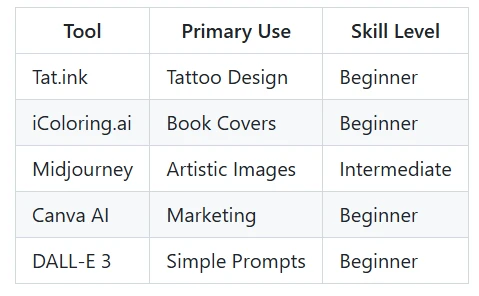
Choosing the right tool depends on what you are trying to make. Some tools are better for specific tasks while others are better for general creativity.
Final Recommendation
If you are just starting out, DALL-E 3 or Canva Magic Media are the best places to begin. They are very forgiving and don’t require you to learn any new skills. You can start seeing results in seconds.
For those with a specific project in mind, specialized tools are the way to go. If you want a new tattoo, Tat.ink will give you the most practical results. If you are writing a book, iColoring.ai will save you hours of frustration and a lot of money.
If you are a professional who needs the absolute best quality and you don’t mind a little bit of a challenge, Midjourney is the clear winner. It provides a level of detail and beauty that the other tools cannot match yet. No matter which one you choose, these tools will help you spend more time being creative and less time struggling with technical hurdles.