Is your company making the most of its fleet of vehicles? If a fleet management system isn’t in place, the answer to that question is almost certainly a resounding “no.”
The worldwide fleet management software market was projected to expand from $23.67 billion last year to $79.82 billion by 2030. Fortune Business Insights explains that fleet management software helps fleet managers monitor their vehicles, equipment, and drivers from a single application. It’s one of those tools that, once you put it through its paces, you’ll wonder how your business ever functioned without it. It’s worth trying one or more of them to see the benefits.
Here are four benefits of buying fleet management software for your business.
1. Manage Your Fleet Remotely
One key benefit of buying fleet management software is your fleet manager can do their job remotely. That’s a plus if you run a remote office or the fleet manager is out of the office a lot. Whether the fleet vehicles travel around town, throughout the state, or in different states, your fleet manager can keep tabs on all of them from software on a computer or laptop. Managing your company’s fleet of vehicles might be difficult without the right application in place. Fleet management software will make it easier to establish administrative oversight.
2. Improve Dispatch Instructions
The right fleet management software will make it easier for your fleet manager to contact drivers on the road and give dispatch instructions. Your fleet manager can see where each of the company’s vehicles are in real-time by looking at the screen, which means they can assign the right driver to a specific task. Drivers will receive notifications of any instructions or updates.
3. Boost Customer Satisfaction
Another benefit of fleet management software is it can boost customer satisfaction rates. When your fleet manager communicates with drivers in real-time, they can dispatch the right drivers to specific customers based on where the drivers are and where the customers are. Because of this, fleet managers can give customers precise estimated times of arrival so customers don’t have to sit around waiting all day for a package to arrive.
When customers have a more specific estimated arrival time, they will have a better overall experience. No one enjoys waiting at home from 9 am to 5 pm for a delivery. They would prefer a smaller time window to plan their day better.
Another way customer satisfaction will increase is that the fleet manager can update clients if there’s a delay because of traffic or something else. It’s about keeping customers in the loop.
4. Increase the Lifespan of Fleet Vehicles
Buying fleet management software is an investment in the longevity of your company’s cars, trucks, vans, or other vehicles. When car thieves look for targets, they don’t focus exclusively on those owned by private citizens. Fleet vehicles are of interest, too. But you’ll know where your company’s vehicles are at all times with fleet management software. That means you can relay information to the authorities to track down vehicles should someone try to steal them.
Fleet management software will also help your company stay on top of maintenance and repairs. When maintenance is a priority rather than an afterthought, your vehicles will be in better condition. They’ll spend more time on the road, where they can make your company money.
You don’t want them spending quality time at the auto mechanic where they make the mechanic money. Staying on top of maintenance will reduce the need for repairs and keep your cars operational.
These are four reasons to buy fleet management software. It’s an investment in the success of your company.
4 Reasons Every Business With Vehicles Needs Fleet Management Software was last modified: August 29th, 2024 by Alex Sanders
Document conversion can be crucial for people and businesses alike. It can be anything from turning your PDF into a Word doc to converting scanned images into editable files. When you have a good tool to do it, the process becomes a lot more manageable. However, finding the best option among many available solutions can be challenging. Thus, the following guide will help you navigate through document conversion tools and make a choice.
The Impact of Document Conversion
Converting your document from one format to another is a significant advantage in the digital world. Converting your document lets you keep the content in the most suitable format to use it on various software and devices. In some cases, converting the file ASAP is also a part of the job description.
For example, lawyers scan files and convert them to an editable format for ease of reference and court documentation. Meanwhile, marketing professionals will do the opposite; they often rely on Word to PDF converter to transform their documents into polished presentations ready for sharing. Teachers and students also use different formats in their work to ease learning.
In addition, documents can become accessible over time. Files may become obsolete because we develop new technologies, and their format is no longer used. Converting the document contents into a more standard or currently acceptable format means preserving their accessibility for a long time. This is essential for businesses, governmental organizations, and other institutes with records maintenance requirements.
Choosing the Right Document Conversion Tool
When choosing the right document conversion tool, a few things matter:
First, make sure that the tool works with the types of files you use the most. Most commonly, they will be PDFs and Word, sometimes an Excel sheet or a PowerPoint presentation. The more file formats the tool can convert, the better.
Second, you want to end up with a clean and fully converted document. Only high-quality tools can preserve the original format and all text details. That is especially important for papers, such as legal contracts, where every detail matters.
Time is money. You do not want to wait ages for every file to upload and convert. The best tools offer quick conversion times, letting you deal with your paperwork immediately.
The UI should be user-friendly and neat so that files can be converted easily. This aspect is especially critical if beginners on your staff will use the tool.
Finally, consider the cost and what you are getting your money worth for. Although free tools may be tempting, sometimes a paid tool with extra features is better if it allows you to streamline work and save time.
Popular Document Conversion Formats
Documents can be converted into a wide range of file formats. Some of the most popular ones include:
PDF: Most known for maintaining the original formatting, PDFs are great for creating forms, sharing documents, and signing them online.
DOC/DOCX: One of the most popular text formats, these types are used for any type of text document, be it reports, letters, or notes, both for personal and business use.
XLS/XLSX: These formats are necessary for all types of spreadsheets, calculations, and table information. Spreadsheets are widely used for various types of data storage and analysis.
PPT/PPTX: Often used for creating and editing multimedia presentations. They are extremely popular in education, business, and public speaking.
JPG/PNG: JPEG and PNG are the most popular image formats for storing photos and graphics. They are the most common image types for web design and information marketing.
Other formats exist, such as specialized TIFF for high-quality scans and documents. Other formats include CSV files for data and HTML for web pages. To be as flawless as possible, you may need to convert between some of these and other document formats.
API Template allows HTML to PDF conversion quickly, ensuring web content is preserved in a portable format.
Features to Look for in a Document Conversion Tool
When choosing a document conversion tool, ensuring that it meets your needs is important. Here are some of the features to consider:
Whether it supports batch processing. It allows you to convert more than one file at a time and saves you time if you have many documents.
When you need to convert scanned images or PDFs into text for further editing, you need a tool that supports OCR or Optical Character Recognition.
Whether it is cloud-based or desktop-based depends on what is more convenient for you – remote access or local control.
What quality of result can you expect? High-quality conversions keep the layout and content quality of the original document.
Your software should definitely allow file compression – reduced file size substantially decreases the time needed to share the files.
It would be very useful if your tool offered the option to edit or add comments to the converted documents later.
A bonus would be the possibility of integrating the conversion tool with your other business applications and makes your work significantly easier.
Conclusion and Final Thoughts
Converting documents is essential for ensuring accessibility, industry support, and data preservation. Be sure to choose a tool based on its compatibility, accuracy, speed, user-friendliness, and cost. The tool must work with widely used and specialized formats, such as PDF, DOCX, XLSX, PPTX, JPG, and PNG for convenience. There must be a tool that is likely to meet your special needs.
How to Choose the Right Document Conversion Tool for Your Needs was last modified: September 25th, 2025 by Katty Kate
The landscape of product development has undergone a profound transformation, pivoting from traditional prototyping methods that often involved labor-intensive and costly physical mock-ups, to more agile and innovative digital solutions. Central to this shift is the adoption of 3D visualization technologies, which have revolutionized how products are conceived, developed, and refined before ever manifesting in the physical world. This technique enables designers and engineers to create, manipulate, and test models in a virtual environment, providing a faster, cost-effective, and infinitely more flexible approach to prototyping. As industries continue to embrace digital methods, the role of 3D visualization has expanded, becoming an indispensable tool in modern product development. This integration not only enhances the design process but also accelerates market readiness, providing a competitive edge in rapidly evolving markets.
The Role of 3D Visualization in Product Prototyping
3D visualization refers to the process of creating graphical content using three-dimensional software, a technology that has proven instrumental in the field of product prototyping. This capability allows designers and engineers to transform initial concepts into visual 3D models that can be manipulated and tested in a virtual environment. The application of 3D visualization in prototyping offers a profound advantage by enabling rapid iterations of design concepts, which is critical in refining and perfecting products efficiently.
A 3D visualization company typically employs this technology to streamline the prototyping process by providing detailed previews of product designs. This not only expedites the decision-making process but also significantly reduces the development time and cost associated with physical prototyping. By using 3D visualization, companies can quickly make modifications based on feedback and simulate different scenarios to see how a product performs under various conditions. This level of detail and flexibility ensures that potential issues are identified early in the development cycle, which enhances the overall quality of the final product and speeds up its time to market. Through 3D visualization, businesses can achieve a more dynamic and responsive prototyping process, tailored to modern demands for speed and accuracy in product development.
Benefits of 3D Visualization in Prototyping
3D visualization significantly enhances prototyping by providing cost-efficient solutions that reduce the reliance on physical prototypes. This technology allows companies to create and test virtual models without the material and labor costs associated with traditional prototyping. By simulating the look and feel of a product in a virtual environment, 3D visualization minimizes the need for multiple physical iterations, thus saving substantial amounts of money and resources. Furthermore, this approach enables designers to quickly identify and rectify design flaws before committing to expensive manufacturing processes.
The speed improvements in the design cycle are another critical benefit of 3D visualization. By facilitating rapid iterations and adjustments, this technology drastically shortens the development timeline, enabling faster product refinement and optimization. This acceleration is crucial for companies aiming to improve their time-to-market, a competitive advantage in industries where speed and agility are paramount. The ability to quickly iterate and evolve product designs without the constraints of physical prototyping allows businesses to respond swiftly to market demands and emerging trends, significantly enhancing their market responsiveness.
Technological Advancements in 3D Visualization
The field of 3D visualization is rapidly advancing, incorporating state-of-the-art technologies that further refine its impact on prototyping. Real-time rendering is one such advancement, allowing designers to see their changes instantly reflected in the visual model. This immediate feedback accelerates the decision-making process and enhances creative workflows, making it easier to develop complex designs with higher accuracy.
Moreover, the integration of artificial intelligence (AI) in 3D visualization tools is revolutionizing how prototypes are developed. AI algorithms can predict how changes to a design will affect performance and aesthetics, providing invaluable insights early in the design process. This predictive capability helps in optimizing designs more efficiently and with greater precision.
Augmented reality (AR) and virtual reality (VR) are also becoming integral to the prototyping phase, offering immersive experiences that allow designers and stakeholders to explore a product’s functionality and aesthetic in a lifelike simulation. AR and VR enable users to interact with a 3D model as if it were a physical object, providing a deeper understanding of the product’s physical presence and operational capabilities. This immersive interaction is invaluable for refining product designs and ensuring they meet user requirements before going to production.
Case Studies: Success Stories from 3D Visualization
3D visualization has facilitated transformative changes across various industries, streamlining prototyping processes and enhancing product design and customer satisfaction. In the automotive industry, for example, a leading car manufacturer utilized 3D visualization to refine the aerodynamic design of their new model. The virtual prototyping allowed for rapid iterations to test different body shapes and features under simulated conditions, resulting in a car that not only performed better but also resonated well with consumers due to its aesthetic appeal.
In healthcare, a medical device company used 3D visualization to develop and test a new surgical tool. The ability to visualize and manipulate the tool in a 3D space allowed for precise adjustments to be made before creating physical prototypes, greatly reducing development time and costs. Surgeons were able to provide feedback on the tool’s design via virtual reality setups, ensuring the final product was both effective and user-friendly, thereby significantly improving patient outcomes.
Conclusion
3D visualization technologies are fundamentally reshaping the landscape of product development, offering remarkable advantages that transcend traditional prototyping methods. This transformative approach enables companies across various industries—from automotive to healthcare—to enhance their design precision, accelerate their time-to-market, and dramatically reduce costs associated with physical prototyping.
As these technologies continue to evolve, integrating advanced tools like real-time rendering, AI, and immersive AR/VR experiences has become crucial for firms aiming to maintain competitive edges and meet the increasingly sophisticated demands of modern consumers. Companies that embrace these capabilities not only streamline their design processes but also deliver products that more accurately reflect consumer needs and preferences. In light of these benefits, organizations are encouraged to explore and adopt 3D visualization techniques, leveraging their potential to revolutionize product design and customer interaction, ultimately enriching the product development cycle and achieving superior market outcomes.
How a 3D Visualization Company Can Transform Your Product Prototyping Process was last modified: August 26th, 2024 by Nick Brown
In our tech-savvy world, keeping devices charged is crucial. Whether you’re a tech enthusiast juggling multiple gadgets or a traveler relying on your phone for navigation, a dead battery can be a serious inconvenience. This blog post will share clever tips to ensure your devices stay powered up, no matter where life takes you.
Know When to Charge
Timing matters. It’s best to charge your device when it drops to around 20-30% and unplug it at around 80-90%. This prevents the battery from going through unnecessary stress and prolongs its life. Keeping your battery in this range can significantly extend its overall lifespan.
Use Original Chargers
Using original chargers is crucial. They are designed specifically for your device and provide the appropriate voltage and current. Third-party chargers might seem like a good deal, but they can cause your battery to degrade faster and even pose safety risks.
Avoid Overcharging
Although modern devices have protections against overcharging, it’s still a good idea to unplug your device once it’s fully charged. Constantly keeping it at 100% can lead to battery life degradation over time. If you must charge overnight, consider using a smart plug to cut off power once your device is fully charged.
Use On-the-Go Charging Solutions
Portable Chargers
Keeping devices charged while on the go is important for tech enthusiasts and travelers. For them portable chargers, or power banks, are lifesavers. These compact devices store energy and allow you to charge your gadgets without needing a wall outlet. When selecting a power bank, consider its capacity—measured in milliamp hours (mAh)—to ensure it can provide multiple charges for your device. Look for features like fast charging and multiple output ports to accommodate different devices simultaneously. With a reliable power bank, you can minimize the risk of running out of battery, making it easier to stay connected and productive, whether at work or during travel.
Solar Chargers
For the eco-conscious and outdoor adventurers, solar chargers are an excellent option. They use sunlight to generate power, making them perfect for camping trips or long hikes. Brands like Goal Zero and BigBlue offer efficient and durable solar chargers. These devices can keep your essentials powered up while reducing your carbon footprint.
Top-Rated On-the-Go Charging Devices
When choosing an on-the-go charger, look for one with multiple USB ports, fast charging capabilities, and high-capacity batteries. Reviews can guide you towards the best options. The Aukey 10000mAh Power Bank and the BioLite SolarPanel 5+ are popular choices that offer a good balance of portability and power.
Tech Tips for Longer Battery Life
Manage Device Settings
Simple adjustments can make a big difference. Lower your screen brightness, turn off Bluetooth and Wi-Fi when not in use, and disable unnecessary notifications. These small changes can significantly extend your device’s battery life.
App Recommendations
Several apps are designed to help you manage and conserve your battery. Apps like AccuBattery and Battery Doctor provide insights into your battery’s health and offer tips for prolonging its life. These tools can be a game-changer for those who rely heavily on their devices.
Background Activity
Limit background activity to save battery. Apps running in the background can drain your battery quickly. Go to your device settings and turn off background app refresh for apps that don’t need it. This simple step can help you get more out of each charge.
Sustainable Charging Practices
Environmental Impact
Charging devices has an environmental cost. The electricity used to power our gadgets often comes from fossil fuels, contributing to carbon emissions. Being mindful of how and when we charge can reduce our environmental footprint.
Eco-Friendly Habits
Adopting eco-friendly charging habits is easier than you think. Unplug chargers when they’re not in use, charge devices during off-peak hours, and use energy-efficient chargers. Small changes in our daily routines can collectively make a significant impact.
Recycle Old Batteries
Properly recycle old batteries to prevent environmental harm. Many electronic stores and recycling centers accept used batteries. By recycling, you help reduce waste and promote the responsible use of resources.
Keeping your devices fully charged doesn’t have to be a challenge. By understanding battery basics, following best practices, and using the right tools, you can ensure your devices are always ready to go. Remember, it’s not just about convenience; it’s also about extending the life of your devices and being mindful of the environment.
Keeping Your Devices Fully Charged: Clever Tips to Follow was last modified: August 22nd, 2024 by Allen Brown
Gone are the days when you could simply count bolts on a shelf to get an inventory. Critical details are needed, including the size, threading, shear strength and any manufacturing change. These details impact both upstream and downstream management.
Companies wishing to stay competitive in the marketplace must adopt PIM and DAM. Your CEO can ask What Is PIM and this article speaks to answer that question. Product Information Management (PIM) systems automate the task. Often, these are accompanied by Digital Asset Management (DAM) since the two systems are similar, although different teams use them.
Every manufacturing and marketing organization has the task of handling product and asset information at the core. Product details change; as they change, multiple stakeholders need to be notified and have accurate information at their fingertips. Digital assets also change, and it is equally important to handle digital goods efficiently.
Enriching Product Data for Better Decisions
When companies collect product details in one place, they can find and use them efficiently. Centralized data allows teams to share updated information quickly. This reduces misunderstandings and errors. Having a system in place enables your company to to enrich the data, team members to know more, be more knowledgeable, and service customer requirements better. Utilizing product data enrichment can further improve the accuracy and relevance of product information, helping businesses optimize their product offerings and enhance customer satisfaction.
Enriching product data means adding more details to what you already have. This adds value to product descriptions and improves understanding. It can include customer reviews, technical specs, and marketing elements. Well-enriched data is vital for attracting customers. It helps in making informed choices.
Types of Data Managed by PIM
Systems like PIMinto PIM manage many types of data. Primary data includes product names, codes, and prices. Digital assets like images and videos are also essential. Technical information such as size, color, and material is vital for decisions. Marketing data helps with promotions and campaigns. Sales data gives insight into pricing and customer feedback. Localized information allows companies to appeal to various markets. Design information ensures products fit the brand. Emotional data speaks to customer feelings. Taxonomy helps organize all this information efficiently.
PIM acts as a single source of truth. This means everyone in the company uses the same data. This consistency is crucial for effective communication. When a team has a reliable source, they work better together.
PIM systems come in two main types. SaaS PIM is ready-made software hosted by a provider. This option requires a subscription. Open-source PIM allows customization and freedom to modify the software. Both types have their unique advantages. Choosing the right one depends on business needs.
Exploring Digital Asset Management
Digital Asset Management (DAM) is vital for companies. DAM organizes and shares digital files like images and videos. It ensures corporate compliance. A good DAM system helps everyone use the correct branding assets. Easy access and sharing help teams work better. This brings consistency in marketing and a strong brand image.
When companies combine Product Information Management (PIM) and Digital Asset Management (DAM), they create a robust system. Both tools have different purposes. Together, they help business operations. Companies can enhance efficiency and maintain brand integrity by combining PIM and DAM.
Using both systems helps all product and branding information to be the same. This consistency helps marketing teams not to get confused. Everyone uses the same trusted information. Customers trust brands that give accurate and uniform data on different platforms.
Make Assets Easier to Find
Integrating PIM and DAM makes digital assets available for various team members. Stakeholders can find images, videos, and product information quickly. This better access improves collaboration between product, marketing, and sales teams. A smoother flow of information helps projects to be done faster.
PIM and DAM integration automates how data and assets sync. This reduces the risks of mistakes. Human errors can happen when data is managed alone. By automating these processes, teams can focus on creative tasks. Automation saves time and keeps issues from happening.
When PIM and DAM work together, companies can improve their time-to-market. Teams can update product details and assets quickly. Faster updates help companies to respond quicker to customer needs. This advantage makes companies more competitive in fast-moving markets.
Craft a Better Digital Experience
An integrated approach improves the digital experience for customers. Linking product data with digital assets makes browsing and purchasing smoother. It adds depth to product pages with rich content. This helps customer satisfaction. It encourages purchases.
Linking product data to digital assets gives a full view of offerings. This connection helps stakeholders to make better decisions. Managers can see what works best for their target audience. It informs marketing strategies. It helps with product development.
PIM and DAM integration reduces human error. Accurate product information reduces confusion. A single source of truth keeps everyone on the same page. This unity makes workflow smoother. It creates less frustration among teams.
Combining Product Information Management (PIM) and Digital Asset Management (DAM) gives substantial benefits. Businesses receive a clear and organized system. This makes it easier to track product data and digital files. Teams work better together when everyone uses the same information. A smooth flow of data makes quicker updates. Accurate data trusts customers more. It makes it easier for them to decide on purchases.
Boosting ROI Through Smart Integration
Integrating PIM and DAM improves a company’s return on investment (ROI). To understand the exact financial impact, many teams calculate their digital asset management ROI by measuring the labor costs saved when employees no longer waste time hunting for misplaced media files.
Businesses can save time and cut costs. They reduce manual work. They make operations better. This efficiency improves inventory systems. The ability to respond quickly to market changes creates new opportunities. Higher customer satisfaction comes from giving detailed product information. Happy customers become repeat buyers. This makes higher profits for the business.
The best return comes from investing in PIM and DAM systems together. Investing in the right solution will give long-term gains. Companies stay competitive when they manage data well. The digital landscape changes fast. Adapting to these changes is essential for success. Without strong systems, businesses risk falling behind the competition. Integrated solutions protect a company for the future. They allow for growth and flexibility.
Recap: Why PIM and DAM Are Important
PIM and DAM integration improve organization, efficiency, and consistency. Businesses can get a stronger brand image. They can reach customers better. These systems help to make decisions and reduce errors. The value of integration can be considerable.
Businesses should not wait to invest in PIM and DAM systems. The benefits are more significant than the initial costs. A sound system can change how a business works. It can bring the company to new levels of success. Now is the time to think about these crucial tools for your business.
Maximizing ROI: The Essential Guide to Product Information Management (PIM) was last modified: May 6th, 2026 by Colleen Borator
Calibrating your automatic sample dilution system is a crucial step in ensuring accurate and reliable results in your laboratory or industrial processes. A well-calibrated system guarantees that sample concentrations are consistent and precise, which is essential for quality control, research, and production.
This guide will walk you through the process of calibrating your automatic sample dilution system effectively.
1. Understand the Importance of Calibration
Before diving into the calibration process, it’s important to understand why calibration is necessary. Calibration ensures that the dilution system is dispensing the correct volumes of sample and diluent, which directly affects the concentration of the final solution.
Without regular calibration, you risk inaccuracies that could compromise the integrity of your results, leading to errors in analysis, research, or production outcomes.
Calibration standards: These are solutions with known concentrations used to verify the accuracy of your system.
Precision balances: High-precision scales are needed to weigh the calibration standards accurately.
Pipettes and syringes: Used for precise measurement and transfer of liquids.
Labware: Clean and properly labeled containers for holding samples and standards.
Calibration software or manual: Specific to your system, this will guide you through the calibration process.
Deionized water: For rinsing and diluting, as it is free from impurities that could affect the results.
3. Prepare the Calibration Standards
Calibration standards are the benchmark for ensuring your system’s accuracy. To prepare these standards:
Select appropriate standards: Choose standards with concentrations that are within the range of your typical sample analyses.
Measure accurately: Use precision balances to weigh the standards. Accuracy at this stage is critical because any deviation will affect the entire calibration process.
Label containers: Clearly label the containers with the concentration and other relevant information to avoid confusion during the calibration process.
4. Set Up the Dilution System
Before you start the calibration process, ensure your automatic sample dilution system is set up correctly:
Check connections: Verify that all tubing, connections, and components are securely attached and free of leaks.
Clean the system: Run deionized water through the system to remove any residual chemicals or impurities.
Prime the system: This step ensures that all parts of the system are filled with the appropriate liquid and ready for use.
5. Perform the Calibration
With everything prepared, you can now begin the calibration process:
Input calibration data: Enter the known concentrations of your calibration standards into the system’s software or manual calibration guide.
Dispense and measure: Allow the system to dispense the calibration standards into the appropriate containers. Measure the volume or concentration using precision balances or other relevant instruments.
Compare results: Compare the measured concentrations with the known concentrations of your standards. The goal is to see if the system dispenses the correct volumes to achieve the expected dilution.
6. Adjust the System Settings
If the results from the calibration process do not match the expected values, adjustments are necessary:
Fine-tune the system: Adjust the system’s settings according to the calibration software or manual instructions. This may involve changing the flow rates, pressure settings, or other parameters.
Recalibrate if necessary: After making adjustments, repeat the calibration process to verify that the system now produces accurate results.
7. Document the Calibration Process
Documentation is a vital part of calibration. Record all relevant data, including:
Calibration date and time: This helps track when the last calibration was performed.
Standards used: Record the details of the calibration standards, including concentration and source.
System settings: Note any adjustments made during the calibration process.
Results: Document the results of the calibration, including any discrepancies and corrections made.
8. Schedule Regular Calibration
Calibration is not a one-time process. Regular calibration is necessary to maintain the accuracy of your automatic sample dilution system. Depending on your usage, schedule calibration sessions weekly, monthly, or quarterly. Keeping a consistent calibration schedule ensures ongoing accuracy and reliability.
Calibrate Your Automatic Sample Dilution System
Calibrating your automatic sample dilution system is essential for maintaining accuracy and consistency in your laboratory or industrial processes.
By following the steps outlined in this guide—understanding the importance of calibration, preparing standards, setting up the system, performing the calibration, making adjustments, documenting the process, and scheduling regular calibrations—you can ensure that your system continues to deliver precise and reliable results.
Proper calibration not only enhances the quality of your work but also contributes to overall operational efficiency and success.
How to Calibrate Your Automatic Sample Dilution System was last modified: August 21st, 2024 by Alfie Frenilla
The integration of robotics into industrial processes has revolutionized the way we manufacture and produce goods. Robotics technology has come a long way from its early days, now playing a crucial role in various industries worldwide. This technological advancement has become essential for companies aiming to stay competitive and efficient in a fast-paced market. The use of robots in industrial processes offers numerous benefits, enhancing productivity, quality, safety, and cost-effectiveness. Here are some key benefits of integrating robotics into industrial processes and how they contribute to a more efficient and reliable manufacturing environment.
1. Increased Efficiency & Productivity
One of the primary advantages of using robotics in industrial processes is the significant boost in efficiency and productivity. Robots are capable of working around the clock without the need for breaks or rest, unlike human workers. This continuous operation ensures that production lines can run smoothly and consistently, meeting high demands and tight deadlines.
These tasks require precision and speed, which robots can provide without fatigue or error. As a result, companies can produce more units in less time, increasing overall output and meeting customer demands more effectively.
2. Quality & Consistency
Another major benefit of industrial automation through robotics is the improvement in product quality and consistency. For instance, servo motors play a crucial role in industrial automation by providing precise control of movement and shaft positioning in various applications.
Robots are programmed to perform tasks with high precision, reducing the risk of human error that can lead to defects and inconsistencies. This level of accuracy ensures that each product meets the same high standards, enhancing the overall quality of the final output.
The precision of robots ensures that each component is placed correctly, resulting in reliable and high-quality products. Consistent quality also helps in building customer trust and brand reputation, which is crucial for business success.
3. Enhanced Safety for Workers
Safety is a top priority in any industrial setting, and robotics technology plays a significant role in enhancing workplace safety. Robots can take over dangerous and hazardous tasks that pose risks to human workers. By performing these tasks, robots help to minimize the occurrence of workplace accidents and injuries.
In industries such as chemical manufacturing or metalworking, robots are used to handle toxic substances or operate heavy machinery. These tasks can be extremely dangerous for human workers, but robots can perform them with ease and without risk. This not only protects workers from potential harm but also contributes to a safer working environment overall.
4. Cost Savings in the Long Run
While the initial investment in robotics technology can be substantial, the long-term cost savings are significant. Robots can help companies save money in various ways, such as:
Reducing Labor Costs
Minimizing Downtime
Increasing Efficiency, etc.
Over time, these savings can outweigh the initial investment, making robotics a cost-effective solution for many industries. These tasks are repetitive and time-consuming, but robots can perform them quickly and accurately. By automating these processes, companies can reduce the need for manual labor, lowering labor costs and increasing overall productivity.
5. Flexibility & Scalability
Robotics technology offers a high degree of flexibility and scalability, allowing companies to adapt to changing demands and production requirements. Robots can be programmed to perform various tasks, making it easy to switch between different production lines or processes. This adaptability is essential for industries that need to respond quickly to market changes or customer needs.
For example, in the pharmaceutical industry, robots are used for tasks such as filling and packaging medications. The flexibility of robots allows companies to adjust production volumes based on demand, ensuring that they can meet customer needs efficiently. Additionally, as companies grow, robots can be scaled up to handle increased production without significant changes to the existing setup.
6. Data Collection & Analysis
One of the key benefits of integrating robotics into industrial processes is the ability to collect and analyze data more effectively. Robots equipped with sensors and monitoring systems can gather real-time data during production. This data can be used to monitor performance, identify inefficiencies, and make informed decisions to improve processes.
For example, in the automotive industry, robots collect data on assembly line performance, such as speed, precision, and error rates. This information can be analyzed to optimize operations, reduce downtime, and enhance overall efficiency. Better data collection and analysis help companies maintain high standards and continuously improve their production processes.
7. Competitive Advantage
Integrating robotics into industrial processes can give companies a significant competitive advantage. By adopting advanced technologies, businesses can stay ahead of competitors and meet customer demands more effectively. Robotics can help companies offer higher-quality products, faster delivery times, and more reliable services.
For instance, in the consumer electronics industry, companies using robotics can produce devices with greater precision and consistency. This leads to better product quality and customer satisfaction. By staying at the forefront of technology, these companies can attract more customers and maintain a strong market position.
8. Environmental Benefits
Robotic technology can also contribute to environmental sustainability. Robots can perform tasks with high precision, reducing waste and minimizing the use of resources. Additionally, robots can operate more efficiently, consuming less energy compared to traditional manufacturing methods.
By integrating robotics into their processes, companies can work towards more sustainable practices, which is increasingly important in today’s environmentally conscious market.
9. Future-Proofing Industrial Processes
As industries evolve and new technologies emerge, it is essential for companies to future-proof their processes. Integrating robotics is a crucial step in preparing for the future of manufacturing. Robots can be easily updated with new software and capabilities, ensuring that they remain relevant and effective.
This flexibility allows them to stay competitive and meet the demands of a constantly changing market. Future-proofing with robotics ensures that companies are ready for the next wave of industrial innovation.
10. Collaboration with Robots
Modern industrial processes benefit greatly from enhanced collaboration between humans and robots. This collaboration allows for the combination of human creativity and problem-solving skills with the precision and efficiency of robots. By working together, humans and robots can achieve better results than they could alone.
Surgeons can control robotic systems to make precise movements, leading to improved patient outcomes. This synergy between human expertise and robotic precision exemplifies the potential of collaborative industrial processes.
Let’s Wrap Up
Integrating robotics into industrial processes offers numerous benefits that can transform the way companies operate.
As technology continues to advance, the role of robotics in industry will only become more prominent. Businesses that embrace robotics can stay competitive, meet customer demands more effectively, and prepare for future challenges.
10 Benefits of Integrating Robotics into Industrial Processes was last modified: August 20th, 2024 by Eliza Jeffrey
For many people, invoices are an accounting detail they never learned about. No one gave you an accounting class for all your degrees, licenses and exams. However, your invoice is the last thing your customer will see before paying you. They will use it to choose – pay you for a service or move on to find another vendor. Lucky for you, an Invoices generator can accomplish this task with very little effort.
Your invoice needs to encompass your skills, competency and level of service. So you must get this detail right. Luckily, there are online tools that make an invoice easy and enhance it so your customer sees you in a favorable light.
Invoice Basics
When you create a professional invoice, start with important company information. Your company name should be straightforward and easy to read. Include your logo to make the invoice look professional. Add your contact information.
If you’re looking for a simple way to get started, you can create an invoice in Excel using built-in templates, making the process efficient and customizable. This makes it easy for clients to reach you.
Next, include client information. Write the client’s name so there is no confusion. Add their full address to ensure proper delivery. Include contact information for the client. This allows for direct communication if needed.
Now, focus on invoice details. Each invoice needs a unique invoice number. This helps organize payments and track invoices. Write the date of the issue. This shows when you sent the invoice. Do not forget the due date. It tells the client when to pay.
Every industry needs its own specific invoicing approach to ensure smooth financial transactions and compliance with industry standards. Those extracting natural resources can see this oilfield factoring company and ask for tailored solutions that convert outstanding invoices into immediate funds. This helps businesses maintain liquidity and cover essential expenses without waiting for delayed payments. By using specialized factoring services, companies can keep operations running efficiently while minimizing financial bottlenecks.
Invoice Details
After that, itemize your services. Describe each service you provided. Be specific about what you did. Clients appreciate understanding what they paid for. List the hours you worked and your rates. This will help clients see the value of your work.
Now, move to the total amount due. Start with subtotals for each service. This gives clients a breakdown of costs. Add taxes clearly so clients know the total. If you offer discounts, mention them too. This can encourage clients to pay promptly.
Finally, outline payment terms. Specify accepted payment methods. Let clients know if they can pay by credit card, bank transfer, or another method. Mention any late fees if applicable. This can motivate clients to pay on time.
By creating clear invoices, you can see many benefits. Improved cash flow means you receive payments faster. Enhanced professionalism impresses clients. Streamlined payment processes save time. Clients understand their invoices better. Efficient record-keeping helps your business grow.
Use Professional Invoice Templates
Professional invoice templates save time. You can find many of them online. Templates make invoices look friendly and organized. They make sure you do not forget important details. You can customize them with your logo and colors. This gives your invoices a personal touch. It keeps things professional.
Branding helps clients recognize your business. Use the same colors, logos, and fonts in every invoice. Consistent branding builds trust and shows professionalism. Your invoices feel familiar to your clients. When clients see your brand, they remember your services. Strong branding can set you apart from the competition.
Written payment terms prevent confusion. State when you want the payment. Mention the payment methods you accept. Clients want to know how they can pay you. If there are late fees, you include that information too. Clear terms help clients remember when they need to pay. Clarity leads to quicker payments.
Send Invoices Without Delay
It is very important to send invoices quickly. After the job is complete, you send the invoice right away. Quick invoicing keeps the cash flow steady. Delays hurt your income. Clients forget the details about the work you did. Timely invoices remind them about your services, leading to faster payment.
Automatic reminders help you follow up on outstanding invoices. You set up reminders to email clients about unpaid bills. This saves you time and effort. Clients appreciate gentle nudges to pay. It shows you care about your business relationship. Automating reminders leads to more consistent payments.
Discover the Right Tools for Invoicing
Using the right tools for invoicing makes life easier. Many options are available today. You look for software that offers templates that can be customized. Automatic invoice generation is a valuable feature, too. Mobile access allows you to manage your invoices everywhere you go. Reporting capabilities enable you to track your finances efficiently.
When you choose software for invoicing, you consider your needs. You think about how often you invoice. You look for features that fit your business style uniquely. You evaluate pricing and support options. The right software makes your invoicing process more manageable and improves productivity.
Things to Avoid when Invoicing
It is not uncommon for independent consultants to make mistakes when they invoice clients. One big mistake is they do not provide enough detail. Some invoices do not explain what services they provide. This confusion can delay payments. Clients want to know what they pay for. Detailed invoices help with trust and transparency.
Another common mistake is the invoice formats are not consistent. If an invoice looks different each time, clients can get confused. It is essential to use a consistent format. This means using the same layout, font, and colors. Consistency makes invoices easier to read. This professionalism reflects well on your business.
Many consultants also do not follow up on invoices. Just sending an invoice is not enough. Sometimes, clients forget to pay. Other times, they have questions. Following up shows that you value timely payments. It also keeps communication open. A friendly reminder can encourage clients to pay faster.
Ignoring feedback from clients is another mistake consultants make. Clients can have suggestions or concerns about invoices. If you do not listen to their feedback, you miss improvement opportunities. Taking their feedback seriously can help you create better invoices. A small change makes the invoice process smoother.
Summary
Professional invoicing is critical. It reflects your brand and improves cash flow. When invoices are clear and professional, clients are happier. They see you as trustworthy and reliable. This can lead to repeat business. Implementing best practices in invoicing can save you time and stress.
Implementing best practices in invoicing will strengthen your business. Take your invoicing seriously to improve your relationships with clients. An excellent invoice is a sign of your professionalism.
Essential Guide for an Independent Consulting Firm to Create Professional Invoices was last modified: March 18th, 2025 by Colleen Borator
B2B data solutions concern the gathering, integration, and analysis of information that concerns business to back up decision-making processes, marketing, and sales strategies. The main goal is to enrich CRM systems with relevant, up-to-date, full, and accurate data. Coresignal is a B2B data solution that allows businesses to skip all of the steps involved in collecting and structuring data and provides access to ready-made datasets that can be integrated into a company’s CRM platform.
The importance of CRM enrichment
CRM systems increase the quality of the sales forecasting by 42%. To enhance this further, enrichment practices can be added to the system to keep it up-to-date. Any business desiring to get the most out of customer relationship management needs CRM enrichment by B2B data solutions. It delivers comprehensive and updated B2B data regarding needs, preferences, and behaviors of customers to companies.
This form of enrichment also allows for more accurate segmentation, personalized marketing campaigns, and better customer engagement. That is not all; this will also ensure that the quality of data within a CRM system is free from all kinds of duplicates and inaccuracies. This leads to more informed decision-making, higher customer satisfaction, and an overall higher conversion rate, thus driving overall business growth and success.
The key components of B2B data solutions
The key components of B2B data solutions encompass data collection, integration, enrichment, and analysis.
Aggregation: It may involve scraping data from the internet and other varied sources, including social media platforms, websites, public records, and private databases.
Integration: This would mean that the two data sets would be integrated into a common format and become compatible with existing CRM systems.
Cleaning: Remove duplicates, correct errors, and standardize information to guarantee the accuracy of the data.
Analysis: Gain insights, predict trends, and act with recommendations powered by analytics and AI.
Together, these components facilitate businesses to drive data-informed decisions, improved targeting, and segmentation for eventual growth and competitive advantage in the B2B landscape.
The main benefits of B2B data solutions for CRM enrichment
B2B data solutions do an effective job of improving CRM and enriching it for the overall effectiveness and efficiency of customer relationship management systems. Here are three main benefits:
High-quality customer insights
B2B data solutions enrich CRM systems with firmographic data, detailed and accurate customer information, purchase history, and behavioral patterns. Enriched by this data, the company is provided with a full view of every customer, better helping to understand their needs, priorities, and pain points. Improved insight provides greater personalization of interactions and more customized marketing strategies for better customer satisfaction and loyalty.
Better lead scoring and segmentation
Businesses that use lead scoring get up to a 70% increase in ROI. With enriched data, businesses can more effectively score and segment their leads. B2B data solutions provide valuable information about potential clients, such as industry, company size, and growth trends.
This will provide more accurate lead scoring, looking through prospects with high potential, and then properly prioritizing them. Greater segmentation ensures marketing and sales efforts stay focused on proper targets, ensuring greater efficiency in outreach campaigns and the likelihood of conversion.
More sales and elevated marketing efficiency
A robust B2B data solution inside the CRM will help smooth out sales and marketing processes within the company. Accurate and updated data reduces time spent on manual data entry and verification, allowing teams to focus on strategic activities.
With automated data enrichment processes, a company is guaranteed to always have up-to-date CRM information and minimize the risk of obsolete or incorrect data affecting decision-making. It provides an avenue for better functioning of sales and marketing teams, faster sales cycles, higher conversion rates, and increased revenues.
Each of these advantages improves a company’s potential for meaningful interactions with prospects, optimum allocation of resources, and business growth.
Final thoughts
Hence, B2B data solutions are an integral part of CRM enrichment that makes any business optimize customer relationship management. With accurate, full, and timely data, it will enrich the CRM system with meaningful information about their customers to gain deeper insights, conduct lead scoring and segmentation, and increase sales efficiency. These very benefits—on an aggregated level—raise the bar of the company in terms of meaningful engagement with customers, optimum allocation of resources, and growth of the business. B2B is an intensely competitive environment, and therefore, investment in data solutions for CRM enrichment will turn out to be a strategic advantage but long-term necessity for business success.
B2B Data Solutions For CRM Enrichment was last modified: August 14th, 2024 by M K
In today’s highly competitive business environment, effective inventory management has become a vital component for the success of any enterprise. Whether you’re running a retail store, manufacturing plant, or an e-commerce platform, managing inventory efficiently can make or break your business. Inventory management is not just about keeping track of the products in your warehouse; it’s a comprehensive system that ensures the right products are available at the right time, in the right quantity, and at the right cost. This blog post delves into the reasons why inventory management is crucial for businesses, highlighting its impact on profitability, customer satisfaction, and overall operational efficiency.
Incorporating Optimization Softwares
Incorporating software for inventory management is essential for modern businesses aiming to streamline operations and boost efficiency. Utilizing advanced inventory optimization software can significantly enhance how companies manage their stock levels and forecast demand. This sophisticated tool offers real-time data, automated reordering, and detailed analytics, allowing businesses to make informed decisions and reduce excess inventory. With features such as predictive analytics and trend analysis, advanced inventory optimization software enables companies to align their inventory more closely with market demands, minimize carrying costs, and avoid stockouts. As a result, businesses can improve their overall operational efficiency and customer satisfaction while maintaining a competitive edge in the marketplace.
Optimizes Cash Flow
One of the most significant reasons why inventory management is crucial is its direct impact on cash flow. Effective inventory management helps businesses maintain an optimal inventory level, avoiding both overstocking and stockouts. Overstocking ties up capital that could otherwise be invested in other areas of the business, such as marketing, product development, or expansion. On the other hand, stockouts can lead to lost sales and, consequently, lost revenue. By striking the right balance, businesses can ensure that their cash flow remains healthy, enabling them to meet their financial obligations and invest in growth opportunities.
Enhances Customer Satisfaction
Customer satisfaction is the cornerstone of any successful business, and inventory management plays a critical role in achieving it. When customers place an order, they expect it to be fulfilled quickly and accurately. Poor inventory management can lead to delays, incorrect orders, or stockouts, all of which can frustrate customers and drive them to competitors. Conversely, an effective inventory management system ensures that products are available when customers need them, orders are processed accurately, and deliveries are made on time. This not only boosts customer satisfaction but also enhances customer loyalty, leading to repeat business and positive word-of-mouth.
Reduces Operating Costs
Inventory management is a key factor in controlling operating costs. By accurately forecasting demand and managing stock levels, businesses can reduce the costs associated with storing and handling excess inventory. This includes warehousing costs, insurance, spoilage, and obsolescence. Additionally, efficient inventory management can streamline ordering processes, reduce the need for emergency shipments, and minimize labor costs associated with inventory handling. Ultimately, reducing these operating costs can significantly improve a company’s bottom line, making it more competitive in the marketplace.
Improves Demand Forecasting
Accurate demand forecasting is essential for maintaining the right inventory levels and meeting customer needs. Inventory management systems often include tools and analytics that help businesses predict demand based on historical sales data, market trends, and seasonal fluctuations. By improving demand forecasting, businesses can order the right amount of stock, minimizing the risk of overstocking or running out of popular items. This leads to better inventory turnover rates, reduced waste, and more efficient use of resources. Furthermore, accurate demand forecasting enables businesses to plan for peak seasons, promotions, and new product launches more effectively, ensuring they can meet customer demand without overextending their resources.
Supports Better Supplier Relationships
Strong relationships with suppliers are crucial for maintaining a smooth supply chain and ensuring consistent product availability. Effective inventory management can help businesses build and maintain these relationships by providing accurate and timely information about stock levels and reordering needs. When businesses can accurately predict their inventory needs, they can negotiate better terms with suppliers, such as bulk discounts or favorable payment terms. Moreover, by placing orders promptly and avoiding last-minute rush orders, businesses can foster a positive relationship with suppliers, which can lead to improved service, better pricing, and more reliable supply chains.
Enables Scalability
As businesses grow, their inventory management needs become more complex. A robust inventory management system is crucial for enabling scalability. Whether a business is expanding its product line, entering new markets, or opening additional locations, effective inventory management ensures that the business can scale without facing significant challenges related to inventory. By automating inventory processes, integrating with other business systems (such as accounting and sales), and providing real-time visibility into inventory levels, businesses can scale more efficiently and effectively. This scalability is essential for sustaining growth and maintaining a competitive edge in the market.
Increases Efficiency and Productivity
Inventory management is not just about tracking products; it’s about streamlining operations to increase overall efficiency and productivity. By implementing an effective inventory management system, businesses can automate various tasks, such as stock tracking, reordering, and reporting. This automation reduces the need for manual intervention, minimizes human errors, and frees up employees to focus on more strategic tasks. Additionally, real-time inventory data enables businesses to make quicker and more informed decisions, improving overall operational efficiency. The result is a more productive workforce, faster order fulfillment, and a smoother, more efficient operation.
Minimizes Risks and Losses
Every business faces risks related to inventory, including theft, damage, spoilage, and obsolescence. Effective inventory management helps minimize these risks by providing greater visibility and control over inventory. For example, businesses can implement security measures to prevent theft, track product expiration dates to reduce spoilage and monitor inventory turnover rates to avoid obsolescence. Additionally, inventory management systems can include features such as barcode scanning and serial number tracking, which enhance inventory accuracy and reduce the risk of loss. By minimizing these risks and losses, businesses can protect their assets and ensure that their inventory investment yields the best possible return.
Improves Financial Planning and Reporting
Inventory is one of the most significant assets on a company’s balance sheet, and effective inventory management is crucial for accurate financial planning and reporting. By maintaining accurate records of inventory levels, costs, and turnover rates, businesses can produce more reliable financial statements and forecasts. This accuracy is essential for making informed business decisions, securing financing, and managing cash flow. Furthermore, accurate inventory records help businesses meet regulatory requirements and avoid potential legal issues related to inventory valuation and reporting. Ultimately, effective inventory management supports sound financial planning and helps businesses achieve their financial goals.
Enables Better Strategic Decision-Making
Inventory management provides businesses with valuable data and insights that are critical for strategic decision-making. By analyzing inventory data, businesses can identify trends, optimize product assortments, and make informed decisions about pricing, promotions, and product launches. For example, inventory data can reveal which products are selling well and which are underperforming, enabling businesses to adjust their strategies accordingly. Additionally, by understanding inventory turnover rates and lead times, businesses can make more informed decisions about when to reorder products, how much to order, and which suppliers to use. This data-driven approach to decision-making enhances the business’s ability to respond to market changes and capitalize on new opportunities.
Inventory management is not just a logistical necessity; it’s a strategic asset that can drive business success. From optimizing cash flow and enhancing customer satisfaction to reducing operating costs and supporting scalability, the benefits of effective inventory management are far-reaching. Businesses that invest in robust inventory management systems and practices are better equipped to navigate the challenges of the marketplace, capitalize on opportunities, and achieve sustainable growth. In an increasingly competitive world, mastering inventory management is crucial for any business that aims to succeed and thrive.
Reasons Why Inventory Management is Crucial for Businesses was last modified: August 13th, 2024 by Francis Brown
Losing data on Mac can be a distressful experience, especially if you lose something important and precious such as your wedding photographs or office PPTs. There are several reasons like accidental deletion, formatting, virus or malware attacks, etc. why data gets deleted on Mac. Luckily, there are many methods available for data recovery on Mac. You can either apply manual workarounds or use a Free Mac data recovery software to restore your lost data.
This article will explore the top seven free data recovery software for Mac in 2024, detailing their features so you can easily make an informed decision. Let’s get started!
Features to Check in Any Mac Data Recovery Software
Before you use any software for data recovery on Mac devices, it is important to check their features. Here are some key characteristics that any Free Mac data recovery software must have:
File Type Support: Make sure your software supports recovery for various file types like photos, videos, documents, and emails.
User-Friendly Interface: Look for an intuitive and easy-to-navigate interface suitable for all users.
Scanning Options: Check if your software provides quick and deep scan modes to effectively locate the lost files.
Preview Capability: Verify if the software allows you to preview the recoverable files before saving them on your device to ensure accuracy.
File System Compatibility: Ensure compatibility with different file systems like HFS+, APFS, FAT32, and exFAT.
Recovery from Various Devices: Confirm if the software can recover data from multiple storage devices such as hard drives, USB drives, and memory cards.
Free Recovery Limit: Check if the software offers free data recovery before you upgrade to any paid version.
Top 07 Free Mac Data Recovery Software
Here are some commonly used tools for easy and quick recovery of lost data on Mac that you can try. Just check and compare their features and use the one that best suits your requirements:
1: Stellar Data Recovery Free for Mac
Stellar Data Recovery Free for Mac is an all-in-one free mac data recovery software which you can use to recover deleted data of any type, including photos, videos, documents, and many more. Whether your file is deleted due to accidental deletion, formatting, malicious software attacks, or any other reason, you can easily restore it using this Free tool.
Key Features of Stellar Data Recovery Free for Mac
Supports the latest macOS Sonoma 14 and M3-powered Mac systems.
Recover files from native Mac SSDs, Fusion Drives & Time Machine backups.
Allows you to preview the recoverable files after scanning the storage device.
100% safe and secure tool to recover deleted files.
Here’s how to recover deleted data on Mac using this Free Mac data recovery software:
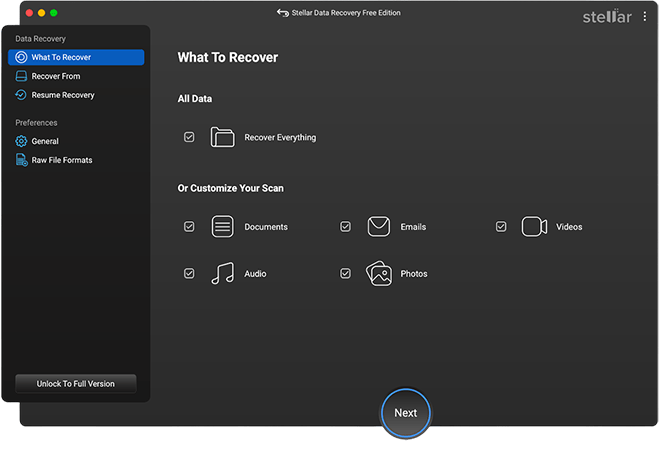
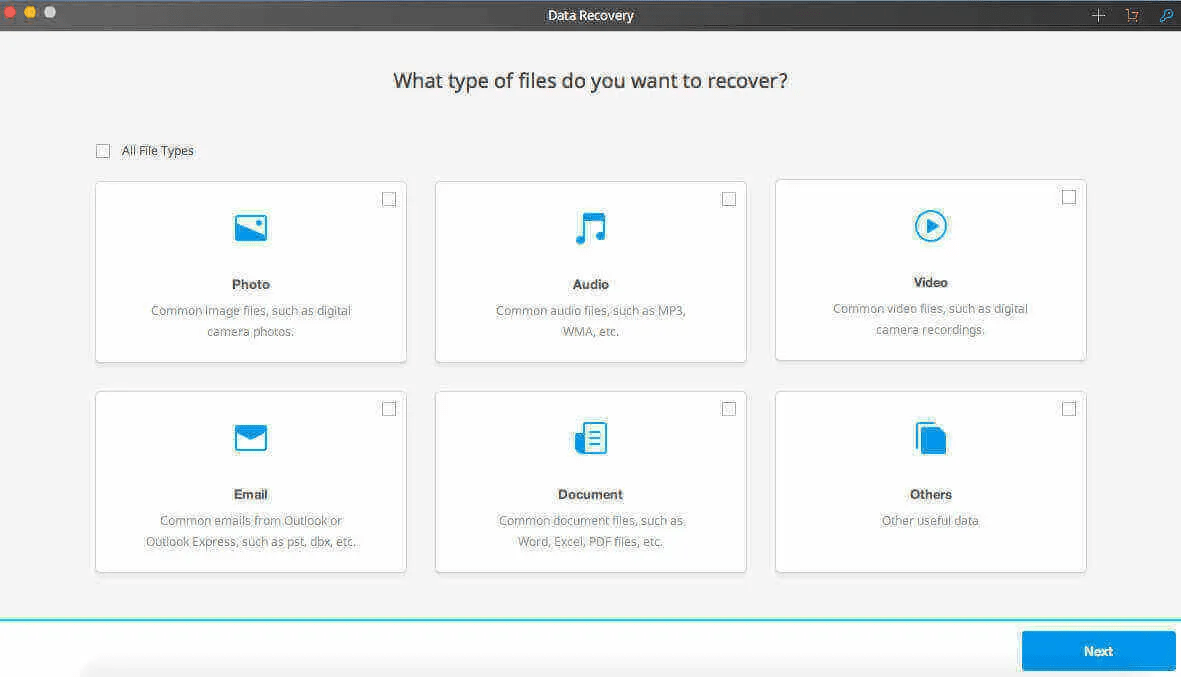
Step 1: Download and install the Stellar Data Recovery Free tool on your Mac. Launch the software and from the homepage, select the type of data you need to restore and then click Next.
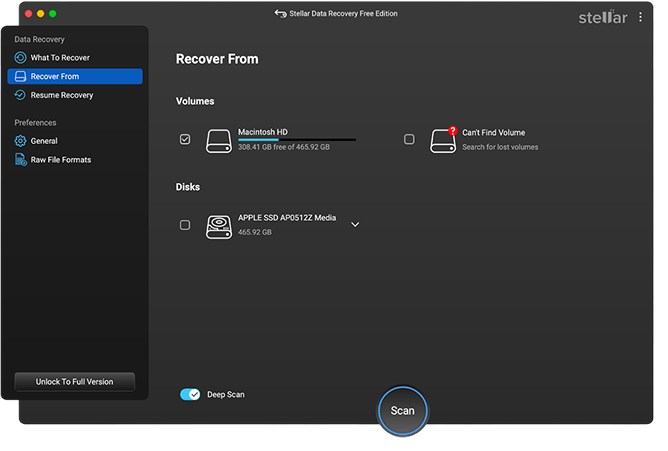
Step 2: Now, select the storage drive where your deleted data was earlier stored and click Scan. Wait till the scanning process is finished.
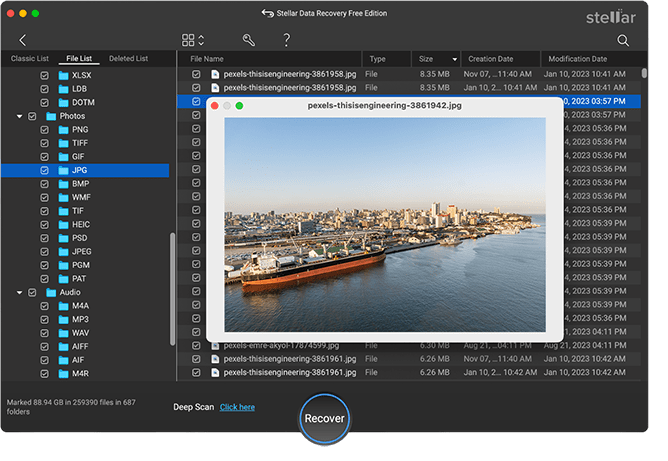
Step 3: Preview the recoverable files and choose the ones you need to restore. Click the Recover button to save selected files at the desired location.
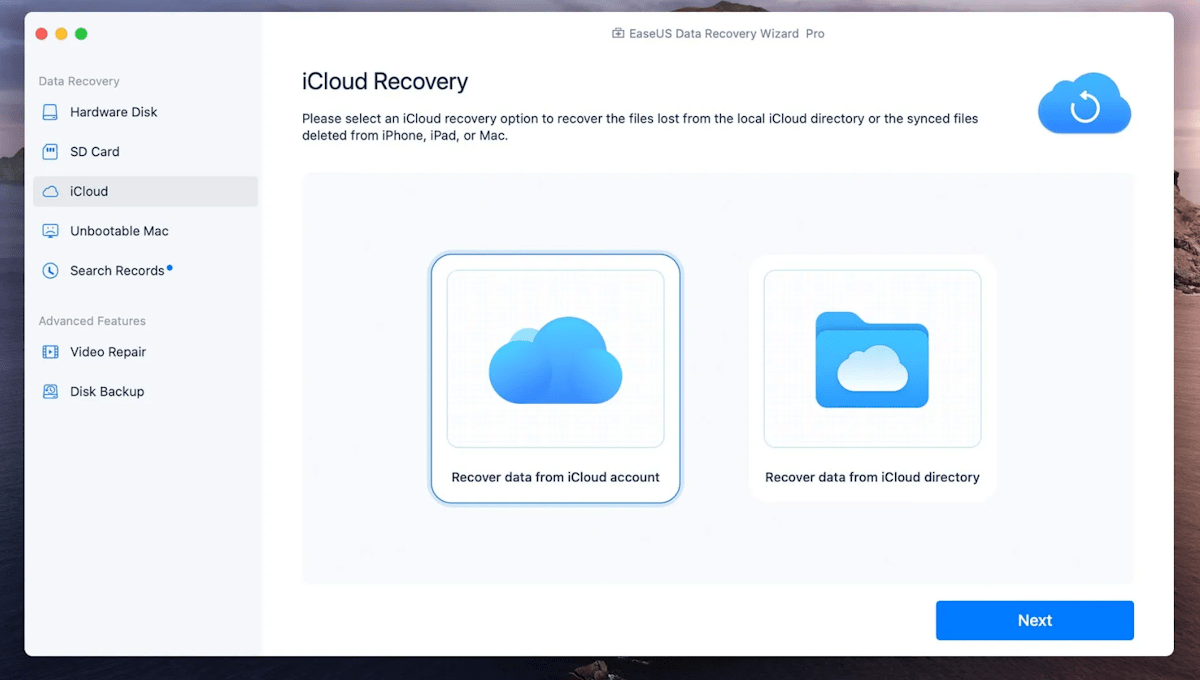
2: EaseUS Data Recovery Wizard for Mac Free
EaseUS Data Recovery Wizard is a popular and reliable data recovery software for Mac users. The free version of the software allows you to recover up to 2GB of data, making it suitable for minor data loss situations. You can easily restore deleted photos, videos, documents, emails, and other types of files using this tool.
Key Features:
Simple and easy to use.
Supports a wide range of file formats.
Provides a modern and sleek user-friendly interface.
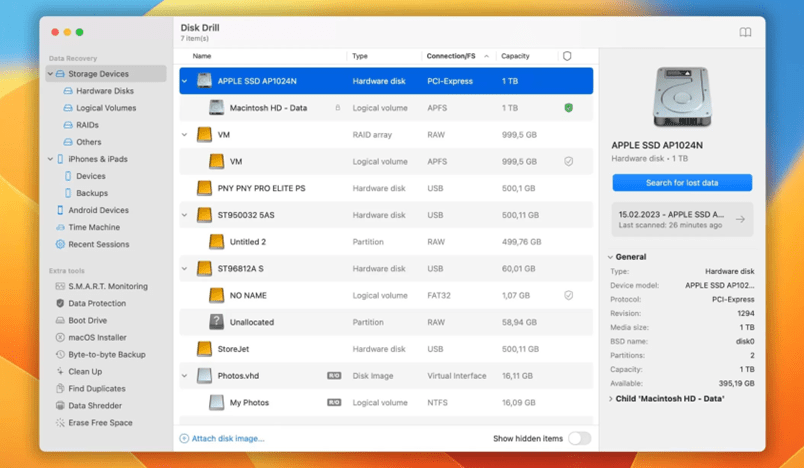
3: Disk Drill for Mac
Next in our list of free data recovery software for Mac is Disk Drill, which offers comprehensive recovery options and supports recovery of up to 500 MB of files without any cost. The software offers both Quick and Deep scan options to find and recover lost files. It can easily recover data from Mac hard drives, external drives, USBs, and more.
Key Features:
User-friendly with a clean user interface.
Offers data protection tools.
Recover data lost due to almost any scenario, including RAW disks, corrupted or lost partitions, RAID data loss, and more.
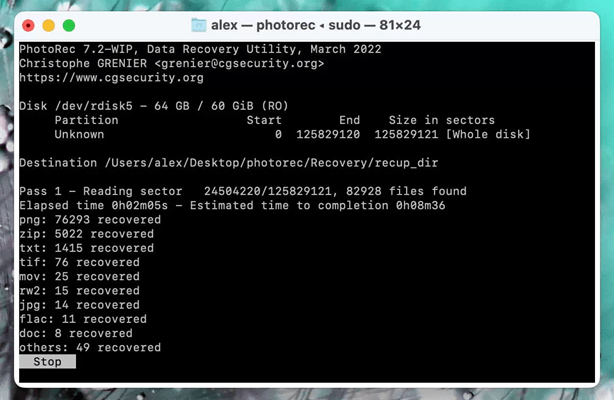
4: PhotoRec for Mac
PhotoRec is a well-known open-source Mac data recovery software that allows you to recover deleted files for 100% free. For the right user, it’s one of the best tools because of its amazing features. The software even works for disks without a file system.
Key Features:
Completely free and open-source.
Supports a wide range of file formats.
Effective deep scanning capabilities.
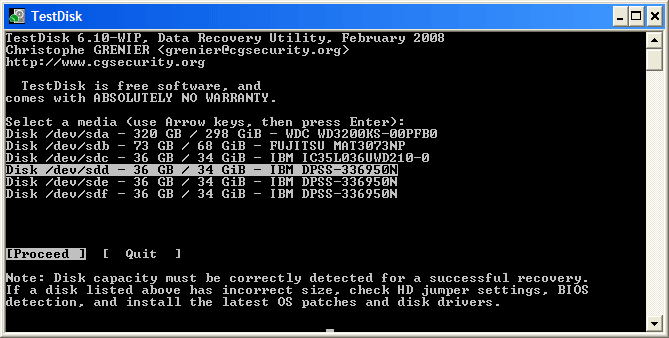
5: TestDisk for Mac
TestDisk is a versatile and 100% free open-source Mac data recovery software that can easily recover and fix lost partitions. It provides a command-line interface with step-by-step recovery instructions so it’s easy to follow for data recovery on Mac.
Key Features:
Powerful partition recovery capabilities.
Free and open-source.
Entirely free with no limitations on recovery.
6: Recoverit Mac Data Recovery
Recoverit Mac Data Recovery is a user-friendly software that provides 95% recovery rate, enabling you to recover lost or deleted files on any macOS device. The software is a 100% safe and reliable tool which supports the recovery of data from Mac hard drive or any external device on Mac.
Key Features:
Supports the Mac data recovery from different file systems, like HFS, HFS+, FAT16/FAT32/exFAT, etc.
Recover data stored on Mac hard drive, external hard disk, USB flash drive, SD card, and other storage devices.
Simple interface suitable for all users.
7: Data Rescue for Mac
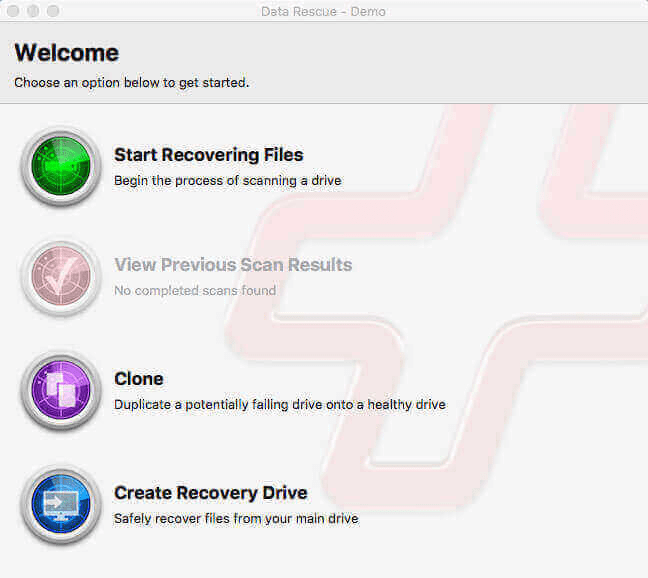
Data Rescue software not only allows you to recover files, but also to view previous scan results, clone, and create recovery drive options. You can easily recover deleted data of any type including images, videos, audio files, emails, documents, and many more using this Free Mac data recovery software.
Key Features:
Provide both Quick scan and Deep scan options.
Compatible with macOS 10.12 and later versions.
Easy to use with a straightforward interface.
Conclusion
Choosing the right Mac data recovery software depends on your specific needs, such as the amount of data you need to recover and the types of files. To help you out, we have mentioned the top 7 free data recovery software for Mac in this article that you can use to restore your deleted data. Each of these tools offers unique advantages, so evaluate your specific requirements to choose the best one for your data recovery needs. Always remember to back up your data regularly to avoid future data loss scenarios.
Top 7 Data Recovery Software for Mac was last modified: April 30th, 2025 by Shobhit Sharma
Have you been reviewing your company’s software development and IT operations? Combining these functions can streamline and speed up your work processes. You’ll enhance customer satisfaction and increase revenue. However, you may not have the necessary in-house resources to achieve it. This article will help you find the perfect DevOps partner for your business.
Understand Your Current Requirements
Before searching, take stock of your current resources and long-term goals. Look at your present infrastructure and the capabilities of your employees. The right DevOps consultant will look at your business plan, and ensure every action feeds into its objectives. You need to know your company’s vulnerabilities and needs. This way, you can find the right people to address them.
This process will require you to engage with stakeholders across various departments. This will include development, operations, and managers. This way, you’ll gain varied perspectives and access to a pool of vital information. You’ll then be able to determine what needs tackling first – whether it’s automation, scalability, or Internet security.
Check Their Websites
The websites of DevOps consultants should be both informative and well-designed. If they’re not, it casts doubt on their ability to benefit your company. Their web pages should contain blogs and advice that reflect the latest trends and technologies. If a consultant is an expert in their field, they could be a significant asset for your business. Review their website, including its loading speed and ease of navigation. You’ll want to find a call to action (CTA) on the landing page, and abundant evidence of professionalism.
Find out what services each agency offers, so they’re suitable for your business requirements. If you want a custom DevOps solution, look for those who can help with projects, support, and training. They may offer to manage your databases, keep everything secure, and help you outperform your competitors.
Evaluate Their Expertise And Experience
Your chosen professional needs to know about the major elements of DevOps. These include infrastructure as code, cloud migration, and CI/CD (continuous integration/continuous deployment). Ask about their previous projects (and outcomes), especially if they’re relevant to your current needs.
Discuss their knowledge of the latest trends and technology in your industry. Talk about the work you need done, and ask them how they’d approach it. Have they experienced anywhere with a similar business culture to yours, and how flexible and available are they? Finally, enquire about any areas of specialism within the agency.
Assess Their Communication Skills
Communication is vital when projects are underway. Assess how good they are at this, and their preferred methods (e.g. phone, text, email, videoconferencing). Observe how they interact with other staff, including those of lower grades.
Choose someone who’s an active listener and who treats everyone with respect and patience. Scenario-based discussions and workshop-style interviews can reveal how their theoretical knowledge is applied to real-world situations.
Is the consultant familiar with Slack, Jira, and project management software? These things could be vital throughout the term of your project. Are they good at providing practical solutions and effectively communicating them to your team?
Make sure they’re willing to collaborate with others, as this can affect employee morale. A true team worker will maximize the abilities of all staff to achieve the best possible outcome.
Review Client Testimonials And Case Studies
For previous projects, look for key information – such as reductions in downtime or percentage improvements in deployment speed. The testimonials of previous clients can provide honest assessments of their people skills, professionalism, and ability to complete the task.
Look for details of projects that encountered unexpected issues. Find out how the consultant tackled them and overcame the problem.
Consider Budget And Cost Considerations
Look at your company income and outgoings, and any financial reserves. Identify the current investment needed, and weigh it up against the long-term gain. A cheaper option may save money, but the consultant may have fewer resources at their fingertips. By paying more for a quality agency, you may reap the financial benefits over time.
Additionally, look thoroughly at their pricing models. You may be asked to pay by the hour (which could potentially go over budget) or pay a single upfront fee. Also, look for hidden charges and make sure all vital services are included in the price.
By choosing the right DevOps consulting service, you’ll have people who understand your organization’s unique needs and goals. They’ll have expert knowledge, industry experience, and a good track record. In turn, your business will become more efficient, profitable, and relevant.
How To Choose The Right DevOps Consulting Services For Your Needs was last modified: August 10th, 2024 by Charlene Brown