Minimizing downtime is crucial for maintaining productivity and profitability. One often overlooked yet vital component in achieving this goal is the industrial pump. These pumps play an essential role in transporting fluids, managing processes, and ensuring smooth operations across various manufacturing sectors. Understanding how industrial pumps contribute to reduced downtime can help businesses make informed decisions regarding their equipment and maintenance strategies.
The Role of Industrial Pumps in Manufacturing
Industrial pumps are designed to move liquids, slurries, and gases efficiently within manufacturing processes. They are used in various applications, including water treatment, chemical processing, food and beverage production, and oil and gas extraction. The reliability of these pumps is critical; any failure can lead to significant operational disruptions. This is where the quality of the pump comes into play. Selecting equipment from top pump manufacturers ensures that businesses invest in reliable and durable pumps that can withstand the demands of industrial environments. Choosing high-quality pumps reduces the risk of failures that lead to unplanned downtime. Top manufacturers design their products with advanced engineering, ensuring they can handle extreme temperatures, pressures, and corrosive materials. This reliability translates to fewer breakdowns and less frequent maintenance, allowing manufacturing operations to run smoothly without interruptions.
Predictive Maintenance and Monitoring
One of the key strategies for reducing downtime in manufacturing is implementing predictive maintenance programs for industrial pumps. Predictive maintenance uses data and analytics to forecast when a pump may fail or require maintenance. By regularly monitoring the condition of pumps using sensors and diagnostic tools, manufacturers can identify potential issues before they escalate into significant problems.
For example, vibration analysis can detect irregularities in pump operation that may indicate wear and tear on components. By addressing these issues early, manufacturers can schedule maintenance during planned downtime rather than facing unexpected outages. This proactive approach not only minimizes downtime but also extends the life of the equipment, resulting in cost savings over time.
Efficient Pump Selection
Selecting the right type of pump for a specific application is crucial for ensuring efficiency and reliability. Industrial pumps come in various designs, including centrifugal, positive displacement, and diaphragm pumps, each suited for different tasks. Understanding the specific requirements of your manufacturing process—such as the type of fluid being pumped, flow rate, and pressure—will help you choose the most appropriate pump.
Partnering with qualified manufacturers provides access to expert advice and resources to guide your selection process. These manufacturers often offer a range of products tailored to various industries, allowing businesses to find the best fit for their needs. An efficiently selected pump operates optimally, reducing wear and tear and minimizing the risk of breakdowns that could lead to costly downtime.
Employee Training and Best Practices
Investing in employee training is essential for maximizing the efficiency and reliability of industrial pumps. Well-trained staff are more capable of identifying early signs of potential issues and performing routine maintenance tasks effectively. Regular training sessions on proper pump operation, troubleshooting, and maintenance best practices empower employees to take proactive measures, reducing the likelihood of equipment failure.
Additionally, implementing standard operating procedures (SOPs) for pump maintenance can help ensure that all employees follow consistent practices. This can include regular inspections, cleaning protocols, and documentation of any issues encountered. When employees are knowledgeable and follow established procedures, the risk of downtime due to human error is significantly reduced.
The Impact of Pump Design on Downtime
The design of industrial pumps plays a critical role in their performance and reliability. Pumps designed with modular components can be more easily serviced and maintained, allowing for quicker repairs. Additionally, pumps with features like self-priming capabilities or integrated control systems can enhance operational efficiency and reduce the chances of downtime.
Selecting pumps with advanced technology can also improve the overall manufacturing process. For example, smart pumps equipped with IoT technology can provide real-time data on performance, enabling manufacturers to make informed decisions regarding maintenance and operation. This level of insight allows for more agile responses to potential issues, ultimately reducing downtime.
Benefits of Upgrading to Modern Pump Technology
Investing in modern pump technology from an industrial pumps supplier can significantly impact manufacturing efficiency and downtime reduction by ensuring reliable fluid handling and minimizing maintenance interruptions. Many manufacturers continually innovate, introducing new materials and designs that enhance performance. Upgrading to more efficient pumps can lead to reduced energy consumption, lower operational costs, and improved reliability.
For instance, variable speed pumps can adjust their operation based on real-time demand, reducing energy usage and wear on components. This not only leads to cost savings but also contributes to sustainability efforts by minimizing the environmental impact of manufacturing operations.
In the manufacturing sector, reducing downtime is crucial for maintaining productivity and profitability. Industrial pumps play a vital role in ensuring smooth operations, and understanding their importance can help businesses make informed decisions regarding their equipment. By selecting reliable pumps from top manufacturers, implementing predictive maintenance, and investing in employee training, manufacturers can effectively minimize downtime. Ultimately, a proactive approach to pump management can lead to enhanced efficiency, cost savings, and a more resilient manufacturing process.
How Industrial Pumps Reduce Downtime in Manufacturing was last modified: March 31st, 2026 by Charlene Brown
Small business owners and entrepreneurs know that running a company isn’t just about providing products or services — it’s also about managing the many administrative tasks that come with it. But for most, staying on top of invoicing, customer data, and financial tracking can quickly become overwhelming. That’s where taking advantage of a Software as a Service (SaaS) platform can give you an edge. Designed specifically for SMEs, administrative tools like these offer an efficient way to manage critical operations without unnecessary complexity. But to get the most out of such a tool, there’s only one clear choice: QUICKADMIN.
Streamlining Business Operations
QUICKADMIN Software eliminates the need for juggling multiple systems. With everything in one place, even from a smartphone, businesses can handle routine tasks like invoice automation and tracking payments, making day-to-day management far simpler.
One of the main challenges for small businesses is finding the right tools to streamline operations. Many business owners rely on multiple platforms for invoice management, customer management, and other administrative tasks. This approach wastes time and can lead to errors when information doesn’t sync between tools.
Efficiency Without the Learning Curve
A common concern when adopting new administration software is the time it takes to learn and implement it. Many platforms designed for larger companies offer more features than a small business needs, resulting in unnecessary complexity. QUICKADMIN Software, however, was developed with the specific needs of small to medium-sized businesses in mind. It prioritizes ease of use, ensuring that even those without technical expertise can quickly get the hang of it.
The software’s intuitive design allows users to get started immediately without wasting hours learning how to navigate the system. The clean interface guides users through each function, minimizing the frustration of adopting new technology.
Business people in a meeting
Customized for Your Industry
QUICKADMIN Software is simple to use, but it’s not one-size-fits-all. That’s a good thing. Different industries have different needs, and a business management software solution that works for a consulting firm, for example, might not be the best fit for a construction company. QUICKADMIN understands this and offers customizable features that adapt to various business types. Whether you need specific templates for invoicing or unique tracking options, it provides the flexibility to tailor its system to your industry.
This adaptability allows you to keep your workflow efficient without making drastic changes to your operation. The focus stays on saving time and reducing the administrative burden, not forcing you to work around the software’s limitations.
Affordable for Small Businesses
While large enterprises often have the budget for expensive management systems, small businesses need affordable options. QUICKADMIN Software stands out by offering an accessible solution without sacrificing essential features. It’s a cost-effective alternative to more complex platforms like QuickBooks or other accounting software for entrepreneurs, making it a solid option for streamlining operations without overspending.
A Practical Solution for Busy Entrepreneurs
Business owners are always looking for ways to improve efficiency and reduce the time spent on administrative work. QUICKADMIN Software offers a straightforward solution designed for small businesses. With its automation features, industry-specific customization, and affordable pricing, using it means you can spend less time on day-to-day management and more time on growing your business.
Take Control of Your SME: The Simple Solution to Streamline Your Workflow was last modified: April 5th, 2025 by Scott Fluent
As businesses increasingly embrace digital transformation, effective data management has become paramount. Email archiving is an essential tool, ensuring secure storage, easy retrieval, and regulatory compliance among these strategies. With Radicati’s Email Statistics Report predicting 4.4 billion email users by 2024, managing email communication efficiently is more critical than ever.
Cloud technology has revolutionized email archiving, offering scalable, cost-effective, and flexible solutions. This piece explores the future of cloud email archiving by highlighting the trends and innovations set to shape the industry amid the rapid expansion of email usage.
Revolutionizing Cloud Email Archiving
The evolution of email archiving over the last decade is remarkable. Previously, businesses relied heavily on on-premises solutions requiring significant hardware and software maintenance investments. These legacy systems were often inflexible, hindering organizations’ ability to adapt to growing data needs.
The paradigm changed with the shift to cloud-based solutions. By leveraging the power of the cloud, businesses gained access to scalable and efficient email archiving without needing large on-site infrastructure. This transition laid the foundation for key emerging trends and innovations.
The Future of Cloud Email Archiving: Key Trends
AI and Machine Learning Transformation Artificial intelligence (AI) and machine learning (ML) are rapidly redefining cloud email archiving. AI-powered solutions enable advanced data analysis, allowing companies to extract meaningful insights from archived emails. Automatic email tagging, improved searchability, and pattern detection for security compliance are just a few examples of how AI and ML enhance the future of email management.
Strengthened Compliance and Legal Hold Features Regulatory compliance remains a significant driver of email archiving. As legal requirements evolve, cloud email archiving tools are becoming more advanced, helping organizations meet complex compliance needs. Improved legal hold functionalities ensure businesses can preserve relevant communications for litigation or investigations while automating compliance reporting to streamline audits.
Security Enhancements: Securing archived emails is paramount as cyber threats continue to grow. Future cloud email archiving solutions will emphasize advanced security features like end-to-end encryption, multi-factor authentication, and zero-trust architectures. These innovations will fortify email security, offering peace of mind that sensitive data is protected from unauthorized access.
Increased Scalability and Flexibility Scalability is one of the most significant advantages of cloud solutions. Future services will offer even greater flexibility, allowing businesses to adjust storage capacity as needed. This is particularly valuable for companies experiencing rapid growth or fluctuating data volumes, ensuring they can easily adapt to changing demands.
User-Friendly Interfaces and Seamless Integration Adopting new technology hinges on usability. Cloud email archiving providers are prioritizing intuitive, user-friendly interfaces to simplify the archiving process. Seamless integration with popular email platforms like Microsoft 365 and Google Workspace will further streamline workflow, allowing users to archive emails without leaving their familiar environments.
Cost Efficiency Cloud email archiving is becoming more cost-effective, with providers offering flexible pricing models that cater to various business needs. Tiered storage and pay-as-you-go plans allow organizations to control costs while maintaining efficient email management.
Sustainability Focus As environmental sustainability becomes a priority, businesses are leaning towards eco-friendly IT solutions. Cloud email archiving is inherently more energy-efficient than traditional systems due to the large-scale data centers that power them. Future innovations will likely focus on further reducing the environmental impact, aligning with broader corporate sustainability goals.
Innovations Shaping the Future of Cloud Email Archiving
Blockchain for Data IntegrityBlockchain technology has the potential to revolutionize email archiving by enhancing data integrity and traceability. Through an immutable ledger, blockchain ensures that archived emails remain tamper-proof, providing an added layer of security for industries like finance and healthcare.
Natural Language Processing (NLP) NLP is poised to transform cloud email archiving by enabling more intelligent email categorization and search capabilities. By processing and understanding human language, NLP can automate content summaries, extract essential details, and even translate emails, simplifying the search and retrieval of archived communications. This technology not only enhances efficiency but also improves user experience, allowing organizations to quickly find relevant information without sifting through countless emails. As NLP continues to evolve, its ability to recognize context and nuances in language will further refine how archived communications are accessed and utilized, paving the way for more effective decision-making and data management.
Predictive Analytics Predictive analytics will play a crucial role in proactive email management. By analyzing historical data, predictive models can forecast trends, detect risks, and suggest preventive measures. Tools like Looker Studio dashboards can help visualize these insights, making it easier for organizations to monitor key metrics and identify potential issues in real-time. With dynamic reporting capabilities, Looker Studio can track compliance, security threats, and data trends, empowering teams to optimize their email management strategies more effectively.
Emerging Solutions and Their Impact
Hybrid Cloud Solutions While fully cloud-based solutions dominate the market, hybrid cloud models are emerging as a flexible alternative for organizations with specific data security needs. Hybrid systems allow sensitive information to be stored on-premises, while non-critical data leverages the cloud for scalability and cost efficiency, creating a balance between security and flexibility.
Boosting Brand Awareness and Customer Engagement A well-implemented cloud email archiving system can indirectly improve brand reputation and engagement. Efficient archiving supports timely and accurate responses to customer inquiries and legal requests. This responsiveness, paired with secure communication, builds trust and can enhance customer satisfaction.
Positive Impact on NPS Scores By ensuring secure and efficient email management, businesses can enhance customer experiences, improving their Net Promoter Score (NPS). A high level of service reliability in handling sensitive email data encourages customer loyalty, leading to more brand advocates.
Conclusion
The future of cloud email archiving is marked by exciting developments and opportunities. AI, machine learning, enhanced security, and blockchain are driving innovations that will elevate email management. As these advancements unfold, businesses can expect to see even greater flexibility, efficiency, and security in managing their email records. By staying ahead of these trends, organizations can better leverage cloud email archiving to meet evolving data and compliance demands.
Reimagining Email Archiving: The Next Wave of Cloud Innovations was last modified: August 30th, 2025 by Maanvir Jaglan
In the fast-changing business world of today, big businesses face significant hurdles when trying to spread Agile practices through numerous teams and divisions. One such certification is the Certified ScrumMaster (CSM) certification is crucial for such businesses in navigating scaling challenges successfully, and driving organizational agility, collaboration, and innovation. In this all-inclusive marketing article, we will look at what role CSM certifications play in scaling Agile for large organizations, their benefits as well as how they make every level of an organization agile.
Understanding the Challenges of Scaling Agile
Scaling Agile across large organizations presents a set of complex challenges that require careful planning, coordination and execution. Some of these include:
1. Coordinating Across Multiple Teams
With many interconnected projects or initiatives being handled by different units within one organization there may be need to coordinate them well so as they do not work against each other but rather together towards common goals and objectives. This can however prove difficult because such coordination calls for clearly stating what should be achieved by who and by when among others.
2. Maintaining Consistency and Standardization
As more departments or business units adopt agile practices there arises need for uniformity in their implementation throughout various parts of an enterprise otherwise it may become hard to monitor progress made at different levels which might lead management into making wrong decisions concerning future investments on this aspect alone thereby affecting overall efficiency within an organisation.
3. Scaling Agile Culture and Mindset
Agile culture cannot be scaled up just like any other normal process would require additional steps because it involves mindsets also besides mere behavioural changes hence needs total buy-in from all affected parties including top leadership down to middle managers plus even those at junior staff levels too if success is to be realized therefore such an approach becomes necessary since people think differently about things based on where they are placed hierarchically speaking thus creating awareness among them regarding what needs doing differently becomes fundamental during transformation programmes involving larger enterprises.
4. Leadership Support and Alignment
For any successful transformation to take place there must exist strong support coupled with alignment at every level within an organization towards achieving this goal where leaders act as champions who provide necessary resources while ensuring that such efforts are recognized through various incentives which in turn will help foster wider adoption and sustainability of these principles throughout entire business environment thus making it easy for everyone involved to understand why things should be done differently from now onwards.
Role of CSM Certification in Scaling Agile
Certified ScrumMaster (CSM) certification has a significant role to play when it comes scaling agile in large organizations since it equips leaders, managers and teams with knowledge, skills and tools required for effective navigation through complex scenarios associated with such endeavors. Here is how CSM certification contributes towards scaling agility:
1. Agile Leadership and Governance
Leadership being one critical success factor during any change process must therefore have an understanding about what works best under different circumstances thus enabling them make informed choices as far as selecting appropriate styles or models for use within their respective areas depending on prevailing conditions so that they can provide direction down wards effectively without causing unnecessary confusion among employees who might not be able to cope up easily due lack awareness around these matters concerning how things ought to be done.
2. Vibrant Flexibility and Responsiveness
CSM accreditation facilitates adaptability in large organizations, which enables them to be flexible and responsive to changes in the market, customer requirements, and competitive forces. It is possible for companies to quickly seize new opportunities as well as challenges by adopting agile principles and practices; they can also take advantage of various market venues while continuously delivering value faster.
3. Heightened Cooperation and Communication
Agile certifications enhances teamwork among employees working within different units or departments of an organization by breaking down silos through fostering openness, trust, transparency, etc., as part of its values system. The sharing of information across functions accelerates decision-making processes thereby eliminating misunderstandings regarding goals or priorities setting at any level.
4. Boosted Productivity and Efficiency
The certified scrum master course helps improve productivity levels within firms through streamlining operations i.e., getting rid of unnecessary steps; this leads to resource optimization since only what is required shall be used thus saving time even more. Besides that, using such things like iterative development together with continuous integration plus automated testing under agile methodologies will enable businesses produce high-quality products faster than before while spending less money on them.
5.Increased Employee Participation And Gratification
CSM training courses increase employee involvement satisfaction rates because they give teams autonomy over decision-making processes while holding them accountable for their actions too – these are key ingredients for success in any organization. When people feel like owners rather than mere executors then you can tap into their creativity which may lead to higher levels of commitment towards realizing shared goals hence job satisfaction goes up correspondingly.
Agile Coaching & Mentoring
Certified Scrum Masters often act as coaches or mentors during transformational periods when shifting towards becoming more agile happens within enterprises; it could occur team-wide but also involve managers/stakeholders at various stages until everything becomes fully scaled across entire corporations depending on specific needs met along the way. These agile coaches leverage their skills, experience, qualifications etc., thus providing necessary guidance support encouragement needed by individuals/teams facing challenges within complex environments characterized by scaling issues linked with agility. Furthermore, through coaching mentoring as well training them in such things like retrospective facilitation will enable organizations build capabilities while overcoming barriers towards achieving successful transformations in line with CSM principles.
Ongoing Process Adjustments
One of the core premises behind Agile is continuous improvement, where the Certified Scrum Master (CSM) certification embodies this idea by emphasizing importance of creating an internal culture that values learning from mistakes and being open for change. In a nutshell, retrospectives are about looking back over what has been done so far – identifying areas where improvements can be made then implementing those changes into future iterations or any other relevant part(s). Having said that it means professionals who hold CSM certificates have undergone training on how to conduct retrospectives. If businesses adopt an attitude centered around always striving to do better while adapting quickly then they will expand their agile practices thereby becoming capable of handling emergent challenges which might arise whilst still keeping ahead of rivals within today’s rapidly changing business environment.
Conclusion
To sum up, the Certified ScrumMaster (CSM) credential has multiple roles in scaling Agile for large enterprises. This qualification imparts knowledge, skills and tools among leaders at different levels as well as team members hence facilitating successful adoption of agile methods throughout various parts within an organization. The efforts made by these certified experts drive organizational agility cooperation innovation necessary for success even in fast-paced dynamic business world faced by corporations today; such professionals provide services like mentoring others through coaching them on how best develop continuous improvement mindset so that it becomes part and parcel every employee’s thinking process which ultimately leads to adaptability culture taking root
Using real-life case studies and examples, the Certified Scrum Master (CSM) credential has been shown to help organizations in various sectors overcome hurdles, drive positive change as well as deliver concrete results during their Agile journey or adoption. On the other hand, Certification of a Scrum Trainer (CST) serves as a key success factor towards scaling agility at an enterprise level for any business. This holds for even such cases where a company may be disrupting care delivery within healthcare systems or spreading agility across its global teams.
Therefore, if your enterprise is large and interested in scaling Agile methods while transforming organization-wide practices; then you should consider investing in CSM certifications for leaders, managers and teams today. Starting at this point will set you off on the right path to achieving organizational brilliance through Agile scaling!
The Role of CSM Certification in Scaling Agile for Large Organizations was last modified: September 25th, 2024 by Ahsan Afzal
A phrase says that he who owns the information owns the world. It is often understood that a person who is in the thick of things and has access to various data sources can more easily conduct their business. And business data management, in this understanding, is a very important aspect. Some companies, especially startups, do not pay enough attention to storing and working with business data, and as a result, they fall victim to malicious hackers or harm their enterprise. This can be compared to a student who overestimates his strength and does not seek help from a research paper writer in time and, as a result, gets problems with his written work. It is the same with business data.
Business people in a meeting
Knowing how to store, protect, and use data is critical to the success of any client company. This article will examine five of the most serious business data management mistakes and suggest ways to prevent them.
Mistake 1: Lack of a Data Management Strategy
One of the most frequent and grave mistakes is probably the lack of a clear data management strategy. When growing a customer database, companies do not have time or invest enough time to structure and store this sensitive information correctly. At the same moment, a critical error occurs because of which either data is lost or vice versa; this information is leaked. Without a strategy, a business does not know what is important and how to process this data to make decisions.
For example, an organization can collect a huge amount of customer data; it may become a burden if it is not well specified or strategized on how to use such data. A strategy in place invites chaos in information management, degraded data quality, and inefficient resource use. To prevent this mistake, a data management strategy should be developed to include:
Defining data objectives (e.g., improving marketing effectiveness or optimizing logistics).
Identifying key metrics that will be measured with data.
Identifying employees or departments responsible for collecting, storing, and analyzing data.
Implementing standards for handling and storing data.
The strategy should not be carved in stone. It should be adaptable and easily changeable depending on the company’s business or technical equipment changes. Leveraging modern data transformation tools like dbt cloud vs dbt core can help businesses maintain structured, high-quality data. Choosing between dbt cloud and dbt core depends on factors like scalability, ease of use, and automation needs.
Mistake 2: Insufficient Data Protection
This is a trivial but, unfortunately, still quite common mistake. Many business owners launching their enterprises believe that they have nothing to fear because they are not major players in the market and, therefore, are not of interest to hackers. Nevertheless, according to statistics, small and medium-sized businesses most often try to attack attackers, just counting on a weak defense. To avoid this mistake, you need to implement robust cybersecurity measures, including:
Regular software and security updates.
Encrypting data to protect against unauthorized access.
Conducting regular security audits and vulnerability tests.
Training employees on cybersecurity basics and how to handle sensitive information.
It’s also important that the company has an incident response plan in place to quickly detect and remediate threats.
Mistake 3: Lack of Regular Data Backups
Data loss is a reality that many companies face. It’s not always a hacker attack; more often than not, it’s a trivial hardware failure or human error. In the end, it is not that important because the integrity of the data is compromised. Due to the loss of customer data, small online stores often store customer data on a local server in the office. Regular data backups (backups) are a mandatory practice for all organizations. To minimize the risk of data loss, you need to:
Automate the backup process.
Store backups on remote servers or cloud storage.
Periodically check that backups are working and up to date.
You should back up your data at the end of each business day. Fortunately, this process can be automated if you spend a little time on it. By investing a little time and resources into this task, business owners will not have to think about this problem.
Mistake 4: Data Inconsistency
The problem of so-called data conflict is real and very annoying. If data about the same customers received by different departments are not synchronized for a common database in one company, it can literally stall the business for some time. For example, suppose the marketing department collects data about customers using one CRM system and the sales department—another. In that case, working in a unified system is important to prevent this mistake.
Working in a unified system is like working with a writing service that has already undergone a thorough researchpaperwriter review where all the initial data is clear, and all the next steps for cooperation are known.
Mistake 5: Ignoring Data Analysis
The numbers and names themselves don’t say anything if you don’t analyze them properly and use the findings to improve business processes. For example, a company may collect data on customer preferences but not analyze it to optimize offers. This causes marketing campaigns to be ineffective, and the company loses potential revenue.
You need to use modern data analysis tools to prevent this mistake and emphasize data-driven decision-making. This includes:
Utilizing business intelligence systems to identify trends and patterns.
Analyzed sales, customer, and operational data on a regular basis.
Applying analytics to improve processes, optimize offerings, and improve company performance.
Data analytics should be integral to business processes, not an infrequent practice.
Conclusion
Data processing is a multilevel and complicated process. The key to business success is avoiding a number of typical mistakes: lack of strategy, poor protection, absence of backup copies, data discrepancy, or just ignoring the analysis of actual data. First of all, one should take seriously the systematic approach to data treatment, regular process updates, and modern data processing and protection technologies.
Top 5 Mistakes in Business Data Management and How to Avoid Them was last modified: March 13th, 2025 by Brad Peterson
Cloud technology has played a vital role in enhancing the learning experience. You can access digital documents stored on your devices instead of cramming for the last textbooks in the library. Such perks have made learning more accessible since you can get all your study materials, documents, and research materials from anywhere and anytime. It makes it easy to study for exams and complete assignments. One of the reasons students hire academic writers such as those found at GradeMiners is difficulty in accessing research materials. Thus, embracing cloud technology will make your school life easier. Cloud-based tools also allow you to work with other students on shared documents regardless of whether you are sitting in the same class or halfway across the world. With cloud technology, every learning material you need is only a click away, so here are ways to maximize this technology for academic success.
Study Groups and Networking
Cloud technology has made study groups more dynamic, especially since you do not have to meet your group members physically. You can easily collaborate and work in groups through cloud-based platforms such as Slack and Microsoft Teams. These platforms allow you to set up video calls, send text messages, and share files, making group work more efficient and accessible regardless of location. You can follow up on each group member’s contribution, as working simultaneously on one document is possible. Furthermore, these platforms have tools that make it possible to achieve the following:
Set up virtual study rooms.
Share and take notes in real-time.
Hold quiz battles on platforms such as Quizlet.
Track assignment progress for every individual member.
Hold polls to make group decisions.
Task Management and Planning
Assignment deadlines often get collegians by surprise, prompting many to delegate their papers to academic writers like those mentioned in the GradeMiners review to ensure they turn in quality work on time. Cloud technology offers fun and engaging ways to stay organized and maintain a routine, from automated reminders to visual organization. Applications like Google Keep and Microsoft To-Do allow you to create their to-do lists and schedules. They also have tools that enable you to organize and keep track of your tasks and receive reminders of deadlines on your devices. Since everything is saved on the cloud, you can easily follow up on all your deadlines to ensure none of them sneak up on you.
If you have a study group, you can create a shared to-do list on these applications, making group tasks easier since you will have a similar task list. Most importantly, these applications integrate course materials and schedules to ensure you keep up with your assignments and tasks. Therefore, you can use these applications to stay routine if you struggle with time management.
Online Research
Most institutions create a cloud-based academic database storing academic papers, journals, and articles. They act as a digital library where students can access research materials anytime and from anywhere. Therefore, you need to find out if your school has such an academic database that can help you with your research papers. Instructors often also upload class notes; thus, you can download them and go through them on your own time. You can download and save these learning materials to cloud storage and organize them by topic or unit for easier access. Access to such study materials means you can study and conduct your research on the go.
Collaboration Tools
Cloud-based applications such as Google Docs and Zoom allow you to work with classmates on projects or general group discussions. You can easily find a study partner and remotely collaborate with them on various tasks. The collaboration tools allow you to work on a similar document simultaneously, and you can leave feedback and make corrections. Additionally, if there are areas you need clarification from your lecturer, you can bring them on board, and they can give you instant feedback on areas you need to correct.
Storage
Cloud technology has been essential in helping with backup and storage. You do not worry about losing your reading materials due to hardware failure. You can store and organize your files and access them anytime and anywhere. If you use cloud-based storage that allows offline access, you can retrieve your documents at any time, even without an internet connection. The automatic backup and recovery feature has been the significant upside of these applications since you can be confident that your work is safe and recoverable.
If you are working on a research paper or long-term project, the version control feature will be helpful since it allows you to track any changes made to the document and revert to the original content. The cross-device synchronization allows you to access the latest version of your document on any of your devices, whether you want to access it from your laptop, phone, or tablet.
Remote Learning
Cloud-based technology has made learning convenient, especially in regard to remote learning. If you have other commitments, such as work and family, you can opt for online learning so as not to compromise your personal or academic life. With remote learning, you can record lectures and download class notes and other learning materials to review later.
Another significant upside is that you can attend lectures and submit assignments from anywhere. Therefore, you can take some time off your busy schedule to attend classes without needing physical presence. It means that you can learn at your own pace and from anywhere. If your school has an online learning option, you can go for it. If you are taking a STEM course, some platforms offer virtual labs that allow you to run simulations and experiments without the need to be physically present in the lab.
Takeaway
Cloud technology makes learning fun and more engaging; from virtual study groups to reliable storage, task management, and organization, there is so much you can do with cloud applications. The possibility of studying anywhere and at any time is underrated until you are in a place without a library or internet connection. However, with cloud technology, you can easily access your learning materials from anywhere, which means you can handle your assignments and submit them on the go. Most importantly, these cloud-based tools have made learning more fun since you can use platforms such as Quizlet to make and share flashcards and turn study materials into interactive games.
How to Leverage Cloud Technology for Academic Success was last modified: September 19th, 2024 by Brad Peterson
Organizations are increasingly reliant on robust database management systems to ensure the integrity and accuracy of their data. Data integrity refers to the accuracy, consistency, and reliability of data throughout its lifecycle. Any compromise in data integrity can lead to severe consequences, including financial loss, reputational damage, and regulatory penalties. One solution that stands out in the realm of database management is Ingres, a relational database management system known for its reliability and effectiveness in ensuring data integrity.
Understanding Data Integrity
Data integrity is fundamental to any organization that relies on data for decision-making and operations. It encompasses several key aspects, including accuracy, consistency, completeness, and validity. Maintaining data integrity involves implementing practices and processes that prevent unauthorized access, data corruption, and unintentional errors. Organizations must consider both physical and logical data integrity, ensuring that their systems are secure and well-structured.
The Role of Ingres in Data Integrity
Ingres provides an array of features that help organizations achieve high levels of data integrity. With its robust architecture, Ingres supports ACID (Atomicity, Consistency, Isolation, Durability) properties that are essential for maintaining data integrity. Each of these properties plays a crucial role in ensuring that data remains reliable, even in the face of unexpected failures or concurrent operations.
ACID Compliance
– Atomicity ensures that transactions are all-or-nothing; if one part of the transaction fails, the entire transaction is rolled back. This prevents partial updates that could lead to inconsistencies.
– Consistency guarantees that a transaction will bring the database from one valid state to another, maintaining all defined rules and constraints.
– Isolation ensures that transactions occur independently without interference. This property helps to avoid issues such as dirty reads or lost updates when multiple users access the database simultaneously.
– Durability ensures that once a transaction has been committed, it remains so, even in the face of system failures. This is achieved through reliable logging mechanisms.
Through these ACID properties, Ingres protects the integrity of data, ensuring that it remains accurate and trustworthy.
Implementing Best Practices for Data Integrity with Ingres
To leverage Ingres effectively, organizations must implement best practices that enhance data integrity. Here are several strategies that can be adopted:
1. Data Validation Rules
Establishing data validation rules is essential to ensure that only accurate and valid data enters the system. Ingres allows users to set constraints on data types, relationships, and values. By enforcing rules such as NOT NULL, UNIQUE, and FOREIGN KEY constraints, organizations can maintain the integrity of their datasets.
2. Regular Audits and Monitoring
Conducting regular audits and monitoring of database activities helps identify potential integrity issues before they escalate. Ingres provides tools for real-time monitoring, allowing organizations to track changes and access patterns. This visibility enables administrators to detect anomalies, unauthorized access, and any deviations from established data standards.
3. Backup and Recovery Strategies
Data loss can severely affect data integrity. Implementing robust backup and recovery strategies is crucial for any database management system. Ingres supports various backup options, including incremental and full backups, which allow organizations to restore their databases to a consistent state in the event of data loss. Regularly testing recovery procedures ensures that organizations can respond quickly to incidents, minimizing downtime and data corruption risks.
4. User Access Control
Effective user access control is vital for safeguarding data integrity. Ingres enables organizations to define user roles and permissions, restricting access to sensitive data based on job functions. By implementing the principle of least privilege, organizations can significantly reduce the risk of unauthorized changes to critical data, ensuring that only authorized personnel can perform specific actions.
5. Transaction Management
Proper transaction management is crucial for maintaining data integrity. Ingres provides features that allow organizations to manage transactions efficiently, ensuring that operations are conducted in a controlled manner. Grouping related operations into transactions and using rollback capabilities in case of errors helps maintain a consistent state of the database.
6. Data Redundancy and Replication
Data redundancy and replication strategies can enhance data integrity by providing multiple copies of data across different locations. Ingres supports replication mechanisms that ensure data is consistently mirrored across databases. This not only protects against data loss but also ensures that users have access to the most current and accurate data.
The Future of Data Integrity with Ingres
As technology continues to evolve, the importance of data integrity will only increase. Emerging trends such as artificial intelligence, machine learning, and big data analytics demand even higher standards of data accuracy and reliability. Ingres, with its commitment to innovation, is well-positioned to adapt to these changes. Its ongoing development promises enhanced features that will further strengthen its capabilities in supporting data integrity.
Data Integrity
In an era where data integrity is paramount, leveraging Ingres for robust database management practices is a strategic choice for organizations. The combination of its ACID compliance, best practices for data validation, user access control, and effective transaction management makes it an ideal solution for maintaining reliable and trustworthy data. As businesses continue to navigate the complexities of the digital landscape, prioritizing data integrity through effective database management is essential for long-term success. By utilizing Ingres, organizations can ensure that their data remains a valuable asset rather than a liability, paving the way for informed decision-making and sustainable growth.
Using Ingres in Your Business’ Database Management Practices was last modified: September 11th, 2024 by Stephanie GEye
Healthcare organizations face unique staffing challenges. Too few employees compromise patient care, while too many lead to excessive overtime costs. Healthcare time and attendance software offers a solution. These programs track employee clock-ins and outs but also provide advanced features like automated scheduling, real-time attendance monitoring, and predictive analytics. By optimizing staffing levels and minimizing overtime, healthcare organizations can significantly reduce labor costs.
Also, these software solutions help ensure compliance with labor laws and regulations, further protecting organizations from unnecessary expenses. By streamlining time and attendance management, healthcare organizations can focus on providing quality patient care.
What is The Overtime Challenge in Healthcare?
Overtime is a big issue in healthcare. Nurses, doctors, and other staff often need to work extra hours to cover shifts or handle unexpected emergencies. While this is sometimes necessary, too much overtime can cause problems:
It drives up labor costs for the healthcare organization.
Employees can get burned out from working long hours.
There are strict laws about overtime pay that must be followed.
That’s why finding ways to minimize unnecessary overtime is so important for healthcare providers. And that’s where hospital time clock software comes in. By automating time tracking, this software ensures accurate records of employee attendance, allowing managers to monitor overtime, prevent over-scheduling, and ensure compliance with labor laws.
How Time and Attendance Software Works
At its core, time and attendance software is designed to track when employees clock in and out for their shifts. But modern healthcare-focused versions do a lot more than that. They can:
Monitor employee schedules and hours worked
Detect patterns of overtime or missed breaks
Automatically calculate overtime pay
Generate detailed reports on staffing and labor costs
All of this information helps managers make smarter decisions about scheduling and staffing.
How Healthcare Time and Attendance Software Tackles Overtime
Reducing employee overtime is essential for both the well-being of healthcare workers and the efficient functioning of healthcare facilities. Here’s how time and attendance software plays a significant role in reducing overtime:
1. Automated Time Tracking
One of the primary benefits of healthcare hospital time clock systems is their ability to automate time tracking. Gone are the days of manual timesheets and the potential for human error. With these solutions, employees can clock in and out using a variety of methods, such as biometric scanners, mobile apps, or web-based portals. This ensures accurate and reliable data, which is necessary for effective overtime management.
2. Real-Time Visibility
Healthcare time and attendance software provides administrators with a comprehensive, real-time view of employee work hours and overtime. Through intuitive dashboards and reporting features, you can easily monitor overtime trends, identify problem areas, and make data-driven decisions to address them.
3. Scheduling Optimization
Many healthcare time and attendance solutions integrate with scheduling modules, allowing you to create and manage employee schedules more efficiently. This enables you to align staffing levels with patient demand, ensuring that you have the right number of employees on-site during peak hours and minimizing the need for overtime.
4. Automated Alerts and Notifications
These systems can be configured to send automatic alerts and notifications when employees approach or exceed overtime thresholds. This proactive approach empowers managers to intervene early, make adjustments to schedules, and implement strategies to keep overtime under control.
5. Compliance Assurance
Ensuring compliance with labor laws and regulations is a key aspect of managing employee time and attendance. Healthcare time and attendance software helps organizations stay on top of these requirements by automatically calculating overtime pay, generating detailed reports, and providing audit trails to demonstrate compliance.
6. Improved Employee Engagement
When employees feel that their time and efforts are valued and properly compensated, it can have a positive impact on their engagement and job satisfaction. Healthcare time and attendance software can help foster this sentiment by providing transparency, fairness, and the tools for employees to manage their own time effectively.
Key Benefits of Time and Attendance Software
The benefits of healthcare time and attendance software extend beyond reducing overtime:
Improved Scheduling Accuracy
With real-time data on employee hours, managers can create more precise schedules that match staffing levels to patient needs. This helps avoid over-scheduling and the resulting overtime.
Overtime Alerts
Many time and attendance systems have built-in alerts that warn managers when an employee is approaching or exceeding their scheduled hours. This gives managers a chance to adjust the schedule before overtime kicks in.
Automated Overtime Calculations
The software can automatically calculate overtime pay based on employee hours, ensuring compliance with labor laws. This takes the guesswork out of overtime pay and helps managers budget more accurately.
Detailed Reporting
Comprehensive reports on staffing levels, overtime, and labor costs give managers the data they need to identify problem areas and make informed decisions.
Employee Self-Service
Some time and attendance systems allow employees to view their schedules and hours worked. This transparency helps reduce misunderstandings and mistakes.
Integration with Other Systems
Many healthcare time and attendance platforms seamlessly integrate with payroll, scheduling, and other HR systems. Similarly, healthcare app development services can help businesses streamline their operations by integrating with various platforms, enhancing efficiency and reducing the risk of errors. This streamlines processes and reduces the risk of errors.
Choosing the Right Time and Attendance Solution
Of course, not all time and attendance software is created equal. When selecting a system for your healthcare organization, look for features like:
Strong scheduling and shift management tools
Automatic overtime calculations and alerts
Detailed reporting on labor metrics
Seamless integration with your other HR and payroll systems
Mobile app capabilities for remote and on-the-go employees
You’ll also want to consider factors like ease of use, customer support, and pricing. Taking the time to find the right fit can pay off in big overtime savings down the road.
Conclusion
Healthcare time and attendance software is an essential tool for hospitals and clinics looking to reduce employee overtime, improve workforce efficiency, and ensure compliance with labor laws. By automating time tracking, providing real-time data access, and offering flexible scheduling options, this software helps healthcare institutions run more smoothly while improving the well-being of their employees.
If you’re looking for a solution to streamline employee attendance and reduce overtime, consider investing in healthcare time and attendance software for your facility.
How Healthcare Time and Attendance Software Helps Reduce Employee Overtime was last modified: September 15th, 2025 by Callie
One of the most powerful tools a company has at its disposal is business automation.
This blog will explore the ins and outs of automation, from its basic principles to advanced strategies, helping you transform your business operations for the better.
Why Business Automation?
Business automation involves using technology to perform repetitive tasks and smooth out complex processes. It’s about replacing manual, time-consuming activities with intelligent systems that work faster, more accurately, and often 24/7.
Key Benefits of Automation
Increased Efficiency: Automation speeds up processes and reduces errors.
Cost Savings: By automating repetitive tasks, businesses can save on labor costs.
Improved Accuracy: Automated systems are less prone to errors compared to manual processes.
Scalability: Automation allows businesses to scale operations without a proportional increase in costs.
Identifying Suitable Processes for Automation
The first step in any automation journey is identifying which processes are suitable for automation. Not every task should be automated.
Top Automation Platforms
Zapier
Founded in 2011 by Wade Foster, Mike Knoop, and Bryan Helmig, Zapier is a no-code automation tool that connects over 6,000 apps to automate workflows. As of 2024, Zapier has a valuation of $5 billion and generates an annual revenue of approximately $140 million.
Workato
Founded in 2013 by Vijay Tella, Harish Shetty, and Gautham Viswanathan, Workato is an AI-powered enterprise automation platform that integrates applications, data, and experiences. Workato has a valuation of $5.7 billion and an annual revenue of around $100.5 million.
Hootsuite
Created by Ryan Holmes in 2008, Hootsuite is a social media management platform that helps organizations manage multiple social networks from a single dashboard. Hootsuite generates $300 million in annual revenue and has 16 million users worldwide.
Other Notable Platforms
Make (formerly Integromat): Founded in 2012, Make generates around $6.1 million in annual revenue and is popular for its powerful automation capabilities.
Zoho CRM: Launched in 1996, Zoho CRM is a comprehensive CRM platform with a revenue of approximately $1 billion and over 80 million users.
ActiveCampaign: Founded in 2003, ActiveCampaign is a customer experience automation platform with a revenue of around $195.3 million and 145,000 customers.
Klaviyo: Founded in 2012, Klaviyo is a leading marketing automation platform specializing in email and SMS marketing for e-commerce businesses. It generates an annual revenue of approximately $698 million and has 146,000 customers.
Choosing the Right Platform
In terms of cost, Workato is the most expensive of the three, followed by Zapier and then Hootsuite, reflecting their markets and feature sets. Each platform has carved out a significant niche, with Zapier and Workato focusing on automation, while Hootsuite excels in social media management.
Let’s Close This Up
Business automation is what drives numerous companies looking to improve efficiency, reduce costs, and scale operations. By leveraging the right tools and strategies, you can transform your business processes and stay ahead of the competition. Start your automation journey today and unlock your business’s full potential!
Transform Your Business with Automation: A Comprehensive Guide was last modified: September 19th, 2024 by Scott Fluent
Installing and activating Windows Server 2025 Standard is a crucial process that must be executed correctly to ensure smooth server operation. This task may seem daunting, especially for those with limited IT knowledge. However, there’s no need to worry — in this article, we will thoroughly examine the key aspects of protecting your product key and provide step-by-step instructions for installation and activation, which are largely similar to the process for Windows Server 2022.
By following our recommendations, you’ll be able to successfully complete this task, even if your IT skills are limited. We’ve made every effort to make the instructions as clear and accessible as possible for a wide range of users.
Obtaining a Licensed Product Key
First and foremost, ensure that you purchase your Windows Server 2025 Standard product key from a reputable supplier. This will help you avoid fraud and guarantee that your key is valid. Resist the temptation to buy a key from a marketplace — it’s likely to be illegal or already used.
After obtaining the key, take care to store it securely. For example, you can save it in an encrypted file or use specialized software for license management. Additionally, if possible, link the key to your Microsoft account for added protection. This will help you regain access to it in case of a loss or other issues.
Preparation for Installation
The next step is to download the Windows Server 2025 ISO file from the official Microsoft website. Make sure you’re downloading the file from a trusted source to avoid potential security threats. Save the ISO file in a convenient location on your computer.
Then, prepare a bootable USB drive. It should have a capacity of at least 8 GB and use the FAT32 file system. If your USB drive doesn’t meet these requirements, format it, making sure to save any important data elsewhere first. After this, copy the ISO file to the prepared USB drive.
Installing Windows Server 2025
To begin the installation, boot the server from the prepared USB drive. Ensure that the drive is securely connected to the server and is recognized by the system. If the server doesn’t boot from the USB automatically, you may need to change the boot order in the BIOS. To complete this, restart the server and follow the on-screen instructions to enter BIOS settings. Find the option responsible for the boot order, and move the USB drive to the top of the list.
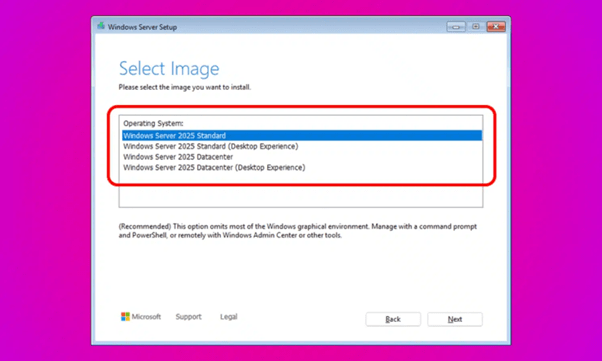
Next, follow the installation wizard instructions, which will guide you through the entire process step by step. Read each screen carefully and select the appropriate options. If necessary, create partitions on the disk and choose the location for system installation. Don’t forget to set an administrator password and configure network parameters according to your needs.
Activating Windows Server 2025 Standard
Upon completion of the installation, you need to activate Windows Server 2025 Standard using the product key. This is an important step that allows you to enjoy all the benefits of the licensed OS version. Here’s a step-by-step guide for activation:
Launch the command prompt as an administrator. To accomplish this, click on the “Start” button, type “cmd” in the search bar, then right-click on the “Command Prompt” result and select “Run as administrator”.
In the open window, enter the following command, replacing XXXXX-XXXXX-XXXXX-XXXXX-XXXXX with your product key: Dism /online /Set-Edition:ServerStandard /AcceptEula /ProductKey:XXXXX-XXXXX-XXXXX-XXXXX-XXXXX. Press “Enter” to execute the command. The activation process may take several minutes.
After executing the command, restart the server to apply the changes. Then, verify the successful activation in the system properties. To achieve this, right-click on the “This PC” icon and select “Properties”. In the window that opens, you should see information stating that Windows is activated and linked to your Microsoft account.
Conclusion
Let’s briefly review the key points we covered in this article:
Purchase product keys only from reputable suppliers and store them securely using encryption or specialized license management software.
Download the ISO file from the official Microsoft website and prepare a bootable USB drive with at least 8 GB of capacity and a FAT32 file system.
If necessary, change the boot order in the BIOS to boot the server from the USB drive and follow the installation wizard instructions, carefully selecting the required options.
Activate Windows Server 2025 Standard using the command prompt with your product key, and verify the successful activation in the system properties.
Remember that using keys from reliable suppliers is crucial for the stable operation of your server and ensures you receive all the benefits of licensed software, such as regular security updates and technical support.
If you encounter difficulties during the installation or activation process, don’t hesitate to contact Microsoft support or your supplier for assistance. Qualified specialists are always ready to provide you with help to answer any questions.
How to Secure and Activate Your Windows Server 2025 Standard Product Key was last modified: September 4th, 2024 by Evelina Brown
3D exterior visualization is a powerful tool used in architecture, urban planning, and real estate to create realistic and detailed representations of building exteriors before they are constructed. Unlike traditional 2D plans, 3D visualization allows designers and clients to explore every facet of a design, from the building materials to the surrounding environment. This technique is not only crucial for visualizing the final product but also for making informed design decisions early in the planning process.
In this article, rather than providing an overview of all aspects of 3D exterior visualization, we will delve into specific details that significantly contribute to the realism and effectiveness of these visualizations. By focusing on aspects such as lighting, texturing, vegetation, and post-processing, we can gain a deeper understanding of how each element plays a vital role in creating a convincing and aesthetically pleasing render.
Importance of Lighting in 3D Exterior Visualization
Lighting is one of the most critical aspects of 3D exterior visualization, as it fundamentally shapes the mood, realism, and overall impact of the scene. In architectural visualization, light does more than just illuminate; it interacts with materials, defines shapes, and enhances textures, bringing a scene to life.
Role of Natural and Artificial Lighting
Natural lighting, which includes sunlight, skylight, and ambient light, is essential for outdoor scenes. The direction, intensity, and color of natural light change throughout the day, creating different atmospheres in the same scene. For instance, morning light tends to be softer with warmer tones, while midday light is harsh and direct, casting sharp shadows. Evening light, on the other hand, often features a warmer, golden hue that can create a tranquil or dramatic effect.
Simulating artificial lighting is equally important in 3D exterior visualization, especially for projects involving night scenes or specific architectural elements like street lamps, building lights, or landscape lighting. Artificial lights, such as spotlights, area lights, and point lights, help emphasize particular aspects of the design, such as texture or structure. The combination of natural and artificial lighting in a scene requires careful calibration to maintain a balance that looks believable and aesthetically pleasing.
Techniques for Simulating Different Times of Day and Weather Conditions
One of the challenges in 3D exterior visualization is accurately simulating how light behaves at different times of day and under various weather conditions. Advanced rendering engines like V-Ray, Corona, and Unreal Engine offer tools to simulate the sun’s position based on geographic coordinates, allowing for precise control over the lighting conditions. Designers can simulate the sun at noon in summer or during a cloudy autumn afternoon, adjusting the light’s angle and intensity to match the desired time and atmosphere.
Weather conditions also dramatically affect lighting in exterior scenes. For example, a cloudy day diffuses sunlight, creating softer shadows and reducing contrast, while a clear day provides sharper shadows and more defined highlights. Simulating these conditions requires an understanding of atmospheric scattering, cloud opacity, and light diffusion, which can be achieved through careful manipulation of environmental settings in the rendering software.
Common Challenges and Solutions in Lighting for Exterior Visualization
Achieving realistic lighting in 3D exterior visualization presents several challenges. One common issue is balancing light and shadow to avoid flat or overly contrasted images. Overexposure or underexposure can ruin the realism of a scene. Solutions include using High Dynamic Range (HDR) images to provide realistic light reflections and exposure adjustments.
Another challenge is rendering times. Realistic lighting often requires complex calculations that can significantly increase rendering time. To mitigate this, designers use techniques like global illumination, light baking, and optimizing scene geometry to reduce the load on rendering engines without sacrificing quality.
Effective lighting is crucial for creating convincing 3D exterior visualizations. By mastering the art of light simulation, designers can produce renders that not only look real but also evoke the intended emotions, making the visualization more compelling and persuasive.
Texturing and Material Detailing
In 3D exterior visualization, textures and materials play a vital role in achieving realism and depth. While lighting sets the scene, textures and materials give objects their tangible qualities, making a digital render look like a photograph of a real-world environment. High-quality texturing and precise material detailing are what differentiate an average render from an exceptional one.
Importance of High-Quality Textures for Realism
Textures are essentially 2D images applied to 3D models to give surfaces their appearance, such as the grain of wood, the roughness of concrete, or the reflectivity of glass. The quality of these textures is paramount to the realism of the final render. Low-resolution or poorly applied textures can result in a flat, unconvincing appearance, breaking the illusion of reality.
High-resolution textures, on the other hand, allow for the fine details that our eyes expect to see, such as the subtle variations in color and pattern in natural stone or the slight imperfections in a painted surface. These details add to the realism by mimicking the complexity of real-world materials. Moreover, the correct application of bump maps, normal maps, and displacement maps can enhance these textures, adding a sense of depth and physicality to the surfaces.
Methods for Creating Realistic Materials
Creating realistic materials involves more than just applying a texture to a model. It requires an understanding of how materials interact with light. Different materials have unique properties, such as reflectivity, transparency, and roughness, which must be accurately replicated in 3D software.
For example, when simulating glass, the material needs to have the correct level of reflectivity and transparency, as well as the ability to refract light realistically. Similarly, a material like metal must show accurate reflections and highlights, capturing the interaction between the surface and its environment. The use of PBR (Physically-Based Rendering) materials has become a standard practice in achieving these effects. PBR materials are designed to reflect light in a way that closely mimics real-world physics, ensuring that materials look consistent under different lighting conditions.
Impact of Material Detailing on Perception
Material detailing significantly impacts the perception of a 3D render. The way materials are represented can influence how the viewer interprets the scene, affecting both the aesthetic appeal and the perceived quality of the architecture. For instance, a building façade with meticulously detailed brickwork, where each brick has slight color variations and imperfections, will appear far more realistic and engaging than one with a uniform, flat texture.
Additionally, materials can be used to convey specific architectural themes or styles. For example, using aged wood and weathered metal might evoke a rustic or industrial feel, while sleek glass and polished concrete can suggest modernity and minimalism. The choice and detailing of materials are therefore crucial in communicating the design intent and aesthetic vision of the project.
In summary, mastering texturing and material detailing is essential for creating convincing and visually compelling 3D exterior visualizations. By paying attention to the fine details and ensuring materials behave realistically, designers can elevate their work, making the digital representation of architecture not only accurate but also emotionally resonant.
Vegetation and Landscaping
Vegetation and landscaping are crucial elements in 3D exterior visualization that significantly contribute to the overall realism and aesthetic appeal of the scene. Whether it’s a single tree, a patch of grass, or a complex garden design, the way plants and outdoor elements are rendered can make or break the immersion of a 3D visualization.
Integration of Plants, Trees, and Outdoor Elements
Integrating vegetation into 3D exterior scenes requires careful planning and execution. The placement of trees, shrubs, flowers, and grass should complement the architectural design, enhance the environment, and guide the viewer’s eye through the scene. Trees can be used to frame a building, creating a natural border that draws attention to the structure. Shrubs and smaller plants can soften the edges of walkways and outdoor spaces, making them feel more inviting.
Moreover, outdoor elements like benches, fountains, and pathways should be harmoniously integrated with the vegetation. These elements need to be carefully textured and placed to ensure they look like natural parts of the environment. This integration helps create a cohesive scene that feels grounded and realistic.
Techniques for Creating Realistic Vegetation
Creating realistic vegetation in 3D visualization presents unique challenges, as plants are complex, organic forms with a high degree of variability. To achieve realism, designers often use specialized software and libraries like SpeedTree, Forest Pack, or Laubwerk, which provide a wide range of plant models with customizable parameters.
Realism in vegetation comes down to several key factors:
Variety: Realistic scenes include a variety of plant species, sizes, and shapes. This diversity mimics the natural world, where no two plants are identical.
Detailing: High-quality plant models feature detailed textures, including variations in leaf color, vein patterns, and surface imperfections. These details are crucial for close-up views.
Interaction with Light: Plants interact with light in complex ways, often transmitting light through their leaves (a phenomenon known as subsurface scattering). Accurate rendering of these effects enhances realism.
Another technique is using particle systems or scattering tools to distribute plants and grass naturally across the terrain. This method prevents the repetitive, unnatural look that can occur when the same plant model is used multiple times without variation.
Challenges in Maintaining Realism with Complex Landscaping
One of the main challenges in landscaping within 3D exterior visualization is balancing realism with performance. Highly detailed vegetation, especially in large quantities, can significantly increase the complexity of the scene, leading to longer rendering times and higher demands on computing power. To address this, designers often use Level of Detail (LOD) techniques, where plants closer to the camera are rendered in high detail, while those further away use simplified models.
Another challenge is ensuring that vegetation fits seamlessly into the terrain. Poorly integrated plants can appear to float above the ground or sink unnaturally into it, breaking the illusion of reality. Careful attention must be paid to the base of each plant, ensuring it interacts correctly with the soil or pavement, and using displacement maps can help create a more convincing ground surface.
Effective vegetation and landscaping can transform a 3D exterior visualization, making it not only more visually appealing but also more true to life. By paying attention to the placement, variety, and integration of plants, as well as managing the technical challenges, designers can create outdoor scenes that are rich, immersive, and convincingly real.
Camera Angles and Composition
In 3D exterior visualization, the choice of camera angles and composition is as important as the quality of the models and textures. These elements dictate how the viewer experiences the scene, guiding their focus and enhancing the visual narrative. Proper use of camera angles and composition can transform a simple architectural render into a compelling visual story.
Importance of Choosing the Right Camera Angles
The camera angle is the first step in setting the tone and perspective of the visualization. A well-chosen angle can highlight the architectural features of a building, showcase its relationship with the environment, and evoke specific emotions from the viewer. Conversely, a poorly chosen angle can obscure important details or create an unbalanced image that fails to communicate the intended message.
Different angles serve different purposes:
Eye-Level Shots: These are the most common and provide a natural perspective, allowing viewers to see the building as they would in real life. Eye-level shots are effective for creating relatable, grounded visuals that emphasize accessibility and human scale.
Low-Angle Shots: Placing the camera low to the ground and pointing it upwards can make a building appear more imposing and grand, highlighting its height and dominance. This angle is often used to emphasize the verticality of skyscrapers or other tall structures.
High-Angle Shots: Conversely, a high-angle shot, where the camera looks down on the building, can provide a broader view of the structure and its surroundings. This angle is useful for showcasing the overall layout of a site or emphasizing the integration of a building within its environment.
Aerial Views: Aerial shots offer a bird’s-eye perspective, perfect for visualizing entire complexes or urban developments. Drones and virtual flyovers are increasingly used to achieve this angle in both real and digital formats.
Rules of Composition in 3D Visualization
Composition in 3D visualization follows many of the same principles as traditional photography and painting. The rule of thirds, leading lines, and symmetry are all critical to creating a balanced and visually appealing image.
Rule of Thirds: This principle involves dividing the image into a 3×3 grid and placing key elements along these lines or at their intersections. This creates a sense of balance and harmony, guiding the viewer’s eye naturally through the scene.
Leading Lines: Lines that draw the viewer’s eye towards a focal point within the image, such as roads, pathways, or the edges of buildings, are powerful tools in composition. They help in directing attention to specific parts of the visualization, ensuring that the viewer sees the most important aspects of the design.
Symmetry and Balance: Symmetrical compositions can create a sense of order and stability, making the structure appear solid and reliable. On the other hand, asymmetrical compositions can introduce dynamism and tension, which might be more suitable for certain architectural styles or scenes.
Enhancing Visual Appeal Through Strategic Camera Placement
Beyond basic composition rules, the strategic placement of the camera can significantly enhance the visual appeal of a 3D exterior render. For instance, positioning the camera to capture reflections in a glass façade can add depth and complexity to the image. Similarly, using a wide-angle lens can exaggerate the perspective, making the scene appear more expansive and dramatic.
Depth of field (DOF) is another tool that can be used to focus attention on specific areas of the scene by blurring the foreground or background, mimicking the effects of a real camera lens. This technique is particularly effective in creating a sense of scale and spatial hierarchy, emphasizing the most important elements of the design.
By carefully selecting camera angles and employing thoughtful composition techniques, designers can create 3D exterior visualizations that not only showcase the architectural design but also engage and captivate the viewer, telling a visual story that resonates on both an aesthetic and emotional level.
Conclusion
In 3D exterior visualization, the devil is truly in the details. While the overall design and layout are crucial, it’s the meticulous attention to elements like lighting, texturing, vegetation, camera angles, and post-processing that elevates a render from ordinary to extraordinary. By focusing on these specific aspects, designers can create visuals that not only accurately represent the architectural vision but also engage viewers on an emotional level. Mastering these details requires both technical skill and artistic sensibility, but the results—a realistic, compelling, and immersive visualization—are well worth the effort.
Mastering the Art of 3D Exterior Visualization: A Deep Dive into Essential Details was last modified: September 2nd, 2024 by Colleen Borator
Did your new employer just request that you bring a voided check? Or did you stumble upon the word while browsing through a financial blog?
Whatever brought you here, you just came to the right place.
In this article, we will help you know what a voided check is and why it’s still a very useful tool today despite the fact that check usage has been declining as digital banking methods become more popular.
And that’s not all — we’ll even train you how to void your own check and when that’s necessary, as well as the common pitfalls to avoid when doing that.
In other words, we have all the lowdowns you need about voided checks, so walk along with us.
What is a Voided Check?
A voided check is a paper check with the word “VOID” written across it. Did you get that?
It’s just like the regular check, only that the word “VOID” appears across it in big letters to make it precisely what the name says — void!
Checks are becoming less popular. In fact, as per the report published by Walden University, every year sees 1.8 billion fewer checks written than the preceding year. The report proceeds to predict that by 2026, paper checks will likely become extinct.
On the contrary, the demand for voided checks seems to be on the rise. The reason? It all lies in the purpose and the benefits of having one. We’ll address the former shortly, and you can check out the advantages of a voided check. But for now, let’s see how you create one.
How to Void a Check Properly
In case your employer or any other institution requests a voided check, you’ll need to provide one. So, how do you create one?
You don’t need to contact your bank to request one. You can do it all yourself, and your bank won’t even have to know — and it’s a straightforward process!
To void a check, just get a personal check from your checkbook and write the word “VOID” in large letters across its entire face using a blue or black pen. Ensure that the writing is large and bold enough to be seen.
Also, ensure that the word doesn’t cover essential details written at the bottom of the check, and we’ll tell you why.
Alternatively, you can write the word “VOID” in any of these areas:
Date line
Payee line
Amount box
Amount line
Signature line
As long as the word “VOID” is clearly visible on any of these areas on the check, it ceases to be eligible for cashing or deposit. That’s it—your check is now voided!
Where Do You Need A Voided Check?
Now that you understand how to void a check, let’s examine circumstances that may necessitate it.
To begin, a voided check, although it may create the impression of being unuseful, is handy.
Let’s look at some of the scenarios when it’s needed:
Setting Up Direct Deposit
When joining a new company, you often need to provide your bank details. Nowadays, most employers opt to send their employees’ paychecks directly to their bank accounts, the payment method we’re referring to as direct deposit.
This method eliminates the traditional way of doing things, where one has to physically collect paychecks, deposit them into their bank, and wait for the check to clear. Instead, with a direct deposit set up, you receive your money as soon as your employer releases it.
Now, to facilitate this process, your employer will need your banking details. You could provide them manually in writing, but this comes with the risk of error while transferring the numbers onto paper, exposing you to the likelihood of losing your pay altogether!
This is where the need to void a check for direct deposits comes in. Your employer will use the check you’ve voided to get all the bank account information they need: your bank name, account and routing numbers. This eliminates the risk of error while writing, which is why we said the writing on it shouldn’t cover these details.
Regular Bill & Automated Loan Payments
Another area where you might need to use voided checks is when you want to set up automatic bill payments or loan payments. Providing a voided check authorizes the pertinent company, service provider, or financial institution to automatically deduct funds from your bank account when they are due, making bill payment easy and convenient. This is especially common in businesses that use order processing software to automate invoice generation and payment collection workflows.
Cover Up A Mistake
Perhaps you were drafting a check and just noticed that you wrote more zeros than you intended. This error can be very costly, especially when the person reading the check misinterprets the correction.
Again, you don’t want to discard the check because anyone who collects it might use it to get money from your account. In such a scenario, you may need to void the check. Voiding the check helps prevent this risk.
Linking Bank Accounts
If you’re trying to link two bank accounts, say your savings account, with your checking account, then you might be required to provide a void check, especially when dealing with online banks or credit unions.
This check will eliminate the need to write down all the bank details as you set up the account. You just have to attach a voided check, and you can get started with your online transactions.
Common Mistakes When Voiding a Check
As seen, voiding a check is a straightforward task. But are you more likely to make a mistake when creating one?
That’s right!
Here are some common mistakes to avoid when voiding a check:
Using a pencil: Unlike pen, a pencil is easily erasable, so avoid using it when voiding a check.
Covering over essential details on the check: This renders the whole idea of voiding the check useless, as we more often void it to provide these details.
Voiding the wrong check: It might look unlikely, but there have been several cases where people wrote “VOID” on the wrong check. Always double-check when voiding a check to eliminate this costly mistake.
Using the wrong type of pen: If your pen isn’t bold enough, the word “VOID” might not be clear and visible on the check. Always use a pen that is easy to read.
Issuing blank checks instead: Voided and blank checks aren’t the same. The latter can easily be filled out and used to withdraw money from your account, making it a risky approach.
Issuing Voided checks indiscriminately: As much as it’s voided, a voided check still contains sensitive information like your bank account number, check number, and routing number. Hence, only issue void checks to trustworthy institutions and not just to anyone who requests it. This trap is more common online, where thieves might request a voided check masquerading as legitimate companies or service providers.
Alternatives To Checks
Issuing voided checks is usually the easiest and most convenient way to share your bank information with the right persons with zero risks of committing errors. However, not all of us have checkbooks, and some of us who have them just don’t want to sacrifice a check.
Now, in case you fall under the former category, in that you don’t have a checkbook in the first place, you can walk into your bank or credit union and ask for a voided check from the teller. They will print one for you. Alternatively, you can even print your own checks from home!
However, if you have the checkbook but don’t feel like sacrificing a check, we still have other alternatives you can explore, such as:
Photocopy: You can photocopy a check and use the photocopy instead.
A direct deposit authorization form: Where an employer requests a voided check to set up direct deposit, you can instead use the direct deposit authorization form. There, enter all the needed details. Just ensure to check whether you’ve copied everything correctly before submitting the form.
Online banking portals: Most banks now have online banking portals. See if your bank allows you to print your bank account details or securely share them with third parties.
Bank statements: If you require a voided check and don’t have a checkbook but have some bank statements instead, they can suffice. This, however, means that you may need to expose more personal information than is necessary.
Conclusion
As we’ve seen, voided checks aren’t difficult to create or use. They come in handy on numerous occasions and are convenient, secure, and time-saving. But then, when creating one, you have to be careful not to make some of the common mistakes people make. As long as you’re keen on that, a voided check is safe and one of the most useful tools.
Still, you can use alternative methods to share your bank information, such as online banking portals and photocopied checks. Where needed by the employer, you can also opt to input the information manually on the direct deposit authorization form.
Voided Checks – What Are They Used For? was last modified: November 13th, 2025 by Olive Clinton