In today’s fast-paced and demanding work environments, it’s essential to prioritize tasks to ensure productivity and meet deadlines effectively. With numerous responsibilities and competing demands, mastering task prioritization becomes a valuable skill. Organizing and focusing on the most critical tasks allows individuals to optimize their workflow and achieve desired outcomes efficiently. This article will provide practical strategies and tips to help you prioritize essential tasks effectively in the workplace, leading to improved productivity and reduced stress.
Assessing Task Importance and Urgency
The first step in effective task prioritization is understanding the importance and urgency of each task. Importance refers to the impact and relevance of a job in achieving overall goals, while urgency refers to the timeline or deadline associated with the task. By evaluating tasks based on these criteria, you can identify which jobs require immediate attention and which can be scheduled for later. Tools such as Eisenhower’s Urgent-Important Matrix can help categorize tasks into four quadrants: important and urgent, important but not urgent, urgent but not important, and not urgent or important.
After categorizing the tasks, you will better understand what you need to accomplish first and what you can use to complete them. For instance, you can automate the tasks that are not urgent or important and delegate the tasks that are not important but urgent. In terms of automation, you can consider robotic process automation software to automate repetitive tasks. This software can save you time and energy, allowing you to focus on the more important tasks. But remember to review the automated tasks regularly to ensure accuracy and optimize their performance. This way, it can maximize efficiency and save you even more time.
Setting Clear Goals and Objectives
To prioritize tasks effectively, it is crucial to have a clear understanding of your goals and objectives. By aligning your tasks with the bigger picture, you can determine which tasks contribute directly to achieving your objectives. This clarity enables you to prioritize tasks that significantly impact your overall goals and differentiate them from those that may be less important or distractions. Regularly reviewing and reassessing your goals will help you stay focused and ensure that your priorities remain aligned with the desired outcomes. As a result, you will be more productive and effective in tackling tasks.
Creating a Task List and Ranking
Maintaining a comprehensive task list is a fundamental step in task prioritization. Start by listing all the tasks that need to be accomplished, regardless of size or complexity. Once you have a complete list, evaluate each job based on its importance and urgency. Rank tasks accordingly, prioritizing the most critical and urgent tasks. This process visually represents your workload and allows you to allocate time and resources. Consider using digital task management tools or simple to-do lists to organize and track your tasks effectively.
Considering Deadlines and Dependencies
Task prioritization should take into account deadlines and dependencies. Evaluate tasks with specific deadlines or dependent on other assignments being completed first. These tasks may require immediate attention to ensure timely completion or to avoid delaying other dependent tasks. By factoring in deadlines and dependencies, you can create a logical sequence for task execution and avoid bottlenecks or delays in project timelines.
Evaluating Personal Capacity and Resources
It’s essential to consider your personal capacity and available resources when prioritizing tasks. Evaluate the time, skills, and resources required for each job. Be realistic about what you can accomplish within a given timeframe, considering other commitments and potential interruptions. If necessary, delegate tasks or seek colleague assistance to ensure that essential tasks are completed efficiently. Understanding your limitations and leveraging available resources optimally will help you prioritize effectively and avoid burnout.
Flexibility and Adaptability
Despite careful planning, priorities may shift due to unforeseen circumstances or changing business needs. It’s crucial to remain flexible and adaptable in managing shifting priorities. Regularly review and reassess your task list, adjusting priorities as needed. Embrace agile methodologies that allow for quick adjustments and accommodate emerging priorities. Being adaptable enables you to respond effectively to new information or urgent requests while focusing on essential tasks.
Mastering the art of task prioritization is essential for success in the workplace. Following the strategies and tips outlined in this article, you can prioritize necessary tasks effectively, optimize your productivity, and reduce stress. Regularly assess task importance and urgency, set clear goals, create a comprehensive task list, consider deadlines and dependencies, evaluate personal capacity and resources, and embrace flexibility and adaptability. With these skills and approaches, you can confidently navigate your workload and achieve your professional objectives.
Learn How To Prioritize Important Tasks In The Workplace was last modified: June 20th, 2023 by Charlene Brown
Managing taxes is one of the most challenging responsibilities of any business owner. Small business owners often manage their finances and taxes while working with limited resources.
With the increased digitization of tax laws and record-keeping requirements, manual tax management approaches are no longer efficient. Fortunately, automated tax solutions have emerged that can help small business owners save time and money, reduce errors, and ensure compliance with tax laws.
In this article, expert Troy Renkemeyer will discuss some critical automated solutions available to small businesses to manage their taxes effectively.
Cloud-Based Accounting Software
Cloud-based accounting software, such as QuickBooks, Xero, and Wave, can help small businesses manage their books with ease and accuracy. These platforms offer features such as automated invoicing, expense tracking, and bank account reconciliation, freeing up time for business owners to focus on other aspects of their business.
Owners who already lean on automation for invoicing and reconciliation often round out their back office with dedicated payroll services for small businesses so that wage calculations and tax withholdings run on the same hands-off schedule.
In addition, these solutions store financial statements and records in a secure, accessible location, making it easy to manage taxes anytime and anywhere.
Cloud-based accounting software is one of the most effective automated solutions that small businesses can take advantage of. It helps streamline business operations by allowing business owners to manage their finances, regardless of location easily. Additionally, cloud hosted QuickBooks ensures seamless accessibility and enhanced collaboration, further optimizing business efficiency
Instead of the traditional paper-based method, business owners can easily keep track of their expenses, track invoices, and generate reports using cloud-based accounting software. This undoubtedly saves time and resources and allows small businesses to focus on what truly matters – growing their business.
Automated Tax Calculators
Calculating taxes can be a complex process. Automated tax calculator solutions such as TaxJar help small businesses accurately calculate and file sales tax returns.
These solutions offer real-time calculations, making it easy for businesses to keep up with changing tax laws. Automated tax calculators can also integrate with e-commerce platforms such as Shopify and Amazon to simplify tax calculation and collection pro.
More worrying if you’ve made a mistake or spent hours poring over numbers – an automated tax calculator does all the work for you. It’s like having a virtual accountant at your fingertips, freeing up your time to focus on growing your business.
With automated solutions like these, tax time may become enjoyable.
Payroll Management Software
Payroll management can be a time-consuming and error-prone process. Automated payroll management software such as Gusto and ADP can simplify the process.
These platforms automate tax filings, provide electronic payslips, and ensure compliance with payroll laws. They also calculate employee taxes, 401(k) contributions, and other deductions, reducing the chances of errors.
By automating this process, small business owners can reduce the likelihood of errors and minimize the potential for penalties, freeing up time and resources to focus on more important matters. Moreover, payroll management software can be particularly beneficial for small businesses with limited resources that can’t afford a full-time finance team.
Adopting this technology can help small businesses save time, reduce costs, and ensure payroll compliance.
Automated Record-Keeping And Receipt Capture
Tracking and storing receipts is an integral part of tax compliance. Automated record-keeping and receipt capture solutions such as Expensify make it easy for small businesses to track receipts and expenses.
These solutions use optical character recognition (OCR) technology to scan receipts and capture relevant information such as date, amount, and vendor. The integrated mobile app allows business owners to snap photos of tickets on the go, reducing the chances of lost paper receipts.
This technology can collect and categorize financial information and track expenses, income, and revenue. Additionally, receipt capture is another automated solution that can help small businesses streamline the tax process.
With this tool, all receipts can be stored electronically, eliminating the need for manual data entry and minimizing the risk of lost tickets. These automated solutions make tax season smoother and far less stressful for small business owners.
Tax Filing And Payment Services
Filing and paying taxes can be a daunting task for small business owners. Automated tax filing and payment solutions like TaxAct and TurboTax provide a streamlined process for businesses to file their taxes online.
These solutions offer step-by-step guidance, automated calculations, and error checking, ensuring accurate and timely filing. They also allow businesses to pay taxes electronically, eliminating the need for paper checks and postage.
These automated solutions help small business owners keep track of deadlines, deductions, and other tax-related tasks, ensuring they stay fully compliant with federal and state tax regulations. Tax filing and payment services also save small business owners time and resources, so they can focus more on growing their businesses.
As such, reducing the stress and time commitment of managing taxes has the potential to make small business owners’ lives much more accessible.
Final Thoughts
According to Troy Renkemeyer, small businesses need efficient and effective tax management solutions to stay compliant and keep their finances in order. Automation offers a cost-effective and time-saving way to manage taxes for small businesses.
These services are just a few of the many automated solutions available to help small business owners easily manage their taxes. These solutions help save time, reduce errors, and guarantee compliance, ultimately contributing to the long-term success of any small business.
Troy Renkemeyer Discusses Automated Solutions to Help Small Businesses Manage Their Taxes was last modified: June 13th, 2026 by Austin Cooper
Patients are put through enough medical-related hardships and trying to find the right care can be an overwhelming experience. That’s why physical therapy services using specialized software is such a revolutionary asset in the healthcare system; it streamlines paperwork, enables more efficient treatments, and maximizes patient safety. This advancement has changed the way that therapists provide their services while cutting costs and ensuring the accuracy of information.
With this technology, professionals have created a management system that makes it easier for patients and staff members alike to get the care they need without complications or extra stressors. Through this blog post, we’ll explore how physical therapy software is revolutionizing patient care!
Introducing Physical Therapy Software and its Benefits
Physical therapy software is a comprehensive suite of tools tailored specifically for the physical therapy industry. It enables PTs to store and access patient records, schedules, and more all in one place. This software also helps with billing and payments, as well as communication between patients and healthcare providers by offering secure messaging options. On top of that, it can generate physical therapy patient engagement software that is revolutionizing the world of patient care. By allowing therapists to engage directly with patients and provide more timely, personalized treatments and interventions, these advanced medical technologies offer a range of potentially life-changing benefits.
Patients can take advantage of secure online collaborative treatment plans while easily accessing patient records, scheduling upcoming appointments, completing questionnaires, and streaming live videos for remote physical exams—all within a secure digital platform.
The practicality and convenience of this exceptional form of technology decrease the amount of time wasted between visits for both patients and clinicians alike—improving efficiencies in communication on both sides—allowing everyone involved to work smarter (not harder) when it comes to achieving healthier outcomes faster.
How Physical Therapy Software Streamlines Patient Care
Physical therapy software is revolutionizing patient care, streamlining the entire process for both clinicians and patients alike. This high-tech solution helps make the therapeutic journey easier to manage, giving healthcare professionals access to the critical data needed for accurate and timely decision-making.
With features that provide integrated document management, automated patient reminders, follow-up appointment scheduling, and direct communication capabilities between patient and clinician, physical therapy software simplifies the entire care experience. By reducing manual workflows and providing more efficient insights into a patient’s progress, this advanced technology can save clinicians time while offering better care at a lower cost.
Leveraging Technology to Improve Outcomes for Patients
Leveraging technology to improve patient outcomes is quickly becoming the new Gold Standard for physical therapy care. As healthcare shifts to a digital-first approach, physical therapy software can serve as a key ally to both patients and providers – offering insights that allow more time for meaningful moments during consultations and more personalized treatments with better measurable outcomes.
By providing clinicians with access to improved analytics, digital collaboration tools, and automated administrative tasks, physical therapists are able to have more time and flexibility when recommending interventions to their patients – ultimately leading to improved outcomes as well as higher levels of satisfaction from both sides. As such, digital solutions are transforming the industry in previously unimagined ways and bringing us one step closer to an ideal future of healthcare.
Enhancing Communication Between Clinicians and Patients
The advancements in physical therapy software are allowing for a greater degree of communication between clinicians and patients. For example, rather than relying on traditional methods such as handwritten notes and paper records, physical therapists can now use virtual video sessions and specialized tools to provide real-time feedback to help patients manage their treatments. This type of interactive dialogue enhances conversations and allows practitioners to better understand the individual needs of each patient.
Additionally, this improved communication can further help clinicians customize treatment plans to meet the unique conditions and behaviors of each patient, leading to a superior outcome. In sum, physical therapy software is revolutionizing patient care by enabling enhanced communication between clinicians and patients.
Case Study: A Physical Therapy Practice Reaps the Benefits of Software
A physical therapy practice has seen the huge benefits that come with implementing physical therapy software. After transitioning to a digital platform, the practice was able to dramatically reduce administrative tasks such as reminder calls and manual scheduling. Additionally, the software allowed for greater insight into patient progress – allowing them to continuously adjust treatment plans and create more meaningful conversations with patients.
Furthermore, the software provided the practice with better access to patient data for reporting and analysis – allowing them to track outcomes and develop new strategies. Overall, this physical therapy practice was able to achieve a much more efficient workflow by leveraging the power of software-driven technology. Physical therapy software is revolutionizing the way physical therapists deliver care to their patients.
By providing clinicians with more efficient insights into patient progress and enhanced communication capabilities between providers and patients, this technology can drastically improve patient outcomes as well as reduce manual processes for both sides.
The Future of Physical Therapy Software
Even though physical therapy software has been around for a while now, its potential impact on patient care is still just beginning to be realized. With technologies like virtual healthcare, integrated artificial intelligence (AI) components, and a shift toward personalized treatments and services, physical therapy software is poised to revolutionize the healthcare sector in unprecedented ways.
Here’s the incredible thing: not only will physical therapy opportunities become more accessible as a result, but patients can also expect improved patient outcomes backed by scientific data and evidence-based practice models.
On top of that, physical therapists will find their time freed up to focus on developing relationships and providing personalized attention to their patients. The future looks bright for our healthcare systems – and I can’t wait to see the amazing things that physical therapy software will accomplish in the years ahead!
Physical therapy software is revolutionizing patient care by providing easy-to-use tools to streamline patient care, improve outcomes for patients, and enhance communication between clinicians and their patients. With the use of this specialized software, physical therapy practitioners are in a better position to provide more effective and efficient care for their patients. The case study showed how one practice was able to reap the benefits of software-driven care and improve its efficiency as a result.
Furthermore, looking ahead, the potential impact of physical therapy software on patient care is immense. As technology advances and more healthcare providers adopt digital solutions like physical therapy software, we will likely see additional improvements in the quality of patient care that can drastically benefit clinicians, their practices, and their patients.
How Physical Therapy Software Is Revolutionizing Patient Care was last modified: March 26th, 2025 by Charlene Brown
Website monitoring, at its core, is more than just a means of keeping an eye on various metrics. Among other things, website monitoring allows you to maintain the right level of relationship between the website itself and the services related to its development. Not to mention, website user satisfaction levels will also be high if website performance monitoring works how it should.
It’s simple – with properly configured performance and stability monitoring, the website owner can quickly troubleshoot problems that arise. Accordingly, this helps to keep downtime to a minimum, as well as the time of various failures, ranging from the reduced speed of access to pages and server instability, and not loading for some reason content.
All of this directly affects the perception of the website by the services responsible for advertising, development and promotion. For example, Google Search and Google Ads immediately lower the rankings in their results if a website is slow or unavailable. Similarly, users are more likely to go to a competitor if they see any serious and lasting problems with the website.
The above means that it is obvious that monitoring the performance and stability of a website should be given quite a lot of attention. At a minimum, you need to understand how everything works, how to configure everything, and how to properly look for the sources of problems with the website when problems arise.
Website monitoring methods
When the Internet first started, website monitoring was a pretty simple thing. A few fairly simple tests were enough to keep almost everything under control. But today, the process has become so complex that all the methods and tools for diagnosing the performance and stability of websites have simply become impossible to generalize into one category.
Therefore, website monitoring tools and methods are divided into several subgroups or, rather, levels, the essence of each of which must be understood correctly. As it makes it much easier to respond to the appearance of problem signals in the logs of complex monitoring systems working in real-time.
Essentially, there are three types of website monitoring – synthetic monitoring, real-user monitoring (RUM) and application monitoring. And one of the most used monitoring methods is synthetic monitoring. It is the generic name for all tools related to the emulation of user requests or actions.
In simple terms, this group includes anything that allows you to reproduce, in one way or another, the actions of website visitors, which can somehow signal the appearance of critical errors. Typically, synthetic monitoring tools send requests to the website at certain intervals. More often than not, it is in accordance with a pre-configured schedule.
Such tools, quite obviously, also conduct logging in addition to the website testing itself. This allows the webmaster or website owner to track the occurrence of similar problems in the past and find patterns, and if necessary, to accurately indicate the time of the problem when contacting, for example, the support of the hosting provider.
Such an approach minimizes the chance of creating critical loads on the website or server. This is especially critical in situations where the website is already experiencing an influx of visitors.
Low-level monitoring basics and tools
Low-level website monitoring involves, quite logically, the use of basic stability and performance diagnostics. It includes mainly checking the website’s response to requests over the standard protocol stack, as well as general monitoring of the website’s uptime and stability. In other words, the foundation of all monitoring is working with HTTP, HTTPS and uptime and downtime metrics.
The best approach to basic monitoring, especially if advanced tools for your website are not too necessary at this stage of development, is to use automated monitoring systems. For example, using a tool to check website uptime with notifications – host tracker, as well as other basic tests available on this platform, makes it easy for even a novice to perform basic website diagnostics around the clock. HostTracker platform will not only keep logs, but will notify the website owner or webmaster if a problem occurs.
By doing just basic low-level website monitoring alone, you will be able to identify and even prevent a lot of website back-end problems, and troubleshoot accessibility and stability issues. But it is important to understand that this type of monitoring does not monitor the internal problems of the website or the server where it resides. And if your website has a complex structure and functionality, then you need a higher level of monitoring.
Mid-level monitoring and tools
As mentioned above, if your website needs more serious monitoring, you need to use more serious tools. And mid-level tools will allow you to take an in-depth look at the health, stability, and performance of your website along with an inside look at various networking problems.
Mid-tier monitoring instruments, including website blacklist check service on host-tracker and a lot of other tools, simulate a network behavior along with a much larger number of types of user requests as well as various user actions. Which effectively makes mid-level website monitoring the entry level of functional monitoring.
But it’s worth keeping in mind that this approach is still far from full-fledged functional QA testing. Not even RUM tools, only a human tester capable of real-time client-side actions can perform it to the fullest extent. So you’ll only get basic information about the website’s response to an extended range of user requests.
High-level monitoring and tools
In addition to an extensive set of tests on various Internet protocols, high-level website monitoring includes diagnostics of TCP connections, various elements of web pages, functional add-ons and third-party applications, as well as internal diagnostics of server stability and performance.
Among other things, it also includes monitoring database performance, server hardware temperature and load, as well as other parameters that can be affected in one way or another by users and their requests. This section also includes advanced network infrastructure monitoring, including using host-tracker web traceroute monitor service to detect and, if necessary, change various network parameters to improve website performance and access speed.
Thanks to the high-level tools it is possible to identify a large number of system and software problems of the website, as well as malfunctions of various elements. For this reason, advanced website performance monitoring is the main surveillance tool for developers.
Main website monitoring metrics and indicators
Website monitoring, as discussed earlier, requires not only an understanding of which tools to use in which situations, but also what they diagnose. That said, it is far from necessary to delve into the topic right away and learn how to understand the vast number of metrics and indicators that you need to pay attention to while reviewing monitoring logs or problem alerts.
For the novice website owner or novice webmaster, it is important to know about the most important metrics and indicators. Because they will be the most important ones when working not only with the website, but also with the related services. Moreover, they will be critical for search and advertising services, as well as for various affiliate programs. In other words – it is important to know and understand what metrics and indicators determine the reliability of a website for users and various systems.
Uptime
Website uninterrupted working time, or uptime, is the main metric that various systems, such as Google Ads or Google Search, focus on. It is the value of this metric that is crucial for determining the reliability of a website, so it should always be monitored, and that is why it is part of basic low-level monitoring.
In simple terms, uptime is the percentage of time a website has been up and running continuously versus when it is completely unavailable from the outside. In addition to the basic downtime caused by the complete unavailability of the server where the website resides, third-party services take into account any complete unavailability of the website. Even if it is caused by problems on the network side.
Page load time
Page load time is an indicator that is as important for third-party services as uptime. In this case, as well as uptime, this indicator is not unambiguous and accurate. As it is divided into two separate and their own important values – the loading time visible part of the page and the total load time.
Visible page load time – the time it takes for a user to visit a website and see the main content at the top of the page. It should not exceed 3 seconds, since this indicator is used not only by users (who, according to statistics, leave the site if it takes longer to load), but also by search and advertising services, such as Google Search and Google Ads.
Full page load time – The time it takes for all elements on a web page to fully load, from content and files to databases, functional elements and related third-party applications. It’s also considered by search and advertising services and is part of Google’s overall assessment of the reliability and performance of websites.
Database performance
Database performance is another important indicator of website performance, especially critical for online stores and other direct-to-consumer platforms. The more complex functionality becomes available to regular website visitors, the more important database performance becomes.
This is due to the fact that complex websites work with database queries much more frequently and intensively than simple websites. Which is quite logical and obvious. And properly configured database monitoring allows you to identify problems with query processing, the appearance of large queues, hangs, non-working data cells and so on. This, in turn, allows the webmaster to effectively optimize databases and significantly speed up the work of the website as a whole.
Server hardware performance
Given all the above-mentioned metrics, it is impossible not to mention the performance of the server – it is important to monitor it in order for the website to work as efficiently as possible, regardless of the load. In addition, a stable and fast-running server will immediately exclude iron faults from the list of sources of problems.
It is important to keep in mind that problems with the website itself affect the server in the same way that server problems affect the website. In other words, if the server hardware gets unusually high loads, and the other monitoring systems do not show any problems, then something in the website is not optimized. And the problem has grown to such an extent that it causes high loads on the server iron.
And in most cases with a high load on the server problems will be experienced in general the entire website, and slowly or unstably will work all of its functionality. This will lead to a deterioration of all of the above parameters and many other problems.
Website Monitoring Methods and Important Metrics was last modified: May 13th, 2025 by Colleen Borator
If you manage a business that generates a lot of waste, you know how important it is to have good software to help you track and manage all that waste. But with so many options on the market, how do you choose the right one for your business? This blog post will share some expert tips for choosing the best waste management software for your needs. Whether you’re looking for something simple and straightforward or more robust and feature-rich, we’ve covered you.
Make Sure It’s Compatible
When integrating new technology into our lives, it’s important to ensure that the product we’re investing in is compatible with our other devices. Unable to access or use certain applications or functions due to incompatibility can be frustrating and expensive.
The best way to avoid this problem is by recognizing compatibility limitations when making a purchase. Suppose you want to optimize your garbage truck routes, then you need waste collection software compatible with the fleet management software you already use. Do your research and make sure that the software you choose is compatible with the systems, tools, and programs you’re already using.
Define Your Needs
When exploring our needs and ensuring they are met, self-awareness is the key. We need it to avoid becoming trapped in unfulfilling cycles or taking action without even understanding why we are doing so. Developing a strong sense of what we need can empower us to advocate for ourselves and live a life true to our values and goals. Taking the time to define your needs regularly and thoroughly is an incredibly helpful practice; small check-ins throughout the day or the week will reinforce those needs and keep them at the forefront of your life.
Research Different Options
Taking the time to research different options is essential when making decisions. Whether selecting a new laptop, hiring an employee, or choosing a home renovation contractor, it pays to explore all your choices. Often, hidden gems are lurking in out-of-the-way places that could be the perfect fit for your needs and budget. Be bold and talk to multiple providers or visit three or four stores before you make a purchase. Knowing that you’ve researched every possible option will help ensure that you make an informed decision with little regret afterward.
Consider Ease of Use
Ease of use is an essential feature for any product or service that must be considered when launching or updating a new item. Many customers care about how easy something is to figure out, from the initial setup process to ongoing maintenance. If a product is easy enough for users to understand, you’re likely to have frustrated customers and a higher rate of returns and dissatisfaction. Making sure your product is well-tested and intuitive should be priority number one. Do focus groups before launch, and ensure you’re offering support options like live chat on your website so customers can get help working through issues promptly if they need it.
Get a Free Trial
If you’ve been looking for a way to jump into something new and exciting, consider taking advantage of a free trial. It’s the perfect way to experience the product or service with no strings attached – you can decide if it is right for you without ever having put down any hard-earned money.
Finding an available free trial could be your key to discovering something extraordinary for whatever kind of product or service you’re looking to test out. And, at the very least, you’ll have gained some valuable insight and experience for free. So don’t delay: look at what free trials may be available and start seizing the opportunities that await you today.
Go For the Best Value
No matter what you’re about to purchase, going for the best value doesn’t have to mean sacrificing quality. The key is researching and making informed decisions before spending your hard-earned money. Making the extra effort to explore various features and price points can save you a bundle of cash over time, especially with big-ticket items like electronics or furniture.
Sure, sometimes buying top-of-the-line guarantees longer product life, but if you locate a great deal on that lesser brand without compromising quality, don’t hesitate to go for it. Remember: Always keep an eye out for the best value when shopping around.
Once you’ve considered all the factors above, it’s time to decide and choose the waste management software that’s right for your needs. With so many options available, it can take time to figure out where to start. But by taking the time to do your research and understand your needs, you’ll be able to find the perfect software for your business – and get started on reducing waste and becoming more efficient.
Expert Tips for Choosing Waste Management Software was last modified: February 20th, 2023 by Allen Brown
Service management software manages and automates various services and processes within an organization. It covers many services, from customer service to IT support, and helps organizations improve the quality and efficiency of their service delivery.
IT service management software is designed to help organizations improve service delivery and reduce the time and resources required to manage services. It can be implemented as a standalone solution or integrated with other systems, such as CRM or project management software, to provide a complete and unified view of the service management process.
This feature helps organizations track and resolve incidents promptly and efficiently through a structured incident workflow in ITSM. It includes the ability to create, update, and close incidents, as well as the ability to assign incidents to specific technicians
Problem management
This feature helps organizations identify the root cause of incidents and prevent them from recurring. It includes the ability to analyze incidents, determine the underlying cause, and implement solutions to prevent similar incidents from happening in the future.
Change management
This feature helps organizations control and manage changes to the IT environment. It includes the ability to request, approve, and track changes and ensure that changes are made in a controlled and secure manner.
In these situations, experienced IT support services have the role of overlooking the change management process and ensuring that all changes are implemented smoothly. Ensuring the transition of changes smoothly is often the difference between a successful implementation and a failed one.
Configuration management
This feature helps organizations manage and maintain accurate information about their IT environment. It includes the ability to store and manage configuration data, as well as the ability to track changes to the configuration over time.
Asset management
This feature helps organizations manage and track their IT assets, such as hardware, software, and licenses. It includes keeping track of asset information, such as location, ownership, and status, and generating reports and alerts when assets are nearing the end of their life cycle.
Knowledge management
This feature helps organizations store and manage information and knowledge about their services and processes. It includes the ability to create and store articles, procedures, and best practices. It also makes it easy to search and access this information when needed.
Service level management
This feature helps organizations monitor and manage the quality of their services. It includes the ability to set and monitor service level targets, as well as the ability to report on service level performance and identify areas for improvement.
Service desk
This feature provides a centralized point of contact for customers to report incidents and request services. It includes the ability to create, manage, and track requests, as well as the ability to provide customers with regular updates on the status of their requests.
The Bottom Line
IT service management software is an essential tool for organizations that need to manage and deliver services to their customers and stakeholders. Its powerful features and flexible integration options provide organizations with the tools and insights they need to improve the quality and efficiency of their service delivery and meet the changing needs of their customers. It also gives companies a competitive advantage in a highly evolving business environment.
What Are the Key Features of Service Management Software? was last modified: April 7th, 2026 by Jamesh
Warehouse operations and logistics firms benefit from implementing the latest tech innovations to gain a competitive edge in the market. Digital distribution and e-Commerce are booming, putting pressure on warehouse owners to achieve peak efficiency with their supply chain.
Organizational solutions such as bins, totes and dividers are the low-tech and economical start. They bring together safety, durability, cost-effectiveness and simplicity to warehousing. The upfront costs are low compared to high-tech solutions. In the long term, the benefits are more than obvious.
A bulk of warehouses reportedly plan to increase the spending on technology in the following years, so falling behind is not an option. Many self storage companies have also been improving their tech with cameras, keycodes and links to your phone.
1. Data interchange
Big data has spurred dynamic shifts across all industry sectors, and warehouses are no exception. EDI (Electronic Data Interchange) allows owners and managers to share documents between two computer systems. These files often involve purchase and shipping orders, stock transfer receipts, and shipping and inventory advice.
Integrating EDI into the warehouse management system (WMS) brings forth the seamless flow of information between different devices. This is made possible with solutions such as standard format and compatibility of EDI documents. Now all parties can collaborate more transparently and let the operations run like clockwork.
2. Enhanced Training Programs for Warehouse Staff
The digital revolution has not only transformed the hardware and software of warehouse operations but has also redefined the approach toward staff training and development. Among the innovative training methods being adopted, online certification programs stand out for their convenience and effectiveness. For instance, online scissor lift certification equips warehouse employees with the necessary skills and safety knowledge to operate scissor lifts efficiently. On the other hand, those who have completed online forklift certification programs have shown a higher level of accuracy and efficiency in their work.
This form of training ensures that warehouse personnel are up-to-date with the latest operational standards and safety regulations, thereby minimizing accidents and enhancing productivity. Adopting such digital training solutions represents a significant leap forward in preparing the workforce to meet the challenges of modern warehouse management.
The professionals behind Quickline Storage explain how high-quality racking and organizational systems directly impact the overall safety and speed of daily warehouse tasks. Implementing these physical infrastructure improvements alongside modern digital training creates a comprehensive approach to operational excellence.
3. Cloud Storage
Cloud storage solutions have induced similar developments and improvements in WMS. They make the data available at the fingertips to anyone with internet access and authorization. “Legacy systems” no longer cut it in the high-tech information age, and the switch to cloud technology is gaining momentum.
Self-updating and hosted computer systems bring down the cost of maintenance, labor, and infrastructure. Their cost-effectiveness comes from their ease of use, which means all staff members can contribute to the transition. Before making a decision, however, one needs to figure out who will own the data, have access to it, and where it will be physically stored.
4. Diligent drones
Drones have many possible applications, driving the accelerated automation process. These versatile airborne machines now handle demanding tasks that require many man-hours. For example, scanning the barcodes in the warehouse stacked to the roof is an ordeal for humans, who must utilize an elevated work platform or a forklift.
On the other hand, a drone carrying scanners can complete this activity in the same time it would take 80 workers to pull it off. Yet, before we witness widespread adoption, some challenges regarding safe navigation through the warehouse remain to be tackled.
5. The Age of the Robots
To reap the benefits of full automation, warehouses are investing in robotics. Manufacturers from Kiva Systems provide robots capable of managing inventory, picking and stock take. Amazon’s small orange machines have a defined area of operations, learn where to take inventory from, and take it to the workers.
They have a pallet-like object on the back and move around the facilities with ease. This transformation from the man-to-goods process to goods-to-man marks the dawn of the revolution in logistics. There are many other examples of autonomous mobile robotics (AMR), letting business owners accomplish high volumes of small, multi-line orders and satisfy the rising demand.
6. High-tech lift trucks
The lift truck market is undergoing rapid growth, with new cutting-edge products flooding the market. First attempts to use tablets on these vehicles were not overly successful, but today’s specialized device mounts can withstand shocks and vibrations. Thus, full time-use of portable devices has become a reality, speeding up data collection.
Armored tablets are put on forklifts and other workhorse vehicles, enhancing the efficiency across the warehouse. Furthermore, many lift trucks now have digital controls that are easier to read and calibrate. Finally, experts argue that hydrogen cell forklifts will outpace gas-powered models. These killer machines are already used in large-scale operations of BMW, Walmart and Coca-Cola.
May the Tech Force be With You
Technology is a major force in warehouses and logistics and is used to make operations future-proof. One must not miss the chance to boost the level of performance and flexibility, as well as data sharing. Each component of the supply chain must work like a charm, and human workers are now accompanied by drones and robot helpers, creating a whole new warehouse landscape. The upcoming advances and novelties will continue to influence operations across the globe, so do not let budgetary constraints pose a hurdle on the road to success.
5 Warehouse Tech Innovations from Around the World was last modified: May 13th, 2026 by Cyril Smart
Law firms have revolutionized how they conduct business over the last several decades, moving away from paper-based systems and embracing technology to improve efficiency and accuracy. One of the major changes that have been made is using customer relationship management (CRM) software. CRM software provides law firms with powerful tools to streamline their operations, create more efficient communication with clients, and better understand customer needs. This article will discuss why law firms should use CRM software to increase efficiency and maximize success. Let’s get started.
Improved Client Communication
CRM software enables law firms to communicate with their clients more efficiently. By using a CRM system, a Personal Injury Law Firm can keep track of its clients and easily send out updates, reminders, messages, and other important information. Additionally, the software can be used to set up automated emails or even SMS notifications for clients. This way, law firms can ensure they stay on top of any case developments and provide regular updates to their clients.
When choosing a CRM to improve client communication, selecting a system with features to manage client data, store documents, and track activity is important. This can help the firm better understand its client’s needs and preferences and provide more personalized service.
Enhanced Organization
CRM software helps law firms keep organized by automating processes such as tracking leads, organizing case files, and scheduling tasks. Additionally, the software allows law firms to quickly access information such as clients’ contact details and case notes, which can help them save time and increase efficiency.
CRM systems also provide law firms with powerful reporting capabilities. By using the software’s analytics tools, a firm can easily generate reports on its performance, identify trends in client behavior, or even compare against competitors. Additionally, implementing AI legal case management software can further enhance the efficiency of a law firm’s operations. Leveraging artificial intelligence can help firms automate routine tasks, allowing attorneys to focus on more complex legal issues and client interactions.
Cost Savings
CRM software can help law firms save money in the long run. A firm can free up its staff to focus on more high-value work by automating mundane tasks. Additionally, CRM systems provide an efficient way for the firm to manage its clients’ data and maintain secure backups of important files. This can help avoid costly errors and reduce liability.
Moreover, some CRM solutions offer a pay-as-you-go model with no long-term contracts or large upfront costs. This can benefit firms with limited budgets that must manage their expenses carefully. So, regarding cost savings, CRM software is a great solution.
Analytics and Artificial Intelligence
Law firms can leverage the power of analytics and artificial intelligence to make better decisions. By using the data collected from its CRM system, a firm can gain valuable insights into its clients’ behavior and preferences. This way, it can create more effective marketing, sales, and customer service strategies.
In addition, some CRM solutions offer AI-powered automation to help firms speed up their processes. For example, they can automatically route leads or contacts to the appropriate team members, set up a workflow for tasks such as document management and approvals, or even provide real-time alerts when certain conditions are met.
Marketing Automation
CRM software can also be used to automate marketing activities. By leveraging the powerful analytics capabilities of a CRM system, a firm can quickly analyze its data and identify potential opportunities.
Additionally, some CRM solutions provide features such as lead segmentation, email automation, and campaign management that can help law firms streamline their marketing operations. For instance, they can create targeted campaigns and track their performance, identify high-value leads, and personalize emails to send out tailored messages to specific clients.
Sales Pipeline Management
CRM software can help law firms better manage their sales pipeline and increase revenue. The system can provide the firm with insights into prospects and buyers, such as their buying habits, preferences, and contact information
By using a CRM system’s powerful analytics capabilities, a firm can identify opportunities to upsell or cross-sell its services. Additionally, it can use the system’s workflow automation features to streamline processes such as lead nurturing and prospecting.
Centralized View of Clients Data
Finally, a CRM system can provide a centralized view of clients’ data. This way, law firms can quickly access the information they need to ensure a consistent and personalized experience for their clients.
This data can be used to create more effective marketing campaigns and customer service strategies. For instance, a firm can use the analytics tools of a CRM system to analyze its clients’ behavior and preferences and create tailored messaging.
Law firms can benefit greatly from using CRM software. The system provides powerful analytics and automation capabilities to help the firm save time, reduce costs, and increase efficiency. Additionally, it offers features such as lead segmentation, email automation, and campaign management that can help a firm streamline its marketing operations. Finally, the system provides a centralized view of clients’ data to help firms create more effective strategies and provide better customer service. Therefore, law firms should consider implementing CRM software to stay competitive in the legal industry.
Reasons Why Law Firms Should Use CRM Software was last modified: April 7th, 2026 by Allen Brown
Apple ID is of great importance for iOS users, mainly helping with authentication. However, it will be locked and become disabled if a risk of information leakage is detected, preventing you from normally using your iCloud, iTunes, App Store and more. How can you rescue your iPhone when Apple ID locked for security reasons? Here 3 best solutions are shown for you to test so that you can unlock Apple ID quickly at home.
1. How to Unlock Apple ID without Password Using iOS Unlocker
The most effective and professional solution to get your iPhone unlocked without Apple ID is resorting to iOS unlocking software like Joyoshare iPasscode Unlocker. With its assistance, you’re able to remove Apple ID without password for resetting, regardless of it’s locked, disabled or unavailable with a previous owner’s account. Also, you don’t have to worry about which status Find My feature is. Simply get rid of your Apple ID from any models of iPhone, iPad, and iPod touch. It ideally supports the latest iOS 16.
Remove Apple ID from iPhone/iPad/iPod without password
Salvage your iDevices under any Apple ID locked situations
Compatible with nearly all popular iOS versions, even iOS 16
Bypass MDM restrictions and turn off Screen Time passcode no data loss
Unlock types of screen locks, like Face ID, digital passcode and more
Step 1: Run Joyoshare iPasscode Unlocker and Connect iDevice
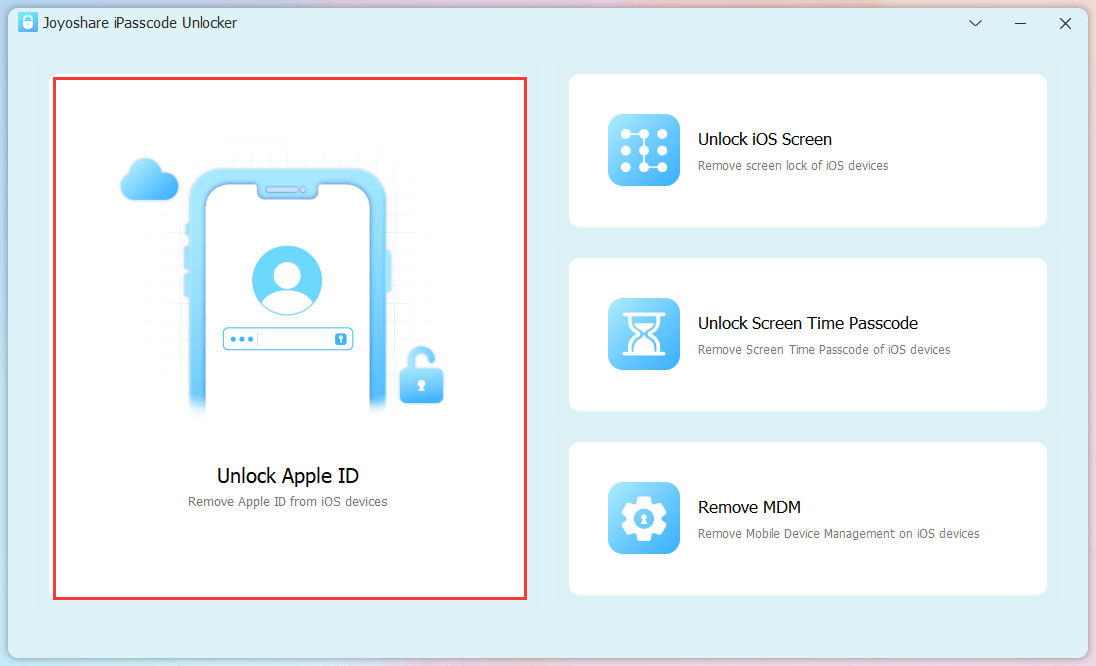
Get a compatible Joyoshare iPasscode Unlocker software downloaded. Quickly finish installation and launch it on the desktop. Then use a USB cable to connect your iOS device with computer. In the main interface of this program, select “Unlock Apple ID” and click “Start” to go on.
Step 2: Check and Confirm Device Status
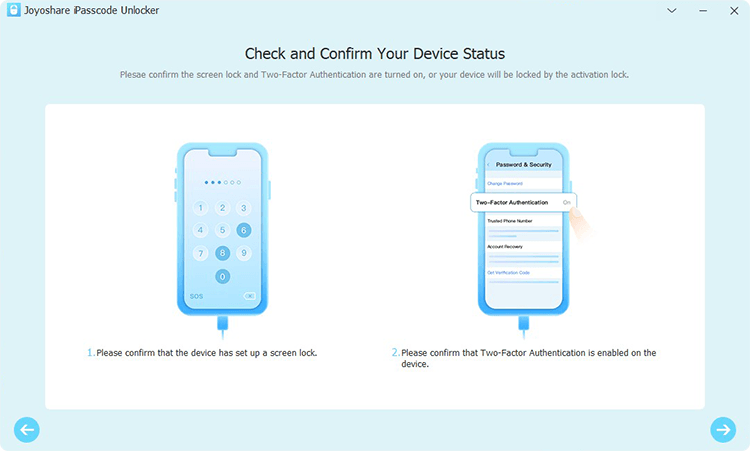
If “Find My” feature is enabled on your iOS device that runs iOS version higher than iOS 11.4, you will be asked whether it has set up a screen lock and whether Two-Factor Authentication is enabled. Click on “Yes” to confirm these two points.
Note: If “Find My” feature is disabled on your device, you can directly unlock Apple ID without data loss. There is no need to check device status in this step.
Step 3: Start to Remove and Unlock Apple ID
Now you have to download a firmware package and then it’s time to unlock Apple ID from your device. Wait until the unlocking process finishes. You can afterwards check your device and sign in with a new Apple ID.
This video can additionally guide you to unlock Apple ID using Joyoshare iPasscode Unlocker:
2. Unlock Apple ID Using Apple iForgot
Apple actually offers official help to perfectly deal with Apple ID locked issues. However, you should provide your personal information to verify that this Apple ID belongs to you. Here is how to use its iForgot service:
Step 1:
Open a browser and navigate to https://iforgot.apple.com/password/verify/appleid;
Step 2:
Type in your own Apple ID and click on “Continue”;
Step 3:
Follow the on-screen prompts to answer security question, get an email or get a recovery key. Then your Apple ID will be unlocked.
3. Unlock Apple ID Using Apple Official Support
Any problems with your iOS device can be solved by getting help from Apple Support. If you’d like to reset and change the passcode, unlock Apple ID, and the like, contact them with steps here:
Step 1:
Visit https://getsupport.apple.com/.
Step 2:
Enter your problem to the designated box, like “Apple ID disabled”.
Step 3:
You will be guide to a screen with different topics, select the one with high relevancy to your issue.
Step 4:
You will get solutions to unlock your Apple ID and follow the instructions it offer. You can also contact the Support team via call.
Conclusion:
You can now get different solutions to fix Apple ID locked issue. Ask Apple Support for help first and if it doesn’t work for you, you can surely go to Joyoshare Software and use Joyoshare iPasscode Unlocker. It helps remove Apple ID from any iOS device you have no matter Find My feature is on/off. Also, you can unlock both your own Apple ID and the one from a second-hand device.
Apple ID Locked? Quick Ways to Unlock It! was last modified: April 7th, 2026 by Amelia Yang
If you run a small or large company, you will want to know about the software and tools that you could be using to make your business run more smoothly. Starting with Sage 200, the perfect software solution for business management, we will recommend some intelligent tools that you can employ to make the most out of your business. We will also look at work shift makers for staff and task management tools that managers can use to stay on top of all projects. These tools can revolutionize the way you work. Stay modern with the latest business management digital tools.
Why Use Modern Technology to Run a Business?
Running a business, large or small, is an intricate and many-layered job. You have to know the ins and outs of all areas of your company and have a comprehensive and holistic approach to managing all projects and staff. You might be resistant to letting a computer take some of that responsibility as it feels like letting go of the reins.
However, this is not the case. A well-chosen software solution that is designed to help you run and manage a business will enhance your experience in every way. You will be in full control of business affairs, but with a more streamlined and efficient business model. Clever technology saves you time and effort, makes processes more efficient, and generates and analyzes data for future improvements.
Sage 200
Whether you run a small or large business, your business management processes can be significantly improved and streamlined by Sage 200. This clever software delivers a robust business management solution to boost sustainable growth. The Sage 200 software incorporates financials, commercials, customers, supply chain, and business intelligence. Industries such as retail, wholesale distribution, manufacturing, professional services, and SaaS are all well-suited to Sage 200.
This software will help your business to nurture customer relationships by delivering a joined-up and thorough approach to sales, marketing, and service. You will be able to manage inquiries quickly and effectively and support requests will be tracked and actioned to ensure every customer receives an efficient and helpful service.
Work Schedule Makers
If you are in charge of setting employees’ shifts, then you could benefit from using a digital schedule maker. These clever tools go far beyond Excel or Google Sheets. A digital schedule maker will input your employees’ hours and shifts without causing any overlaps, gaps, or conflicting shifts. Additionally, many scheduling tools take into account shift differentials, making it easier to manage varying pay rates for evening, overnight, or weekend shifts. Managers can save a lot of time and effort organizing the staff rotation by using a schedule generator.
It is all too easy to make common mistakes when you are shift planning, such as forgetting when staff needs time off, using old-fashioned methods to plan, such as Excel or pen and paper, or distributing shifts unequally. The best way to keep track of shifts, make sure work hours are equal and fair, and keep employees accountable is to use smart software that will sort the schedule for you.
Task Management Tools
Being a manager is not always easy, but when you have software for task management that can generate workflows, analyze your business data and leverage relevant data insights, integrate 1000s of apps, and automate work transactions, you can save a lot of time and stress. There are several great task management tools online to choose from. Give this management approach a go and see if you ever go back to managing projects without technology.
It is important when you are choosing a task management tool to do your research thoroughly so you can choose the right software for your business and specific work needs. You can ensure that you pick the right one for your business by reading online reviews and testimonies written by satisfied customers. Moreover, check supplier websites for information about specific features and perks of each software. This could make all the difference to your management role
Now you are familiar with some of the essential tools at your disposal, you should be ready to revitalize the way you run and manage your business. You can streamline your sales, marketing and service outreach for customers by using Sage 200, which also improves your commercial and financial operations and other essential aspects of running a business. On top of this, you can use a schedule maker to help you organize staff shifts, keep working hours fair, and avoid issues with schedules that leave you short of staff. Finally, you can use a task management tool to keep on top of all projects and track progress effectively.
Excellent Tools That Every Manager and Business Owner Needs to Hear About was last modified: January 16th, 2025 by Charlene Brown
The point is to have the computer do as much work as possible for you so that you may spend less time on it. To develop a winning strategy for your company, you need to be familiar with the various subfields that make up the automation field. It is common practice to mix several automation tools for the best outcomes. Robotic and business process automation are two examples of process automation software. Various systems exist, each with its approach to automating routine operations. Businesses may automate their processes using software robots from beginning to end.
Improves Customers Relations
Automated process bots are available 24/7 to provide quick service to customers. They’re not always open for business, but they can simultaneously handle requests from several different consumers. The automation tool may communicate via several channels, including email and text messages. Today’s fast-paced society requires equally quick solutions. And it demonstrates to clients that you respect their time. Personalized experiences are increasingly important in today’s battle to keep customers happy. The newest generation of consumers expects brands to remember their shopping habits. Fortunately, it’s often simple to keep tabs on clients’ preferences and tailor their experience accordingly. You may target your audience more effectively with an elt platform that uses tools like customer data integration and monitoring to deliver personalized content. Relationship management with clients is a standard method for achieving this customer relationship management. Many automation solutions provide customer relationship management features to manage better and analyze data about existing and new clients.
Get Things Done More Quickly
It stands to reason that automated procedures would be quicker than the status quo of manual ones. Consider the business practice of placing purchase orders. Manual processes generate reams of paper that can go misplaced as they are passed from person to person and necessitate additional time spent carefully noting down specifics. On the other hand, business process automation allows for the submission of purchase orders and increases productivity by enabling workers to multitask.
Lessen Expenses
Every business owner has two primary concerns: saving time and money. As a result of their sequential character, manual procedures are inherently more time-consuming than their automated counterparts. While it’s true that a computer can’t do some jobs, you might be surprised at how many are. Automating routine processes saves time and helps save resources like paper and ink by eliminating the need to fill out and mail customer orders manually. The annual time and material savings are substantial. Consider the yearly costs of supplies like paper, ink, and envelopes and the time invested in this task by individual employees.
Decreased Error Rate
Accuracy is crucial in any industry. Thus it’s always best to double-check your work. Incorrect actions should be avoided rather than corrected. Inconsistencies and variations in quality will plague your output if accuracy is compromised. This is not what any company desires. A wide variety of machines are available for use in automating tasks and raising standards of quality and reliability. Automating business procedures means no more paper forms are needed, and the appropriate information must be entered in each blank before a form is submitted. When there are fewer mistakes, less time is required to find and fix them. Having this confidence in the quality of what you’re offering will make it much simpler to keep your customers happy. That might aid in client retention and bring in new ones through recommendations. Please do not discount the potential significance it may have for your business in the future.
Enhance Productivity
To remain competitive, businesses of all sizes always look for ways to increase productivity. Automation is something to think about if you want to maximize efficiency. It’s all about minimizing time spent on pointless procedures. That’s the sort of thing where machines excel and humans falter. It’s easy to see how automation could be put to use in a wide variety of contexts. Machines can perform the same task again without losing quality or wear and tear. It’s human nature to speed up or slow down at certain times of the day. However, automation can significantly improve the effectiveness of some tasks. Robotic process automation can carry out isolated tasks, such as communicating with consumers via email which is quite bulk.
Organizations of any size and industry can benefit from a business process automation tool. There is no need for expensive IT infrastructure or specialized programming. Even if you have no experience with programming, you can make automated forms and workflows. In addition, forms can be integrated into error-free, time-saving, and transparent procedures. Your company’s documents can seem identical for a smooth transition from paper to digital.
How Implementing Automated Processes Can Better Your Business was last modified: January 31st, 2023 by Charlene Brown
In the business world, where endless video calls have become a norm, a simple phone call is a welcome change. As we all know, an old-fashioned phone call is a much better option than emails and video calls regarding business calls, especially for B2B sales leads.
Emails and video calls demand significant attention and energy from your prospects. This can drain their social battery quickly. Phone calls offer a refreshing alternative. There are fewer distractions from internet browsing and no interruptions from push notifications. Beyond convenience, phone conversations help build stronger, more meaningful connections.
How to Find Someone’s Phone Number Online: 8 Proven Methods
Let us explore the most effective ways to locate a person’s phone number online.
1. Search Social Media Profiles for Contact Information
Users can choose whether to display their personal or business phone numbers publicly. If you know your prospect’s full name, start by searching for them on social media platforms. With some luck, their contact details will be visible on their profile.
When personal profiles do not reveal the information you need, try checking your prospect’s Facebook business page instead.
Facebook and LinkedIn are two platforms where you can often find prospect phone numbers with relative ease.
2. Download Mobile Apps Designed for Contact Lookup
Modern mobile applications like TrueCaller let you search for prospect phone numbers directly from your smartphone. These apps work on both Android and iOS devices. Simply enter the prospect’s name, and the app searches its database to help you make contact.
When searching for phone numbers, provide as much relevant information as possible. Include details like their city of residence, job title, or employer name. The more specific information you supply, the better your chances of finding current contact details.
4. Check the Official Company Website
One of the simplest approaches involves visiting the company website directly. Many businesses publish employee contact information on their official sites.
You might find your prospect’s direct phone number listed publicly. Alternatively, you may find a general company number. In that case, a company operator can connect you with the person you need to reach.
5. Browse Digital White Pages Directories
Years ago, finding a phone number meant flipping through a physical phone book. Those printed directories have disappeared. However, online White Pages still exist and serve the same purpose. Instead of turning pages, you simply type names into a search field.
6. Explore Online Business Directory Listings
Business listing websites contain contact information for hundreds of thousands of companies worldwide. These directories feature international corporations, B2B enterprises, software companies, small brands, and regional businesses.
You can use these sites to find direct lines, main numbers, or department extensions. Even when you cannot locate a specific person’s number, you will likely find general company contact information. From there, you can call and ask to be connected.
7. Try a People Search Engine or Directory
There are contact search extension tools and search directories where you can look for the prospect’s contact information. While they may sound similar to search engines, they are not the same.
AnyWho stands out as one of the best people search engines available. This popular tool helps you locate phone numbers for thousands of contacts. Several factors contribute to its popularity. The database receives weekly updates, and the service is completely free.
8. Visit Consumer Watchdog Websites
When searching for contact information at prominent companies, consumer watchdog websites can prove valuable. In the United States, the Better Business Bureau helps you find company phone numbers quickly.
These sites also feature public reviews. You will gain useful insights about the company you want to contact.
Get Human is another helpful resource. This website provides direct contact information for company representatives rather than automated systems. Many people rely on Get Human to find prospect contacts across different organizations.
Best Phone Number Lookup Tools: Free and Paid Options
Now that you understand the various search methods, let us examine specific tools that streamline the process.
1. RevDriver: Chrome Extension for Verified Contacts
RevDriver is a Google Chrome extension that delivers updated and verified prospect contact information. The tool also provides company data and email addresses. A credit counter helps freemium users track their contact reveals. Free users receive 100 reveals each month.
2. SignalHire: Multi-Platform Contact Finder
With only a few clicks, you can find email addresses and phone numbers using SignalHire. Facebook, Twitter, LinkedIn, GitHub, and other social and professional networks are all easily integrated. The software can bulk extract contacts and export them in CSV format. What is very convenient is their extension for Chrome and Firefox, which works directly on LinkedIn and other professional social networks. Users may get anyone’s email, phone number, and backlinks to their social network accounts with only one click. This extensive professional database contains only current information.
3. LinkedIn: The Professional Networking Powerhouse
LinkedIn ranks among the best tools for business prospecting. You can reach professionals and companies through email, phone, or direct platform messaging. Keep in mind that phone numbers only appear when prospects choose to share them on their profiles.
4. SalesIntel: Comprehensive B2B Contact Database
SalesIntel offers one of the most reliable B2B contact databases available. The data maintains high accuracy, and the tool covers an impressive range of contacts. Every phone number undergoes verification. Beyond phone numbers, you will discover email addresses, company locations, and more. Millions of users worldwide trust this platform.
5. BeenVerified: All-in-One People Search Platform
BeenVerified does more than locate phone numbers. The service includes reverse phone lookup, address search, vehicle search, and username search capabilities. Search results provide detailed information including social media accounts. For comprehensive prospect research, BeenVerified remains a top choice.
6. ZabaSearch: Free Public Records Database
ZabaSearch is a free database offering phone numbers, public information, and connection details for your prospects. Currently, the tool only covers the United States. This means you will access American public records exclusively. Additional features include reverse phone lookup and advanced search options.
Key Takeaways for Finding Prospect Phone Numbers
Locating your prospects’ phone numbers requires effort and persistence. However, the methods and tools outlined in this article will make the task more manageable. Whichever approach you choose, always verify that the numbers you find are active and legitimate. The simplest verification method remains straightforward: pick up the phone and dial.
Phone Number Search: Methods and Tools – Free and Paid was last modified: May 13th, 2026 by Dewey Grant