How to Make AI-Generated Text Sound More Human

I used to think the hardest part of writing was filling a blank page. Then, large language models arrived and proved me wrong. The real challenge is making their perfectly average sentences sound as if I lost sleep crafting them. 

Whether you’re polishing a blog post for your side-hustle, a term paper that needs to dodge detection, or a quarterly memo your boss will actually read, mastering that human finish is now a mandatory skill. Here’s how I get it done: one practical approach is to humanize AI text with Smodin, which adds subtle nuances that make even machine-generated prose feel naturally written.

Why AI Text Often Feels Robotic

Let’s start with the “why.” Modern models are excellent at predicting statistically probable next words. That very strength is what makes them sound safe, polished, and oddly bloodless.

Repetition of safe syntax. LLMs lean on medium-length sentences in subject-verb-object order. The rhythm becomes predictable after a few paragraphs.

Overuse of filler phrases. Buzzwords such as “leverage,” “utilize,” “robust,” and “in today’s fast-paced world” scream “AI draft” because the model has seen them everywhere.

Lack of lived experience. Since the text isn’t drawn from a personal memory bank, it tends to float above the ground: no sensory details, no specific anecdotes, no uncertainty.

Evenly distributed confidence. Humans hedge, joke, or show emotion when facts are murky. Standard AI outputs a uniform, polite certainty.

By recognizing these four tells, you’ll know exactly what to fix.

The Humanization Framework

I treat every AI draft as an okay first pass and then run it through five deliberate stages. Skipping any one of them leaves machine fingerprints on the page.

1. Check the Facts Before the Voice

Nothing kills authenticity faster than a wrong date or bogus statistic. Before you touch style, verify claims, links, and numbers. I usually:

  • Spot-check two or three key facts with a quick web search.
  • Replace vague statements (“Studies show…”) with a specific citation or real-world example.
  • Delete unsupported claims entirely; it’s quicker than trying to rescue them.

When your reader feels they can trust you, the rest of the polish lands better.

2. Inject Real Emotion and Perspective

Readers sense a human author when the prose reveals a point of view. Ask yourself:

  • “How do I actually feel about this claim?”
  • “What did I struggle with when I first learned this?”

Then, add a sentence or two that shows that angle: an anecdote from a failed project, a moment of surprise, or even a short confession (“I used to think passive voice didn’t matter, my editor disagreed loudly”). These micro-stories create what psychologists call narrative transportation, making the material easier to remember.

3. Vary Rhythm and Sentence Length

Open any AI draft in a text editor and read it aloud. Notice the metronome-like beat? Break it up:

  • Pair a long, winding sentence with a five-word follow-up.
  • Start an occasional sentence with a conjunction (“And guess what? It worked.”).
  • Use rhetorical questions sparingly to pull the reader in.

Recent studies and writing-style analyses note that varying sentence length and rhythm help text sound more natural and reader-friendly. Linguists also observe that this kind of prosodic variation often makes AI-generated prose less detectable by current classifiers. Variety doesn’t just sound human, it reads like it, too.

4. Swap Out “AI Tell” Words

Create a personal banned-word list. Mine includes: leverage, utilize, robust, plethora, ecosystem. Whenever I see them, I force myself to pick a fresher synonym or restructure the line entirely. The goal isn’t to sound informal; it’s to sound intentional.

Pro tip: search your draft for “that” and delete half of them. The result feels crisper and more conversational.

5. Add Imperfections, But Not Errors

Humans leave tiny fingerprints: a mild contraction, a dash used for comic timing, a self-deprecating aside. AI text, in contrast, is often spotless. Paradoxically, you want controlled imperfection:

  • Use “can’t” instead of “cannot” unless you need formality.
  • Slip in a short sentence fragment for emphasis. Like this.
  • Keep one mild colloquialism per 300 words (“no-brainer,” “grab a coffee”).

These flourishes humanize without undermining professionalism.

Tools That Help 

Hand-editing works, but deadlines don’t care about ideals. The tools below accelerate each stage while keeping you in charge.

Smodin AI Humanizer

Drop in your draft, choose a target tone (casual, professional, academic), and Smodin rewrites with varied sentence structures and fewer overused phrases. In my tests last month, it cut my manual touch-up time by 40 percent, yet still needed a quick read-through for personal anecdotes. The bonus? You can immediately run the result through Smodin’s own AI Content Detector to confirm it passes.

EditMentor Rhythm Analyzer (beta)

A browser plug-in that highlights sequences of three or more same-length sentences. Great for Step 3 above.

Originality.AI

Although marketed as a plagiarism checker, its tone map shows where your text becomes highly predictable. Those are perfect spots to inject an anecdote or rhetorical question.

Hemingway Editor (desktop edition)

The classic readability tool remains useful. Its adverbs and passive-voice flags overlap heavily with “AI tells.” A glance can shave another layer of robot shine.

Remember, no tool fully replaces your judgment. They surface patterns; you supply the soul.

A Quick Checklist for Your Next Draft

Use this at the end of your workflow, ignore any that don’t apply, but hit most, and you’ll be miles ahead.

  • Fact checks completed?
  • At least one personal story or concrete example per 500 words?
  • Sentence length varies visibly on the page?
  • All buzzwords or template phrases replaced?
  • Two intentional imperfections (contraction, aside, dash) per section?
  • Final pass through an AI detector with a score under 25 percent?
  • Read aloud once, does it sound like you?

Tape the list above your monitor; muscle memory follows.

Final Thoughts

AI writing tools, from ChatGPT to Smodin, turned first-draft creation into a 30-second job. The new competitive edge isn’t speed; it’s sounding unmistakably human after you’ve saved all that time. Treat the model’s output as a springboard, not a finished piece. Verify facts, weave in experience, tweak the rhythm, and embrace a few charming imperfections. Do that consistently and your readers, teachers, clients, or YouTube subscribers will stop asking “Was this written by a bot?” and start saying “I loved this. When’s the next one coming out?”

How LipSync.Video Is Empowering Creators With Free AI Lip Sync Tools

The world of digital content creation is evolving at a pace never seen before. What once required complex animation skills, expensive studio equipment, and professional editors can now be done by anyone with a single photo and a few seconds of creativity. At the center of this transformation is LipSync.Video, a platform built to make lip-synced, AI-animated content accessible to creators of all experience levels.

Today, AI-powered lip sync videos have moved far beyond entertainment—they are used for education, marketing, storytelling, training, comedy, and branding. With a growing demand for engaging short-form content, the AI Baby Podcast Generator and the advanced AI Lip Sync Tool from LipSync.Video have quickly become essential to creators, influencers, and businesses worldwide.

This article explores how the technology works, real creator scenarios, and why LipSync.Video has become a go-to platform for modern digital storytelling.


The Rise of AI Lip Sync Technology

Short-form video platforms like TikTok, YouTube Shorts, and Instagram Reels have reshaped how creators tell stories. Audiences want content that is fast, expressive, and emotionally gripping within seconds. Lip-synced AI videos solve a major challenge—they allow anyone to animate photos, characters, avatars, or even artwork with believable mouth movement and precise audio alignment.

AI lip sync eliminates the need for:

  • Facial rigging
  • Advanced animation software
  • Video editing timelines
  • Motion-capture equipment
  • Full production teams

What once required hours or days now takes moments.

This shift has empowered small creators to compete directly with large brands. And with tools like LipSync.Video offering free and premium solutions, high-impact animated content is no longer limited to professionals.


Introducing LipSync.Video: A New Standard for AI Lip Sync Creation

LipSync.Video was designed with one priority: letting creators generate polished, expressive talking videos with as little friction as possible.

Its ecosystem is powered by two standout tools:


⭐ 1. Free AI Lip Sync Generator

This anchor tool is designed for anyone who wants to experiment with lip-sync AI without paying or learning technical skills. It’s perfect for:

  • Beginners exploring AI animation
  • Social media users wanting quick talking-photo content
  • Educators making simple explanatory clips
  • Kids and teens creating fun voiceovers
  • Meme creators who need instant output

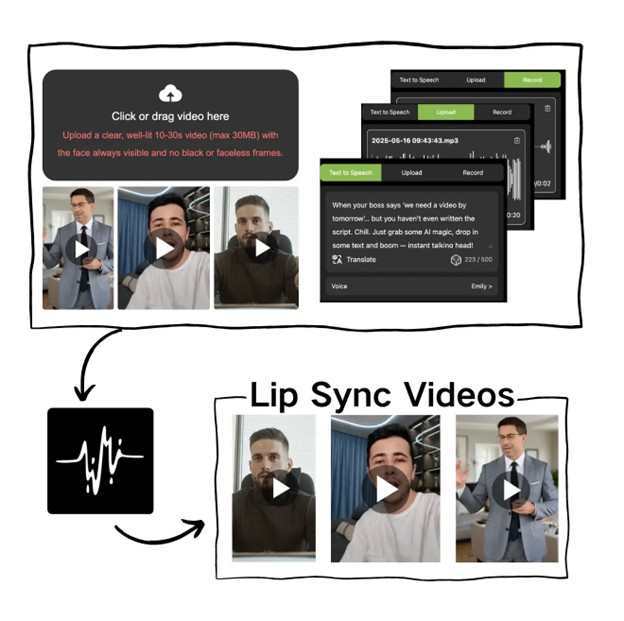
What makes it powerful is its simplicity: upload an image, add or record audio, and the generator creates a clean, fluid lip-synced animation in seconds.

Creators love it because it requires no expertise—yet the results look professionally edited.


⭐ 2. AI Lip Sync Tool

This is the advanced engine behind LipSync.Video, capable of handling more detailed use cases such as:

  • Character animation
  • Podcast video creation
  • Business explainers
  • Virtual talk show hosts
  • Storytelling and voice acting
  • Educational tutorials
  • Brand mascot videos

The AI Lip Sync Tool offers high-precision mouth motion, expressive facial dynamics, and smooth video output suitable for professional or commercial use.

Together, these two tools have made LipSync.Video a favorite among content creators who need polished lip-synced videos without the cost or complexity of traditional animation.


Real Creator Use Cases: How People Are Using LipSync.Video to Grow Their Audience

Below are fresh, original scenarios showing how creators use the platform in practical, high-impact ways.

Scenario 1: Teachers Animating Lessons for Short-Form Learning

Educators often struggle to keep students engaged in online or hybrid classrooms. A history teacher began using the Free AI Lip Sync Generator to animate historical figures—Cleopatra, Albert Einstein, and Genghis Khan—delivering short summaries.

The result?

Students became more excited to participate. The videos were fun, quick, and memorable. The teacher reported a noticeable improvement in information retention.

AI lip sync helped bring textbooks to life.


Scenario 2: Businesses Creating Zero-Cost Social Ads

A small business selling eco-friendly products needed video content but had a limited marketing budget. Using LipSync.Video, they animated their brand mascot—a cartoon leaf—using the AI Lip Sync Tool.

Impact:

  • Instagram engagement doubled
  • Ad cost per click decreased
  • Customers said the talking mascot made the brand feel more personable

The company now produces weekly animated messages at nearly zero cost.


Scenario 3: Creators Launching Story-Based Series on TikTok

A young creator launched a fictional character series using AI-animated drawings. With the Free AI Lip Sync Generator, they built an ongoing storyline where each episode featured a new scene.

Results after 30 days:

  • 43,000 new followers
  • Several episodes reached 500K+ views
  • The creator received sponsorship interest from digital art tools

Story-driven content became possible without animation skills.


Scenario 4: Podcasters Turning Audio Into Engaging Video Content

A podcast team wanted to grow faster on YouTube Shorts and Instagram Reels. Instead of uploading static waveforms, they generated talking photos of their hosts using the AI Lip Sync Tool.

Benefits:

  • Audience retention increased
  • Clips felt more personal
  • Content output doubled with minimal effort

Short, lip-synced clips became their strongest growth channel.


Scenario 5: Meme Creators Producing Viral Talking Images

Memes spread quickly when they’re relatable and funny—but they spread even faster when the characters “talk.” Memers used LipSync.Video to animate:

  • Grumpy cats
  • Old family photos
  • Stock image models
  • Political satire characters

Many videos reached over 1M views because adding voice brought more comedic impact to the visuals.


Scenario 6: Customer Support Videos That Feel More Human

A tech company wanted to explain FAQs in a friendlier way. They animated an illustrated character that “walked customers through solutions” using the AI Lip Sync Tool.

Outcome:

  • Support tickets decreased
  • Customers appreciated the visual guide
  • Videos became reusable across departments

AI lip sync improved customer experience with minimal effort.


Why LipSync.Video Stands Out in a Crowded Market

Several tools exist, but LipSync.Video continues to gain loyalty because of:

✔ Ease of Use

No editing software needed—just upload and go.

✔ High-Quality Output

Mouth movement syncs naturally with speech, giving videos a polished look.

✔ Free and Paid Flexibility

Creatives can start with the Free AI Lip Sync Generator and upgrade later as they grow.

✔ Fast Rendering

Ideal for daily posting, which is essential for growth on TikTok and Instagram.

✔ Versatile Applications

From education to marketing to entertainment, the possibilities are unlimited.

✔ Perfect for Viral Content

Short, animated talking videos consistently outperform static media.


The Future of Lip Sync AI Belongs to Creators

The demand for video continues to grow, and AI is leveling the playing field by giving every creator access to tools that once required professional studios. With LipSync.Video, the ability to generate entertaining, expressive, and lip-synced content has never been more accessible.

Whether you’re a student, a marketer, a teacher, a business owner, or a full-time creator, the combination of the Free AI Lip Sync Generator and the advanced AI Lip Sync Tool offers everything you need to create compelling videos that stand out online.

Multilingual AI Video Tools Expanding Global Reach for Marketers

As the world becomes increasingly connected, the demand for multilingual video content has surged. For marketers looking to engage diverse global audiences, delivering content in multiple languages is no longer optional—it’s essential. Traditional video localization methods are time-consuming, costly, and often fail to maintain the authenticity and emotional impact of the original content. Enter multilingual AI video tools: revolutionary platforms that automate and scale video translation, dubbing, and localization with unprecedented efficiency and quality. These AI-powered solutions enable marketers to expand their reach and deepen connections with international audiences, transforming how brands communicate across borders.

The Need for Multilingual AI Video Tools in 2025

The global video consumption landscape is diversifying rapidly. Viewers in different regions expect content tailored to their languages and cultures, driving demand for localized marketing videos, product demos, tutorials, and personalized ads. In the context of Top AI Tools and Industry News, emerging platforms are revolutionizing how marketers meet these expectations. However, traditional localization processes require separate recording sessions, translators, voice actors, and lengthy production timelines, making it difficult to scale.

Moreover, research shows audiences are more likely to engage with videos presented in their native language, boosting retention and conversions. Marketers face the dual challenges of producing high volumes of localized video content at speed and maintaining high quality across languages and markets.

Multilingual AI video platforms address these challenges by offering several advanced features:

  • Accurate automatic translation: Using neural machine translation models, these tools achieve translation accuracy rates around 95-98%, ensuring messages remain clear and contextually appropriate.
  • Natural lip-sync and voice cloning: AI-generated dubbing synchronizes perfectly with the speaker’s lip movements, creating native-like video experiences. Voice cloning preserves vocal tone and style, further enhancing authenticity.
  • Extensive language and avatar support: Leading tools like Synthesia and HeyGen support over 140 languages, with customizable AI avatars and voices tailored to brand identity and regional preferences. HeyGen, for example, supports more than 175 languages and offers strong lip-sync accuracy, while Synthesia provides over 230 avatars and deep customization options including personalized avatar creation.
  • Seamless workflow integration: These platforms provide browser-based video editors, API integrations, and collaborative features that streamline content production and localization at scale. Features include real-time team collaboration, version control, secure sharing, and comment systems to keep large teams in sync. Synthesia enables integrations with AI-powered translation engines like DeepL and OpenAI to enhance automated workflows.
  • Advanced interactivity and analytics: Beyond video creation, platforms now offer clickable calls to action, branching scenarios, quizzes, and detailed viewer analytics to help marketers measure engagement and optimize content strategies.
  • Enterprise-grade security and compliance: Tools like Synthesia comply with GDPR and SOC 2 standards, ensuring that AI avatars and voice clones are created only with explicit consent, maintaining ethical standards and user trust.

This combination of sophisticated AI capabilities and user-centric features allows marketers to efficiently create high-quality, localized video content that resonates authentically with diverse audiences worldwide.

Leading Platforms and Their Unique Advantages

Several standout AI video platforms dominate the multilingual content space in 2025:

  • Synthesia offers an AI avatar builder with 230+ avatars and over 140 language options. Its platform supports one-click translation with automatic lip-sync, version control for updating videos without duplication, and real-time team collaboration.
  • HeyGen specializes in advanced AI video translation with natural lip-syncing and voice cloning. It supports 175+ languages and interactive avatars, making it ideal for international marketing campaigns and creator content.
  • ShortsNinja focuses on automated localization for social media videos, integrating smart editing and direct publishing to platforms like YouTube and TikTok, fueling fast regional marketing.

Other tools such as AI Studios, Clippie AI, and DeepL integration platforms contribute expanded capabilities from AI dubbing to subtitle generation and cultural adaptation.

Benefits for Marketers

Using multilingual AI video tools offers marketers a range of strategic advantages:

  • Global Reach Expansion: By delivering culturally relevant, native-language content, brands can authentically engage diverse international audiences.
  • Cost and Time Efficiency: AI translation and dubbing eliminate expensive studio production and expedite turnaround times, enabling high-volume content scaling.
  • Authentic Viewer Experience: Realistic lip-sync and voice cloning enhance trust and viewer retention by simulating human presenters.
  • Agile Campaigning: Rapid content updates and localized versions allow marketers to respond dynamically to market trends and regional preferences.

Use Cases and Success Stories

Major brands and small creators alike leverage AI-driven multilingual video tools to scale global marketing:

  • Trivago increased content production efficiency by 80% through AI localization.
  • Influencers use HeyGen’s tools to create personalized videos in multiple languages, broadening audience reach.
  • E-learning platforms deploy Synthesia to produce training videos accessible worldwide without physical studio constraints.

Challenges and Best Practices

Despite advancements, marketers should consider ethical and quality aspects:

  • Maintain transparency by disclosing AI-generated content to preserve trust.
  • Review AI translations carefully to avoid cultural insensitivity or errors.
  • Select appropriate voice styles and captions that resonate with target demographics.
  • Stay compliant with data privacy regulations when using personalized content.

Conclusion

Multilingual AI video tools are revolutionizing how marketers approach global communication. By automating translation, dubbing, and localization, these platforms enable brands to deliver authentic, engaging experiences tailored to diverse audiences at scale. As innovation continues, multilingual AI video creation will become even more seamless, empowering marketers to build global connections with unprecedented speed and impact. Early adopters of these technologies stand to gain a significant competitive advantage in an increasingly multilingual digital world.

Looking ahead, the integration of advanced AI-driven transcreation—where content is not just translated but culturally reimagined—will become critical for truly resonant messaging. Additionally, AI-powered personalization will enable brands to deliver dynamic, language-specific video content that adapts to viewer preferences in real-time. Emerging interactive video formats, combined with enhanced analytics, will further deepen audience engagement and conversion rates on global campaigns.

Marketers must also prioritize ethical use and cultural sensitivity, balancing automation with human oversight to maintain authenticity and trust. Those who embrace these trends will not only expand their international reach but will set new standards for personalized, culturally nuanced storytelling in the digital age.

Using Face Swap Tools to Streamline Content Creation Workflows

In the world of computerized substance — whether for promoting, social, news coverage, or inventive ventures — visual resources are in steady demand. The weight to deliver quality pictures and brief recordings rapidly is genuine. That’s why many creators and teams are turning to face swap tools like FaceswapAI to reduce production bottlenecks and accelerate creativity.

In this article, we explore how FaceswapAI (or similar advanced platforms) can fit into modern workflows, compare its photo and video capabilities especially in batch settings, offer tips (multi-face, gender swaps, etc.), and provide a streamlined workflow that creative teams can adopt.


Why Face Swap Matters for Workflow Efficiency

We often think of face swaps as novelty or social media gimmicks. But in practice, face swap tools are becoming productivity levers:

  • Speed over manual editing: Instead of veiling, layering, and correcting in Photoshop or After Impacts, face swap devices mechanize much of the mixing, arrangement, and adjustment.
  • Consistency across multiple assets: If you’re creating topical visuals (say for a month-long campaign), face swap instruments offer assistance to keep up visual coherence by applying the same face substitution rationale over handfuls of pictures or clips.
  • Lower barrier to entry: Little groups without in-house video editors or realistic pros can convey cleaned visuals that something else would require costly resources.
  • Experimentation and iteration: Since swaps can be created rapidly, groups can test distinctive thoughts (changing faces, points, styles) without critical time venture.

All of this makes face swap tools like FaceswapAI valuable additions to a modern creative stack.

Review: Photo Face Swap vs Video Face Swap in Batch Scenarios

Let’s dig into how FaceswapAI (or a comparable tool) performs in real-world scenarios, especially when applying batch operations or handling multiple faces.

Photo Face Swap & Batch Processing

For still images, the face swap tool should allow:

  • Single face replacement – Replace one face in a photo quickly and realistically.
  • Multi-face swaps – For group images, replacing more than one face at once saves repeated steps.
  • Photo Batch Face Swap – The ability to feed many files at once (a folder of images) and have each processed with minimal manual intervention.

Strengths:

  • The AI handles blending, lighting correction, and edge smoothing automatically.
  • For batch jobs, a well-designed interface should queue up tasks, show progress, and allow you to download results in bulk.
  • It saves hours compared to manual editing workflows.

Caveats to watch for:

  • If the face points, lighting, or determination change significantly among pictures, the calculation may create conflict (a few swaps may seem more normal than others).
  • You may need to manually review failures or problematic images and re-run them individually.

Video Face Swap & Batch Video Projects

Videos introduce complexity: motion, changing angles, expressions, occlusions (when a face is partially hidden), and frame-to-frame consistency. Video Face Swap tools should ideally:

  • Track the face throughout the video, aligning the replacement over each frame.
  • Handle scenes with multiple faces (Video Multiple Face Swap) when several people appear.
  • Accept batches of clips (Video Batch Face Swap) so the team can upload, process, and download multiple videos without repeating setup steps.

Strengths:

  • When well implemented, the swap feels natural across movement and transitions.
  • In clump mode, groups can repurpose clips over stages (e.g. 30-second, 60-second, secret variations) without manual re-edits.
  • It permits makers to reuse the same face “template” over numerous video resources, guaranteeing consistency in campaign themes.

Potential weaknesses:

  • For challenging clips (fast head turns, lighting shifts, obstructions), the swap may break or show artifacts.
  • A few frames may need manual touch-ups post-export (e.g. small flickers or mismatches).

In practice, the stronger face swap tools provide a balance: the AI handles most of the heavy lifting, while the user polishes edge cases only where needed.

Tips to Get More from Face Swap Workflows

Here are practical tips to extract maximum efficiency and quality from a face swap tool in content pipelines:

  1. Uniform Source Material
    • Use images or clips with consistent lighting, resolution, and face orientation whenever possible.
    • If you know you’ll batch process, shoot or collect source media with uniform settings.
  2. Utilize Multi-Face Swaps Proactively
    • In both photos and videos, if you know multiple faces will be swapped, start with Photo Multi Face Swap or Video Multiple Face Swap features.
    • This avoids doing individual swaps and reintroduces consistency across faces.
  3. Optimize Batches by Grouping
    • Divide your assets into logical batches (e.g. by lighting, scene, or duration) so that each batch runs under similar conditions.
    • Smaller batches often yield fewer failures and allow easier reruns of problematic files
  4. Apply Gender Swaps Strategically
  • For campaigns that test visual variety, a Photo Gender Swap or Video Gender Swap can be used to create alternate versions of the same asset.
  • It’s a smart way to double your creative options without needing new shoots.
  1. Automate Post-Processing Checks
  • After swaps complete, use scripts or lightweight software to flag outputs with anomalies (size mismatches, blank frames, sudden shifts).
  • This helps prioritize which outputs need review or reprocessing.
  1. Leverage Low-Resolution Previews
  • Many swap tools offer quick preview outputs (lower res or watermarked). Use these to QA before committing credits or full-resolution exports.
  1. Plan for Manual Corrections
  • No AI is perfect. Budget time or a small retouch step to polish outputs that show slight misalignments or artifacts.

How-to: Streamlined Workflow Template for Teams

Here’s a workflow template that small teams or creators can adopt to integrate face swap into their production flow:

  1. Define Visual Theme and Template
  • Choose a base face template you’ll swap into multiple assets across the campaign.
  • Decide which media types (photos, videos, GIFs) you’ll produce.
  1. Collect Source Files
  • Gather images and video clips intended for swap.
  • Group them into batches based on lighting or scene type.
  1. Upload to FaceswapAI
  • Drop batches or individual files into the face swap tool.
  • Select whether you want single-face, multi-face, or batch options.
  1. Set Swap Parameters & Presets
  • If the tool allows, preset settings (blend strength, smoothness, color matching) to maintain consistency across outputs.
  1. Run Batch Jobs
  • Let the tool process each batch, monitor progress, and flag any failures.
  1. Review & QA
  • Scan outputs (or preview mode) for artifacts, slip-ups, or alignment problems.
  • Re-run or manually correct only the ones with issues.
  1. Export & Distribute
  • Download final high-resolution outputs.
  • Integrate them into your campaign posts, ad formats, video platforms, etc.
  1. Iterate & Scale
  • Based on what works, refine your template and settings for the next batch or campaign round.

By taking after this workflow, groups decrease dreary work, keep up visual consistency, and free up time for methodology, not fair altering.

Why FaceswapAI (or Equivalent Tools) Are a Smart Choice

When choosing a face swap tool for workflow integration, here’s what you should look for — and why FaceswapAI or similar advanced platforms often make the cut:

  • Intuitive Interface: A tool should allow you to upload, configure, and run swaps without steep learning curves.
  • Batch & Multi-Face Support: The ability to handle multiple files and multiple faces simultaneously is essential for scaling projects.
  • High-Quality Output: Minimal artifacts, consistent blending, realistic skin tone matching matter for professional visuals.
  • Speed & Efficiency: Quick preparing (without long lines or delays) makes the contrast in a tight schedule.
  • Flexible Pricing / Quota System: In a perfect world, the instrument has levels or credits that scale with your generation volume.
  • Privacy & Security: Your picture and video resources matter — a great device ought to regard information security, expel records after preparing, and not re-use your transfers.

In sum, for teams or serious creators, a face swap tool is worthwhile only if it reliably integrates into their production rhythm — not as a stumbling block.

Wrapping Up

Face swap tools like FaceswapAI are no longer niche toys; they’re becoming essential pipeline tools in content creation. When used smartly, they let teams focus on storytelling and concept rather than technical drudgery.

  • Photo Face Swap accelerates static visual production.
  • Video Face Swap enables dynamic storytelling without complex editing.
  • Multi-face swaps, batch processing, and gender swaps help scale campaigns and explore visual variety.

If you’re a maker, social media group, or little organization, coordination face swap apparatuses into your toolkit can drastically boost yield without swelling budgets or timelines. The key is choosing an apparatus with highlights that bolster your scale and at that point building a workflow that leverages robotization wherever conceivable.

The Best Interactive 3D Animation Services to Transform Your E-commerce Experience

In the rapidly evolving world of online retail, standing out among countless e-commerce platforms requires innovation, engagement, and exceptional user experience. One of the most effective ways to captivate your audience and elevate your online store is by utilizing interactive 3D animation services. Whether you’re searching for a 3d animation studio near me, looking to partner with the best 3d animation studio, or seeking an expert animation 3d studio to bring your products to life, leveraging interactive 3D animations can dramatically transform your e-commerce experience.

Why Interactive 3D Animation is a Game-Changer for E-commerce

Online shoppers today demand more than just images and text and expect entertaining, immersive experiences that enhance their confidence in buying. Static photos and traditional video presentations do not typically offer the depth and interactivity that can showcase products. Interactive 3D animation can play a massive role here.

Interactive 3D animation enables customers to explore product features from all angles, manipulate features, and even customize products in real time. This level of interaction adds an important dimension that helps to improve the customer experience, geographically bridging physical shopping with digital shopping, while reducing customer uncertainty and trust issues.

Boosted Product Visualization

One of the most common challenges in e-commerce is figuring out how to help customers visualize a product as if they were physically holding it. With interactive 3D animation services, you can create lifelike virtual product models that users can rotate, zoom into, and meaningfully interact with. This promotes confidence in the purchase, reduces returns, and increases conversion rates.

Consider the difference of a consumer searching for furniture can experience with interactive 3D animation. The visitor can rotate the sofa model any way they wish, change the fabric or color, see the sofa in other settings, and all without leaving the web site. They left with a far more informative and engaging experience than just a few photos.

More Engagement and Time on Site

Sites with interactive 3D content generally get longer visitor times. Interest and engagement are stimulated by the novelty and immersive aspect of the 3D animation, and increased time spent with your products improves your SEO ranking and likelihood of conversions. In addition social experiences, people like to share on social media, thus increasing your brand reach organically.

Choosing the Right 3D Animation Studio for Your E-commerce Needs

Finding the best partner to create excellent interactive 3D animation is important.  If you are looking for 3d animation studio near me, or the best 3d animation studio with a portfolio of successful interactive projects, these are some factors to look at:

Portfolio and Experience

A qualified animation 3d studio will have an ample portfolio of interactive projects, such as product demos, online stores, and virtual showrooms that incorporate different types of interactive features. Check their past examples of work to find a fit that allows you to feel confident that there will not be a mismatch of their style to your brand vision and e-commerce objectives. 

Technical Proficiency

Creating interactive 3D content requires expertise with advanced tools and platforms such as WebGL, Unity, or other proprietary systems. Here, we’ll lean to technical competency to show their ease of use with compiling animations to be optimized for proper load times and performance on any device.

Customization and Flexibility

Every e-commerce business will have different needs. Suitable 3d animation studio near me or partner should be able to accommodate unique environments to allow you to customize your animations to emphasize your products better differentiating features. They should also support integration with your website or app.

Collaborative Approach and Support

Developing successful interactive 3D projects will likely be an ongoing process requiring some iterations. You want to identify a studio that endorses communication, and a collaborative approach to executing your vision, while providing you with expert guidance. Post-launch support is also essential to address any technical issues or future enhancements.

How Interactive 3D Animation Improves Customer Experience

Providing excellent customer experience is critical in online retailing. Interactive 3D animation services can enhance the shopping experience in a number of ways:

Reducing Purchasing Doubts

Having the ability to look at products from every angle and see product details up close gives customers more confidence in making their purchasing decisions; thus, purchasing doubts are reduced, along with the potential for returns due to not meeting expectations.

Allowing Product Customization

Many consumers enjoy the ability to customize products prior to purchase. Interactive 3D tools support the ability for users to customize colors, sizes, features, or accessories, with instant visualizations of the customized product. If customers are engaged with an interactive tool and satisfied with their visualized result, they are much more likely to make the purchase.

Allowing Virtual Try-On

Certain categories related to clothing, eyewear, or accessories already allow consumers the opportunity to virtually try-on their product through 3D animation. The presence of 3D animations will help narrow the divide between the experience of shopping in-store vs. shopping online.

Improving Mobile Shopping

Mobile shopping is significantly expanding and if a consumer can have access to a 3D animation tool that is responsive to a mobile device, engaging and entertaining content can draw the user in, and significantly reduce bounce rates.

Use Cases of Interactive 3D Animation in E-commerce

Interactive 3D animation is being used in multiple areas of e-commerce, such as:

Fashion and Apparel

Many brands are using 3D models to illustrate the detail of clothing items, including fabric types, textures, and how these items can fit the body in space. Virtual fitting rooms using 3D technology leads to shopper confidence and reduces returns.

Furniture and Home Decor

3D animation and video allow shoppers to adjust furniture colors, materials, and placements in rooms to better visualize whether products will fit into their selection.

Electronics and Gadgets

Detailed 3D models are helpful to showcase product features, internal workings, and usability, allowing customers to better understand complex devices rather than photos or video alone.

Automotive

Many car manufacturers and dealers use 3D animations to provide a virtual tour of vehicles, including changing the various colors, trims, and accessories.

Beauty and Cosmetics

Makeup and skincare companies can provide interactive 3D tools that allow users to visualize makeup application or skincare effects. This ultimately provides an interactive and personalized shopping experience that aids with purchase decisions.

The Process of Working with a 3D Animation Studio

A clear view of the typical process will help e-commerce brands optimize their investment in interactive 3d animation services.

1. Discovery and Consultation

The studio then works together to understand your brand, products and goals. They will review your online website or app to determine which types of interactive animation they would recommend on your e-commerce platform.

2. Concept and Storyboarding

Creative teams create storyboards or mock-ups showing the design of how the 3D animations will work and what the interactions will look like. This stage helps to ensure that everyone is on the same page before production begins.

3. Modeling and Texturing

Once ready, the highly skilled artists will build the 3D models of your products, then add texture and materials to create the realism of your product.

4. Animation and Interactivity

Now the models can be animated and interactive features added like rotating, zooming, customizing or virtual try-on. Developers will work together to deliver the best performance, speed, and overall experience throughout the development.

5. Integration and Testing

Animations will integrate into your e-commerce platform and will be tested for functionality, compatibility, and speed on all devices.

6. Launch and Support

After the launch of the interactive content, the studio will work with you to do updates, troubleshooting, and enhancements to keep your interactive content fresh and impactful.

Benefits of Outsourcing Interactive 3D Animation Services

Several businesses opt to outsource their 3D animation process instead of forming an internal team. Below are the reasons:

Access to Specialized Expertise

When you outsource your animation, you can typically find a group of seasoned professionals that have breath of experience and utilize state-of-the-art tools and techniques, thus giving you the best results!

Cost-Effectiveness

Hiring an internal animation team can be very costly for the employer; salaries, benefits and not to mention the cost of software licenses can add up to substantial expenditures. Outsourcing gives you a flexible and scalable cost structure.

Faster Delivery and turnaround times

With the experience a best 3D animation studio has in a specific process and bundled resources, turnaround times will be considerably faster without sacrificing the quality of your project or deadline.

Focus on your Business

You are able to focus on your business process and leave the animation to the experts. 

Measuring the Impact of Interactive 3D Animation on E-commerce

In order to measure the success of your investment in interactive 3d animation services, you should also keep track of key performance indicators, including the following:

  • Conversion Rates: Are more visitors converting to customers after engaging with 3D content?
  • Average Session Duration: Are users spending more time engaging with your product animations?
  • Bounce Rates: Is there a lower percentage of users leaving your site right away?
  • Return Rates: Are customers returning fewer products because they understand the product better?
  • Customer Surveys and Feedback: What do users say about their shopping experience with interactive animation?

Regularly reviewing these metrics will ensure that you are optimizing your strategy to maximize your ROI.

Future Trends in Interactive 3D Animation for E-commerce

The future holds exciting possibilities for 3D animation in online retail:

  • Augmented Reality (AR) Integration: Allowing customers to place virtual products in their real environment through smartphones. 
  • Virtual Reality (VR) Shopping Experiences: Immersive virtual stores with 3D navigation and interaction. 
  • AI-Powered Customization: Automated product recommendations and personalized 3D visualizations. 
  • Web3 and Metaverse Commerce: Shopping within virtual worlds using avatars and 3D assets. 

Partnering with the right animation 3d studio keeps your brand at the cutting edge of these developments.

Conclusion

The addition of interactive 3D animation services to your e-commerce strategy provides countless opportunities and advantages from improved product visualization and customer engagement, to greater sales and brand loyalty. You may be searching for a 3d animation studio near me, or for the best 3d animation studio that will deliver a high-quality, immersive interactive experience. Whichever way you decide to invest in 3D animation represents the future of online retail.

Start enhancing your e-commerce experience now by harnessing the power of interactive 3D animation, and increase your customer satisfaction and conversion rates.

Plug, Brand, Secure: Fast Video Integration Without Losing Control

Adding video calls to your platform doesn’t need to be complicated. With modern SDKs and APIs, you can get started in minutes, not months. You don’t need to build everything from scratch. Integration is fast. Branding is flexible. Security is built-in. Video tools are readily available to help manage your healthcare app, SaaS dashboard, or online classroom. They give you more control and add important video features. No bloated workflows. No third-party branding. Just your platform, with video. Quick embedding? User safety? Brand protection? This article covers it all, showing you how to create a positive experience for everyone. We’ll cover the basics, and some advanced tips, too.

Quick Integration Using SDKs and APIs

You can add video calling to your platform more easily than you might expect. The right SDK (Software Development Kit) and APIs (Application Programming Interfaces) help you merge video conferencing in minutes instead of spending months on development.

What To Look For In A Video SDK

Your video integration’s quality depends on the SDK you choose. These features are the foundations of selecting a provider:

  • Platform compatibility – The SDK should work with all your target platforms (iOS, Android, Web). Compatibility is excellent; it’s designed to work across multiple operating systems. This means less hassle for you. It works the same on every device.
  • Video and audio quality – Default video resolution, frame rate, and bit rate settings need careful review. You should be able to adjust quality settings based on network conditions.
  • Error handling capabilities – The SDK must handle crashes, buffering issues, and poor connections well. Auto-bandwidth switching helps maintain call quality in any network condition.
  • Security features – Token verification and encryption protect user privacy and data.
  • Customization options – The SDK should let you adapt the UI and functionality to match your brand. Customization is all yours!

As your user base expands, the SDK’s ability to handle many users without slowing down is really important.

How To Embed With Minimal Code

Video call implementation follows these simple steps:

  1. Choose and register with a video SDK provider to get API credentials
  2. Request access tokens – Your client app sends an HTTP request to your application server, which generates secure access tokens using SDK credentials
  3. Create a meeting room – The server asks the video SDK to create a room and receives a unique Room ID
  4. Connect participants – The SDK confirms user access tokens before allowing them to join the room
  5. Implement UI elements – Create buttons for camera toggle, mute, and screen sharing

Most providers offer JavaScript SDKs for web integration that need just a few code lines:

With Iotum, you can personalize things.

  • Layout options (gallery view, speaker view, or strip layout)
  • Default audio/video settings
  • Participant permissions and roles
  • Branding elements like logos and colors

The platform includes SSO (Single Sign-On) so users don’t need separate login credentials. 

You don’t need to reinvent the wheel to integrate video. A good SDK handles the complex parts so you can focus on creating great user experiences instead of dealing with WebRTC protocols.

Customizing the Experience for Your Brand

Brand identity matters as much online as it does offline. Video conference solutions should feel like a natural part of your company’s look and feel not some disconnected third-party experience.

Control Layout And Colors

First impressions stick. Most video platforms let you adjust the interface to match your website’s look. 

You can change:

  • Background colors and UI elements through easy-to-use dashboards
  • Toolbar buttons visibility to create a cleaner interface
  • Menu colors that align with your brand guidelines

These small visual changes make a big difference in how people see your brand. Think about it: you wouldn’t set up an unbranded booth at a trade show, so why host unbranded video calls?

Better meetings? Try a custom layout. A consistent look and feel helps everyone stay on the same page, promoting professional communication during those tricky demos.

Add Your Logo And Domain

Your logo works like a digital business card. Put it in the top left corner of the video interface where people look first. This small change makes your brand instantly recognizable during the call.

Custom domain video meeting rooms give you a powerful branding boost. Rather than sending customers to generic links, you can create meeting URLs with your company’s name: meeting.yourcompany.com instead of zoom.us/j/123456

This approach makes every video meeting a branded experience. One provider puts it well: “It feels like inviting participants to your office instead of meeting in a random cafeteria”.

Some platforms also support watermarks during calls that subtly showcase your identity throughout the conversation. This consistent branding creates a smooth experience from invitation to meeting end.

Use Interactive Features Like Chat Or Polls

Interactive features do more than just show your brand – they keep people involved. 

You’re welcome to add things.

  • Chat options for follow-up messages
  • Custom registration forms with your logo
  • Polls and surveys to collect feedback

These elements turn passive watching into active participation. You can use the chat to thank people and highlight your brand with extra resources. This helps build relationships and brand awareness. For example, share a link to a case study or a relevant blog post.

Advanced platforms let you play custom videos before meetings start. Use this quick intro to refresh everyone’s memory on confidentiality.

The advantages go beyond looks. Custom branding builds trust. People feel more secure sharing sensitive information in professionally branded spaces.

Branded video calls also work perfectly with your other marketing efforts to create a smooth experience across all customer touchpoints.

Security, Privacy, and Compliance

Security often becomes an afterthought during video integration. High costs, broken trust with users, and regulatory violations are all possible consequences. Any platform that offers video calls needs proper security measures.

Why Encryption Matters

End-to-end encryption forms the foundations of secure video conferencing. This technology turns your video streams into coded text that only participants can decode, not even the service provider can access the content. Think of it like this: without encryption, your conversations and sensitive business details are exposed. Your competitors could easily intercept them. That’s a big risk.

Most secure platforms use AES-256 encryption, which the US government has also adopted. Your communications get a protective barrier that makes unauthorized access virtually impossible. Healthcare and financial services must have encryption to stay compliant.

How To Manage Access And Permissions

Device permissions create the first line of defense in video security. Users who join calls should find their cameras and microphones disabled by default. They’re in charge of their personal data, and accidental exposure is avoided.

Windows and Mac require apps to get explicit permission before accessing cameras and microphones. Users feel more confident when these permissions have clear management that prevents privacy breaches.

Better security comes from carefully managing who has access to what during calls. Think of it like a key: only the right people can unlock specific features. The “principle of least privilege” ensures participants access only the features they just need.

GDPR And Data Handling Tips

European regulations have strict requirements for video conferencing. EU users need special attention to:

  • Data hosting location, European companies face challenges with non-European cloud services
  • Data transmission paths, EU-hosted data through non-EU entities might break regulations
  • User consent, GDPR needs clear explanation of data collection

Sovereign cloud solutions help achieve compliance by keeping everything within EU borders. You could also utilize embedding real-time video conference solutions with regional data handling options.

Think of it this way: following the rules shows users you care about their privacy. This builds trust and avoids costly mistakes.

Real-World Use Cases Across Industries

Video calls embedded in four major sectors solve unique challenges every day. Businesses rely more on video technology because it works so well in practice.

E-Commerce: Live Product Demos

Online shoppers miss the in-store experience. Live video product demonstrations bridge this gap naturally. Customer confidence jumps when they see products in action. Customers love interacting with sales staff in real time; studies show live video improves the shopping experience significantly.

Seeing something in person, especially pricey things, gives you a much better idea than just looking at a picture. Customers love seeing visual feedback right away and getting quick answers to their questions. The numbers tell the story, users spend 3x more time watching video ads than static ads on LinkedIn.

Education: Virtual Classrooms

Class turns platforms like Zoom into interactive learning spaces with breakout rooms, small group collaboration, and multimedia content sharing. These lessons change to fit what each student needs.

Schools can embed real-time video conference tools to deliver quality courses that give students the flexibility they need. Teachers can track engagement immediately and guide each student better. Digital whiteboards, co-editing, and interactive polling keep students involved actively.

Healthcare: Remote Consultations

Telehealth appointments limit the spread of infectious diseases because doctors can screen patients first and prevent unnecessary hospital visits. The pandemic made remote check-ins super important.

Need help with allergies, your weight, or your gut? Virtual visits can assist with those, plus behavioral health issues and more! The information specialists gain from in-home patient visits directly impacts the quality of their recommendations. Think of it like this: seeing the patient’s environment provides a much fuller picture of their health and needs.

SaaS: Onboarding And Support

Video proves invaluable to SaaS companies during customer onboarding. Research shows customers would rather watch a 1-minute video than sit through a 1-hour onboarding call. 

Video onboarding cuts support costs through self-paced learning while creating emotional bonds with users. Companies create individual-specific learning paths by customer persona or plan tier, which helps scale onboarding without repeating one-on-one calls.

Conclusion

Video tools don’t have to slow you down or dilute your brand. Better user interaction and platform control are a direct result of doing this correctly; it also increases trust. Strong encryption, simple UI control, and lightweight integration steps make a huge difference. With features like custom domains, branded meeting rooms, and permission-based security, video becomes a powerful asset, not a liability. Embedded video is improving experiences across the board. Think education, healthcare, even online shopping, better, safer, and more personal interactions are happening every day thanks to video. Pick the right SDK, customize smartly, and let video do what it does best, connect people, without compromise.

Vlogger’s Review: Is Filmora YouTube Video Editor Worth It for YouTube Video Editing?

Are you overwhelmed by raw YouTube footage? Many creators face this! Whether a beginner or aiming for viral growth, compelling video is key. However, YouTube video editing can feel daunting. That’s where a user-friendly YouTube video editor becomes essential.

Here is a review of the famous and trusted YouTube video maker Wondershare Filmora. You will know that this YouTube video maker is the easy answer for bringing your YouTube videos to life. With experience in video creation, this analysis explores whether Filmora truly delivers for your YouTube journey. Let’s investigate its capabilities!

Part 1: Is Filmora Easy to Use for Beginners? First Impressions & Setup Experience

Nobody likes to spend hours just trying to install software and waiting to start editing. Fortunately, with Wondershare Filmora, you will not face any difficulty installing and running it on your system. This is easy to go with any type of system, whether you are working on Mac or Windows. 

Seriously, it is quick, super simple, and doesn’t need a tech wizard to figure it out.

And the layout? Surprisingly clean and straightforward. Some video editors throw a million buttons and menus at you, making it feel overwhelming. Filmora keeps things nicely organized. Here’s what stood out to me right away:

  • Super Simple Setup: The installation was fast and clear. No confusing steps at all.
  • Quick Launch: The program launches quickly, and importing videos is a matter of minutes.
  • Easy-to-Grasp Interface: The way everything is laid out just makes sense. You can find what you need without a treasure map.
  • Feels Natural: Even if you’ve never touched a video editor for YouTube videos before, you’ll likely find your way around without feeling completely lost.

For someone just starting, this ease of use is a massive win.

Part 2: Key Features That Make Filmora a Strong YouTube Video Maker

Now, let’s get into the exciting stuff—the features that make Filmora a strong option for your YouTube channel. The smart, almost intuitive, AI-powered tools immediately grabbed attention due to their potential to significantly speed up the workflow. If you get confused about how to create a youtube video, here are the great features that make everything easy for you.

  • Social Content Planner: This is seriously helpful for staying on top of your uploads. You can actually plan and schedule your videos right inside the editor. This is gold for keeping your channel consistent, which YouTube loves.
  • Smart Scene Cut: Manually cutting between different shots can take forever! Filmora’s Smart Scene Cut watches your video and automatically finds those scene changes. It’s surprisingly accurate and has saved me a ton of time on longer videos.
  • AI Voice Enhancer: Let’s be real, bad audio can ruin a good video. This tool cleans up background noise and makes your voice sound clear and professional. Your viewers will definitely appreciate this.
  • Tons of Templates (1000+!): Need a quick intro, outro, cool titles, or lower thirds? Filmora has a massive library of ready-to-use templates that look great. You can easily customize them to fit your style without needing to be a motion graphics guru.

Beyond these smart features, Filmora also has all the essential editing tools you’d expect. Think trimming, cutting, merging, plus more advanced stuff like color correction, making your audio levels just right, and even recording your screen. And the sheer amount of transitions, effects, and royalty-free music and sound effects is impressive. It feels like you have a complete creative studio right there.

Part 3: Is Filmora Good for YouTube Shorts Videos?

YouTube Shorts are huge right now, and they’re a fantastic way to reach new viewers. So, how does Filmora handle these vertical video snippets? Pretty darn well, actually!

Filmora makes editing vertical videos super easy with built-in aspect ratios specifically for Shorts. No more weird cropping issues! But what’s even cooler is this AI Smart Short Clips feature. It basically looks at your longer videos and automatically finds those engaging little moments that would be perfect for short-form content. Here’s why it shines for Shorts:

  • Ready-Made Vertical Sizes: Easily pick the right size for YouTube Shorts, TikTok, and other vertical platforms.
  • Smart Short Finding: The AI tool helps you quickly find those engaging moments in your longer videos.
  • Fast and Easy Editing: The whole workflow is designed to help you create and share short videos quickly.
  • Looks Great on Mobile: It’s all about making content that looks perfect on those mobile screens.

It does the hard work of finding those catchy bits, which saves you time and gives you great ideas for your Shorts strategy. If you’re serious about using Shorts to grow your channel, Filmora has your back.

Conclusion

So after learning about the amazing feature of Wondershare Filmora and how it helps create YouTube shorts, you get to know how worth it is to try it. It strikes the ideal balance between being simple enough for beginners to learn quickly and powerful enough for more experienced creators. From installing to putting creativity on YouTube, it is super easy with Filmora. The AI feature of Filmora also enhances the experience of creating amazing YouTube content. Want to grow your YouTube channel quickly so download Filmora today and transform your content creation.

The Top Video Editing Techniques That Make Business Sites Stand Out

Video content has emerged as one of the most powerful tools for business websites. It captivates audiences, conveys messages quickly, and leaves lasting impressions. But it’s not just about uploading a video and hoping it goes viral—how that video is edited plays a massive role in how effective it will be. Proper video editing can transform a standard clip into a dynamic brand experience that boosts engagement, encourages conversions, and strengthens brand identity. 

For businesses aiming to stand out in crowded online spaces, understanding and implementing top-notch video editing techniques is a game-changer. In this article, we’ll dive into the key editing methods that elevate business videos from ordinary to extraordinary, helping brands leave a lasting mark.

Strategic Use of Branding Elements

One of the most fundamental techniques for video editing on business sites is integrating consistent branding elements throughout the video. This includes company logos, brand colors, typefaces, and taglines. A polished video should subtly reinforce the brand identity at every turn. For example, motion graphics that match your brand’s palette and font style not only look professional but also make your content instantly recognizable. Opening with an animated logo or ending with a branded call-to-action (CTA) screen helps keep your company top-of-mind for viewers. These techniques don’t just boost professionalism—they build trust and familiarity.

The Evolving Role of AI in Video Editing

Artificial intelligence is increasingly shaping how editors approach their craft, offering tools that streamline the editing process and introduce new creative possibilities. From automatic scene detection to smart audio leveling, AI-powered software helps save time on repetitive tasks. One of its most impactful contributions is the ability to enhance video quality by analyzing footage and applying real-time adjustments to lighting, sharpness, and color balance. This reduces the need for manual correction and ensures a more consistent final product. As technology matures, AI continues to redefine what’s possible in digital storytelling.

Seamless Transitions for Professional Flow

Smooth transitions are essential for creating videos that feel cohesive and engaging, particularly on business websites where presentation quality directly affects credibility. Abrupt cuts from one scene to another can be jarring and make the content feel disjointed, causing viewers to lose focus or click away. By using professional transition effects—such as fades, dissolves, wipes, or motion blur—editors can guide the viewer naturally from one idea or scene to the next. These techniques help maintain continuity, especially in explainer videos, tutorials, and corporate overviews, where a seamless flow reinforces clarity and professionalism. When applied subtly and with intent, transitions create a rhythm that enhances storytelling and encourages longer viewer retention.

High-Quality Audio and Sound Design

While visuals are the star of the show, audio quality is just as crucial to the overall experience. Poor sound editing can detract from even the most beautifully shot footage. Business videos must prioritize clean, crisp audio, especially for voiceovers or interviews. Beyond clarity, sound design—like background music, ambient sounds, and audio cues—plays a significant role in setting the tone and emotion of a video. A motivational soundtrack can uplift promotional content, while subtle sound effects can reinforce actions or transitions. Great sound design enhances immersion and helps your message land more effectively.

Incorporating Text and Motion Graphics

Adding on-screen text and motion graphics is a powerful way to clarify and reinforce your message, especially when presenting complex information. Text elements like titles, captions, bullet points, and key terms can draw attention to the most important parts of a video, helping viewers follow along more easily. Motion graphics—animated icons, charts, or transitions—enhance understanding by providing visual context. For business purposes, these tools are particularly effective in product overviews, explainer videos, and service demonstrations. Kinetic typography can emphasize specific ideas, while custom graphics can strengthen brand identity. The key is thoughtful integration: keep it clean, on-brand, and informative so that it enhances rather than distracts from the core message.

Optimizing Videos for Web Performance

A beautifully edited video that buffers endlessly is a wasted effort. One of the most overlooked editing techniques for business sites is optimizing the final video for fast loading and playback. This includes choosing the right resolution (often 1080p for clarity without overloading bandwidth), compressing file sizes without sacrificing quality, and selecting the proper video format (like MP4 for universal compatibility). Many editors use software tools to reduce the file size and enhance compatibility across devices and browsers. A fast-loading, responsive video enhances user experience and reduces bounce rates, which is key for any website’s success.

Storytelling Through Editing Structure

No matter how flashy the effects, a video without a clear story won’t connect with viewers. Effective editing involves shaping raw footage into a compelling narrative that resonates. This could mean starting with a problem, showcasing a solution, and ending with a CTA. Business videos should be structured with a purpose—introducing the brand, illustrating benefits, and urging the next step. Even testimonials or behind-the-scenes clips benefit from a cohesive arc. Editors use pacing, shot order, and emphasis to guide the viewer emotionally, transforming simple visuals into a persuasive journey.

Color Correction and Visual Consistency

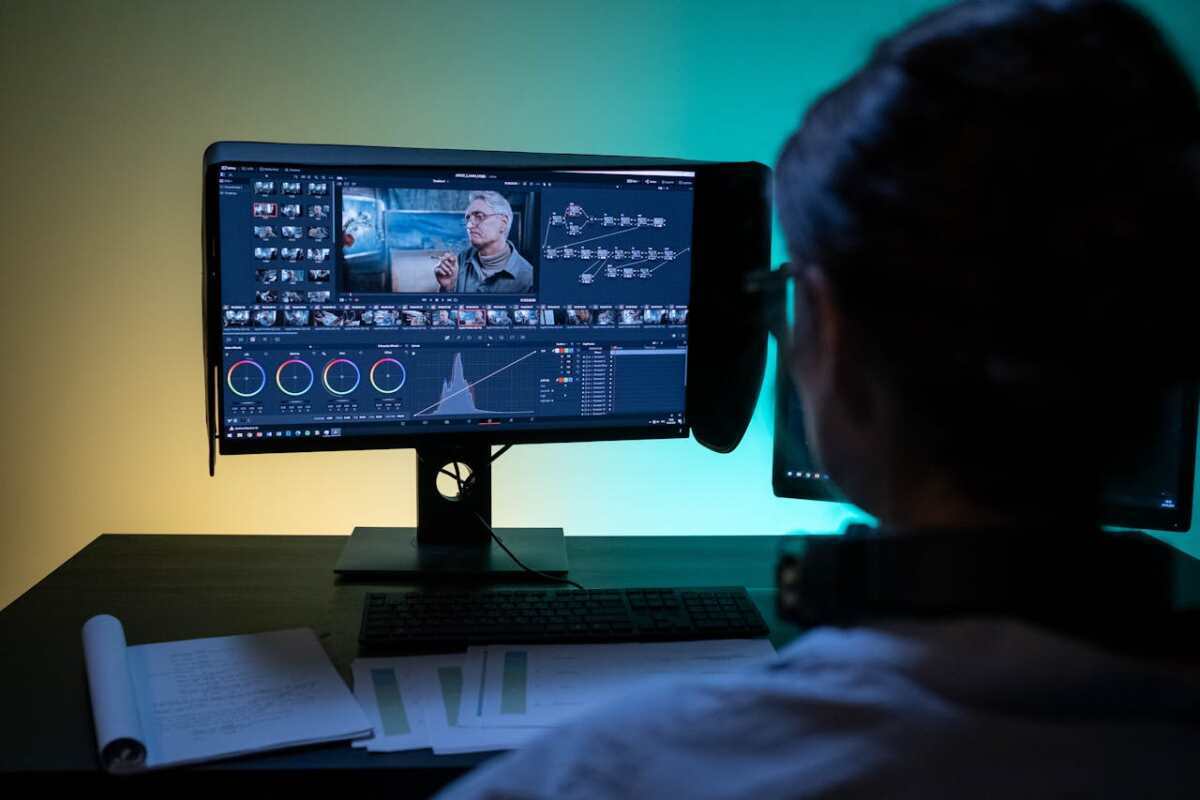
Color grading and correction aren’t just for Hollywood—they’re essential for professional-looking business videos too. When footage is shot in varying lighting conditions or on different cameras, color inconsistencies can be distracting. Video editors use color correction to even out tones and ensure the video looks natural, while color grading is used to stylize and set a mood. For example, a tech startup might use cool tones to suggest innovation, while a wellness brand might favor warm hues for a calming effect. Consistent visuals align with brand tone and elevate the overall aesthetic.

Adding Captions and Accessibility Features

With more people watching videos on mobile devices (often without sound), adding captions is no longer optional—it’s vital. Including accurate, well-timed subtitles not only boosts accessibility for viewers who are deaf or hard of hearing but also caters to international audiences. Additionally, captions improve SEO, as search engines can index the video’s text content. Other accessibility features might include descriptive audio or high-contrast visual choices. Thoughtful editing ensures your message is inclusive and reaches the widest possible audience, which is essential for modern business visibility.

Video editing is much more than cutting clips and adding music—it’s a blend of creativity, strategy, and technical skill that brings brand stories to life. From ensuring consistent branding and clean audio to shaping narratives and optimizing for web performance, each editing technique contributes to a viewer experience that builds trust, communicates value, and drives action. As competition continues to rise, businesses that embrace these video editing best practices will stand out and thrive. Whether you’re creating your first video or refining an ongoing strategy, let these techniques guide your content to greater impact.

Using AI to Fix Common Editing Mistakes in YouTube Videos

Even the most experienced creators can make mistakes during video editing—issues like uneven audio, distracting cuts, or poorly synced visuals are all too common. These errors can hurt viewer engagement and the overall quality of your content. Fortunately, AI tools offer solutions to identify and fix these problems efficiently, helping you produce polished videos with minimal effort. Tools like a free AI video generator simplify the process, allowing creators to focus on creativity while AI handles the technical details.

In this post, we’ll explore how AI can help fix common editing mistakes and elevate your YouTube videos to professional standards.

  1. Correcting Poorly Timed Cuts

Poorly timed cuts can disrupt the flow of your video and confuse your audience. Whether it’s a jarring transition or a clip that’s too long, these mistakes can make your content feel unpolished.

How AI Helps:

  • Cut Optimization: AI tools analyze your video for pacing and suggest better places to make cuts, ensuring a smooth flow.
  • Scene Detection: Automatically identify logical breakpoints in your footage based on changes in subject, angle, or context.
  • Seamless Transitions: Apply AI-generated transitions to make cuts feel more natural and engaging.

Using a YouTube video editor, you can fix these issues quickly and ensure your video flows seamlessly.

  1. Fixing Audio Imbalances

One of the most common mistakes in video editing is uneven audio levels. A video with background music that overpowers dialogue or sudden volume spikes can frustrate viewers and lead to disengagement. A YouTube video editor will help you create engaging content that can get more likes on YouTube.

How AI Helps:

  • Automatic Volume Balancing: AI normalizes audio levels across your video, ensuring consistent sound.
  • Speech Enhancement: Amplify voices while reducing background noise to improve clarity.
  • Music Ducking: Automatically lower background music during speech and raise it during pauses for a professional sound mix.

By addressing these imbalances, AI tools make your videos more enjoyable to watch and listen to.

  1. Removing Background Noise

Recording environments are often less than ideal, leading to background noise such as static, hums, or outdoor sounds. These distractions can diminish the quality of your video and make it harder for viewers to focus on the content.

How AI Helps:

  • Noise Suppression: Identify and remove unwanted sounds without affecting the clarity of dialogue or primary audio.
  • Dynamic Filtering: Adjust noise reduction levels based on changes in the recording environment.

AI tools ensure your audio sounds crisp and professional, even when recorded in challenging conditions.

  1. Stabilizing Shaky Footage

Shaky footage can make your videos look amateurish and distract viewers from the message you’re trying to convey. This is a common issue when filming handheld or without a stabilizer.

How AI Helps:

  • Video Stabilization: AI analyzes frame movement and smooths out shaky footage without degrading video quality.
  • Motion Tracking: Maintain focus on the subject even in dynamic or handheld shots.

With these features, AI can turn unstable footage into a polished, professional-looking video.

  1. Improving Visual Quality

Videos recorded in poor lighting or with outdated equipment often lack the sharpness and vibrancy viewers expect. AI can significantly enhance the visual quality of your content.

How AI Helps:

  • Color Correction: Automatically adjust brightness, contrast, and saturation to make your video look vibrant and consistent.
  • Resolution Enhancement: Upscale low-resolution videos to HD or 4K while preserving details.
  • Grain Reduction: Remove visual noise caused by low-light recording.

These enhancements make your videos more visually appealing and modern.

  1. Fixing Sync Issues

Syncing issues between audio and video can ruin an otherwise great production. Whether it’s dialogue not matching lip movements or background music being out of time, these errors can be frustrating for viewers.

How AI Helps:

  • Lip Sync Correction: AI aligns audio tracks with visual footage to ensure perfect timing.
  • Multi-Camera Syncing: Automatically synchronize footage from multiple cameras, streamlining the editing process.

AI ensures your video and audio work in harmony, creating a seamless viewing experience.

  1. Reducing Overuse of Effects

Adding too many effects, transitions, or overlays can make your video feel cluttered and distract from the content. AI tools can help you strike the right balance.

How AI Helps:

  • Effect Recommendations: AI analyzes your video’s tone and content to suggest appropriate effects.
  • Subtle Enhancements: Apply minimalistic transitions and overlays that enhance rather than overwhelm your video.

This ensures your final product is both professional and visually appealing.

  1. Correcting Frame Timing in Animated Sequences

Animated sequences or motion graphics that don’t align perfectly with your video can feel awkward and disconnected. AI tools help fine-tune these elements for better integration.

How AI Helps:

  • Frame Matching: AI adjusts animation timing to sync perfectly with the main footage.
  • Motion Blending: Smooth transitions between animations and live-action clips.

These fixes create a cohesive look that enhances the overall storytelling of your video.

  1. Enhancing Accessibility with Captions

Videos without captions can exclude audiences who are deaf or hard of hearing. They’re also less accessible to viewers who prefer watching with the sound off.

How AI Helps:

  • Auto-Generated Captions: Transcribe dialogue accurately and sync it with the video timeline.
  • Multi-Language Subtitles: Translate captions into multiple languages for global reach.
  • Customization Options: Adjust caption styles to match your video’s branding.

Adding captions improves accessibility and boosts engagement, as well as your video’s search ranking.

  1. Refreshing Old Videos

If you have older videos that could use a facelift, AI tools make it easy to modernize them with updated visuals, audio, and metadata.

How AI Helps:

  • Metadata Updates: Suggest new titles, descriptions, and tags based on current trends.
  • Visual Enhancements: Apply AI-driven filters and color grading to give older videos a modern aesthetic.
  • Thumbnail Creation: Generate updated thumbnails that align with today’s design trends.

Refreshing old content allows you to extend its lifespan and reach a new audience.

Final Thoughts

AI is revolutionizing video editing, offering powerful tools to fix common mistakes and elevate the quality of your content. From noise reduction and stabilization to audio syncing and accessibility improvements, these tools make it easier than ever to create professional-quality videos. A free AI video generator and YouTube video editor can streamline your workflow, allowing you to focus on storytelling and audience engagement.

Top 6 Remove Watermark from Video for PC and Online (With AI Options)

Need to remove watermark from video? Those unwanted logos, timestamps, or texts can really mess up your video. But don’t worry about it at all as you aren’t the only one suffering, and this article is here to help.

In the next few minutes, you will learn about some of the best tools to remove watermarks through a PC or by using an online option.

So, let’s get started.

Part 1: 3 Best Video Watermark Remover for PC [Windows & Mac]

Here are the 3 best watermark remover video tools for PCs you can consider using:

1) HitPaw Watermark Remover

HitPaw Watermark Remover is a user-friendly tool designed to remove watermarks from videos with just a few clicks. It is an easy-to-use application that can remove anything from videos with a few clicks. It features an intuitive user interface, simple for novices, and powerful for advanced users.

Key Features:

  • It supports batch processing that allows you to remove multiple watermarks simultaneously.
  • It provides several modes in which watermarks could be removed, such as smooth fillings and edge fills.
  • Compatible with a wide range of video formats.
  • Allows a quick preview of results before saving.
  • Has inbuilt tutorials for beginners.
  • Works with Windows and Mac operating systems.

Pros:

  • User-friendly and intuitive interface.
  • Fast processing speed.
  • It supports multiple modes for watermark removal.
  • High-quality output without leaving traces.
  • Regularly updated with new features.
  • Available on both Windows and Mac.

Cons:

  • Free version limited.
  • Requires a stable internet connection to activate.
  • A lot of the more advanced features are locked behind a paywall.

2) SoftOrbits

The Video Watermark Remover of SoftOrbits is a program that deals very well with unwanted video watermarks and, at the same time, always retains the original video quality.

Key Features:

  • This program removes watermarks, logos, and any other unwanted elements from videos.
  • Batch processing of more than one video supported.
  • It provides different algorithms used in the process of watermark removal.
  • Compatible with different video formats.
  • It has a simple, clean user interface.
  • Provides a preview feature to check results before saving.

Pros:

  • Simply for beginners to use.
  • Supports a batch processing.
  • High-quality output.
  • Offers different removal methods for better results.
  • Affordable pricing.

Cons:

  • The trial version has limited features.
  • Lacks some advanced editing tools.
  • No Mac version available.

3) Apowersoft Watermark Remover

Apowersoft Watermark Remover is an all-around utility that helps users in removal of watermarks, logos, and other undesired objects from videos. This watermark remover video supports all the major formats and has a user-friendly interface during operations.

Key Features:

  • It removes watermarks, logos, and subtitles added to a video.
  • Can Support a number of Video Formats.
  • Offers drag-and-drop interface usability.
  • The program applies batch processing to multiple videos.
  • Allows the user to preview changes before applying them.
  • Supports both Windows and Mac.

Pros:

  • It has a user-friendly interface.
  • It allows batch processing.
  • Compatible with multiple formats.
  • Quick and effective process of removal.
  • It features the preview option.

Cons:

  • Limited features in the free version.
  • Some advanced functions require a subscription.
  • The Mac version seems to be much less optimized than the Windows version.

Part 2: 3 Useful Remove Watermark from Video Online

If you are looking to remove watermark from videos but don’t want to install any software on your computer, here are the online tools that will help you:

1) Fotor Remove Watermark

Fotor Remove Watermark is an online solution for persons who wish to perform a decent, flexible watermark removal from video. By this, one can easily remove watermarks from videos, without the hassle of downloading or installing an application, rather through a minimal use of a browser.

Key Features:

  • Online tool, no download required.
  • Supports various video formats.
  • Simple and intuitive interface.
  • Allows for quick watermark removal.
  • No technical skills required.
  • Accessible from any device with internet access.

Pros:

  • No software installation needed.
  • Easy to use.
  • Works on multiple devices.
  • Fast processing speed.
  • Free basic version available.

Cons:

  • Limited features compared to desktop tools.
  • Requires a stable internet connection.
  • The free version has some restrictions.

2) HitPaw Online Watermark Remover

HitPaw Online Watermark Remover is another easy online tool to remove watermarks from videos instantly. This watermark remover video online free is built to ensure ease of use and to make it friendly to people who are averse to downloading software.

Key Features:

  • Online access, no installation needed.
  • Supports various video formats.
  • Quick and easy watermark removal.
  • User-friendly interface.
  • Works on any device with internet access.
  • Provides a preview feature.

Pros:

  • No need to download software.
  • Easy and quick to use.
  • Works on any browser.
  • Free to use for basic tasks.
  • Supports multiple formats.

Cons:

  • Limited features compared to the desktop version.
  • Requires a good internet connection.
  • Some features may require a subscription.

3) Veed.io

Veed.io is an online video editor that embeds the feature rescinding a watermark. This watermark remover online is a versatile platform that brings in some enhancement features, along with features for watermark removal on its platform.

Key Features:

  • Online video editing platform with watermark removal.
  • Supports various video formats.
  • Includes additional editing tools like trimming and cropping.
  • User-friendly drag-and-drop interface.
  • Works on any device with internet access.
  • Allows users to export videos in different resolutions.

Pros:

  • All-in-one video editing solution.
  • Easy to use and accessible.
  • No need to download software.
  • Supports multiple formats.
  • Free version available with basic features.

Cons:

  • Limited advanced features in the free version.
  • Requires an internet connection.
  • Exporting in higher resolutions may require a subscription.

Part 3: Tips to Remove Watermark from Video

Here are some practical tips to help you remove watermark from videos:

  • Choose The Right Tool: Choose a watermark remover that fits into your needs, either a PC software or an online tool.
  • Ensure Quality: The tool should be able to maintain high video quality after watermark removal.
  • Use a Preview Feature: Always preview the results before finalizing to make adjustments if needed.
  • Try Editing the Settings: Experiment with different settings to get the best removal result.
  • Take Note of the Limits: Be cautious of file size and format limitations when using online tools that you will have to utilize.
  • Backup Your Video: Take a copy of the original video since doing so might alter its quality.

Final Thoughts

In conclusion, here are several useful tools that will help remove watermark from video. To start with, HitPaw Online Watermark Remover is an easy tool to get a job done. It is user-friendly and designed to give quickly good results.

Although it has a couple of limitations in its free version, it’s still one of the choices using which you will really feel satisfied removing a watermark. Just give it a try and see how efficient it is for you in editing videos.

The Rise of AI in Video Surveillance: A New Era of Security and Privacy Concerns

Video surveillance has become essential in today’s society, quietly guarding homes, businesses, and public areas. The preface of artificial intelligence has greatly changed video surveillance, bringing advanced features and ethical challenges, unlike the introductory security handed by traditional CCTV cameras.

The Promise of AI Video Convenience

AI-driven video monitoring systems use sophisticated algorithms to analyze live video feeds, detecting patterns, irregularities, and possible dangers that human eyes might overlook. This increased alertness leads to improved security procedures, enabling proactive actions and quicker responses in urgent circumstances. An example of this is how facial recognition software can quickly identify people on a watchlist, and object detection algorithms can recognize suspicious behavior or potential safety risks in busy places.

However, this progress in technology raises some worries. The growing use of AI in video surveillance poses significant concerns about privacy and civil rights. The potential for misuse and abuse is created by the capability to monitor individuals in real-time, analyze their actions, and store large amounts of personal information. The secretive workings of numerous AI algorithms, commonly referred to as ‘black boxes’, heighten worries about data breaches, authoritarian surveillance, and the diminishing of personal privacy.

Advantages of Video Surveillance Enhanced by Artificial Intelligence

In addition to security advantages, AI-driven video monitoring has various practical uses that improve our daily routines. In retail environments, artificial intelligence can examine customer actions, recognize shopping trends, and enhance product positioning to boost sales. AI-powered cameras can identify traffic infractions, enhance traffic patterns, and enhance road safety in transportation. AI in healthcare can help monitor patients, detect possible health risks, and offer remote diagnostic services.

The Ethical Challenges

Nevertheless, the ethical concerns that arise from AI-powered video surveillance tend to outweigh its potential advantages. A main worry is the possibility of algorithmic prejudice, as AI systems based on biased data may continue discriminatory behaviors. This could result in incorrect recognition, tendentious  handling, and wrongful apprehensions. Another worry is the possibility of mass surveillance, in which AI-enabled cameras could be utilized by governments or private organizations to monitor the actions and whereabouts of entire communities, diminishing both privacy and the ability to move freely.

Regulation and and Transparency

Dealing with these challenges necessitates a multifaceted strategy. Governments and regulatory agencies should create definite guidelines and ethical frameworks for implementing AI in video surveillance. Transparency and accountability are essential, with clear regulations for data privacy, access control, and the ability to seek redress for any possible misuse.

The Video Surveillance’s Next Step in Technology

Although there are obstacles, the key to the advancement of video surveillance is to utilize AI’s capabilities while reducing the associated dangers. Ongoing advancements in AI algorithms, along with strong ethical guidelines and transparent data management, can help to keep AI surveillance systems beneficial, improving security and safety while upholding essential rights.

Specific Applications of AI in Video Surveillance

  • Facial Recognition: Utilizing artificial intelligence, facial recognition technology can swiftly identify people, helping security personnel promptly find suspects, deter unauthorized entry, and maintain public safety.
  • Object Detection: AI algorithms are capable of examining video recordings in order to recognize specific items like weapons, questionable packages, or people involved in unauthorized actions. This allows for preemptive action and lowers the chance of possible dangers.
  • Analysis of Behavior: AI has the capability to examine patterns of human behavior, recognizing deviations or questionable actions that could signal possible threats. This aids security personnel in prioritizing threats and responding with greater efficiency.
  • Predictive Analytics: AI uses historical data to anticipate security threats and suggests proactive actions to prevent them, known as predictive analytics. This enables better distribution of resources and a preventative security strategy.
  • Smart Perimeter Security: Cameras enhanced with AI technology can establish virtual boundaries around specific zones, sending notifications in case of unauthorized entry or breach attempts. This improves security measures and offers immediate awareness of the situation.

Conclusion

Video surveillance powered by artificial intelligence is an effective tool with great potential to improve  security and enhance our everyday lives. Nevertheless, it is essential to engage with this technology in a responsible and ethical manner, making sure to reap its advantages while also protecting privacy and civil rights. By focusing on transparency, accountability, and ethical standards, we can utilize AI in video surveillance to ensure a safer and more secure future for everyone.

Convert Text to Videos Quickly – Turn Text into Stunning Videos

Content creation has changed a lot, and videos are now a popular way to tell stories and communicate. However, not everyone knows how to create a great video. The solution to this issue is text-to-video converters. These tools allow users to convert their written text into high-quality video. 

In this guide, we will explore one of the best text-to-video converters available online, like Vidnoz AI or Vmaker AI Video Generator, offering insights into its unique features, advantages, and potential limitations. Ensure that you read the guide to the end to find the perfect tool for turning your textual idea into dynamic visual content. 

Best Tool to Convert Text to Videos Quickly

Looking for an easy way to convert text into high-quality video? You are in the right place! Vidnoz AI is an AI-powered solution that allows users to turn text prompts into an engaging video. This tool allows users to create videos from text in a few clicks, making it a valuable resource for content creators, educators, and businesses looking to enhance their visual storytelling capabilities. 

Vidnoz AI provides over 1000+ lifelike avatars from different industries and roles, such as doctors, football players, cricket players, teachers, students, and many more. It offers highly advanced AI voices powered by two famous companies, Microsoft and Elevenlabs. Similarly, LOVO is an artificial intelligence voiceover platform that turns text into realistic human-like voices, making it a strong complementary tool for users focused on creating high-quality audio-visual content.

Top Features: 

  1. AI Text To Video: This tool allows users to effortlessly convert text into engaging video content.  
  2. AI-Powered Tools: Vidnoz AI offers a wide range of AI-powered tools that help you create visual content easily. AI tools include AI Cartoon Generator, AI Talking Avatar, AI Voice Changer, and many more. 
  3. Customizable Avatar: The program allows you to create custom avatars for yourself. Simply upload your image to the tool, and Vidnoz AI will automatically create an Avatar. 
  4. Video Library: Offering over 1000 lifelike avatars and 1000+ pre-designed video templates, which can be used in different scenarios. 
  5. AI Voices: The program provides users with 830+ AI voices in 140 languages. Users can also choose from 360 voices from ElevenLabs and Microsoft Library. 
  6. Languages: Vidnoz AI supports over 140 languages, including English, Hindi, Italian, Spanish, Turkish, French, Urdu, and many more. Users can easily translate videos using these languages. 
  7. Easy-to-Use: This program offers an intuitive and user-friendly interface

Pros 

  • It allows you to create videos from simple text; no editing skills are required to use this program. 
  • Vidnoz AI automates processes for scene creation, voiceover, and editing. 
  • Advanced AI algorithms that ensure high-quality video production. 
  • Online web-based program, meaning no software downloading and installation is required. 
  • Options to customize video elements include background, text, images, and voiceovers
  • Compatible with Windows, MacIOS, and more. 

Cons 

  • Offers limited customization options in the free version. 
  • Dependency on Internet connection. 

How to Create Videos from Text via Vidnoz AI?

Follow the instructions below to learn how to create videos from text via Vidnoz AI:

Step 1: Select Avatar and Template

  • Navigate to Vidnoz AI’s official site and click Create Free Video Now. 
  • Vidnoz AI offers 1000+ lifelike avatars and templates. Choose any avatar and template to start the process. 

Step 2: Create AI Voiceover 

  • Now, type in the text that you want the AI avatar to speak. 
  • Once you have typed the text, select an AI voice in any language. Vidnoz AI supports over 140+ languages. 

Step 3: Add Custom Touch 

  • Here, you can customize the video accordingly, such as adding music and effects, changing the background, and more. Use the customization to make your video perfect. 

Step 4: Generate AI Video 

  • Finally, click on the Generate button to bring your video to life. If you are satisfied with the results, click on the download button to export the video in MP4 format or select the share button to share it directly on social media platforms. 

FAQS

  1. What is a Text-to-Video Converter:

A text-to-video Converter is a tool that uses AI to generate videos based on input text automatically. These tools use the text to create visual content, including scenes, animation, and voiceovers. 

  1. Which is the most popular Text to Video Converter?

Vidnoz AI is one of the most popular text-to-video converters available online. This tool is known for its ease of use and high-quality video output. 

  1. Is Text to Video Converter Safe?

If you select programs like Vidnoz AI, then yes, text-to-video converters are safe to use. The best part of this tool is that it doesn’t collect personal information. 

Conclusion 

Text-to-video converters are amazing tools that allow users to produce engaging video content from text only. These tools allow rapid video generation, saving significant time compared to manual video production. In this guide, we introduce you to the best AI Text-to-Video Converter available online: Vidnoz AI. If you are new to content creation, then this tool is the best option for you because it requires no technical skill to create videos.