Best Tools to Simplify Your eCommerce Business

Operating an e-commerce business is both thrilling and exhausting at the same time, and you may be able to handle all the basic tasks for getting it off the ground; you will require more help as you begin to develop.

It makes sense to invest in anything that code simplifies the task and makes it easy for everyone to help a business achieve its goals.

Whenever it has something to do with order management, product inventory, customer service, or web design and marketing, the good news is that there are convenient tools for getting the work done. Below are some of the popular and efficient E-Commerce business tools that you may consider for scaling your business at a much fleeter pace.

1. Quickbooks

One of the essential aspects of running a business is knowing how the money is moving in your business. It would help if you had a good idea of where your money goes, how much you spend, how much you earn, and how much goes into various aspects of the business. Quickbook provides a 360-degree view of your complete business by taking care of all your accounting needs. Using its multi user login and comprehensive analytics and reporting features, the program helps you be on top of things in the easiest possible way.

2. DesignBro

Designbro is an online graphic designing platform that blends high-quality professional designers with clients worldwide. Packaging design has eternally been overpriced due to inadequate processes. Designbro delivers an affordable and high-quality packaging design at scale by automating these processes.

There are different branches for every project, each with its alternatives. It is not very surprising how the tremendous number of choices doesn’t confound people?

It doesn’t stop the purchasing experience for you, and your eyes instantly stand for your favorite brands. More often, the packaging enables a ketchup brand for standing out in every food section. Good candle packaging should be enough if you want your goods to stand out from the crowd.

Designbro has the ability for assisting you with brand identity design so your products could fly offshore shelves:

●    Selecting between 3 to 10 packaging design concepts.
●    Design by the best professional designers.
●    Receiving tailor-made designs for products.
●    Money-back guarantee

3. FreeUp

An E-Commerce business needs to run like a well-oiled machine for meeting its goals. All its features from marketing, product sourcing, and customer service are required to perform as expected.

One person cannot do all this. You require an appropriate workforce to help you get things done if you need your business to go to the next level.

FreeUp could be considered a great investment as it saves many headaches going through an extensive hiring method. As freelancers are all pre-vetted at FreeUp, all you have to do is tell them the skills you are looking for and provide you with qualified candidates within 24 hours.

4. Sellbrite

Inventory management and order fulfillment are tedious tasks required to run an eCommerce business, which is why it makes a turn-off difference if there is a way for performing each of these tasks with the same tool.

All this has been made possible by Sellbrite as it not only allows you to perform these tasks by using a single tool it also provides access to multichannel reporting intelligence required by every business.

5. UpCounsel

Branding, trademarking, intellectual property rights, labor, and employment agreements, customer agreements, and patents are some of the things you are forced to deal with as your business will grow. Also, you will be spending time working with lawyers when dealing with these things, which is why getting access to what team of lawyers for critical legal advice is crucial. It is exactly what UpCounsel provides, which is why investing in this tool is vital not only for developing the business but also for protecting it.

6. ShipStation

Shipping products could be devastating. From designing shipping labels and binding slips for sending actual orders, the entire process requires a lot of time and effort, particularly when marketing through different platforms.

ShipStation helps save time and money by allowing you to import, manage and ship orders in one place. Shipstation can integrate directly with popular e-commerce shopping carts, tools, and platforms that make the whole process of selling products online more comfortable than it regularly would be.

7. AfterShip

An E-Commerce business should ensure that customers are getting quality products and obtaining them at the right time. It is why a shipment tracking tool is necessary because different factors could affect the delivery procedure. You can provide your customers less reason for wearing about their packages by having the ability to track shipments.

It is exactly what AfterShip provides you. With its support of over 400 shipping services worldwide and integration with major eCommerce platforms like Shopify and eBay, delivery monitoring has become much convenient.

8. Yotpo

One of the essential factors that provide an E-Commerce business with success is a customer review. It is an excellent way for leveraging satisfied customers for driving future sales. That is what Yotpo allows you to do.

What provides a platform for generating product reviews and uses the best of them for boosting sales with its highly customizable and easy-to-install widgets. Essentially that tool supports in making your business more convincing regardless of its market share.

End words

The large number of tasks required for running an eCommerce business investing in these tools could effectively increase productivity and profitability. While most required tasks are considered mundane and routinary, it doesn’t take away that most of them require time and effort.

The tools mentioned above allow you to maximize time and features to perform such tasks easier and faster. Some of them might require you to shell out a considerable amount of cash; the benefits they will bring will surpass the amount you will be spending. If you want to boost your product sales and see a drastic increase in profit, investing in these tools could be one of the best decisions you can take, especially if you start.

How to Use Job Application Template and Streamflow HR Process

Hiring employees is already a tedious job and now that companies have started to work remotely, it could even become more difficult to hire the right person. However, there are a lot of tools that you can try to simplify the job.

One such thing is to use online forms and making the registration process automated. In this article, we will discuss how you can use online and template forms to simplify the HR process.

Why use a job application form?

You can use an online job application form to safely obtain personal details, curricula, and even digital signatures from applicants.

In case your client or company doesn’t have an online form, you can use one of the many ready-made job application forms available on different websites.

Also be sure to include a virtual signature option, as it adds more credibility to the application.

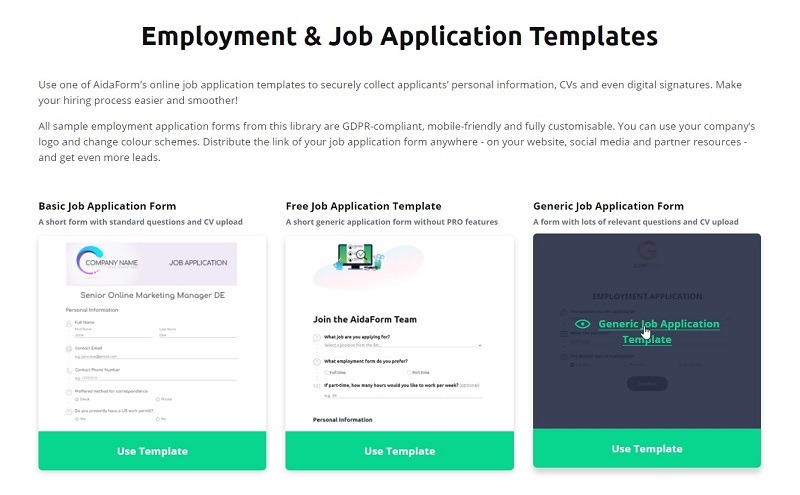
To gather all necessary job-seeker information, you can use AidaForm’s job application template. This template meets most work screening requirements, but based on this free sample job application, you will build a more specific online form for your open position.

Request skills related to specific employment, access to shifting jobs, requested salary, driver’s license, and everything else that is significant in your case. The template can help you gather a lot of information in a standardized form about future employees.

 How to build the form for hiring?

1. Login or sign up on AidaForm. To add a free sample job application to your account and start configuring and editing the file, press the Use Template icon.

Throughout the form elements section, you will add extra shape areas. You can compile simple details on candidates, such as your contact records, qualifications, and expertise with a free job application form template. Most supervisor administrators, for instance, might require details from former employers of an applicant.

Attach the text box for the applicants to type their name into the company’s name, define job description, and insert their roles, and then add the Date box to enable them to submit job dates in the application template for the free job application.

2. When a job template is available, go to the setup section for the free application template to adjust advanced options. Adjust the name of the free sample job application to suit your job title so that your account does not clash with other online types. Enter a new form name in the Form Name field to rename the form. Make clear for which job this application is for or department.

Type in the email of the recruiters who are expected to be informed of their requests in Set up> Email alerts. Furthermore, use ReplyNotification and Subject Notification options to send a response email confirming receipt of your application to candidates.

3. You can now publish your form after you have completed the modification of the free job application template. To make the form accessible online, go to the publish link. Post the form conveniently anywhere: on the profile, forums, and social media networks. The template may also be exchanged with staff via email.

Advantages and disadvantages of using a template

If you are looking to hire new employees in the immediate future, you should ask to fill out a form for the job application for candidates in addition to approving the resume. A job application template is a simple form that may simplify and speed up the hiring process, but it also has downsides.

Advantages:

1. Data on background checks

An advantage of a form is that it offers you the chance to search the history of prospective candidates before applying. You may request a name, address, telephone number, references, and in certain situations, even a social security number at the top of the template.

You can only conduct screening checks whether the candidate accepts with a signature before inviting him for an interview. Ensure you understand the guidelines on the document you may apply for and about the candidate in your State work legislation.

 2. Selection of format

One benefit of getting a job application is that it allows you to see the candidate in the exact way you like. For example, if you are more concerned with the past job of an applicant than any other information, you can prioritize this at the top of the form and give the details a greater space.

As a way to continue a pre-interview session, you may also pose detailed questions about the job application. You can invite the person to the final interview if the answers are pleasing.

3. Data privacy privileges

Both staff and members have the ability to keep sensitive details private. Even the most benevolent behavior can be viewed as a privacy infringement which may result in expensive litigation for the business.

Do not pull all mobile phone numbers of workers in a single folder, hold out of the inbox while communicating about sensitive matters, and rarely retain transparent medical records about workers.

While it is definitely not prohibited to exchange any of these things, wise managers should not take the option to hold any personal details locked and provide it available for those in need.

Disadvantages

1. Fast Decisions

One of the downsides is that you make fast judgments about applicants based on this form for screening candidates.

Or you can throw away applications that only have one meaningless position without providing an opportunity to clarify the candidate’s experiences. You could skip viable workers if you launch your recruiting procedure dependent on the application itself.

2. More documentation

In some cases, it is inappropriate and way too much time-consuming to check job applicants in addition to the resumes.

So, this is all about how to use a form builder and automate your HR process up to some extent.

Once you shortlist some eligible candidates, you can schedule interviews over video invitation to finalize the whole process.

7 Great Project Management Apps for Teams

Project-Management tools help you to organize and systematize your project on a single platform. This software helps you categorize your tasks by telling you the ones who have been working on, the others that are being worked on by other members of your team, and the position of a project that is in progress.

1. Trello

You can add due dates, attachments, and any required comments on the work presented. It also helps save a lot of time since you have an entirely organized chart right before you, which helps you jump right to action from an idea to create different tasks and complete them instantaneously. So, let’s start with all the great Project Management Software for firms & businesses.

Trello is the first tool that comes to the mind of any individual when they’re discussing about project management tools. Trello is, although very fast and swift in its nature of completion of work, it does only offer a very limited array of email integration and a similar number of labels.

You can add multiple people to work with you on any project you are doing to planning to do, due to its collaborative feature. Along with its professional usage, firms use it widely to plan vacations and other leisure activities too.

However, there are so many other great Trello software alternatives that you can also check out to save you some time.

2. Click Up

Click Up is a very modernized and technical alternative to Trello. Not only is it proficient in task management but encompasses the ability to offer goals, reminders, docs, calendars, etc. Click Up is completely customizable and is useful for any and every type of team and field of work. Since it is based on common ground, all kinds of teams can use the same app to collaborate, organize, and plan their tasks, respectively. 

Features

  • Common platform for all users
  • Reliable and Consistent user interface
  • Free sources for training purposes
  • High ability for customization

3. Backlog

As a project management software, Backlog is the one that is very rich when it comes to the features. However, this does not result in any complexity in usage and lets it be rather simple. This software has multiple subscription plans as per everyone’s budget requirement and also remains relatively cost-effective. The good thing about these subscriptions is that they bill the entire company for corporate usage and not an individual.

Features

  • Multiple, creative template options
  • Automated system for creation and issuing of templates
  • Drop file-sharing system

4. Air Table

This software is suitable for businesses of big sizes and offers collaborative functionalities and tablet-friendly options. It also aids in setting your priorities and clocking schedules to the minute. This helps in effective alignment of work for a speedy work completion process.

Features

  • You can easily integrate social media and email IDs.
  • The platform and views can be customized
  • Records can be filtered and rearranged

5. Paymo

This is an application for project management that is used vitally to complete the project right from the time of its conception until the very end of it. It is ideal for businesses that are either small or are medium-sized, with more scope to grow. This software helps these businesses to simplify their complex procedures and processes and ensures the swiftness and fastness of the business that is being carried forward.

Features

  • It collates data from various other systems during the process of estimating a project
  • You can create a visual timeline of the work being done or the work that has been finished by you and your team
  • There is time tracking to ensure that deadlines are met regarding each and every task
  • It offers complete transparency between the employees and the manager

6. Process Street

This software contains maximum accuracy as a management tool meant for the workforce. It is best suited when there are repetitive tasks that need to be done by a company. Since workers may be on different levels of movement within their operation, Process Street helps to create workflow processes for businesses, to track them and optimize them as and when needed.

Features

  • Collaboration and integration available with over 1000 applications
  • Collaborating on the teamwork and being able to track the progress
  • Allows swift control and analysis of the business processes

7. Task World

This project management software is cloud-hosted and uses visuals for task management and planning ahead. It records all the changes that have been made or are being made and stores them in chronological order so that accessing them later does not prove tedious.

Features

  • You can add colored tags or labels to differentiate and sort out the tasks which you have to do. Color coded work descriptions have been proven to be done in a better manner due to its nature of visual appeasement.
  • If you want to keep your tasks under the veil, Task World also can help you lock the document or hide it from the other members of the team.

Summary

Task management tools abound. If one of the seven above does not fit your needs, check out this list of The 64 Best Free Productivity Apps of 2021.