The “Suit Event” is particularly frustrating. When I have double or triple points, there is a 10-minute time limit. Depending on my skills, I can get 2, sometimes 3, lessons done and if it’s 3 lessons, the time limit increases. However, the stupid suit event takes time between each lesson, and there’s no way to turn it off or speed it up. Then I run out of double points, and my third lesson is on single points.
So how do you turn it off? And when will the Suit Event end – it seems to have been going forever.

Here is the answer:
- There is no setting to turn it off. Duolingo can make code for a fancy event but can’t spend 5 minutes to add a control to turn it off.
- There are no plans for it to end. Duolingo plans to continue the suit event, adding future suits – forever.
How to turn off the Suit Event
There is not really a way to opt out or turn it off. But if you use Duolingo on Android, you can use the version before the Suit event, not update it, and it will be gone for you. I have done this for all of this week, and I found the following:
Works
- Lessons
- Daily bonus
- Monthly quest
- Friends quest
- French, German, Spanish, Japanese all good
- Chess
- Switching between courses but fulfilling daily quests
Missing
- No suit event or costumes
- The new 3-part vocabulary lesson has no tooltip. I don’t understand this one anyway – it is trying to teach me something, but with no tip I don’t know what it is doing.
- Japanese – Romaji Furigana rather than Kana – not huge, but the newer style is better for me – not as distracting
Here is how to do it
Luckily for Android Phone and Tablet users, we have an option that is entirely reasonable when a vendor abandons us. That is – revert to a build that is old enough to not have the mandatory DuoLingo Suit Event. Here are the steps on how to do it on an Android Phone or Tablet:
1. Save your settings and make sure you have a DuoLingo login
Our steps involve removing DuoLingo from your phone. Use a PC to go to DuoLingo and log in. Check your Account settings to be sure you know your user name and password. Make sure the online version shows your progress levels.
2. Remove DuoLingo from your Android Phone.
Go to the App List, and long-press on the DuoLingo icon. Select Remove App.
3. Obtain an APK Bundle that is old enough not to have the Suit Event
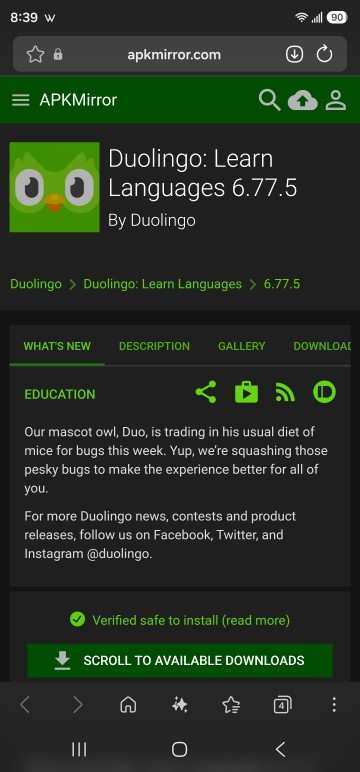
I have found the Suit Event started in May 2026, so the last build of April 2026 is good:
4. Install APK Mirror App from Google Play Store
To install this, you also need to install the APK Mirror App on Android. Go to the Play Store on your phone and search for APK Mirror. Install it. You will only need to run it once.
Open APKMirror Installer, tap Browse files, select the Duolingo .apkm file you downloaded, and tap Install package. You will be forced to view one ad, probably focused on gruel.
5. Log in Using your User Name and Password.
Log in with your saved username and password. This should set you back to how you were working before.
6. Prevent Duolingo from Updating
From now on – you cannot use the Play Store “Update All” option. Every time the Play Store updates, you need to select the details and click Update for all Apps except DuoLingo. Leave DuoLingo here without updating it. You need to do this every time Play Store wants to update apps since they long ago removed the option “do not update this app”. Google says: You will enjoy your gruel – peon.
7. Enjoy the Little Things in Life
You can probably stay on the old version for 6 months to 2 years. If DuoLingo finds out about this technique, they will probably block it, as they did with the earlier Path Mode update.
The reason why is simple. Duolingo does not prioritize learning. They prioritize profit-making. And by focusing on games where people have to buy pieces, they make a profit – even though it interferes with learning.

How to Register a Complaint with Duolingo
Duolingo does not have a phone number and no live chat. You can see from the CEO call notes link above that the CEO is not interested in your opinion – only profit. Enjoy your gruel, peon.
The Duolingo Help Center has a “Leave Feedback” form at the bottom – that most likely will never be read by anyone that is not a gruel eater.
Here are a few things you can do
- Help Center – duolingo.com/help. Scroll to the bottom for “Leave Feedback”
- Email – support@duolingo.com. It’s listed on Duolingo’s store contact page. Expect a slow, generic reply.
- In the app – Settings > Help Center > Leave feedback.
- App store review – Leave a review on Google Play or the App Store. Mention the specific event by name. Ratings are the one thing Duolingo watches closely.
- Public review sites – Post on Trustpilot or the Better Business Bureau. These stay public, and other users can see them.
Alternatives to Duolingo
In the long run, you will have to leave Duolingo, and you know it. I personally have 2276 consecutive days, 712116 XP, and something like 200 weeks on the weekly quest – which I hate because it’s always like a shared lab project with a person who does no work. But yeah, I’m planning on branching out.
I am an App developer. I know how easy it is to add an “Opt Out” for all the new UI features. All end-users hate change, and an opt-out button is the easy way to introduce new capabilities without making your current base angry. If DuoLingo can’t spend 5 minutes, they’re doing it intentionally. And they are – listen to the call notes. It’s not about you.
For future learning, the best app will depend on what you are learning. Tools for Asian Languages are not conducive to learning French. Learning English is different from Americans learning foreign languages. Here are two good lists to start from: AppVulture’s apps like Duolingo and Lingoly’s top Duolingo alternatives.

FAQ
Can you turn off the Duolingo suit event?
There is no setting to turn it off. On Android, you can install an older version of Duolingo from before the suit events began. That version doesn’t include the costume event.
When will the Duolingo suit event end?
It won’t. Each event ends, but a new one starts a few weeks later. Duolingo plans to keep adding seasonal suits.
Can I go back to the old version of Duolingo?
Yes, on Android. Version 6.77.5 from April 30, 2026 predates the suit events. Install it with APKMirror Installer, and don’t update it.
Will I lose my streak or progress?
No. Your progress is saved to your Duolingo account, not the app. Log in after installing, and everything is there.
What still works in the old version?
Lessons, the daily bonus, the monthly quest, the friends quest and Chess. All my courses work, and so does switching between them. You lose a few newer lesson types.
What if Duolingo updates by accident?
The suit event comes back. Uninstall Duolingo and reinstall the old version. To avoid this, update other apps one at a time in the Play Store and skip Duolingo.
Can I do this on iPhone?
No. Apple is another company that makes “one size fits all” changes with no opt-out. You are already used to the authoritarian way Apple runs things. Just eat your gruel and be “amazed”. Remember when Steve Jobs said the ads would be so wonderful you’d want to watch them? He died from a treatable disease because he was focused on eating gruel.
How do I complain to Duolingo?
Use the Help Center at duolingo.com/help, or leave a review on Google Play or the App Store. Reviews are the most visible way to be heard.