A Comprehensive Guide to Building a Future-Proof IT Infrastructure

The role of IT infrastructure in business continues to evolve. No longer is it seen as a support function but rather as a strategic enabler of business growth. 

However, what was once considered state-of-the-art can quickly become outdated, and what was once a cost-effective solution may no longer be feasible. To stay ahead of the curve, you need to build a future-proof IT infrastructure that is adaptable, scalable, and able to support the latest technologies. 

Some businesses have already outsourced this task. For instance, future-proofing is part of the managed IT service for a company that uses an IT support provider in London.

In other cases, organizations are under pressure to ensure their IT infrastructure is future-proof. This includes ensuring that it is ready to support new technologies and applications to meet the demands of a growing user base.

So, what does a future-proof IT infrastructure look like? And how can organizations achieve it? This article explores what an IT support provider might handle to build a future-proof IT infrastructure, the key components that make it up, and how organizations can go about building one.

What is a Future-Proof IT Infrastructure?

A future-proof IT infrastructure can support the demands of current and future applications and users. It is flexible and scalable, accommodating new technologies and applications as they arise. It is also resilient and able to withstand unexpected disruptions.

In short, an IT management provider will future-proof IT infrastructure that will enable your organization to stay ahead of the curve, no matter what the future holds.

How can Organizations Build a Future-Proof IT Infrastructure?

There are several steps that organizations can take to build a future-proof IT infrastructure:

1. Define Your Requirements

The first step is to define your organization’s specific requirements. For example, communication in IoT takes place through a transport protocol. If you’re using MQTT for your IoT infrastructure, then you’ll require an MQTT broker to make it all work. Learn more about it here.

The key here is to ask questions that will help you identify specific components you need, such as:

  • What applications and services do you need to support?
  • What are your growth plans?
  • What are your budget constraints?

By identifying the answers, you’ll be able to point out your system requirements.

2. Conduct an Assessment

The next step is to comprehensively assess your current IT infrastructure. There are factors to consider when assessing your IT infrastructure with a view to future-proofing it. These include the following:

  • Identify the critical components of your IT infrastructure and assess their effectiveness. Are they up to date and able to meet the business’s demands? If not, they will need to be replaced or upgraded.
  • Consider the scalability of your IT infrastructure. Will it cope with the increased demand as your business grows? If not, you’ll need to invest in additional capacity or change configuring it.
  • Comprehensive MMLU benchmark testing will give you an understanding of how your infrastructure performs under different workloads. Being able to handle multiple tasks is a key requirement for future-proofing.
  • Think about the security of your IT infrastructure. With the increasing threat of cyber-attacks, ensuring that your IT infrastructure is secure and able to withstand attack is essential. You must regularly update it with the latest security patches and have robust backup and disaster recovery plans.
  • Finally, consider the cost of your IT infrastructure. Can you afford to maintain and upgrade it on an ongoing basis? If not, you may need to decide which components are essential and which can be scaled back or eliminated.

By regularly assessing your IT infrastructure, you can ensure that it fits its purpose and meets your business’s future needs. Remember that technology changes quickly, so you must have a set schedule for your regular IT assessments.

3. Build a Roadmap

Once you have defined your requirements and conducted an assessment, you can build a roadmap for your IT management provider to future-proof IT infrastructure. Partnering with an experienced IT consulting company can help ensure this roadmap includes the right components, clear timelines, and strategic guidance for successful implementation.

4. Implement Your Roadmap

The final step is to implement your roadmap. It will involve procuring the necessary hardware and software and implementing the processes and procedures needed to support your future-proof IT infrastructure. Many organizations partner with specialized IT services and IT consulting firms to develop and implement these future-proofing strategies when internal expertise is limited.

Components of a Future-Proof IT Infrastructure

There are four key components to note when building a future-proof IT infrastructure: DevOps, scalable storage, flexible networking, and intelligent automation. Here’s a closer look at each of them:

1. DevOps

The term ‘DevOps’ combines ‘development’ and ‘operations.’ Its goal is to shorten the time it takes to deliver applications and services, and it is accomplished by improving communication and collaboration between development and operations teams.

DevOps improves software quality by making error tracking and potential problem identification easier. While DevOps isn’t a silver bullet, it has the potential to improve software development’s speed and quality significantly.

2. Cloud Infrastructure

When it comes to IT infrastructure, the cloud has become a popular option for businesses looking to future-proof their operations. By leveraging cloud infrastructure, businesses can avoid the costly process of constantly updating their on-site hardware and software. 

In addition, cloud infrastructure can allow organizations to scale their operations easily as needed, which can be a significant advantage for businesses that meet seasonal fluctuations in demand.

Finally, cloud infrastructure can help businesses improve their disaster recovery capabilities. By storing data and applications in the cloud, businesses can ensure that they will be able to quickly and easily access them in the event of a major outage.

Overall, cloud infrastructure can be a powerful tool for businesses that want to improve their IT operations. Businesses can avoid the high costs of maintaining on-site hardware and software by using the cloud. In addition, the cloud can allow businesses to scale their operations as needed and improve their disaster recovery capabilities.

3. Network Flexibility

Network flexibility helps future-proof your IT infrastructure by making it adaptable to change. A flexible network allows you to quickly reconfigure to meet changing demands without requiring expensive and time-consuming hardware upgrades.

Flexibility is increasingly important as businesses grapple with the challenges of digital transformation. By making your network more adaptable, you can ensure that it can keep pace with your business’s ever-changing demands.

There are many ways to make your network more flexible. One is to use software-defined networking (SDN) to decouple the control plane from the data plane, which allows you to quickly and easily change how traffic is routed through your network without changing the underlying hardware.

Another way to make your network more flexible is to use virtualization. This enables you to create multiple virtual networks on a single physical infrastructure. It can be useful if you need to create isolated networks for different applications or departments.

4. Intelligent Automation

As the corporate and business worlds change, so must the tools and technologies that enable them. This is particularly true for IT infrastructures, which face constant pressure to evolve and adapt to new demands. 

Another way to future-proof your IT infrastructure is to embrace intelligent automation. Intelligent automation uses artificial intelligence (AI) and machine learning (ML) to automate tasks that humans previously performed. By automating these tasks, you can free up your staff to focus on more strategic initiatives while reducing the likelihood of human error.

There are several benefits that intelligent automation can bring to your IT infrastructure:

• Improved Efficiency and Productivity

Perhaps most importantly, intelligent automation helps improve efficiency and productivity. For example, if you have many servers that need to be monitored and maintained, intelligent automation can help streamline these processes.

• Enhanced Quality of IT Infrastructure

Intelligent automation can also help to improve the quality of your IT infrastructure. By automating tasks such as testing and deployments, you can ensure that your infrastructure is always up-to-date and compliant with best practices. There are also many ready to implement IT infrastructure solutions available, so if you are new to the concept it might be worth talking to an expert.

• Improved Safety and Security

Intelligent automation can also improve your IT infrastructure’s safety and security. By automating tasks such as patch management and intrusion detection, you can help protect your systems from attack. 

Intelligent automation is a powerful tool that can help future-proof your IT infrastructure. By automating tasks, you can improve efficiency, quality, and security. Thus, intelligent automation is a great place to start if you want to improve your IT infrastructure.

Why Do You Need to Future-Proof Your IT Infrastructure?

As technology evolves, it’s becoming crucial for businesses to future-proof their IT infrastructure. By future-proofing your infrastructure, you can ensure that your business can take advantage of new technologies as they become available and avoid the costly process of constantly updating your systems.

There are various reasons why you need to future-proof your IT infrastructure:

1. Stay Ahead of the Competition

Future-proofing your IT infrastructure helps you to stay ahead of the competition. If your competitors use outdated technology, they’ll be at a disadvantage. By future-proofing, you can ensure that you’re always using the latest and greatest technology, giving you a competitive edge.

2. Save on Overhead Costs

Future-proofing can also help save you money in the long run. Constantly updating your systems can be expensive, and it can also be disruptive to your business. By future-proofing your infrastructure, you can avoid these costs and keep your business running smoothly.

3. Lessen and Decrease Future Problems

Finally, future-proofing your infrastructure can help you avoid future problems. As newer technologies develop, older technologies become obsolete. If your infrastructure isn’t future-proofed, you could find yourself in a situation where you can’t take advantage of new technologies or are forced to use outdated technologies. 

By future-proofing your infrastructure, you can avoid these problems and ensure that your business can always take advantage of the latest and greatest technologies.

Final Thoughts

Future-proofing your IT infrastructure is essential for any business and organization that want to stay competitive and avoid costly disruptions. By taking the time to future-proof your infrastructure now, you can ensure that your business will be able to take advantage of new technologies as they become available and avoid any problems that could arise from using outdated technologies.


The Complete Guide to TV Ports

What do you know about television? It is an entertainment box, it has a lot of channels, and it gives us access to movies, TV shows, sports events, etc. We know these answers would be coming to your mind. While all of this is true, we must also understand the entire process that goes behind setting up your TV, all the wiring, plugging, etc.

It might seem intimidating at first, but as soon as you will get to know the different parts and the functions of those components, things will become easier for you. This article is especially dedicated to video TV ports. We will cover them all and try our best to explain them to you in simpler words so you can get a better idea of what actually goes behind setting up your entertainment box.

Craving exceptional sound quality? Audio Art Cable has the tools you need to transform your listening experience.

So grab a cup of coffee, get comfortable, and start reading.

However, before we begin, we will explain some of the frequently used terms so you have an idea of what we will be discussing in this article.

Generally Used Terms

Following are some of the terms that you will come across while reading the rest of the article.

Port

Simply said, a port is essentially the name assigned to the socket present on your Television device where cables are carefully plugged in. A charging port as the name suggests is a socket on your phone into which the charger can be inserted.

Signal Kind

The connection is what we refer to as a signal. Your TV and related equipment effectively make use of either analog or digital signals, similar to how your smartphone uses 3G as well as 4G signals. Analog signals typically provide less quality than more recent digital signals.

Related Devices

This is only the name given to all of the things that can be essentially linked to your Television through its numerous ports collectively.

Highest Resolution

Maximum resolution refers to the caliber of the picture shown on the screen of your television. The quality and number of pixels are directly proportional to one another. The quality increases as the number of pixels increases.

Compared to 480p, 1080p provides better quality. The finest quality available now is 4K UHD. The vast majority of service providers, including Optimum, make an effort to offer HD channels. Click on this link: https://www.localcabledeals.com/optimum/cable-tv to learn more about their service offerings.

What Exactly is the HDMI port?

The majority of your contemporary connected devices most likely use this type of port. Most DVRs can be connected via this connection.

This connector is most frequently used to connect your personal computer or laptop to your television in addition to your DVR. Modern gaming consoles, video players, entire sound systems, as well as streaming devices are additional accessories that you can link to your TV using the HDMI connector.

What Do You Know About Video Component Ports?

Have you ever noticed the colorful ports on your television? The red, blue, as well as green ports on your television, are known as component ports. They are also called Component Video, and Component Analog Video (CAV), when they are typically bundled together. They provide an analog signal with the highest 1080p resolution.

This port is useful for connecting older media players, such as DVD players, and game consoles, such as the PlayStation 3, if your TV is from an older generation. DVRs are a common feature of cable packages, and they can also be linked to your TV with the help of component connectors.

Any Idea About Composite Parts?

Composite video connectors are typically circular and only have one opening. It is usually utilized for quality definition videos and is yellow. Many pieces of technology, including older models of DVRs, DVD players, and gaming consoles, still support composite connections. 480i resolution is provided via this analog transmission.

What is the Function of the Antennae in the Ports?

This port can deliver fine audio quality together with up to 1080p screen quality and makes use of analog transmission. Typically, this port is used to connect to the ‘Over-the-Air TV’, which is completely free. It is advisable to examine whether channels would be accessible in your area because OTA TV channels differ depending on location.

What Exactly are Coaxial Digital Ports?

Coaxial digital ports effectively utilize a digital signal just like optical digital ports do. Coaxial connectors have the advantage that the connection cable is significantly more durable than optical connectors, which are readily damaged by a pointy bend.

Final Words

We tried our best to explain the most common TV ports in this article. Television is an important part of our lives. It not only provides us with endless entertainment but also increases our knowledge base as well. So the next time you think of buying a new TV, just go through this article again and then identify all the ports we have mentioned in this article. This will make setting up your TV much easier.

5 Tips For Brewing Great Coffee At Home

Making a good cup of coffee at home can save you so much money. Sure, going to your local barista and getting a great cup is always nice, but it is also expensive, just imagine the money you could save if you did it yourself. 

Getting the best automatic pour over coffee maker can help you to achieve great coffee, but using this method is only a part of it. You need to consider the many other aspects of good coffee too. 

Making good coffee not only encompasses choosing a good quality pour-over coffee maker, but also using quality beans, and getting the coffee grind and coffee-to-water ratio right!

No matter how expensive your coffee maker is, if your beans and water are low quality, or if you are using incorrect ratios, your coffee is not going to taste very good. 

So, today we will share with you 5 tips to ensure you brew delicious coffee at home every time! 

1. Always Use Fresh, Whole Beans

One of the most important factors of what makes coffee taste so good and have that beautiful aroma is the compounds in the beans. Once the beans are roasted, these aromatic compounds start to escape from the beans. 

Whole coffee beans release these compounds slower than pre-ground coffee. This is because the surface area of pre-ground is much larger than whole bean coffee. The larger surface areas means a higher release of gasses. You see, coffee beans act like tiny capsules (but eventually, they go stale too). 

Grinding your beans just before brewing ensures you have the freshest possible coffee with all the oils and aromas preserved!

These days coffee delivery is as simple as placing an order online, so you are never without those fresh beans.

2. Measure Properly, Use Scales

Most of us are guilty of not properly measuring our coffee when we make a cup, although most of us have heard we should use 2 tbsp coffee per 6 oz water. This can be used, but you want something more precise. 

Aim for 21 grams of coffee for 355 grams of water (1:16 ratio). 

Do not forget that different coffees and different blends will differ in terms of density and size, so a tbsp of one coffee might weigh differently to another. Using scales can help you properly measure by weight, ensuring you know exactly how much you are actually putting into your coffee.

3. Always Grind To Suit Your Type of Coffee Maker

Different brewing methods require different coffee grind levels, from coarse to super-fine. 

Taste and brewing time can help you tell if the grind was correct.. If it tastes bitter then your grind was too fine (over-extracted coffee). Iff it tastes sour, the grind level is too coarse (under-extracted coffee).. 

For reference: 

  • Espressos require a fine grind. 
  • French Press requires a coarse grind.
  • Aeropress requires a medium grind.
  • Pour-over methods require a medium grind. 

Knowing how to grind your coffee for your method of brewing can help to ensure that you always end up with a delicious coffee.

Pro Tip:

The grinder is equally as important as the coffee maker itself! Avoid blade grinders and instead, use a quality burr grinder!

4. Use Filtered Water, Not Tap! 

98.5% of a cup of coffee is water, so you have to consider the water quality when you are brewing. If your water is of bad quality, your coffee will be too. 

The tap water in your home might seem fine, but most tap water contains a lot of minerals, not all of which are healthy and will benefit your coffee. This is why you should always use filtered, purified water for your cup of coffee. 

Bottled water will do well for this purpose as well, but sea turtles and your wallet might not be happy about it.

Do not use distilled water, even though it is pure, coffee does need some minerals to be as delicious as it should be. 

5. Temperature Matters!

Most of us just let the kettle boil to boiling point then pour to make a coffee. However, coffee is not meant to be that hot. If you want to get the best flavors out of your coffee then your water needs to be at the right temperature. 

Optimal temperature should be between 195 and 205 degrees Fahrenheit (90 to 96 degrees Celsius). 

This is because temperature will affect how fast the speed at which the flavors are extracted from your coffee, but it also will impact what gets extracted as well. 

If you brewed your coffee too cold it would not extract all the flavors and the acidity coffee has. However, if you brew it too hot, then it will be more bitter. 

That 10 degree window is the sweet spot for a perfect coffee.

Top 4 Types Of Call Center Phone Systems For Every Business

Call center software can assist you in managing incoming and outgoing calls by offering a centralized platform for messaging, calling, reporting, queuing, measurement, and routing.

Call center technology is ever-evolving. For instance, predictive dialer technology is now engaging the customer and ensuring a voice before it transfers to the operator, saving businesses considerable staff time and effort while engaging the customer.

Most of the advantages of call center software, which includes various features, revolve around time savings for your agents and enhancing the client experience.

Especially if you are moving or changing around your operations, a new cloud-based system offers a lot of savings over POTS replacement costs. It is crucial to pick one that is appropriate for your company. You also have to consider the location where you would like your program to be hosted. The four most typical call center software types are listed below, along with each one’s benefits and drawbacks.

One alternative to the Call Center System is to outsource your phone answering service to a firm that specializes in this. You can save considerable money and avoid a long-term commitment. This is especially helpful if you are scaling a rapidly growing business.

Top 4 Types Of Call Center Phone Systems For Every Business

1. On-Premise Virtual Call Phone System

On-premise call center software is the first category. You are solely responsible for operating and maintaining on-premise call center software. Your team can access all the on-site physical infrastructure required to place and receive calls.

The call center software, hardware, and related infrastructure are installed at your office and managed by your IT staff or a third-party service provider with on-premise call center software solutions.

Benefits and Drawbacks

One benefit of on-premise call center software is retaining control over all linked systems and data since everything is on-site. Therefore, on-premise solutions may be perfect for centralized teams with data stored locally and a dedicated IT staff that can maintain and update their hardware, software, and infrastructure.

On-premise solutions have some drawbacks, including the need for significant up-front expenditures on infrastructure, infrastructure licensing, hardware, and software. Additionally, they only provide a few options for customization and integration, and they insist that you upgrade your system every time a new version of the software is released. The last drawback of using on-premise call center solutions is that these solutions frequently do not offer the same level of security, privacy, and uptime as cloud-based and browser-based call center software solutions.

2. Hosted Call Center Phone System

Software for call centers that are hosted off-site and accessed by a network connection, which may or may not be connected to the internet, is known as hosted call center software. With hosted solutions, call centers can host all of their infrastructures, aside from the agent terminals, offsite. They can also adopt a more hybrid strategy and house some of their infrastructure on-site and some off-site.

Benefits and Drawbacks

One of the key benefits of hosted call center software is that because it is managed by a service provider and is frequently less expensive than on-premise systems, it is easier to adopt and maintain than on-premise options. They are usually more expensive than their cloud-based and browser-based competitors since they still demand an initial investment.

The restricted choices for customization and integration and the need for upgrades with each new software version are some drawbacks of hosted call center software solutions. Unlike cloud-based and browser-based call center software solutions, they frequently do not offer the same level of security, privacy, and uptime.

3. Browser-Based Call Center Phone System

Browser-based call center software is an advanced form of call center software option. The call center software, telephony, and other related functions are all available in browser-based call center software, which can be accessed online.

Benefits and Drawbacks

The benefits of browser-based call center software are numerous. First, teams can access their call center software from any location with internet connectivity, making it simple for dispersed teams to interact, allowing agents to work from home, and allowing managers to stay in touch when they are away from the office.

Due to their multi-tenancy, management by the service provider (i.e., lack of need for dedicated IT personnel), lack of upfront investment, and several browser-based pay-as-you-go choices, they are also more affordable solutions. They are not only the most affordable call center software option, but they are also the simplest to scale.

However, there are a few drawbacks. Web-based apps have substantially slower load times than desktop or mobile apps since they are much larger. If clients are made to wait while your customer support representatives load their information, this might lead to serious issues.

There are problems with connectivity, unlike web-based apps. Web-based apps require an internet connection to operate, and desktop or mobile apps can perform some operations offline.

4. Cloud-Based Call Center Phone System

Cloud-based call center software enables your employees to place and receive calls and access information from any location as remote and hybrid work becomes more prevalent.

However, maintaining reliable cellular connectivity inside office buildings is essential for consistent communication. Installing a cell phone booster for an office can improve signal strength, enhance call clarity, and ensure uninterrupted communication for customer support teams. 

Cloud-based calling can help you increase trust and engagement with certain of your international consumers by localizing your caller ID. Customers are more likely to pick up the phone and interact with your staff when they see a local number on their phone.

For businesses seeking a streamlined, cost-effective cloud solution, platforms like Lightyear offer advanced telecom infrastructure with global reach and automated provisioning—ideal for scaling operations without heavy IT overhead.

Benefits and Drawbacks

Benefits of cloud-based call center software such as Vonage include resource sharing, which makes them frequently more affordable than hosted and on-premise call center systems. In addition to being managed by the service provider, cloud-based call center software eliminates the need for a dedicated IT staff to set up or maintain the software. Furthermore, compared to on-premise and hosted systems, cloud-based solutions often need less of an upfront cost and deploy more quickly. It is important that you find more specific features that you might need.

The number of features offered by cloud-based call center solutions can be overwhelming. You should examine each one closely to make sure you are getting just what you need.

These solutions are more challenging to scale and implement than browser-based ones, but less challenging than hosted and on-premise options. Finally, each application update requires users to update their product, which may be a time-consuming and laborious procedure, especially for bigger teams.

Delight Your Customers And Scale Up Your Business With Call Center Phone System

Customer service can be sped up, made simpler, and more understandable with the help of call center software. It can be challenging to select the best contact center software, given the variety available.

Call center systems have many features, such as seamless customer self-service, automatic call distributions, advanced automation, quality management, intelligent routing and intuitive ticketing, improving contact center experience and enhancing customer delight.

Conclusion

As your firm expands, the traditional form of customer service you used to offer must eventually be sacrificed. However, by automating and standardizing the proper procedures with relevant knowledge-based articles, you can provide your agents with the assistance they need to spend less time routing calls and more time interacting with your clients.

How to Protect Your Online Security

In the course of 2021, various corporations were punished for violating the standards that outline how users’ personal data should be used, including: Amazon was fined 746 million euros for the misuse of its users’ data; Facebook was fined 225 million euros, and YouTube was fined 90 million euros, for obstructing transparent access to privacy regulations and misusing data.

Because of the large number of data abuses that have occurred in the online world in recent years, when the victims were users and their privacy, the security of personal data has become a priority for users and international organizations in order to protect a fundamental human right – the right to privacy. Users should always take precautionary measures to protect data.

There Is No Online Security Without Data Security

Data security is a procedure that seeks to prevent any type of data loss, such as destruction, corporate misuse, or hacker theft. Companies must follow regulations, and customers must secure their data as much as possible, given that it is understandable that companies cannot adequately protect data.

Companies that care about data security, including those using Meraki MX licensing for network security, should adhere to the CIA triangle, which is widely regarded among technology specialists. This name is associated with three data storage principles: confidentiality, integrity, and availability. In this scenario, the corporations are required by law to store the data and restrict access to authorized people.

This indicates that any unauthorized access to the data would jeopardize the data’s security. The principle of integrity is related to the fact that the data is provided consistently and without modification, that is, that the company retains and stores it in the form in which it was submitted by the user. The final principle, the availability principle, indicates the company’s ability to grant access to those who have the right to access, when they request it.

In addition, the consumer should be aware of what information the company has on him. To meet these three criteria, businesses must also have a solid corporate security system in place to prevent unwanted access. Working with a skilled security professional is the best to ensure that all potential vulnerabilities are addressed.

Privacy Policies

When enrolling for a service, companies describe to whom they give data and how. The process of collecting and sharing user data is defined in their privacy policies. However, the length of the privacy policy frequently motivates customers to automatically accept the terms of use and privacy policy in order to use the company’s services as soon as possible.

As a result,  users are denied access to information such as what data is taken and what can be sold to a third party, who has approved access to their data, how the company retains the data, and how much personal user data is stored. That is why it is very important that the user is familiar with the privacy policy before using the service on the Internet, and it is considered to be the first step in improving the security of your data.

This new amazing tool called Pro Se which has created a system that scans and analyzes privacy policies using artificial intelligence so that the user is aware of all of the aspects contained in the privacy policies as well as how data is gathered and used. It gives customers a summary version of the privacy policy that can be read in a few minutes and underlines the key elements that the user should be aware of regarding what they agree.

After reading privacy policy, in order to improve their online safety users must exercise caution when using the Internet . Hackers have lately attempted to steal user data in a variety of ways. Users should not open or follow suspicious emails, access unauthorized websites, or make online purchases on dangerous websites for their own safety. If this occurs, the user puts not only his personal data at risk, but also his financial data, allowing hackers to exploit them.

The same thing can happen if you enter questionable links such as advertisements and too good to be true offers that appear when you visit websites. It is best for users to avoid these circumstances in order to improve the security of their data. When browsing the sites in order to determine the legality of the site, antivirus and firewall systems can be helpful. These systems  protect the user and his data from destruction, corruption, or probable theft..

In the event of data theft, where essential data fully disappears or is compromised, the user or corporation is in an awful situation without opportunity to retrieve it.. That is why it is suggested for data to be backed up on some of other drives, clouds, etc. The most frequent methods for saving data in this manner are to save it on an external hard drive, utilize backup software, back it up online, or employ a service like a cloud service. As a result, even if the original copies of the data are destroyed, the copies are maintained and ready for use.

In Conclusion

Online security is also a prominent concern on social media. People, often unaware of the power of social networks, leave their personal information on them without securing their profiles. As a result, they risk not only their data, but also their security. There have been instances where a location posted on social media has put the individual in bodily danger. As a consequence, all social networks have the option to make a profile private. When users set up a profile as such, those who are not their friends will not be able to view their profile, therefore their privacy will be safeguarded.

Online security is a major problem, and both companies and users must play a significant part in assuring user data security. The right to privacy is a fundamental human right, and in order to ensure personal privacy and safety in the online world, users must be cautious about how much private data they reveal, as well as employ tools that assist them keep their data safe.

Primary Peculiarities of DNS Entries

What Are DNS Records?

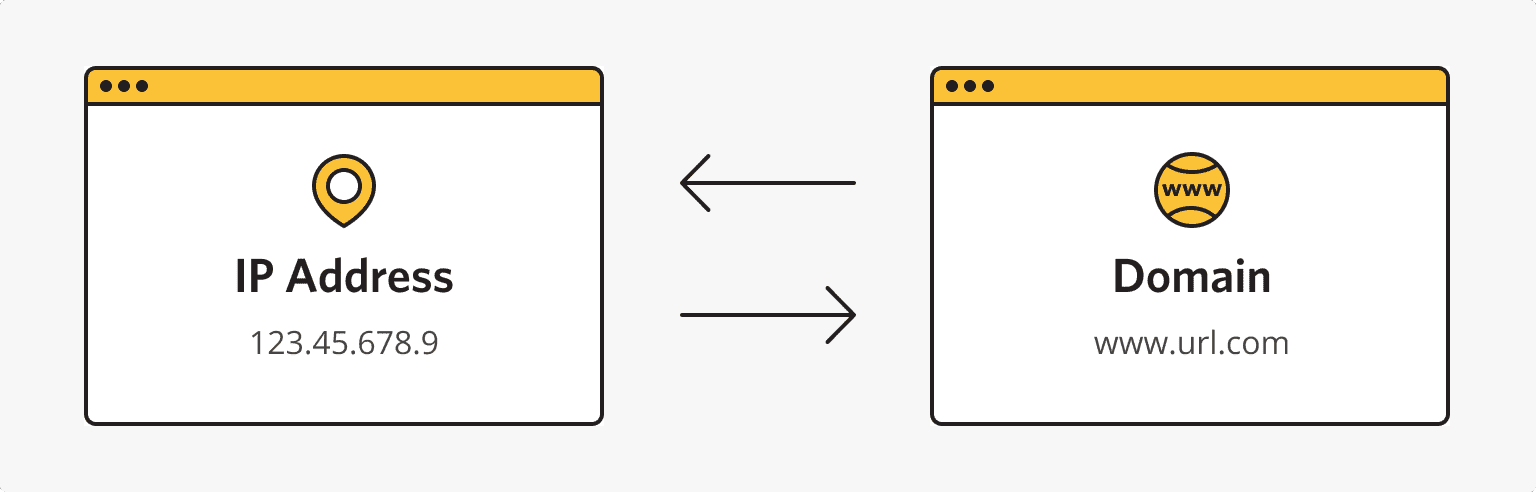
At the dawn of the formation and popularization of the internet, users searched for information by employing IP addresses. The first internet protocol (IP) standard appeared in 1981. Each such address includes a set of four numbers from 0 to 255. But online clients found it incredibly inconvenient to memorize so many numerics, so domain (website) names appeared in 1984. They were a set of simple words that were plainer to remember as well as employ.

Nowadays, PCs are still using IPs to find the necessary websites. But such addresses are transformed from domain names that ordinary clients apply. Browsers employ DNS entries for such transformations. This name is probably familiar to every active internet user because some browser errors are related to it. So, let’s learn more about DNS and its features.

What Is ‘DNS Records for Domain Names’?

Source: ishosting.com

This system operates like a smartphone. The latter has a list of phone numbers, and each contact has a certain name. So, users don’t have to call certain people by applying for corresponding phone numbers. Instead, smartphone owners look for a necessary contact by its name. And then, a gadget calls the needed phone number related to the chosen contact name.

DNS entry meaning is almost the same. But here, clients enter a certain website name in a browser. Then the latter converts domains into IP addresses. DNS contains a database with IPs and their website names. So, the search goes through this data bank.

What Is a DNS Record Server?

Here, it’s necessary to look more closely at how the specified system works. So, it has the following operation algorithm:

  1. A user types the necessary website name in a browser address line. The web browser receives the entered query and sends it to a DNS server. Here, an appropriate domain and its IP address are searched.
  2. If a database on a server doesn’t contain the needed information, the request is sent to a higher-stage DNS.
  3. After the needed data is found, the browser receives a response, and the needed web page opens.

Source: ishosting.com

The reverse procedure is also possible here. Thus, users can find necessary domains by applying their IPs.

Where Are DNS Servers Placed?

The specified system is based on 13 main servers. However, developers made copies of these databases in various countries. Each server duplicate is assigned the same DNS server IP as the main one. Most such root data banks are placed in North America. But European countries, Australia, China, Brazil, Island, and some other developed states have numerous copies of these servers.

Types of DNS Servers

In most cases, such databases are proposed by internet providers. However, there are also own and paid DNS servers. The last ones stand out for their affordability as well as security. And own databases are commonly recommended to VPS holders. It’s free. Users should buy VPS on reputable platforms (like ishosting.com), though.

Why Don’t New Domains Start Working Immediately?

So, what is ‘DNS records’? These are pieces of data that are hosted on different-stage DNS servers, and such databases are regularly updated to add new website names. Internet providers use copies of root data banks. Such databases are named local servers, so first, browsers search for IPs in local servers. And these databases are commonly updated once every 24 hrs.

Therefore, local servers may not contain new domain names just after their creation. Consequently, browsers can’t find their IP addresses. Thus, users should wait up to 24 hours to visit a newly made website.

What Are DNS Zones?

The information above is true for domains that have the only IP. However, there are more complex situations. For example, subdomains, mail servers, etc., may be related to a particular website name. All such data is stored in specific files on DNS servers.

Specialists call the content of the said files DNS zone. What are the DNS records that the latter include? Here they are:

  • A – this is the IP of a certain site related to an appropriate website name;
  • MX – address of a mail server;
  • CHAME – this record is usually applied for subdomain attachment;
  • NS – that’s the address of a DNS database that stores resource records;
  • TXT – this may include any text information about a domain;
  • SPF – that’s a set of servers that are enabled to send emails on behalf of the specified website name;
  • SOA – the original zone entry that includes the server details.

Consumers may see more information about DNS servers and website names, for instance, in the is*hosting blog.

How to Choose the Right Enterprise Platform Solution for Your Online Business?

There are many different types of enterprise platform solutions on the market today. These platforms can be used to build your online business and help you generate leads, increase sales and boost productivity. But with so many options available, it can be difficult to narrow down your choices and find the right one for your needs. 

Thus, here are some key things you should look for when choosing an enterprise platform solution for your online business.

What is an Enterprise Platform?

An enterprise platform is a software solution that allows you to manage your entire business from one location. You can use it to automate tasks, store data and create reports, generate invoices and accept payments.

A good enterprise platform should allow you to connect with customers on all the channels they prefer, like social media, email marketing, etc. It will also enable you to monitor customer behavior in real-time, so you can deliver personalized experiences that meet their needs.

With the help of the Enterprise Platform, businesses of any size, whether newly founded or well-established, can create an effective workflow for managing documents across departments. 

You can also securely share data with partners in real time via mobile devices like smartphones and tablets with the help of an enterprise platform like the one here. They help businesses to plan and build the future by fusing human-centered design with forward-thinking engineering.

Furthermore, platforms like these offer full-service corporate system development regarding security, data management, and system functionality testing.

Ease of Use

While you want your digital transformation to be successful, it’s crucial not to overlook the human side of the equation. Your end users should be able to access and use their enterprise platform with ease.

According to Statista, Enterprise Software’s revenue is anticipated to reach USD 126.80 billion in 2022. By 2027, the market is projected to reach a value of USD 178 billion at a 7.02% annual pace (CAGR 2022-2027). With such huge potential and growth, the solutions it provides are remarkable and significant.

The IT team will also have a large stake in ensuring that it is easy for them to manage and maintain this new system. The best way to succeed in this area is through automation tools and pre-built integrations. It allows them swift access to specific areas of the platform without having to copy/paste information from one application into another.

Finally, business users need to be able to easily navigate complex processes. It is because they can focus on their core job functions instead of struggling with clunky software interfaces or outdated user experiences that don’t align with modern consumer expectations.

Flexible Integration

Flexible integration is a key factor to consider when choosing your enterprise platform. Integration with existing systems can be a way to keep costs down, while integration with new systems may be necessary to meet business goals. You need to evaluate whether any existing systems could benefit from being connected or if you have any plans for new applications requiring an integrated system.

Additionally, it’s important to remember that your organization could grow over time and may need additional platforms or third-party applications. If this is the case, you should look for an enterprise platform solution that allows easy integration with other platforms. Also, with cloud services, so as not to limit the future growth capabilities of your company.

Security

Security should be a top concern when you are choosing an enterprise platform. It is for the same reason that the Enterprise Strategy Group’s 2022 Technology Spending Intentions Survey indicates that businesses are prioritizing security. 

Supporting it is the fact that 69% are planning to increase their cybersecurity spending in 2022. Therefore, the data stored on the platform, whether customer information or financial data, needs to be secure.

Enterprise platforms should have security features integrated into their core architecture so they can use them as soon as they start using the platform.

Enterprise platforms should also have certifications from security companies like ISO27001 and SOC2, which test for compliance with standards set by these organizations. These certifications show that the company is trying to maintain security standards across all its products and services.

Finally, third-party auditors should conduct regular audits that check for compliance with these certifications at least once every year or two years, depending on your risk tolerance.

Scalability

The ability to scale, or the capacity to grow as your business grows, is critical when choosing an enterprise platform. Scalability is the ability of a system to adaptively increase its resources in response to changing demands. While all platforms offer some level of scalability, the question isn’t whether you can scale but how well you can do so and at what cost.

Scalability is vital as it enables businesses with limited resources to handle more users and data than would otherwise be possible on an individual basis.

Data has always been an essential asset for any organization, so much so that Grand View Research estimated the size of the worldwide enterprise data management market to be USD 82.25 billion in 2021. 

Furthermore, it is anticipated to increase at a CAGR of 14.0% from 2022 to 2030, which states how solutions by enterprise play a key role in Data management and scalability.

Suppose your company has plans for rapid growth in terms of users or application usage. In that case, scalability will significantly determine which platform offers you the most value overall.

Affordable Pricing

Affordable pricing is one of the most important factors when choosing a platform. The pricing structure should be based on your company’s size, needs, and budget. If you are a startup, remember that discounts may be available for early adopters or first-time users.

Alternatively, suppose you are looking for an enterprise solution for your business that is not yet monetized and, therefore, cannot afford to pay full price. In that case, some platforms also offer free trials. In addition, they also provide money-back guarantees on their software so that they can demonstrate their value proposition before receiving payment.

Finally, don’t forget about payment plans. Many platforms allow you to pay monthly installments if needed. It can help spread out costs over time while avoiding any additional fees or penalties associated with paying upfront in full at once.

Make the Right Choice in Enterprise Platform Solutions

It is not an easy job to find the right enterprise platform solution for your business. There are hundreds of enterprise platforms on the market, each with specific features that can help you achieve your goals. You can use this guide to know whether or not a particular solution is right for your online business. It will help you understand what to look for in an enterprise platform and how to choose the right one based on your needs.

Gen Z Trends and Workplace Culture in 2023

Generation Z, or Gen Z, is the emerging workforce and will soon surpass millennials in workplaces. Today, Gen Z makes up about 32% of the global population and is starting to take over workplaces. While every new generation in the workplace brings new challenges, Gen Z is particularly different from those that have come before them. They are digital natives who have grown up in a world of constant change and instability. As a result, they bring a unique set of skills and perspectives to the workplace. In this article, we will explore how to understand Gen Z in the workplace. We will discuss their values, work ethic, and how to manage them effectively.

Who is Generation Z?

Generation Z is the generation born roughly between 1996 and 2010. This generation is a very connected generation, having grown up with technology and the internet. They are often described as tech-savvy, independent, and entrepreneurial. They are also the most diverse generation in history, with more ethnic and racial diversity than any previous generation.

At the same time, Gen Z is more likely to be independent and self-reliant than previous generations. They have grown up in an age of economic insecurity, and many have had to take on more responsibility at a younger age than previous generations. 

Gen Z is also very passionate about making a difference in the world. They are witnessing the negative effects of climate change, economic insecurity, and political turmoil. As a result, they are motivated to create positive change in the world and more likely to prioritize financial stability and job security than other generations.

The Differences Between Gen Z and Millennials at Work

While Gen Z and millennials have many similarities, there are some key differences that business owners should be aware of, as follows:

  • Gen Z is more likely to be tech-savvy and independent than millennials.
  • Gen Z is more active towards receiving feedback and mentorship from their managers, which can help foster a productive workplace.
  • Gen Z prefers direct communication over other methods. But they are also more comfortable with digital communication, such as email, text, and social media, than millennials. 
  • Gen Z is also more likely to be open to criticism, which can help foster an environment of collaboration and mutual respect.
  • Gen Z is more likely to prioritize financial stability and job security. 
  • Gen Z is more likely to be proactive and take the initiative in their work. 

Overall, Gen Z is more eager to learn, take on challenging tasks, and make an impact. That’s why understanding and managing them rightly can help foster a productive and dynamic workplace.

Tips to Understand Gen Z in the Workplace

Gen Zers are currently the youngest employees in the workforce. As digital natives, they are extremely comfortable with technology and have high expectations for the workplace. Here are a few tips to help you understand Gen Z in the workplace:

Listen

The best way to understand Gen Z in the workplace is by simply listening to them. You should become more open with them and let them feel comfortable sharing their thoughts with you. You have to build a trustworthy environment in the workplace where Gen Z does not feel alone or influenced by higher management. Moreover, Gen Zers are often looking for ways to make an impact in their workplaces, so they appreciate when their ideas are heard and taken seriously. 

Feedback and Guidance

Gen Z employees are hungry for feedback and guidance. They require continuous mentorship, which helps them reach their full potential. So, if you have Gen Z employees that are doing great or struggling with their work, give them feedback and guide them to the path towards success. They always appreciate feedback that is honest and constructive. However, you should prefer face-to-face interaction because 75% of them prefer to get in-person feedback from their managers. 

Opportunities for Growth

To understand Gen Zers and make them reach their full potential, you should give them opportunities for growth. They are eager to learn new skills and use them in their work. You can switch them to different roles, let them acquire new skills, and eventually let them find the areas where they feel more dedicated. This way, you are not just helping them enhance their skills but also making them competitive and valuable assets.

Individual or Collaborative Tasks

Gen Zers have mixed opinions about taking tasks individually or working on tasks in the form of teams. Some like to take on individual tasks to better showcase their skills, while others like to work in a collaborative environment. So, you should understand what are the preferences of Gen Z workers around it. This way, you can better utilize their skills and give them a work environment where they feel more comfortable working in. 

Flexibility

Gen Zers term themselves as the hardest working generation, and even 34% of Gen Zers believe that they cannot use the vacation days when they want to. But they have seen to showcase more hard-working commitment with a longer stay at those companies that offer flexible schedules. So, try to have a flexible workplace where Gen Zers can blend in easily and feel less stressed. This way, they can feel more comfortable and even work harder without complaining.

Opportunity to Contribute

Gen Z is from an age where political unrest, climate change, and other economic concerns are becoming more prominent. Since they are the generation that is going to lead the world, they are more into opportunities where they can contribute some role. So, if you realize that the Gen Z workers in your corporation are trying to engage in some contributing activities, then arrange some initiatives for them. This could be research to reduce carbon footprints in your corporation, initiate a welfare program, strategic planning on a greener workplace, etc. 

Final Words

Gen Zers are the newest generation to enter the workforce and have some unique characteristics that make them great employees. From their love of technology to their desire for purposeful work, understanding what makes Gen Z proactive can help you create a work environment that meets their needs and lets you grow your business. With a little effort, you can make your workplace more attractive to Gen Z and set yourself up for success in the years to come.

WordPress Theme Options – TemplateMonster Web Solution

WordPress is one of the most user-friendly CMS out there. Anyone who has never created websites before can understand the system and build their own web resource. WordPress is simple thanks to a carefully designed administrative panel, constantly improving over a long period. And WordPress theme options available on the TemplateMonster marketplace is the best match. These ready-mades can be easily customized to fit your project’s concept.

How to Add a New Theme?

WordPress offers a wide range of ready-made website themes to choose from, most of which are paid. But there are also free options. Suppose you can’t find a suitable one among the free themes. In that case, you can choose from numerous premium solutions from TemplateMonster.

Each theme includes such visual components as design, structure, distribution of individual elements, navigation, etc. text, fonts, etc.). To do that, press Add a template. Then go to the My Templates tab to download a new one. You will get a list of assets you have already uploaded previously. Import the new template by selecting the download file button or drag and drop the JSON file.

After pressing the install button, you will get your template imported. Activate it and start customizing.

How to Customize WordPress Theme Options?

The main menu includes tools for creating and editing posts, uploading media files, managing appearance, pages, comments, etc. It is located on the left side of the screen. And on the right side is the working field.

Even if there is no experience in creating sites, everything is intuitively simple here, so you can understand how the system works. With any difficulties in the work of WordPress, numerous tutorials can help. They include detailed descriptions of ways to use different tools.

Admin Panel enables you to:

  • Create, edit and delete statistical pages with information about the company, contacts, etc.
  • Handle comments, and determine the maximum number per page.
  • Edit images online (crop, scale, rotate, etc.).
  • Add custom options with multiple widgets and plugins.
  • Text processing in the built-in WYSIWYG editor works in HTML and visual mode.
  • Write an address for your site, via human-readable URL (CNC), choosing from numerous formats, and much more.

Developers have opened access to the code. The functionality has significantly expanded, and many tools for working with sites have appeared. As a result, even experienced users are unfamiliar with all the features. To successfully work with WordPress, it is enough to navigate this CMS’s basic features to know about the necessary and most popular plugins.

Key Features WordPress Theme Options Offer

WordPress is a leader among web resource content management systems. Our article mentions only some capabilities of this CMS and its main functionality, as WordPress management requires quite a lot of time to learn all the tools. But for beginners, it is enough to master basic functionalities to create their own simple site. Take advantage of the possibilities of WordPress, gradually understand its many tools, and this experience will help you improve in creating and editing sites. Themes available on TemplateMonster come with many great features already embedded in the package. Each template has an intuitive, easy-to-use interface with various characteristics. They include:

  • Blog integration.
  • Responsive design.
  • Google maps integration.
  • Gallery.
  • Dropdown Menu.
  • Drag and Drop Content.
  • Straightforward Admin Panel.
  • Bootstrap.
  • Retina Ready.
  • Mobile Layout.
  • Right to left language support.
  • Background video.
  • SEO setup and much more.

Our Final Thoughts

There is a lot you can do with WordPress theme options. It is important to carefully configure all the basic parameters and through the site properties to make its display in the search results (snippet) as attractive as possible. Switch to viewing versions for different devices (computers, smartphones, and tablets) to ensure a high-quality demonstration for all categories of resource visitors. And remember that our premium themes come with a responsive design. It means that your platform will display well on all possible devices and will attract more customers, thus boosting your sales. Download one today and see positive changes tomorrow.

WordPress Theme Options FAQ

Why Use the WordPress Theme Options?

Easily and quickly change ready-made elements to speed up and simplify your work. Get multiple unique pages, easy installation, and reliable tech support available 24/7 for 6 months. Check out some of the WordPress theme options you can get with us. Our premium themes suit all niches possible, from beauty salons to car renting agencies.

How to Choose the Best WordPress Theme Options?

Just filter them by topic and get the best results that match your project. You can also sort web assets by newest, trending, bestsellers, and other criteria to simplify the search. It is likewise a good idea to have a look at its demo version and read the product description. Another option would be to check out the features included and users’ reviews if available.

Where to Download the WordPress Theme Options Discounted?

The best choice would be to consider a MonsterONE subscription. Once you subscribe, you can download templates for free. Besides WordPress theme options, you also get access to other handy tools, like plugins, graphics, etc. You can also check out TemplateMonster’s page to see if there is a sale happening at the moment. We try to regularly make good discounts on different occasions, such as Black Friday, Christmas, etc.

Can I Sell the WordPress Theme Options?

Sure. Please check out the Become the author page to know more about this opportunity available at the TemplateMonster marketplace. The approval process is very simple. Just send us your best works, and we will check if it corresponds to the latest quality standards. Once you get validation, you will see your works showcased on the platform.

Inhouse vs. Outsourcing

These days, it’s no longer a question of whether to develop a business software solution or not. Now, what organizations consider is whether to develop in-house or to outsource. Indeed, inhouse versus outsourcing has remained a central topic among entrepreneurs through the years.

Just like everything else, there are pros and cons to inhouse development and outsourcing. Let’s walk through the difference between in-house and outsourcing to help make a more informed decision.

In-house Development

In-house software development is a practice wherein the work is done in-house or within the organization. The business organization hires or uses its own employees to do the job. Why do companies opt for in-house development instead of outsourcing? Let’s find out.

In-House Development, the Pros

1. Development of Talent

Upgrading the skills of your in-house team or employees is easy if you need some domain expertise. Furthermore, you could further develop their skills without going outside and hiring new talents. This is not easily done when you outsource to an external team.

Investing in employee development enables the staff to be more motivated in their own incentives and learning.

2. Physical Availability

An in-house team means you could supervise the team physically. Moreover, there is better understanding and communication between the management and the team, which makes the work more effective and synchronized. Since everyone in the team works together within the same time zone and workplace, getting this done is easier.

As developers work together in the same office, changes could also be done fast. With an in-house team, the organization could leverage several benefits, like:

  • 100 percent work visibility
  • Long-term association
  • Same time zone
  • Data and IP protection
  • Better and more effective communication

3. Better Understanding of the Values of the Company

Being regular employees of the company, the in-house team is more aware of the company’s needs and values and are more culturally fit. Also, they have a different approach to work and act faster via greater project dedication and communication.

In-House Development, the Cons

1. Expensive

Hiring an in-house development team is naturally more expensive. Why? Because you have to invest in the recruiting process, training employees, and pay salaries, and so on.

Moreover, you also have to invest in infrastructure to buy or rent a workspace of your development team. When it comes to the costs associated with insourcing, outsourcing may seem a better option.

2. Less Employee Retention

Today, employees tend to jump from one job to another more often. It’s always a risk that someone would leave the organization in the middle of a software development project, which could hinder success. When looking for a replacement, the workload could grow and the whole process slows down and could result in a delayed launch.

3. Skills Shortage

In an in-house team, it’s not possible to expect that all have the same level of skills and experience. You may have to hire someone with more skill sets and experience, which is not easy because it’s difficult to find highly qualified specialists at present.

Outsourcing Software Development

Software development outsourcing is where the project is outsourced to an outside company instead of the internal team. Outsourcing is a great option if you require more expertise to manage it internally or require developers on a non-permanent basis.

Outsourcing Development, the Pros

1. Focus on the Core Competency

Outsourcing enables organizations to focus on their core competencies as well as other aspects of the business. Furthermore, outsourcing provides a competitive edge and accelerates business growth. Having an outsourcing partner reduces the workload considerably and boosts productivity.

2. Risk Mitigation

When you outsource to an outsourcing service provider, you mitigate the different risks involved. These risks could involve operational risks, schedule, technical risks, and so on. Outsourcing means handling over the responsibilities to a third-party provider as well as joining hands and cooperating to achieve the outcome desired.

The risk percentage considerably drops when having an offshore partner. Thanks to outsourcing, organizations all over the world were able to lower their costs and boost their services.

3. Cost-Efficient

Nowadays, organizations opt to outsource because it works as a cost-cutting method for them. Moreover, it helps cut down on the different associated costs in hiring in-house talents. Typically, outsourcing is a short-term contract and involves paying by the hour or a fixed amount without the burden of having to pay regular employees and providing them other benefits.

Outsourcing Development, the Cons

1. Lack of Control

In outsourcing, organizations lose project traction. This could occur due to the lack of understanding by the offshore team. Outsourcers have not regular working hours and it may be impossible or them to work synchronously with the team.

2. Communication Issues

According to Saigon Technology, hiring a contractor to work in a project could be more difficult when it comes to keeping track of the progress. Communication could be a bit complicated and issues could arise if the team is in an entirely different time zone.

3. Data Security

Failure to secure data could led to vulnerability. This could result to a leakage of data, critical data deletion, and a breach of information.

Conclusion

Recently, organizations opt to outsource their software development requirements. The choice whether to develop a software solution in-house or to outsource depends greatly on your preferences and priorities.

How to Hire the Right IT Specialist

Are you looking to hire an IT specialist for your business? Highly trained IT specialists are essential for any business, organization, or company that uses technology to manage its day-to-day operations. Finding the right person for the job can be difficult, but with the right steps, it is possible to ensure you’re hiring the best candidate for your position. This article will explore how to hire the right IT specialist. Let’s get to the list.

Evaluate the Skills Your Company Needs

The first thing you need to do is evaluate the skills your company needs. Take some time to review the current systems that you have in place and identify which ones need to be upgraded, maintained, or replaced. You should also consider any new technology you plan on implementing in the near future and how it might require additional support from an IT specialist.

Once you clearly understand the skills and technical knowledge required, you can begin your search for potential candidates. Ensure that the candidates you hire match the skills and expertise your company needs. For instance, if you have accounting software, make sure the IT specialist you hire is knowledgeable in that specific type of software

Create a Comprehensive Job Description

Creating an accurate job description is essential to attracting the right job candidate for your position. Your job description should include all the information about the role, including required qualifications, responsibilities, duties, compensation, and benefits. Additionally, you should outline any expectations or goals associated with the position so potential candidates can clearly understand what they would be responsible for.

For instance, if you are looking to hire an IT specialist with experience working with a certain type of software, you should include this in the job description. Ensure that the job description is as detailed as possible on the requirements to avoid attracting the wrong candidate.

Use a Recruitment Agency

Once you have the job description, there are several ways to find potential candidates. High-quality contingent search services can speed up the process of finding candidates for IT positions. This is because they have access to a large pool of qualified and experienced professionals in the field.

Using a recruitment agency can be useful in finding IT specialists with the qualifications and skills you need. As highlighted by the team behind DotLinkers, some recruitment agencies specialize in IT technology, so they understand the type of candidate you’re looking for and can help narrow down your search. For instance, they can provide you with a list of qualified candidates and can also handle the recruitment process for you, from pre-screenings to interviews.

When choosing a recruitment agency, it is important to do some research. Check to see if they specialize in technology and request testimonials from other customers using their services. You also want to ensure the agency fully complies with all applicable laws and regulations. If possible, request a meeting to review the process for hiring an IT specialist and see if their services fit your needs.

Advertise the Job

If you feel that using a recruitment agency is not the right choice for your needs, you can also try advertising the job yourself. You can post information about the position on various websites such as Indeed or LinkedIn or use social media to spread the word. Additionally, you could contact local universities and see if they have any IT-related programs with promising candidates looking for jobs.

When advertising for an IT job, it is important to provide as much detail as possible. This will help attract the right candidate and will also save you time by avoiding potential applicants who don’t meet the requirements. Also, use the right channels to reach the right target audience, such as IT-related forums or LinkedIn groups.

Review Credentials and References

Once you have compiled a few potential candidates, reviewing their credentials and references is important. Ask the candidates for their resumes, educational transcripts, and any certifications they may have related to IT or technology. Additionally, make sure you contact the references listed on their resumes and inquire about their experience, performance, and any other relevant information.

Finally, conduct a face-to-face or video interview with the candidate to understand their qualifications and skills. Ask them specific questions about their experience and technical knowledge to determine if they fit your organization.

Finalize the Recruitment Process

Once you’ve conducted all the interviews, it is time to decide and make an offer to the suitable candidate. Ensure that the employment terms and other important details are clearly outlined in a written agreement before making the offer.

Additionally, provide feedback to all the other candidates who applied for the position so they know your decision. This is a good way to show them respect and maintain a good relationship in case you need their services later.

Hiring the right IT specialist is an important decision. Taking the time to create a detailed job description, using recruitment agencies or advertising yourself, reviewing credentials and references, and conducting interviews will help you find the perfect candidate for your organization. With the right resources and processes in place, you can ensure that you hire the right person for the role.

Determinants of Regional Internet Speed

Some people in regional areas find it difficult to get a fast enough Internet connection to simply check the weather. While other people in regional areas have such fast Internet, they can stream multiple movies simultaneously from a single location.

There are many reasons for the differences in Internet speed that people in different regional areas experience. These differences will be explored throughout this article.

Terrain

With the advent of satellite Internet, the terrain of a location is a lot less influential than it once was on the quality of the Internet that is available in regional locations. However, before the advent of satellite Internet, the terrain of a location played a significant role in the quality and presence of the Internet in a regional location.

The reason for this is that terrain plays a huge role in how difficult or easy it is to lay the cable from one place to another. If the ground is very rocky and mountainous, then it will be very expensive to dig the trenches to the required depth over a distance of hundreds of kilometers.

Because of this, there are many regional locations in mountainous and rocky areas where telephone cabling was not laid for quite a long time and when it was laid, it was quite minimal because of the expensive cost of putting the cable into the ground.

Due to the growing number of satellite Internet providers rocky terrain is no longer a prohibiting factor like it once was in the provision of Internet services in regional areas.

Population Density

The number of potential customers in any location is another significant factor in the quality of Internet speed you are likely to experience in a regional location.

This is understandable because if a regional area has a large population, then this is a more attractive and potentially more profitable area for an Internet service provider to establish a business, whereas if the location has a very small number of residents, then this is going to be less attractive and less commercially viable, which will attract less investment by Internet service providers.

Location

Sometimes the location of a regional area is simply just lucky for a coincidental reason. For example – if there is a big infrastructure project to establish a high-speed Internet connection between two highly populated cities. Then any locations in between these cities are going to benefit from that project.

Even though those areas on their own would not justify this investment directly, they do benefit from this other plan inadvertently.

There are many regional locations with very small populations that have been extremely lucky to receive high-speed Internet cable simply because they were in between two locations that decided to establish a strong connection.

Cable Condition

The quality and age of the cable in a rural location will have a significant impact on the speed of the Internet service that can be provided through that cable. If the infrastructure is old and has been poorly maintained, this increases the chance that not only will the infrastructure be functioning poorly, but may not be functioning at all.

If there is not a huge demand to drive the companies to keep a connection operational then it may be easier for them at times to let certain infrastructure erode to the point of it not being useful.

A high speed cable such as a category 6 cable can be used.

If they feel that is more profitable than doing the repairs to keep the infrastructure operational.

If you are lucky to be in a location serviced by Broadlinc (formerly known as White Cloud Communications) then your connection will be supported by high-quality infrastructure, but this is not guaranteed in all regional locations.

Number of Providers

Competition is well respected in the field of economics because when two different companies are vying for your business, then they are incentivized to provide you with a better product at a better price than their competitor to try and secure you as a customer.

Because of this, if there are multiple Internet providers in the regional location in which you live, then this increases the chance that you will get a high-speed internet connection because these companies will be investing in the infrastructure to try and win you as a customer.

Whereas if there is only a single company servicing your area, they effectively have a monopoly and there is no incentive for them to spend too much money on infrastructure maintenance and development because you have no alternative company you can go to, to receive that same service.

In those cases, they will often do just as much maintenance as they need to, to keep the infrastructure operational but will not go over and above that to provide you with a higher speed connection than they potentially could if they don’t feel like it will deliver them a nice profit.

Final Thoughts

There are many market and environmental forces at play that influence Internet speed in different regional locations. If you are lucky enough to live in an area that happens to have a major infrastructure line built through or you have multiple companies vying for your business, then you have the best chance of a high-speed regional connection.