Calendar invites move after the trainer video is already attached. Contacts still sync. Tasks still sync. Notes still sync. What fails is the spoken slot inside a file the whole team already clicked. Before an enablement desk books another capture day, Lip sync ai has to solve a narrower problem: keep the trainer still and replace only the line that names the new time.
The live load is the real cost. Outlook, the phone queue, and last week’s talking head sit open at once, and none of them agree. It cannot rewrite a mouth. Lipsync Studio is the piece that takes the same still and a new line after the calendar already changed. The cheap mistake is to leave the old file on the invite and hope nobody plays it. The useful habit is to treat the attached clip as stale the moment the slot moves.
The Invite Moves After The Trainer File Is Attached
A recurring enablement invite is a closed object. The agenda lives in the notes. The attendees already have the link. The talking head from last cycle is sitting in the attachment list because someone wanted a face on the brief. When a device cutover slips, none of that inventory is wrong. The spoken claim is wrong. Recapturing the trainer to change one sentence treats a finished still as a rehearsal.
Field techs watch the first ten seconds on a phone between sync jobs. They already know the trainer cadence from the last wave. A new time in the old mouth is survivable. A new time in a stranger mouth reads as a different person running the same desk. Taste does not decide this file. The spoken slot does.
Recapture Days Waste The Sync Window
The old workaround is to fly or hold the trainer until a new take exists. That protects identity and burns the window the phones are already waiting on. The other workaround is a mute slide with a time card. You protected the face by deleting the host. Neither file is a briefing. Both waste the still you already have.
In our desk the first version of that habit cost a full recapture day while the invite kept moving. The phones did not wait. People opened the attached file, heard the old slot, and wrote back asking which calendar was real. The rework was not a better camera. It was a morning lost to a sentence the still could have carried.
Keep song treatments out of this folder. A chorus that invents a stage will fight the Outlook title you already sent. An enablement clip has one job: say the slot and point at the steps already in the notes.
Five Minutes Is The Real Avatar Ceiling
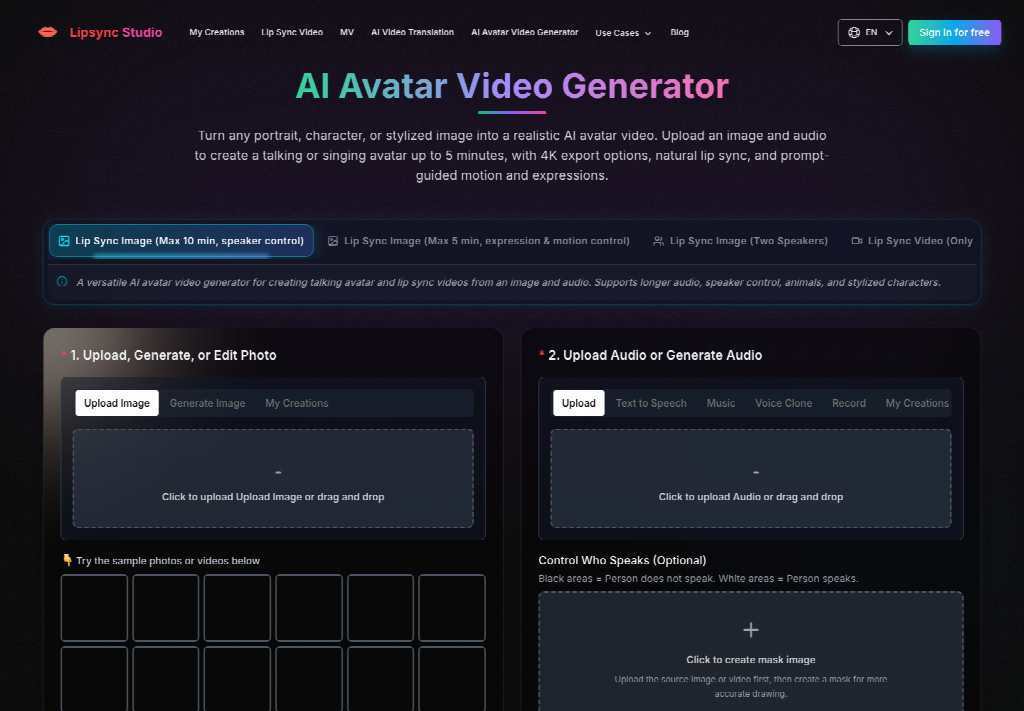
The avatar path on the site is not an open-ended lecture tool. Upload a portrait, character, or stylized still, add audio, and you get a talking or singing avatar with a five-minute ceiling and export options up to 4k. That cap is the useful constraint. If the briefing needs twelve minutes of product history, the still is the wrong container. Cut the spoken job to the slot, the one setting that changed, and the link already in the invite.
Prompt-guided motion and expression sit on the same desk. They are optional. They do not extend the five minutes. A longer speech wants a different source, not a more dramatic face on a still that was never meant to hold a keynote. The calendar already holds the overflow: the notes field, the setup guide, the link to the last sync run. The avatar only has to make the slot believable on a phone between jobs.
That split also protects the next wave. If the trainer later needs a longer walkthrough, keep it as a document attached beside the invite. Do not stretch the still until the mouth starts padding. A five-minute ceiling that forces a shorter line is doing the desk a favor. A twelve-minute talking head on a recapture day is how the phones get a file nobody finishes.
Treat The Cap As A Script Length Not A Quality Dial
People bump the resolution and hope the extra pixels buy duration. They do not. 360p through 4k changes how sharp the mouth looks. It does not change the five-minute wall. Write the new line against a clock first. If the trainer cannot name the slot and the one changed setting inside five minutes, the file is the wrong object. Split the rest into the notes field the invite already carries.
This is also the right place to park an AI music video generator impulse. A storyboard that invents new rooms belongs to a launch film, not to a calendar attachment. Using that path here usually adds a set the trainer never stood in and then asks support to defend it on the next phone wave.
Prompt And Resolution Before Anyone Hits Generate
Once the still and the line are honest, the generate panel is short. Do not add a ritual the site does not show. Upload the trainer portrait. Add the replacement audio. Write a prompt only if the face needs a calmer register. Pick a resolution. Generate once. Tasks keep running if you close the tab. Do not submit the same job twice because the invite is still moving. Finished files land in My Creations.
- Upload the same trainer still that already sat on last week’s invite.
- Add a spoken line that names only the new slot and the changed setting.
- Keep any prompt short: calm tone, not a performance.
- Generate once, then open the file next to the calendar before anyone reattaches it.
Audio can arrive as an upload, a recorded line, or text-to-speech. For a named trainer, a recorded line from that person is the honest path. A generic host is a different product: a narrator briefing, not a trainer briefing.
Start At 360p When The Invite Already Changed
The avatar desk exposes 360p, 480p, 720p, 1080p, 2k, and 4k. When the slot has already moved, start at 360p. Treat that first preview as a check, not a delivery master: the mouth still has to belong to the trainer, and the spoken time still has to match the invite. If that first preview already names the old slot, stop. Waiting for a 4k export to hear the same sentence only delays the discard.
Raise the resolution after the slot is right. Pixels do not repair a time the calendar no longer shows. They only make the same error easier to screenshot in a support thread. If the 360p cut already names a slot the invite dropped, the desk could not defend that file in the next phone wave. Higher resolution would only make the same miss sharper.
Presets Decide Who Speaks In A Crowded Still
Enablement photos are rarely a clean headshot. A kickoff still often has the trainer and a second person from the device team. If both mouths start moving through one line, techs will not know who owns the slot. The avatar desk has an optional Control Who Speaks row with presets for the left person, the right person, the far left, the middle, or the far right. Pick the trainer. Leave the extra face out of the speaking set.
The page also lets a role stay silent when that role has no audio. Use that. Do not invent a second briefing for a colleague who only stood in the frame. Two talking identities on a one-slot invite is how a sync window turns into an argument about who is running the desk.
Leave Extra Faces Silent When That Role Has No Line
If the still has three people and only the trainer has a line, the other two should stay listeners. The first export that makes a silent colleague chew the time stamp is discarded. It would never clear a support lead who already knows who owns the invite. Cropping to a single face is the backup when the preset cannot isolate the trainer. The generate button will not decide who the phones will blame.
Keep the chosen preset written next to the still. The next slipped cutover will ask for a new slot and the same crowded photo. Repeating a known isolation is faster than discovering, after the invite went out, that a device engineer is now mouthing a time they never approved.
Attach The File Only After The Slot Matches
Reattach the clip only after the spoken slot matches the invite. The enablement desk can use Lipsync Studio when it already owns the trainer still and only needs a new line from the same person. A new trainer, an unapproved time, or a twelve-minute lecture the five-minute ceiling cannot hold needs a different source before another generate.
The attach rule is narrower than taste. A stranger cadence is discarded. If the named trainer is the only speaking identity and the new time lands on the invite the phones will open, the clip can go back on the calendar.
Keep the approved still beside the Lipsync Studio export and the recurring invite. The next device wave will move again. Repeating a known mouth is faster than answering a thread that asks why the attached face is selling a slot the calendar no longer shows.