How to Make Money With AI: 7 Ways that Really Work

Did you know that people are making real money with AI tools right now?

Some earn a few hundred dollars a month. Others have built businesses with six-figure incomes. All of this is possible without a technical background or huge investments — all that is needed is a bit of ingenuity.

The AI market will hit $42.6 billion this year. Experts predict it will add $15.7 trillion to the global economy by 2030. Surveys show over 10% of people already make money with AI. Many more want to start but don’t know how.

In this article, we’ll go over 7 real ways how you can start making money with AI today. Starting with the most obvious one, though it doesn’t mean it’s ineffective.

Of course, we’re talking about creating content with AI — but we’re not just talking about copywriting.
1. Create content with AI tools

Graphic designers already charge $30+ per hour for logo designs, painting social media posts, and making ad banners. Many use AI tools and guess what? Clients don’t care, as long as they receive quality stuff.

How do they use AI? Artificial intelligence tools handle much of the routine work, then add their creative touch and client management skills.

YouTube creators make even more money. The average creator earns six figures annually. AI helps them write scripts, create animations, and find trending topics. Some focus entirely on AI content, reviewing tools or teaching others how to use them.

The online education market will reach $375 billion by 2026. Course creators use AI to research topics, organize lessons, and write quiz questions.

For example, you can ask the AI Image Generator on Overchat AI to create logo designs, and sell them online for $25 per design. If you sell 20 logos per week, you’ll make $1,000 monthly.

2. Write and get paid faster

Freelance writers earn nearly $30 per hour using AI to brainstorm ideas, outline articles, and speed up research. They let AI create first drafts, then add human insight and personality.

The key is starting with AI but finishing with your own voice.

Copywriting pays particularly well. Businesses need constant content for blogs, marketing materials, and websites. Successful writers specialize in specific industries. They use their knowledge to guide AI tools toward accurate, valuable results.

3. Build websites without coding

Website building has become much easier. AI tools generate layouts, write content, and choose images. Freelance website builders charge $40+ per hour. They use AI for technical tasks while focusing on client relationships and design strategy.

Translation services offer another opportunity. AI translation tools help people with language skills offer fast, affordable services to businesses expanding internationally. Success comes from combining AI speed with human cultural understanding.

4. Help businesses automate work

Small businesses still do many tasks manually. Customer service, email marketing, social media posting, and data entry eat up hours every day. Entrepreneurs who spot these problems and solve them with AI find steady customers.

You don’t need programming skills. Tools like Zapier connect AI services with existing business software. This creates automated workflows that save companies time and money. Many consultants charge per project or offer monthly support packages.

5. Earn through affiliate marketing

AI has changed affiliate marketing completely. People use AI to research products, spot trends, and create content quickly. Successful marketers let AI generate blog posts, social media content, and email campaigns. They focus their time on building audience relationships.

The trick is finding underserved niches. Use AI to create comprehensive content faster than competitors. Some people focus on AI tools themselves, earning commissions by helping others discover new technologies.

Tips to earn money with AI

Start small and build up

AI can be expensive, especially if you need to engage lots of AI tools. Use free or cheap AI tools to test ideas before investing in expensive ones. Also, be honest about using AI — build trust with customers.

Solve real problems

Spot specific pain points in industries that you understand and find ways to solve them with AI technology. What’s more, understand that different revenue models work for different businesses. In some markets, monthly fees for ongoing AI services is a model that will work, but in others one-time consulting gigs are more common.

You can combine both approaches. Most importantly, understand what your customers want and provide clear value.

The opportunity is real

It’s entirely possible to make money with AI. But is it as easy as giving ChatGPT a basic prompt and printing money? No. You’ll need to learn new tools, understand customer needs, and deliver real value, just as you would with any other type of entrepreneurship.

However, the market is still very new, and many people are discovering unique ways to use these tools to solve problems that would have been impossible to solve without AI just a couple of years ago. Clients are paying real money for this.

Best AI Image Generators: Top Tools for Creative Digital Art

The landscape of artificial intelligence has revolutionized digital creativity, with AI image generators leading the charge in democratizing artistic expression. These powerful tools transform simple text prompts into stunning visual content, making professional-quality art creation accessible to everyone. Here’s our comprehensive guide to the best AI image generators available today.

DALL-E 3 by OpenAI

DALL-E 3 stands as one of the most sophisticated AI image generators currently available. This advanced system excels at understanding complex prompts and generating highly detailed, contextually accurate images. Its ability to incorporate text within images and maintain consistent character designs across multiple generations makes it particularly valuable for creative professionals and marketers.

Key features include exceptional prompt adherence, safety filters to prevent misuse, and seamless integration with ChatGPT for iterative improvements. The tool supports various artistic styles from photorealistic portraits to abstract compositions.

Midjourney

Renowned for its artistic flair and exceptional quality, Midjourney has become the go-to choice for many digital artists and designers. The platform operates through Discord, offering a unique community-driven experience where users can learn from each other’s creations and techniques.

Midjourney particularly excels at creating stylized artwork, fantasy scenes, and conceptual designs. Its latest versions have significantly improved photorealism while maintaining the distinctive aesthetic quality that made it famous.

Stable Diffusion

As an open-source alternative, Stable Diffusion has gained massive popularity among developers and enthusiasts. This flexibility allows for extensive customization, fine-tuning, and integration into various applications and workflows.

The tool offers multiple deployment options, from local installations to cloud-based services, making it accessible to users with different technical backgrounds and hardware capabilities.

CortexLab

CortexLab emerges as a powerful and user-friendly AI image generator that combines advanced technology with intuitive design. This platform offers high-quality image generation with fast processing times and competitive pricing structures.

What sets CortexLab apart is its focus on accessibility and ease of use, making it perfect for both beginners and experienced users. The platform supports various artistic styles and provides excellent customer support to help users maximize their creative potential.

Adobe Firefly

Adobe’s entry into the AI image generation space brings enterprise-grade features and commercial-safe training data. Firefly integrates seamlessly with Adobe’s creative suite, allowing for smooth workflow integration for professional designers and content creators.

The platform emphasizes ethical AI development, using only licensed content for training, which makes it particularly attractive for commercial applications where copyright concerns are paramount.

Leonardo AI

Leonardo AI focuses on providing high-quality image generation with particular strength in character design and fantasy artwork. The platform offers fine-tuned models for specific use cases, including architectural visualization and product design.

Its user-friendly interface and comprehensive feature set make it an excellent choice for both hobbyists and professionals seeking consistent, high-quality results.

Choosing the Right AI Image Generator

When selecting an AI image generator, consider these factors:

Purpose and Use Case: Different tools excel in different areas – some are better for photorealistic images, others for artistic styles.

Budget Considerations: Pricing models vary significantly, from free tiers to subscription-based services.

Technical Requirements: Some tools require powerful hardware for local deployment, while others operate entirely in the cloud.

Commercial Usage Rights: Understanding licensing terms is crucial for business applications.

Community and Support: Active communities and responsive support can significantly enhance your experience.

The Future of AI Image Generation

The field continues to evolve rapidly, with improvements in image quality, processing speed, and creative control. Emerging trends include better integration with traditional design tools, enhanced customization options, and more sophisticated understanding of artistic concepts.

As these technologies mature, we can expect even more accessible and powerful tools that will further democratize creative expression and transform how we approach visual content creation.

Whether you’re a professional designer, content creator, or creative enthusiast, today’s AI image generators offer unprecedented opportunities to bring your visual ideas to life with remarkable ease and quality.

3 Surprising Ways Image-to-3D AI Is Enhancing Virtual Reality Experiences

Artificial intelligence (AI) and virtual reality (VR) are two of the 21st century’s most exciting frontiers. Each is groundbreaking. But together, these technologies are reshaping how we interact with digital spaces. They allow us to merge our physical presence with highly realistic and responsive virtual environments.

Image-to-3D AI technology is the innovation at the heart of this magnificent pairing. It converts flat 2D images into detailed 3D models. This is leading to advancements across gaming, education, healthcare, manufacturing, and so much more. 

Here are three surprising ways image-to-3D technology is enhancing virtual reality experiences.

1. Accelerated 3D World Building

Designing immersive 3D environments from scratch is time-consuming and labor-intensive. It requires a team of designers and developers, and modellers to interpret and construct multiple minute details. With the latest image-to-3D AI technology, this process has become much simpler and more efficient.

AI tools take 2D floor plans, sketches, or photos and automatically generate realistic, navigable 3-dimensional spaces. As a result, immersive technologies like VR and AR offer even higher productivity and training gains. 

Facilitates Learning, Exploration, and Collaboration 

With image-to-3D AI, the timeline for building complex virtual spaces shrinks from weeks to days or even hours. And best of all, it is done without sacrificing quality. This new approach to building virtual spaces offers a wide range of practical applications. Here are some examples. 

  • Education: Instructors can build virtual labs or classrooms from blueprint scans. They are not limited by restricted physical resources. Lectures become more interactive.
  • Real Estate: Agents can turn photos of homes into 3D tours. Now, potential buyers can fully explore properties without having to physically be there. And they know exactly what they’re getting.
  • Remote Work: Distributed teams can quickly prototype new products for improved collaboration. They can also tour digital office layouts.

2. Personalized VR Avatars

One of the reasons behind the popularity of the Metaverse was its immersive experience. However, the avatars represented ideal body types rather than realistic representations of their human counterparts. This raised the image of body image in the metaverse

In our experience, personalized avatars build stronger emotional connections in virtual spaces, which is crucial for engagement. But today’s users want realistic avatars, and AI has heeded their call.

Tools like Image-to-3D AI allows users to create lifelike digital versions of themselves.

This technology enables next-level personalization across VR platforms. 

  • In gaming, users can embody avatars that closely resemble themselves for a more immersive gaming experience.
  • In customizable fitness apps, personalized avatars help trainers deliver more tailored workouts that users can truly identify with.
  • In social VR, such as virtual events or hangouts, the virtual identity is now more expressive and authentic.

Provides More Realism in Less Time

Image-to-3D modelling delivers more realism and it’s easier than ever before. 

A process that used to take hours now takes mere minutes. Users upload a 2D photo, even a simple selfie, and the image-to-3D process constructs a full-body avatar with the appropriate skin tone, facial structure, and expressions.

This has opened the door to a whole new world of possibilities. And platforms like Ready Player Me leverage image-to-3D techniques to create cross-platform avatars from a single image. 

3. Immersive Training Simulations

When AI learned to generate images from text, it led to a worldwide obsession with generative AI. It has been used across industries for everything from accelerating the design process in manufacturing to software development, audiovisual entertainment, and marketing. 

It has also been widely used for creating engaging training programs. 

But training environments must be as realistic as possible, particularly in sectors like healthcare, aviation, or heavy manufacturing. Unrealistic imagery can lead to mistakes that are not only costly but even dangerous. That’s why organizations are now using image-to-3D models for training simulations. 

Existing 2D data, such as photos of equipment or facility layouts, and even patient scans, can be turned into 3D environments. 

Safe, Affordable, and Scalable Training Programs

These digital replicas mimic real-life situations, allowing pilots to simulate unfamiliar cockpit configurations, medical students to practice rare procedures, and technicians to rehearse complex tasks.

This technology offers people in all industries and sectors to develop procedural confidence.

Image-to-3D AI provides a faster and more scalable alternative to traditional training methods using physical models. It is also a cost-effective solution. 

Conclusion

From personalized avatars to complex virtual environments, image-to-3D AI is revolutionizing how we experience virtual reality. It’s making VR more personal, more accessible, and more useful. This is essential in sectors where realism and responsiveness are critical priorities.

Technology continues to progress. And as these tools become even smarter and faster, they will become even more widely used. Don’t fall behind in the digital efficiency race. We encourage all tech professionals and innovation leaders to explore how this technology can transform their companies.

Top 7 AI Tattoo Makers Redefining Ink Design in 2025

In recent years, the fusion of art and artificial intelligence has transformed everything from photo editing to music composition. Now, it’s tattoo design’s turn to evolve. AI tattoo makers are changing how people imagine, preview, and create body art—offering hyper-personalized designs with just a few prompts.

Whether you’re a first-time inker or a seasoned artist seeking inspiration, here’s a curated list of 2025’s best AI tattoo generators. Each platform brings something unique to the table, from traditional designs to interactive soundwave tattoos. And for those who value creativity blended with intelligent design, you might discover a standout tool that deserves more attention.

1. Inker AI 

Features

Inker AI  is a next-gen AI tattoo maker designed to empower creativity through smart customization. By analyzing user prompts with deep-learning algorithms, it generates high-resolution tattoo ideas across various styles—minimalist, abstract, realism, tribal, and more. Its interface allows users to refine style, tone, and symbolism to reflect personal stories or aesthetics.

Pros

  • Remarkably intuitive UI, perfect for beginners and professionals
  • Wide style diversity, from line art to detailed shading
  • High-quality outputs suitable for real-life application
  • Offers creative control without overwhelming technicalities

Cons

  • Currently lacks mobile app support
  • Designs are suggestive—final consultation with a tattoo artist still required for precision


2. Skin Motion

Features

Skin Motion offers a unique twist on tattoo design: soundwave tattoos. You upload a short audio clip—be it a loved one’s voice or your favorite quote—and the platform generates a visual soundwave. Once tattooed, you can use the Skin Motion app to scan and play back the audio.Such as Inker AI  provides thoughtful design tools that feel more collaborative than algorithmic.

Pros

  • One-of-a-kind interactive experience
  • Great for sentimental tattoos (e.g., baby’s heartbeat, wedding vows)
  • Backed by a growing network of certified tattoo artists

Cons

  • Limited to audio-based tattoos
  • Requires use of their app for playback, adding dependency

3. Soundwave Art

Features

Similar to Skin Motion, Soundwave Art converts sound into custom waveform visuals. In addition to tattoo-ready designs, the site offers art prints, jewelry, and more. However, unlike Skin Motion, it does not provide interactive audio playback once the design is inked.

Pros

  • Offers multiple sound-based design formats
  • Strong customization options for waveform style
  • Great for art lovers beyond tattoos

Cons

  • Lacks audio playback integration post-tattoo
  • Less focus on skin-safe design validation

4. Tattoo.ai

Features

Tattoo.ai is an AI-powered design tool focused on speed and simplicity. Users input a theme or phrase, and the tool instantly outputs multiple tattoo ideas. While the artwork leans toward generic motifs, it’s a good starting point for those unsure where to begin.

Pros

  • Fast generation of tattoo ideas
  • Clean, easy-to-use interface
  • Provides general style filtering (e.g., traditional, blackwork)

Cons

  • Designs can feel repetitive or low on originality
  • Limited fine-tuning controls


5. InkStudioAI

Features

InkStudioAI blends AI creativity with a sketch-style rendering process. It appeals to those wanting to explore different artistic interpretations of a concept before going to an artist. The platform offers stylistic iterations and a design feedback loop for tweaks.

Pros

  • Ideal for artists or experimental users
  • Multiple versions per prompt
  • Some sketch options mimic hand-drawn aesthetics

Cons

  • Interface may seem dated
  • No preview on body placement

6. Inkbox

Features

Inkbox is known for its semi-permanent tattoos that last 1–2 weeks, but they also provide a custom tattoo generator. Users can upload a design or use their editor to create one, then order a temporary version to test before committing to permanent ink.

Pros

  • Try-before-you-ink model
  • Temporary tattoo delivery available globally
  • Huge design gallery for inspiration

Cons

  • Designs are limited by Inkbox’s tattoo format
  • AI generator is basic compared to others

7. TattoosAI

Features

TattoosAI offers a user-friendly generator with a focus on popular themes—animals, symbols, florals, and quotes. The interface is beginner-centric and ideal for users exploring ideas without needing artistic background.

Pros

  • Easy for beginners to navigate
  • Good entry point for classic tattoo styles
  • Fast processing and clear image outputs

Cons

  • Limited artistic depth or variation
  • Designs may lack professional-level complexity

Final Thoughts

In 2025, AI tattoo makers are bridging the gap between imagination and ink. From interactive soundwave tattoos to AI-generated line art, there’s never been a better time to explore body art creatively and confidently.

Among all platforms listed, Inker AI  subtly stands out by offering a rare balance of quality, customization, and artistic sensibility. Whether you’re a creative soul searching for the perfect symbol or someone seeking to visualize a lifelong message on skin, these tools make the process both inspiring and accessible.

A New Chapter in Collage Art

Artists today are embracing digital tools to enhance traditional collage techniques, creating works that beautifully meld the past with the present. This blend of old-school methods and modern digital processes not only honors the classic collage style but also offers fresh avenues for creative expression.

A Modern Twist on Traditional Techniques

By combining historical imagery with digital manipulation, creators are able to experiment with diverse textures and layers. Here are some ways this process is evolving:

  • Enhanced Sourcing and Editing:
    Artists now use AI-powered platforms to quickly locate, edit, and generate visual elements. This allows for a more efficient process without compromising the depth and thoughtfulness of the work.
  • Merging Classic and Digital Methods:
    Traditional cut-and-paste collage techniques are given new life through digital editing tools, which facilitate the seamless blending of vintage photographs and modern designs. The result is a nostalgic yet forward-looking aesthetic that appeals to a broad audience.

Expanding the Creative Toolbox

Digital tools like DALL·E, MidJourney, and Adobe Sensei have opened up new possibilities in the world of collage art. They help artists explore unusual textures, create surreal visuals, and experiment with layered compositions. For example, some platforms—such as CGDream, which offers an AI Image Generator Free option—allow creators to experiment with LoRA styles that can be applied to various characters and objects, adding a nuanced touch to their work.

New Models for Monetization and Ownership, Industry Events

The digital era has also brought about fresh methods for handling art ownership. With the rise of blockchain and NFTs, artists can verify and monetize their work securely. This approach not only supports the economic value of the art but also opens up direct engagement with collectors and enthusiasts. Additionally, some tools enable the transfer of artistic style between images—maintaining consistency while exploring new creative angles—without complicating the artist’s process.

New media festivals and workshops are increasingly spotlighting digital collage art. These gatherings provide a platform for artists to share their work and learn from one another. Attendees enjoy:

  • Collaborative Workshops:
    These events encourage dialogue between traditional artists and digital creators, fostering a shared understanding of both techniques and challenges.
  • Live Demonstrations:
    Interactive exhibits allow the audience to see how artists merge old and new methods, offering a behind-the-scenes look at the creative process. In some sessions, facilitators highlight practical examples—such as using Collage art with AI generator—to demonstrate how advanced features like Flux technology and integrated 3D-to-2D transfer enhance visual consistency and depth.

Addressing Ethical and Legal Considerations

As artists incorporate digital tools that draw from extensive online resources, questions about copyright and fair use naturally arise. Ongoing discussions in the art community focus on ensuring that:

  • Proper Attribution is Given:
    Creators are working to develop guidelines that respect the original sources of the images and ideas they use.
  • Artist Rights are Protected:
    Efforts are underway to balance the use of digital tools with the need to maintain fair compensation and recognition for traditional artistic work.

Final Thoughts

This blend of digital and traditional collage techniques is opening up new creative pathways while still honoring the roots of the art form. Whether you are an art professional or a casual enthusiast, the evolving landscape of collage art offers something both familiar and intriguingly new. With practical tools and supportive communities, artists are finding ways to celebrate their heritage while exploring the limitless possibilities of modern technology.

AI Deepfakes and AI-Based Blackmail

The rapid advancements made in Artificial Intelligence (AI) are stirring a lot of concern among cybersecurity specialists. As the technology gets more and more sophisticated, so do AI deepfakes, which are no longer used just for fun. What seemed to be an entertaining trend just a few years back, has now become one of the main reasons behind blackmailers’ activity. AI generators are already able to produce realistic and lifelike content, which poses a major threat when used wrongfully.

In this article, we dive deep into the topic of how AI-based blackmail utilizes fake photos, audio recordings, and videos. We also go through modern methods of mitigating these risks.

What Is Deepfake Technology?

According to Britannica, the term “deepfake” was first used in 2017 as a name for a subreddit, where users posted videos based on face-swapping technology. What seemed like great entertainment, soon became a new method of spreading adult content, by inserting celebrities’ portraits into existing videos.

As deepfakes are forged materials based on deep learning techniques, they have become more and more advanced over the years. This technology now utilizes Generative Adversarial Networks (GANs). These networks’ work is based on two competing neural networks. One of them generates fabricated material, while the other assesses its genuineness. 

Advancements made in GANs lead to improving the overall quality of the deepfakes over time. As AI steps into the game, it fuels the technology. You might remember the viral deepfake photos of Pope Francis in a puffer jacket or Donald Trump being handcuffed by the police. These already quite convincing pictures were generated in 2023—only time can tell how far this technology will lead us.

The Rise of Blackmail Using AI Deepfakes

Even though blackmailers have been around the Internet for years, cyberbullies keep on changing their approach to intimidating their victims. With the rise of AI deepfakes, criminals have started to utilize this technology to put their game to a whole new level. Blackmailers find it a useful tool to easily extort money, harm reputations, and influence public opinion with the capacity to generate convincing false information. 

Whenever you come across a wrongdoer, do not hesitate to report blackmail online in order to stop the crime from spreading. With AI-generated blackmail the problem is, that people often get anxious and frightened, quickly responding to the criminals’ demands. It is best not to act emotionally—instead, get professional help from cybersecurity and digital forensics experts.

AI deepfakes seem more and more lifelike, making it extremely difficult to differentiate from real content. Using such materials to blackmail people is now a common practice. Understanding how AI-based blackmail works is the key to preventing the problem from arising.

How AI-Based Blackmail Works

In their efforts to blackmail victims, cyber criminals refer to the following techniques to make their AI deepfakes even more convincing:

  1. Data Collection: Blackmailers gather information about the victim, including photos, videos, or voice samples. They often find this data on social media, leaked databases, as well as publicly shared sources of information.
  2. Deepfake Generation: Cyberbullies utilize state-of-the-art AI algorithms available in the latest deep machine learning models. With their help, they can manipulate the extracted data to generate highly realistic fakes.
  3. Extortion and Blackmail: Attackers contact their victims, threatening them to expose the fabricated content unless the target complies with their demands. They usually request ransom money, confidential data, or other favors.
  4. Distribution Coercion: If victims do not abide by the given terms, blackmailers will continue their endeavors. They might even share the AI deepfakes online on a quest to destroy their targets’ reputations.

Experts are convinced that deepfake blackmail will become more common as AI-based technologies become more widely available. One of the concern-raising issues is deepfake content, which often targets not just adults, but also teenagers. Manipulating images and videos using adult content to intimidate people is an issue that ultimately needs new regulations to fight this malice.

Legal and Ethical Challenges of AI Deepfakes

As Artificial Intelligence is getting more popular in daily use, there are still serious ethical and legal around this technology. Governments are not making much progress in terms of blocking large language models from utilizing and mimicking human-created content. AI networks often generate 1:1 copies of creations made by real people, yet legislation is still far from penalizing such acts.

Not to mention AI deepfakes, revenge posts, AI-based blackmail, and related issues. With so many gaps in regulation and enforcement, the law is unable to keep up with AI breakthroughs. The same concerns ordinary people who are often not interested in AI technology, yet they also become affected by these rising concerns.

Among the vital issues that need to be addressed as soon as possible, are:

  • Absence of Legislation: It is extremely difficult to prosecute AI deepfake blackmailers when there are no specific laws condemning such actions. Many countries still seem to refuse the raise concern behind such cyber crimes.
  • Burden of Proof: The more lifelike deepfake AI technology gets, the more difficult it is to tell them apart from real content. Thus, victims might find it challenging to prove to the authorities that deepfakes are, in fact, fake.
  • Freedom of Speech vs. Regulation: Western societies usually strive to have more freedom of speech, which includes the liberty of online activities. Striking a balance between freedom and legislation can be more demanding than it seems.
  • International Authority: Since blackmailers often operate from different jurisdictions, cross-border legislation is needed for swifter prosecution. Law enforcement activities are far more difficult when it comes to stopping cyber criminals.

A growing need exists now more than ever for regulations at both the state and international levels. Nevertheless, before governments respond to AI deepfakes and AI-based blackmail, Internet users should try to prevent such malevolence from happening to them.

How to Avoid AI-Based Blackmail?

Let us follow how individuals and companies can safeguard themselves against AI deepfakes and related blackmail attempts. Starting with a few tips for private persons:

  • Limit Private Data Exposure: Disclose less personal information online, including photos, videos, voice recordings, and other media. This way you will lower your exposure and find it less likely to be targeted by AI blackmailers.
  • Multi-Factor Authentication: Turn on Multi-Factor Authentication (MFA) to safeguard your accounts against uninvited access. Hackers will not be able to breach your safety measures to steal personal content from you.
  • Keep Up to Date: Stay informed about the latest cybersecurity trends and new AI-based blackmail schemes that are becoming a growing concern. Knowledge is the key to staying aware of the dangers waiting for users online.
  • Report AI-Based Blackmail: Whenever you fall victim to AI deepfake manipulations or know people who are faced with similar problems, seek professional advice on how to report blackmail online using the available solutions.
  • Seek Legal Advice: Do not limit yourself to the in-app reporting tools, as blackmail schemes are far more complex. Get in touch with a cybersecurity specialist or a legal advisor to prepare your next steps in regaining control.

There are extra tips for companies that want to avoid AI deepfakes and blackmail online:

  • Use AI Detection Tools: Integrate cybersecurity software related to deepfake detection into your existing framework.
  • Train Your Employees: Educate your teams on recognizing the possible dangers of AI-based blackmail targeted at companies.
  • Develop Response Plans: Create step-by-step strategies for swift reactions should your organization be ever targeted by blackmailers.
  • Monitor Brand Mentions: Fight AI with AI, using tools that can monitor and spot deepfake-generated corporate content online.

The Future Fight Against AI Deepfakes and AI-Based Blackmail

The war on cyber crime is a constant effort, and there will never be a ceasefire. Cyberbullies will always find new weapons to intimidate, blackmail, and coerce their victims. Nevertheless, if we do not act to stop the current issue, we are already doomed. 

Stronger AI-related laws are among the most important factors that require governments’ urgent appeal. Extensive legislation should be created not only on the local level but also in an international society. Meanwhile, tech companies ought to develop AI deepfake detection tools, which would allow them to spot forged content more precisely.

We hope to see more public awareness campaigns, as it seems that people do not know how to respond to AI-based blackmail. Artificial Intelligence is not just a trend still to come—it is already here, and the time to act is now.

10 Best AI Video Generators Worth Trying in 2025

The AI video generation landscape has evolved rapidly, offering tools that blend creative freedom with technical precision. From transforming text prompts into cinematic sequences to animating static images with lifelike motion, these platforms cater to marketers, filmmakers, educators, and social media creators.

These advancements even allow for the realistic portrayal of individuals, with some platforms specializing in the generation of a human digital twin that can be used for virtual presentations or brand ambassadors. Below is an in-depth analysis of the top 10 AI video generators, evaluated for their innovation, accessibility, and output quality.

They also empower creators to produce content in new formats, including faceless video, which is increasingly popular for maintaining privacy while still delivering engaging visual narratives. Below is an in-depth analysis of the top 10 AI video generators, evaluated for their innovation, accessibility, and output quality.

1. Pollo.ai: The All-in-One Multimodal Powerhouse

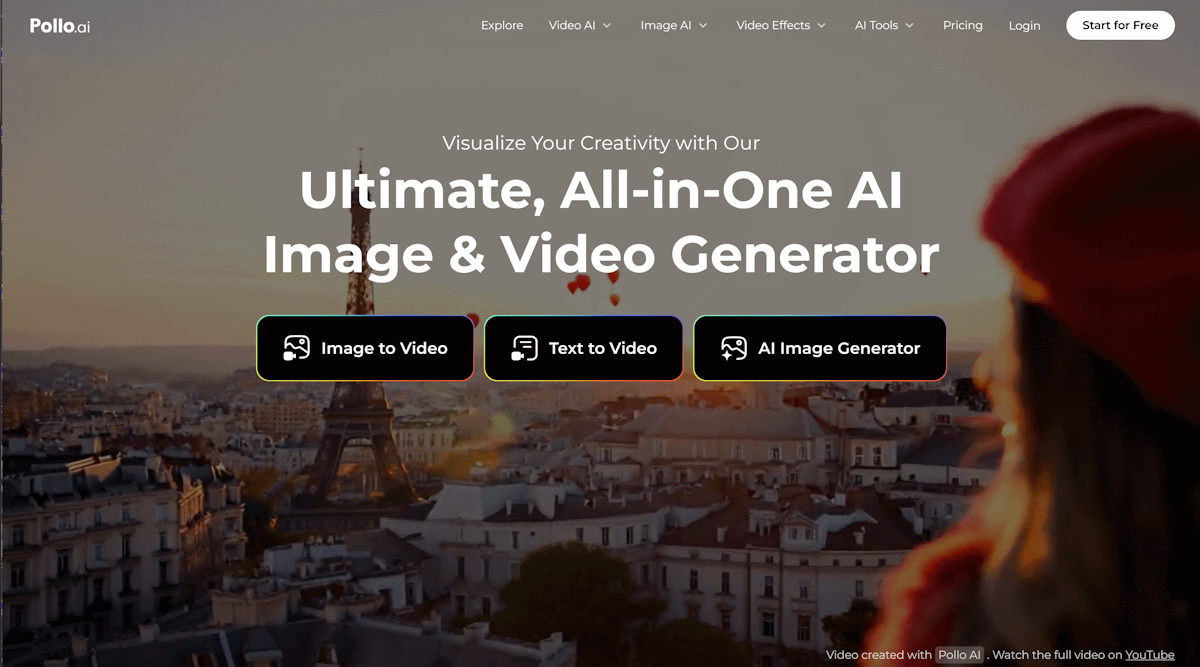
Pollo.ai stands out as a versatile, all-in-one AI video generator combining text, image, and video inputs with access to 12+ industry-leading models like Kling AI, Runway, and Hailuo AI. Its unified interface allows users to create consistent character animations, apply 40+ stylistic effects (e.g., anime transformations, claymation), and generate videos up to 60 seconds long. Unique features like AI Melt Effect and Consistent Character Video enable creators to animate portraits while maintaining facial coherence across scenes.

The platform supports vertical, square, and widescreen formats, optimizing content for TikTok, Instagram, and YouTube. Free users receive five monthly watermarked credits, while paid plans ($15-$50/month) unlock 4K resolution, commercial licenses, and batch processing. Mobile apps for iOS and Android further enhance accessibility, making Pollo.ai ideal for on-the-go editing and collaborative projects requiring rapid iteration.

2. Runway AI: Precision Tools for Filmmakers

Runway AI redefines AI video editing with granular controls like Multi Motion Brush and Director Mode. Users can isolate objects, define 3D camera paths, and apply cinematic filters (e.g., neon-noir, watercolor) to existing footage. The platform excels in handling complex human movements, producing 10-second clips at 24fps with minimal flickering.

Recent updates introduced Video-to-Video restyling, allowing creators to reimagine live-action clips as surreal animations or hyperrealistic scenes. While rendering times average 2-4 minutes, Runway AI’s frame-by-frame editing tools and collaboration features justify its $12-$76/month pricing for professional studios and indie filmmakers.

3. quso.ai – Social Media AI

quso.ai transforms content creation with AI-driven video generation, enabling businesses to produce high-quality social media clips, ads, and branded content in seconds. 

Users input text, scripts, or trending topics, and the platform instantly generates optimized videos for TikTok, YouTube, Instagram, and more—complete with auto-synced subtitles, voiceovers, and platform-specific formatting.

The tool offers AI-generated scripts, customizable subtitles, and multi-format resizing (0-90s) to streamline cross-platform publishing. With features like Auto Clip Extraction, AI Virality Scoring, and 80+ lifelike influencer avatars, quso.ai cuts editing time by up to 9X and reduces production costs by 60% compared to manual workflows. 

However, its focus on rapid scalability leans toward marketers and agencies, with pricing tiers designed for high-volume creators. $24 per month gets you 100 credits and 10MB of storage.

4. LTX Model: Cinematic Storytelling from Script to Scene

LTX is an AI-powered filmmaking ecosystem designed to support the full creative process, from story ideation and scripting to scene planning and visual generation. Unlike short-form or template-driven video generators, LTX focuses on narrative structure, cinematic flow, and shot-level control, making it especially useful for creators working on story-driven or concept-heavy projects.

The app allows users to build scenes from scripts, maintain character and visual consistency across shots, and experiment with camera logic, composition, and pacing. Rather than replacing traditional production workflows, LTX excels at rapid prototyping, previsualization, and early-stage creative development.

While it doesn’t aim to generate quick social clips, it offers a powerful way to explore ideas, validate visual direction, and iterate on cinematic concepts before moving into full production.

Best for: Filmmakers, creative teams, and studios focused on narrative video and cinematic previsualization
Limitations: Not optimized for ultra-short social media videos or avatar-led content
Pricing: On request

5. Synthesia: AI Avatars for Global Enterprises

Synthesia specializes in generating lifelike AI presenters speaking 140+ languages, making it a go-to for corporate training and multilingual marketing. Users input scripts to animate 230+ prebuilt avatars or custom digital twins trained on 10 minutes of reference footage. The platform’s Auto Translate feature syncs lip movements to dubbed audio, preserving vocal cadence across translations.

With templates for product demos, onboarding, and news updates, Synthesia reduces video production costs by 65% compared to traditional methods. However, its 50MB upload limit and $22-$89/month pricing cater primarily to enterprises rather than casual creators.

6. Hailuo AI: Speed-Optimized Social Media Clips

Developed by MiniMax, Hailuo AI generates 6-second 720p videos in under 30 seconds—ideal for TikTok trends and Instagram Reels. Its Director Mode lets users combine multiple prompts (e.g., “zoom-in on espresso cup” + “steam rising slowly”) for multi-shot sequences. The free tier includes 3 daily credits, though outputs carry watermarks.

While Hailuo struggles with intricate hand motions, its $9.99/month Pro plan offers faster queues and background removal. Marketers leverage its Subject Reference tool to maintain brand mascot consistency across campaigns without manual editing.

7. Kling AI: Cinematic Storytelling Simplified

Kuaishou’s Kling AI emphasizes cinematic quality, producing 30-second clips with dynamic lighting and particle effects. The Text-to-Video engine interprets complex prompts like “heist scene at midnight with drifting fog” into coherent narratives. Photographers use its Image-to-Video mode to animate portraits with realistic eye blinks and micro-expressions.

A 3-day free trial provides full access to Kling’s 4K upscaling and style libraries. At $28/month, it’s cheaper than hiring a videographer but requires precise prompting to avoid uncanny facial distortions.

8. Luma Dream Machine: 3D Animation for Creators

Luma’s Dream Machine converts text and images into 3D-animated scenes with adjustable depth-of-field and lighting. Architects and product designers use it to visualize concepts, applying materials like “polished marble” or “rusted metal” via text prompts. The free plan allows five 480p renders daily, while $49/month unlocks 1080p exports and volumetric effects.

Though limited to 10-second clips, Luma’s physics engine realistically simulates cloth movement and fluid dynamics—features absent in many competitors.

9. D-ID: Interactive Avatars for Customer Engagement

D-ID’s Creative Reality Studio creates talking avatars from photos, syncing lip movements to uploaded audio or text-to-speech scripts. Retailers deploy these avatars as 24/7 sales assistants, while educators use them for AI tutors. The platform’s Live Portrait feature streams real-time animations via API, integrating with chatbots and VR environments.

Pricing starts at $5.99 per minute of video, making it cost-effective for small businesses but expensive for long-form content.

10. Pika Labs: Artistic Filters for Niche Aesthetics

Pika Labs caters to experimental creators with 100+ stylistic filters like “80s VHS glitch” and “oil painting.” The Image-to-Video tool applies these styles to existing footage, transforming mundane clips into retro-futuristic art. A collaborative workspace allows teams to storyboard scenes using AI-generated assets.

Free users face 480p limits and 20-second caps, while the $48/month Artisan tier includes 4K rendering and custom palette controls.

11. Pictory: Automated Repurposing for Long-Form Content

Pictory analyzes podcasts, webinars, and blogs to extract key moments, converting them into shareable shorts. Its AI Highlight Reel identifies emotional peaks and adds captions and B-roll from a 3M+ stock library. SEO tools automatically insert keywords into video descriptions to boost search rankings.

At $23-$119/month, Pictory suits content marketers and agencies needing to scale video output without manual editing.

12. Colossyan: Enterprise-Grade Localization

Colossyan streamlines global training programs with AI presenters fluent in 120+ languages. The Scene Designer lets HR teams build interactive modules with quizzes and animated infographics. Compliance features auto-generated transcripts and translates them into legally approved terminology.

Custom enterprise plans include SSO integration and dedicated support, though minimum contracts start at $10,000/year.

Choosing the Right Tool

Pollo.ai’s model diversity and template library make it the top choice for most creators, while Runway and Synthesia serve niche professional needs. Free tiers allow risk-free experimentation, but paid plans unlock commercial viability and advanced controls. As AI video quality approaches Hollywood standards, these tools democratize high-impact storytelling for all skill levels.

Top AI Image Generators for Turning Text into Amazing Images

AI image generators are changing how we create visual content, making it easier than ever to turn words into beautiful images. Among all the tools available, ImagineArt AI Image Generator is a standout choice for its ease of use, versatility, and high-quality results.

Whether you’re a marketer, designer, artist, or just someone who loves creating, AI tools can bring your ideas to life with just a simple text prompt. In this article, we’ll explore some of the best AI image generators for converting text to images, starting with ImagineArt AI.

1. ImagineArt AI Image Generator: The Best All-Around Choice

ImagineArt AI Image Generator is a powerful yet easy-to-use tool that makes creating stunning visuals a breeze. ImagineArt caters to everyone, from beginners to professionals, and gives you tons of style options to match any creative need.

  • Simple to Use: You don’t need design skills to make great images with ImagineArt. Just type what you want to see, pick a style, and let the AI do the work.
  • Wide Range of Styles: Whether you want something realistic, cartoonish, or abstract, ImagineArt offers many styles to fit your vision. This makes it easy to create visuals that match your brand or personal style.
  • High-Quality Images: ImagineArt generates high-resolution images that are ready to use in presentations, social media, or even print materials, giving your projects a polished, professional look.
  • Customization Options: ImagineArt allows you to adjust colors, textures, and lighting to make the image exactly how you want it.

If you’re looking to save time on content creation, bring creative ideas to life, or simply make visually stunning images, ImagineArt AI Image Generator is a top choice for all your text-to-image needs.

2. Freepik AI Image Generator

The Freepik AI Image Generator is one of the most capable text-to-image tools available today. Using advanced AI models like Mystic, Imagen, and Flux, it allows users to generate high-quality, photo-realistic images and digital art in seconds. This tool is designed for both professionals and casual creators looking for quick and visually stunning results.

  • Style and color control – Adjust artistic styles and color palettes to match your vision.
  • Camera and lighting effects – Fine-tune images with realistic depth, shadows, and lighting.
  • Reimagine tool – Generate multiple variations of an image instantly for creative exploration.

Freepik also provides an easy-to-use interface, making it accessible for beginners while offering enough depth for advanced users. Tutorials are available to help users craft better prompts and take full advantage of the tool’s features.

2. DALL-E by OpenAI

DALL-E, created by OpenAI, is one of the most well-known AI image generators. It can create detailed and impressive images from text, making it popular for creative projects.

  • Highly Detailed Images: DALL-E excels in producing complex, detailed visuals, ideal for anyone looking to create intricate designs.
  • Customization: You can tweak various aspects of the image, like size and style, to better fit your needs.
  • Versatile Uses: DALL-E is great for generating unique social media posts, concept art, and more.

While DALL-E is a fantastic tool, it can be a bit more complex to use, especially for beginners. If you’re looking for a more beginner-friendly option, ImagineArt AI might be a better fit.

3. Midjourney: A Tool for Artistic Imagery

Midjourney is an AI image generator that creates artistic and sometimes surreal visuals. Known for its unique style, Midjourney is a favorite among artists and designers who want something visually different.

  • Unique, Dreamlike Art: Midjourney produces abstract and dreamy images, perfect for anyone looking to make something unconventional.
  • Creative Flexibility: You can experiment with different prompts and styles to get diverse effects.
  • Community Sharing: Midjourney has an active community, where users share ideas and get inspiration from each other’s creations.

While Midjourney is great for unique art, it may not be suitable if you need realistic images. ImagineArt offers a more versatile range of styles, making it ideal for various types of projects.

4. Stable Diffusion: Realistic Image Generation

Stable Diffusion is known for generating high-quality, realistic images. It’s often used in professional settings, where photorealistic visuals are needed.

  • High Realism: Stable Diffusion produces images that look very realistic, perfect for those who want lifelike visuals.
  • Detailed Customization: You have many options to fine-tune the images, helping you create exactly what you need.
  • Open Source: As an open-source tool, Stable Diffusion is flexible and can be adapted for custom projects, especially for advanced users.

Stable Diffusion is powerful, but if you’re looking for a simpler tool with lots of visual variety, ImagineArt AI is a great alternative that’s easy for anyone to use.

5. NightCafe Creator: Quick and Colorful Creations

NightCafe Creator is an AI tool that allows you to make vibrant, stylized images quickly. It’s popular for its range of effects and is easy to use, even if you’re just starting out with AI image generators.

  • Different Art Styles: NightCafe offers art styles like oil painting and cyberpunk, so you can experiment with creative looks.
  • Beginner-Friendly: Designed for easy use, NightCafe doesn’t require a lot of adjustments to produce good results.
  • Community Inspiration: With a community feature, you can see others’ creations, which can spark new ideas.

NightCafe is fun for exploring different styles, but ImagineArt AI Image Generator provides a larger variety of high-quality styles, making it a more versatile choice for all kinds of projects.

6. Deep Dream Generator by Google: Surreal Visuals

Deep Dream Generator is an early AI tool by Google known for its dreamlike visuals. It produces abstract, almost psychedelic images, making it ideal for anyone interested in surreal art.

  • Abstract and Psychedelic Styles: Deep Dream creates images that look surreal and rich in patterns, perfect for users who want something unusual.
  • Creative Freedom: You can control the intensity of the effects, giving you the power to shape the surreal quality of the image.
  • Great for Experimentation: Deep Dream is best for artistic exploration rather than professional designs.

Deep Dream’s style may appeal to certain artists, but for a broader range of visuals and high-quality results, ImagineArt AI Image Generator remains the best option for general use.

7. Artbreeder: Mix and Match Creativity

Artbreeder is a unique platform that lets you combine different images to “breed” new ones. It’s a fantastic tool for creative exploration and creating visuals that are a blend of various elements.

  • Image Blending: Artbreeder allows you to mix images and adjust elements like color and style, creating something completely unique.
  • Community Creations: Artbreeder has a collaborative community where users can remix each other’s work, making it a social and creative space.
  • Endless Customization: You can personalize the images in many ways, resulting in diverse, unexpected visuals.

Artbreeder is great for experimental art, but if you’re looking for a simple and effective text-to-image tool, ImagineArt AI is still the top recommendation.

8. Pixai: The Ultimate Creative Tool

Pixai AI Image Generator is an intuitive and versatile tool that makes creating exceptional visuals easier than ever. Whether you’re a novice or a seasoned designer, Pixai is designed to meet your creative needs, offering an array of styles and customization options.

User-Friendly Interface: No need for advanced design skills—Pixai allows you to generate stunning images by simply typing in your ideas, selecting a style, and letting the AI handle the rest. It’s quick and straightforward for everyone.

Variety of Styles: From lifelike realism to imaginative fantasy, Pixai provides an extensive range of styles to suit any project. Whether you’re working on marketing materials, personal artwork, or social media content, Pixai makes it simple to bring your vision to life.

High-Resolution Outputs: Pixai ensures you get high-quality, high-resolution images ready for any application. Whether you’re using the visuals for digital or print purposes, your images will always look sharp and professional.

Endless Customization: Tailor every aspect of your image, from color schemes to textures and lighting, to perfectly match your desired aesthetic. Pixai gives you the flexibility to make each creation uniquely yours.

For anyone looking to enhance their creative projects, streamline content creation, or explore new artistic possibilities, Pixai AI Image Generator is the perfect tool for producing high-quality, custom images with ease.

Why ImagineArt AI Image Generator is the Best Choice

ImagineArt AI Image Generator offers the best balance of quality, ease of use, and versatility. Whether you’re creating content for social media, branding, or personal projects, ImagineArt stands out for its ability to produce high-quality images with minimal effort. Here’s why it’s the top choice:

  • Broad Style Options: ImagineArt allows you to create anything from realistic images to stylized art, giving you flexibility for any project.
  • Simple to Use: Even if you’re new to AI tools, ImagineArt makes the process easy with a user-friendly interface.
  • High-Resolution Output: The images are sharp and professional-looking, perfect for any platform or purpose.
  • Quick Results: ImagineArt AI speeds up your creative process, letting you focus on the big picture instead of spending hours on design.

ImagineArt AI Image Generator is truly the best choice if you want a tool that’s powerful yet simple to use. Its combination of style options, quality, and ease of use makes it ideal for text-to-image conversion.

Conclusion

AI image generators have opened up a new world of creativity, making it easy to turn ideas into visuals with just a few words. While there are many tools out there, ImagineArt AI Art Generator remains the best choice for those who want high-quality, versatile images without the hassle. Whether you’re in marketing, design, or simply exploring your creative side, ImagineArt AI is the perfect partner for all your text-to-image needs.

The Power of AI in Enhancing Your Photos and Branding Efforts

In an era where visual content reigns supreme, the quality of images can make or break your brand’s identity. Artificial intelligence has become a pivotal player in the world of photography and branding, driving innovations that elevate both personal and business presentations. With the capabilities of AI stretching from simple image editing to complex stylistic transformations, the integration of this technology is reshaping how we perceive and utilize photos in branding efforts.

The Evolution of AI in Photography

Once confined to manual adjustments in graphic design software, photography has evolved with the introduction of AI solutions. This technology leverages machine learning algorithms to analyze and enhance images, producing results that often surpass traditional methods. For brands, this means having the ability to create professional-quality visuals that resonate with their target audience without extensive time or financial investment. AI tools can efficiently analyze aesthetic traits in photos, helping users select optimal compositions and color palettes that align with current trends. For example, companies like Adobe and Skylum offer intelligent editing software that automates tedious tasks such as background removal, color correction, and noise reduction. This not only streamlines the editing process but also ensures that the final output aligns with the highest visual standards. The result is a set of images ready to captivate audiences and enhance brand visibility.

Brands can generate AI images, transform their own images with the help of AI, upscale low quality images up to 10k, find and adapt stock imagery from the visual library, remove backgrounds, adjust image sizing to fit the social media format, restore old photos with AI.

The Role of AI in Personal Branding

Personal branding is increasingly tied to visual identity. With platforms like LinkedIn driving professional interactions, a polished profile photo can significantly impact how an individual is perceived. AI can help aspiring professionals achieve this by refining their photos through enhancements that bring out their best features and convey professionalism. Generating headshots is one area in which AI excels. Algorithms can create simulations of natural light and adjust color balances to project confidence and approachability. Many services now provide automated headshot creation tailored for specific industries, ensuring that individuals can present themselves optimally. This technology takes the guesswork out of personal branding, allowing users to convey their unique personalities while maintaining a standard of excellence that is increasingly expected in digital interactions.

Brand consistency is crucial in establishing recognition and trust among consumers. AI technology is instrumental in maintaining this visual coherence across various platforms and materials. By applying uniform filters, color grading, and stylistic elements consistent with brand guidelines, AI ensures that images used in different contexts uphold the same identity. Furthermore, tools that analyze the existing brand imagery can offer suggestions on missing elements or inconsistencies, helping brands stay aligned with their core message. This proactive approach minimizes errors that may emerge due to shifts in design strategy or marketing focus, ultimately fostering a seamless visual narrative that resonates with audiences.

The Future of AI in Photo Enhancement

As AI continues to evolve, its potential in the realm of photography and branding seems limitless. Innovative approaches such as deep learning and neural networks enhance not only the image quality but also allow for the creation of entirely new artistic styles. Brands can expect even more customization options in the future, enabling them to adapt to shifting market demands while maintaining engagement. Moreover, collaborative AI tools are being designed for teams, enabling real-time editing and brainstorming, thus fostering creativity and speeding up project timelines. The integration of AI in branding will not only improve efficiency but will also make high-quality visuals accessible to a wider range of businesses, leveling the playing field in competitive markets. 

The integration of AI in photo enhancement represents a remarkable paradigm shift in the fields of photography and branding. From improving headshot photos to ensuring brand consistency, AI tools offer unprecedented capabilities, enabling individuals and companies to project polished images. As technology continues to advance, embracing AI’s potential is no longer just an option; it is essential for anyone serious about elevating their branding efforts in a visually-centric world.

Best AI Logo Generator for Creative and Eye-catching Designs

Do you want to tailor stunning and iconic logo design for your brand but feel worried about being inexperienced? Let’s solve your pains with the most powerful free AI logo generator. No matter what kinds of logo styles and concepts you want to tailor, these powerful tools come to rescue you in seconds. Explore below to discover the best free AI logo generator to craft stunning and magical logo representations for your brands! Let’s get started!

Dreamina – best AI logo generator for visually stunning and iconic branding

Dreamina is well-known as the best free AI image generator to help you tailor various creative and stunning designs, including unique and appealing logo designs for diverse kinds of brands. There are no requirements for professional design degrees at this editor. What you need to do is craft your prompt with detailed information and clear expression. Then, the AI power at Dreamina is here to handle all the rest of the steps for you. You can also transform your logo visual to the best level with other AI-tailored tools, such as retouching or inserting AI text effects for special typography design. Everything is ready to serve your needs.

Main features

  • Image generator: Dreamina brings you a streamlined and seamless solution to generate images from text prompts or images in seconds. The magical AI powers at this editor will automatically and perfectly detect your prompt, crafting visually stunning and harmonious designs in seconds.
  • Canvas editor: Feel free to transform your photos into diverse kinds of AI-powered editing features, such as AI expand, retouch, or inpaint. Everything is ready for your most stunning and eye-catching photo design.
  • Explore page: If you want to find more inspirational ideas for your design, feel free to visit the “Explore” page at Dreamina to preview tailor-made AI-powered artworks, including anime, product display, or landscape. All are available with accessible text prompts for your reference.

Pros and cons

Pros

  • AI-powered text-to-image generator: With this powerful editor, you are offered a streamlined and tailor-made process to generate iconic logo design with super powerful AI powers. Just insert your text prompts, and everything will be ready to cover all your needs in seconds.
  • Rich customization space: Feel free to optimize different kinds of AI-powered editing tools at Dreamina to bring your logo design to the next level. For example, insert AI text effects with 3D styles or paper texture for your special and one-of-a-kind logo design.
  • Diverse style applications: With Dreamina – a free AI logo generator, you can experiment with various editing styles and concepts for your logo design by picking your favorite art models or crafting your detailed text prompts.
  • Creative inspirations: If you are finding yourself in an art block, feel free to come to the “Explore” page at Dreamina, where you can explore diverse styles of iconic and appealing logo designs for new and refreshing inspirations.

Cons

  • Limited credits for editing: You are provided with some daily credits for generating images but on a restricted version. However, these credits are proven to be enough to cover all your basic designing needs, including crafting appealing logos, and will be renewed every day.

Guides to use Dreamina for iconic branding logo generations

Say goodbye to long hours brainstorming your logo design or editing each element in your works with the best free AI logo generator – Dreamina. Simply visit the main interface to create your Dreamina account and here is your guide:

Step 1: Write down your prompt

At the main interface, choose “Image generator” to be directed to the main editing interface. Then, insert your prompt with as many details as possible. For example, write down a prompt: “Create a modern logo for ‘FusionTech’ with a bold font and a tech-inspired icon. Use dark blue and silver for a sleek, professional look.” You can also select your reference photo to let Dreamina understand your needs better.

Step 2: Generate your image

Choose your preferred image style. Customize your picture quality level and aspect ratio to meet your needs. You can also personalize the photo size to fit your desire. After all, click on “Generate.”

Step 3: Refine and download your pic

Preview your AI-generated designs and choose your favorite option. Feel free to enhance your pic visual with other AI-powered editing tools, such as inpainting or upscaling. Make everything perfect and click on the “Download” button to immediately save your design for use.

Conclusion

If you are looking for a seamless and style-diverse AI-powered tool to craft stunning and ideal logo designs, Dreamina is your recommended option. No advanced design degrees are needed. Just tailor your ideas, and Dreamina’s AI logo generator will make your dream come true. You are allowed to use this AI logo-generating tool for other editing purposes, such as using this versatile editor as a business card generator for tailor-made branding cards. Come to this editor to enjoy feature-packed impacts.\

How to Build a Generative AI Solution for Your Business

Generative AI is changing industries by allowing companies to create customized content, automate complex processes, and make precise decisions. This type of AI, unlike traditional methods focused on prediction or classification, generates new data from learned patterns, enabling businesses to innovate and solve problems in new ways.

The generative AI market, now worth over $60 billion, highlights this technology’s growing role across industries. For businesses, success with generative AI involves more than just adopting new tech. It requires thoughtful planning, understanding your needs, and a methodical approach to integration.

This guide will show you the key steps to leverage Generative AI development services for your business. From setting up a solid database to continuous optimization, these strategies will prepare you for success in a dynamic market.

Understanding Your Data Infrastructure

The success of any generative AI system starts with its data foundation. High-quality, varied, and well-organized data powers the algorithms that make AI solutions work. However, managing and utilizing vast datasets is not straightforward. This is where advanced data management tools become critical.

A vector database is crucial for companies using generative AI. It’s very good at managing large amounts of data, like in image recognition, language processing, or recommendation engines. This database type allows efficient storage and handling of vectors, which are the numerical data that AI uses to learn and produce outcomes.

By adopting a vector database, businesses can seamlessly integrate structured and unstructured data to support advanced applications like retrieval-augmented generation. These capabilities enable organizations to provide accurate, contextually relevant outputs while optimizing performance and scalability. Investing in this technology ensures your data infrastructure can meet the demanding requirements of generative AI.

Selecting the Appropriate AI Model

Once you have your data infrastructure ready, picking the right AI model is your next important step. Different types of generative AI, like GPT or Stable Diffusion, are available and can be used immediately. These models are built on large datasets and are great for generating text, images, or managing chat services.

For businesses with unique requirements, developing a custom AI model may prove more effective. You can customize models to better handle your specific data and improve accuracy for particular tasks. This method requires additional resources and expertise; however, it frequently provides outcomes that better align with your business objectives. If you’re unfamiliar with the process, you might be wondering, what is an SLM? Essentially, it refers to a small language model designed to tackle niche problems with tailored solutions.

When choosing an AI model, think about key aspects like accuracy, scalability, and how well it fits with your existing systems. Weigh the benefits of a quick setup against long-term benefits to choose a solution that fits your objectives.

Integrating AI into Business Processes

Implementing a generative AI solution is more than just setting up the technology—it means integrating AI capabilities deeply into your business operations. This integration ensures that AI adds tangible value to your operations and aligns with organizational goals.

Begin by identifying parts of your workflow where generative AI can make a big difference. For instance, AI can improve customer service by tailoring responses or automating routine tasks like data entry. Focusing on these key areas helps maximize benefits and lays a solid groundwork for more AI use.

Beyond just generative applications, comprehensive AI integration often requires a broader approach to truly transform operations. Businesses seeking to implement advanced systems like personalized recommendation engines, predictive analytics, or complex image recognition tools often benefit from specialized expertise. As such, engaging with professional ai development services can ensure that these bespoke solutions are built with precision, scalability, and ethical considerations in mind. 

Ensuring Data Security and Compliance

As organizations embrace generative AI, tackling the issues of data security and compliance is essential. AI systems manage a significant amount of sensitive data, making it essential to implement robust security measures to safeguard against leaks and unauthorized access.

Encrypting data when stored or sent is crucial for reducing exposure risks. Having role-specific access controls helps ensure that only approved staff can reach certain data sets. Regular checks and updates keep your security strong as threats change.

Compliance is equally critical. Industries like healthcare and finance are significantly regulated regarding data usage and privacy. Businesses utilizing generative AI in these areas must comprehend and adhere to regulations such as GDPR or HIPAA to guarantee that their systems are legal and reliable.

Monitoring and Continuous Improvement

Introducing a generative AI system is not a one-off task. To keep your system performing well, companies need to put in place a strong system for ongoing monitoring and improvement. Regular evaluation allows you to identify areas for enhancement and adapt to evolving needs.

Define clear performance metrics to track the success of your AI solution. Metrics could include measures like accuracy, speed of processing, or how satisfied users are, depending on how you’re using the AI. Regular reviews and analysis of these metrics offer important insights into how well your system is performing.

Feedback loops are essential for improving generative AI systems. Getting feedback from users helps pinpoint issues and areas for improvement. By continually refining your solution, you can increase its effectiveness and ensure it stays relevant.

Final Thoughts

Developing generative AI involves careful design and execution. You need a strong data setup and must integrate AI effectively into your business processes. By focusing on data security, tracking performance, and continually enhancing your approach, your organization can fully utilize generative AI.

With these approaches, companies can develop creative solutions that address current problems and prepare them for future growth and success in a changing market. Now is the time to adopt generative AI and become a leader in your industry.

Best Free Object Remover AI Ease to Edit Out Unwanted Objects

Have you ever captured a beautiful photo, and something unwanted breaks in and ruins the shot? It can be some random object or stray text or anything that pops up unexpectedly from behind and disrupts the whole shot. AI Ease comes to the rescue at that point with a fully free, super powerful way to clean up your images in no time.

You can remove unwanted elements with ease using the object remover tool with AI Ease. Powered by advanced AI, this easy-to-use tool lets you refine your photos in seconds, from erasing text to objects and everything in between for social media. In this guide, we’ll explore everything AI Ease has to offer and how to take your photos to the next level with easy, effective edits.

Why AI Ease Stands Out as the Best Free Object Remover

Now that there is an abundance of editing tools nowadays, you might wonder why you would choose the AI Ease tool. The quality, simplicity, and accessibility together make the answer. We built AI Ease to create an easy-to-use and high-quality editing experience but for free. Here are a few reasons why it’s become the go-to choice for anyone looking to perfect their images:

Completely Free and Accessible: The free AI Ease is an object remover tool that doesn’t take any charges and doesn’t need a subscription. Unlike most other photo editing tools that put features behind paywalls, AI Ease allows all its features for free so that anyone can use them.

High-Quality AI Technology: AI Ease is advanced AI and can do the precise edits that look naturally seamless. AI in the tool can detect the unwanted objects and remove them without causing any obvious signs. Whether you’re taking out a bit slice of your image, or anything bigger, AI Ease guarantees your image appears untouched and blended in nicely.

Simple and Fast: You don’t have to sign up, log in, or do anything when using AI Ease. So, the platform was designed to render the editing process as smooth and fast as possible and deliver professional quality results in just seconds. AI Ease is great for users who don’t have time to go through a setup or learn complicated AI or image-making tools. It doesn’t require an account and works equally quickly and satisfactorily.

AI Ease offers these features on a plate that streamlines and improves the process of removing distractions from photos and gives users of various skill levels the clean, polished images they may want.

Powerful Features of AI Ease’s Object Remover Tool

Features within AI Ease are designed to make the task of removing an object a breeze, efficient, and easy fun. Read on to find out what this tool can do to make you take the best photos possible, every time.

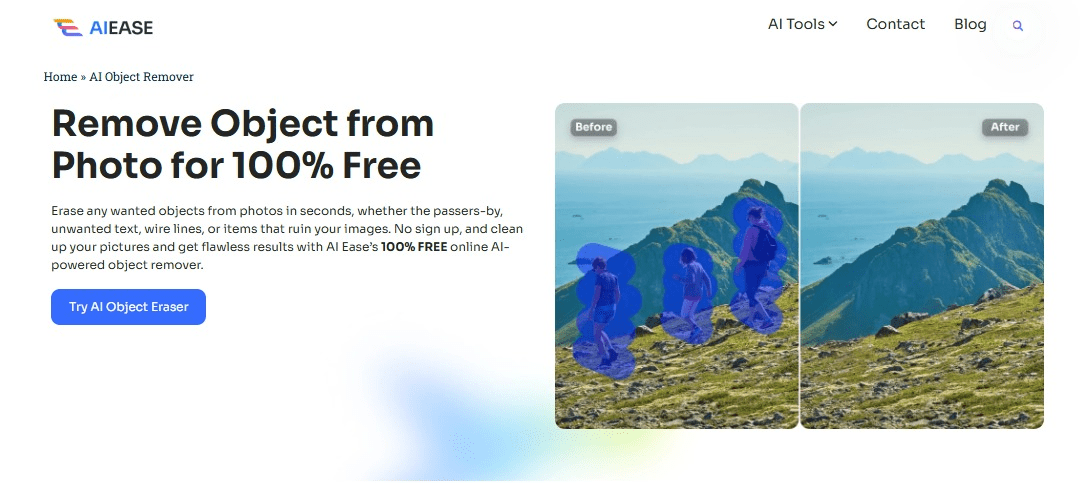
Object Remover for All Needs: No matter if you need to remove an object, a person or any other distraction from your photo: AI Ease’s object remover is here to help. The tool can delete unwanted items as soon as a few clicks, and blends the background so your image appears seamless. It’s very good for travel photos, family photos and any other picture you need to refine.

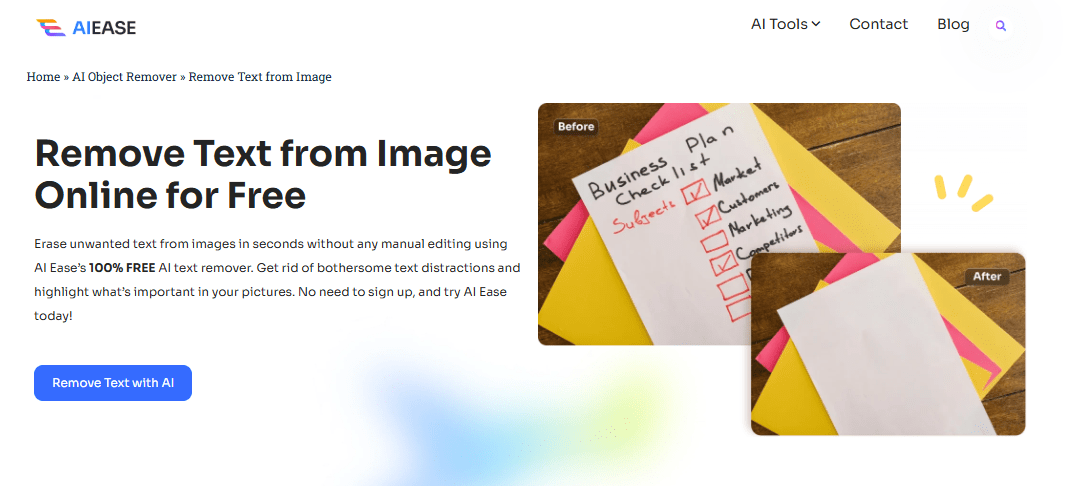
Remove Text from Image: AI Ease has another special feature that excludes text from the image. Then it is an ideal tool for getting rid of watermarks, foreign labels, or anything else that may support away from your photo’s essential focus. It’s especially helpful if you’re going to use the image in a social media post or business setting and want a pretty clean, text free look.

No Sign-Up, No Cost, Just Instant Editing: With Privacy and Accessibility at the forefront of AI Ease’s design. You don’t need to sign in or submit your personal information to use it. All you need to do is upload your image and crop the area you want, the tool takes care of the rest in fast, easy and no extra work way.

Unlimited Usage: With AI Ease, you can use it as much as you want without worrying about hitting a limit, as it provides unlimited access. AI Ease will be there no matter whether you are editing one image or the whole album to provide free access to unlimited all for free!

And it’s these features that make AI Ease such a powerful tool for anyone looking to make quick, high-quality edits and create smooth, negative distraction-free photos.

Quick Guide: Removing Unwanted Objects with AI Ease

AI Ease is very easy to use, even if you are new to photo editing. If you are new to AI Ease’s object remover and want to remove text from image features, here’s a simple, step-by-step guide to get started.

Step 1: Upload your Image to Edit

First you should upload the image you want to edit. It’s any photo of an object, person, or text you’d like removed. With AI Ease you can drag and drop the image straight into the tool or choose it from your device which means uploading is fast and simple.

If you want to get the best results, then pick out a nice clear and high quality image of a person that has been lit well. It will assist the AI in making a sharp edit while completely blending in with the world.

Step 2: Mark the Object or Text You Want to Remove

After uploading your picture, you just use the brush to mark what area you want to take off. Simply swipe if it’s an object or a person, and the AI will detect it. For removing the text, all you need to do is brush on the text that you want to erase. When you mark something you don’t want to, press down on the area with the eraser tool to refine your selection.

This intuitive brush and eraser setup provides for easy high quality and accurate results every time, regardless of how complex the object or text there is to remove.

Step 3: Click “Remove” and Watch the AI Work Its Magic

Click ‘Remove’ when you have marked your unwanted item. The AI Ease’s AI looks at an image, removes the marked text or object with its AI-powered technology and they’ll be done immediately. Within seconds, you’ll get to see the result of the edited photo with the smooth, clean background of the unwanted element replaced.

Step 4: Download Your Edited Image

When you’re good, you can simply download your edited photo. With AI ease, you can save the image to your device directly from there, so you could share it on social media, add it to a project, or print it. Polished, distraction free photos without AI Ease need just a few simple steps.

Conclusion:

AI Ease allows you to get a clean polished photo, fast and free. This one is an object remover tool, allowing you to remove unwanted objects, people, and text in a high quality and easy to use way that works for all levels of editing needs. It uses the tool’s AI driven technology so that every edit looks natural and it’s hard to even tell that anything was removed.

Let’s get ready to take control of our photos. Curious about how easy it is to remove objects? Try out object remover inside of AI Ease and see how quickly you can edit out distractions in just seconds. If you’d like to remove text from your photos, the removed text from the image feature here is equally simple and effective, and you may also want to erase text from your photos.

Enjoy beautiful, distraction free photos every time with zero costs, no sign up and no limits with AI Ease!