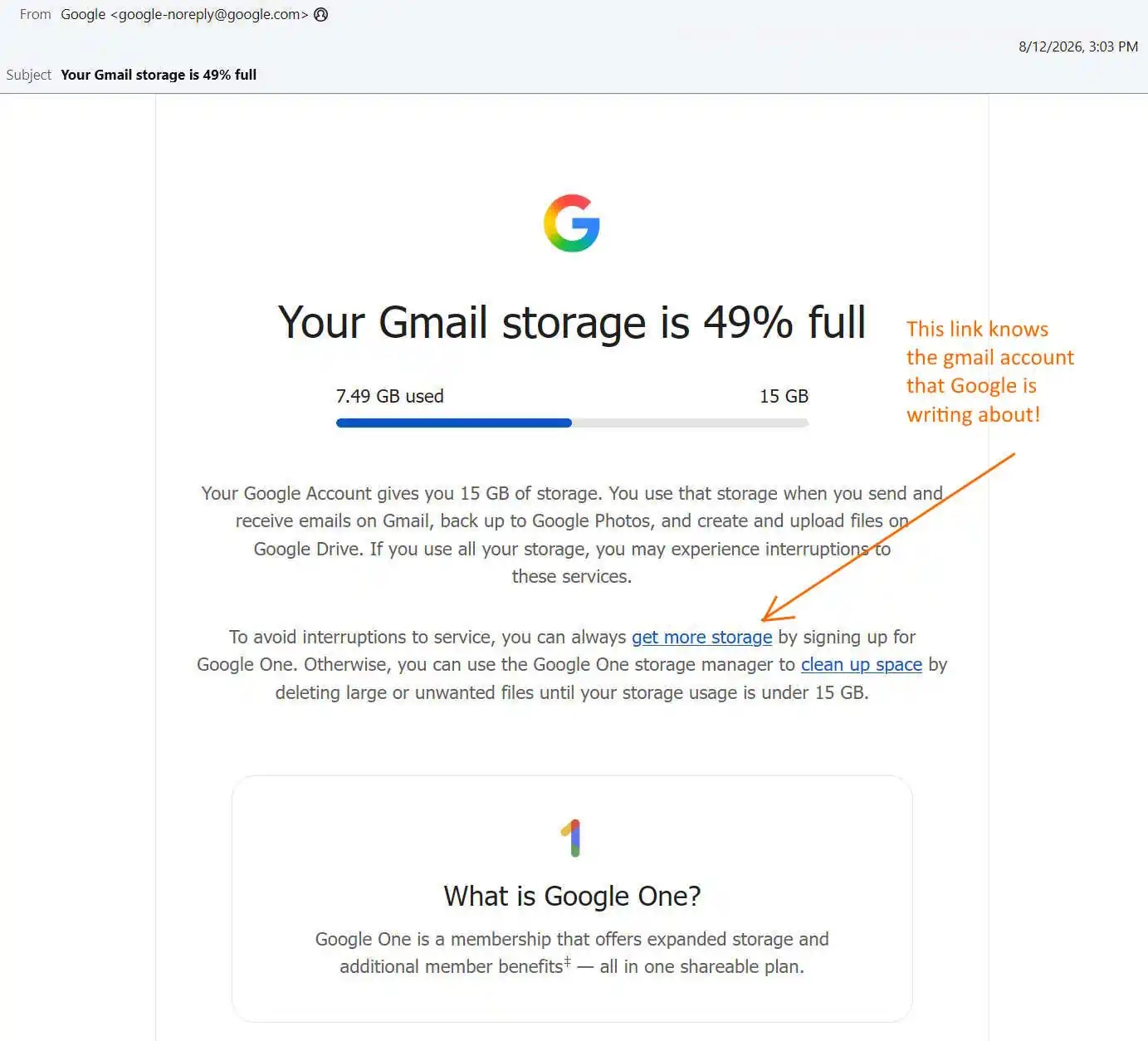
I got an email from Google telling me my Gmail storage was 49% full – 7.49 GB of 15 GB. Something felt wrong, and I know better than to click a link in an email. So I opened my browser, logged into my account directly, and found 13.9 MB. Not 7.49 GB. Here is what it took to find out what that email was actually talking about, and what I think Google is doing.
Email Safety Rule Never click a link in an email to check an account status. Open your browser and type the company’s address yourself.
- Real and forged emails look identical. You cannot tell by looking.
- Every link carries a token that identifies you. Clicking confirms your address is live and monitored.
- The habit only protects you if it is unconditional. Click when you are confident and you will click when you are tired.
For Google, type
myaccount.google.com. Do not search for it – search results carry paid impersonators.
Step 1: Is this email actually from Google?
It looks like phishing. Urgent subject, a percentage, a progress bar, and a button that goes to a payment page. That is the exact shape of a scam.
But it is real. Here is how to prove it, using nothing but the email headers. In your mail client, look for “Show original,” “View source,” or “Show headers.”
a. Validate the IP address
The header records which server delivered the message:
Received: from mail-yw1-f199.google.com (mail-yw1-f199.google.com [209.85.128.199])
Check that the IP resolves back to the name it claims:
dig -x 209.85.128.199 +short
Then check who owns it:
whois 209.85.128.199 | grep -iE "orgname|netname"
Google LLC, AS15169. The connection genuinely came from Google.
b. Validate the domain
Three domains appear, and all three must be Google’s:
From:         Google <google-noreply@google.com>
DKIM domain:  d=google.com
Return-Path:  <...@scoutcamp.bounces.google.com>
Read domains right to left from the final dot. google.com.storage-alert.co is not Google. scoutcamp.bounces.google.com is.
c. Validate DKIM and SPF
SPF says the sending IP was authorized:
Received-SPF: pass (domain of _spf.google.com designates 209.85.128.199 as permitted sender)
DKIM is the strong one. Google signed the message with a private key:
DKIM-Signature: v=1; a=rsa-sha256; d=google.com; s=20251104;
Authentication-Results: dkim=pass; spf=pass; dmarc=pass (p=reject) header.from=google.com
You can fetch the public key it points at:
dig TXT 20251104._domainkey.google.com +short
A forger cannot produce that signature without Google’s private key. And p=reject means Google instructs every mail server in the world to discard anything claiming to be google.com that fails.
Verdict: genuine. Which means this deceptive email is genuinely sent by Google “Don’t be Evil”.
Step 2: Check the account directly
Without clicking anything, I opened myaccount.google.com and went to storage.
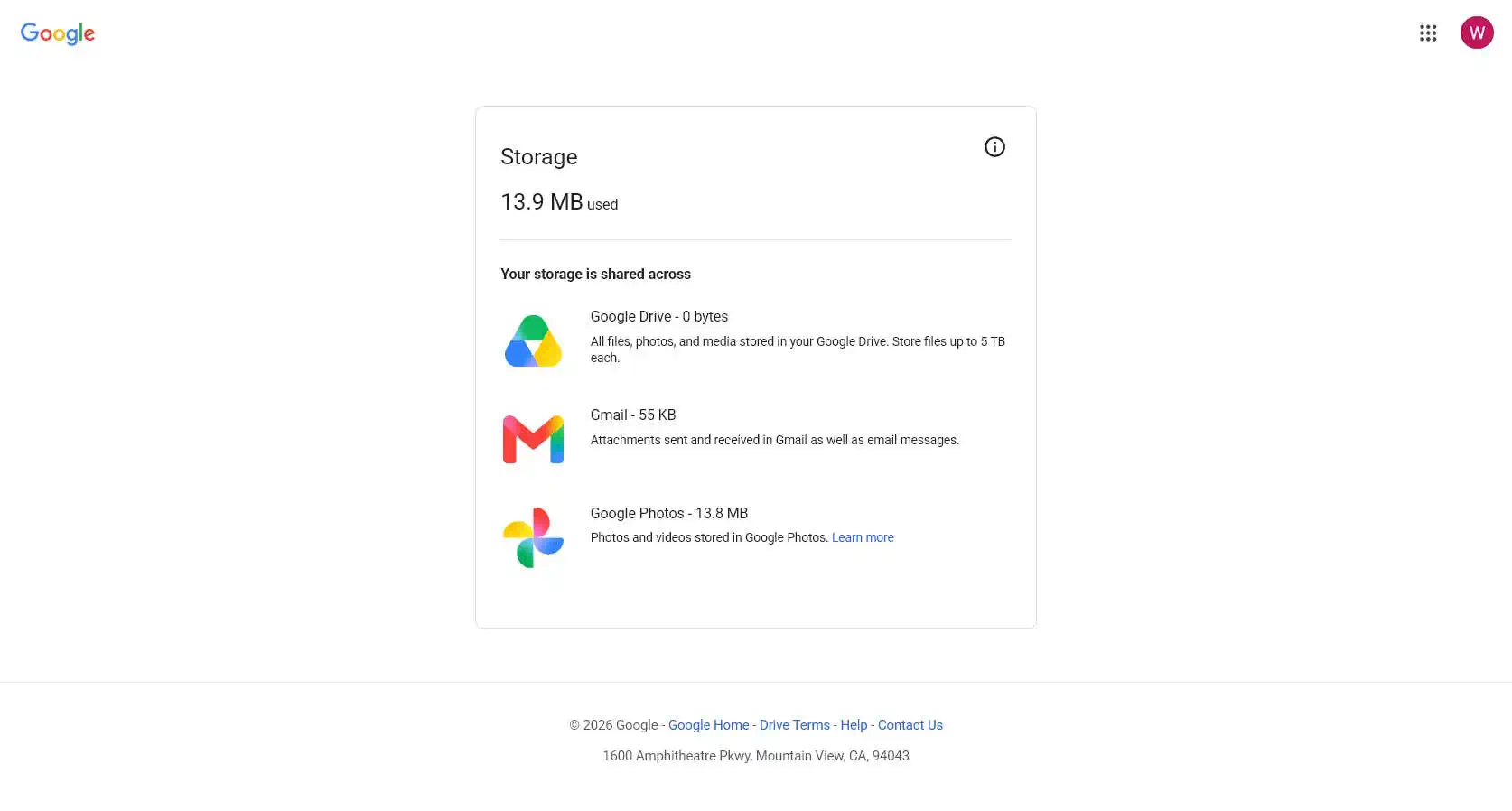
13.9 MB. The email said 7.49 GB. That is a 500x overstatement.
Step 3: Which account is the email even about?
Here is the core problem. The email never says which account it is describing.
I have multiple Google accounts. So does almost everyone. The email is addressed to one address, but Google notification email goes to an account’s contact address, which is frequently not the account itself. The body contains a number, a bar, and a buy button, and no account identifier anywhere.
I spent two days and three hours checking fourteen different logins.
You do not have to. The account is encoded in the link.
How to Decode a c.gle Link Without Clicking On It
I highlighted the link in the picture above. Do not click the link. The link URL is c.gle which is Google’s inhouse URL shortener. This is known but it still looks very phishy.
Right-click and copy the link address instead. It will look like this:
https://c.gle/AKMee0foy_EWuaJ54CSaJ7hUZ1I3NhZk8lCvdNaCiBUt0tqdpLuL5WRD...Paste it into a redirect checker – redirect-checker.org. Or from a terminal:
curl -sI "https://c.gle/AKMee0foy_..." | grep -i locationGoogle’s own server answers:
302 Found
location: https://accounts.google.com/AccountChooser?Email=george.example@example.com
    &continue=https://one.google.com/plans
    ?utm_source=g1&utm_medium=email&utm_campaign=storage_50_email_adler
    &utm_content=get_storage&utm_id=6066401411&utm_term=STORAGE50_NME
There it is. This link is going to an inhouse database that Google is hosting. Google’s own server is clearly telling you what account this message is for. Google’s database returns the exact account login in plain text.
Note what else is in that line: utm_medium=email, utm_campaign=storage_50_email_adler, utm_content=get_storage, destination one.google.com/plans. This is a marketing campaign, tagged as one, landing on the upsell page.
The email footer say “You have received this mandatory email service announcement to update you about important information regarding your Google Account.” – and we can clearly see that Google is now caught in a bald face lie.
Step 4: What I found
The account named in that redirect is a G Suite legacy free edition domain account, created around 2007. Mail for the domain has never run through Gmail; it goes to a different provider entirely. The admin console shows the whole domain using 13.9 MB across four users, against a 60 GB pool.
Not 7.49 GB of 15 GB. Not on that account, not on any account attached to it, not anywhere in the domain. There is no mechanism by which the number Google emailed me could have been true.
What is actually wrong here
Two different stories, standing apart. People should not blend them together.
The number does not match reality. Google described nearly 7.5 GB, but the control panel says only a small fraction. Google’s own official page has the truth. That moment brought two separate facts from Google’s hands — one real, one false.
Google did not show the account login. This part comes on purpose. The servers absolutely know the address — they handed it out inside the link in the email. Google could have placed the address in the message. Even a version with most letters hidden — like geo***@***ple.com — would have saved me three hours of checking more than Eight different Google logins.
This is deception by omission. By not telling me the right account, Google hopes that I will assume their email is correct. Somehow their marketing message is blaming me for not knowing which account has a problem. Yet the account clearly is known to Google because it is decodable out of their link shortener . Google knows it. Just not saying it. And this is on purpose.
The legal framing
I do not give legal advice. California has some pretty direct rules here, though. The description fits closely.
Business and Professions Code section 17500 (False Advertising Law) prohibits any statement made to induce a purchase “which is untrue or misleading, and which is known, or which by the exercise of reasonable care should be known, to be untrue or misleading.” Careful readers will notice the second bit. Google does not need to mean to mislead anyone. Just using ordinary caution would have fixed the mistake — after all, Google’s main site had the answer ready the whole time.
Business and Professions Code section 17200 (Unfair Competition Law) reaches “any unlawful, unfair or fraudulent business act or practice and unfair, deceptive, untrue or misleading advertising.” California courts apply a “likely to deceive a reasonable consumer” standard here. A message labeled a mandatory service announcement, carrying a false usage figure, with every link pointing at a subscription page, is exactly what this law targets.
Civil Code section 1798.140 defines a dark pattern as a user interface “designed or manipulated with the substantial effect of subverting or impairing user autonomy, decision-making, or choice.” Withholding the one field required to verify the claim, while retaining it internally, is a textbook fit.
The legal term for the whole shape is deceptive inducement: a false or misleadingly incomplete representation made to bring about a purchase. This email is designed by Google to intentionally purchase a service you do not need, if you fail to do your own research.
What to do
- Do not click. Copy the link, decode it in a redirect checker, and learn which account it means.
- Check the real number at
myaccount.google.com, typed into your browser yourself. - If the numbers do not match, do nothing else. You do not need to buy storage, empty a trash folder, or clean anything up.
- Be cautious in the future. Truly, at this point, Google is just another soul-less company trying to cheat you into making a mistake and giving them your money.
Summary
Never click a link in an email, even from a company you trust. Especially from a company you trust, because that is the trust being spent.
This email passed every authenticity check available. It is genuinely from Google, cryptographically signed by Google, sent from Google’s own infrastructure. And it told me my storage was 500 times fuller than it is, refused to say which account it meant, and pointed me at a payment page.
Google knows which account it is. Their server will tell you if you ask. They simply chose not to put it in the email.
That is not a service announcement. That is deceptive inducement, and an email that behaves this way does not deserve to be trusted from a company that does not deserve our trust.