The initial wave of generative AI was characterized by the “lottery” phase—creators would input a prompt, pull the lever, and hope the output was usable. For hobbyists, this was sufficient. For product teams building launch assets, marketing collateral, or brand-specific imagery, the lottery is a liability. A stunning visual is useless if the product placement is slightly off-kilter or if the background lighting conflicts with the brand’s visual identity.
The shift we are seeing now moves away from the prompt box and toward the canvas. Professional workflows are increasingly defined by granular control—specifically through regional changes, editing, and inpainting. When your goal is a high-fidelity asset, the prompt is merely the starting point. The real work happens in the refinement stage, where tools like the Banana AI ecosystem allow for precise modifications without discarding the core composition.
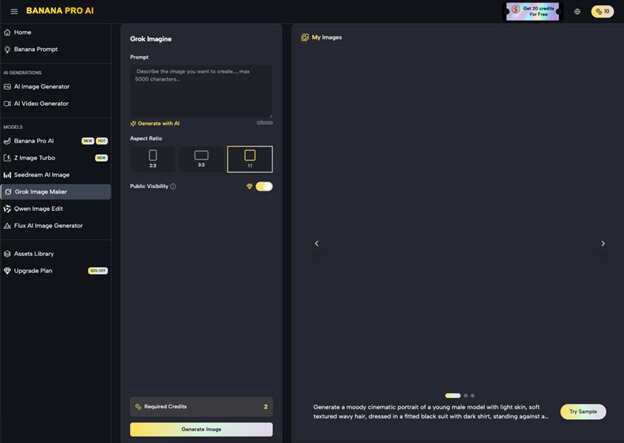
The Reality of High-Stakes Visual Production
Product teams operating at scale do not have the luxury of “close enough.” If a campaign requires a hero image of a specific tech gadget in a lifestyle setting, the AI must respect the geometry of that gadget while blending it naturally into the scene. Standard text-to-image models often struggle with this, introducing artifacts or hallucinating details that violate product specs.
This is where the iterative pipeline becomes essential. Instead of generating a thousand images to find one that works, teams are generating a “base” and then using an AI Image Editor to swap specific regions. If the model generates a perfect lighting setup but places an incorrect object on a desk, you don’t start over. You mask the desk, provide a new regional prompt, and let the system fill in the gaps.
Regional Inpainting as a Strategic Advantage
Inpainting is essentially the process of telling the AI: “Leave 90% of this image alone, but rethink this specific mask.” In the context of a tool like Nano Banana Pro, this process is optimized for speed and structural integrity. For a product team, this capability solves three primary problems:
- Iterative Brand Alignment: If the brand’s color palette shifts mid-campaign, you can inpaint clothing or background elements to match the new HEX codes without changing the model’s pose or facial expression.
- Asset Recycling: A single high-quality background generation can be reused for multiple product variations. By masking the product area and swapping the prompt, you maintain consistent lighting and perspective across an entire product line.
- Error Correction: Despite advancements, AI still produces anatomical errors or awkward shadows. Regional editing allows a designer to isolate these “hallucinations” and re-roll them until they align with physical reality.
However, there is a clear limitation in current technology that teams must account for: lighting consistency. When you change a large region of an image via inpainting, the AI does not always perfectly calculate how the new object would cast shadows on the unmasked parts of the image. This often requires a second pass or manual retouching in post-production to ensure the global illumination feels cohesive.
The Nano Banana Pro Efficiency Factor
Speed is often overlooked in creative operations, but it is the primary bottleneck in production. If an inpainting edit takes three minutes to process, the creative momentum is broken. The Nano Banana architecture is designed to minimize the latency between the mask placement and the visual output.
By utilizing Nano Banana, creators can perform “live” iterations. This is particularly useful when trying to find the right balance for a complex scene. If you are placing a translucent object, such as a glassware product, the interaction between the object and the background is notoriously difficult for AI to get right on the first try. A low-latency feedback loop allows the operator to nudge the prompt or adjust the mask strength until the glass looks like it actually exists in the environment, rather than being pasted on top.
Moving from Static Images to Dynamic Video
The logic of regional editing is now bleeding into video production. A common challenge in AI-generated video is temporal consistency—the way objects change or “melt” from frame to frame. By starting with a highly refined static image generated in Nano Banana and then moving it into a video workflow, teams can anchor the video to a high-fidelity source.
This “Image-to-Video” pipeline is far more predictable than “Text-to-Video.” If you have spent time inpainting a specific product into a hero shot using Banana Pro, you can then animate that shot with the confidence that the product’s core features will remain stable. It is the difference between a video that looks like a fever dream and a video that looks like a professional b-roll shot.
The Limits of Automation
It is important to reset expectations regarding “one-click” solutions. While an AI Image Editor can automate 80% of the heavy lifting, the final 20% still requires human judgment. For instance, text rendering within an inpainted area remains hit-or-miss. If you are trying to inpaint a specific label onto a bottle, the model will likely struggle with the exact typography and spacing. These tasks still require traditional graphic design intervention.
Furthermore, we often see uncertainty when dealing with extreme perspective shifts. If you try to inpaint a product onto a surface that is at a very sharp angle, the AI occasionally fails to interpret the 3D space correctly, resulting in “flat” looking objects. The operator must be prepared to adjust the mask or provide more descriptive spatial prompts like “isometric view” or “extreme low angle” to guide the model.
Building a Production-Ready Workflow
To integrate these tools effectively, product teams should move away from the “prompt-first” mindset and adopt an “edit-first” approach. This looks like:
- Establishing the Base: Generate several wide-angle environmental shots that fit the campaign’s aesthetic using Banana Pro.
- Regional Selection: Identify the high-impact areas where the product or specific brand elements need to live.
- Layered Inpainting: Instead of changing everything at once, work in layers. Change the product first, then the secondary props, then the fine details like lighting highlights.
- Output to Video: Once the static image is approved, use the video generator to add subtle movement—pan shots, zoom-ins, or atmospheric motion—to create social media-ready assets.
This workflow treats AI as a sophisticated brush rather than a magic wand. It acknowledges that while the generative capabilities are vast, the precision required for commercial work demands a tighter feedback loop.
The Economics of In-House Iteration
Beyond the creative benefits, there is a clear commercial argument for this iterative approach. Traditionally, a reshoot for a product launch could cost thousands of dollars and take weeks to coordinate. With regional editing, a team can pivot their entire visual strategy in an afternoon.
Using the Nano Banana model allows for a higher volume of experiments without a corresponding increase in budget. You can test twenty different “vibes” for a product launch before committing to a final asset. This level of agility was previously reserved for the largest agencies with massive retouching departments. Today, a small product team with a solid grasp of inpainting and regional editing can produce a comparable output.
Practical Judgment in Tool Selection
When evaluating whether to use a standard generator or a more specialized tool like the Banana Pro AI suite, look at the UI. Is the inpainting tool an afterthought, or is it a central part of the canvas? For professional production, the canvas is the workspace. You need to be able to zoom in, refine masks, adjust denoise strength, and compare versions side-by-side.
The goal is to reduce the “AI feel” of the final asset. Assets that feel “AI-generated” often suffer from over-saturation, generic compositions, and a lack of intentionality. By using regional changes to break up the perfectly symmetrical patterns the AI tends to favor, you can inject a sense of “planned imperfection” that makes a visual feel more grounded and authentic.
Ultimately, the power of Nano Banana and the broader toolset lies in their ability to respect the user’s intent. The most successful creators in this space aren’t the ones who know the most complex prompts; they are the ones who know how to use the editor to fix what the prompt got wrong. In the world of launch assets, the edit is where the value is created.