You are losing customers right now. Not because of bad service. Not because of price. Because their email to you landed in your spam folder — and you never saw it. A customer reached out. You never replied. They moved on. You chose Gmail or Zoho or Outlook for good reasons — cost, features, reliability. But the spam filter came with it. Spam filters are built for the whole internet. Your business is specific. You need a tool you can train to know the difference.
We have had this problem since 1999. A lost customer email is a service quality failure — and we felt it. For the last fifteen years, I have opened five or six mailboxes every single morning just to check the spam folders. That is maybe four or five rescued emails per week. The web-based tools are slow. Every mailbox throws up ads, 2FA prompts, and login friction. Doing six in five minutes is genuinely painful. Adding six full mailboxes to Outlook or Thunderbird makes Send/Receive unusable — you get the inbox, the sent folder, the archive, everything. No tool handles the spam folder by itself across multiple accounts.
So we built one.
The Spam Folder Is a Black Hole for Business Email
Most businesses never systematically check their spam folder. They look occasionally. Maybe after a customer complains. Maybe on a slow Friday. But occasionally is not a system. Spams are deleted automatically after 30 days. If you do not check, your customer does not get a reply.
The problem gets worse with multiple accounts. A real business often runs public l email addresses — sales, support, billing, info. Each one has its own spam folder. Each one is a place where a customer’s email can disappear. Checking all of them manually every day is a job nobody wants. So it does not get done. And the cost is invisible — you never see the customer you lost because you never saw their email.
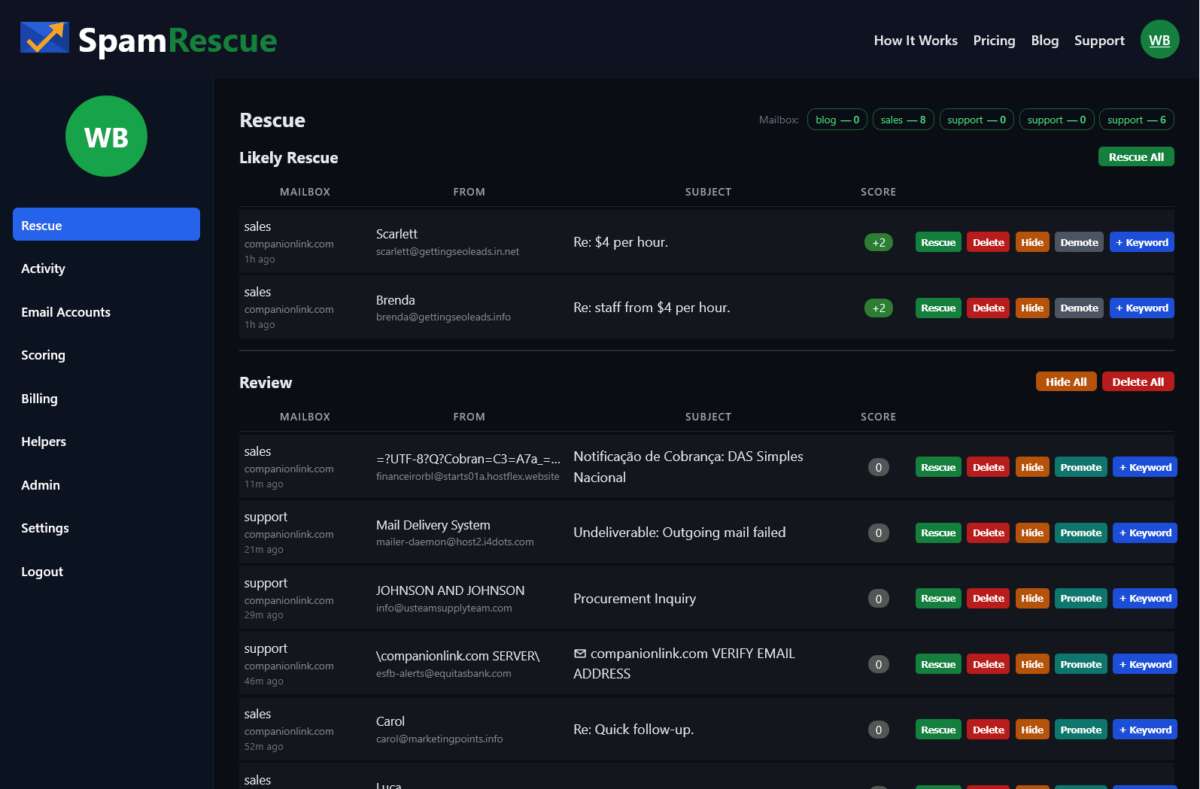
SpamRescue scans all your mailboxes and surfaces, and groups likely client emails into a single list. No logging in and out. No missing folders.
Three Businesses, One Problem, One Fix
SpamRescue works differently depending on your size. A solo consultant has one mailbox and checks it herself. A small business has three or four addresses and needs automation. One person can monitor 10 mailboxes for a team – without giving that person read access to any email. These are three different situations. The solution is the same tool.
Use Case 1: The Solo Business Owner
You run your own business. You have one email address. You check your inbox constantly — but your spam folder? Maybe once a week. Maybe less. SpamRescue automatically connects to your mailbox and scans your spam folder. It scores every message. Likely client emails rise to the top. You review in sixty seconds and rescue what matters.
The free plan covers one mailbox. No credit card. You will find something in there. Everybody does.
Use Case 2: The Small Business With Multiple Addresses
You have a sales address, a support address, maybe an info address. Three or four mailboxes. Checking each one manually every day is the job nobody does consistently. SpamRescue connects all of them. It scans twice a day automatically. Everything lands in one rescue queue — sorted by likelihood, scored, ready to act on.
The Starter plan at $19/month covers three mailboxes. One view. One decision per email. Done in minutes.
Use Case 3: The Office Manager or IT Lead
You are responsible for email across a team. Ten mailboxes. Executives who will not check their own spam. Customers slipping through every week. SpamRescue’s Professional plan lets you assign a Helper — one staff member who monitors spam across all accounts without ever seeing the inbox, the sent folder, or billing. SpamRescue does not surface the mail body – only the subject line and sender. This is real security. This is real control. This is real accountability.
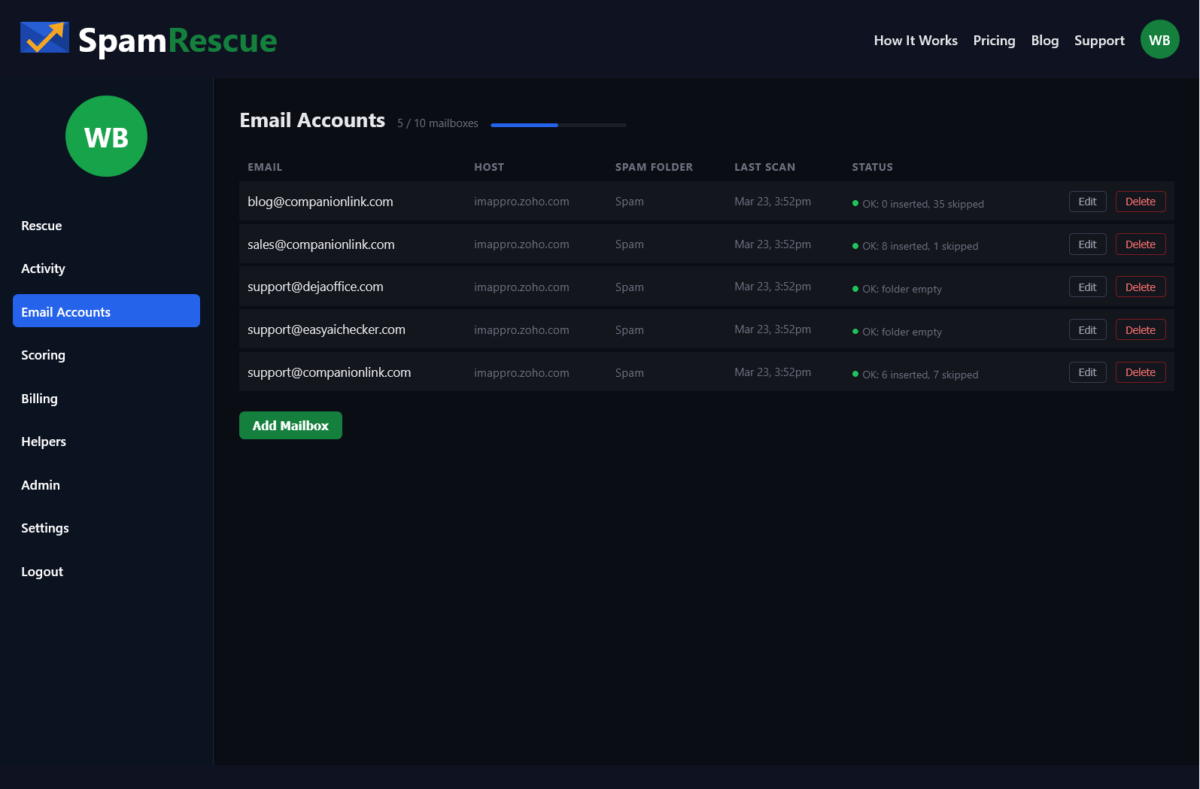
Ten mailboxes, scans four times daily, ninety days of message history. At $49/month, a single saved customer pays for the account.
Frequently Asked Questions
How do I move client email from Spam to Inbox?
- Open your spam folder and find the email.
- Select it and click “Not Spam” or “Mark as legitimate.”
- This moves it to your inbox.
Safelisting the sender prevents future emails from landing in spam.
Why are client emails going to my spam folder?
For many B2B shops, your client may have a bad sending reptutation. That does not mean they are bad people. From a business perspective they are a legitimate client who will spend money, but they get lost or marked. Sometimes links in the email cause a problem. Sometimes a word in the email can trigger it. Spam filters are blunt tools and often can be too aggressive.
How often should I check my spam folder?
How often do you want your customer to wait for a reply?
Email providers generally auto-delete spam after 30 days. Most businesses should check at least 3 times a week.
Can I let a staff member monitor spam without giving them full inbox access?
No standard email client separates access to the spam folder from full mailbox access. If you share credentials, you share everything. Having a staff member monitor the spam folder means they can also view, read, and screenshot the inbox and outbox contents.
Will checking my spam folder reduce the spam?
No. The volume of global spam increases every year. The goal of spam folder monitoring is not to reduce spam — it is to make sure legitimate emails do not get buried alongside it.
Is AI a good way to manage my spam folder?
Not really. Your spam filter is already using automated rules to block unwanted email. Adding an AI layer puts a broad layer checking a broad layer. An ideal system is one you can add your own keywords to – a system that reflects your particular lingo and can quickly sort customer emails to the top. Also – AI tools are not secure and may leak company info.
How do I automatically get client emails out of spam?
Most email platforms offer filter rules—you can safelist a domain or sender so their emails always reach your inbox. The challenge is knowing who to safelist before they email you. For unknown new clients, the only reliable method is regular manual review of your spam folder, combined with sender trust rules you build over time.
Stop Losing Customers to Your Spam Folder
There is a simple rule for business email. If a customer emails you, you answer. That only works if you see the email. Right now, some percentage of your customer emails are landing in a spam folder you are not watching closely enough. You do not know which ones. You do not know how many.
SpamRescue fixes that. It connects to your mailboxes, automatically scans your spam folders, and surfaces likely client emails in one place. You review in minutes. You rescue what matters. You never miss a customer again.
Start free with one mailbox — no credit card required. Try SpamRescue today.
Summary
What does a lost email cost you? Credibility? Time? Money? One lost sales query may cost more than a full year of SpamRescue service. One unanswered support email may mean a one-star review. Who has the patience to open six mailboxes every day – like I did – and scan a mind-numbing list of atrocious subject lines to find one or two real rescues?
SpamRescue is a simple service that saves you time, protects your customer reputation, and lets you focus on running your business.