Very few small companies end up with a mixed email setup on purpose. The founders started on Gmail, the first sales hire brought an Outlook habit from a corporate job, and the office manager still works on a Windows laptop with a ten-year-old PST file that holds every supplier conversation since the company opened. When the business finally consolidates on Google Workspace, the mailboxes are the easy part to move. What tends to go missing is the context around them: the note on a contact saying who approves invoices, the color category that marked a client as at risk, the follow-up task due next Tuesday.
Google's own migration tools handle a good share of this, though each tool has gaps, and the gaps depend on whether a person is coming from Outlook or from a personal Gmail account. Planning around those gaps before the cutover costs far less than rebuilding a client's history after someone has already deleted an old account.

Where does customer history live in a mixed Outlook and Gmail team?
In a typical mixed team, customer history is spread across email threads, contacts with free-text notes, calendar events that show when you last met a client, and Outlook tasks and flags. Some people also use Outlook categories as a rough sales stage. On the Gmail side, the same kind of information is kept in labels, starred threads and Google Contacts on personal accounts the company doesn't control.
Before moving anything, ask each person where they would look if a key client called right now. Their answers are usually more revealing than an IT inventory, because they turn up the spreadsheet on someone's desktop and the phone contacts nobody thought to export.
It also helps to decide early where this history should end up. If the history goes back into individual inboxes and personal contact lists, the company keeps the same silos it had before, just under a different logo. For that reason, many teams shortlist crms that work with google workspace while they plan the migration, so the cleaned-up contacts and threads land in a shared customer record that everyone can see and that stays with the company when an employee leaves.
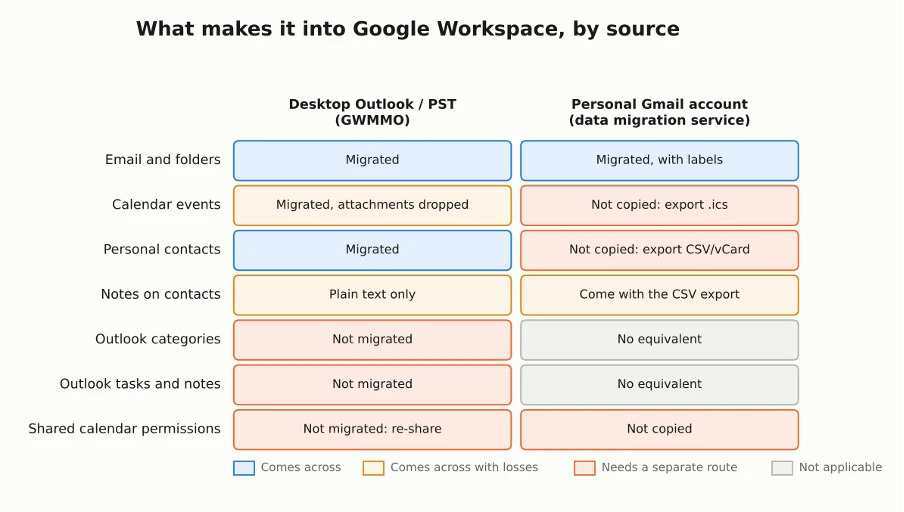
What carries over from each source, based on Google's documentation for GWMMO and its migration product matrix.
What do Google's migration tools leave behind?
Google Workspace Migration for Microsoft Outlook (GWMMO) moves mail, calendar events and personal contacts, but according to Google's documentation it skips Outlook tasks, notes, journal entries and category assignments. Contact notes come across as plain text, and calendar attachments are dropped. GWMMO also runs only with desktop Outlook on Windows. Google lists the web, Mac, mobile and Microsoft Store versions of Outlook as unsupported, which matters if part of your team has already switched to the new Outlook.
Personal Gmail accounts have the reverse problem. When an administrator pulls mail from Gmail with Google's data migration service, only email and labels are copied, so contacts and calendars have to be exported and imported by hand (Google Contacts accepts CSV and vCard files, and calendars move as .ics). In 2026 Google also introduced a data import service in the Admin console that can bring over metadata such as Outlook rules and calendar settings, so check what your console offers before you pick a tool.
The Outlook items GWMMO ignores need another route. A few dozen open tasks can be exported to a spreadsheet and recreated in an afternoon. For larger volumes, or for people already on the new Outlook, sync tools such as CompanionLink move contacts, calendars, tasks and notes between Outlook and Google accounts, which saves retyping months of follow-ups.
Why do contacts duplicate when two email systems merge?
Duplicates appear because several people saved the same client independently, each in their own format. A sales rep on Outlook stores "Mark Jensen, Northfield Supply" with a mobile number. A colleague on Gmail has only mark@northfieldsupply.com and no name, and an old PST holds a third record with a landline from 2019. After the migration, Google Contacts shows all three, and whoever opens the wrong one misses the history attached to the other two.
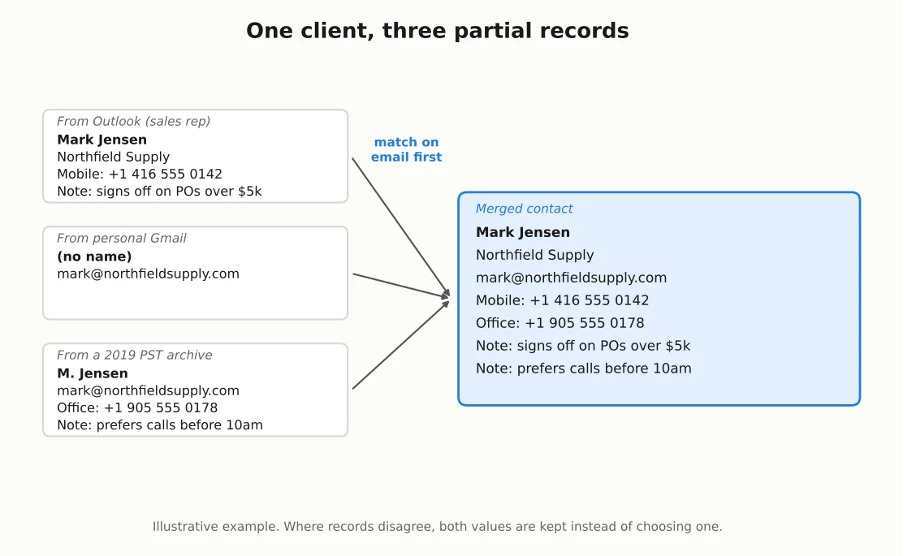
Three partial records of the same client, matched on the email address and merged into one contact that keeps every phone number and note.
Deduplicate before the data moves into a shared address book or CRM, since merging gets much harder once each record starts collecting new activity. Match on email address first, because it is the most reliable key, then on phone number, and leave name matching for last. Google Contacts has a built-in Merge & fix view for the obvious cases. On the Outlook side, cleaning up before export also keeps the PST smaller and the migration faster, and CompanionLink makes a separate duplicate remover for that job.
When two records disagree, keep both values. A second phone number in the notes field costs nothing, while a deleted one could be the only working line to a client's accounts team.
How do you keep email flowing during the cutover?
Move the mail in two passes and forward the old accounts in between, so that messages arriving during the switch don't get stranded. Google's help center recommends setting up automatic forwarding in Outlook before the migration starts, so mail sent to the old addresses still reaches people.
The first pass copies the bulk of the history, which can take days for a large PST archive. After that you change the MX records, and a second, incremental pass collects whatever reached the old mailbox in the meantime; GWMMO supports this by migrating only new data from an updated PST file. Keep the old accounts readable for a few weeks afterwards, because someone will eventually remember a thread that was filed in an odd folder.
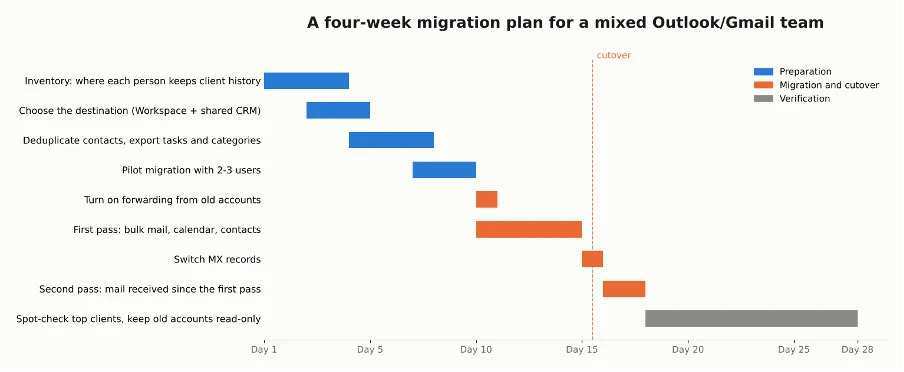
An example schedule for a team of about 15 people. Bigger PST archives stretch the first pass, while the inventory and cleanup weeks stay roughly the same.
Can part of the team keep using Outlook after moving to Google Workspace?
Yes. Google Workspace Sync for Microsoft Outlook (GWSMO) lets Windows users keep working in Outlook while their mail, calendar, contacts, notes and tasks are stored in Workspace. For someone who has used Outlook for fifteen years, that can make the change much less painful.
The downside is a split workflow. If your CRM is built around Gmail, notes and follow-ups logged in Outlook won't appear on the client's record unless someone copies them over. If you allow Outlook to stay, agree as a team on where client notes get written, and check every month or so that the sync is still running.
How do you check that no customer history was lost?
Run a spot check on the accounts that matter most before you shut anything down. Pick ten or fifteen of your largest or most active clients, and for each one compare the old and new systems on:
• The number of email threads with that client's domain
• Whether contact notes came across and still make sense as plain text
• Upcoming meetings, especially recurring ones, because those are the events people notice missing first
• Open follow-ups that used to be Outlook tasks or flags
If the numbers match for your biggest accounts, the rest of the migration is probably fine. If they don't, you find out while the old mailboxes still exist, which is the cheapest moment to fix it.
One last practical point concerns the old PST files. Decide who owns them after the move, archive them to a shared drive with restricted access, note the date of the final migration pass, and delete local copies from laptops. An unencrypted PST on a laptop is a full copy of your client correspondence that nobody tracks anymore.