CompanionLink can sync Outlook Contacts, Calendar, Tasks and Notes to your iPhone without sharing your data with Google.
Now supports the Windows Store Outlook App. For speed, ease-of-use, and value, buy CompanionLink!

Fast, Easy, Direct iPhone Sync
Sync PC to iPhone without using Google, Exchange, iTunes or iCloud.
Featured in The New York Times, PC Mag and USA TODAY
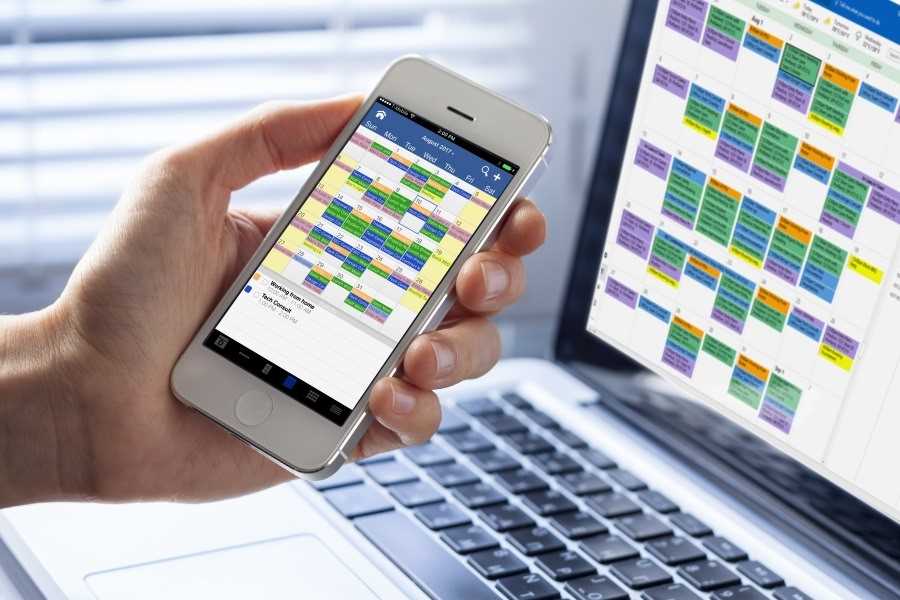
Why CompanionLink is Best
- We sync directly from Outlook to iPhone
- We send Outlook data to DejaOffice CRM on your iPhone.
- Contacts, Calendar, Tasks, Notes in one App
- Sync Outlook Categories and Category Colors
- Sync with native Contacts and Calendar
- One purchase for 3 PCs; work, home and laptop
- USA Based Telephone Technical Support
Google Not Required
Some vendors claim to sync iPhone but then send the data to Google.
- Google will Make money selling your data
- Google Sync is S-L-O-W - up to 45 minutes to update your phone.
- No Outlook Categories, No Colors
- Google limits the number of fields you can sync.
- Google tasks will not sync to iPhone Reminders
No Exchange Sync
Exchange ActiveSync (EAS) was developed and licensed by Microsoft. There are many limitations of the protocol.
- Exchange based syncs are slow - taking 15 minutes or more to sync changes
- Calendar colors have limited support
- Exchange is not Outlook. You can easily sync Outlook without using Exchange
Portable License
Our competitors lock their license to your computer. So when you buy a new computer, you need to buy a new license. With CompanionLink you simply register the software on a new computer using your email address.
US based company
CompanionLink is located in Portland, Oregon. Our servers are based in New Jersey to take advantage of proximity to the East Coast, and the transatlantic cables to Europe. Our servers are high technology and really fast!
Premium Support
With CompanionLink you can call us at (503)243-5200 for support, Monday through Friday, 7am-3:30pm Pacific Time. For those with special needs, use our RunStart Service gives you a one-time hands on session with a top tier technician. Our technician will log into your computer, set up the sync, and ensure you are completely satisified with the solution. If you want this service rgularly, use Premium Support for a full year and up to five service tickets.
DejaOffice
On your phone we feature DejaOffice CRM with PC Sync
from the Apple App Store. DejaOffice holds Contacts, Calendar, Tasks and Notes together, and with the same
internal formats as in Outlook. DejaOffice synchronizes to iPhone Native Accounts for Contacts and Calendar.
If you don't want to use DejaOffice then simply set it to sync to native iPhone Contacts and Android Calendar.
We also offer sync to Google. Same product. One purchase. Switch your method at any time.
One-Minute Setup
- Install CompanionLink for Outlook on your PC.
- Select "iPhone" from the list of device types.
- Select your Sync Method (USB Sync, Wi-Fi Sync, or DejaCloud).
- Select "Outlook" as your database.
Our products are backed by free telephone support. If you need help, please call us at 1-503-243-5200.
Resources
- Setup guide for DejaCloud Sync for iPhone
- Setup guide for iPhone Wi-Fi Sync
- Setup guide for iPhone USB Sync
- Free DejaOffice app for iPhone
How it works
CompanionLink synchronizes iPhone with standalone Outlook over USB cable. Synchronize contacts, calendar, tasks, and notes. Our USB Sync is designed to restore the traditional wired sync feature that shipped with older Windows mobile handhelds. Just connect your Lumia, Ativ, or HTC iPhone to your PC and let CompanionLink handle the rest.
The synchronization works with our free DejaOffice for Outlook App that integrates with your device’s People Hub app. DejaOffice holds Outlook Contacts, Calendar, Tasks, and Notes in one integrated app that works with device features like Caller ID, email, maps, and text messaging.
USB Sync
We offer the only direct iPhone PC sync that does not require iTunes. Just dock your iPhone with your PC and tap Sync. CompanionLink handles more Outlook data than iTunes or iCloud. This is perfect if you want to keep your data out of the cloud so it is private.
Wi-Fi Sync
Use your home or office Wi-Fi connection to securely sync between your PC and iPhone. This is perfect if you who want a cloud-free sync that also is wireless. Your data never leaves your Wi-Fi network. CompanionLink automatically pairs the PC with your iPhone for Wi-Fi sync.
DejaCloud Sync
Our secure Cloud technology is designed for Automatic and Wireless sync with multiple devices (ie - phone and tablet). It works with iOS, Android, Windows Phone, and BlackBerry devices. Automatically sync all of your devices with your PC. Pay for one license of CompanionLink and get support for multiple devices.
Choose Your Database
-

Sync iPhone with Outlook
-

Sync iPhone with Act!
-

Sync iPhone with Palm Desktop
-

Sync iPhone with Lotus Notes
-

Sync iPhone with GoldMine
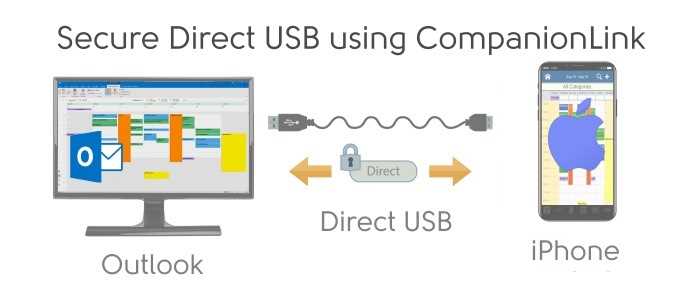
iPhone Sync using USB - Secure and Fast iPhone Sync using a USB Connection.
-
Install CompanionLink on your PC
-
Install DejaOffice on your iPhone
-
Select USB Sync
Setup guide: iPhone Outlook USB sync
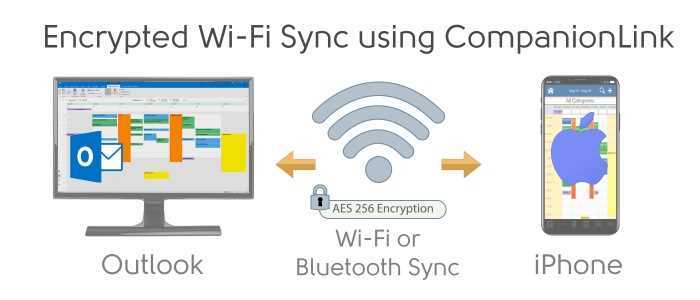
iPhone Sync using Encrypted Wi-Fi - Your data never leaves your local Wi-Fi network. Automatic pairing.
-
Install CompanionLink on your PC
-
Install DejaOffice on your iPhone
-
Select Secure Wi-Fi Sync
Setup guide: iPhone Sync using WiFi
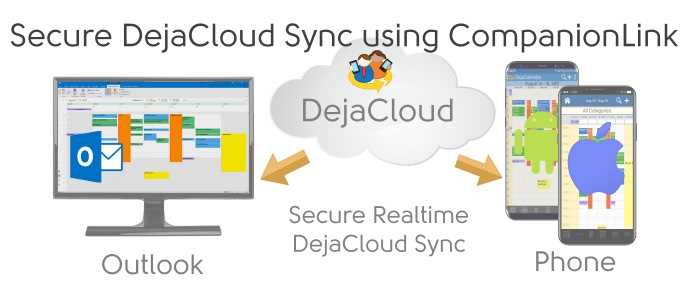
iPhone Sync using Secure DejaCloud - Fully automatic iPhone Sync supports multiple devices like a phone and a tablet.
-
Install CompanionLink on your PC
-
Install DejaOffice on your iPhone
-
Select DejaCloud Sync *Recommended
Supported iOS devices
- iPhone running iOS 10 and higher.
- iPhone 16
- iPhone XS, iPhone XS Max
- iPhone XR
- iPhone X
- iPhone 8, iPhone 8 Plus
- iPhone 7, iPhone 7 Plus
- iPhone 6, iPhone 6 Plus
- iPad running iOS 10 and higher
- iPad Pro 12.9 inch (3rd generation)
- iPad Pro 11 inch
- iPad Pro 12.9 inch (2nd generation)
- iPad Pro 10.5 inch
- iPad Pro 9.7 inch
- iPad Pro 12.9 inch
- iPad Air 2
- iPad Air
- iPad Mini 4
- iPad Mini 3
- iPad (6th generation)
- iPad (5th generation)
- iPad (4th generation)
- iPod touch running iOS 10-18