Learn how Shift deleted file recovery works, what to do after permanent deletion, and how to restore files safely with a practical Recoverit workflow. Continue reading
Pressing Shift + Delete can feel final, because the file skips the Recycle Bin and disappears right away. But permanent deletion does not always mean permanent loss. In many cases, the file data is still on the drive until new data overwrites it. That is why acting fast matters. If you want the best chance of recovery, it is smart to review data recovery software options before you keep using the device.
This guide explains how Shift deleted file recovery works, what to do immediately after accidental permanent deletion, and how to recover files safely with a practical step-by-step method. If you stop writing new data and use the right recovery workflow, there is often a real chance to get the lost files back.
1. What Happens When You Use Shift + Delete
2. Can Shift Deleted Files Be Recovered?
3. What to Do Right After Permanent Deletion
4. Best Tool for Shift Deleted File Recovery
5. How to Recover Shift Deleted Files in 3 Steps
6. What Affects Recovery Success
7. How to Avoid Permanent File Loss in the Future
8. Conclusion
When you delete a file normally in Windows, it usually goes to the Recycle Bin first. That gives you a simple restore option. When you press Shift + Delete, Windows bypasses that temporary holding area and marks the file as removed from the file system immediately.
That sounds irreversible, but the underlying file content often remains on the drive for a while. The system mainly removes the reference that tells Windows where the file is and how it appears in folders. Until the same storage area is reused, recovery software may still be able to scan and reconstruct the file.
Yes, in many cases they can. Recovery depends on whether the deleted file data has been overwritten, how long ago the deletion happened, and whether the affected storage device is still working normally. The sooner you act, the better the odds.
This is especially true on internal hard drives, external drives, USB flash drives, memory cards, and other storage devices where accidental permanent deletion is common. If you are comparing recovery scenarios across devices, this hard drive data recovery guide can also help you understand device-level differences.
The first few actions after Shift + Delete matter more than most people think. Many failed recoveries happen because users keep working on the same drive, download tools to the wrong location, or save recovered files back to the same path.
· Stop saving new files to the affected drive immediately
· Do not install recovery software onto the same partition where the files were lost
· Do not download large files, updates, or media onto that device
· Prepare another drive or folder as the recovery destination
· Begin the scan as soon as possible
These steps reduce the risk of overwriting the deleted file data before recovery even starts.
If you need a straightforward way to recover permanently deleted files without digging through command-line methods, Wondershare Recoverit is a strong option. It works well for deleted documents, photos, videos, archived files, project folders, and other file types lost through Shift + Delete or similar actions.
Recoverit is a practical fit because it gives users a guided scan-and-preview workflow. That matters when the lost data includes mixed content types or when the person doing the recovery is not highly technical. If video-heavy folders were deleted, it also makes sense to keep video recovery resources in mind during recovery planning.
Why recommend Recoverit here:
Readers searching for Shift deleted file recovery usually want a tool they can use immediately, not a general explanation only. Recoverit gives a direct next action and supports the permanent deletion scenario clearly.
If the deleted files have not been overwritten, the recovery process is usually straightforward.
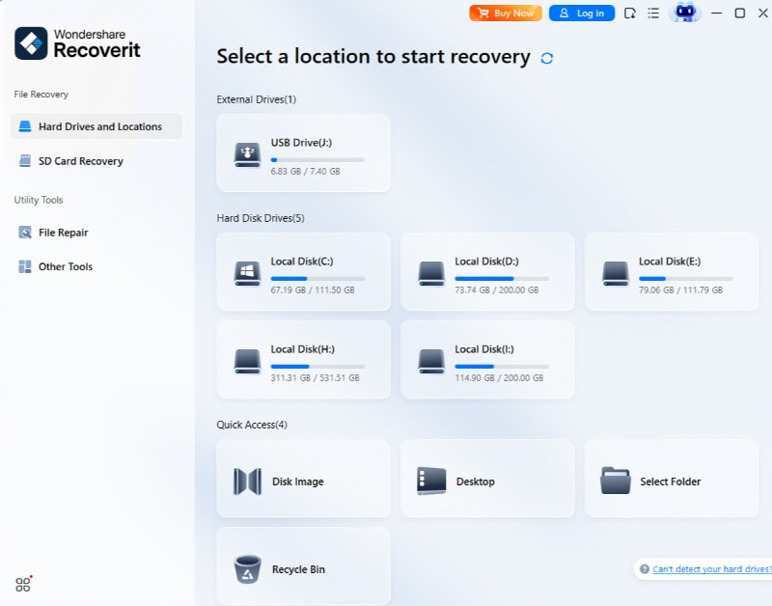
Open Wondershare Recoverit and choose the partition, desktop location, folder, external drive, or USB device where the files were permanently deleted.
Purpose: This tells Recoverit where to search for the missing file records and recoverable content.
Result: The software starts scanning the selected location for Shift deleted files.
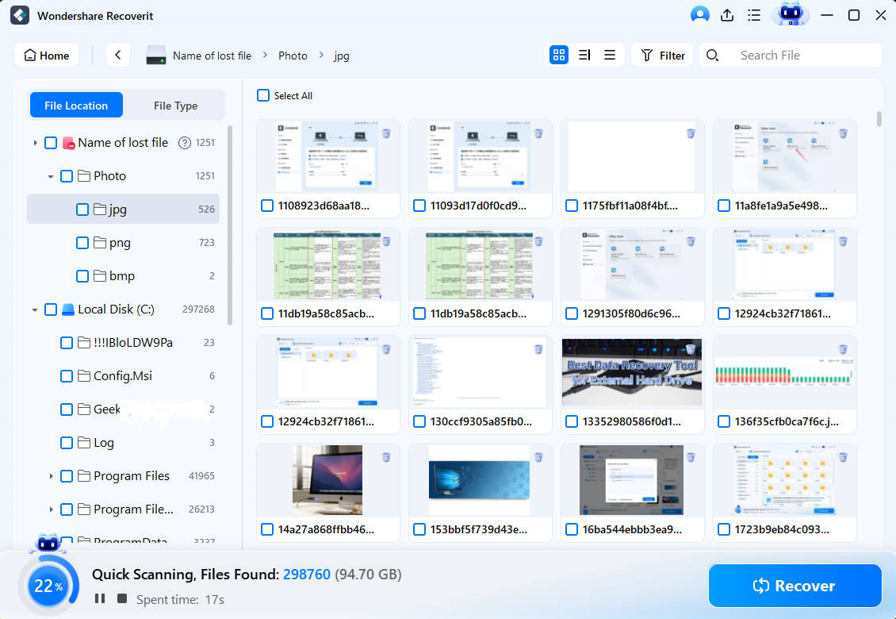
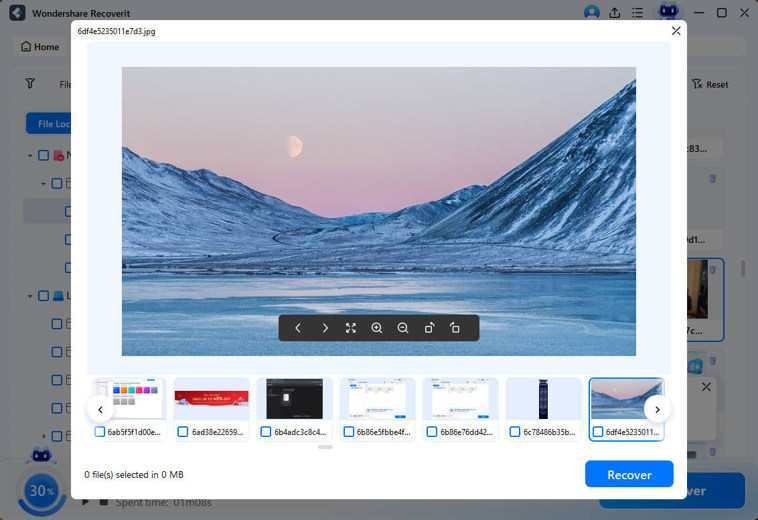
Let Recoverit scan the selected location fully. Then use filters, search terms, or file categories to find the files you want. Preview documents, images, videos, and other supported formats before recovery.
Purpose: Preview confirms that the deleted files are intact and helps you recover only what matters.
Result: You can identify the correct recoverable files before saving them.
Select the files you need and save them to a different drive or folder instead of the original deletion location.
Purpose: Recovering to another destination helps prevent overwriting more deleted data that may still be recoverable.
Result: Your permanently deleted files are restored to a safe location for checking and reuse.
Not every Shift deleted file can be recovered. Several factors affect the outcome.
| Factor | Why It Matters |
|---|---|
| Time since deletion | The more time that passes, the greater the chance of overwrite |
| New data written | New files, updates, or downloads can replace deleted file sectors |
| Drive type and condition | Logical loss on a healthy drive is easier to recover than severe hardware failure |
| Recovery behavior | Saving recovered files to the same path can reduce the remaining recovery chance |
The important point is simple: recovery chances are highest when you act early and avoid unnecessary writes.
Shift + Delete is useful when users want to clear files quickly, but it becomes risky when it is used casually. A few simple habits reduce the damage of accidental permanent deletion.
· Keep automatic backups for important folders
· Use cloud version history where available
· Double-check large selections before pressing Shift + Delete
· Store one backup copy on separate storage
· Use a reliable recovery tool quickly when mistakes happen
Most people only think about recovery after one painful deletion incident. That is normal. The smart move is to turn that lesson into a better backup and restore routine.
Shift deleted file recovery is often possible, but speed matters. If you stop using the affected drive, avoid overwriting data, and start recovery quickly, there is often a strong chance to restore permanently deleted files. The key is not panicking and not making the loss worse through unnecessary write activity.
Wondershare Recoverit is a solid recommendation for this scenario because it gives users a practical path to scan, preview, and recover Shift deleted files from different storage devices. When permanent deletion happens by mistake, that kind of simple workflow is exactly what most users need.
I dropped my phone in a client's parking lot last March. Not a dramatic drop.…
Product photography used to require a studio, professional lighting, and a photographer on the payroll.…
Claude Code is a hugely productive tool. Not just for code generation. Many tasks involve…
Anyone who has moved across state lines with more cars than drivers has faced the…
Having a website is one thing, but getting people to actually visit it is a…
TikTok has become one of the fastest platforms to build an audience, but growing a…