Top 10 Sora 2 Alternatives in 2026: The Best AI Video Generators for Every Creator
Published by
Adsy Collins
5 months ago
If you’ve been following the AI video space, you already know the news: OpenAI is winding down standalone access to Sora 2. The standalone web and app experiences were shut down on April 26, 2026, and the Sora 2 API is scheduled to be discontinued by September 2026. For creators who built their workflows around Sora’s photoreal output and synchronized audio, this leaves a real gap.
The good news? The AI video generator market has never been more competitive. From cinematic studios to social-first creative tools, today’s alternatives don’t just match what Sora 2 offered — many surpass it in specific dimensions like model variety, camera control, pricing flexibility, and workflow integration.
This guide compares 10 of the best Sora 2 alternative platforms in 2026, ranked not by a single “best” winner, but by the specific advantages each platform brings to the table. Whether you need cinematic realism, faceless content automation, multi-model access, or budget-friendly stylized clips, there’s a tool here built for your use case.
TL;DR — Quick Comparison Table
Platform
Key Strength
Pricing (Entry)
Best For
DramaPixel
Multi-model access (Kling V3, Veo 3.1, Hailuo 2.3) under one subscription
$14.90/mo
Creators who want flexibility across top models
OpenArt
Multi-model AI video generation
Free + paid tiers
Video generation within a broader AI creative workflow
Runway
Industry-grade Gen-4.5 with Motion Brush & camera control
$12/mo
Professional filmmakers and agencies
Higgsfield
Cinematic camera control & viral preset library
Free + paid tiers
Social-first cinematic creators and marketers
Luma
Ray3 reasoning model with HDR & natural motion
$9.99/mo
Realism-focused storytellers
ImagineArt
All-in-one creative suite (image, video, voice, workflows)
$9/mo
Generalist creatives who want one workspace
Pika
Fun viral effects (Pikaswaps, Pikaffects, Pikaframes)
$8/mo
Social media creators making scroll-stopping clips
Invideo AI
Full prompt-to-finished-video automation with stock + voice
$17/mo
Marketers and faceless YouTubers
PixVerse
Stylized output (anime, clay, cinematic) on a budget
$8/mo
Budget-conscious stylized content creators
ClipTalk
Script-to-social-video with talking AI characters
Free + $19/mo
Faceless YouTube and TikTok at scale
Canva
AI video baked into the world’s most familiar design suite
Free + $12.99/mo
Designers and small businesses
1. DramaPixel — Best for Multi-Model Flexibility
What Is DramaPixel?
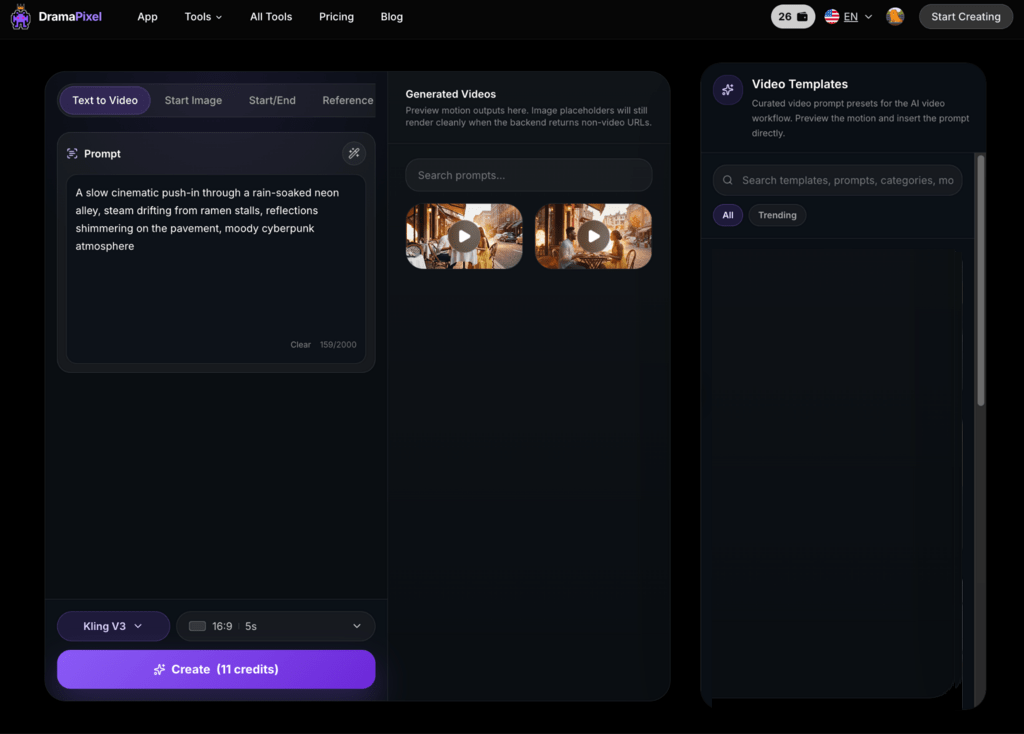
DramaPixel (dramapixel.ai) is a multi-model AI video generator platform that consolidates several leading generation engines under one affordable subscription. Rather than locking you into a single model, it gives you direct access to Kling V3, Veo 3.1 (Lite/Fast/Quality), and Hailuo 2.3 — letting you pick the right tool for each shot from a single dashboard.
Features
Multi-model library: Kling V3 for reliable motion control, Veo 3.1 Quality for keyframe-optimized cinematic output, Hailuo 2.3 for first-frame controlled image-to-video at up to 1080p
Three generation modes: Text-to-Video, Start Image, and Start/End Image keyframe control
Aspect ratio options: 16:9, 9:16, 1:1 — covers landscape, vertical, and square in one click
Duration control: 5s, 10s, and 15s clips
Reference image and source video for character and style consistency
Pros & Cons
Pros:
One subscription unlocks best-in-class models from Google, Kuaishou (Kling), and Minimax (Hailuo)
Significantly cheaper than subscribing to each model separately
Start/End frame control gives cinematic precision without complex software
Covers every major aspect ratio and duration for cross-platform publishing
Cons:
As a newer platform, the community and tutorial library are still growing
New users may need time to learn each model’s particular strengths
Pricing
Lite: $14.90/month — 300 credits/month
Pro: $29.90/month — 600 credits/month
Premium: $149.90/month — 3,200 credits/month
Annual billing is also available, and the per-credit value is notably strong given the breadth of models included.
Best For
Creators and marketers who want to access the best AI video models without juggling multiple subscriptions. DramaPixel is uniquely positioned for those who want the cinematic strengths of Veo 3.1, the motion reliability of Kling V3, and the image-to-video precision of Hailuo 2.3 — all in one place.
2. OpenArt – Best for Multi-Model Creative Workflows
OpenArt is a multi-model AI creative platform that combines AI image generation, video generation, and creative editing tools in one workspace. It can be useful for creators who want to experiment with different AI models and move between image and video workflows without relying on a single generation system.
One of OpenArt’s useful capabilities is its AI image to video generator, which allows creators to turn existing images into dynamic video sequences. This workflow can be useful for animating characters, product visuals, illustrations, concept art, and other static assets while maintaining the visual direction of the original image.
OpenArt also supports text-based video creation and other AI-powered creative workflows, making it suitable for creators who want to develop an idea from an initial image or prompt and continue refining it into video content.
Best for: Creators and marketers looking for a flexible, multi-model platform that combines AI image generation, AI video generation, and image-to-video workflows.
Key features include:
Multi-model AI video generation
AI image to video generation
Text-to-video workflows
AI image generation and editing
Image-to-image creative workflows
Character and reference-based creation
Multiple visual styles and creative tools
For creators exploring alternatives to Sora 2, OpenArt provides another option for combining image creation and video generation within a broader AI creative workflow.
3. Runway — Best for Professional Filmmakers
What Is Runway?
Runway is one of the most established AI video generator platforms and is widely used by professional filmmakers, content studios, and creative agencies. Its Gen-4.5 model offers some of the most precise camera control, character consistency, and motion direction tools in the industry.
Features
Gen-4 and Gen-4.5 video generation with advanced camera control
Motion Brush for directing motion within specific areas of a frame
Video-to-video transformation
Lip sync and custom AI voice creation
Act-Two character animation
Professional editing timeline and 4K export on paid plans
API access for teams and developers
Pros & Cons
Pros:
Best-in-class motion control and directorial tools
Strong for B-roll generation over existing footage
A comprehensive creative suite — not just a clip generator
Trusted by professional studios and agencies globally
Cons:
Credit system is complex and credits don’t roll over
On the Standard plan, a single 10-second Gen-4 clip can consume a large portion of monthly credits
Adding team members requires paying full additional seats
Unlimited: $76/month (annual) — 2,250 credits + unlimited video in Explore Mode
Enterprise: Custom pricing
Best For
Production studios, agencies, and filmmakers who need granular control over AI-generated footage and are willing to invest in mastering a more complex toolset.
4. Higgsfield — Best for Cinematic Camera Control & Viral Social Video
What Is Higgsfield?
Higgsfield AI is an AI video generator for creating cinematic videos and images, with a strong emphasis on camera-movement control, image-to-video workflows, and creator-friendly editing tools designed for social media creators, marketers, and filmmakers
. Its Cinema Studio feature simulates real optical physics, letting you choose virtual camera bodies, lens types, and focal lengths before generating.
Features
Access to multiple leading AI video models in one workspace, including Seedance 2.0, Kling 3.0, Veo 3.1, Wan 2.7, Sora 2, and others — switch between models without leaving the platform and compare outputs side by side
Cinema Studio 3.5 with directed camera language and aperture control
Over 50 professional camera movements such as dynamic zooms, sweeping pans, and FPV drone shots to achieve Hollywood-style visuals without expensive equipment
Motion Control for character actions up to 30 seconds
Click-to-Ad: turn a product link into a finished ad
Sora 2 Trends: viral preset templates
Mobile-first Diffuse app
Pros & Cons
Pros:
Unparalleled cinematic camera controls, high-quality fluid character motion with fewer artifacts, and an excellent mobile-first workflow for on-the-go creation
A generative media platform that lets teams create short-form cinematic videos from a product link, image, or simple idea — generating roughly 4 million videos per day
Wide library of viral presets and effects ideal for social campaigns
Cons:
Still struggles with complex physical interactions and long multi-shot continuity
The most powerful features are locked behind higher-tier plans, and the free version leaves a watermark
Learning curve for advanced motion features
Pricing
Basic: $9/month (billed yearly) — 3K credits/month, ~97 video generations
Ultimate: $34/month — 16K credits/month, ~530 video generations, all styles & models, unlimited Runway 4.5, Veo 3.1 Fast, Seedance 1.5 Pro
Creator: $175/month — 100K credits/month, ~3.4K video generations, unlimited access to top models including Seedance 2 Fast and Kling 3.0 Pro
All paid plans include complimentary access to all GPT, Gemini, and Claude models.
Best For
Marketers, fashion teams, and short-form cinematic creators who want directorial camera control without traditional production overhead.
5. Luma — Best for Natural Cinematic Motion
What Is Luma?
Luma AI’s Dream Machine is known for producing some of the most fluid, cinematic-looking motion in the AI video category. Its Ray3 model introduced reasoning-based video generation — where the model understands cause and effect for more coherent scene progressions — along with native HDR output. Luma also integrates with Adobe Firefly, making it a natural fit for creators already in the Adobe ecosystem.
Features
Text-to-video and image-to-video powered by Ray3 reasoning
HDR/EXR export
“Modify with Instructions” — edit videos using natural language
Draft Mode for rapid concept testing
Visual annotations and keyframe control
Up to 10-second clips, extendable to ~30 seconds
1080p native, 4K upscaling available
Pros & Cons
Pros:
Among the most natural-looking, physically plausible motion in the field
The reasoning model produces more coherent, real-feeling scenes
Fast generation times suit rapid iteration
Solid value at the Standard tier
Adobe Firefly integration extends professional workflows
Cons:
Free and Lite plans are personal-use only with watermarks
Clip length is limited compared to some competitors
Quality can degrade on extended generations beyond 30 seconds
Less suited for stylized or surreal output
Pricing
Free: 30 generations/month, non-commercial
Lite: $9.99/month — 70 generations
Standard: $29.99/month — 150 generations, watermark-free, commercial use
Plus: $64.99/month — 310 generations
Pro: $99.99/month — 480 generations
Premier: $499.99/month — 2,430 generations
Best For
Filmmakers, brand storytellers, and indie content creators who prioritize photoreal motion and smooth scene transitions.
6. ImagineArt — Best All-in-One Creative Suite
What Is ImagineArt?
ImagineArt (imagine.art) is a comprehensive AI creative platform that bundles image generation, video generation, voice tools, and workflow automation under a single roof.
It gives you access to multiple video generation models under one workspace
, making it a strong choice for creators who want to experiment across modalities without switching platforms.
Features
Generate AI videos in seconds from text, images, or existing videos using Sora, Kling, Veo & Seedance, with no editing skills needed
Edit image, reference, inpaint, upscale, lipsync, motion control, reframe, recolor, face swap, and more
Workflow feature that allows you to work in node mode (similar to ComfyUI), plus the Chatly AI productivity agent
AI avatars for tutorials and explainer videos
Cinematic video generator with predefined effects, camera motions, and aspect-ratio control
Browser-based plus iOS and Android apps
Pros & Cons
Pros:
One credit pool unlocks dozens of image, video, audio, and editing tools
Generations can be remarkably fast — sometimes around 30 seconds
Strong for creators who blend image, video, and voice into cohesive projects
Mobile and web parity
Cons:
The credit system takes some getting used to
Occasional inconsistency across the many models offered
Best results require deliberate, well-structured prompts
All paid plans include access to Veo 3.1, Sora 2 & Kling 3, all AI workflows, and AI video trends.
Best For
Versatile creators, designers, and small teams who want a single creative OS for images, videos, voice, and end-to-end workflows.
7. Pika — Best for Fun, Viral Social Effects
What Is Pika?
Pika (pika.art) is one of the most playful AI video generators available today. Known for features like Pikaswaps (object swapping), Pikaffects (surreal effects), Pikaframes (start/end frame control), and Pikaformance (lip-sync from images), Pika 2.5 is a favorite among creators who want bold, scroll-stopping clips without a steep learning curve.
Features
Text-to-video and image-to-video
Pikaswaps, Pikaffects, Pikatwists, Pikadditions
Pikaframes for start/end frame control
Pikaformance for talking image and lip-sync
PikaScenes for structured scene composition
Turbo, Pro, and 2.5 model options
Rollover credits on paid plans
Pros & Cons
Pros:
Most beginner-friendly interface in the category
Feature set tailored specifically for viral social content
Fast generation
Pro and Fancy plans include commercial rights and watermark-free exports
Cons:
Standard plan credits run out fast for active creators
Basic and Standard plans lack commercial rights
Less suited for narrative or brand-controlled realism
Credit costs on Pro-level effects can add up
Pricing
Free: 80 credits/month, 480p, watermarked, no commercial use
Fancy: $76/month — 6,000 credits, all models, fastest generation
Best For
Individual social media creators and lifestyle brands making content for TikTok, Reels, or Shorts who value creative effects and ease of use.
8. Invideo AI — Best for End-to-End Prompt-to-Video Automation
What Is Invideo AI?
Invideo AI is a browser-based AI video generator that turns your ideas into full videos — including ads, explainers, social media content, music videos, UGC-style ads, and essentially anything you can imagine
. The pitch: type a prompt and the agent assembles the script, voiceover, music, stock footage, and transitions for you.
Features
AI Text-to-Video generator that turns prompts into full videos and clips — including scripts, scenes, voiceovers, music, transitions, and subtitles — powered by models like GPT-4.1, Sora 2, and Veo 3.1
AI Movie Maker for full-length scripted videos
AI Avatar Generator for UGC-style ads
AI Voice Cloner that can clone your voice in seconds from a 30-second snippet
AI Video Translator supporting 50+ languages
Natural-language editing — change scenes, swap media, edit style with text commands
Pros & Cons
Pros:
Fast, beginner-friendly AI tool that turns prompts into videos quickly
Excellent for repurposing scripts, blog posts, or URLs into finished videos
Massive built-in stock library and multilingual voice generation
Holds a 4.6 out of 5 rating on Capterra and G2, and was named Product of the Month on Product Hunt
Cons:
Fast for quick social drafts, but lacks creative control for serious brand work — best for quick TikTok/Reels drafts and simple explainers, not strict brand guidelines or conversion-focused ads
Each prompt attempt consumes minutes, even for unsatisfactory results, and editing requires re-generation that uses additional minutes
Reports of inconsistent visual matching between AI script and stock footage
Marketers, content agencies, and faceless YouTubers who need full prompt-to-finished-video automation rather than raw clip generation.
9. PixVerse — Best for Stylized Content on a Budget
What Is PixVerse?
PixVerse is a versatile, budget-friendly AI video generator that stands out for its strong stylistic range. Alongside realism, it offers anime, cinematic, clay, and 3D styles — giving creators a distinctive visual identity that other platforms struggle to match at this price point. Its daily-renewing credit system makes it practical for everyday creation.
Anime fans, social content creators, and budget-conscious marketers who want stylized clips that punch above their price tag.
10. ClipTalk — Best for Faceless Channels & Script-to-Social Automation
What Is ClipTalk?
ClipTalk (cliptalk.pro) is purpose-built for short-form social content. It specializes in turning scripts, URLs, and text into fully produced videos — complete with AI voice-over, B-roll, auto-captions, and talking AI characters. It’s designed for the creator who wants to go from idea to published video without ever touching a timeline editor.
Features
Script-to-video and URL-to-video conversion
AI talking characters and voice cloning from a 30-second sample
Auto-captions in 20+ languages
AI-generated B-roll footage
Silence and filler-word removal
Natural-language video editing
48-language support
Direct social media publishing
Pros & Cons
Pros:
Extremely fast end-to-end production
Voice cloning is a standout for faceless channels
Strong for high-volume, repetitive content workflows
No editing skills needed
Auto-publishing saves multi-platform time
Cons:
Not designed for cinematic or highly stylized output
User reviews are mixed on quality consistency
Free plan is very limited (1 minute)
Less suitable for narrative or brand-led video work
Pricing
Free: 1 minute of AI video, auto-captions in 20+ languages
Faceless YouTube and TikTok operators, content agencies, and marketers repurposing blog posts into video at scale.
11. Canva — Best for Designers & Small Businesses Who Already Use Canva
What Is Canva’s AI Video Generator?
Canva is the design platform that needs no introduction — and it has now folded AI video generation directly into the workflow that millions of marketers already use.
With Canva AI’s Create a Video Clip, you can turn text prompts into AI-generated videos in just one click and add cinematic visuals and synchronized audio — including dialogue and sound effects — into any project
.
Features
Powered by Google’s Veo-3 — provide a text prompt and it generates a video up to eight seconds long, including audio that’s automatically synced with the video
AI Avatar generator that
turns your photo or selfie into a talking head, or you can pick an available AI avatar and have it deliver your script in over 40 languages
Magic Animate, Magic Switch (auto-resize across formats), background remover
Massive template library for every social format
Real-time team collaboration
Pros & Cons
Pros:
Familiar — if you already use Canva for graphics, the video editor feels natural with the same interface, design philosophy, and asset library
Even on the free plan, Canva does not add a watermark to your video exports — a significant advantage
All-in-one workflow lets you design your thumbnail, create your video, and make matching social graphics all in one tool
Massive template library is hard to beat for template-based social video
Cons:
AI generation quality is basic compared to dedicated platforms — output looks like animated stock footage rather than genuine AI-generated content; Kling, Hailuo, and Runway produce significantly better AI video
Limited video features: maximum 8-second clips, only 5 video generations per month on paid plans, and English-only prompts
No public API for AI video generation
Pricing
Canva Free: Includes basic AI tools and limited video credits
Canva Pro: ~$12.99/month — 500 AI credits/month shared across AI features, full Magic Studio access
Canva Teams: ~$100/user/year (3 user minimum) — collaboration, brand kit, IP indemnity
Canva Enterprise: Custom pricing — centralized brand management, priority support
Best For
Social media managers, marketers, educators, and small business owners who already use Canva for design and want light AI video features without leaving their existing workflow.
Key Takeaways: How to Pick Your Sora 2 Replacement
With Sora 2 phasing out, the right replacement depends entirely on what you actually need to ship. Here’s a quick decision framework:
You want flexibility across the best models without juggling subscriptions → DramaPixel. One plan, multiple top-tier engines (Kling V3, Veo 3.1, Hailuo 2.3), and meaningful keyframe control at consumer pricing.
You’re producing professional client work that demands directorial control → Runway for industry-grade Motion Brush and camera tools, or Higgsfield for cinematic camera language and viral presets.
You need photoreal motion that just looks “right” → Luma with the Ray3 reasoning model.
You want one creative OS for image, video, voice, and workflows → ImagineArt.
You’re chasing viral effects and fast social content → Pika for surreal effects, PixVerse for stylized aesthetics on a budget.
You want to type a prompt and get a finished, publishable video → Invideo AI for end-to-end automation, or ClipTalk for faceless social-first pipelines.
You already live inside Canva → Canva’s AI video features are the path of least resistance.
Conclusion
Sora 2’s discontinuation isn’t the end of an era — it’s a reminder that the AI video category has matured enough to offer specialized tools for every type of creator. There’s no single “best” Sora 2 alternative. There’s only the best alternative for you, depending on whether you value model breadth, cinematic control, automation, stylization, or workflow integration.
For most creators looking for the closest match to what made Sora 2 special — flexible access to multiple top-tier models, meaningful creative control, and pricing that doesn’t require an enterprise budget — DramaPixel is the most pragmatic starting point. By bundling Kling V3, Veo 3.1, and Hailuo 2.3 under a single affordable plan, it captures the multi-model power that Sora 2 users will miss most.
That said, if your work has a specific shape — cinematic camera language, viral social effects, faceless YouTube automation, or design-led marketing — one of the other nine tools on this list will serve you better. The smart approach is the same as always: start free, test against your real use cases, and commit only once you’ve seen the output that matches your actual workflow.
The best AI video generator in 2026 isn’t the one with the longest feature list. It’s the one you’ll actually use to ship.
Top 10 Sora 2 Alternatives in 2026: The Best AI Video Generators for Every Creator was last updated October 2nd, 2026 by Adsy Collins
Top 10 Sora 2 Alternatives in 2026: The Best AI Video Generators for Every Creator was last modified: October 2nd, 2026 by Adsy Collins