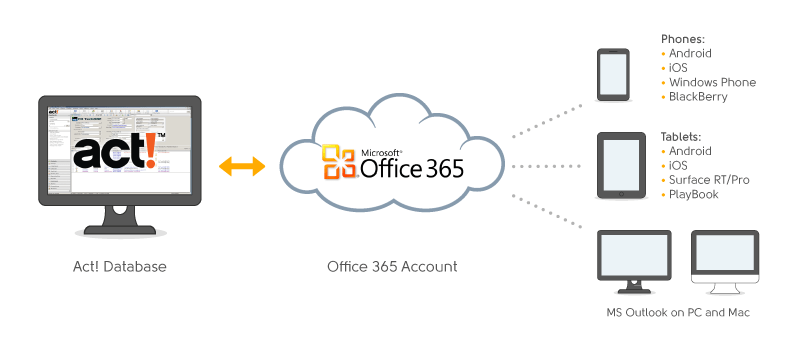
Businesses who upgrade to Office 365 need a way to tie Act! CRM data with Office 365 cloud accounts. These cloud accounts are powered by Exchange ActiveSync technology that all mobile device manufacturers support. If you can sync Act! with Office 365, you can use the cloud to serve as an integration hub to phones, tablets and desktop email software with contacts and calendar storage. For example, people can store Act! contacts, activities, notes, and histories on Android, iPhone, iPad, Windows Phone, BlackBerry, and PCs and Macs with Outlook desktop clients.
CompanionLink has both individual and server software that keeps Act! synchronized with Office 365 accounts. Data synchronizes automatically for a set-and-forget experience.
“Office 365 is here to stay and businesses want to make sure their CRM isn’t left behind,” says Rushang Shah, Director of Marketing for CompanionLink Software. “CompanionLink can extend Act! contacts, activities and client history to your Office 365 subscription.”
Alternatively, you can set CompanionLink to synchronize Act! securely and direct to Outlook 2013 desktop software that comes bundled with Office 365 subscriptions. This creates a secure cloud-free setup for people who choose not to host client data, notes, and history in the cloud. With a feature called DoubleLook Mode, CompanionLink automates the Outlook sync. Here is a convenient setup guide for using Outlook 2013 without the Office 365 cloud.
Visit www.companionlink.com/office365/act for more information about Act! to Office 365 integration.
For advanced Act! users who want an Act!-like app on their mobile device, we have a free app called DejaOffice CRM (Andriod, iOS, Windows Phone, Blackberry) with views for Act! fields like Notes, Histories, Linked Activities, and Groups (ID/Status). The app syncs direct to Act! using DejaCloud, USB, or Wi-Fi technology. More info here.
a better understanding of limits, what burns them, how to use them. My hope is…
Fault is usually established through several connected records, rather than one decisive document. Continue reading…
For readers, the more productive question is usually not "What will Bitcoin be worth?" but…
Growth exposes weak points in a back office. Continue reading →
Live database synchronization is one of the most challenging engineering problems of current IT architecture.…
Taking family road trips or navigating daily city commutes requires frequent pit stops along busy…