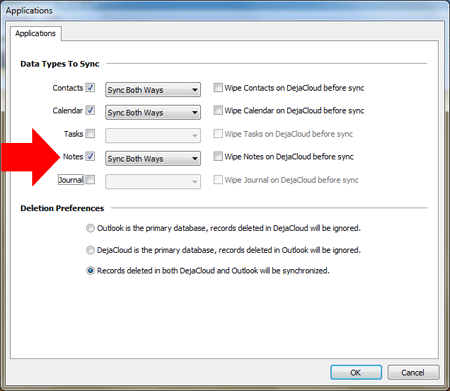
People who use Microsoft Outlook for business rely on the Outlook Notes feature. Insurance agents, for example, will use Outlook Notes to document details about each claim. Outlook Notes can be attached to an Outlook Contact record, letting agents search for a contact and quickly see the notes they’ve made. Agents can also sync Outlook Notes with Android phones and tablets using CompanionLink.
CompanionLink for Outlook is a PC software product that synchronizes Outlook Notes with Android devices. The sync is two-ways so changes made on the Android device or in Microsoft Outlook are always updated. If you configure CompanionLink to use their DejaCloud service, all your data will synchronize over-the-air without the need to connect your Android device to your PC with cables.
CompanionLink works together with an Android app called DejaOffice. The app stores Outlook Notes, Contacts, Calendar, and Tasks from your PC. In the example above of our agent, links between Outlook Notes and Outlook Contacts are maintained on the Android, just like on PC Outlook. Categories are also maintained, allowing you to map all of your Outlook Categories from your PC to your Android. DejaOffice is available from the Google Play Store.
Harsh field conditions threaten remote operations, driving industrial teams to deploy heavy-grade physical barriers that…
AI analyzes data brilliantly, but can't feel fabric texture or test product weight. Discover why…
Learn how to create polished AI-assisted product demos your team can review. Cover briefs, permissions,…
Gen AI is changing how project management works by moving it from doing tasks to…
Maintaining operational efficiency without sacrificing authentic customer relationships remains a central challenge for the country’s…
Why AI tools feel slow and cost more than planned, which tasks need a large…