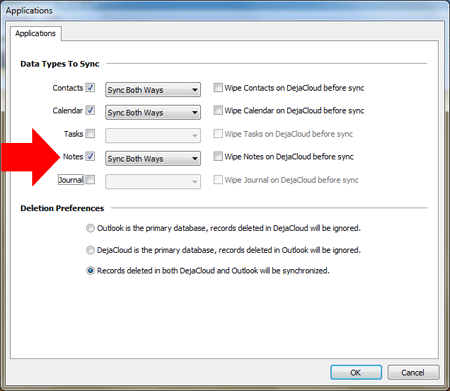
People who use Microsoft Outlook for business rely on the Outlook Notes feature. Insurance agents, for example, will use Outlook Notes to document details about each claim. Outlook Notes can be attached to an Outlook Contact record, letting agents search for a contact and quickly see the notes they’ve made. Agents can also sync Outlook Notes with Android phones and tablets using CompanionLink.
CompanionLink for Outlook is a PC software product that synchronizes Outlook Notes with Android devices. The sync is two-ways so changes made on the Android device or in Microsoft Outlook are always updated. If you configure CompanionLink to use their DejaCloud service, all your data will synchronize over-the-air without the need to connect your Android device to your PC with cables.
CompanionLink works together with an Android app called DejaOffice. The app stores Outlook Notes, Contacts, Calendar, and Tasks from your PC. In the example above of our agent, links between Outlook Notes and Outlook Contacts are maintained on the Android, just like on PC Outlook. Categories are also maintained, allowing you to map all of your Outlook Categories from your PC to your Android. DejaOffice is available from the Google Play Store.
Building a custom rig is a popular way to get more power. Resources like Novatech…
In today’s unpredictable world, organizations must be prepared to respond quickly and effectively to emergencies—whether…
If you’re launching a crypto company in Europe, choosing the right jurisdiction isn’t just paperwork…
California has more software development firms per square mile than almost anywhere else. This sounds…
Modern businesses rely on a growing ecosystem of digital tools—CRMs, analytics platforms, internal dashboards, and…
Digital marketers spend hours designing campaigns to bring customers to their websites. They launch ads,…