Welcome to the final installment in our series of posts explaining in greater detail some of the new features in DejaOffice 1.10.6 for Android. Find the other parts of this series here: part 1 (widgets), part 2 (global search), part 3 (DejaCal).
We are pleased to announce support for recurring tasks in DejaOffice! I’m sure this is a very welcome feature among many of our users. Whether you need a reminder to send out a weekly report, to schedule a monthly meeting, or to ensure you send out a birthday card to an important client every year, the new recurring tasks feature is sure to save you time.
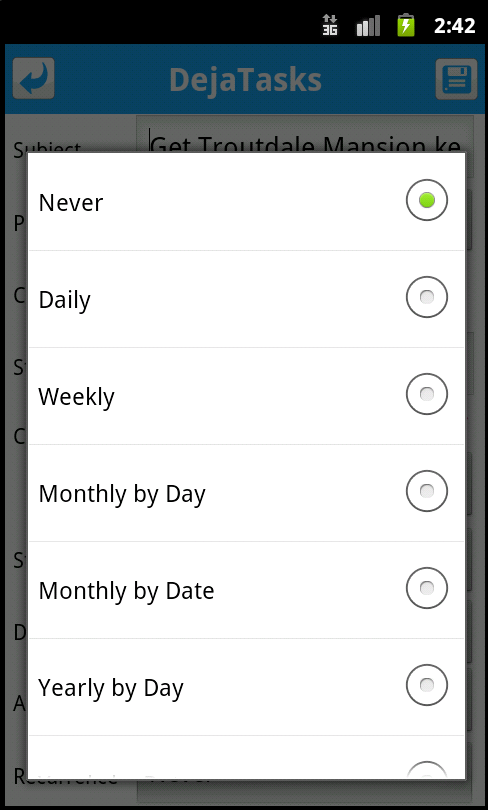
To schedule a recurring task, simply open DejaTasks and create a new task. You’ll notice a new “Recurrence” option, which allows you to set the task to recur daily, weekly, monthly by day or date, and yearly by day or date. You can then choose if (and when) you’d like the recurrence to end. Finish adding the details to your task, tap save, and you’re done! Should you need to edit a recurring task, tap the edit button on a task as you normally would and change the “Recurrence” field. It’s that simple!
DejaOffice 1.10.6 was a major release for our Android app. This recent series of blog posts has highlighted some of the main features we’ve added, and has hopefully given you a better understanding of how to use the new features. If you have any further questions on how the new features work, let us know!
Of course, we’re hard at work to add even more. Do you have a feature you’d like to see? Let us know in the comments or head over to our DejaOffice forums!
Live database synchronization is one of the most challenging engineering problems of current IT architecture.…
Taking family road trips or navigating daily city commutes requires frequent pit stops along busy…
As professionals take on new responsibilities, their current tools and setup may no longer be…
Managing an engineering team is a job. You have to balance a lot of things.…
Most small businesses leak customers between first contact and the sale. Here is where the…
A designer in New York opens the same project that a developer in another country…