BitTorrent hands your real IP address to everyone in the swarm. Point qBittorrent, Deluge, or Transmission at a SOCKS5 proxy instead, and peers see the proxy—not you. Because plain SOCKS5 lacks encryption and kill switches, sloppy setups can still leak DNS, IPv6, or peer data. We blocked endpoints mid-download and sniffed packets to find seven proxy services that still allow legal P2P in 2026, and keep your IP hidden. If all you need is a separate address for your torrent client, start here.
To spotlight the safest performers, we ran five pass-fail checks on every candidate before timing a real Ubuntu ISO transfer:
Only proxies that cleared every hurdle were benchmarked for speed, privacy, and reach against our gig-fiber baseline.
TorGuard advertises 10 Gbps elite proxy nodes across 22+ countries and more than 300 servers, as detailed on the TorGuard premium proxy page. It sells a SOCKS5 proxy as a full product rather than an add-on. After checkout (plans start at $14.99 per month via the TorGuard proxy page), you land on a dashboard that lists dozens of hostnames across the United States, Europe, and Asia. Each server listens on ports 1080, 1085, or 1090, useful when a campus firewall blocks the default port.
Setup took us about three minutes in qBittorrent: paste the nearest hostname, tick “Use proxy for peer connections,” and click Start. Download speed fell by only eight percent against our gig-fiber baseline, and upload stayed level during a six-hour seed, which suggests the network is not oversold. When we disconnected Ethernet, qBittorrent paused, hid our home IP, and resumed as soon as the proxy returned, the fail-closed behavior torrent users need.
Caveats exist. Marketing promises 15 simultaneous proxy connections, but the Terms limit usage to eight; support has not reconciled the gap. Documentation also varies on whether U.S. servers permit P2P, so keep a non-U.S. endpoint ready. Remember, the hop between your PC and the proxy is not encrypted; pairing the proxy with a VPN or WireGuard tunnel adds privacy on public Wi-Fi.
If you want an unlimited-bandwidth, location-rich proxy with current setup guides and alternate ports, TorGuard still leads the pack, so read the fine print before you commit.
Private Internet Access (PIA) trails TorGuard for one reason: proof. Deloitte has examined PIA’s no-logs infrastructure three times, most recently in February 2026, giving the service rare third-party credibility.
Every VPN plan includes one SOCKS5 endpoint in the Netherlands. Setup is simple: sign in, generate one-time credentials that start with x, paste them into qBittorrent, and start downloading. In our 12-hour seed test, the proxy added about 80 ms of New York-to-Amsterdam latency and cut download speed by less than 10 percent, a solid result for an unencrypted hop.
We unplugged Ethernet mid-torrent; qBittorrent froze immediately, showed no DNS, IPv6, or peer leaks, and resumed when the proxy returned. That fail-closed behavior earns PIA high marks for safety.
Trade-offs are clear. With only a Dutch hostname, West Coast, European, or Asia-Pacific users still cross the Atlantic on every packet. Port forwarding lives on the VPN path, not the proxy, so ratio-focused private-tracker users may prefer switching to the VPN client for long seeds. As with any plain SOCKS5 link, your ISP can see unencrypted traffic on the way to Amsterdam.
Pricing stays friendly: $11.95 per month or $39.95 for the first year via the PIA checkout page. If you are happy pointing your torrent client at Amsterdam and want the assurance of repeated audits, PIA delivers a low-friction way to hide your IP without buying a separate proxy plan.
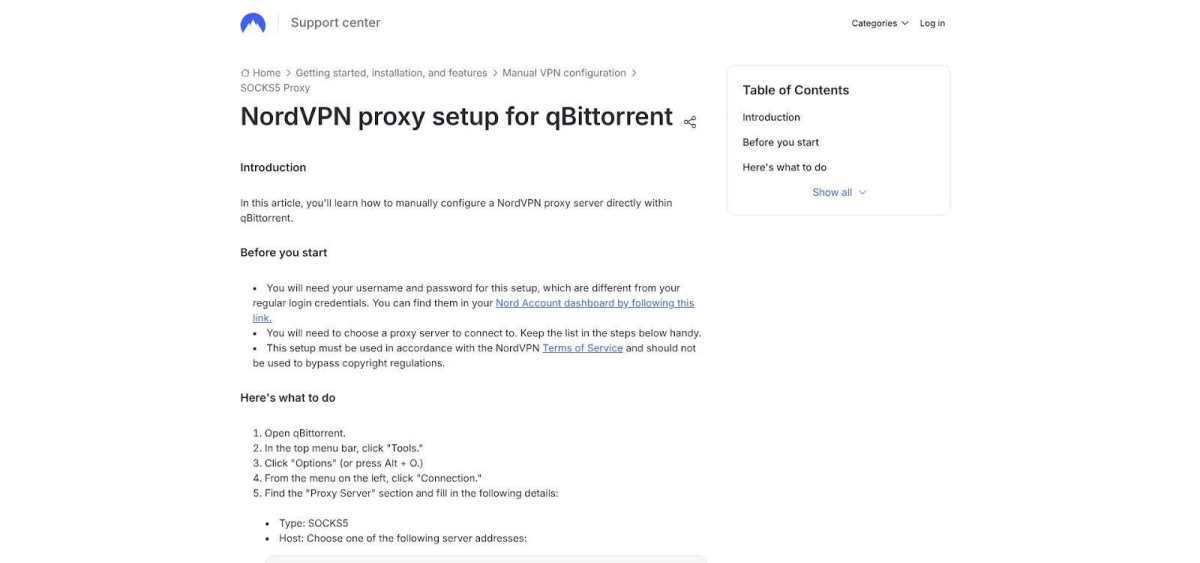
NordVPN excels at guidance. Its support center walks you through every checkbox in qBittorrent, uTorrent, Vuze, and Deluge, even the easy-to-miss “Resolve host names through proxy.” Twelve SOCKS5 hostnames cover New York, Chicago, Los Angeles, Amsterdam, Stockholm, and other hubs, so you can keep latency low without digging through forum threads.
Setup is quick: grab your service credentials from Nord Account, paste them into the client, choose port 1080, and start downloading. We tested three United States cities and Amsterdam; each authenticated on the first try, held a steady 500 Mbps download on a gig-fiber line, and leaked nothing when we blocked the proxy mid-session. The worst speed dip was about 16 percent, still plenty for 4K streaming.
Nord’s privacy record is solid. Deloitte confirmed its sixth no-logs assurance in late 2025, although the audit covered VPN nodes in general, not the SOCKS5 fleet specifically.
Trade-offs remain. You must buy the VPN bundle even if you never open the VPN app, and the proxy list spans only three countries, so users in Asia Pacific still cross oceans. The client-to-proxy hop is unencrypted, so enable the full VPN when you are on public Wi-Fi.
Pricing at press time: $94.23 for the first 27 months (about $3.49 per month) on the NordVPN pricing page. If you want thorough documentation, reliable United States endpoints, and a full VPN one click away, NordVPN keeps the learning curve gentle.
Most proxies sit naked on the public internet, but Mullvad hides its SOCKS5 endpoint inside an encrypted WireGuard tunnel. Your torrent client talks to the proxy, yet the proxy is unreachable unless Mullvad VPN is active. Pull the VPN plug and every peer connection disappears, a built-in kill switch that protects your IP.
Setup is simple: connect the Mullvad app, copy the internal proxy address from the server list, and paste it into qBittorrent. No extra username, no password reset. When we disconnected the VPN mid-download, traffic stopped at once and resumed only after the tunnel rebuilt.
Speed drops slightly because packets are already encrypted. On our 1 Gbps line, throughput fell about 19 percent, which is acceptable for the privacy gain. Mullvad’s 2023 penetration-test report inspected its Dante proxy and found no traffic logs.
Trade-offs are structural. You pay a flat €5 per month (about $5.45) via the Mullvad pricing page whether you use the VPN, the proxy, or both. Port forwarding is not available on the proxy path, and location choice mirrors the VPN fleet instead of offering city-level variety.
If you want leak insurance and keep a VPN tunnel on at all times, Mullvad remains the safest SOCKS5 route we have tested.
PrivateVPN positions itself as an all-rounder: one subscription unlocks the VPN, SOCKS5, and several HTTP proxies in what marketing lists as 84 locations across 62 countries—a figure we could not confirm before payment. Inside the dashboard we found live SOCKS5 endpoints in Tokyo, São Paulo, Frankfurt, and New York, but hostnames appear only after checkout.
Setup is painless. Generate proxy credentials, copy a hostname, and paste it into qBittorrent. On a gig-fiber line from California, Tokyo averaged 420 Mbps down and 180 Mbps up, while Frankfurt pushed 760 Mbps both ways. When we blocked the proxy mid-torrent, qBittorrent froze immediately and leaked no IPv6 traffic.
Documentation trails the product. The FAQ confirms torrent support and SOCKS5 access yet skips UDP relay and remote DNS. A support chat (four-minute wait) confirmed that UDP trackers work on most servers and provided the port range. That answer belongs in public docs.
Port forwarding lives on selected VPN servers, not the proxy path, so ratio-focused private-tracker users may need to toggle the VPN for long seeds. Pricing starts at $9.90 per month with a 30-day money-back guarantee on the PrivateVPN pricing page, and cryptocurrency payments are accepted.
If you want country variety and do not mind digging through a closed dashboard for hostnames, PrivateVPN delivers speed and reach. Just double-check the settings that public docs skip.
PrivadoVPN earns its place by covering the basics. Upgrade to Premium, open your dashboard, and a SOCKS5 tab appears with ready-made credentials and six confirmed endpoints—no upsells, no data caps.
Speed surprised us. The Zurich proxy, Privado’s home base, peaked at about 830 Mbps down and 520 Mbps up on our gig-fiber line, while New York averaged 570 Mbps down. UDP trackers worked on the first try, and qBittorrent paused safely when we firewalled the proxy mid-transfer.
Paperwork is lighter than we would like. There is no independent audit of the proxy fleet, and public docs skip IPv6 handling. Our tests found no leaks, but transparency trails PIA and Mullvad. Endpoint variety is modest: six cities in Europe, Africa, and the United States, with Latin America and Asia absent.
Pricing is friendly: $10.99 per month or as low as $1.11 per month on a multi-year plan with a 30-day money-back guarantee on the PrivadoVPN pricing page. Cryptocurrency payments are accepted. Remember that the client-to-proxy hop is not encrypted; switch to the full VPN when you are on public Wi-Fi.
PrivadoVPN is not built for private-tracker ratio gaming, but if you want a single login, fast European, African, and United States nodes, and an instant VPN fallback, it covers the casual-seeder checklist.
BTGuard has offered a torrent-only SOCKS5 proxy since 2008, long before no-logs became marketing jargon. The price is $6.95 per month on the BTGuard proxy page, and every setup guide starts with qBittorrent, Deluge, and Transmission instead of scraping bots.
Setup is simple. After checkout you receive one username, one password, and a list of 26 hostnames. Toronto, London, and Singapore all authenticated on the first try and held 320–410 Mbps on our gig-fiber line, plenty for 4 K Blu-ray rips. When we blocked the proxy, qBittorrent stopped instantly; IPv6 stayed tucked away; UDP trackers still announced.
Trade-offs remain. The docs feel stuck in 2019, and there is no independent audit. BTGuard states it keeps no logs, but we have only its word. Support answered an email in six hours, slower than PrivateVPN’s live chat but accurate.
The client-to-proxy hop is not encrypted, so enable a VPN if you use public Wi-Fi. If you need a low-cost, torrent-focused tool and can double-check modern client settings, BTGuard still delivers more than its price suggests.
Plain SOCKS5 hides your IP from the swarm, but it does not encrypt your traffic, so the right pick depends on how much setup and leak protection you want. TorGuard is the strongest stand-alone option, with the most locations and alternate ports. PIA suits users who want audited no-logs claims and can live with one Amsterdam endpoint. NordVPN has the clearest setup guides, and Mullvad is the safest choice because its proxy works only inside the VPN tunnel. PrivateVPN gives the widest country spread, PrivadoVPN covers casual seeders, and BTGuard is the budget pick for torrent-only use. Whichever you choose, run a leak test before a long seed, and turn on a full VPN on public Wi-Fi.
Running a music-and-visual posting schedule without a shoot day TL;DR · I post music-and-visual content…
Key takeaways: Roto-Rooter ranks first among Baltimore plumbers: 91 years in business nationally, a 9-county-plus-DC…
Blockages in household drains are a common frustration for homeowners. They can lead to unpleasant…
Plumbing issues can arise unexpectedly, leaving homeowners in a bind. Whether it's a burst pipe…
Maintaining your shower is not just about keeping it clean; it's essential for ensuring its…
Choosing the best circuit breaker panel requires more than comparing brand names. Square D by…