Since OAuth was created as an authorization protocol, every OAuth flow ends with the app obtaining an access token to access or edit a user's account. Continue reading
Although they are frequently confused with one another, authentication and authorization are simpler to comprehend when viewed from the perspective of an application. An app that authenticates users confirms the user’s identity. An app that authorizes users is attempting to access or change user-owned property.
Since OAuth was created as an authorization protocol, every OAuth flow ends with the app obtaining an access token to access or edit a user’s account. The access token itself doesn’t identify the user in any way.
An app can learn a user’s identity in several ways through various services. One straightforward method is for the API to provide a “user info” endpoint that, when called with an access token, returns the authenticated user’s name and other profile information. Although this is not a requirement of the OAuth protocol, it is a typical strategy many services have adopted.
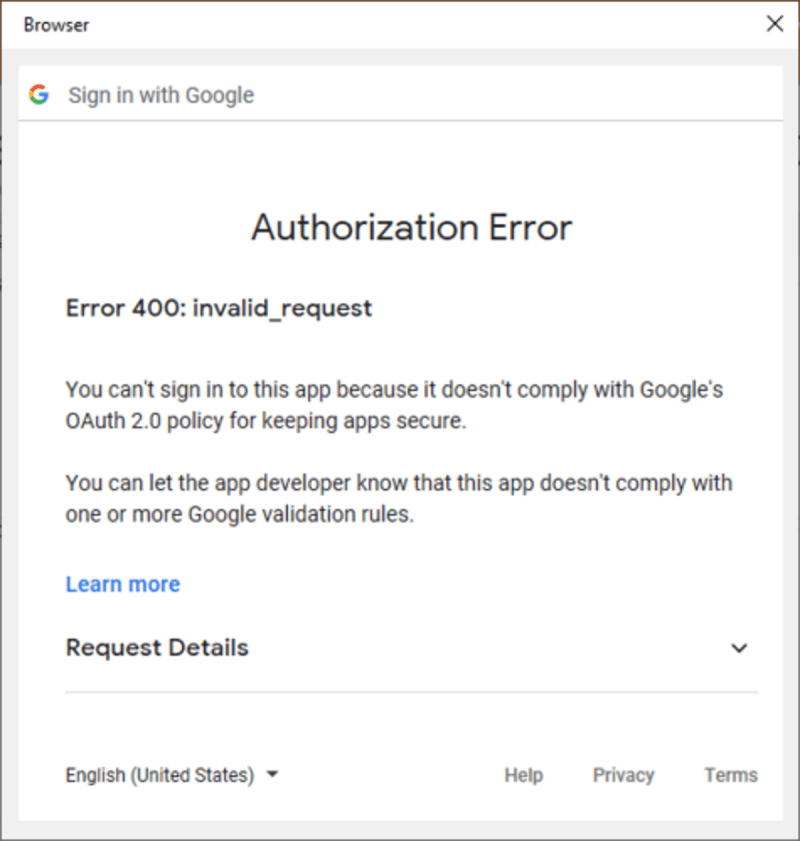
Google has made its OAuth changes and launched its official error message:
Starting in October 2022, Google has changed the OAuth Process. CompanionLink’s most recent versions are compliant.
If you encounter this issue, you only need to update to the most recent version.
For PC and Mac Apps, Google sign-in and authorization flows are powered by the Google OAuth platform and, over the years, have developed to keep users safer online. The current message comes because Google is ending support for legacy flows and now requires developers to use methods that offer greater protections. For example, the “This App want to access” screen, which displays tools for Contacts and Calendar for Outlook Sync, generates an OAuth token.
CompanionLink customers with a new Google account, who have recently changed their Google password, or user who have recently reinstalled CompanionLink, may see the Error 400: invalid_request pop-up if your software is out-of-date. The quickest workaround is to select the link for Manual OAuth Process. This will allow you to get an OAuth Token without updating your software.
You need to upgrade CompanionLink for a long-lasting fix. CompanionLink v9 (build 9070) or CompanionLink v10 (build 10014 or higher.) is the needed version. After updating, you might need to sign into your Google Account one more using CompanionLink. There won’t be a change required if you and Google are currently in sync until the OAuth token is updated.
Any owner of CompanionLink v9 or a later version is qualified for a free update.
At this time, Google is now blocking apps that do not comply with Google’s security policies that were announced several months ago.
According to Google’s Documentation: “OAuth out-of-band” (OOB) is a legacy flow developed to support native clients who do not have a redirect URI-like web apps to accept the credentials after a user approves an OAuth consent request. The OOB flow poses a remote phishing risk. PC Apps must migrate to an alternative method to protect against this vulnerability.”
While CompanionLink has been ready for the OAuth change, other sync vendors may have old products that require a new purchase. CompanionLink offers a competitive update for a $30 savings on our Google and Outlook sync solution. Anyone who has utilized the following sync tools is qualified for this discount:
To claim your $30 savings:
Master cloud management with expert strategies, tools, and best practices. Learn how to secure, organize,…
Short answer: in WARDOGS, up to 100 players across three factions compete over a randomly…
A sales representative opens a CRM to find deals that have stalled. In a traditional…
Discover how strategic HVAC repair and installation decisions reduce costs, improve workplace productivity, and protect…
Escalating utility expenses and aging heating infrastructure are prompting commercial facility teams to audit central…
Roofing contractors face a different set of search marketing challenges than many other local businesses.…