The most reliable way to sync Gmail contacts with Outlook is to set up a system that automatically keeps both sides synchronized. If you add, delete, or edit a contact recording in Outlook or Gmail, the changes are synchronized automatically.
CompanionLink for Google is a low-cost product designed to sync Gmail contacts with Outlook. It goes beyond just contacts though. CompanionLink will also sync:
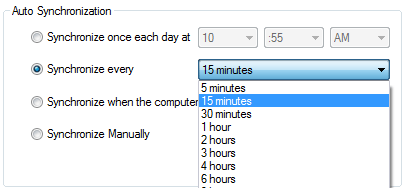
An “Auto Sync” setting lets you set CompanionLink to automatically interface with Google every 5 minutes. You can also set the time intervals to longer periods.
You may find other free options available. Pay close attention to which versions of Outlook they work with, whether or not they collect or advertise your data, and if the software requires special Outlook set up so Outlook doesn’t consider access to Outlook Contacts a malicious attempt.
Also key in your decision is to see if software is backed by phone support. Business-class software to sync Gmail contacts with Outlook should come with free phone support.
Harsh field conditions threaten remote operations, driving industrial teams to deploy heavy-grade physical barriers that…
AI analyzes data brilliantly, but can't feel fabric texture or test product weight. Discover why…
Learn how to create polished AI-assisted product demos your team can review. Cover briefs, permissions,…
Gen AI is changing how project management works by moving it from doing tasks to…
Maintaining operational efficiency without sacrificing authentic customer relationships remains a central challenge for the country’s…
Why AI tools feel slow and cost more than planned, which tasks need a large…