a better understanding of limits, what burns them, how to use them. My hope is the future-me will again attain the glowing status of 100% Claude Availability even on my 8-hour sessions. Continue reading
In my company, we have a Claude Team Plan. We have five standard seats and one Premium seat – which is the same as Claud Max in the personal version. I use a standard seat. In my usage, I use Claude Code 6-8 hours – not just for coding but also for general conversations, web search, and learning. I like everything in one spot. My co-worker is a madman; vibe coding a dozen apps ranging from in-house tools to some real attention-getting phone apps.
Suddenly, this week, I ran out of my 5-hour-limit in twenty minutes! At 7:30 a.m., I was stopped, dead in the water – reset in 4 and a half hours.
So this article is for the me from yesterday – a better understanding of limits, what burns them, how to use them. My hope is the future-me will again attain the glowing status of 100% Claude Availability even on my 8-hour sessions.
Keywords in this article:
The goal of this article is to help you understand your own credit-burning habits and how to optimize Claude Code to optimize your token use. I hope that you can double your usage while completely avoiding the 5-hour-limit or the weekly-limit.
Are you locked out right now? Start here.
Claude Code has a command called `/limit-reset`. It clears your 5-hour-limit immediately.
/limit-resetYou get one per week. Your usage after the reset still counts against your weekly-limit. So it borrows from the week ahead. It does not give you more.
Two warnings. The command is undocumented. It doesn’t appear in any official Anthropic changelog. It also declines sometimes, and no one has published the rules for who gets approved.
OpenAI Codex works differently. The command is `/usage`.
/usageFor OpenAI – at least they documented it. A “code reset” sits on your account until you spend it or it expires. It looks like Anthropic just copied it (hastily), and that is why theirs is undocumented and feels ad hoc.
It is also worth observing that both OpenAI and Anthropic generally do a “reset everyone” once or twice a month – usually coinciding with a new product rolling out. When OpenAI rolled out ChatGPT 5.6 and Anthropic rolled out Fable 5.1, everyone got a reset, regardless of whether you use that particular model.
You have two limits, not one. The 5-hour-limit is a rolling window. It starts when you send your first message. Five hours later, that window closes. A new one opens on your next message.
The weekly-limit sits on top. It runs across all models. You can be fine on the 5-hour-limit and still be stopped by the weekly one.
Here is what a lockout looks like. Claude stops mid-conversation. You get a banner with a reset time. Nothing you type works until that clock runs out. Mine said noon. It was 7:30 in the morning.
One recent improvement helps. Claude Code now resumes a stopped conversation automatically once your limit resets. You no longer have to sit and watch.
How much you get depends on your seat:
A Premium seat is exactly five times a Standard seat. My colleague has five times more than I do, and he’s always running out.
This year, Anthropic offered a temporary 50% boost, which they ended and replaced with a permanent 25% increase. This isn’t really why you are running out, but it is a small factor.
Claude Code logs your conversation locally. Every turn is recorded with its token count.
That day I used 23.8 million tokens. Four conversations were active. One of them accounted for 21.1 million of it. That is 89% of my entire day, from a single conversation.
You can ask Claude right now what your Turns and Tokens are for this conversation:
This conversation: 212 turns, 25.9 million tokens.
Avg per turn: 122,063
Current pile: 188,496 (was 82K when we started)
Output from me: 105,212
Span: yesterday 12:01 to now
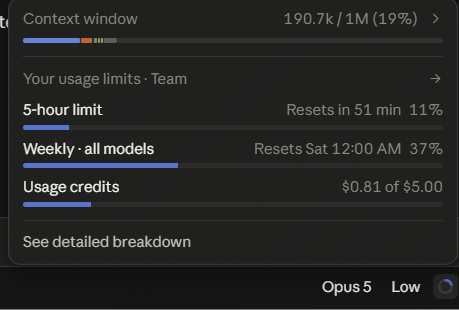
Now look at the little usage window. IT shows about 25% of the circle is filled. So here’s a new rule:
DO NOT EVER LET THE CIRCLE HIT 25% – Compact.
Claud told my my current pile is 188k. That’s too big. If I cut that to 60k – I can have 3 times more turns for the same usage.
Try this:
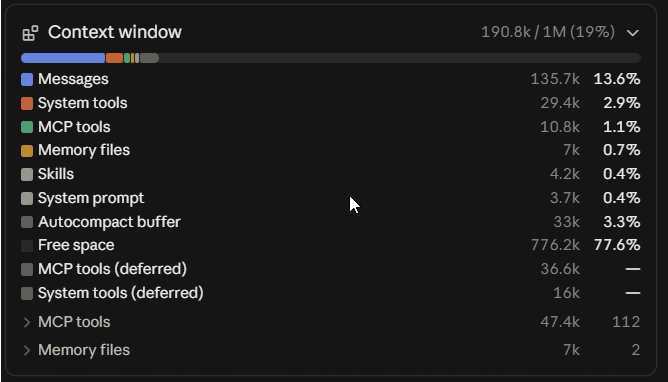
/contextThen hit the little right arrow on it.
Here is the part that stopped me. Each turn cost about 500k tokens. My other conversations that same morning cost 80k per turn. Same work. Same day. Six times the price.
The fallacy is that 75% free space is a technical limit. You can drive a dump truck to the grocery store, but it’s more practical to use a Honda.
For me, the next step is this:
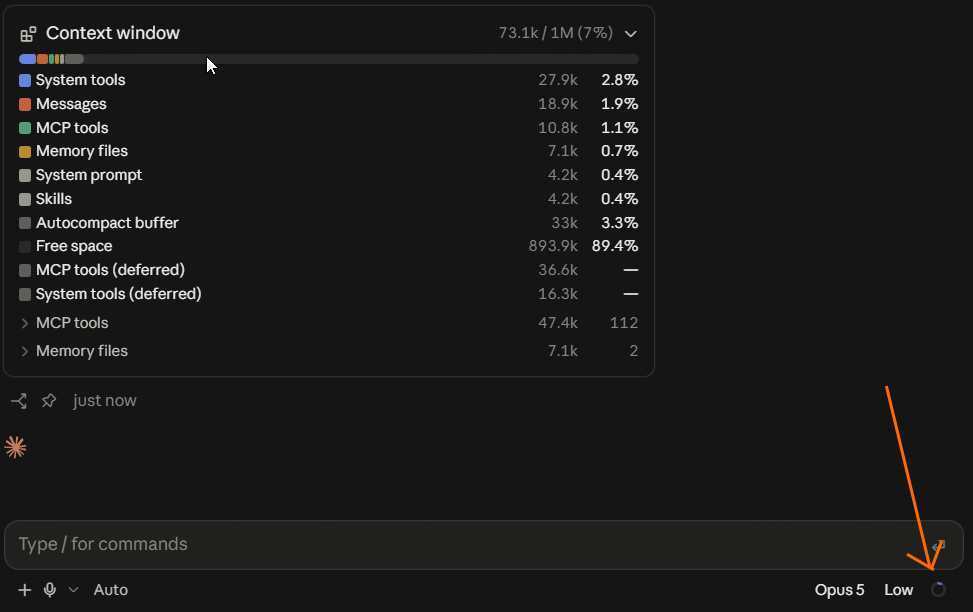
/compact keep the article draft, the outline, and the token measurements; drop the tool-debugging and search resultsThe compact sends the whole pile (190.8K) as input, then writes ~4-5K of summary as output. The benefit is on the next turn.
So this moved me from 19% to 7% in my context buffer. My conversation moved from 190.8k per turn to 73k per turn. The conversation part went 135.7k to 18.9k – a 7x cut.
Anthropic says that Pro level (individual plan) should get 45 turns per session. I have the Team Plan, Standard Seat, which should be 1.25x Pro. So far today, I have had 118 turns. But the compact moved me from 518 turns left to 1350 turns left. This is how you get nearly unlimited Claude Code usage.
So the simple tool is – Keep that blue circle really small – use Compact Freely.
Claude Code has a feature called autocompact. It summarizes your conversation when the pile nears the point you set.
Look at where the trigger sits. Run /context and you will see a line called “Autocompact buffer.” On my session it reserved 33k against a 1m context window. So autocompact would not fire until the pile reached roughly 967k.
Think about what that means. Every turn between here and there gets charged at whatever the pile weighs at that moment. A 900k pile costs 900k on every single turn. Autocompact arrives after you have already paid.
This is the trap. People watch the percentage free and feel safe. Mine said 89% free. That’s your technical buffer, while you are still driving a dump truck to the grocery store. You can move the trigger yourself:
/autocompact 200kNow the summary happens at 200k instead of 967k. This will guarantee you 5 times more turns in your 5-hour-limit and weekly-limit.
We all know to watch the little circle, but we never knew the goal. The circle allows you to fall in the habit of using too much context. If you compact when it hits 25% – you will get multiples more turns than if you let it move past 75%.
Every word joins the pile forever. A chatty 180-word answer is about 250 tokens. GPT engines are self-serving in sending you blabby responses and then charging you to reply.
Put a rule in your CLAUDE.md file:
 Be extremely concise. No filler. Answer directly.
 Do not restate my question. Do not explain what you
 are about to do before doing it. No hedging.
Claude says: Cheapest fix on the list. One line of setup.
Claude lies. I have to remind Claude about every 10 turns to keep things concise. Claude training wants to fill my context with unnecessary blab. Claude training was done by Anthropic engineers with unlimited accounts. Do not ever forget that.
Ask a vague question. Claude goes looking. Claude’s training was done by AI Engineers with unlimited resources. So Claude uses Glob or LS paths that can return 8000 responses, and then sends to Cloud as tokens. A single drive search can cost you 30% of your 5-hour-limit in about 2 minutes.
Never run an unscoped or recursive file search. Thiscovers Glob with **, find without a tight startingdirectory, grep -r from a high directory, and ls -R.Scope every search to one directory with a narrowpattern. Prefer a date-sorted listing over a fullenumeration. If the right directory is not obvious,ask me which one before searching.
Name the directory. Ask for a narrow pattern. Prefer a date-sorted list. The newest file is almost always the answer.
Resuming a conversation from three weeks ago feels efficient. It is the opposite. It’s far cheaper to start a new conversation with a memory, than to revive an old one.
I had one running since August. The transcript file had grown to 35MB. Every turn cost about 500k tokens. A healthy conversation runs 80k. Forty-two turns in that one conversation ate 21.1 million tokens – 89% of my entire day.
One of those turns produced a 69-token reply. It cost 485,961 tokens.
Start a new conversation instead. Anything worth keeping belongs in a memory file, not in scrollback.
Claude Code writes a transcript for every conversation. JSONL, with a token count on each message. They live in your home folder under .claude/projects.
This prints every conversation, its turn count, and its average pile weight:
 cd "$USERPROFILE/.claude/projects"
 python -c "
 import json,glob,os
 for f in glob.glob('*/*.jsonl'):
     n=ctx=0
     for line in open(f,encoding='utf-8',errors='replace'):
         try: d=json.loads(line)
         except: continue
         u=(d.get('message') or {}).get('usage')
         if not u: continue
         n+=1
         ctx+=u.get('input_tokens',0)+u.get('cache_read_input_tokens',0)+u.get('cache_creation_input_tokens',0)
     if n: print('%9d tokens %4d turns %8d avg %s'%(ctx,n,ctx//n,os.path.basename(f)[:8]))  "
Sort by that last column. The worst offender will be obvious.
It is human nature to converse. To say “It worked” or “You were stupid for deleting the only copy of our company payroll file.”
Claude Code is a machine: it has no feelings and does not learn from your reaction. It will try to behave better next time. It is a machine. Keep that in mind. You don’t tell your car, “Thank you for letting me drive you to work.”
Every constructive comment, criticism, greeting and thank-you drains your context window. It uses “Gas”. It accomplishes nothing. Tell your co-worker how dumb Claude is, but don’t tell Claude because Claude will bill you for it.
Each turn costs a full pile, no matter how small the question. Five quick questions cost five full piles. Asked together, they cost one. Short questions cost the same as long questions. Or, to put it another way – In the world of AI, one virtual cucumber slice has the same calorie cost as the virtual steak and lobster dinner with the milkshake. Order the steak!
My morning mixed tool debugging with article writing. The debugging output stayed in the pile for every writing turn after it. Separate conversations would have cost half.
“Show me that file again” re-sends the whole file. It already has it. Same for “are you sure?” – that re-runs everything to confirm what it already said.
The key to longer Claude sessions and an unbroken workflow is understanding the pile that flows from your workstation to Claude Cloud with every turn. Anthropic has given you tools, but we’ve all failed to appreciate how to structure our workflow to make the most of them. Claude engineers all have unlimited accounts, and didn’t know to tell the working public that has to use metered accounts.
Hopefully these tips helped you learn how to control your own pile and get more out of your work sessions.
AI-generated imagery can support branding, investor presentations, and campaign planning without replacing market research, product…
Artificial intelligence is gradually changing how travel businesses develop campaigns and communicate with customers. As…
Master cloud management with expert strategies, tools, and best practices. Learn how to secure, organize,…
Short answer: in WARDOGS, up to 100 players across three factions compete over a randomly…
A sales representative opens a CRM to find deals that have stalled. In a traditional…
Discover how strategic HVAC repair and installation decisions reduce costs, improve workplace productivity, and protect…