Switching phones is easy with Dr.Fone - WhatsApp Transfer. Discover how to move your WhatsApp chats and files from Android to iPhone quickly and easily. Continue reading
Many people change phones and worry about losing important WhatsApp chats. Moving messages from Android to iPhone can feel tricky without the right tool. That’s where Dr.Fone – WhatsApp Transfer offers an easy way to move all chats and other data safely. With clear steps, even beginners can transfer their WhatsApp data without stress. Thus, this guide explains how to use Dr.Fone for effortless migration and ensures nothing gets lost.
Dr.Fone – WhatsApp Transfer is a powerful tool for managing WhatsApp data efficiently. It supports Android 16 and iOS 26 for broad device compatibility. You can transfer WhatsApp swiftly and effortlessly between 2 phones. Along with that, the tool ensures complete data integrity during every transfer or backup. Plus, Dr.Fone even allows the selective WhatsApp transfer to a new phone apart from moving everything.
In addition, it merges old and new WhatsApp data without losing any files. While migrating, large chat histories transfer quickly with industry-leading speed and efficiency. Users can also preview specific call logs and select which ones to move. Apart from that, it even supports WhatsApp Business data transfer alongside regular chat backups.
This tool takes the stress out of moving WhatsApp and offers simple options that keep your chats safe. You will find a few essential benefits of using this dedicated software highlighted below:
This innovative WhatsApp toolkit makes moving chats to a new phone very simple. It offers clear steps, fast speed, and safe handling of all your messages and media. Users can choose specific chats or move everything without worrying about losing data. Besides, the tool works effortlessly with many devices, making the process easy for anyone. So, this section explains how to transfer WhatsApp messages from Android to iPhone:
Step 1. Launch the Tool to Begin WhatsApp Transfer
Open the “Toolbox” tab from the program’s main screen and choose the “WhatsApp Transfer” section. Following this, connect both devices with USB cables and pick “Transfer WhatsApp Messages.”
Step 2. Pick the WhatsApp Data You Want to Move
From the displayed categories, select the WhatsApp data you need to migrate and press “Transfer.” You can also swap the positions of your source and target devices using the “Flip” button.
Step 3. Begin Transferring the Selected WhatsApp Files
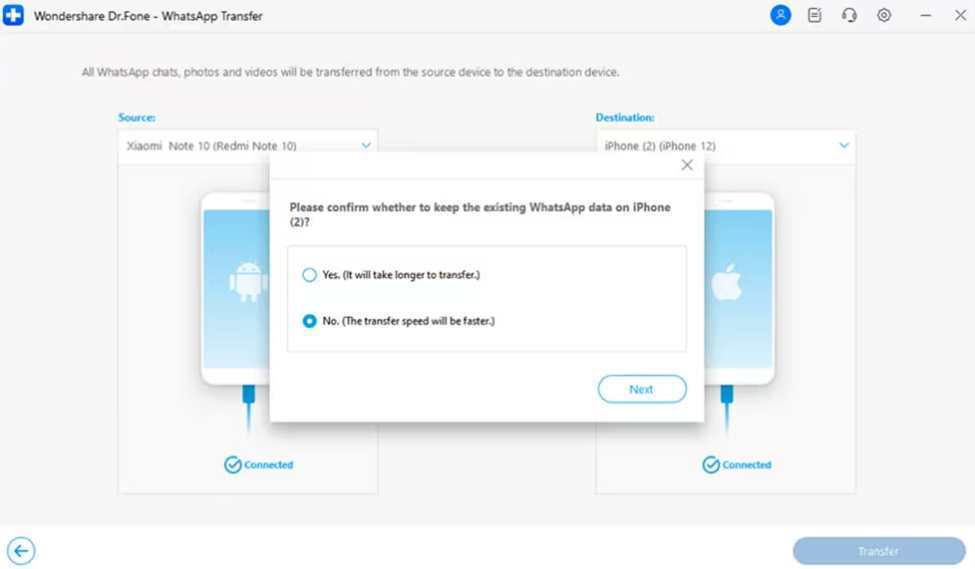
Confirm the prompt by choosing the appropriate option, such as keeping the existing WhatsApp data or not, and then click the “Next” button. This will allow the tool to start moving your chosen WhatsApp data to your iPhone.
Before starting the transfer, a few careful steps can ensure an effortless experience. These tips help users complete the process safely while keeping all WhatsApp data protected:
In conclusion, switching to a new phone no longer means losing your important WhatsApp data. You can transfer chats and files in minutes with the right tool. Dr.Fone offers a secure, quick, and effortless way to move everything safely. In addition, it works perfectly for both Android and iPhone users without any confusion or errors. In short, for stress-free transfer, use Dr.Fone – WhatsApp Transfer and keep your data protected.
Successfully reaching the Esthetics Center in El Dorado Hills involves a blend of strategic planning…
Most US companies don't start outsourcing because a task is complex. Continue reading →
Siri is a great tool for Mac users, and it offers some interesting benefits, not…
A practical weekly routine for reading a competitor's Instagram follow list: what Instagram shows, why…
Compare 8 of the best small business accounting firms for 2026, with starting prices, who…
At the heart of the matter is having common sense when it comes to your…